写一篇关于“简易计算器”的学习笔记。
简介:ArkTS 是鸿蒙主推的开发语言,基于 TypeScript(TS)扩展,专为 HarmonyOS 设计,支持声明式 UI 和状态管理。简介:鸿蒙支持使用 JavaScript(JS)开发轻量级应用,基于类似前端的开发模式(如 HML+CSS+JS)。if ('+-*/p'.includes(char)) { // p表示百分比特殊处理。// 第四行按钮 (1, 2, 3, %, 0, .,
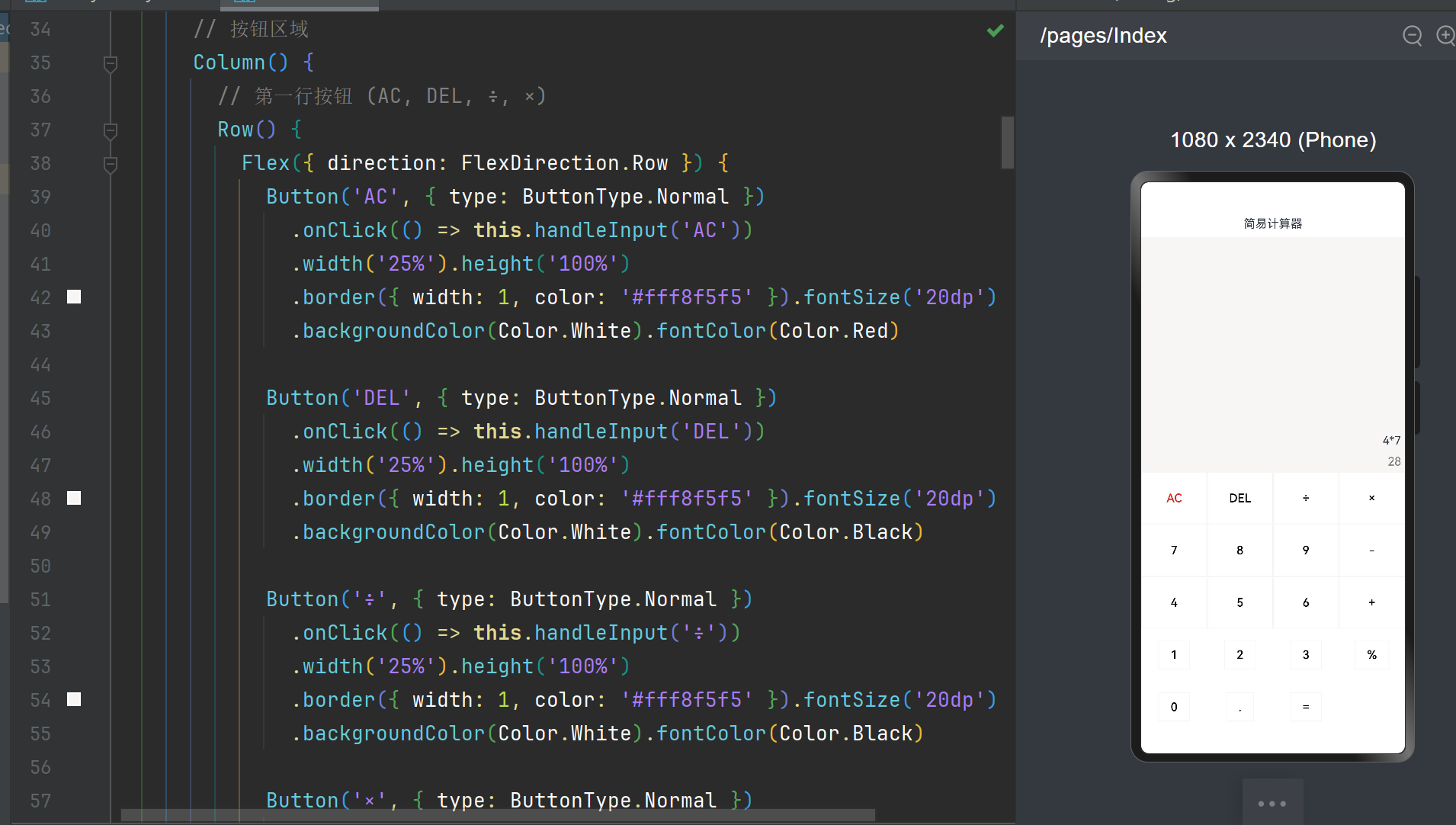
@Entry
@Component
struct Index {
private step: string = ''; // 存储当前输入表达式
private value: string = ''; // 存储计算结果
build() {
Column() {
// 标题行
Row() {
Text('简易计算器').fontSize('30dp')
}
.width('100%')
.height('5%')
.justifyContent(FlexAlign.Center)
// 显示区域
Column() {
Text(this.step)
.fontSize('30dp')
.padding('5dp')
Text(this.value)
.fontSize('20dp')
.padding('5dp')
.fontColor('#ff777777')
.height('30dp')
}
.width('100%')
.height('45%')
.backgroundColor('#fff8f5f5')
.alignItems(HorizontalAlign.End)
.justifyContent(FlexAlign.End)
// 按钮区域
Column() {
// 第一行按钮 (AC, DEL, ÷, ×)
Row() {
Flex({ direction: FlexDirection.Row }) {
Button('AC', { type: ButtonType.Normal })
.onClick(() => this.handleInput('AC'))
.width('25%').height('100%')
.border({ width: 1, color: '#fff8f5f5' }).fontSize('20dp')
.backgroundColor(Color.White).fontColor(Color.Red)
Button('DEL', { type: ButtonType.Normal })
.onClick(() => this.handleInput('DEL'))
.width('25%').height('100%')
.border({ width: 1, color: '#fff8f5f5' }).fontSize('20dp')
.backgroundColor(Color.White).fontColor(Color.Black)
Button('÷', { type: ButtonType.Normal })
.onClick(() => this.handleInput('÷'))
.width('25%').height('100%')
.border({ width: 1, color: '#fff8f5f5' }).fontSize('20dp')
.backgroundColor(Color.White).fontColor(Color.Black)
Button('×', { type: ButtonType.Normal })
.onClick(() => this.handleInput('×'))
.width('25%').height('100%')
.border({ width: 1, color: '#fff8f5f5' }).fontSize('20dp')
.backgroundColor(Color.White).fontColor(Color.Black)
}
}
.width('100%').height('20%')
// 第二行按钮 (7, 8, 9, -)
Row() {
Flex({ direction: FlexDirection.Row }) {
Button('7', { type: ButtonType.Normal })
.onClick(() => this.handleInput('7'))
.width('25%').height('100%')
.border({ width: 1, color: '#fff8f5f5' }).fontSize('20dp')
.backgroundColor(Color.White).fontColor(Color.Black)
Button('8', { type: ButtonType.Normal })
.onClick(() => this.handleInput('8'))
.width('25%').height('100%')
.border({ width: 1, color: '#fff8f5f5' }).fontSize('20dp')
.backgroundColor(Color.White).fontColor(Color.Black)
Button('9', { type: ButtonType.Normal })
.onClick(() => this.handleInput('9'))
.width('25%').height('100%')
.border({ width: 1, color: '#fff8f5f5' }).fontSize('20dp')
.backgroundColor(Color.White).fontColor(Color.Black)
Button('-', { type: ButtonType.Normal })
.onClick(() => this.handleInput('-'))
.width('25%').height('100%')
.border({ width: 1, color: '#fff8f5f5' }).fontSize('20dp')
.backgroundColor(Color.White).fontColor(Color.Black)
}
}
.width('100%').height('20%')
// 第三行按钮 (4, 5, 6, +)
Row() {
Flex({ direction: FlexDirection.Row }) {
Button('4', { type: ButtonType.Normal })
.onClick(() => this.handleInput('4'))
.width('25%').height('100%')
.border({ width: 1, color: '#fff8f5f5' }).fontSize('20dp')
.backgroundColor(Color.White).fontColor(Color.Black)
Button('5', { type: ButtonType.Normal })
.onClick(() => this.handleInput('5'))
.width('25%').height('100%')
.border({ width: 1, color: '#fff8f5f5' }).fontSize('20dp')
.backgroundColor(Color.White).fontColor(Color.Black)
Button('6', { type: ButtonType.Normal })
.onClick(() => this.handleInput('6'))
.width('25%').height('100%')
.border({ width: 1, color: '#fff8f5f5' }).fontSize('20dp')
.backgroundColor(Color.White).fontColor(Color.Black)
Button('+', { type: ButtonType.Normal })
.onClick(() => this.handleInput('+'))
.width('25%').height('100%')
.border({ width: 1, color: '#fff8f5f5' }).fontSize('20dp')
.backgroundColor(Color.White).fontColor(Color.Black)
}
}
.width('100%').height('20%')
// 第四行按钮 (1, 2, 3, %, 0, ., =)
Grid() {
GridItem() {
Button('1', { type: ButtonType.Normal })
.onClick(() => this.handleInput('1'))
.border({ width: 1, color: '#fff8f5f5' }).fontSize('20dp')
.backgroundColor(Color.White).fontColor(Color.Black)
}
GridItem() {
Button('2', { type: ButtonType.Normal })
.onClick(() => this.handleInput('2'))
.border({ width: 1, color: '#fff8f5f5' }).fontSize('20dp')
.backgroundColor(Color.White).fontColor(Color.Black)
}
GridItem() {
Button('3', { type: ButtonType.Normal })
.onClick(() => this.handleInput('3'))
.border({ width: 1, color: '#fff8f5f5' }).fontSize('20dp')
.backgroundColor(Color.White).fontColor(Color.Black)
}
GridItem() {
Button('%', { type: ButtonType.Normal })
.onClick(() => this.handleInput('%'))
.border({ width: 1, color: '#fff8f5f5' }).fontSize('20dp')
.backgroundColor(Color.White).fontColor(Color.Black)
}
GridItem() {
Button('0', { type: ButtonType.Normal })
.onClick(() => this.handleInput('0'))
.border({ width: 1, color: '#fff8f5f5' }).fontSize('20dp')
.backgroundColor(Color.White).fontColor(Color.Black)
}
GridItem() {
Button('.', { type: ButtonType.Normal })
.onClick(() => this.handleInput('.'))
.border({ width: 1, color: '#fff8f5f5' }).fontSize('20dp')
.backgroundColor(Color.White).fontColor(Color.Black)
}
GridItem() {
Button('=', { type: ButtonType.Normal })
.onClick(() => this.handleInput('='))
.border({ width: 1, color: '#fff8f5f5' }).fontSize('20dp')
.backgroundColor(Color.White).fontColor(Color.Black)
}
}
.columnsTemplate('1fr 1fr 1fr 1fr')
.rowsTemplate('1fr 1fr')
.width('100%').height('40%')
}
.width('100%').height('50%')
}
.height('100%').width('100%')
}
// 输入处理逻辑
private handleInput(char: string) {
// 已有计算结果时处理新输入
if (this.value !== '') {
if ('+-×÷'.includes(char)) {
this.step = this.value + char;
this.value = '';
return;
} else if (char === 'AC') {
this.step = '';
this.value = '';
return;
} else if (/\d|\./.test(char)) {
this.step = char;
this.value = '';
return;
}
}
// 常规输入处理
switch (char) {
case 'AC':
this.step = '';
this.value = '';
break;
case 'DEL':
this.step = this.step.slice(0, -1);
break;
case '=':
this.calculate();
break;
case '+':
case '-':
case '×':
case '÷':
case '%':
this.handleOperator(char);
break;
case '.':
this.handleDecimal();
break;
default: // 数字
this.step += char;
}
}
// 处理运算符输入
private handleOperator(op: string) {
if (this.step === '') {
if (op === '-') this.step = op; // 允许负数开头
return;
}
const lastChar = this.step.slice(-1);
if ('+-×÷%'.includes(lastChar)) {
if (op === '-' && lastChar !== '-') {
this.step += op; // 允许负号
} else {
this.step = this.step.slice(0, -1) + op; // 替换运算符
}
} else {
this.step += op;
}
}
// 处理小数点输入
private handleDecimal() {
const parts = this.step.split(/[+\-×÷%]/);
const currentNum = parts[parts.length - 1];
if (!currentNum.includes('.')) {
if (currentNum === '') {
this.step += '0.';
} else {
this.step += '.';
}
}
}
// 计算逻辑
private calculate(): void {
if (this.step === '') return;
try {
// 转换运算符并处理百分比
const processedExpr = this.step
.replace(/×/g, '*')
.replace(/÷/g, '/')
.replace(/%/g, 'p'); // 用p临时表示百分比
// 执行自定义解析
const tokens = this.tokenize(processedExpr);
const result = this.evaluateExpression(tokens);
// 处理结果显示
this.value = this.formatResult(result);
} catch (e) {
this.value = 'Error';
console.error('Calculation error:', e);
}
}
// 表达式分词
private tokenize(expr: string): (number | string)[] {
const tokens: (number | string)[] = [];
let currentNumber = '';
for (const char of expr) {
if ('+-*/p'.includes(char)) { // p表示百分比特殊处理
if (currentNumber !== '') {
tokens.push(parseFloat(currentNumber));
currentNumber = '';
}
tokens.push(char);
} else if (/[0-9.]/.test(char)) {
currentNumber += char;
}
}
if (currentNumber !== '') {
tokens.push(parseFloat(currentNumber));
}
return tokens;
}
// 表达式求值
private evaluateExpression(tokens: (number | string)[]): number {
// 处理百分比
const processedTokens = this.processPercentage(tokens);
// 创建操作数栈和运算符栈
const values: number[] = [];
const ops: string[] = [];
// 定义运算符优先级
const precedence: Record<string, number> = {
'+': 1,
'-': 1,
'*': 2,
'/': 2
};
for (const token of processedTokens) {
if (typeof token === 'number') {
values.push(token);
} else {
while (ops.length > 0 &&
precedence[ops[ops.length-1]] >= precedence[token]) {
this.applyOperation(values, ops);
}
ops.push(token);
}
}
while (ops.length > 0) {
this.applyOperation(values, ops);
}
return values.pop() || 0;
}
// 处理百分比符号
private processPercentage(tokens: (number | string)[]): (number | string)[] {
const result: (number | string)[] = [];
for (let i = 0; i < tokens.length; i++) {
const token = tokens[i];
if (token === 'p') {
const prev = result.pop() as number;
result.push(prev * 0.01);
} else {
result.push(token);
}
}
return result;
}
// 执行单个运算
private applyOperation(values: number[], ops: string[]): void {
const op = ops.pop()!;
const right = values.pop()!;
const left = values.pop()!;
switch (op) {
case '+': values.push(left + right); break;
case '-': values.push(left - right); break;
case '*': values.push(left * right); break;
case '/':
if (right === 0) throw new Error('Division by zero');
values.push(left / right);
break;
}
}
// 格式化结果
private formatResult(result: number): string {
if (Number.isNaN(result)) return 'Error';
// 处理小数精度
const rounded = Math.round(result * 100) / 100;
const str = rounded.toFixed(2);
// 去除末尾零和小数点
return str.replace(/\.?0+$/, '');
}
}
- 思考和总结
- 查阅资料并对比鸿蒙的 ArkTS 开发、JavaScript 开发和 Java 开发的优劣。
1. ArkTS(推荐)
简介:ArkTS 是鸿蒙主推的开发语言,基于 TypeScript(TS)扩展,专为 HarmonyOS 设计,支持声明式 UI 和状态管理。
优势:
性能优秀:基于静态类型(TypeScript),编译时优化,运行效率高。
声明式 UI:使用 @Component、@State 等装饰器简化 UI 开发,代码更简洁。
生态适配:完美兼容鸿蒙的方舟编译器(ArkCompiler),支持本地代码优化。
类型安全:静态类型检查减少运行时错误,适合大型项目。
跨设备开发:支持一次开发多端部署(手机、平板、智能穿戴等)。
劣势:
学习成本:需要熟悉 TypeScript 和鸿蒙特有的装饰器语法。
生态较新:相比 JavaScript/Java,社区资源和第三方库较少(但增长迅速)。
适用场景:
鸿蒙原生应用开发(尤其是复杂 UI 和高性能需求场景)。
跨设备应用开发(eTS + ArkUI)。
2. JavaScript(类 Web 开发)
简介:鸿蒙支持使用 JavaScript(JS)开发轻量级应用,基于类似前端的开发模式(如 HML+CSS+JS)。
优势:
上手简单:熟悉 Web 开发的开发者可快速入门。
跨平台:代码可复用部分 Web 生态(如 Vue/React 开发者较易适应)。
动态灵活:适合快速原型开发。
劣势:
性能较低:解释执行,不如 ArkTS/Java 高效。
功能限制:无法直接调用部分原生能力(依赖桥接)。
维护性差:动态类型在大型项目中易出错。
适用场景:
轻量级应用(如小型工具类 App)。
Web 开发者转型鸿蒙的过渡方案。
3. Java(传统 Android 兼容)
简介:鸿蒙早期支持 Java 开发(类似 Android),但逐渐被 ArkTS 取代。
优势:
生态成熟:Java 开发者群体庞大,现有 Android 代码可部分迁移。
面向对象:适合复杂业务逻辑开发。
劣势:
性能一般:依赖虚拟机(JVM),效率低于 ArkTS。
开发效率低:需手动管理 UI 和生命周期,代码冗余。
鸿蒙适配弱:未来鸿蒙新特性可能优先支持 ArkTS。
适用场景:
迁移现有 Android 应用到鸿蒙。
需要复用 Java 库的遗留项目。

讨论HarmonyOS开发技术,专注于API与组件、DevEco Studio、测试、元服务和应用上架分发等。
更多推荐



 5
5 0
0- 0


 已为社区贡献2条内容

所有评论(0)