一文彻底拿下HarmonyOS NEXT记账App之注册+登录功能实现
通过以上设计,注册登录模块在保证安全性和易用性的同时,充分发挥了 HarmonyOS NEXT 的分布式特性和系统级能力,为用户提供跨设备一致的高效登录体验,同时为后续功能扩展奠定了坚实基础。就先到这里啦,继续加油!
程序员Feri一名12年+的程序员,做过开发带过团队创过业,擅长嵌入式、鸿蒙、人工智能、Java等,专注于程序员成长那点儿事,希望在成长的路上有我相伴!君志所向,一往无前!
注册功能设计
1. 核心功能特性
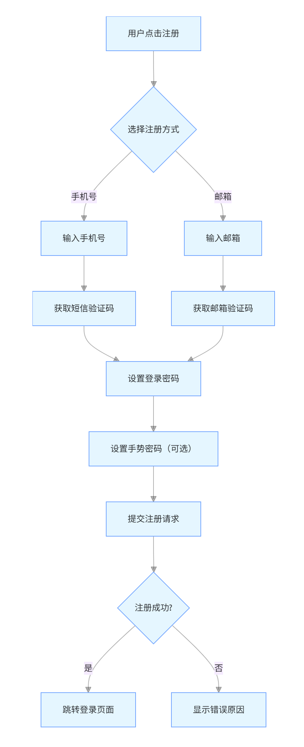
多端统一注册体系:基于 HarmonyOS NEXT 分布式能力,支持手机、平板、穿戴设备等多端共用一套注册账号,通过分布式数据服务实现账号信息实时同步
安全验证机制:集成华为安全组件,提供图形验证码、短信验证码双重验证(支持国内 / 国际号码自动识别),密码强度检测(8-20 位混合大小写字母 + 数字 + 特殊字符)
个性化注册选项:支持手机号 / 邮箱两种注册方式,可选择创建手势密码(用于快速登录),默认勾选《用户隐私协议》和《服务条款》(需手动取消勾选时禁用注册按钮)
2.技术实现要点
UI 组件:使用 ArkUI X 的 TextInput 组件(带实时输入校验)、Button 组件(注册按钮根据表单完整性动态禁用)、Checkbox 组件(协议勾选状态绑定)
数据校验:通过自定义 Validator 函数实现:
手机号格式(11 位数字,支持 + 86 前缀)
邮箱格式(正则匹配 @符号及域名)
密码强度实时提示(弱 / 中 / 强三色进度条)
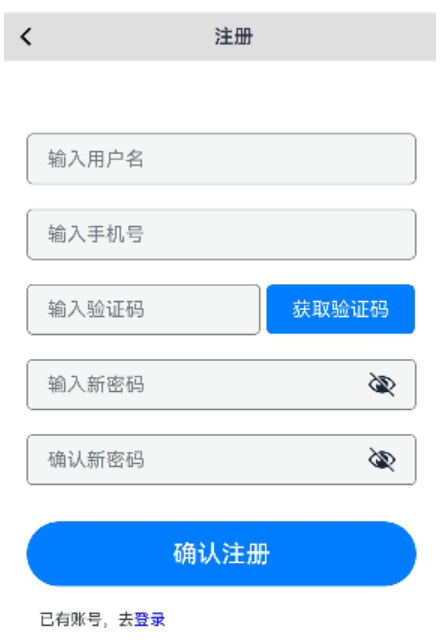
3.注册功能代码实现
import { promptAction,router } from '@kit.ArkUI'

import { strNotEmpty,createCode } from '../util/SysUtil';


@Entry
@Component
struct RegisterPage {

  name:string="";
  phone:string="";
  //用户输入的验证吗
  code:string="";
  //系统记录的发送的验证码
  sysCode:string="";
  password:string="";
  password2:string="";
  @State btn1:boolean=true;

  showMsg(msg:string){
    this.getUIContext().getPromptAction().showToast(
      {message:msg}
    )
  }

  build() {
    Column({space:10}) {

      Row(){
        SymbolGlyph($r("sys.symbol.chevron_backward"))
          .fontSize(20)
          .fontWeight(700)

        Text("注册").fontWeight(600)
        Text()
      }
      .width("100%")
      .justifyContent(FlexAlign.SpaceBetween)
      .padding(10)
      .backgroundColor("#dfdfdf")

      Column(){
        TextInput({placeholder:"输入用户名"})
          .margin({top:30})
          .width("100%")
          .border({style:BorderStyle.Solid,width:1,color:Color.Gray})
          .borderRadius(5)
          .onChange(v=>{
            this.name=v;
          })
        TextInput({placeholder:"输入手机号"})
          .margin({top:20})
          .width("100%")
          .border({style:BorderStyle.Solid,width:1,color:Color.Gray})
          .borderRadius(5)
          .type(InputType.PhoneNumber)
          .onChange(v=>{
            this.phone=v;
          })

        Row(){
          TextInput({placeholder:"输入验证码"})
            .width("60%")
            .border({style:BorderStyle.Solid,width:1,color:Color.Gray})
            .borderRadius(5)
            .type(InputType.Number)
            .onChange(v=>{
              this.code=v;
            })
          Text("获取验证码")
            .borderRadius(5)
            .padding(10)
            .width("38%")
            .backgroundColor("#007dfe")
            .fontColor(Color.White)
            .textAlign(TextAlign.Center)
            .border({style:BorderStyle.Solid,width:1,color:"#007dfe"})
            .margin({left:5})
            .enabled(this.btn1)
            .onClick(()=>{
              //发送短信验证吗
              //模拟 随机生成6位数字
              //发送成功,不可再次点击
              if(this.phone.length==11){
                let num:string=createCode(6);

                promptAction.showToast({
                  message:"注册验证码:"+num
                })
                console.log("注册验证码:"+num);
                this.btn1=false;
                this.sysCode=num;
              }else {
                promptAction.showToast({
                  message:"亲,请输入正确的手机号之后,再发送验证码"
                })
              }
            })
        }
        .margin({top:20})
        .width("100%")
        TextInput({placeholder:"输入新密码"})
          .margin({top:20})
          .width("100%")
          .border({style:BorderStyle.Solid,width:1,color:Color.Gray})
          .borderRadius(5)
          .type(InputType.Password)
          .onChange(v=>{
            this.password=v;
          })
        TextInput({placeholder:"确认新密码"})
          .margin({top:20})
          .width("100%")
          .border({style:BorderStyle.Solid,width:1,color:Color.Gray})
          .borderRadius(5)
          .type(InputType.Password)
          .onChange(v=>{
            this.password2=v;
          })
        Button("确认注册")
          .width("100%")
          .fontSize(20)
          .padding(15)
          .margin({top:30})
          .onClick(()=>{
            //1.验证 验证码是否正确
            if(this.code===this.sysCode){

              //2.验证参数 都不为空,则进行全局存储,方便其他页面使用
              // if(this.name.length>0 && this.phone.length>0&& this.password.length>0){
              if(strNotEmpty(this.phone,this.name,this.password)){
                //3.验证2次密码是否一致
                if(this.password===this.password2){
                  //全局存储 共享
                  AppStorage.setOrCreate("name",this.name);
                  AppStorage.setOrCreate("phone",this.phone);
                  AppStorage.setOrCreate("password",this.password);
                  promptAction.showToast({
                    message:"恭喜你,注册成功!"
                  })
                  //注册成功,跳转到登录页面
                  router.pushUrl({
                    url:"pages/LoginPage"
                  })

                }else {
                  promptAction.showToast({
                    message:"亲,2次输入的密码不一致,请检查!"
                  })
                }
              }else {
                promptAction.showToast({
                  message:"亲,请检查昵称、手机号或密码,因为有些没有内容!"
                })
              }
            }else {
              promptAction.showToast({
                message:"亲,验证码不正确,请检查!!!"
              })
            }
          })
        Row(){
          Text(){
            Span("已有账号,去")
            Span("登录")
              .fontColor(Color.Blue)
              .onClick(()=>{
                //跳转页面
                router.pushUrl({url:"pages/LoginPage"})
              })
          }
          .fontSize(13)
        }
        .width("100%")
        .padding(10)
        .justifyContent(FlexAlign.SpaceBetween)
        .margin({ top:10 })
      }
      .width("100%")
      .backgroundColor(Color.White)
      .padding(20)
      Text(this.name);
    }
    .height('100%')
    .width('100%')
  }
}
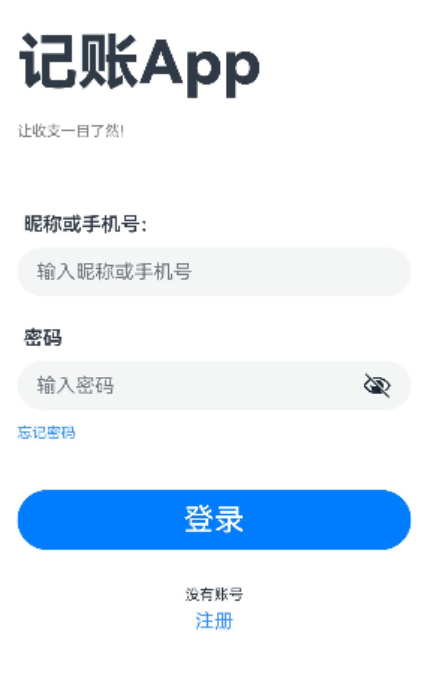
4.登录功能代码实现
import { promptAction,router } from '@kit.ArkUI'
import { strNotEmpty } from '../util/SysUtil';

@Entry
@Component
struct LoginPage {
  //账号:可能是昵称或者是手机号
  account:string="";
  password:string="";

  build() {
    Column({space:10}) {
      Column({space:20}){
        Text("记账App")
          .fontSize(50)
          .fontWeight(800)

        Text("让收支一目了然!")
          .fontColor(Color.Gray)
          .fontSize(12)
      }
      .width("100%")
      .margin({top:40})
      .alignItems(HorizontalAlign.Start)

      Column(){
        Text("昵称或手机号:")
          .fontWeight(600)
          .width("100%")
          .margin({left:10,bottom:10})
        TextInput({placeholder:"输入昵称或手机号"})
          .onChange(v=>{
            this.account=v;
          })
      }.margin({top:50,bottom:15})

      Column(){
        Text("密码")
          .fontWeight(600)
          .width("100%")
          .margin({left:10,bottom:10})

        TextInput({placeholder:"输入密码" })
          .type(InputType.Password)
          .onChange(v=>{
            this.password=v;
          })
      }
      Text("忘记密码")
        .fontColor("#3894ff")
        .fontSize(12)
        .margin({top:2})
        .width("100%")
        .onClick(()=>{
          //跳转页面 跳转到 忘记密码页面
          router.pushUrl(
            {
              url:"pages/FindPage"
            }
          )
        })

      Button("登录")
        .width("100%")
        .margin({top:30})
        .fontSize(25)
        .padding(10)
        .onClick(()=>{
          //1.验证内容是否为空
          if(strNotEmpty(this.account,this.password)){
            //2.验证 全局存储的 账号或 密码是否正确
            if(((this.account===AppStorage.get("name")) || (this.account===AppStorage.get("phone")))
              && this.password===AppStorage.get("password")){
              //登录成功
              promptAction.showToast({
                message:"恭喜你,登录成功!"
              })
              //跳转页面 跳转到首页
              router.pushUrl({
                url:"pages/MyPage"
              })
            }else {
              promptAction.showToast({
                message:"亲,登录失败,账号或密码不正确!"
              })
            }
          }else {
            promptAction.showToast({
              message:"亲,请检查账号或密码,有空内容!"
            })
          }
        })

      Column(){
        Text("没有账号")
          .fontSize(12)
          .margin({bottom:5})
        Text("注册")
          .fontColor("#3894ff")
          .onClick(()=>{
            //跳转到 注册页面
            this.getUIContext().getRouter().pushUrl({
              url:"pages/RegisterPage"
            })
          })
      }
      .margin({top:20})
    }
    .height('100%')
    .width('90%')
    .margin({left:"5%"})
  }
}
5.总结
通过以上设计,注册登录模块在保证安全性和易用性的同时,充分发挥了 HarmonyOS NEXT 的分布式特性和系统级能力,为用户提供跨设备一致的高效登录体验,同时为后续功能扩展奠定了坚实基础。
就先到这里啦,继续加油!

讨论HarmonyOS开发技术,专注于API与组件、DevEco Studio、测试、元服务和应用上架分发等。
更多推荐

 11
11 0
0- 0


 已为社区贡献59条内容

所有评论(0)