ArkUI框架
·
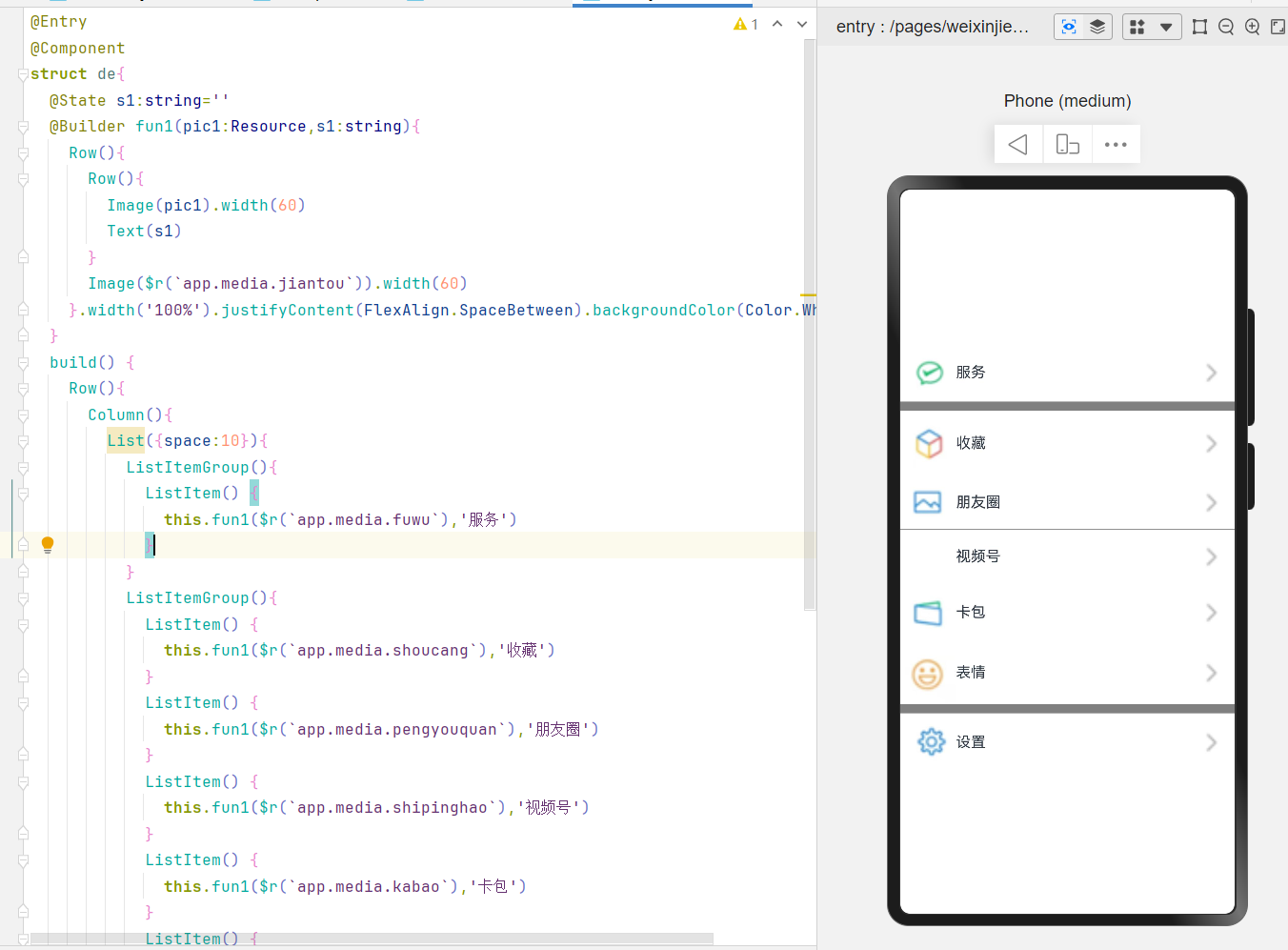
本文介绍了一个基于ArkUI框架的组件结构,通过@Entry和@Component注解定义了一个名为de的组件。组件内部使用@State注解管理状态变量s1,并通过@Builder注解定义了一个名为fun1的构建函数,用于生成包含图片和文本的行布局。在build函数中,使用Row和Column布局嵌套,结合List和ListItemGroup组件,生成了一个包含多个列表项的界面。每个列表项通过调用fun1函数,展示不同的图标和文本内容,整体布局采用白色背景,列表项之间留有10像素的间距,列表背景为灰色。
@Entry
@Component
struct de{
  @State s1:string=''
  @Builder fun1(pic1:Resource,s1:string){
    Row(){
      Row(){
        Image(pic1).width(60)
        Text(s1)
      }
      Image($r(`app.media.jiantou`)).width(60)
    }.width('100%').justifyContent(FlexAlign.SpaceBetween).backgroundColor(Color.White)
  }
  build() {
    Row(){
      Column(){
        List({space:10}){
          ListItemGroup(){
            ListItem() {
              this.fun1($r(`app.media.fuwu`),'服务')
            }
          }
          ListItemGroup(){
            ListItem() {
              this.fun1($r(`app.media.shoucang`),'收藏')
            }
            ListItem() {
              this.fun1($r(`app.media.pengyouquan`),'朋友圈')
            }
            ListItem() {
              this.fun1($r(`app.media.shipinghao`),'视频号')
            }
            ListItem() {
              this.fun1($r(`app.media.kabao`),'卡包')
            }
            ListItem() {
              this.fun1($r(`app.media.biaoqing`),'表情')
            }
          }
          ListItemGroup(){
            ListItem() {
              this.fun1($r(`app.media.shezhi`),'设置')
            }
          }
        }.backgroundColor(Color.Gray)
      }
      .width('100%')
    }
    .height('100%')
  }
}

讨论HarmonyOS开发技术,专注于API与组件、DevEco Studio、测试、元服务和应用上架分发等。
更多推荐


 3
3 0
0- 0


 已为社区贡献8条内容

所有评论(0)