HarmonyOS应用基础阶段- 05、ArkUI框架—组件样式基础(二)
·
文章目录
4.8文本垂直对齐方式
Text 组件内容默认垂直居中,效果如下:
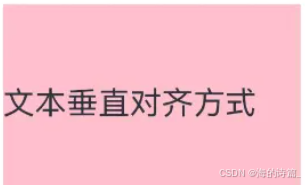
可使用align属性调整Text组件垂直对齐方式。
属性: align()
参数: 枚举Alignment

文本垂直对齐方式
@Entry
@Component
struct Index {
  build() {
    Column() {
      Text('顶对齐')
        .width(200)
        .height(100)
        .backgroundColor('#d3f2e3')
        .textAlign(TextAlign.Center)
        // 垂直对齐方式
        .align(Alignment.Top)

      Text('居中对齐')
        .width(200)
        .height(100)
        .backgroundColor(Color.Orange)
        .textAlign(TextAlign.Center)
          // 垂直对齐方式
        .align(Alignment.Center)

      Text('底对齐')
        .width(200)
        .height(100)
        .backgroundColor('#d3f2e3')
        .textAlign(TextAlign.Center)
          // 垂直对齐方式
        .align(Alignment.Bottom)
    }
  }
}
4.9文本首行缩进
属性:textIndent
参数:数值
@Entry
@Component
struct Index {
  build() {
    Column() {
      Text('HarmonyOS 是新一代的智能终端操作系统,为不同设备的智能化、互联与协同提供了统一的语言。带来简洁,流畅,连续,安全可靠的全场景交互体验。')
        .fontSize(14)
        .textIndent(28)
    }
  }
}
4.10文本溢出
文本溢出

使用 textOverflow 配合 maxLines 实现文本溢出显示省略号效果
4.10.1文本超长显示方式
属性:textOverflow
参数:{overflow: TextOverflow},TextOverflow 为枚举类型
● None:文本超长时裁剪显示
● Clip:文本超长时进行裁剪显示
● Ellipsis:文本超长时显示不下的文本用省略号代替
● MARQUEE:文本超长时以跑马灯的方式展示(滚动显示)
4.10.2最大行数
属性:maxLines
参数:数字
@Entry
@Component
struct Index {
  build() {
    Column() {
      Text('HarmonyOS 是新一代的智能终端操作系统,为不同设备的智能化、互联与协同提供了统一的语言。带来简洁,流畅,连续,安全可靠的全场景交互体验。')
        .fontSize(14)
        .textIndent(28)
        .maxLines(2)
        // 超长文本使用省略号代替
        .textOverflow({overflow: TextOverflow.Ellipsis})
        // 裁剪超长文本
        .textOverflow({overflow: TextOverflow.Clip})
        // 超长文本滚动显示
        .textOverflow({overflow: TextOverflow.MARQUEE})
    }
  }
}
5、显示图片
作用:在应用中显示图片,支持png、jpg、bmp、svg和gif类型的图片格式。
组件:Image(‘图片的数据源’),支持本地图片资源和网络图片资源。
5.1图片数据源
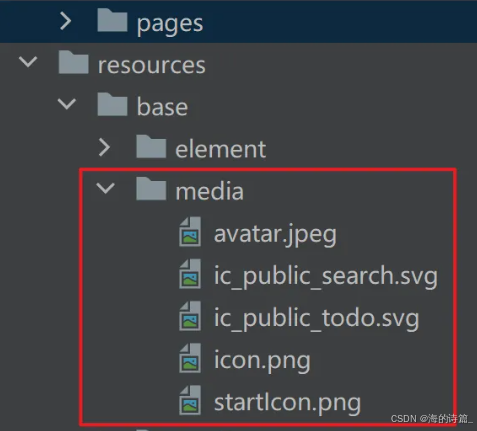
图片数据源即图片存储位置,通常存储在resources/base/media
Image组件
@Entry
@Component
struct Index {
  build() {
    Column() {
      // 本地图片
      Image($r('app.media.cat'))
        .width(200)

      // 网络图片
      Image('https://www.itheima.com/images/logo.png')
        .width(200)
    }
  }
}
5.2案例-百度-小说简介
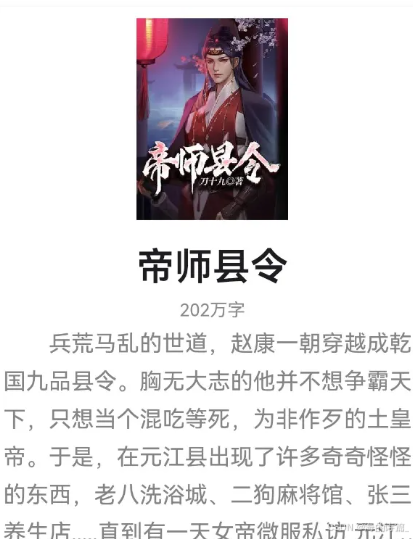
涵盖知识:Text 组件、Image组件、文本属性等
@Entry
@Component
struct Index {
  build() {
    Column() {
      Image($r('app.media.story'))
        .width(120)
      Text('帝师县令')
        .lineHeight(60)
        .fontSize(30)
        .fontColor('#1d1c21')
        .fontWeight(600)
      Text('202万字')
        .lineHeight(24)
        .fontSize(14)
        .fontColor('#999')
      Text('兵荒马乱的世道,赵康一朝穿越成乾国九品县令。胸无大志的他并不想争霸天下,只想当个混吃等死,为非作歹的土皇帝。于是,在元江县出现了许多奇奇怪怪的东西,老八洗浴城、二狗麻将馆、张三养生店.....直到有一天女帝微服私访 元江县.....')
        .lineHeight(30)
        .fontSize(18)
        .textIndent(36)
        .maxLines(4)
        .textOverflow({overflow: TextOverflow.Ellipsis})
        .fontColor('#777')
    }
  }
}
6、Image组件属性
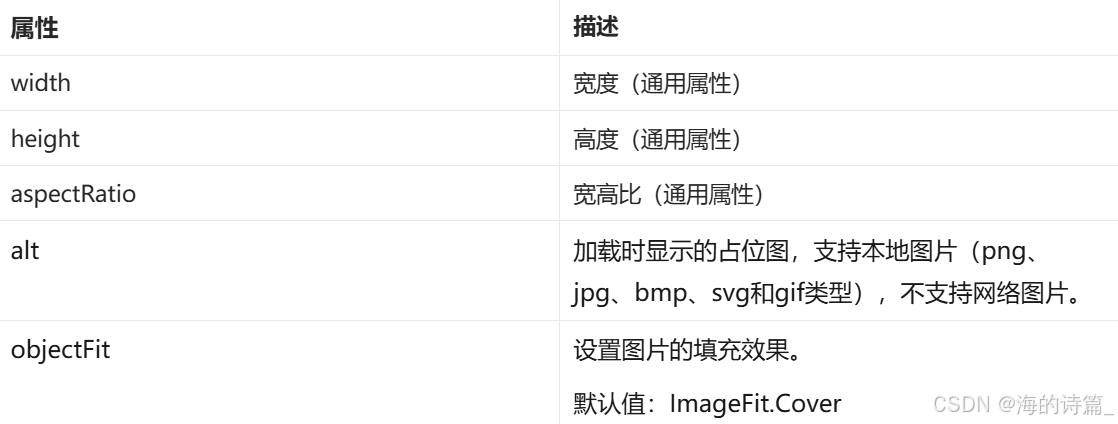
添加backgroundColor属性添加背景色,方便观察组件尺寸范围
6.1尺寸控制
● width:组件宽度,取值数字或百分比
● height:组件高度,取值数字或百分比
● aspectRatio:组件宽高比,宽度/高度
@Entry
@Component
struct Index {
  build() {
    Column() {
      // 本地图片 正方形图添加 aspectRatio 属性,宽高比例为 1:1
      Image($r('app.media.cat'))
        .width(200)
        .aspectRatio(1)

      // 网络图片
      Image('https://www.itheima.com/images/logo.png')
        .width(200)

        // 长方形图片设置宽高比1:1, 会导致图片显示不全
        .aspectRatio(1)
    }
  }
}
6.2占位图 alt
作用:加载时显示的占位图片
属性:alt
占位图
@Entry
@Component
struct Index {
  build() {
    Column() {
      Image('https://www.itheima.com/images/logo.png')
        .width(200)

        // 加载时显示的占位图
        .alt($r('app.media.startIcon'))
    }
  }
}
7、案例-QQ音乐-卡片
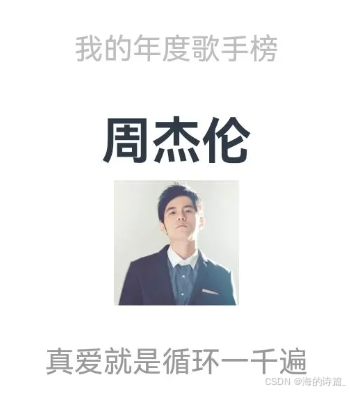
@Entry
@Component
struct Index {
  build() {
    Column() {
      Column() {
        Text('我的年度歌手榜')
          .lineHeight(40)
          .fontSize(14)
          .fontColor('#bdbdbd')
        Text('周杰伦')
          .lineHeight(50)
          .fontSize(24)
          .fontWeight(700)
        Image($r('app.media.zhoujielun'))
          .width(60)
        Text('真爱就是循环一千遍')
          .lineHeight(40)
          .fontSize(14)
          .fontColor('#999')
      }
        .width(200)
        .height(200)
        .backgroundColor('#fff')
    }
    .width('100%')
    .height('100%')
    .backgroundColor('#f5f7f8')
  }
}

讨论HarmonyOS开发技术,专注于API与组件、DevEco Studio、测试、元服务和应用上架分发等。
更多推荐


 11
11 0
0- 0


 已为社区贡献5条内容

所有评论(0)