鸿蒙-ArkTS和Native之间的交互使用10——使用 libarchive创建getCompressList的napi压缩接口
·
前言:
- 性能优化:若仅需目录信息,调用
archive_read_data_skip可跳过数据读取,提升效率。 - 编码问题:某些压缩包可能使用非 UTF-8 编码的路径名,需额外处理字符集转换。
压缩getCompressList:
在鸿蒙的cpp代码中添加如下:
export const getCompressList: (path: string,outFile: string,) => object
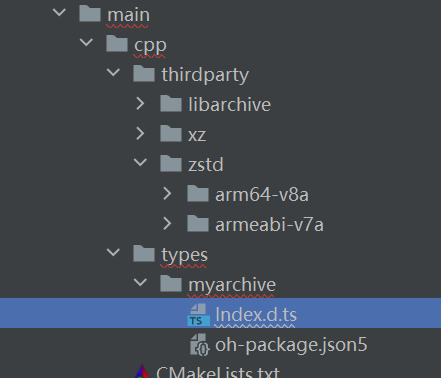
然后添加c代码
首先创建 libarchive 的读取对象,并配置支持的压缩格式和过滤器:
struct archive *a = archive_read_new();
archive_read_support_filter_all(a);  // 支持所有压缩过滤器
archive_read_support_format_all(a);  // 支持所有归档格式
打开压缩包文件
通过 archive_read_open_filename 打开目标文件,并检查是否成功:
if (archive_read_open_filename(a, "example.zip", 10240) != ARCHIVE_OK) {
    fprintf(stderr, "Error opening file: %s\n", archive_error_string(a));
    return;
}
遍历归档条目
循环读取每个条目,提取路径名并判断是否为目录:
struct archive_entry *entry;
while (archive_read_next_header(a, &entry) == ARCHIVE_OK) {
    const char *pathname = archive_entry_pathname(entry);  // 获取条目路径
    mode_t type = archive_entry_filetype(entry);           // 获取文件类型

    if (type == AE_IFDIR) {  // 判断是否为目录
        printf("Directory: %s\n", pathname);
    }

    archive_read_data_skip(a);  // 跳过数据读取(仅需元数据)
}
错误处理与资源释放
在遍历过程中需检查返回值,并在结束时释放资源:
if (archive_errno(a) != 0) {
    fprintf(stderr, "Error: %s\n", archive_error_string(a));
}

archive_read_free(a);  // 释放读取对象
完整示例代码
static napi_value getCompressList(const char *filename) {
    struct archive *a = archive_read_new();
    archive_read_support_filter_all(a);
    archive_read_support_format_all(a);

    if (archive_read_open_filename(a, filename, 10240) != ARCHIVE_OK) {
        fprintf(stderr, "Error: %s\n", archive_error_string(a));
        return;
    }

    struct archive_entry *entry;
    while (archive_read_next_header(a, &entry) == ARCHIVE_OK) {
        const char *path = archive_entry_pathname(entry);
        if (archive_entry_filetype(entry) == AE_IFDIR) {
            printf("Found directory: %s\n", path);
        }
        archive_read_data_skip(a);
    }

    if (archive_errno(a) != 0) {
        fprintf(stderr, "Error: %s\n", archive_error_string(a));
    }

    archive_read_free(a);
    return create_result(env, ErrorCode::SUCCESS);
}
在ArkTS中的使用方式:
 export async function getCompressList(inFile: string,outFile: string): Promise<Result> {
    return archive.getCompressList(inFile,outFile) as Result
  }

讨论HarmonyOS开发技术,专注于API与组件、DevEco Studio、测试、元服务和应用上架分发等。
更多推荐

 1
1 0
0- 0


 已为社区贡献24条内容

所有评论(0)