HarmonyOS (一)跨包动态路由配置
·
不知为何,从第一个页面跳到第二个页面,第二个页面的内容一直呈现不出来,于是多看了一遍,发现未集成NavDestination,哈哈哈
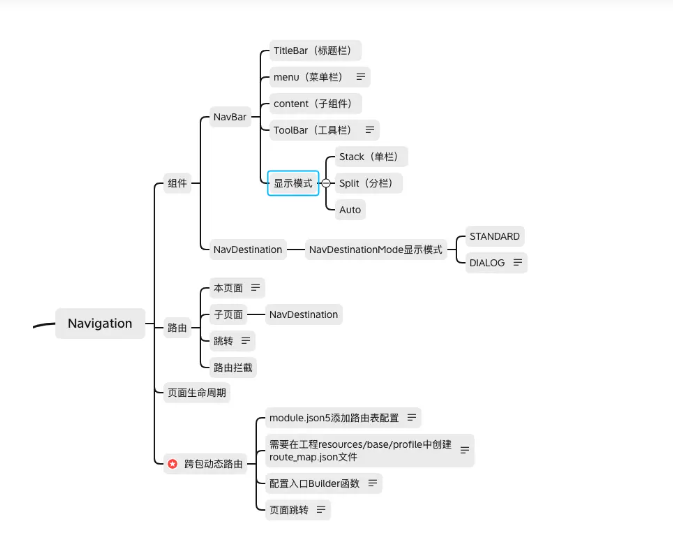
跨包动态路由
- module.json5添加路由表配置
  {
    "module" : {
      "routerMap": "$profile:route_map"
    }
  }
2.需要在工程resources/base/profile中创建route_map.json文件
  {
    "routerMap": [
      {
        "name": "PageOne",
        "pageSourceFile": "src/main/ets/pages/PageOne.ets",
        "buildFunction": "PageOneBuilder",
        "data": {
          "description" : "this is PageOne"
        }
      }
    ]
  }

配置项说明name | 跳转页面名称。
pageSourceFile | 跳转目标页在包内的路径,相对src目录的相对路径。
buildFunction | 跳转目标页的入口函数名称,必须以@Builder修饰。
data | 应用自定义字段。可以通过配置项读取接口getConfigInRouteMap获取。
3.配置入口Builder函数,子页面需使用NavDestination
// 跳转页面入口函数
  @Builder
  export function PageOneBuilder() {
    PageOne()
  }

  @Component
  struct PageOne {
    pathStack: NavPathStack = new NavPathStack()

    build() {
      NavDestination() {
      }
      .title('PageOne')
      .onReady((context: NavDestinationContext) => {
         this.pathStack = context.pathStack
      })
    }
  }
4.页面跳转
  @Entry
  @Component
  struct Index {
    pageStack : NavPathStack = new NavPathStack();

    build() {
      Navigation(this.pageStack){
      }.onAppear(() => {
        this.pageStack.pushPathByName("PageOne", null, false);
      })
      .hideNavBar(true)
    }
  }
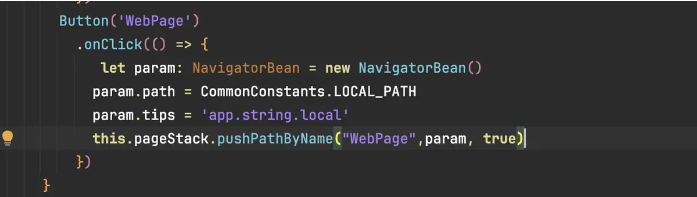
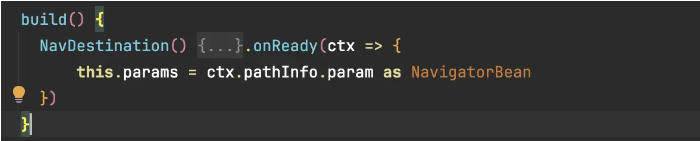
补充: 页面传值

讨论HarmonyOS开发技术,专注于API与组件、DevEco Studio、测试、元服务和应用上架分发等。
更多推荐
 6
6 0
0- 0


 已为社区贡献133条内容

所有评论(0)