跟我一起学“仓颉”设计模式-命令模式练习题
·
一、练习题
1. 设计一个简易的加法运算器,该运算器可以实现简易的加法,还可以对运算执行撤销操作。
类图
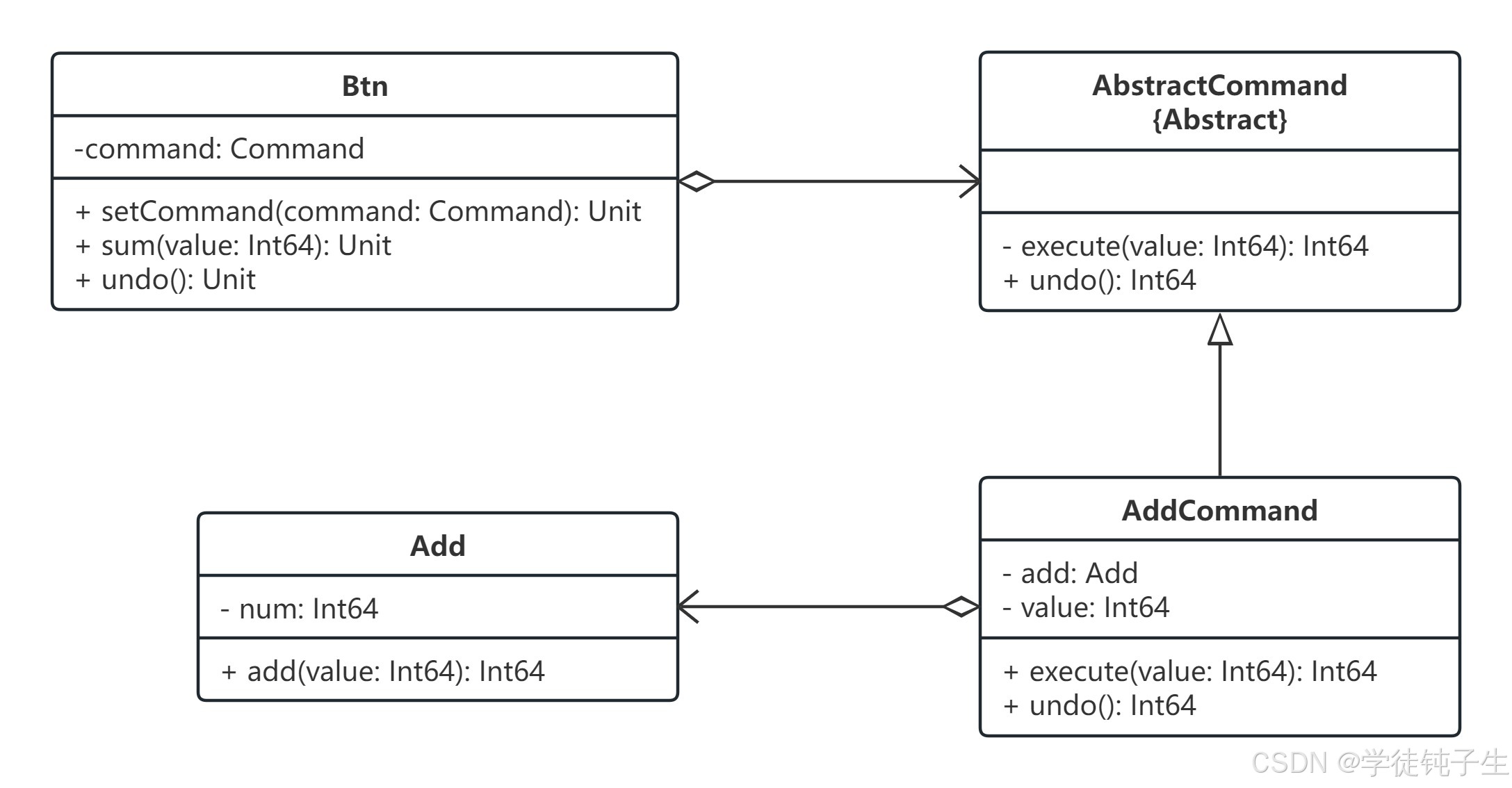
核心代码
package DesignPattern.command

// 接收者
public class Add {
    private var num: Int64 = 0

    public func add(value: Int64) {
        num += value
        return num
    }
}


// 抽象命令类
public abstract class AbstructCommand {
    public func execute(value: Int64): Int64
    public func undo(): Int64
}

// 具体命令类
public class AddCommand <: AbstructCommand {
    private var value: Int64 = 0
    private let add: Add = Add()

    public func execute(value: Int64): Int64 {
        this.value = value
        return add.add(value)
    }

    public func undo(): Int64 {
        return add.add(-this.value)
    }
}

public class Btn {
    private var command = Option<AbstructCommand>.None

    public func setCommand(command: AbstructCommand) {
        this.command = command
    }

    public func sum(value: Int64) {
        let result = command.getOrThrow().execute(value)
        println("加法运算结果为: ${result}")
    }

    public func undo() {
        let result = command.getOrThrow().undo()
        println("撤销运算结果为: ${result}")
    }
}
测试代码
package DesignPattern
import DesignPattern.command.*

main(): Int64 {
    let btn = Btn()
    btn.setCommand(AddCommand())
    btn.sum(22)
    btn.sum(8)
    btn.sum(10)
    btn.undo()

    return 0
}
二、小结
本章为大家详细的介绍了仓颉设计模式中命令模式练习题的内容,下一章,为大家带来解释器模式的内容。最后,创作不易,如果大家觉得我的文章对学习仓颉设计模式有帮助的话,就动动小手,点个免费的赞吧!收到的赞越多,我的创作动力也会越大哦,谢谢大家🌹🌹🌹!!!

讨论HarmonyOS开发技术,专注于API与组件、DevEco Studio、测试、元服务和应用上架分发等。
更多推荐
 3
3 0
0- 0


 已为社区贡献191条内容

所有评论(0)