#放码来战.端云一体化开发#HarmonyOS 5 【农民叔叔】24.【端侧工程】我的页面个人信息及退出登录
·
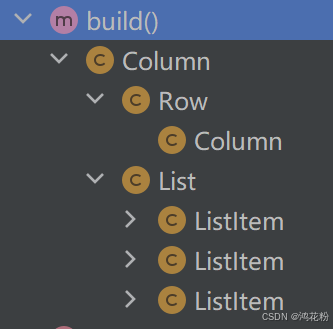
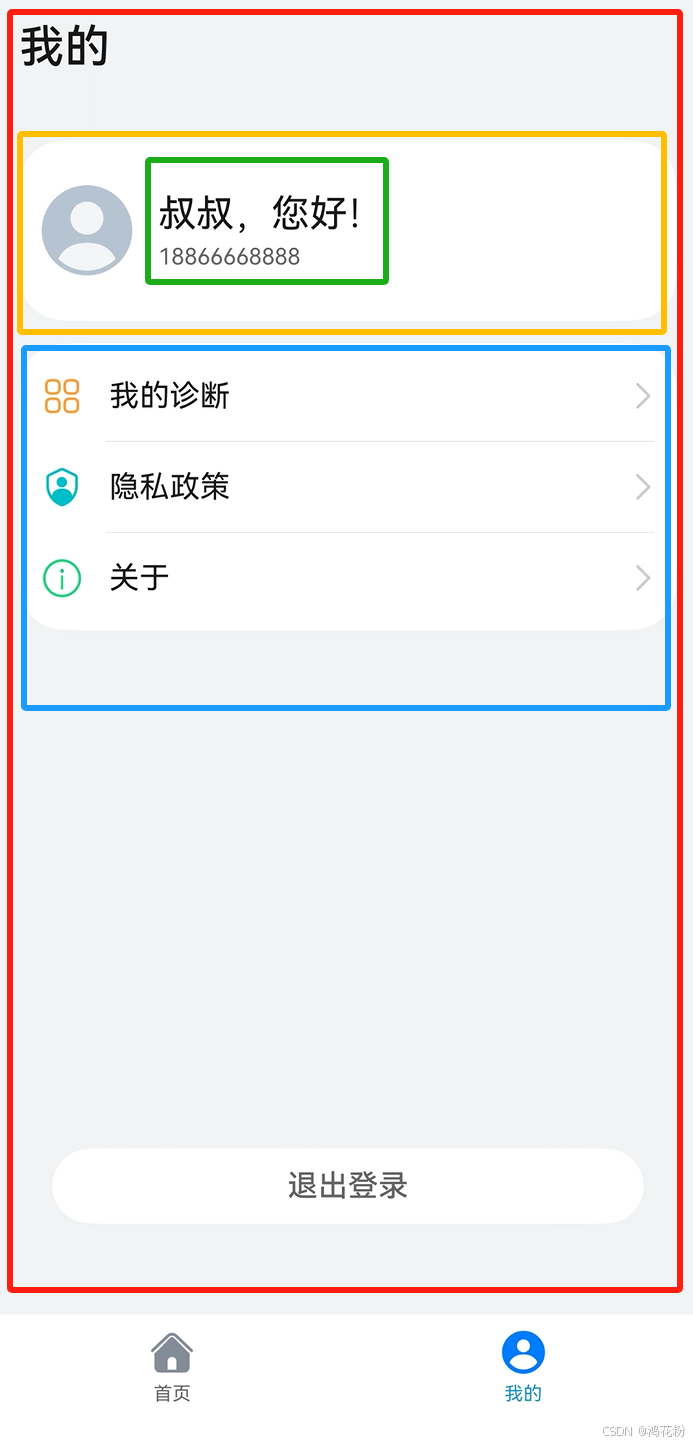
整个页面布局主要是三部分:是否登录显示个人信息、列表菜单项、退出按钮。
 |
 |
1.build()布局代码
build() {
    Column(){
      // 标题“我的”
      Text('我的')
        .fontWeight(FontWeight.Medium)
        .fontSize(24)
        .alignSelf(ItemAlign.Start)
        .fontColor($r('sys.color.ohos_id_color_text_primary'))
        .margin({top:12})

      // 个人信息
      Row(){
        // 头像
        Image($r('app.media.icon_account'))
          .width(48)
          .height(48)
        // 昵称、手机号
        Column(){
          Text('叔叔,您好!')
            .fontSize(20)
            .fontColor($r('sys.color.ohos_id_color_text_primary'))
          if(this.isLogin){
            Text('18866668888')
              .fontSize(12)
              .margin({top:4})
              .fontColor($r('sys.color.ohos_id_color_text_secondary'))
          }else {
            Text('请先登录 >')
              .fontSize(12)
              .margin({top:4})
              .fontColor($r('sys.color.ohos_id_color_text_primary_activated'))
              .clickEffect({level:ClickEffectLevel.LIGHT,scale:0.9})
              .onClick(()=>{
                // 跳转登录页面
                router.pushUrl({url:'pages/LoginPage'});
              })
          }
        }
        .margin({left:14})
        .alignItems(HorizontalAlign.Start)
      }
      .alignItems(VerticalAlign.Center)
      .width('100%')
      .backgroundColor($r('sys.color.ohos_id_color_card_bg'))
      .padding({left:12})
      .margin({top:35,bottom:12})
      .borderRadius(24)
      .height(96)

      // 列表项
      List(){
        // 我的诊断
        ListItem(){
          Row(){
            Image($r('app.media.icon_zhenduan'))
              .width(22)
              .height(22)
            Text('我的诊断')
              .margin({left:14})
              .fontColor($r('sys.color.ohos_id_color_text_primary'))
            Blank()
            Image($r('app.media.icon_right_grey'))
              .width(12)
              .height(24)
          }
          .width('100%')
          .onClick(() => {
            router.pushUrl({url:'pages/MyPestPage'});
          })
        }
        .height(48)
        .padding({left:12,right:12})

        // 隐私政策
        ListItem() {
          Row() {
            Image($r('app.media.icon_privacy'))
              .width(22)
              .height(22)
            Text('隐私政策')
              .margin({ left: 14 })
              .fontColor($r('sys.color.ohos_id_color_text_primary'))
            Blank()
            Image($r('app.media.icon_right_grey'))
              .width(12)
              .height(24)
          }
          .width('100%')
          .onClick(()=>{
            router.pushUrl({ url: 'pages/PrivateFilePage' });
          })
        }
        .height(48)
        .padding({ left: 12, right: 12 })

        // 关于
        ListItem() {
          Row() {
            Image($r('app.media.icon_about'))
              .width(22)
              .height(22)
            Text('关于')
              .margin({ left: 14 })
              .fontColor($r('sys.color.ohos_id_color_text_primary'))
            Blank()
            Image($r('app.media.icon_right_grey'))
              .width(12)
              .height(24)
          }
          .width('100%')
          .onClick(()=>{
            router.pushUrl({ url: 'pages/AboutUsPage' });
          })
        }
        .height(48)
        .padding({ left: 12, right: 12 })
      }
      .width('100%')
      .backgroundColor($r('sys.color.ohos_id_color_card_bg'))
      .borderRadius(24)
      .padding({ top: 4, bottom: 4 })
      .divider({
        strokeWidth:0.25,
        color:'#33000000',
        startMargin:46,
        endMargin:12
      })

      Blank()

      // 退出按钮
      Button('退出登录')
        .visibility(this.isLogin?Visibility.Visible:Visibility.Hidden)
        .width('90%')
        .height(40)
        .fontSize(16)
        .fontColor($r('sys.color.ohos_id_color_text_secondary'))
        .fontWeight(FontWeight.Medium)
        .backgroundColor($r('sys.color.ohos_id_color_card_bg'))
        .margin({bottom:48})
        .onClick(() => {
          // 登出
          this.signOut();
        })
    }
    .width('100%')
    .height('100%')
    .padding({left:12,right:12})
    .backgroundColor($r('sys.color.ohos_id_color_sub_background'))

  }
2.退出按钮
/**
   * 登出
   */
  signOut():void{
    auth.signOut()
      .then(()=>{
        // 空置首选项用户信息
        // TODO:
        promptAction.showToast({message:'退出成功'});
        router.pushUrl({url:'pages/MainPage'});
      })
      .catch((err:BusinessError)=>{
        promptAction.showToast({message:'退出失败'})
      })
  }
讨论HarmonyOS开发技术,专注于API与组件、DevEco Studio、测试、元服务和应用上架分发等。
更多推荐
 3
3 0
0- 0



 已为社区贡献33条内容

所有评论(0)