第33篇|拍完回到哪里:相册、地图和预览浮层的状态闭环
第 33 篇把前面几篇串起来。拍照完成后,项目不能只把一条记录插进数组,还要同步选中记录、相册分组、地图标记、预览浮层、推荐状态和持久化数据。appendGalleryRecord 是这个闭环的中心:它让一次拍摄真正落到用户可见的相册和地图体验里。 本文是 21 天「智能相机开发实战」训练营中的一篇实操记录。所有代码片段都来自当前项目,配图围绕运行页面和源码关键路径展开,读完以
第33篇|拍完回到哪里:相册、地图和预览浮层的状态闭环
第 33 篇把前面几篇串起来。拍照完成后,项目不能只把一条记录插进数组,还要同步选中记录、相册分组、地图标记、预览浮层、推荐状态和持久化数据。appendGalleryRecord 是这个闭环的中心:它让一次拍摄真正落到用户可见的相册和地图体验里。
本文是 21 天「智能相机开发实战」训练营中的一篇实操记录。所有代码片段都来自当前项目,配图围绕运行页面和源码关键路径展开,读完以后可以直接回到工程里按函数名定位。
本篇目标
- 理解拍照完成后的 UI、地图、存储三层同步。
- 读懂 appendGalleryRecord 为什么要做多件事。
- 知道保存后回读的意义,避免页面和存储层状态分叉。
- 掌握拍照统一入口如何路由到不同能力路径。
代码位置
entry/src/main/ets/pages/Index.etsentry/src/main/ets/services/GalleryRecordService.ets
一、闭环的标准:用户拍完马上知道照片去了哪里
真实用户不会关心 PhotoOutput.capture 是否返回成功,他关心拍完之后能不能看到预览、相册里有没有、地图上是否出现新的记忆点、再次进入 App 是否还在。第 33 篇看的就是这条“拍完以后”的链路。
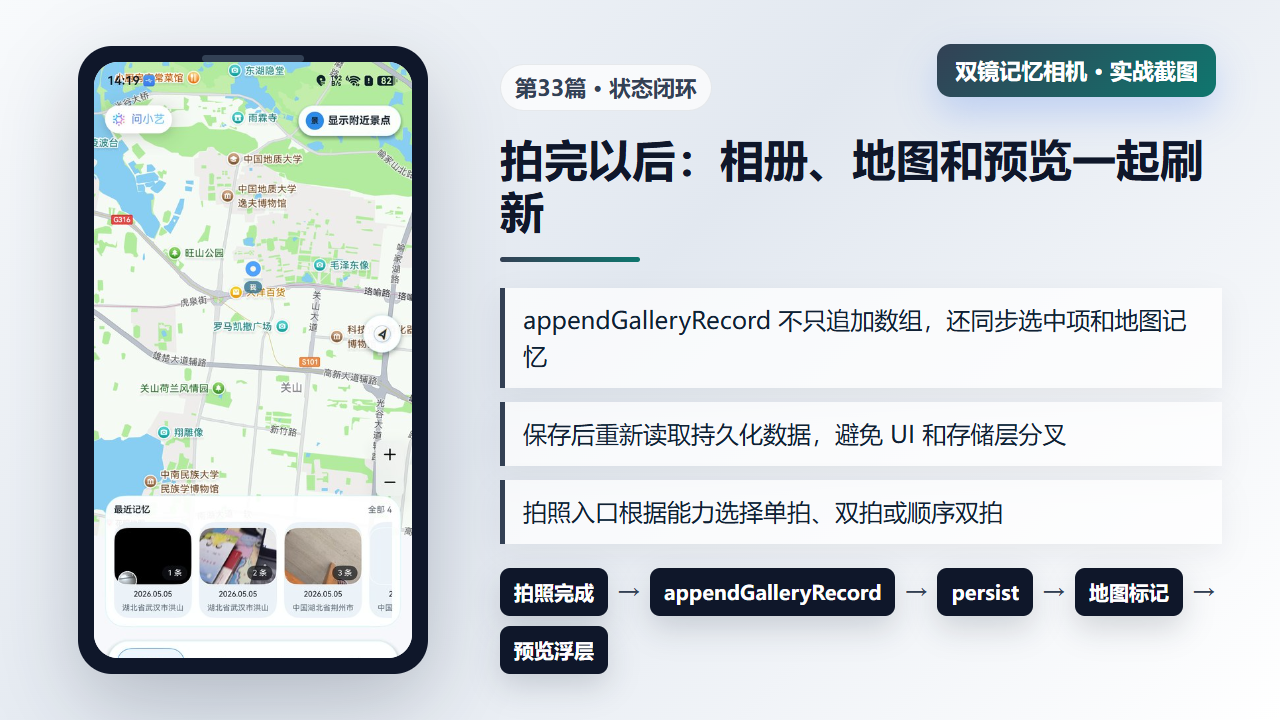
图1 拍照完成后相册、地图、预览浮层和持久化一起刷新
二、appendGalleryRecord:把记录加入相册,也同步当前选择
appendGalleryRecord 会先补本地洞察,再把新记录放到数组最前面。随后它同步选中项、分组 key、用户备注草稿、拍照预览浮层、地图记忆、数量统计和推荐状态。最后才持久化。它不是简单的 push,而是一次用户体验刷新。
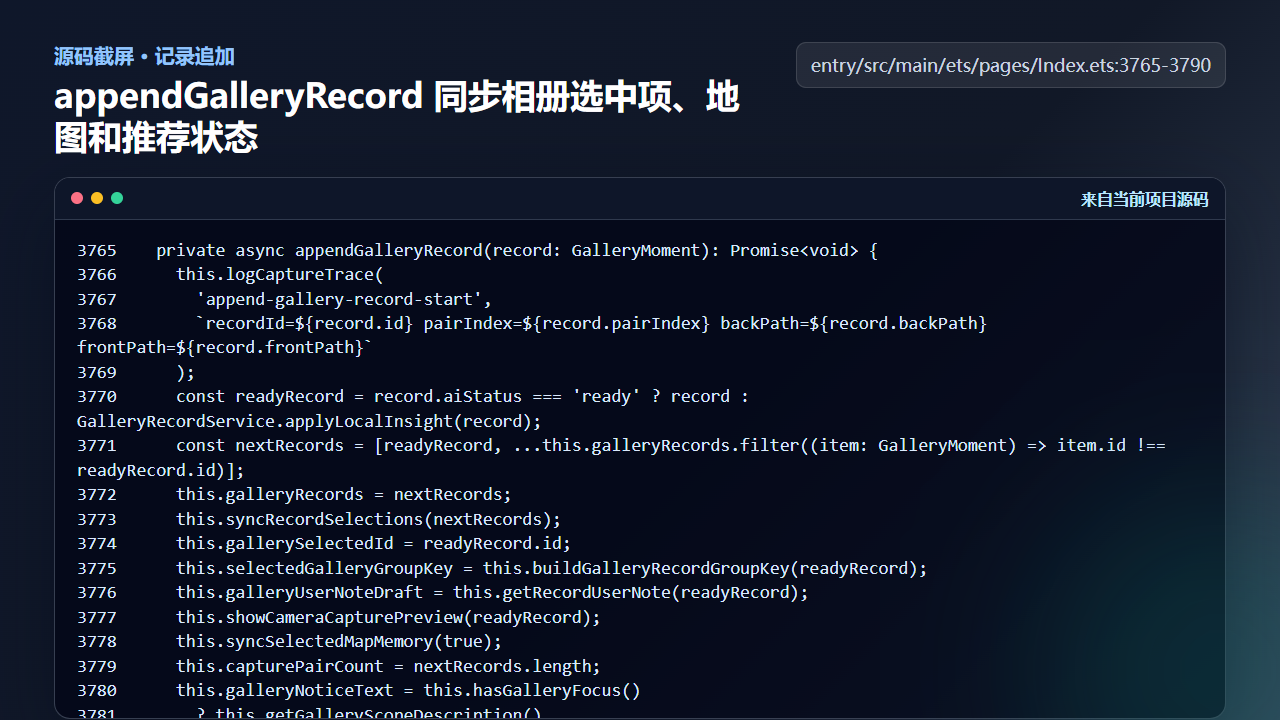
图2 appendGalleryRecord 同步相册选中项、地图和推荐状态
  private async appendGalleryRecord(record: GalleryMoment): Promise<void> {
    this.logCaptureTrace(
      'append-gallery-record-start',
      `recordId=${record.id} pairIndex=${record.pairIndex} backPath=${record.backPath} frontPath=${record.frontPath}`
    );
    const readyRecord = record.aiStatus === 'ready' ? record : GalleryRecordService.applyLocalInsight(record);
    const nextRecords = [readyRecord, ...this.galleryRecords.filter((item: GalleryMoment) => item.id !== readyRecord.id)];
    this.galleryRecords = nextRecords;
    this.syncRecordSelections(nextRecords);
    this.gallerySelectedId = readyRecord.id;
    this.selectedGalleryGroupKey = this.buildGalleryRecordGroupKey(readyRecord);
    this.galleryUserNoteDraft = this.getRecordUserNote(readyRecord);
    this.showCameraCapturePreview(readyRecord);
    this.syncSelectedMapMemory(true);
    this.capturePairCount = nextRecords.length;
    this.galleryNoticeText = this.hasGalleryFocus()
      ? this.getGalleryScopeDescription()
      : ''
    await this.syncMapMarkers();
    this.updateAwarenessRecommendation(false);
    await this.persistGalleryRecords(nextRecords);
    this.gallerySelectedId = readyRecord.id;
    this.selectedGalleryGroupKey = this.buildGalleryRecordGroupKey(readyRecord);
    this.logCaptureTrace(
      'append-gallery-record-finished',
      `recordId=${readyRecord.id} total=${nextRecords.length} selected=${this.gallerySelectedId}`
这段代码说明了页面状态不是越少越好,而是要有清楚的来源。新记录进来时,所有依赖当前记录的状态都在同一个函数里更新。
三、persistGalleryRecords:保存后回读,确认状态源一致
保存记录时,项目先调用 GalleryRecordService.saveRecords,然后马上 loadRecords 并通过 applyGalleryRecords 回写页面状态。这个“保存后回读”看起来多一步,但能减少 UI 数组和存储内容不一致的问题,也方便后续端云同步读取同一份快照。
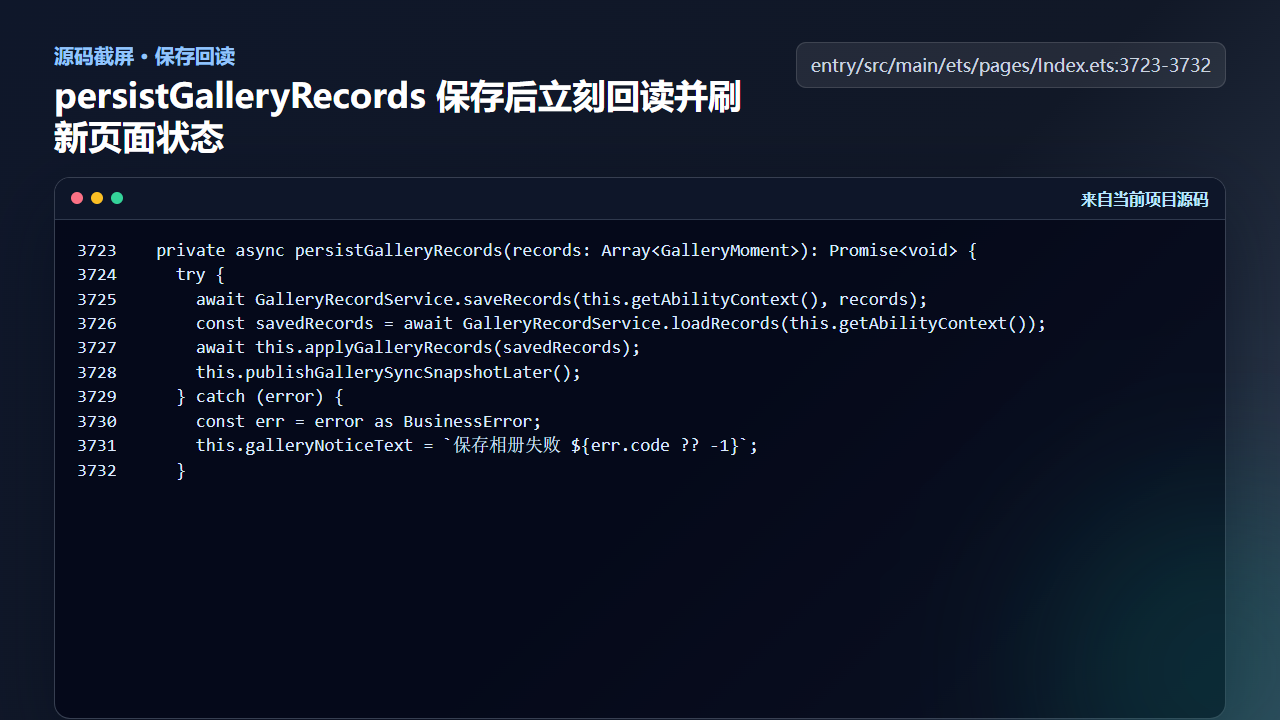
图3 persistGalleryRecords 保存后重新读取并刷新页面状态
  private async persistGalleryRecords(records: Array<GalleryMoment>): Promise<void> {
    try {
      await GalleryRecordService.saveRecords(this.getAbilityContext(), records);
      const savedRecords = await GalleryRecordService.loadRecords(this.getAbilityContext());
      await this.applyGalleryRecords(savedRecords);
      this.publishGallerySyncSnapshotLater();
    } catch (error) {
      const err = error as BusinessError;
      this.galleryNoticeText = `保存相册失败 ${err.code ?? -1}`;
    }
如果只写内存数组,刷新页面后就可能丢;如果只写存储不刷新页面,用户看不到结果。闭环要同时照顾即时反馈和长期持久化。
四、triggerCameraCapture:拍照入口按能力选择路径
统一入口会根据当前模式、是否确认、双摄能力、单摄能力和预览状态选择对应路径。双摄可用时走 triggerDualCapture;单拍模式走 triggerSingleCapture;并发不可用但仍想完成双拍时走 triggerSequentialCapture。最终这些路径都会回到同一个入库闭环。
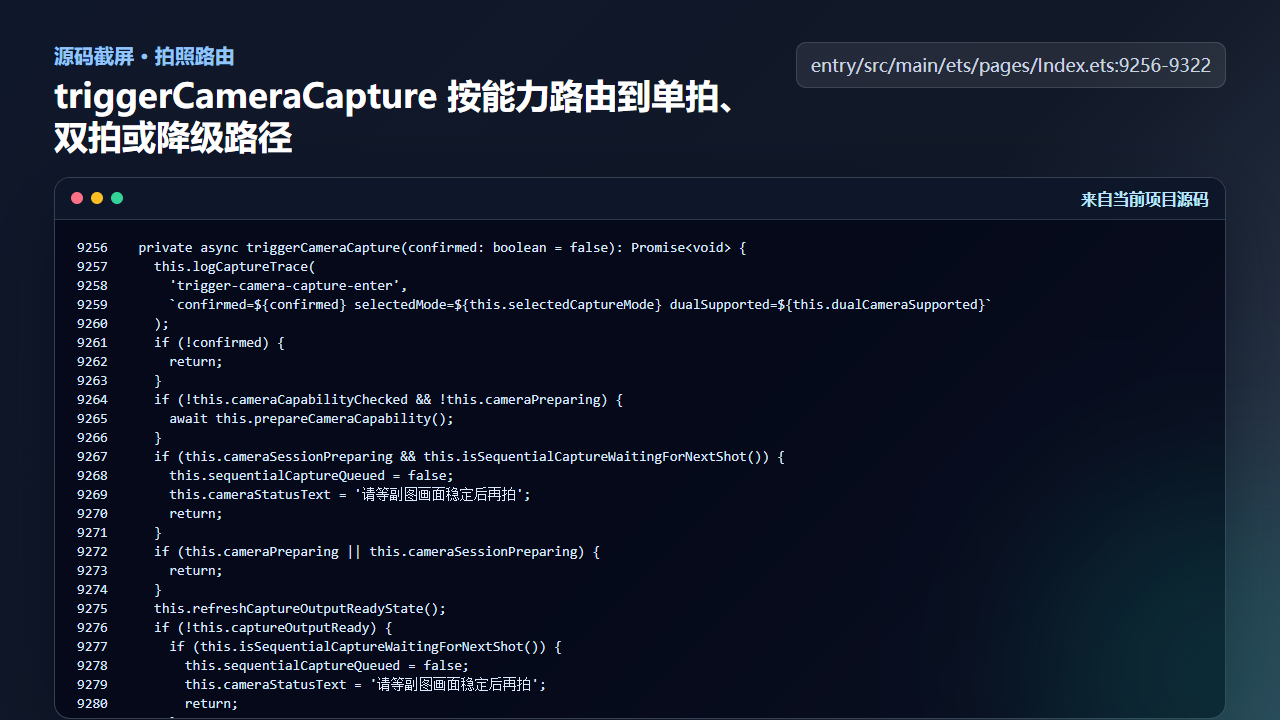
图4 triggerCameraCapture 根据能力路由到单拍、双拍或顺序双拍
  private async triggerCameraCapture(confirmed: boolean = false): Promise<void> {
    this.logCaptureTrace(
      'trigger-camera-capture-enter',
      `confirmed=${confirmed} selectedMode=${this.selectedCaptureMode} dualSupported=${this.dualCameraSupported}`
    );
    if (!confirmed) {
      return;
    }
    if (!this.cameraCapabilityChecked && !this.cameraPreparing) {
      await this.prepareCameraCapability();
    }
    if (this.cameraSessionPreparing && this.isSequentialCaptureWaitingForNextShot()) {
      this.sequentialCaptureQueued = false;
      this.cameraStatusText = '请等副图画面稳定后再拍';
      return;
    }
    if (this.cameraPreparing || this.cameraSessionPreparing) {
      return;
    }
    this.refreshCaptureOutputReadyState();
    if (!this.captureOutputReady) {
      if (this.isSequentialCaptureWaitingForNextShot()) {
        this.sequentialCaptureQueued = false;
        this.cameraStatusText = '请等副图画面稳定后再拍';
        return;
      }
      this.cameraStatusText = '相机正在收尾,请稍候';
      return;
    }
    this.hideCameraCapturePreview();

    if (this.selectedCaptureMode === 'single') {
      if (!this.singlePhotoOutput || !this.singlePreviewLive) {
        await this.switchSingleCameraTo(this.singleCameraRole);
      }
      this.logCaptureTrace('trigger-camera-capture-branch-single');
      await this.triggerSingleCapture();
      return;
    }

    if (this.shouldUseDualCapture()) {
      this.logCaptureTrace('trigger-camera-capture-branch-dual');
      await this.triggerDualCapture();
      return;
    }

    if (this.dualCameraSupported) {
      const fallbackRole: CameraLensRole = this.backPreviewLive
        ? 'back'
        : (this.frontPreviewLive ? 'front' : 'back');
      const singleFallbackReady = this.singleCameraSupported &&
        ((this.singlePhotoOutput !== undefined && this.singlePreviewLive && this.singleCameraRole === fallbackRole) ||
          await this.switchSingleCameraTo(fallbackRole));
      if (singleFallbackReady) {
        this.logCaptureTrace('trigger-camera-capture-branch-dual-fallback-single', `fallbackRole=${fallbackRole}`);
        this.cameraStatusText = '';
        this.lastCaptureSummary = this.cameraStatusText;
        await this.triggerSingleCapture();
        return;
      }
      this.cameraStatusText = '';
      this.lastCaptureSummary = this.cameraStatusText;
      return;
    }
    this.logCaptureTrace('trigger-camera-capture-branch-sequence');
    await this.triggerSequentialCapture();
  }
统一入口的价值在于把用户动作固定下来,把设备差异留给能力判断。用户点击的仍是拍照,工程内部决定怎样安全完成。
工程检查清单
- 拍照完成后必须同步相册选中项,而不是只追加数据。
- 地图标记和相册记录来自同一份
GalleryMoment。 - 保存后回读可以暴露持久化失败或格式异常。
- 统一入口负责能力路由,具体拍摄函数负责各自上下文。
- 成功态、失败态和降级态都应该能回到同一个可见结果。
今日练习
- 在代码中追踪
appendGalleryRecord后页面哪些状态会变化。 - 真机拍照后切到地图页,观察新记录是否影响地图记忆。
- 模拟双摄不可用路径,确认顺序双拍最终仍能进入相册。
下一篇会继续沿着同一条工程链路往下拆:先看用户能看到的效果,再回到源码确认状态、文件和服务边界是否闭合。

讨论HarmonyOS开发技术,专注于API与组件、DevEco Studio、测试、元服务和应用上架分发等。
更多推荐



 7
7 0
0- 0


 已为社区贡献207条内容

所有评论(0)