第36篇|顺序双拍降级:没有并发能力也能完成作品
第 36 篇讲降级。不是所有设备都支持前后摄同时工作,但训练营项目不能因为并发为空就放弃双镜作品。项目提供顺序双拍:先用单摄预览拍后摄,再切到前摄拍第二张,最终仍复用保存、合成和入库链路。 本文是 21 天「智能相机开发实战」训练营中的一篇实操记录。所有代码片段都来自当前项目,配图围绕运行页面和源码关键路径展开,读完以后可以直接回到工程里按函数名定位。 本篇目标 理解设备能力不
第36篇|顺序双拍降级:没有并发能力也能完成作品
第 36 篇讲降级。不是所有设备都支持前后摄同时工作,但训练营项目不能因为并发为空就放弃双镜作品。项目提供顺序双拍:先用单摄预览拍后摄,再切到前摄拍第二张,最终仍复用保存、合成和入库链路。
本文是 21 天「智能相机开发实战」训练营中的一篇实操记录。所有代码片段都来自当前项目,配图围绕运行页面和源码关键路径展开,读完以后可以直接回到工程里按函数名定位。
本篇目标
- 理解设备能力不足时如何保留核心用户任务。
- 读懂双摄失败如何切换到单摄预览。
- 掌握顺序双拍如何保存前后两次拍摄上下文。
- 知道统一入口如何在双摄、单拍和顺序双拍之间选择。
代码位置
entry/src/main/ets/pages/Index.ets
一、降级不是砍功能,而是换路径完成任务
从用户角度看,他想得到一张包含环境和自己的双镜记忆。并发双摄是最理想路径,但不是唯一路径。顺序双拍把同一目标拆成两次拍摄:先拍环境,再补自拍,最终仍可以合成为一条相册记录。
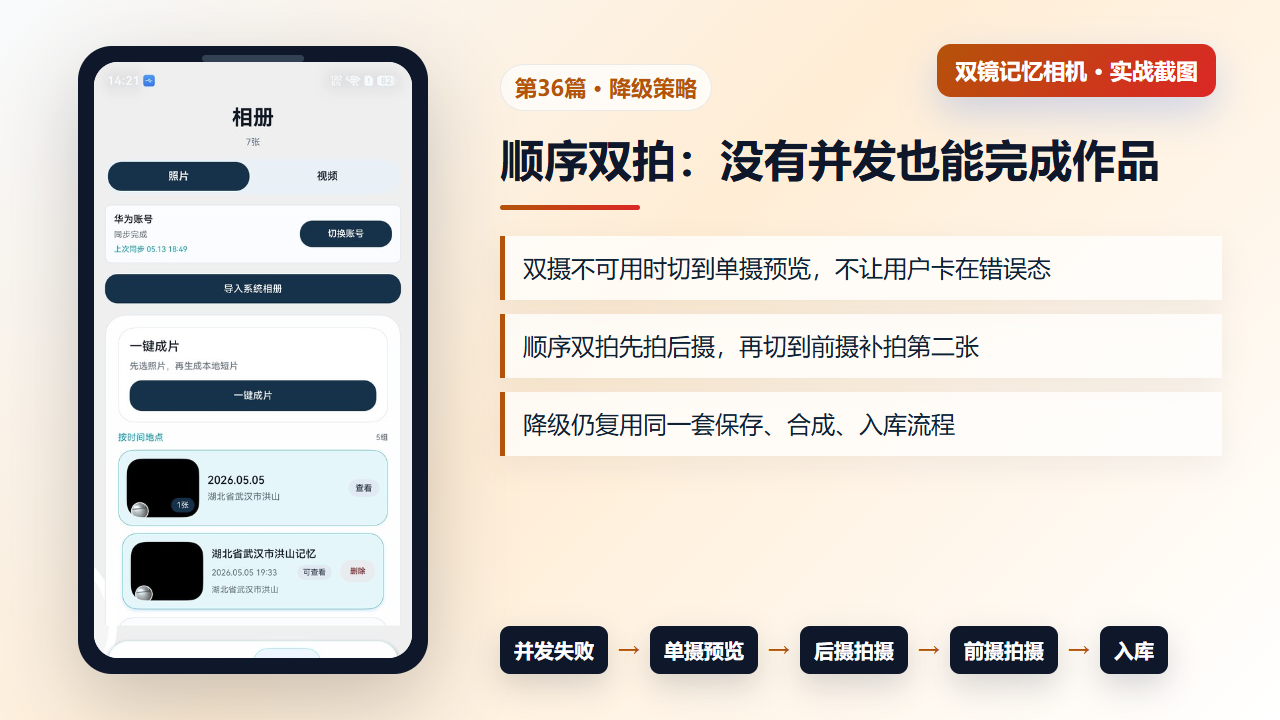
图1 顺序双拍降级:双摄不可用时仍完成后摄和前摄两张照片
二、fallbackToSequentialSinglePreview:双预览失败后回到单摄
当双摄能力不可用或双预览启动失败,项目会调用 fallbackToSequentialSinglePreview。它清理双预览 watchdog,关闭双摄会话,更新提示文案,再调用 ensureSinglePreview。用户看到的是可继续拍摄,而不是一个不能恢复的黑屏。
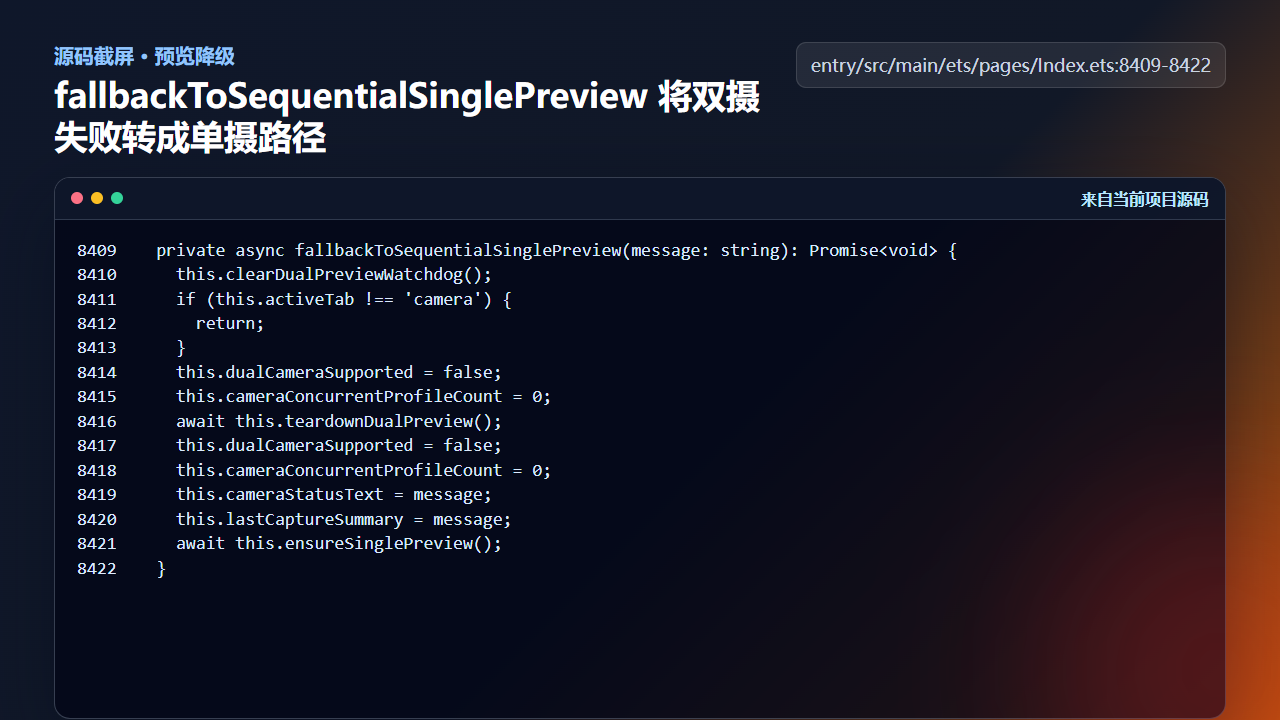
图2 fallbackToSequentialSinglePreview 将双摄失败转成单摄预览
  private async fallbackToSequentialSinglePreview(message: string): Promise<void> {
    this.clearDualPreviewWatchdog();
    if (this.activeTab !== 'camera') {
      return;
    }
    this.dualCameraSupported = false;
    this.cameraConcurrentProfileCount = 0;
    await this.teardownDualPreview();
    this.dualCameraSupported = false;
    this.cameraConcurrentProfileCount = 0;
    this.cameraStatusText = message;
    this.lastCaptureSummary = message;
    await this.ensureSinglePreview();
  }
降级路径要先清理旧资源,再打开新路径。否则双摄残留会话可能占用相机资源,导致单摄也打不开。
三、triggerSequentialCapture:用一次上下文承载两次拍摄
顺序双拍通过 backCaptureDelivered 和 frontCaptureDelivered 判断下一次应该拍哪个角色。第一次拍摄会初始化缩略图和上下文,随后切换单摄角色。第二次拍摄完成后,后续交付逻辑会把前后路径一起合成并入库。
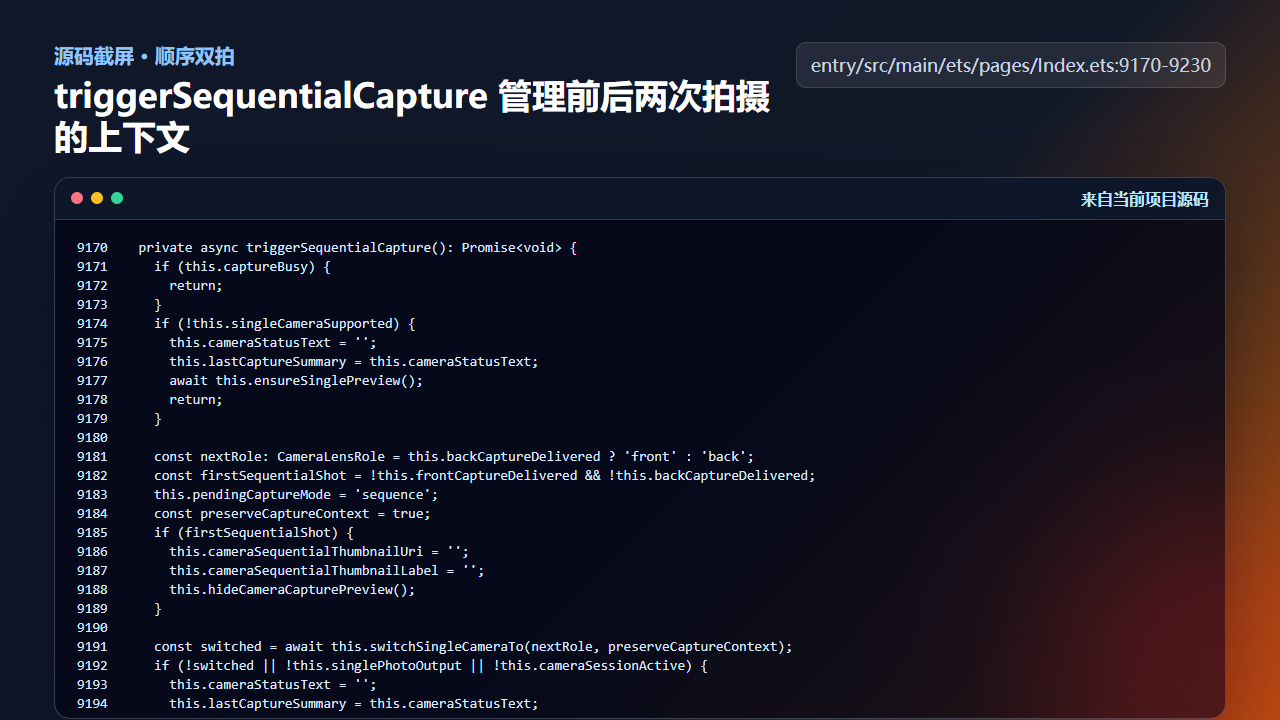
图3 triggerSequentialCapture 管理前后两次拍摄的上下文
  private async triggerSequentialCapture(): Promise<void> {
    if (this.captureBusy) {
      return;
    }
    if (!this.singleCameraSupported) {
      this.cameraStatusText = '';
      this.lastCaptureSummary = this.cameraStatusText;
      await this.ensureSinglePreview();
      return;
    }

    const nextRole: CameraLensRole = this.backCaptureDelivered ? 'front' : 'back';
    const firstSequentialShot = !this.frontCaptureDelivered && !this.backCaptureDelivered;
    this.pendingCaptureMode = 'sequence';
    const preserveCaptureContext = true;
    if (firstSequentialShot) {
      this.cameraSequentialThumbnailUri = '';
      this.cameraSequentialThumbnailLabel = '';
      this.hideCameraCapturePreview();
    }

    const switched = await this.switchSingleCameraTo(nextRole, preserveCaptureContext);
    if (!switched || !this.singlePhotoOutput || !this.cameraSessionActive) {
      this.cameraStatusText = '';
      this.lastCaptureSummary = this.cameraStatusText;
      return;
    }

    if (!this.frontCaptureDelivered && !this.backCaptureDelivered) {
      const locationSnapshot = await this.buildCaptureLocationSnapshot();
      const timestamp = `${Date.now()}`;
      this.pendingCaptureId = timestamp;
      this.pendingBackCapturePath = this.buildCaptureFilePath('back', timestamp);
      this.pendingFrontCapturePath = this.buildCaptureFilePath('front', timestamp);
      this.pendingCaptureLatitude = locationSnapshot.latitude;
      this.pendingCaptureLongitude = locationSnapshot.longitude;
      this.pendingCapturePlace = locationSnapshot.place;
      this.pendingCaptureTitle = locationSnapshot.memoryTitle;
      this.armPendingWatermark(parseInt(timestamp, 10), locationSnapshot.place, 'dual');
      this.lastCaptureSummary = this.buildCaptureSummary(locationSnapshot);
    }

    this.captureBusy = true;
    this.pendingSingleCaptureRole = nextRole;
    this.cameraStatusText = firstSequentialShot
      ? ''
      : ''
    this.setPhotoOutputReady('single', false);

    const captureSetting: camera.PhotoCaptureSetting = {
      quality: this.captureQualityLevel,
      rotation: camera.ImageRotation.ROTATION_0,
      mirror: nextRole === 'front'
    };
    try {
      await this.singlePhotoOutput.capture(captureSetting);
    } catch (error) {
      const err = error as BusinessError;
      this.failDualCapture(`${this.getCameraRoleLabel(nextRole)}拍照失败 ${err.code}`);
    }
  }
注意这里没有为降级路径另写一套相册模型。它仍然使用同一个 pending capture 和 GalleryMoment 结构,只是拍摄动作从并发变成顺序。
四、统一入口:把用户点击映射到最合适路径
triggerCameraCapture 是按钮背后的统一入口。它先处理确认逻辑,再根据当前选择模式和设备能力进入单拍、双摄并发或顺序双拍。能力判断集中在这里,页面其他区域不需要知道当前设备到底支持哪条路径。
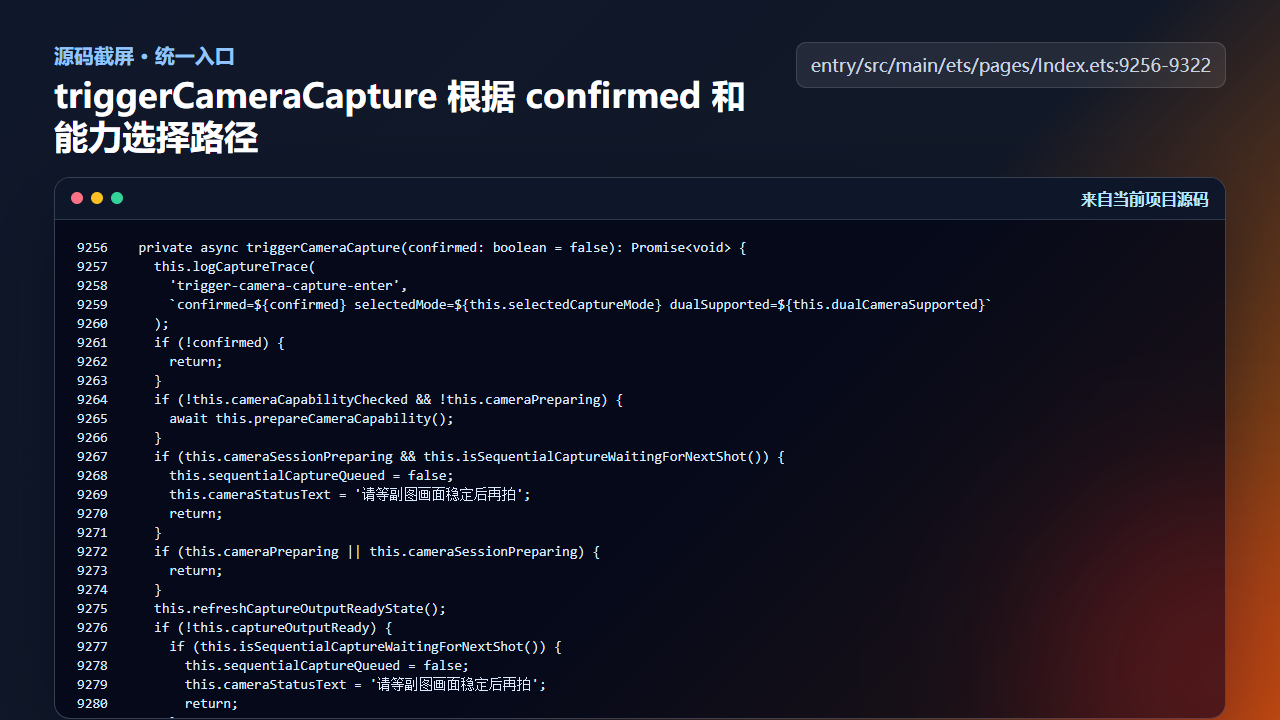
图4 triggerCameraCapture 在单拍、双拍和顺序双拍之间选择
  private async triggerCameraCapture(confirmed: boolean = false): Promise<void> {
    this.logCaptureTrace(
      'trigger-camera-capture-enter',
      `confirmed=${confirmed} selectedMode=${this.selectedCaptureMode} dualSupported=${this.dualCameraSupported}`
    );
    if (!confirmed) {
      return;
    }
    if (!this.cameraCapabilityChecked && !this.cameraPreparing) {
      await this.prepareCameraCapability();
    }
    if (this.cameraSessionPreparing && this.isSequentialCaptureWaitingForNextShot()) {
      this.sequentialCaptureQueued = false;
      this.cameraStatusText = '请等副图画面稳定后再拍';
      return;
    }
    if (this.cameraPreparing || this.cameraSessionPreparing) {
      return;
    }
    this.refreshCaptureOutputReadyState();
    if (!this.captureOutputReady) {
      if (this.isSequentialCaptureWaitingForNextShot()) {
        this.sequentialCaptureQueued = false;
        this.cameraStatusText = '请等副图画面稳定后再拍';
        return;
      }
      this.cameraStatusText = '相机正在收尾,请稍候';
      return;
    }
    this.hideCameraCapturePreview();

    if (this.selectedCaptureMode === 'single') {
      if (!this.singlePhotoOutput || !this.singlePreviewLive) {
        await this.switchSingleCameraTo(this.singleCameraRole);
      }
      this.logCaptureTrace('trigger-camera-capture-branch-single');
      await this.triggerSingleCapture();
      return;
    }

    if (this.shouldUseDualCapture()) {
      this.logCaptureTrace('trigger-camera-capture-branch-dual');
      await this.triggerDualCapture();
      return;
    }

    if (this.dualCameraSupported) {
      const fallbackRole: CameraLensRole = this.backPreviewLive
        ? 'back'
        : (this.frontPreviewLive ? 'front' : 'back');
      const singleFallbackReady = this.singleCameraSupported &&
        ((this.singlePhotoOutput !== undefined && this.singlePreviewLive && this.singleCameraRole === fallbackRole) ||
          await this.switchSingleCameraTo(fallbackRole));
      if (singleFallbackReady) {
        this.logCaptureTrace('trigger-camera-capture-branch-dual-fallback-single', `fallbackRole=${fallbackRole}`);
        this.cameraStatusText = '';
        this.lastCaptureSummary = this.cameraStatusText;
        await this.triggerSingleCapture();
        return;
      }
      this.cameraStatusText = '';
      this.lastCaptureSummary = this.cameraStatusText;
      return;
    }
    this.logCaptureTrace('trigger-camera-capture-branch-sequence');
    await this.triggerSequentialCapture();
  }
这是产品体验和工程实现之间的分层:用户操作稳定,工程路径可变。
五、顺序双拍如何保持同一组上下文
顺序双拍不是“拍两张单摄照片再凑到一起”。项目会在第一次拍摄时创建 pendingCaptureId、两张目标路径、地点快照和水印上下文,第二次拍摄沿用这组状态。这样后摄和前摄虽然不是同一时刻完成,但仍然属于同一个作品闭环,后续合成、入库、地图落点都能复用同一条记录线。
  private async triggerSequentialCapture(): Promise<void> {
    if (this.captureBusy) {
      return;
    }
    if (!this.singleCameraSupported) {
      this.cameraStatusText = '';
      this.lastCaptureSummary = this.cameraStatusText;
      await this.ensureSinglePreview();
      return;
    }

    const nextRole: CameraLensRole = this.backCaptureDelivered ? 'front' : 'back';
    const firstSequentialShot = !this.frontCaptureDelivered && !this.backCaptureDelivered;
    this.pendingCaptureMode = 'sequence';
    const preserveCaptureContext = true;
    if (firstSequentialShot) {
      this.cameraSequentialThumbnailUri = '';
      this.cameraSequentialThumbnailLabel = '';
      this.hideCameraCapturePreview();
    }
这里的 preserveCaptureContext 是降级体验的关键。第一次从后摄切到前摄时,不应该重置 pendingCaptureId;否则相册服务会以为这是两次无关拍摄。firstSequentialShot 只在第一张时清理缩略图和浮层,第二张时保留上一次拍摄结果,让用户知道自己正在补齐另一面镜头。
    if (!this.frontCaptureDelivered && !this.backCaptureDelivered) {
      const locationSnapshot = await this.buildCaptureLocationSnapshot();
      const timestamp = `${Date.now()}`;
      this.pendingCaptureId = timestamp;
      this.pendingBackCapturePath = this.buildCaptureFilePath('back', timestamp);
      this.pendingFrontCapturePath = this.buildCaptureFilePath('front', timestamp);
      this.pendingCaptureLatitude = locationSnapshot.latitude;
      this.pendingCaptureLongitude = locationSnapshot.longitude;
      this.pendingCapturePlace = locationSnapshot.place;
      this.pendingCaptureTitle = locationSnapshot.memoryTitle;
      this.armPendingWatermark(parseInt(timestamp, 10), locationSnapshot.place, 'dual');
      this.lastCaptureSummary = this.buildCaptureSummary(locationSnapshot);
    }
这段只在两路都还没有交付时执行,因此第二张不会重新生成地点和路径。换句话说,顺序双拍的降级不是“降低数据质量”,只是把并发采集改成分步采集。用户多按一次或多等一次,但最后得到的仍然是同一种 GalleryMoment。
六、降级路径的验收标准
验收顺序双拍时,不只看能不能拍照,还要看四个状态是否闭合。第一,后摄完成后页面要提示继续拍前摄,不能让用户误以为任务结束。第二,前摄完成后才进入合成或入库,不能提前创建半成品。第三,失败时要明确是哪一路失败,并允许重新进入单摄路径。第四,最终记录的 place、memoryTitle、backPath、frontPath 都来自同一组 pendingCapture* 状态。
工程检查清单
- 降级前要关闭双摄相关资源,避免相机被占用。
- 顺序双拍要保持同一个 captureId 或同一组上下文,便于最终合成。
- 第一次和第二次拍摄要有清晰的 UI 反馈,用户知道下一步拍什么。
- 降级路径复用相册记录和文件保存逻辑,避免双维护。
- 统一入口负责能力选择,具体拍摄函数不重复判断全局产品逻辑。
今日练习
- 在不支持并发的设备上打开拍照页,确认是否进入单摄顺序路径。
- 阅读
triggerSequentialCapture,标出前后两次拍摄分别修改哪些状态。 - 设计一句用户可理解的降级提示,不出现内部 API 名称。
下一篇会继续沿着同一条工程链路往下拆:先看用户能看到的效果,再回到源码确认状态、文件和服务边界是否闭合。

讨论HarmonyOS开发技术,专注于API与组件、DevEco Studio、测试、元服务和应用上架分发等。
更多推荐



 6
6 0
0- 0


 已为社区贡献207条内容

所有评论(0)