水果翻牌游戏新特性接入
·
效果
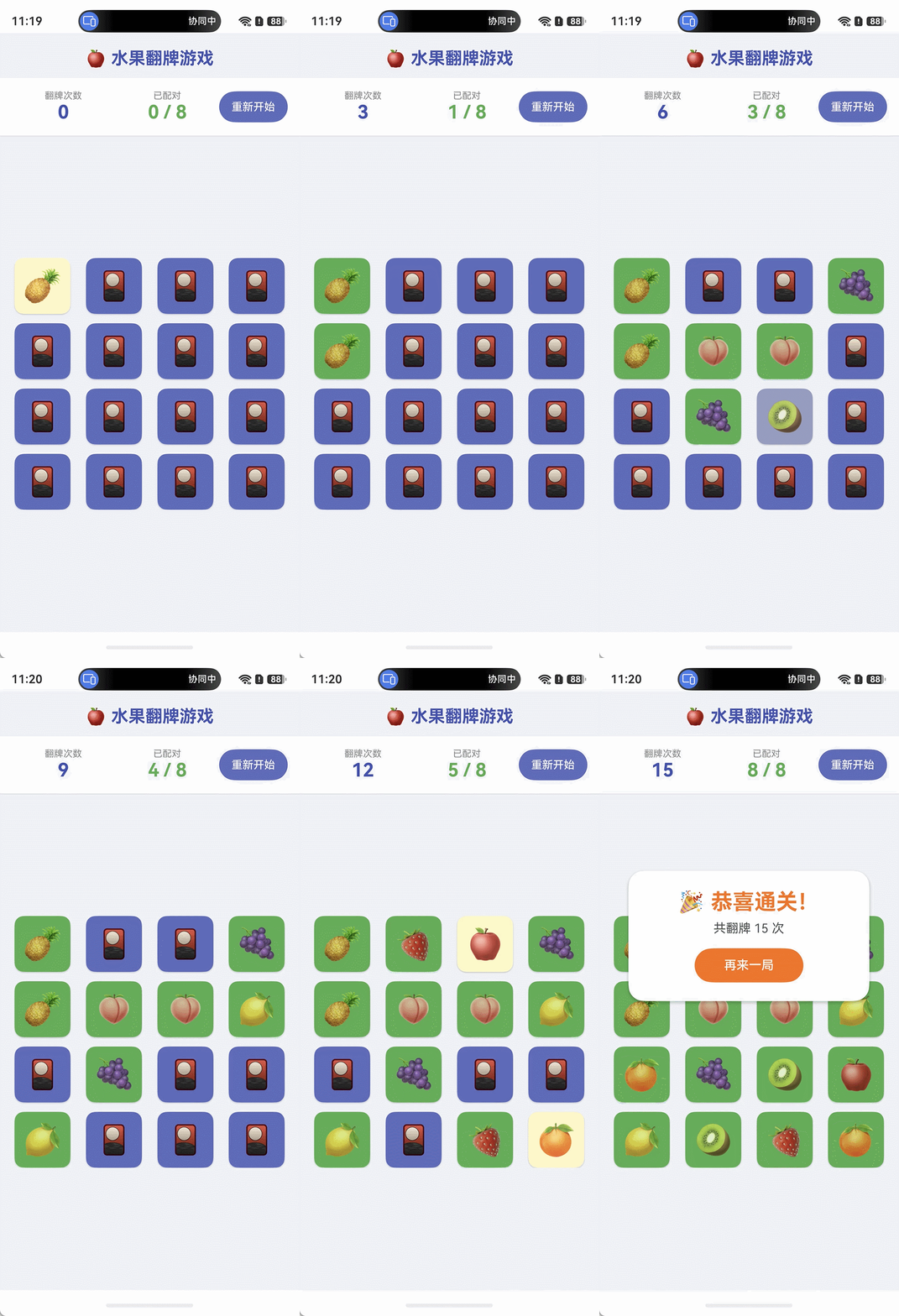
一、整体架构
Index.ets
├── @ObservedV2 CardItem          // 数据模型(细粒度响应)
├── @ComponentV2 CardView         // 单张卡片子组件
└── @Entry @ComponentV2 Index     // 主页面(状态持有者)
所有组件均使用 状态管理 V2(@ComponentV2 + @Local + @ObservedV2 + @Trace),没有引入任何 V1 装饰器。
二、实现流程
1. 定义数据模型 CardItem
   └── @ObservedV2 + @Trace 实现属性级响应

2. 编写初始化函数
   ├── createCards()   生成 16 张牌(8 对 emoji)
   └── shuffle()       Fisher-Yates 洗牌

3. 封装 CardView 子组件
   ├── @Param card      接收卡片数据
   ├── @Event onFlip    向父层上报翻牌事件
   └── Stack 切换正/背面显示

4. 主页面 Index 状态管理
   ├── @Local cards[]         当前牌组
   ├── @Local moves           翻牌次数
   ├── @Local matchedCount    配对数
   ├── @Local firstIndex      第一张翻开的索引
   ├── @Local isChecking      防抖锁(两张比较期间锁定)
   └── @Computed isGameOver   派生:是否全部配对

5. handleFlip() 核心翻牌逻辑
   ├── 翻第一张 → 记录 firstIndex
   ├── 翻第二张 → 对比 emoji
   │   ├── 匹配 → isMatched = true,matchedCount++
   │   └── 不匹配 → setTimeout 900ms 翻回
   └── isChecking 防止比较期间继续翻牌

6. resetGame() 重置所有状态
三、关键代码讲解
3.1 数据模型 — @ObservedV2 + @Trace
@ObservedV2
class CardItem {
  public id: number = 0;
  @Trace public emoji: string = '';
  @Trace public isFlipped: boolean = false;
  @Trace public isMatched: boolean = false;
}
为什么用 @ObservedV2 + @Trace?
V2 中 @Trace 实现属性级精确更新:只有被修改的属性会触发对应 UI 刷新,避免整个卡片列表重新渲染。若用 V1 的 @Observed,嵌套属性变更无法可靠触发更新。
3.2 初始化牌组 — 显式 for 循环(规避 ArkTS 泛型推断限制)
function createCards(): CardItem[] {
  const cards: CardItem[] = [];
  for (let i = 0; i < FRUIT_EMOJIS.length; i++) {
    cards.push(new CardItem(i * 2,     FRUIT_EMOJIS[i]));
    cards.push(new CardItem(i * 2 + 1, FRUIT_EMOJIS[i]));
  }
  return shuffle(cards);
}
3.3 子组件通信 — @Param + @Event
@ComponentV2
struct CardView {
  @Param card: CardItem = new CardItem(0, '');  // 父 → 子,单向
  @Event onFlip: () => void = () => {};          // 子 → 父,事件上报

  build() {
    Stack() { /* ... */ }
      .onClick(() => {
        if (!this.card.isFlipped && !this.card.isMatched) {
          this.onFlip();   // 通知父层处理翻牌
        }
      })
  }
}
@Param 替代 V1 的 @Prop,@Event 替代回调 prop 模式,语义更清晰。
3.4 核心翻牌逻辑 — handleFlip()
private handleFlip(index: number): void {
    if (this.isChecking) {
      return;
    }

    const card = this.cards[index];
    if (card.isFlipped || card.isMatched) {
      return;
    }

    card.isFlipped = true;

    if (this.firstIndex === -1) {
      // 翻第一张
      this.firstIndex = index;
    } else {
      // 翻第二张,做比较
      this.moves += 1;
      this.isChecking = true;
      const first = this.cards[this.firstIndex];
      const second = this.cards[index];

      if (first.emoji === second.emoji) {
        // 配对成功
        first.isMatched = true;
        second.isMatched = true;
        this.matchedCount += 1;
        this.firstIndex = -1;
        this.isChecking = false;
      } else {
        // 配对失败,延迟翻回
        // 记录本轮翻牌的 id(而非 index),避免 resetGame 后操作到新牌组
        const firstId = this.cards[this.firstIndex].id;
        const secondId = card.id;
        this.firstIndex = -1;
        // 用局部变量捕获当前 cards 引用,确保 setTimeout 操作同一批对象
        const currentCards = this.cards;
        setTimeout(() => {
          // 通过 id 定位,防止 index 在 shuffle 后错位(本场景 index 稳定,双重保险)
          for (let i = 0; i < currentCards.length; i++) {
            if (currentCards[i].id === firstId || currentCards[i].id === secondId) {
              currentCards[i].isFlipped = false;
            }
          }
          // 只在牌组未被替换时解锁(resetGame 已将 isChecking 重置,此处赋值幂等无副作用)
          if (this.cards === currentCards) {
            this.isChecking = false;
          }
        }, 900);
      }
    }
  }
3.5 派生状态 — @Computed
@Computed
get isGameOver(): boolean {
  return this.matchedCount === FRUIT_EMOJIS.length;
}
@Computed 自动缓存,只在 matchedCount 变化时重新计算,驱动胜利弹层显示/隐藏。
3.6 UI 片段复用 — @Builder
@Builder
StatusBar() { /* 顶部状态栏 */ }

@Builder
CardGrid() { /* 卡片网格 */ }

build() {
  Column() {
    this.StatusBar()
    this.CardGrid()
    if (this.isGameOver) { /* 胜利弹层 */ }
  }
}
@Builder 拆分 build() 为命名片段,保持主 build() 简洁、无副作用。
四、运行方式
- 将上述代码保存到
entry/src/main/ets/pages/Index.ets(已写入)。 - 在 DevEco Studio 中点击 Run 或使用模拟器预览。
- 无需创建其他文件,所有逻辑均在单文件内完成。
五、游戏规则
| 操作 | 行为 |
|---|---|
| 点击背面牌 | 翻开,显示水果 emoji |
| 翻开两张相同 | 标记配对(变绿,不可再翻) |
| 翻开两张不同 | 900ms 后自动翻回 |
| 全部配对 | 显示胜利弹层,展示翻牌次数 |
| 点击"重新开始" | 重置所有状态,重新洗牌 |

讨论HarmonyOS开发技术,专注于API与组件、DevEco Studio、测试、元服务和应用上架分发等。
更多推荐
 5
5 0
0- 0



 已为社区贡献15条内容

所有评论(0)