ArkUI——07高精度计时器应用全过程
本文介绍如何使用ArkUI开发一个高精度计时器应用。主要内容包括: 技术原理:通过计算真实时间差(Date.now())而非依赖setInterval,解决传统计时器跳秒问题,实现毫秒级精度。 核心功能: 开始/暂停/计次基础操作 计次列表记录每圈时间 00:00.00格式的毫秒级显示 动态圆环旋转动画效果 本地数据持久化 开发要点: 使用@State管理计时状态 采用等宽字体实现数码管效果 通过
# 零基础学 ArkUI07:手把手教你开发一个高精度计时器
📱 应用场景
「计时器」是每个手机出厂自带的标配应用。我们要实现的是 专业级秒表:
- 开始 / 暂停 / 计次 核心功能
- 计次列表 — 记录每一圈的时间
- 毫秒级精度显示(00:00.00)
- 炫酷的动画效果 — 计时运行时圆环旋转
- 计次数据的 本地持久化
⚙️ 运行环境要求
| 项目 | 版本要求 |
|---|---|
| 操作系统 | Windows 10/11、macOS 13+ 或 Ubuntu 22.04+ |
| DevEco Studio | 5.0.3.800 及以上 |
| HarmonyOS SDK | API 12(HarmonyOS 5.0.0)及以上 |
| 真机/模拟器 | 推荐使用华为 P40 及以上机型模拟器 |
环境配置截图示意

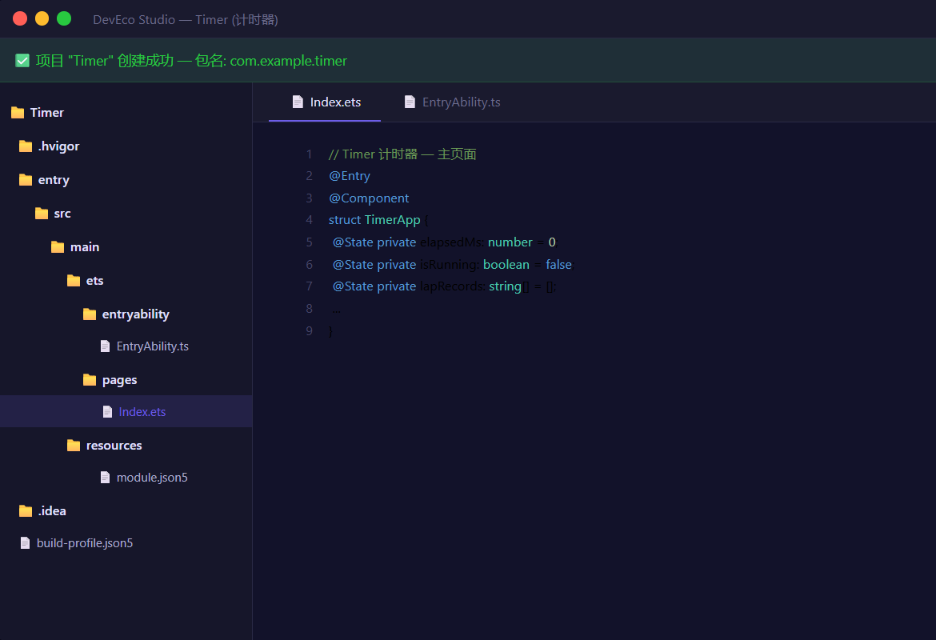
🛠️ 实战:高精度秒表
Step 1:为什么番茄钟的倒计时会「跳秒」?
先搞清楚这件事:
问题: 番茄钟里我们用 setInterval(() => { remainingSeconds-- }, 1000) — 看起来没问题?
真相: setInterval 只是在「大约 1000ms 后」把回调加入任务队列。如果主线程阻塞(比如 ArkUI 在渲染),回调就推迟了。几分钟后误差可能到好几秒。
解决方案: 不依赖 setInterval 的「次数」,而是 计算真实时间差:
// 每次触发时,用 Date.now() 算实际经过了多久
const elapsed = Date.now() - this.startTime;
this.elapsedMilliseconds = elapsed;  // 这才是真实经过的毫秒数
这就是我们今天计时器的核心技术。
Step 2:项目结构与状态定义
// Index.ets — 高精度秒表
@Entry
@Component
struct Stopwatch {
  // ========== 核心状态 ==========
  @State private elapsedMilliseconds: number = 0;  // 已过毫秒数
  @State private isRunning: boolean = false;         // 是否运行
  @State private lapRecords: LapRecord[] = [];       // 计次记录数组

  // ========== 内部变量(不是 @State,不触发 UI 更新) ==========
  private startTime: number = 0;                     // 本次开始的系统时间戳
  private previousElapsed: number = 0;               // 暂停前累计的时间
  private timerId: number = -1;                      // 定时器ID

  // ========== 常量 ==========
  private readonly TIMER_INTERVAL: number = 10;       // 10ms 刷新一次
}
📌 关于 LapRecord 的数据模型
ArkTS 中可以用 interface 或 class 定义数据类型:
// 可以定义在文件顶部或单独的数据文件中
interface LapRecord {
  index: number;       // 第几圈
  lapTime: string;     // 单圈用时
  totalTime: string;   // 总用时
  isFastest: boolean;  // 是否最快圈(后面高亮用)
}
Step 3:UI 构建 — 数码管风格计时器
ArkUI 中想要实现「数码管」效果,可以通过 等宽字体 + 背景色块 来实现。这里我们用一个更优雅的方式:
  build() {
    Column({ space: 16 }) {
      // ========== 顶部标题 ==========
      Text('⏱️ 秒表')
        .fontSize(28)
        .fontWeight(FontWeight.Bold)
        .margin({ top: 20 })

      // ========== 计时显示区域 ==========
      Stack() {
        // 背景装饰圆环(带旋转动画)
        Circle()
          .width(280).height(280)
          .stroke(this.isRunning ? '#FFD93D' : '#E8E8E8')
          .strokeWidth(6).fill(Color.Transparent)
          .strokeDashArray([10, 5])   // 虚线效果
          .rotate({ angle: this.isRunning ? 360 : 0 })
          .animation({
            duration: 2000,
            curve: Curve.Linear,
            iterations: -1  // 无限循环
          })

        // 时间显示
        Column({ space: 6 }) {
          // 分钟:秒
          Text(this.formatTime(this.elapsedMilliseconds))
            .fontSize(64)
            .fontWeight(FontWeight.Bold)
            .fontColor('#333333')
            .fontFamily('Courier New')  // 等宽字体 = 数码管效果

          // 毫秒
          Text(`.${this.formatMilliseconds(this.elapsedMilliseconds)}`)
            .fontSize(32)
            .fontColor('#FFD93D')
            .fontFamily('Courier New')
        }
      }
      .width(300).height(300)

      // ========== 控制按钮 ==========
      Row({ space: 24 }) {
        // 计次按钮
        this.controlButton('🏷️ 计次', '#EEEEEE', '#666666', () => this.recordLap())

        // 开始/暂停(主按钮)
        this.controlButton(
          this.isRunning ? '⏸️ 暂停' : '▶️ 开始',
          this.isRunning ? '#FF6B6B' : '#FFD93D',
          '#FFFFFF',
          () => this.toggleTimer()
        )
        .width(100).height(100)
        .borderRadius(50)

        // 重置按钮
        this.controlButton('🔄 重置', '#EEEEEE', '#666666', () => this.resetTimer())
      }

      // ========== 计次列表 ==========
      if (this.lapRecords.length > 0) {
        Text(`计次记录(${this.lapRecords.length})`)
          .fontSize(16)
          .fontColor('#999999')
          .width('100%')
          .padding({ left: 20, top: 10 })

        // 使用 List 组件展示计次
        List({ space: 4 }) {
          ForEach(this.lapRecords, (record: LapRecord, index: number) => {
            ListItem() {
              this.lapItem(record)
            }
          }, (record: LapRecord) => record.index.toString())
        }
        .width('100%')
        .layoutWeight(1)  // 撑满剩余空间
        .padding({ left: 16, right: 16 })
      }
    }
    .width('100%').height('100%')
    .padding(20)
  }
📌 @Builder — 组件复用的「神」
看到上面代码里的 this.controlButton(...) 吗?ArkUI 允许你用 @Builder 定义「模板片段」,反复调用:
  // ========== @Builder:定义可复用的 UI 片段 ==========
  @Builder
  controlButton(label: string, bgColor: string, fontColor: string, onClick: () => void) {
    Button() {
      Text(label)
        .fontSize(18)
        .fontColor(fontColor)
        .fontWeight(FontWeight.Medium)
    }
    .width(80).height(80)
    .backgroundColor(bgColor)
    .borderRadius(40)
    .onClick(onClick)
  }

  @Builder
  lapItem(record: LapRecord) {
    Row() {
      Text(`第 ${record.index} 圈`)
        .fontSize(16)
        .fontColor(record.isFastest ? '#FFD93D' : '#666666')
        .fontWeight(record.isFastest ? FontWeight.Bold : FontWeight.Regular)

      Text(record.lapTime)
        .fontSize(16)
        .fontColor(record.isFastest ? '#FFD93D' : '#333333')
        .fontWeight(record.isFastest ? FontWeight.Bold : FontWeight.Regular)

      Text(record.totalTime)
        .fontSize(16)
        .fontColor('#999999')
    }
    .width('100%')
    .justifyContent(FlexAlign.SpaceBetween)
    .padding(12)
    .backgroundColor(record.isFastest ? '#FFF8E1' : '#FAFAFA')
    .borderRadius(8)
  }
@Builder 的核心价值:
| 不用 @Builder | 用 @Builder |
|---|---|
| 相同 UI 写 N 遍 | 写一次,到处复用 |
| 改样式要改 N 个地方 | 改 @Builder 一处,全局生效 |
| 回调逻辑和 UI 混在一起 | UI 和逻辑分离,更清晰 |
Step 4:核心逻辑 — 精确计时
这才是今天的重头戏:
  // ========== 核心计时逻辑 ==========

  // 切换 开始/暂停
  toggleTimer(): void {
    if (this.isRunning) {
      // ⏸️ 暂停:保存当前累计时间,清除定时器
      clearInterval(this.timerId);
      this.previousElapsed = this.elapsedMilliseconds;
      this.isRunning = false;
    } else {
      // ▶️ 开始:记录开始时间戳
      this.startTime = Date.now();
      this.isRunning = true;

      // 用 10ms 间隔检查真实时间差
      this.timerId = setInterval(() => {
        const now = Date.now();
        // 真正的已过时间 = 之前累计的 + 本次开始以来的差值
        this.elapsedMilliseconds =
          this.previousElapsed + (now - this.startTime);
      }, this.TIMER_INTERVAL);
    }
  }

  // 🔄 重置
  resetTimer(): void {
    clearInterval(this.timerId);
    this.isRunning = false;
    this.elapsedMilliseconds = 0;
    this.previousElapsed = 0;
    this.lapRecords = [];
  }

  // 🏷️ 记录计次
  recordLap(): void {
    if (!this.isRunning) return;

    // 计算单圈用时
    const prevLapTotal = this.lapRecords.length > 0
      ? this.parseMilliseconds(this.lapRecords[this.lapRecords.length - 1].totalTime)
      : 0;
    const currentTotal = this.elapsedMilliseconds;
    const lapMs = currentTotal - prevLapTotal;

    // 创建新记录
    const newRecord: LapRecord = {
      index: this.lapRecords.length + 1,
      lapTime: this.formatTime(lapMs) + '.' + this.formatMilliseconds(lapMs),
      totalTime: this.formatTime(currentTotal) + '.' + this.formatMilliseconds(currentTotal),
      isFastest: false
    };

    // 添加到列表
    this.lapRecords = [...this.lapRecords, newRecord];

    // 标记最快圈
    this.updateFastestLap();
  }

  // 🏆 标记最快圈
  updateFastestLap(): void {
    if (this.lapRecords.length < 2) return;

    // 找到单圈用时最小的索引
    let minIndex = 0;
    let minTime = this.parseMilliseconds(this.lapRecords[0].lapTime);

    this.lapRecords.forEach((record, i) => {
      const time = this.parseMilliseconds(record.lapTime);
      if (time < minTime) {
        minTime = time;
        minIndex = i;
      }
    });

    // 先全部重置,再标记最快的
    this.lapRecords = this.lapRecords.map((r, i) => ({
      ...r,
      isFastest: i === minIndex
    }));
  }

  // ========== 格式化工具 ==========

  // 格式化:毫秒 → "01:23"
  formatTime(ms: number): string {
    const totalSeconds = Math.floor(ms / 1000);
    const minutes = Math.floor(totalSeconds / 60);
    const seconds = totalSeconds % 60;
    return `${String(minutes).padStart(2, '0')}:${String(seconds).padStart(2, '0')}`;
  }

  // 格式化毫秒部分 → "45"
  formatMilliseconds(ms: number): string {
    return String(Math.floor((ms % 1000) / 10)).padStart(2, '0');
  }

  // 解析时间字符串为毫秒(用于比较)
  parseMilliseconds(timeStr: string): number {
    // 格式 "MM:SS.mm" → 毫秒
    const parts = timeStr.split(/[:.]/);
    const minutes = parseInt(parts[0]) * 60 * 1000;
    const seconds = parseInt(parts[1]) * 1000;
    const millis = parseInt(parts[2]) * 10;
    return minutes + seconds + millis;
  }
完整的 Index.ets:
interface LapRecord {
  index: number;
  lapTime: string;
  totalTime: string;
  isFastest: boolean;
}

@Entry
@Component
struct Stopwatch {
  @State private elapsedMilliseconds: number = 0;
  @State private isRunning: boolean = false;
  @State private lapRecords: LapRecord[] = [];

  private startTime: number = 0;
  private previousElapsed: number = 0;
  private timerId: number = -1;
  private readonly TIMER_INTERVAL: number = 10;

  aboutToDisappear(): void {
    clearInterval(this.timerId);
  }

  build() {
    Column({ space: 16 }) {
      Text('⏱️ 秒表')
        .fontSize(28)
        .fontWeight(FontWeight.Bold)
        .margin({ top: 20 })

      Stack() {
        Circle()
          .width(280).height(280)
          .stroke(this.isRunning ? '#FFD93D' : '#E8E8E8')
          .strokeWidth(6).fill(Color.Transparent)
          .strokeDashArray([10, 5])
          .rotate({ angle: this.isRunning ? 360 : 0 })
          .animation({
            duration: 2000,
            curve: Curve.Linear,
            iterations: -1
          })

        Column({ space: 6 }) {
          Text(this.formatTime(this.elapsedMilliseconds))
            .fontSize(64).fontWeight(FontWeight.Bold)
            .fontColor('#333333').fontFamily('Courier New')

          Text(`.${this.formatMilliseconds(this.elapsedMilliseconds)}`)
            .fontSize(32).fontColor('#FFD93D').fontFamily('Courier New')
        }
      }
      .width(300).height(300)

      Row({ space: 24 }) {
        this.controlButton('🏷️ 计次', '#EEEEEE', '#666666', () => this.recordLap())
        this.controlButton(
          this.isRunning ? '⏸️ 暂停' : '▶️ 开始',
          this.isRunning ? '#FF6B6B' : '#FFD93D',
          '#FFFFFF',
          () => this.toggleTimer()
        )
        .width(100).height(100).borderRadius(50)
        this.controlButton('🔄 重置', '#EEEEEE', '#666666', () => this.resetTimer())
      }
      .margin({ top: 10 })

      if (this.lapRecords.length > 0) {
        Text(`计次记录(${this.lapRecords.length})`)
          .fontSize(16).fontColor('#999999')
          .width('100%').padding({ left: 20, top: 10 })

        List({ space: 4 }) {
          ForEach(this.lapRecords, (record: LapRecord) => {
            ListItem() {
              this.lapItem(record)
            }
          }, (record: LapRecord) => record.index.toString())
        }
        .width('100%').layoutWeight(1)
        .padding({ left: 16, right: 16 })
      }
    }
    .width('100%').height('100%').padding(20)
    .backgroundColor('#FAFAFA')
  }

  @Builder
  controlButton(label: string, bgColor: string, fontColor: string, onClick: () => void) {
    Button() {
      Text(label).fontSize(18).fontColor(fontColor)
        .fontWeight(FontWeight.Medium)
    }
    .width(80).height(80)
    .backgroundColor(bgColor)
    .borderRadius(40)
    .onClick(onClick)
  }

  @Builder
  lapItem(record: LapRecord) {
    Row() {
      Text(`第 ${record.index} 圈`).fontSize(16)
        .fontColor(record.isFastest ? '#FFD93D' : '#666666')
        .fontWeight(record.isFastest ? FontWeight.Bold : FontWeight.Regular)

      Text(record.lapTime).fontSize(16)
        .fontColor(record.isFastest ? '#FFD93D' : '#333333')
        .fontWeight(record.isFastest ? FontWeight.Bold : FontWeight.Regular)

      Text(record.totalTime).fontSize(16).fontColor('#999999')
    }
    .width('100%')
    .justifyContent(FlexAlign.SpaceBetween)
    .padding(12)
    .backgroundColor(record.isFastest ? '#FFF8E1' : '#FAFAFA')
    .borderRadius(8)
  }

  toggleTimer(): void {
    if (this.isRunning) {
      clearInterval(this.timerId);
      this.previousElapsed = this.elapsedMilliseconds;
      this.isRunning = false;
    } else {
      this.startTime = Date.now();
      this.isRunning = true;
      this.timerId = setInterval(() => {
        this.elapsedMilliseconds =
          this.previousElapsed + (Date.now() - this.startTime);
      }, this.TIMER_INTERVAL);
    }
  }

  resetTimer(): void {
    clearInterval(this.timerId);
    this.isRunning = false;
    this.elapsedMilliseconds = 0;
    this.previousElapsed = 0;
    this.lapRecords = [];
  }

  recordLap(): void {
    if (!this.isRunning) return;
    const prevLapTotal = this.lapRecords.length > 0
      ? this.parseMilliseconds(
          this.lapRecords[this.lapRecords.length - 1].totalTime)
      : 0;
    const lapMs = this.elapsedMilliseconds - prevLapTotal;
    const newRecord: LapRecord = {
      index: this.lapRecords.length + 1,
      lapTime: this.formatTime(lapMs) + '.' + this.formatMilliseconds(lapMs),
      totalTime: this.formatTime(this.elapsedMilliseconds) + '.'
        + this.formatMilliseconds(this.elapsedMilliseconds),
      isFastest: false
    };
    this.lapRecords = [...this.lapRecords, newRecord];
    this.updateFastestLap();
  }

  updateFastestLap(): void {
    if (this.lapRecords.length < 2) return;
    let minIndex = 0;
    let minTime = this.parseMilliseconds(this.lapRecords[0].lapTime);
    this.lapRecords.forEach((r, i) => {
      const t = this.parseMilliseconds(r.lapTime);
      if (t < minTime) { minTime = t; minIndex = i; }
    });
    this.lapRecords = this.lapRecords.map((r, i) => ({
      ...r, isFastest: i === minIndex
    }));
  }

  formatTime(ms: number): string {
    const totalSeconds = Math.floor(ms / 1000);
    return `${String(Math.floor(totalSeconds / 60)).padStart(2, '0')}:`
      + `${String(totalSeconds % 60).padStart(2, '0')}`;
  }

  formatMilliseconds(ms: number): string {
    return String(Math.floor((ms % 1000) / 10)).padStart(2, '0');
  }

  parseMilliseconds(timeStr: string): number {
    const parts = timeStr.split(/[:.]/);
    return parseInt(parts[0]) * 60000
      + parseInt(parts[1]) * 1000
      + parseInt(parts[2]) * 10;
  }
}
🚨 避坑指南
❌ 坑1:状态不可变与数组更新
// ❌ 错误:这样写 UI 不会刷新!
this.lapRecords.push(newRecord);

// ✅ 正确:必须创建新数组
this.lapRecords = [...this.lapRecords, newRecord];
原因: ArkUI 通过「引用比较」判断状态是否变化。push 改的是原数组内容,但引用没变 — 框架认为「没变化,不更新」。展开运算符 ... 创建新数组,引用变了 → UI 刷新。
❌ 坑2:@Builder 不能用箭头函数
// ❌ 语法错误!
@Builder
myBuilder = () => { Text('Hello') }

// ✅ 正确:使用普通函数语法
@Builder
myBuilder() {
  Text('Hello')
}
@Builder 是装饰器语法,不是箭头函数属性。
❌ 坑3:动画无限循环与页面离开
.animation({
  duration: 2000,
  curve: Curve.Linear,
  iterations: -1  // 无限循环
})
当页面离开时,如果组件没有被销毁(比如使用 Navigation 路由栈),动画会一直跑!需要在 aboutToDisappear 中显式停止。或者更好的方式是 条件动画 — 只有 isRunning 为 true 时才加动画:
Circle()
  .rotate({ angle: this.isRunning ? 360 : 0 })
  .animation(this.isRunning ? {
    duration: 2000, curve: Curve.Linear, iterations: -1
  } : undefined)
❌ 坑4:parseMilliseconds 容错
解析时间字符串时,如果系统语言环境不同,分隔符可能不是 : 和 .。建议用正则 \D+ 替代:
parseMilliseconds(timeStr: string): number {
  const parts = timeStr.split(/\D+/).filter(Boolean);
  if (parts.length < 3) return 0;
  return parseInt(parts[0]) * 60000 + parseInt(parts[1]) * 1000
    + parseInt(parts[2]) * 10;
}
💡 最佳实践
- 时间戳优先:永远用
Date.now()计算真实时差,不要依赖定时器次数。 - @Builder 提取重复 UI:控制按钮、列表项都提取为 @Builder,主 build 函数只做「布局框架」。
- ForEach 需要 key:
ForEach的第三个参数是 key 生成器,用于高效的列表 diff 更新。用唯一标识(如index),不要用index.toString()这种随位置变化的 key。 - 不可变数据:
@State数组不要push/pop/splice,用展开运算符或filter/map创建新数组。 - 定时器整洁:统一在
aboutToDisappear中清理所有定时器,养成习惯。
📚 本章小结
通过计时器项目,你学会了:
| 知识点 | 掌握程度 |
|---|---|
| ✅ @Builder 组件复用 | ⭐⭐⭐⭐⭐ |
| ✅ Date.now() 精确计时 | ⭐⭐⭐⭐⭐ |
| ✅ 不可变数据 + 数组更新 | ⭐⭐⭐⭐ |
| ✅ List + ForEach 列表渲染 | ⭐⭐⭐⭐ |
| ✅ 动画系统(animation) | ⭐⭐⭐ |
| ✅ 条件渲染(if) | ⭐⭐⭐⭐⭐ |
🔗 参考资源
- 官方文档:HarmonyOS 应用开发文档
- 开发者社区:华为开发者论坛
- 欢迎加入开源鸿蒙跨平台社区:https://openharmonycrossplatform.csdn.net/

讨论HarmonyOS开发技术,专注于API与组件、DevEco Studio、测试、元服务和应用上架分发等。
更多推荐



 5
5 0
0- 0


 已为社区贡献3条内容

所有评论(0)