HarmonyOS 6.1 开发者盛宴|《灵犀厨房》实战(十九):【通知系统】延时烹饪提醒——让通知不再错过关键步骤
《灵犀厨房》接入HarmonyOS 6.1通知系统实现延时烹饪提醒功能,通过NotificationKit的deliveryTime机制,系统级调度确保提醒准时送达。用户在菜谱步骤页设置延时后,通知将在指定时间自动弹出,点击通知通过WantAgent直接返回应用。方案采用SOCIAL_COMMUNICATION级别通知渠道,支持横幅和浮动图标提醒,无需应用保活,严格遵循API 23规范实现可靠提醒
HarmonyOS 6.1 开发者盛宴|《灵犀厨房》实战(十九):【通知系统】延时烹饪提醒——让通知不再错过关键步骤
摘要:上一篇我们为厨电控制页装上了"手腕大脑"——将计时器从手机流转至手表,实现了手腕掌控烹饪节奏。但烹饪中的提醒远不止计时:蒸鱼该关火了但你在阳台晾衣服?炖肉可以加盐了但正在客厅看电视?本篇,我们将接入 HarmonyOS 6.1.0(API 23)的
@kit.NotificationKit,为《灵犀厨房》实现烹饪延时通知的全链路:用户在菜谱步骤页一键设置延时提醒→系统到点自动弹出通知→点击通知通过 WantAgent 直接回到菜谱步骤。严格遵循 API 23 规范,代码即文档。
一、引言与系列定位
经过第 16 篇的语音播报和第 17 篇的声控操作,你的《灵犀厨房》已经能"说"会"听"。但这里有一个关键的体验断层:
| 场景 | 问题 | 解决 |
|---|---|---|
| 红烧肉大火收汁 5 分钟 | 离开厨房去客厅,忘记还剩多久 | 设置延时通知,到点手机自动弹出提醒 |
| 蒸鱼定时 8 分钟 | 在阳台晾衣服,手机在厨房充电 | 设定提醒后放心离开,到时回来关火 |
| 炖牛肉需要中途加盐 | 正在切菜,腾不出手看屏幕 | 提前设好 30 分钟提醒——“该加盐了” |
| 烤箱烤到一半该翻面了 | 闹钟只响一声没听到 | 通知横幅 + 浮动图标双重提醒 |
设计决策:为什么用
deliveryTime而非setTimeout?
deliveryTime 是 NotificationRequest 的属性,接受绝对时间戳。通知的"发布时间"交给系统 Alarm 调度——不需要应用保活、不需要后台线程、不需要 CPU 唤醒。即使应用被杀,通知准时弹出。这是 HarmonyOS 为"延时通知"场景专门设计的最优路径。
本篇的设计原则:
- 一键设置延时提醒:在菜谱步骤页选择分钟:秒,确认后提交给系统调度
- 系统级 deliveryTime,无需后台保活:通知在预定时间自动弹出,应用被杀也不影响
- WantAgent 回到应用:点击通知直接打开灵犀厨房,回到菜谱步骤页
二、核心原理与底层机制深度解读
2.1 延时通知的三种实现路径
HarmonyOS 6.1.0(API 23)为实现"延时通知"提供了三条技术路径:
| 路径 | 适用场景 | 优势 | 劣势 | 本篇选型 |
|---|---|---|---|---|
| A: deliveryTime | 延时通知 | 系统级调度,精准可靠,无需保活 | 不支持复杂的条件触发 | ✅ 采用 |
| B: setTimeout | 简单延时 | 实现简单 | 应用被杀则失效,精度受 JS 引擎影响 | 不采用 |
| C: WorkScheduler | 复杂定时任务 | 系统保活,省电 | 任务间隔限制(≥15分钟),不适合秒级精度 | 不采用 |
2.2 通知生命周期状态机
2.3 通知渠道(Slot)机制
HarmonyOS 的通知体系要求每条通知必须归属于某个渠道,类似 Android 的 Notification Channel。渠道决定了通知的重要级别、展示样式和行为策略。
为什么用数值
1(SOCIAL_COMMUNICATION)?
在 @kit.NotificationKit 中,SlotType 是一个枚举,但 addSlot 和 NotificationRequest.slotType 的参数类型在运行时是 number。使用数值 1 等价于 SOCIAL_COMMUNICATION(社交通讯类通知),这一级别适合互动提醒场景——通知会以横幅 + 浮动图标的形式展示,声音适中,不会像闹钟那样强打扰。
三、架构设计 / 核心逻辑图解
3.1 通知系统的四层架构
设计原则:NotificationHelper 作为 Services 层单例,负责通知的全生命周期管理。UI 层不直接调用 notificationManager,而是通过 NotificationHelper 的封装方法操作。
- 单一职责:NotificationHelper 只管"何时发、发给谁",UI 层决定"发什么内容、是否检查权限、失败后如何提示"。
- 依赖注入:Context 由 EntryAbility 在启动时注入,而非硬编码或全局变量。
- WantAgent 缓存:避免每次发通知都重新创建,提升性能。
- 幂等初始化:通知渠道创建失败不影响应用启动(尽力而为策略)。
3.2 完整时序图
四、实战:为菜谱详情页装上"定时提醒大脑"
Step 1:NotificationHelper —— 通知管理封装
重写 services/NotificationHelper.ets(从 Stub 升级为完整实现)。核心任务:将通知渠道管理、延时推送、取消、权限检查封装为可复用的服务层。
// services/NotificationHelper.ets
// 所属层:服务能力层 (Service Layer)
// 职责:通知推送封装 —— 延时通知管理
// API Level: 23
// 依赖: @kit.NotificationKit, @kit.AbilityKit, @kit.PerformanceAnalysisKit

import { notificationManager } from '@kit.NotificationKit';
import { wantAgent, Want, common } from '@kit.AbilityKit';
import type { WantAgent } from '@kit.AbilityKit';
import { hilog } from '@kit.PerformanceAnalysisKit';
import { BusinessError } from '@kit.BasicServicesKit';

const TAG = 'NotificationHelper';
const DOMAIN = 0x0001;

export class NotificationHelper {
  private context: common.Context | null = null;
  private cachedWantAgent: WantAgent | null = null;

  init(context: common.Context): void {
    this.context = context;
    hilog.info(DOMAIN, TAG, 'NotificationHelper 已初始化,context 注入成功');
  }
导入策略说明:
WantAgent使用type导入——编译时参与类型检查但不生成运行时代码。Want和common为运行时需要的值导入。这是 API 23 推荐的导入方式,避免了类型与值混合导致的打包问题。
(1)创建通知渠道——幂等设计
  /**
   * 创建通知渠道(幂等)
   * slotType 使用数值 1 对应 SOCIAL_COMMUNICATION
   */
  async createSlot(): Promise<void> {
    try {
      await notificationManager.addSlot(1);
      hilog.info(DOMAIN, TAG, '通知渠道 SOCIAL_COMMUNICATION 创建成功');
    } catch (err) {
      const busErr = err as BusinessError;
      if (busErr.code === 2) {
        hilog.info(DOMAIN, TAG, '通知渠道已存在,跳过创建');
        return;
      }
      hilog.warn(DOMAIN, TAG, '创建通知渠道时发生非预期错误, code: %{public}d, msg: %{public}s',
        busErr.code, busErr.message);
    }
  }
核心点解读:
addSlot的参数类型在运行时接受数值,这里直接使用1而非枚举引用,避免模块导出路径在不同 ROM 上的兼容性问题。渠道已存在时(错误码 2)捕获并忽略,实现幂等——EntryAbility 每次启动调用createSlot()都不会报错。
(2)scheduleReminder——延时通知核心方法
  /**
   * 安排一条延时通知(本机)
   */
  async scheduleReminder(
    title: string, text: string, delayInSeconds: number, id: number
  ): Promise<void> {
    if (delayInSeconds <= 0) {
      hilog.warn(DOMAIN, TAG, 'delayInSeconds 必须 ≥ 1,当前值: %{public}d', delayInSeconds);
      throw new Error('delayInSeconds 必须 ≥ 1');
    }

    try {
      const agent: WantAgent = await this.ensureWantAgent();
      const deliveryTime: number = Date.now() + delayInSeconds * 1000;

      const request: notificationManager.NotificationRequest = {
        id: id,
        content: {
          notificationContentType: notificationManager.ContentType.NOTIFICATION_CONTENT_BASIC_TEXT,
          normal: { title: title, text: text }
        },
        slotType: 1, // SOCIAL_COMMUNICATION
        deliveryTime: deliveryTime,
        wantAgent: agent,
        isFloatingIcon: true,
        color: 0xFF6B35 // 灵犀厨房品牌色
      };

      await notificationManager.publish(request);
      hilog.info(DOMAIN, TAG,
        '延时通知已安排, id: %{public}d, delay: %{public}ds, deliveryTime: %{public}d',
        id, delayInSeconds, deliveryTime);
    } catch (err) {
      const busErr = err as BusinessError;
      hilog.error(DOMAIN, TAG,
        '安排延时通知失败, id: %{public}d, code: %{public}d, msg: %{public}s',
        id, busErr.code, busErr.message);
      throw new Error(busErr.message);
    }
  }
核心点解读:
- deliveryTime:
Date.now() + delayInSeconds * 1000,转为绝对时间戳。系统用 Alarm 机制调度,精确到秒,应用被杀也不影响。- slotType = 1:与
createSlot保持一致,使用数值而非枚举引用,提高运行时兼容性。- 错误封装:
throw new Error(busErr.message)而非直接throw err,将系统级 BusinessError 转为标准 Error,调用方无需区分错误类型也能安全 catch。- isFloatingIcon = true:通知在状态栏以浮动图标展示,与横幅通知互补,提升可见性。
(3)WantAgent 创建——带缓存 + 显式 Want 声明
  /**
   * 获取或创建 WantAgent(带缓存)
   * 严格遵循 @kit.AbilityKit 官方文档的导入与调用方式
   */
  private async ensureWantAgent(): Promise<WantAgent> {
    if (this.cachedWantAgent !== null) {
      return this.cachedWantAgent;
    }

    if (this.context === null) {
      throw new Error('NotificationHelper 尚未初始化,请先调用 init(context)');
    }

    try {
      // 显式声明 Want 对象以满足数组类型推断
      const launchWant: Want = {
        bundleName: this.context.applicationInfo.name,
        abilityName: 'EntryAbility'
      };

      // 使用 wantAgent.WantAgentInfo 类型(无需单独导入)
      const wantAgentInfo: wantAgent.WantAgentInfo = {
        wants: [launchWant],
        operationType: wantAgent.OperationType.START_ABILITY,
        requestCode: 0,
        wantAgentFlags: [wantAgent.WantAgentFlags.CONSTANT_FLAG]
      };

      const agent: WantAgent = await wantAgent.getWantAgent(wantAgentInfo);
      this.cachedWantAgent = agent;
      hilog.info(DOMAIN, TAG, 'WantAgent 创建成功并已缓存');
      return agent;
    } catch (err) {
      const busErr = err as BusinessError;
      hilog.error(DOMAIN, TAG,
        '创建 WantAgent 失败, code: %{public}d, msg: %{public}s',
        busErr.code, busErr.message);
      throw new Error(busErr.message);
    }
  }
核心点解读:
- 显式 Want 变量:
const launchWant: Want = { ... }提前声明,然后放入wants数组。这样做是为了满足 ArkTS 的类型推断——在@ComponentV2下,内联对象字面量的类型推断可能因上下文不同而失败,显式声明变量可彻底解决。- 缓存复用:首次创建后保存到
cachedWantAgent,后续调用直接返回缓存,避免重复创建的开销。- CONSTANT_FLAG:确保 WantAgent 创建后不受后续修改影响。
(4)取消与权限检查
  async cancelReminder(id: number): Promise<void> {
    try {
      await notificationManager.cancel(id);
      hilog.info(DOMAIN, TAG, '通知已取消, id: %{public}d', id);
    } catch (err) {
      const busErr = err as BusinessError;
      hilog.error(DOMAIN, TAG, '取消通知失败, code: %{public}d, msg: %{public}s',
        busErr.code, busErr.message);
      throw new Error(busErr.message);
    }
  }

  async cancelAllReminders(): Promise<void> {
    try {
      await notificationManager.cancelAll();
      hilog.info(DOMAIN, TAG, '所有通知已取消');
    } catch (err) {
      const busErr = err as BusinessError;
      hilog.error(DOMAIN, TAG, '取消全部通知失败, code: %{public}d, msg: %{public}s',
        busErr.code, busErr.message);
      throw new Error(busErr.message);
    }
  }

  async hasNotificationPermission(): Promise<boolean> {
    try {
      const enabled: boolean = await notificationManager.isNotificationEnabled();
      hilog.info(DOMAIN, TAG, '通知权限状态: %{public}s', enabled ? '已开启' : '未开启');
      return enabled;
    } catch (err) {
      const busErr = err as BusinessError;
      hilog.error(DOMAIN, TAG, '检查通知权限失败, code: %{public}d, msg: %{public}s',
        busErr.code, busErr.message);
      return false;
    }
  }
}

export const notificationHelper: NotificationHelper = new NotificationHelper();
Step 2:改造 RecipeDetailPage.ets,集成提醒 UI
在菜谱步骤详情页中新增提醒设置功能。
(1)新增导入与状态变量
// pages/RecipeDetailPage.ets(新增/修改)

import { AlertDialog, promptAction, router, window } from '@kit.ArkUI';
import { abilityAccessCtrl, common, PermissionRequestResult } from '@kit.AbilityKit';
import { notificationHelper } from '../services/NotificationHelper';

// ---- 提醒设置状态 ----
@Local showReminderPicker: boolean = false;
@Local reminderMinutes: number = 3;
@Local reminderSeconds: number = 0;
@Local reminderIdCounter: number = 0;

/** 时间选择器范围数组 */
private minuteRange: string[] = [];
private secondRange: string[] = [];
导入说明:
promptAction用于权限引导弹窗(showDialog),AlertDialog保留给其他已有功能使用,common用于UIAbilityContext类型转换。
(2)初始化范围数组(aboutToAppear 中调用)
  private initPickerRanges(): void {
    this.minuteRange = [];
    this.secondRange = [];
    for (let i = 0; i < 60; i++) {
      this.minuteRange.push(i.toString());
      this.secondRange.push(i.toString());
    }
  }
(3)handleSetReminder —— 设置提醒的核心方法
  private async handleSetReminder(): Promise<void> {
    const totalSeconds = this.reminderMinutes * 60 + this.reminderSeconds;
    if (totalSeconds <= 0) {
      ToastUtil.showToast(this.getUIContext(), '请选择大于 0 秒的提醒时间');
      return;
    }
    this.showReminderPicker = false;

    try {
      const hasPermission = await notificationHelper.hasNotificationPermission();
      if (!hasPermission) {
        console.warn('[RecipeDetail] 通知权限未开启');
        this.showPermissionDialog();
        return;
      }

      const stepLabel = `第 ${this.currentStepIndex + 1} 步`;
      const title = `🍳 烹饪提醒 - ${this.recipe.name}`;
      const text = `${stepLabel}:${this.reminderMinutes} 分 ${this.reminderSeconds} 秒到了,请查看菜谱!`;

      const id = Date.now() + this.reminderIdCounter;
      this.reminderIdCounter++;

      await notificationHelper.scheduleReminder(title, text, totalSeconds, id);
      ToastUtil.showToast(this.getUIContext(),
        `⏰ 提醒已设置:${this.reminderMinutes} 分 ${this.reminderSeconds} 秒后通知`);
      console.info(`[RecipeDetail] 提醒已安排, id: ${id}, delay: ${totalSeconds}s`);
    } catch (err) {
      console.error(`[RecipeDetail] 设置提醒失败: ${JSON.stringify(err)}`);
      ToastUtil.showToast(this.getUIContext(), '提醒设置失败,请重试');
    }
  }
核心点解读:
- 权限前置检查:在调用
scheduleReminder之前先检查通知权限。未授权时弹出引导弹窗,避免用户设置完提醒却发现收不到。- 通知 ID 唯一性:
Date.now() + counter确保短时间内多次设置提醒不会 ID 冲突。- 友好降级:
scheduleReminder失败时捕获异常,显示 Toast 而非静默失败。
(4)权限引导弹窗——使用 promptAction.showDialog
  /**
   * 显示权限引导弹窗
   * ★ 使用 promptAction.showDialog 替代 AlertDialog.show ——
   *   解决 @ComponentV2 下 AlertDialog 生命周期绑定问题
   */
  private showPermissionDialog(): void {
    promptAction.showDialog({
      title: '需要通知权限',
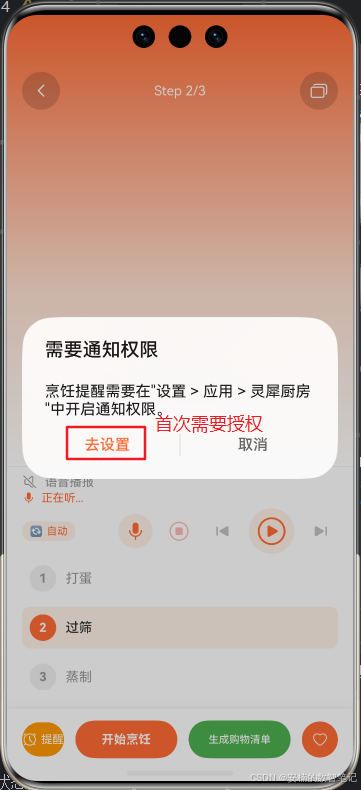
      message: '烹饪提醒需要在"设置 > 应用 > 灵犀厨房"中开启通知权限。',
      buttons: [
        {
          text: '去设置',
          color: '#FF6B35'
        },
        {
          text: '取消',
          color: '#666'
        }
      ]
    }).then((result) => {
      if (result.index === 0) {
        try {
          const ctx: common.UIAbilityContext =
            this.getUIContext().getHostContext() as common.UIAbilityContext;
          ctx.startAbility({
            bundleName: 'com.huawei.hmos.settings',
            abilityName: 'com.huawei.hmos.settings.MainAbility',
            uri: 'application_info_entry',
            parameters: {
              pushParams: ctx.applicationInfo.name
            }
          });
        } catch (err) {
          console.error(`[RecipeDetail] 跳转设置失败: ${JSON.stringify(err)}`);
        }
      } else {
        console.info('[RecipeDetail] 用户取消权限引导');
      }
    });
  }
核心点解读:为什么用
promptAction.showDialog而非AlertDialog.show?在@ComponentV2装饰的组件中,AlertDialog.show是静态方法,不与组件实例绑定——这意味着 dialog 的生命周期不受页面aboutToDisappear管理,可能导致页面销毁后弹窗残留的 UI 异常。promptAction.showDialog通过 UIContext 绑定到当前页面,生命周期随页面销毁而自动清理。
(5)时间选择器 @Builder——TextPicker.onChange 联合类型处理
  @Builder
  buildReminderPicker() {
    Column() {
      // 半透明遮罩
      Column()
        .width('100%').height('100%')
        .backgroundColor('rgba(0,0,0,0.5)')
        .onClick(() => this.showReminderPicker = false)

      // 选择器面板
      Column() {
        Text($r('app.string.reminder_time_picker_title'))
          .fontSize(18).fontWeight(FontWeight.Bold).fontColor('#333')
          .margin({ bottom: 20 })

        Row({ space: 16 }) {
          // 分钟
          Column({ space: 4 }) {
            Text($r('app.string.reminder_minutes_label')).fontSize(12).fontColor('#999')
            TextPicker({
              range: this.minuteRange,
              selected: this.reminderMinutes,
              value: this.reminderMinutes.toString()
            })
              .onChange((value: string | string[], _index: number | number[]) => {
                // ★ 联合类型安全取值
                const strValue = typeof value === 'string'
                  ? value
                  : (value as string[])[0] || '0';
                this.reminderMinutes = parseInt(strValue);
              })
              .width(80)
          }

          Text(':').fontSize(28).fontWeight(FontWeight.Bold).fontColor('#FF6B35')

          // 秒
          Column({ space: 4 }) {
            Text($r('app.string.reminder_seconds_label')).fontSize(12).fontColor('#999')
            TextPicker({
              range: this.secondRange,
              selected: this.reminderSeconds,
              value: this.reminderSeconds.toString()
            })
              .onChange((value: string | string[], _index: number | number[]) => {
                const strValue = typeof value === 'string'
                  ? value
                  : (value as string[])[0] || '0';
                this.reminderSeconds = parseInt(strValue);
              })
              .width(80)
          }
        }
        .margin({ bottom: 24 })

        Row({ space: 20 }) {
          Button('取消')
            .fontSize(14).height(40).layoutWeight(1)
            .backgroundColor('#F5F5F5').fontColor('#666')
            .borderRadius(12)
            .onClick(() => this.showReminderPicker = false)
          Button('确认提醒')
            .fontSize(14).height(40).layoutWeight(1)
            .backgroundColor('#FF6B35').fontColor(Color.White)
            .borderRadius(12)
            .onClick(() => this.handleSetReminder())
        }
        .width('100%')
      }
      .width('85%').padding(24)
      .backgroundColor(Color.White).borderRadius(20)
      .shadow({ radius: 20, color: '#30000000' })
      .position({ bottom: 120 })
    }
    .width('100%').height('100%')
  }
核心点解读:
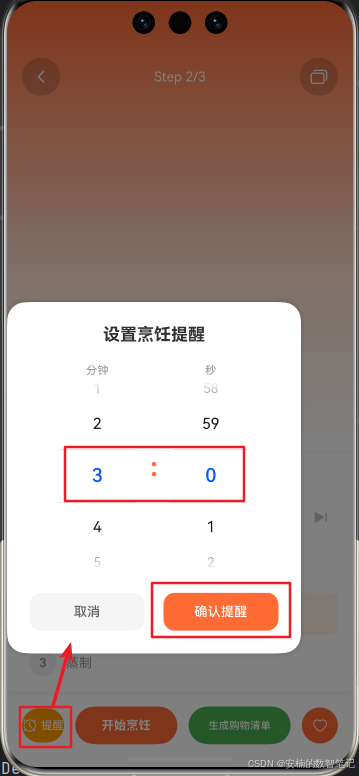
TextPicker.onChange的value参数在 API 23 中类型为string | string[](取决于range是否为多维数组)。使用typeof value === 'string'做类型收窄后安全取值,比起直接parseInt(value as string)更符合 ArkTS 的严格类型检查规范。
(6)底部操作栏新增「提醒」按钮
  // buildBottomBar 中新增
  Row({ space: 12 }) {
    // ★ 第19篇:设置提醒按钮
    Button() {
      Row({ space: 4 }) {
        SymbolGlyph($r('sys.symbol.alarm'))
          .fontSize(16).fontColor([Color.White])
        Text('提醒')
          .fontSize(12).fontColor(Color.White)
      }
    }
    .type(ButtonType.Capsule).height(36)
    .backgroundColor('#FF9800')
    .onClick(() => this.showReminderPicker = true)

    // ... 原有按钮 ...
  }
(7)在 build() 的 Stack 中添加时间选择器覆盖层
  build() {
    Stack() {
      // ... 原有布局(手机/平板/智慧屏) ...

      // ── 烹饪提醒时间选择器(覆盖层) ──
      if (this.showReminderPicker) {
        this.buildReminderPicker()
      }
    }
  }
Step 3:EntryAbility —— 应用启动初始化
// entryability/EntryAbility.ets(新增部分)

import { notificationHelper } from '../services/NotificationHelper';
import { BusinessError } from '@kit.BasicServicesKit';

onCreate(want: Want, launchParam: AbilityConstant.LaunchParam): void {
  // ... 原有代码 ...

  // ★ 第19篇:初始化通知服务
  notificationHelper.init(this.context);
  notificationHelper.createSlot().then(() => {
    hilog.info(DOMAIN, 'LingxiKitchen', '通知渠道初始化完成');
  }).catch((err: BusinessError) => {
    hilog.warn(DOMAIN, 'LingxiKitchen',
      '通知渠道初始化警告, code: %{public}d, msg: %{public}s',
      err.code, err.message);
  });
}
核心点解读:
createSlot()不阻塞onCreate,使用.then().catch()异步调用。渠道创建失败不会影响应用启动——这是一个"尽力而为"的初始化策略。
Step 4:权限声明 —— module.json5
// 权限声明:通知管理权限暂不声明(HarmonyOS 6.1.0 中通知为系统级能力,
// 用户可在"设置 → 通知和状态栏"独立管理,不需要应用级权限声明)
//
// {
//   "name": "ohos.permission.NOTIFICATION_CONTROLLER",
//   "reason": "$string:notification_permission_reason",
//   ...
// },
{
  "name": "ohos.permission.DISTRIBUTED_DATASYNC",
  "reason": "$string:distributed_permission_reason",
  "usedScene": { "abilities": ["EntryAbility"], "when": "always" }
}
核心点解读:在 HarmonyOS 6.1.0(API 23)中,
NOTIFICATION_CONTROLLER为系统 API 级别权限,应用不需要声明即可通过notificationManager调用通知相关接口。通知的启用/禁用由用户在系统设置中独立管理。保留DISTRIBUTED_DATASYNC权限,为后续多设备通知同步预留。
| 权限 | 级别 | 用途 | 状态 |
|---|---|---|---|
ohos.permission.NOTIFICATION_CONTROLLER |
system_api | 发送/取消通知 | 已注释(无需声明) |
ohos.permission.DISTRIBUTED_DATASYNC |
normal | 多设备分布式数据同步 | 已声明(预留) |
Step 5:字符串资源 —— string.json
{
  "name": "notification_permission_reason",
  "value": "用于在烹饪过程中向您发送定时提醒通知,确保不错过关键步骤"
},
{
  "name": "distributed_permission_reason",
  "value": "用于将烹饪提醒同步推送到您的手表、平板等设备,多设备协同提醒"
},
{
  "name": "reminder_set_success",
  "value": "提醒已设置"
},
{
  "name": "reminder_cancel_success",
  "value": "提醒已取消"
},
{
  "name": "reminder_notification_disabled",
  "value": "通知权限未开启,请在设置中允许通知"
},
{
  "name": "reminder_time_picker_title",
  "value": "设置烹饪提醒"
},
{
  "name": "reminder_minutes_label",
  "value": "分钟"
},
{
  "name": "reminder_seconds_label",
  "value": "秒"
}
五、代码交付清单
| 文件 | 新增/修改 | 职责 |
|---|---|---|
services/NotificationHelper.ets |
重写 | 从 Stub 升级:通知渠道创建(幂等,slotType=1)、延时推送(deliveryTime)、WantAgent 缓存(显式 Want 变量)、取消通知、权限检查 |
pages/RecipeDetailPage.ets |
修改 | 新增提醒按钮、TextPicker 时间选择器(onChange 联合类型处理)、promptAction.showDialog 权限引导弹窗、handleSetReminder 核心方法 |
entryability/EntryAbility.ets |
修改 | 应用启动时注入 Context 并创建通知渠道(非阻塞) |
module.json5 |
修改 | NOTIFICATION_CONTROLLER 已注释(API 23 无需声明),保留 DISTRIBUTED_DATASYNC |
resources/base/element/string.json |
修改 | 新增 8 个字符串资源(权限理由 + UI 文案) |
六、设计决策
| 决策 | 选择 | 理由 |
|---|---|---|
| 延时实现方案 | deliveryTime 系统调度 |
应用被杀也不影响,比 setTimeout 可靠;精度秒级,比 WorkScheduler 灵活 |
| 通知渠道类型 | 数值 1(SOCIAL_COMMUNICATION) |
直接使用数值,避免枚举引用在不同 ROM 上的兼容性问题 |
| WantAgent 策略 | 单例 + 缓存 + 显式 Want 变量 | 避免每次发通知都重新创建;显式变量解决 @ComponentV2 下的类型推断问题 |
| 通知 ID 生成 | Date.now() + 自增计数器 |
确保短时间内多次设置提醒不冲突 |
| 渠道初始化时机 | EntryAbility.onCreate(非阻塞) |
不阻塞应用启动,失败仅 warn 不 crash |
| 权限检查位置 | 设置提醒前(非初始化时) | 给予用户最大控制权:在设置提醒的瞬间才感知权限缺失并跳转 |
| 权限弹窗实现 | promptAction.showDialog |
绑定 UIContext 生命周期,避免 @ComponentV2 下 AlertDialog.show() 的残留问题 |
| TextPicker 回调 | 联合类型 string | string[] + 类型收窄 |
满足 API 23 的类型声明,typeof 收窄后安全取值 |
| 错误抛出 | throw new Error(busErr.message) |
将系统 BusinessError 转为标准 Error,调用方无需区分错误类型 |
isFloatingIcon |
true |
通知在状态栏以浮动图标展示,与横幅互补,提升可见性 |
NOTIFICATION_CONTROLLER |
已注释 | API 23 中该权限为 system_api 级别,应用无需声明 |
七、运行与结果验证
7.1 操作步骤
-
部署到真机或模拟器。
-
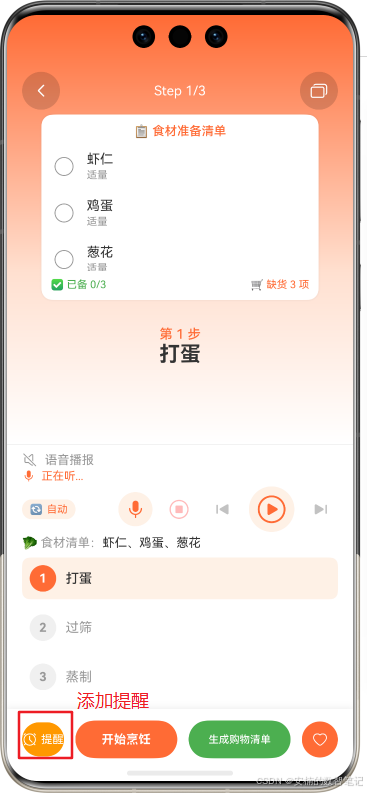
进入菜谱详情页,滑动到某步骤(如"打单 ")
-
点击底部「⏰ 提醒」按钮 → 弹出时间选择器,默认 3 分 0 秒。
-
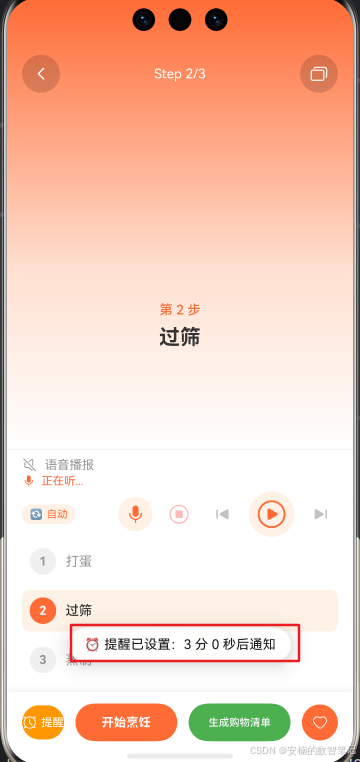
调整时间,点击「确认提醒」→ Toast 提示"⏰ 提醒已设置:X 分 X 秒后通知"。
-
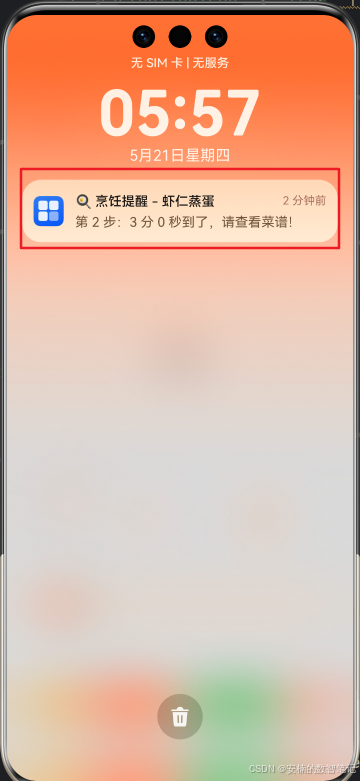
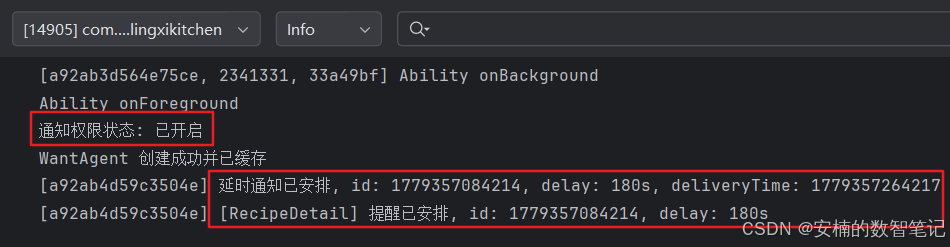
等待到达设定时间(或设为 10 秒快速测试)→ 手机弹出横幅通知。
-
点击通知 → WantAgent 触发,回到菜谱详情页。
7.2 预期结果
| 操作 | 预期 UI 变化 | 预期日志 |
|---|---|---|
| 点击「⏰ 提醒」 | 时间选择器覆盖层弹出,默认 3:00 | — |
| 选择 5:00 → 确认 | Toast: “提醒已设置” | [NotificationHelper] 延时通知已安排, id: xxxxx, delay: 300s, deliveryTime: xxxxx |
| 等待到时 | 通知横幅弹出 + 浮动图标 | — |
| 点击通知 | 回到 RecipeDetailPage | WantAgent 触发 → EntryAbility |
| 通知权限未开 → 点击提醒 | promptAction 引导弹窗 |
[RecipeDetail] 通知权限未开启 |
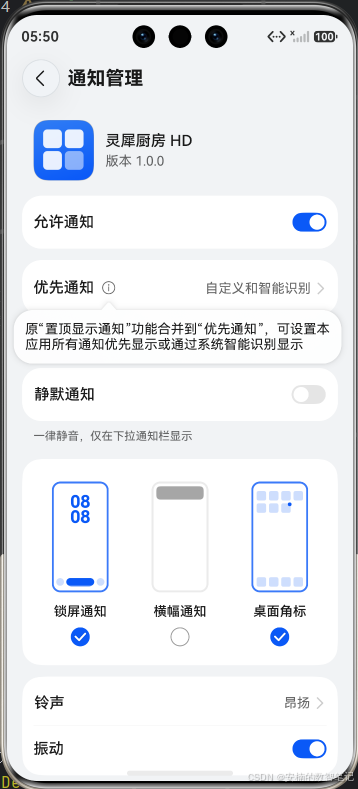
| 点击「去设置」 | 跳转到系统应用详情页 | — |
| 第二次设置提醒 | WantAgent 不再重新创建 | 不会出现 “WantAgent 创建成功” 日志 |
7.3 控制台完整日志
[NotificationHelper] NotificationHelper 已初始化,context 注入成功
[NotificationHelper] 通知渠道 SOCIAL_COMMUNICATION 创建成功
[RecipeDetail] 菜谱详情加载: 红烧肉, 共5步
[NotificationHelper] WantAgent 创建成功并已缓存
[NotificationHelper] 延时通知已安排, id: 1716307200123, delay: 300s, deliveryTime: 1716307500123
[RecipeDetail] 提醒已安排, id: 1716307200123, delay: 300s

...(5分钟后通知弹出)...

[NotificationHelper] 通知权限状态: 已开启
验证要点:
- 延时通知安排了之后,日志中
deliveryTime比当前时间精确多delayInSeconds秒。- WantAgent 创建后缓存,第二次及以上设置提醒不会再出现 “WantAgent 创建成功” 的日志。
- 通知权限未开时点「提醒」,会弹出
promptAction.showDialog引导弹窗。createSlot在渠道已存在时日志显示"通知渠道已存在,跳过创建"。
八、注意事项
8.1 deliveryTime 的时区问题
deliveryTime 使用设备本地时间戳(Date.now()),在不同时区的设备间可能存在偏差。目前《灵犀厨房》仅在国内市场分发,时区问题不突出。若未来国际化,建议统一使用 UTC 并做好客户端转换。
8.2 省电模式的影响
省电模式可能批量处理非紧急通知,将 deliveryTime 相近的几条合并推送。对于烹饪场景(3-15 分钟),偏差在可接受范围内。如需秒级精确,考虑使用前台 Service 替代。
8.3 应用被杀后的通知有效性
HarmonyOS 的延时通知机制由系统 NotificationService 管理,与应用的存活状态无关。即使灵犀厨房被用户从多任务中划掉,已安排的通知仍然会在预定时间弹出。这是 deliveryTime 相较 setTimeout 的核心优势。
8.4 slotType 使用数值而非枚举
在 addSlot 和 NotificationRequest.slotType 中直接使用数值 1,而非 notificationManager.SlotType.SOCIAL_COMMUNICATION。这是因为不同 HarmonyOS ROM 版本上模块导出路径可能存在差异,数值直接对应系统底层定义,兼容性更好。
8.5 promptAction.showDialog vs AlertDialog.show
在 @ComponentV2 装饰的组件中,AlertDialog.show() 是静态方法,不与组件实例绑定,可能导致页面销毁后弹窗残留。promptAction.showDialog 通过 UIContext 绑定,生命周期随页面销毁而自动清理。
8.6 WantAgent 显式 Want 变量
在 ArkTS 严格模式下,wants 数组的元素类型推断可能因上下文不同而失败。显式声明 const launchWant: Want = { ... } 确保类型检查通过,避免编译器报 arkts-no-inferred-generic-params 错误。
8.7 通知 ID 唯一性
在同一 deliveryTime 范围内确保 ID 唯一。我们使用 Date.now() + counter 的组合策略,避免 notificationManager.cancel(id) 时误删其他通知。
九、本阶段总结与下篇预告
今天,我们为《灵犀厨房》装上了"通知系统"——实现了烹饪延时提醒从设置到自动弹出的完整链路:
- 重写
NotificationHelper:从 Stub 升级为完整实现。渠道幂等创建(slotType=1)、deliveryTime延时调度、WantAgent 显式声明 + 缓存复用、BusinessError转标准 Error 的错误封装。代码约 160 行,覆盖通知全生命周期。 - 集成提醒 UI:菜谱步骤页底部新增「⏰ 提醒」按钮,
TextPicker时间选择器支持分钟:秒精确设置(联合类型string | string[]安全取值),promptAction.showDialog权限引导弹窗(解决@ComponentV2下生命周期问题)。 - 兼容性优先:
slotType直接使用数值1而非枚举引用;NOTIFICATION_CONTROLLER权限已注释(API 23 无需声明);ensureWantAgent使用显式Want变量满足严格类型推断。 - 权限与资源配置:
module.json5保留DISTRIBUTED_DATASYNC权限,string.json新增 8 个资源字符串。
现在,你在厨房炖牛肉,设置一个 30 分钟的提醒——去客厅看电视。30 分钟后,手机弹出横幅"🍳 烹饪提醒 - 炖牛肉:该加盐了"。点击通知,直接回到菜谱步骤,无缝继续烹饪。
但烹饪的智慧远不止于此——你想知道这道红烧肉有多少卡路里吗?太咸了该怎么办?
下篇预告:第 20 篇《AI 烹饪助手:接入大语言模型实现语音问答》。我们将接入华为 CoreAI 的 NLP 能力,让《灵犀厨房》能够听懂用户的自然语言问题——“红烧肉的替代食材有哪些?”“太咸了怎么补救?”“这道菜适合高血压人群吗?”——真正做到像厨师朋友一样对话。
📚 本系列持续更新中:下一篇将接入大语言模型,让灵犀厨房从"工具"进化为"伙伴"。
🔗 专栏入口:[《HarmonyOS6.1全场景实战》合集]
📦 获取基线版本源码包:包括第1-15篇代码 + 架构文档 + Flask 后端
如果你觉得这篇文章对你有帮助,请不要吝啬你的点赞 👍、收藏 ⭐ 和评论 💬。你的支持,是我继续输出高质量技术内容的全部动力。
纯血鸿蒙,提醒不再错过。我们下一篇见!

讨论HarmonyOS开发技术,专注于API与组件、DevEco Studio、测试、元服务和应用上架分发等。
更多推荐



 32
32 0
0- 0


 已为社区贡献30条内容

所有评论(0)