我用 HarmonyOS 写了个「饮品特调研究所」,踩了不少坑
我用 HarmonyOS 写了个「饮品特调研究所」,踩了不少坑
喝奶茶喝出个 App 来,还附赠一堆编译报错。
这个 App 长什么样
打开应用,顶部是一个橙色渐变的 Header,写着「饮品特调研究所」。下面依次是:
- 基底选择 - 横向滑动卡片,奶茶、鲜果茶、手冲咖啡、特调微醺、气泡水
- 杯型选择 - 中杯/大杯/超大杯三选一
- 温度选择 - 热饮、常温、正常冰、少冰、去冰,标签组形式
- 甜度调节 - 滑动条,0%~100% 自由调节
- 加料小料 - 珍珠、椰果、脆波波、奶盖、冰淇淋、燕麦,支持多选
- 风味灵感 - 8 个预设标签(白桃乌龙、桂花酒酿等)+ 自由输入框
- 调配按钮 - 点击后摇晃动效,然后弹出结果卡片
- 历史记录 - 保存最近 10 条调配记录
整个界面采用卡片式布局,橙色为主色调,选中状态有阴影和放大效果,视觉上还挺像那么回事的。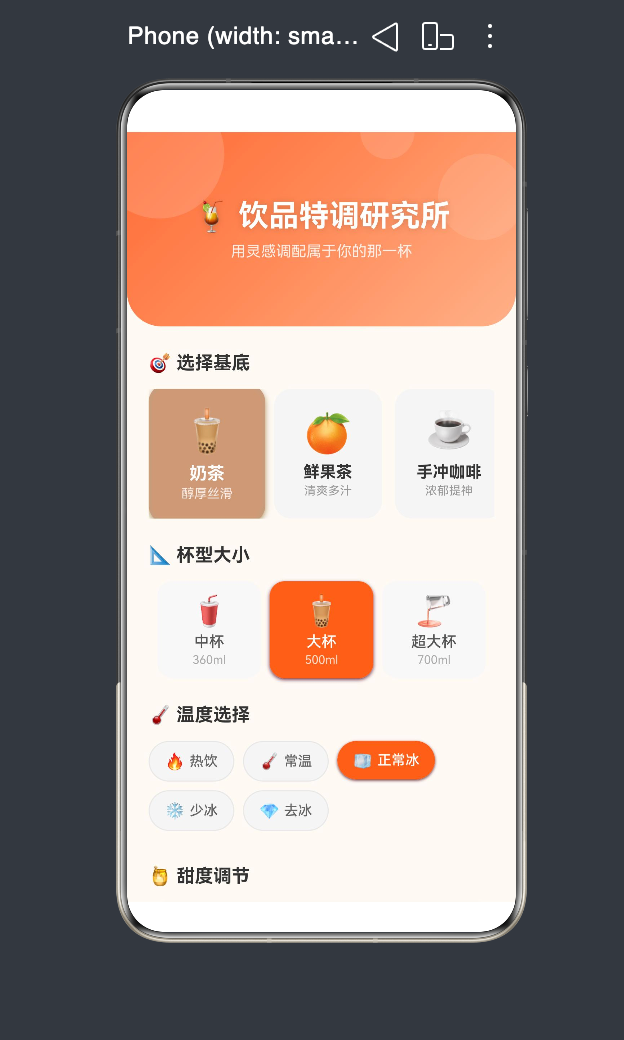
代码整体结构
先看一眼整体架构,心里有个数:
// 数据接口定义
interface BaseOption {
  emoji: string
  name: string
  desc: string
  color: string
}

interface CupSizeOption { label: string; ml: string; icon: string }
interface IceOption { emoji: string; label: string }
interface ToppingOption { emoji: string; name: string }
interface HistoryRecord {
  base: string; baseEmoji: string; cup: string; ice: string
  sweetness: number; toppings: string[]; flavor: string; time: string
}

@Entry
@Component
struct Index {
  @State selectedBase: number = 0
  private baseOptions: BaseOption[] = [...]
  // ... 其他状态和数据

  build() { /* 主界面 */ }

  @Builder sectionTitle(title: string) { /* 辅助方法 */ }
  @Builder resultRow(label: string, value: string) { /* 结果行 */ }
}
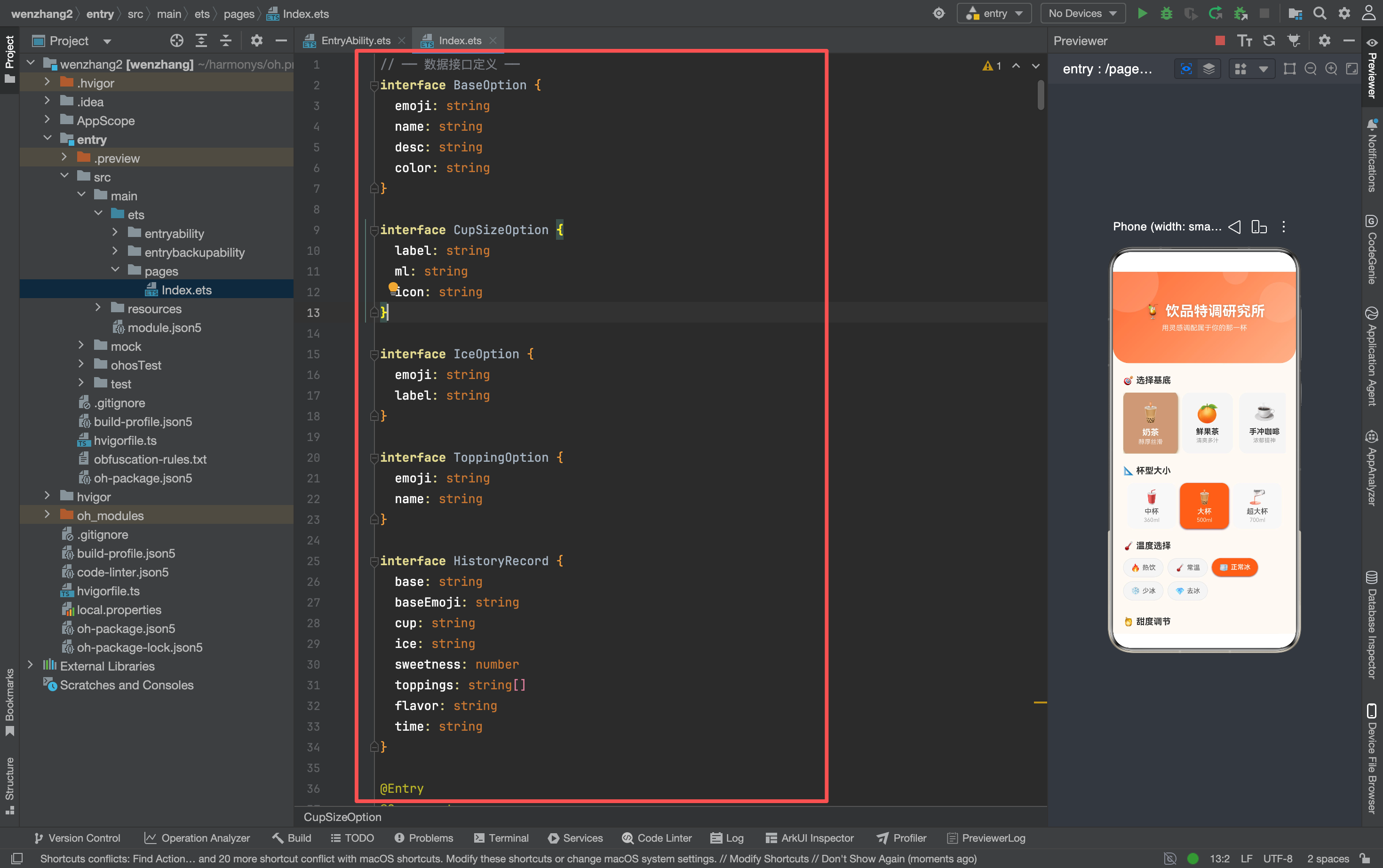
ArkTS 的组件结构和 React 的函数组件思路类似–用 @State 管状态,用 build() 描述界面,状态变了 UI 自动更新。
逐模块拆解
1. 基底选择 - 横向滑动卡片
这是整个应用最核心的交互区域。用 Scroll + Row + ForEach 实现横向滑动,每个基底是一个卡片:
Scroll() {
  Row() {
    ForEach(this.baseOptions, (item: BaseOption, index: number) => {
      Column() {
        Text(item.emoji).fontSize(36)
        Text(item.name).fontSize(15).fontWeight(FontWeight.Bold)
        Text(item.desc).fontSize(11)
      }
      .width(100).height(120)
      .borderRadius(16)
      .backgroundColor(this.selectedBase === index ? item.color : '#F5F5F5')
      .border({ width: this.selectedBase === index ? 3 : 0, color: item.color })
      .shadow(this.selectedBase === index ?
        { radius: 12, color: item.color + '40', offsetY: 6 } : this.noShadow)
      .scale(this.selectedBase === index ? { x: 1.08, y: 1.08 } : { x: 1, y: 1 })
      .animation({ duration: 200, curve: Curve.EaseOut })
      .onClick(() => { this.selectedBase = index })
    })
  }
}
.scrollable(ScrollDirection.Horizontal)
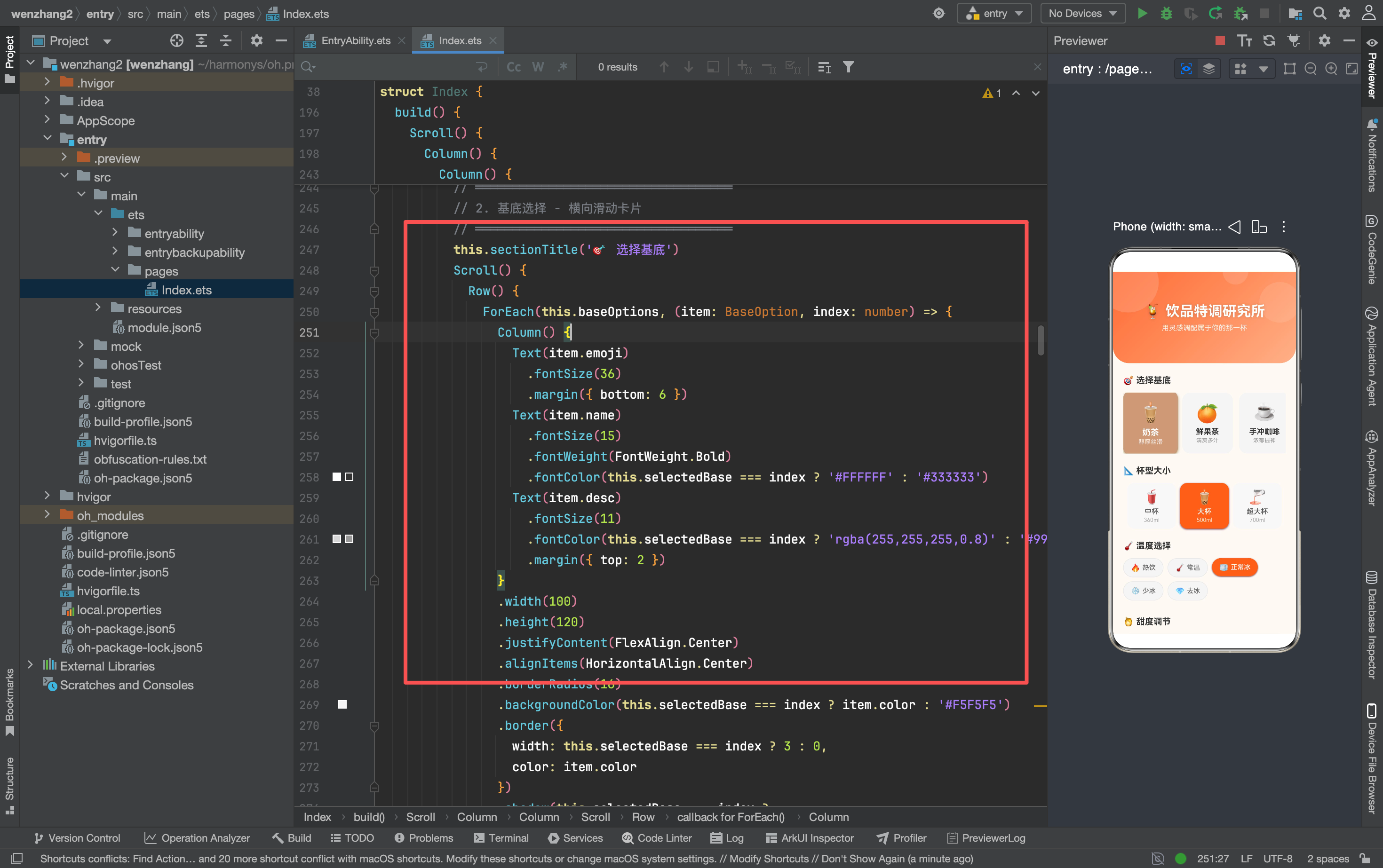
关键点:
- 选中状态通过三元表达式切换背景色、边框、阴影、缩放
.animation()让状态切换有过渡效果- 阴影使用了
noShadow常量作为回退值,避免条件渲染的复杂性
2. 温度/加料/风味 - Flex 标签组
这三个模块都用了 Flex({ wrap: FlexWrap.Wrap }) 实现标签自动换行:
Flex({ wrap: FlexWrap.Wrap }) {
  ForEach(this.iceOptions, (item: IceOption, index: number) => {
    Row() {
      Text(item.emoji).fontSize(15)
      Text(item.label).fontSize(13).margin({ left: 4 })
    }
    .padding({ left: 14, right: 14, top: 9, bottom: 9 })
    .borderRadius(20)
    .backgroundColor(this.selectedIce === index ? '#FF6B35' : '#F5F5F5')
    .onClick(() => { this.selectedIce = index })
  })
}
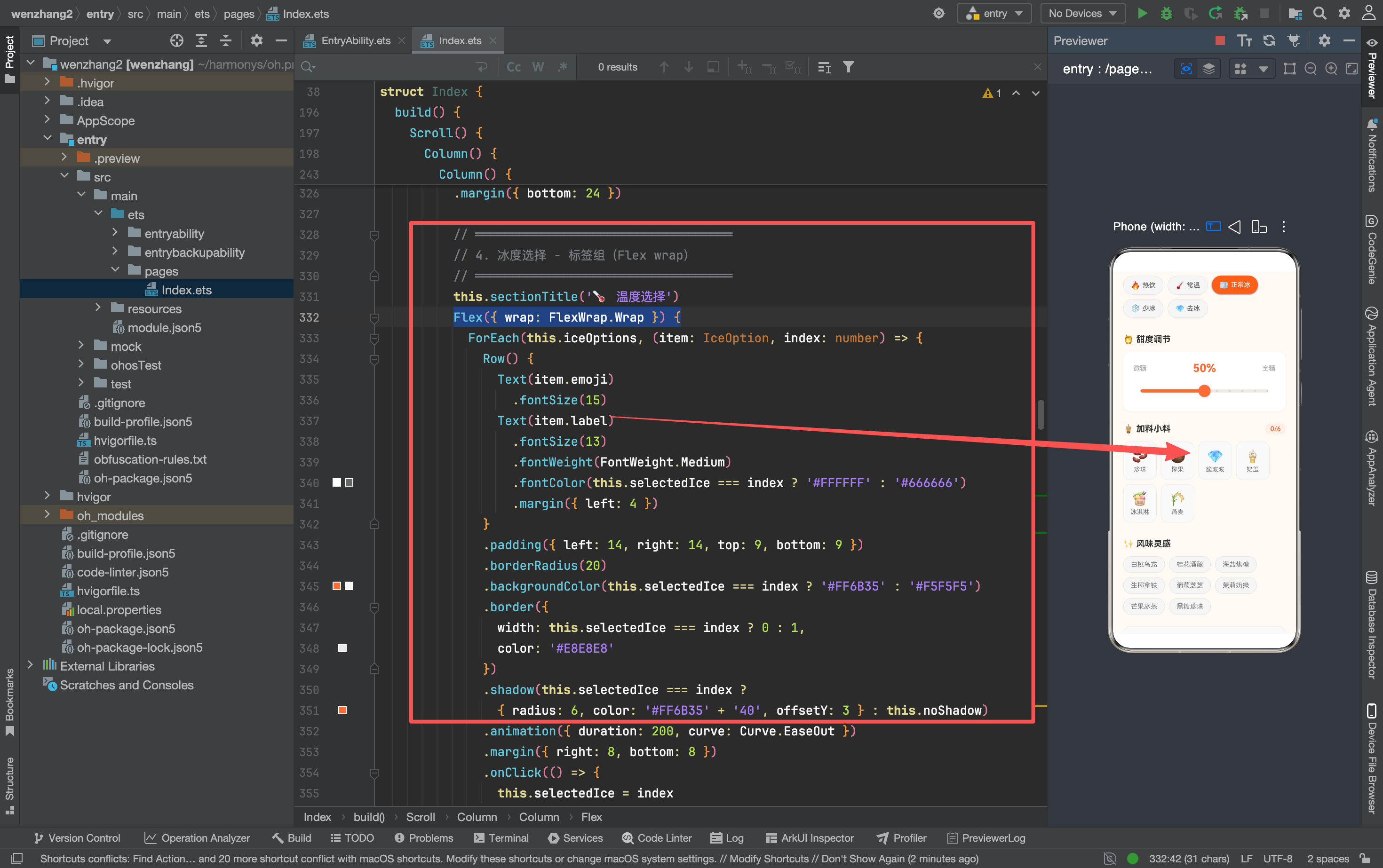
加料部分是多选,点击时需要更新布尔数组并触发重新渲染:
.onClick(() => {
  this.selectedToppings[index] = !this.selectedToppings[index]
  // ArkTS 数组更新必须创建新数组才能触发渲染
  let newToppings: boolean[] = []
  for (let j = 0; j < this.selectedToppings.length; j++) {
    newToppings.push(this.selectedToppings[j])
  }
  this.selectedToppings = newToppings
})
这里有个重要细节:ArkTS 中直接修改数组元素不会触发 @State 更新,必须创建新数组赋值才行。这和 React 的不可变数据思路是一样的。
3. 调配按钮 - 摇晃动效
点击调配按钮后,先播放摇晃动画,再弹出结果卡片:
startMix(): void {
  this.isMixing = true
  const uiContext = this.getUIContext()
  if (uiContext) {
    uiContext.animateTo({
      duration: 120,
      curve: Curve.Linear,
      iterations: 6,
      playMode: PlayMode.Alternate,
      onFinish: () => {
        this.isMixing = false
        this.showResult = true
        // 结果卡片滑入
        uiContext.animateTo({
          duration: 400,
          curve: Curve.EaseOut
        }, () => {
          this.resultOpacity = 1
          this.resultTranslateY = 0
        })
      }
    }, () => {
      this.shakeAngle = 15
    })
  }
}
注意这里用了 this.getUIContext() 获取 UI 上下文,然后调用 uiContext.animateTo()。旧版本的全局 animateTo 已经被废弃了。
4. 结果卡片 - 条件渲染 + 渐变背景
结果卡片用 if (this.showResult) 条件渲染,搭配渐变背景和滑入动画:
if (this.showResult) {
  Column() {
    Text('调配完成').fontSize(20).fontWeight(FontWeight.Bold).fontColor('#FFFFFF')
    // ... 基底、杯型、温度、甜度、加料、风味的详情行
  }
  .linearGradient({
    angle: 135,
    colors: [['#FF6B35', 0], ['#FF8C5A', 0.6], ['#FFA377', 1]]
  })
  .shadow({ radius: 16, color: '#FF6B35' + '40', offsetY: 8 })
  .opacity(this.resultOpacity)
  .translate({ y: this.resultTranslateY })
  .animation({ duration: 400, curve: Curve.EaseOut })
}
5. 历史记录 - 数据持久化(内存)
saveToHistory(): void {
  const record: HistoryRecord = { /* ... */ }
  // ArkTS 不支持 unshift,用展开运算构建新数组
  let newHistory: HistoryRecord[] = [record]
  for (let i = 0; i < this.history.length; i++) {
    newHistory.push(this.history[i])
  }
  if (newHistory.length > 10) {
    newHistory = newHistory.slice(0, 10)
  }
  this.history = newHistory
}
目前历史记录只存在内存里,App 重启就没了。后续可以对接 @ohos.data.preferences 或数据库做持久化。
踩坑实录:编译错误与修复
这部分是重点。我在开发过程中遇到了一系列 ArkTS 编译错误,都是因为 ArkTS 的严格类型检查。逐个来看:
坑 1:Select 组件的类型声明
报错信息:
arkts-no-obj-literals-as-types
arkts-no-noninferrable-arr-literals
arkts-no-untyped-obj-literals
出错代码:
Select([
  { value: '奶茶' },
  { value: '鲜果茶' },
  { value: '手冲咖啡' }
])
原因: ArkTS 严格模式下,不能直接把对象字面量数组传给 Select 组件,因为编译器无法推断数组元素的类型。
修复方式: 提前定义好带类型的数组变量:
private selectOptions: SelectOption[] = [
  { value: '奶茶' },
  { value: '鲜果茶' },
  { value: '手冲咖啡' }
]

Select(this.selectOptions)
或者更简洁地用 ResourceStr[]:
private selectItems: ResourceStr[] = ['奶茶', '鲜果茶', '手冲咖啡']
Select(this.selectItems)
坑 2:shadow 的三元表达式类型不匹配
报错信息:
Argument of type '{ radius: number; color: string; offsetY: number; } | {}'
is not assignable to parameter of type 'ShadowOptions | ShadowStyle'.
Type '{}' is not assignable to type 'ShadowOptions | ShadowStyle'.
出错代码:
.shadow(this.selectedBase === index ?
  { radius: 12, color: item.color + '40', offsetY: 6 } : this.noShadow)
虽然 noShadow 已经定义为 ShadowOptions 类型,但三元表达式的返回类型被推断为联合类型 { radius: number; color: string; offsetY: number } | {},其中 {} 不符合要求。
修复方式: 给三元表达式加上类型断言:
.shadow((this.selectedBase === index ?
  { radius: 12, color: item.color + '40', offsetY: 6 } : this.noShadow) as ShadowOptions)
或者更干净地直接用 undefined:
.shadow(this.selectedBase === index ? { radius: 12, color: item.color + '40', offsetY: 6 } : undefined)
坑 3:Row 组件没有 flexWrap 属性
报错信息:
Property 'flexWrap' does not exist on type 'RowAttribute'.
出错代码:
Row() {
  ForEach(this.iceOptions, ...)
}
.flexWrap(FlexWrap.Wrap)
原因: Row 是单行布局组件,不支持换行。需要换行应该用 Flex 组件。
修复方式: 把 Row 改成 Flex:
Flex({ wrap: FlexWrap.Wrap }) {
  ForEach(this.iceOptions, (item: IceOption, index: number) => {
    Row() { /* 标签内容 */ }
  })
}
坑 4:animateTo 已废弃
警告信息:
'animateTo' has been deprecated.
原因: 全局的 animateTo 函数在新版本中已被标记为废弃。
修复方式: 使用 UIContext.animateTo():
// 旧方式(已废弃)
animateTo({ duration: 200 }, () => { this.shakeAngle = 15 })

// 新方式
const uiContext = this.getUIContext()
uiContext.animateTo({ duration: 200 }, () => { this.shakeAngle = 15 })
坑 5:数组更新不触发渲染
这不是编译错误,但容易踩坑。ArkTS 中直接修改数组元素不会触发 @State 更新:
// ❌ 不会触发渲染
this.selectedToppings[index] = !this.selectedToppings[index]

// ✅ 必须创建新数组
let newToppings: boolean[] = []
for (let j = 0; j < this.selectedToppings.length; j++) {
  newToppings.push(this.selectedToppings[j])
}
this.selectedToppings = newToppings
同样,Array.unshift() 在 ArkTS 中也不支持,需要手动构建新数组。
坑 6:对象字面量必须对应已声明的类或接口
报错信息:
arkts-no-untyped-obj-literals
Object literal must correspond to some explicitly declared class or interface
这个问题出现在多个地方(Slider 的参数、Button 的 shadow 等),本质上都是同一个原因:ArkTS 严格模式要求所有对象字面量都必须有明确的类型声明。
通用修复思路:
- 提前定义接口或类型别名
- 使用
as Type类型断言 - 把对象赋值给带类型的变量后再传入
技术栈与踩坑总结
| 模块 | 技术点 | 坑 |
|---|---|---|
| 基底选择 | Scroll + Row + ForEach | shadow 三元类型断言 |
| 杯型选择 | Row + ForEach | shadow 三元类型断言 |
| 温度选择 | Flex + ForEach | Row 没有 flexWrap,要用 Flex |
| 甜度调节 | Slider + onChange | 无 |
| 加料小料 | Flex + 多选布尔数组 | 数组更新必须创建新数组 |
| 风味灵感 | Flex + TextInput | 无 |
| 调配按钮 | animateTo 动效 | 旧版 animateTo 已废弃 |
| 结果卡片 | 条件渲染 + 渐变 | 无 |
| 历史记录 | ForEach + 数组操作 | 不支持 unshift |
总结
ArkTS 的严格模式确实比普通 TypeScript 素很多,但换个角度想,这些问题在编译阶段就被拦住了,总比上线后用户手机上崩溃要好。
这套代码后面还想接个大模型,让用户输入玄学描述也能出配方,到时候估计又是一堆新坑。到时候再说吧。
踩过的坑:对象字面量类型声明、shadow 类型断言、Row 没有 flexWrap、animateTo 已废弃、数组更新不触发渲染

讨论HarmonyOS开发技术,专注于API与组件、DevEco Studio、测试、元服务和应用上架分发等。
更多推荐


 13
13 0
0- 0


 已为社区贡献26条内容

所有评论(0)