HarmonyOS ArkUI技术实践:番茄计时器应用的设计与实现
摘要
番茄工作法(Pomodoro Technique)是一种广泛应用于个人时间管理的方法论。本文基于HarmonyOS ArkUI声明式开发范式,设计并实现了一款功能完整的番茄计时器应用。文章详细介绍了应用的技术架构、核心功能实现、状态管理策略、UI组件设计等内容,并针对开发过程中遇到的技术难点进行了分析与总结。
关键词:HarmonyOS、ArkUI、番茄工作法、定时器、状态管理
1 项目概述
1.1 项目背景
番茄工作法由Francesco Cirillo于1980年代提出,其核心理念是将工作时间分割为固定长度的专注时段(通常为25分钟),每个时段称为一个"番茄"。该方法可有效提升工作专注度,降低时间碎片化程度。
本文所述番茄计时器应用旨在为HarmonyOS用户提供便捷的番茄工作法辅助工具,实现专注计时、休息提醒、统计分析等核心功能。
1.2 项目信息
| 项目属性 | 配置信息 |
|---|---|
| 项目名称 | PomodoroTimer |
| 开发框架 | HarmonyOS ArkUI |
| 开发语言 | ArkTS |
| API版本 | 23 |
| 应用模型 | Stage模型 |
| 包名 | com.example.pomodorotimer |
1.3 功能规格
| 功能模块 | 功能描述 | 技术要点 |
|---|---|---|
| 专注计时 | 25分钟倒计时,支持开始/暂停/重置 | 定时器管理、状态同步 |
| 休息计时 | 短休(5分钟)、长休(15分钟) | 模式切换、时间重置 |
| 自动切换 | 计时结束自动切换下一模式 | 事件驱动、状态机 |
| 统计功能 | 记录已完成番茄数量 | 数据持久化(可选) |
2 技术架构
2.1 架构设计
本应用采用单页面架构,所有功能集中在Index.ets组件中实现。架构层次如下:
┌─────────────────────────────────────────┐
│             UI Layer (View)              │
│  ┌───────────┐ ┌───────────┐ ┌────────┐ │
│  │TimerPanel │ │ControlBtns│ │ModeTabs│ │
│  └───────────┘ └───────────┘ └────────┘ │
├─────────────────────────────────────────┤
│          Logic Layer (Controller)        │
│  ┌───────────┐ ┌───────────┐ ┌────────┐ │
│  │TimerLogic │ │ModeSwitch │ │Stats   │ │
│  └───────────┘ └───────────┘ └────────┘ │
├─────────────────────────────────────────┤
│          Data Layer (State)              │
│  ┌───────────────────────────────────┐  │
│  │ @State variables (displayTime,    │  │
│  │ currentMode, isRunning, etc.)     │  │
│  └───────────────────────────────────┘  │
└─────────────────────────────────────────┘
2.2 技术选型
定时器方案:
| 方案 | 精度 | 复杂度 | 适用场景 | 本次选择 |
|---|---|---|---|---|
| setInterval | 秒级 | 低 | 通用倒计时 | ✅ |
| setTimeout递归 | 毫秒级 | 中 | 高精度计时 | ❌ |
| 后台任务API | 系统级 | 高 | 后台长时间运行 | ❌ |
选择依据:番茄计时器精度要求为秒级,且无需后台长时间运行,故选用setInterval方案。
状态管理方案:
| 装饰器 | 作用域 | 持久化 | 本次选择 |
|---|---|---|---|
| @State | 组件内 | ❌ | ✅ |
| @Prop | 父→子单向 | ❌ | ❌ |
| @Link | 父↔子双向 | ❌ | ❌ |
| @StorageLink | 应用级 | ✅ | ❌ |
选择依据:应用所有状态均在单组件内管理,无需跨组件传递,故选用@State装饰器。
3 核心功能实现
3.1 状态定义
// 计时器核心状态
@State displayTime: string = '25:00'       // 格式化显示时间
@State currentMode: string = 'focus'       // 当前模式:focus/shortBreak/longBreak
@State isRunning: boolean = false          // 运行状态标志
@State completedCycles: number = 0         // 已完成番茄计数
@State isTimeUp: boolean = false           // 计时结束标志

// 内部状态
private remainingSeconds: number = 25 * 60 // 剩余秒数
private timerId: number = -1               // 定时器句柄
设计说明:
displayTime与remainingSeconds分离,前者负责UI显示,后者负责逻辑计算,实现视图与数据的解耦。isRunning标志用于控制按钮状态显示及防止重复创建定时器。timerId用于保存定时器句柄,便于后续清除。
3.2 时间格式化
private formatTime(seconds: number): string {
  const mins = Math.floor(seconds / 60)
  const secs = seconds % 60
  return `${String(mins).padStart(2, '0')}:${String(secs).padStart(2, '0')}`
}
技术要点:
- 使用
Math.floor计算分钟数,避免浮点数问题。 - 使用
padStart(2, '0')实现零填充,确保格式统一。
3.3 定时器管理
开始计时:
private startTimer(): void {
  if (this.isRunning) return  // 防止重复启动

  this.isRunning = true
  this.isTimeUp = false

  this.timerId = setInterval(() => {
    this.remainingSeconds--

    if (this.remainingSeconds <= 0) {
      this.displayTime = '⏰ 时间到!'
      this.onTimeUp()
      return
    }

    this.displayTime = this.formatTime(this.remainingSeconds)
  }, 1000)
}
暂停计时:
private pauseTimer(): void {
  this.isRunning = false

  if (this.timerId !== -1) {
    clearInterval(this.timerId)
    this.timerId = -1
  }
}
重置计时:
private resetTimer(): void {
  this.pauseTimer()
  this.remainingSeconds = this.getModeTime(this.currentMode)
  this.displayTime = this.formatTime(this.remainingSeconds)
  this.isTimeUp = false
}
技术要点:
- 使用
if (this.isRunning) return防止重复启动。 - 清除定时器后重置
timerId为-1,避免误操作。 - 重置时调用
getModeTime获取当前模式对应的时长,确保逻辑一致性。
3.4 模式管理
模式配置映射:
private getModeTime(mode: string): number {
  const timeMap: Record<string, number> = {
    'focus': 25 * 60,
    'shortBreak': 5 * 60,
    'longBreak': 15 * 60
  }
  return timeMap[mode] || 25 * 60
}

private getModeLabel(mode: string): string {
  const labelMap: Record<string, string> = {
    'focus': '🍅 专注中',
    'shortBreak': '☕ 短休中',
    'longBreak': '🌙 长休中'
  }
  return labelMap[mode] || '🍅 专注中'
}

private getModeColor(mode: string): string {
  const colorMap: Record<string, string> = {
    'focus': '#FF9F0A',      // 橙色
    'shortBreak': '#34C759',  // 绿色
    'longBreak': '#5AC8FA'    // 蓝色
  }
  return colorMap[mode] || '#FF9F0A'
}
模式切换逻辑:
private switchMode(mode: string): void {
  if (this.isRunning) {
    this.pauseTimer()  // 切换前暂停计时器
  }

  this.currentMode = mode
  this.remainingSeconds = this.getModeTime(mode)
  this.displayTime = this.formatTime(this.remainingSeconds)
  this.isTimeUp = false
}
技术要点:
- 使用
Record<string, T>类型定义映射表,提高代码可维护性。 - 模式切换时先暂停计时器,避免状态冲突。
3.5 自动切换逻辑
private onTimeUp(): void {
  this.pauseTimer()
  this.isTimeUp = true

  if (this.currentMode === 'focus') {
    // 专注结束,增加计数
    this.completedCycles++

    // 根据周期数决定休息类型
    if (this.completedCycles % this.MAX_CYCLES === 0) {
      this.switchMode('longBreak')
    } else {
      this.switchMode('shortBreak')
    }
  } else {
    // 休息结束,返回专注
    this.switchMode('focus')
  }
}
状态转换图:
┌─────────┐  专注结束  ┌──────────┐
│ 专注    │ ────────→ │ 短休息   │
│ (25min) │           │ (5min)   │
└─────────┘           └──────────┘
     ↑                     │
     │                     │ 休息结束
     │                     ↓
     │               ┌──────────┐
     │   4番茄后     │ 长休息   │
     └────────────── │ (15min)  │
                     └──────────┘
4 UI组件设计
4.1 布局结构
Column (垂直容器)
├── Text (标题)
├── Column (计时面板)
│   ├── Text (倒计时)
│   └── Text (模式标签)
├── Row (控制按钮)
│   ├── Button (开始/暂停)
│   └── Button (重置)
├── Row (模式切换)
│   ├── Button (专注)
│   ├── Button (短休)
│   └── Button (长休)
├── Text (统计信息)
└── Row (番茄图标列表)
4.2 计时面板组件
Column() {
  Text(this.displayTime)
    .fontSize(72)
    .fontWeight(FontWeight.Bold)
    .fontColor(this.isTimeUp ? '#FF3B30' : this.getModeColor(this.currentMode))
    .fontFamily('Courier New')  // 等宽字体防止跳动

  Text(this.getModeLabel(this.currentMode))
    .fontSize(18)
    .fontColor(this.getModeColor(this.currentMode))
    .margin({ top: 8 })
}
.width(240)
.height(240)
.backgroundColor('#1C1C1E')
.borderRadius(120)  // 圆形面板
.justifyContent(FlexAlign.Center)
.margin({ top: 30 })
设计要点:
- 使用等宽字体
Courier New,避免数字变化时文本宽度变化导致的视觉抖动。 borderRadius设置为宽高的一半(120),实现圆形面板效果。- 颜色根据
isTimeUp状态动态变化,计时结束时显示红色警示。
4.3 按钮组件
主控制按钮:
Button(this.isRunning ? '⏸️ 暂停' : '▶️ 开始')
  .fontSize(20)
  .fontWeight(FontWeight.Bold)
  .width(160)
  .height(56)
  .borderRadius(28)
  .backgroundColor(this.getModeColor(this.currentMode))
  .fontColor(Color.White)
  .onClick(() => { this.toggleTimer() })
重置按钮:
Button('↺')
  .fontSize(24)
  .width(56)
  .height(56)
  .borderRadius(28)
  .backgroundColor('#333333')
  .margin({ left: 12 })
  .onClick(() => { this.resetTimer() })
4.4 模式切换标签
@Builder modeButton(mode: string, label: string) {
  Button(label)
    .fontSize(14)
    .fontWeight(FontWeight.Medium)
    .height(40)
    .borderRadius(20)
    .backgroundColor(this.currentMode === mode
      ? this.getModeColor(mode)
      : '#2C2C2E')
    .fontColor(this.currentMode === mode
      ? Color.White
      : '#8E8E93')
    .layoutWeight(1)
    .margin({ left: 4, right: 4 })
    .onClick(() => { this.selectMode(mode) })
}
技术要点:
- 使用
@Builder装饰器定义可复用组件。 - 使用
layoutWeight(1)实现按钮平均分配宽度。 - 通过条件表达式动态设置样式,实现选中态切换。
4.5 统计组件
Text(`🔁 已完成 ${this.completedCycles} 个番茄`)
  .fontSize(16)
  .fontColor('#8E8E93')
  .margin({ top: 20 })

if (this.completedCycles >= 1) {
  Row() {
    ForEach(this.getCycleDots(), (dot: string) => {
      Text(dot)
        .fontSize(22)
        .margin({ left: 4, right: 4 })
    })
  }
  .margin({ top: 8 })
}
技术要点:
- 使用条件渲染
if控制统计显示。 - 使用
ForEach渲染动态列表,需确保数据源稳定。
5 技术难点与解决方案
5.1 定时器生命周期管理
问题:组件销毁时定时器未清除,导致内存泄漏及潜在错误。
解决方案:
aboutToDisappear(): void {
  this.pauseTimer()  // 组件销毁时清理资源
}
说明:在组件生命周期aboutToDisappear中调用pauseTimer,确保定时器被正确清除。
5.2 状态更新触发UI刷新
问题:直接修改@State装饰的数组元素不会触发UI更新。
解决方案:
对于基本类型(string、number、boolean),直接赋值即可触发更新:
this.displayTime = this.formatTime(this.remainingSeconds) // ✅ 触发更新
对于数组类型,需创建新数组:
// ❌ 不触发更新
this.items.push(newItem)

// ✅ 触发更新
this.items = [...this.items, newItem]
5.3 定时器精度问题
问题:setInterval受事件循环影响,长时间运行可能累积误差。
分析:番茄计时器精度要求为秒级,单次25分钟运行累积误差在可接受范围内(<1秒)。
优化方案(如需更高精度):
private startTime: number = 0
private duration: number = 0

private startTimer(): void {
  this.startTime = Date.now()
  this.duration = this.remainingSeconds * 1000

  this.timerId = setInterval(() => {
    const elapsed = Date.now() - this.startTime
    this.remainingSeconds = Math.max(0, Math.ceil((this.duration - elapsed) / 1000))
    this.displayTime = this.formatTime(this.remainingSeconds)

    if (this.remainingSeconds <= 0) {
      this.onTimeUp()
    }
  }, 100)  // 缩短检查间隔
}
6 性能优化建议
6.1 渲染优化
| 优化点 | 当前实现 | 优化建议 |
|---|---|---|
| 定时器频率 | 1000ms | 保持不变,避免过度刷新 |
| 列表渲染 | ForEach + 数组 | 可使用LazyForEach优化大数据量 |
| 条件渲染 | if语句 | 保持不变,组件数量少 |
6.2 内存优化
| 优化点 | 当前实现 | 优化建议 |
|---|---|---|
| 定时器清理 | aboutToDisappear | 保持不变 |
| 状态变量 | @State | 保持不变,状态数量可控 |
7 完整代码
@Entry
@Component
struct Index {
  private readonly FOCUS_TIME: number = 25 * 60
  private readonly SHORT_BREAK: number = 5 * 60
  private readonly LONG_BREAK: number = 15 * 60
  private readonly MAX_CYCLES: number = 4

  @State displayTime: string = '25:00'
  @State currentMode: string = 'focus'
  @State isRunning: boolean = false
  @State completedCycles: number = 0
  @State isTimeUp: boolean = false

  private remainingSeconds: number = 25 * 60
  private timerId: number = -1

  private formatTime(seconds: number): string {
    const mins = Math.floor(seconds / 60)
    const secs = seconds % 60
    return `${String(mins).padStart(2, '0')}:${String(secs).padStart(2, '0')}`
  }

  private getModeTime(mode: string): number {
    if (mode === 'focus') return this.FOCUS_TIME
    if (mode === 'shortBreak') return this.SHORT_BREAK
    return this.LONG_BREAK
  }

  private getModeLabel(mode: string): string {
    if (mode === 'focus') return '🍅 专注中'
    if (mode === 'shortBreak') return '☕ 短休中'
    return '🌙 长休中'
  }

  private getModeColor(mode: string): string {
    if (mode === 'focus') return '#FF9F0A'
    if (mode === 'shortBreak') return '#34C759'
    return '#5AC8FA'
  }

  private toggleTimer(): void {
    this.isRunning ? this.pauseTimer() : this.startTimer()
  }

  private startTimer(): void {
    this.isRunning = true
    this.isTimeUp = false
    this.timerId = setInterval(() => {
      this.remainingSeconds--
      if (this.remainingSeconds <= 0) {
        this.displayTime = '⏰ 时间到!'
        this.onTimeUp()
        return
      }
      this.displayTime = this.formatTime(this.remainingSeconds)
    }, 1000)
  }

  private pauseTimer(): void {
    this.isRunning = false
    if (this.timerId !== -1) {
      clearInterval(this.timerId)
      this.timerId = -1
    }
  }

  private onTimeUp(): void {
    this.pauseTimer()
    this.isTimeUp = true
    if (this.currentMode === 'focus') {
      this.completedCycles++
      this.switchMode(this.completedCycles % this.MAX_CYCLES === 0
        ? 'longBreak'
        : 'shortBreak')
    } else {
      this.switchMode('focus')
    }
  }

  private switchMode(mode: string): void {
    if (this.isRunning) this.pauseTimer()
    this.currentMode = mode
    this.remainingSeconds = this.getModeTime(mode)
    this.displayTime = this.formatTime(this.remainingSeconds)
    this.isTimeUp = false
  }

  private selectMode(mode: string): void {
    this.switchMode(mode)
    this.isRunning = false
  }

  private resetTimer(): void {
    this.pauseTimer()
    this.remainingSeconds = this.getModeTime(this.currentMode)
    this.displayTime = this.formatTime(this.remainingSeconds)
    this.isTimeUp = false
  }

  aboutToDisappear(): void {
    this.pauseTimer()
  }

  private getCycleDots(): string[] {
    return Array(this.completedCycles).fill('🍅')
  }

  build() {
    Column() {
      Text('🍅 番茄计时器')
        .fontSize(28)
        .fontWeight(FontWeight.Bold)
        .fontColor(Color.White)
        .padding(20)

      Column() {
        Text(this.displayTime)
          .fontSize(72)
          .fontWeight(FontWeight.Bold)
          .fontColor(this.isTimeUp ? '#FF3B30' : this.getModeColor(this.currentMode))
          .fontFamily('Courier New')
        Text(this.getModeLabel(this.currentMode))
          .fontSize(18)
          .fontColor(this.getModeColor(this.currentMode))
          .margin({ top: 8 })
      }
      .width(240)
      .height(240)
      .backgroundColor('#1C1C1E')
      .borderRadius(120)
      .justifyContent(FlexAlign.Center)
      .margin({ top: 30 })

      Row() {
        Button(this.isRunning ? '⏸️ 暂停' : '▶️ 开始')
          .fontSize(20)
          .fontWeight(FontWeight.Bold)
          .width(160)
          .height(56)
          .borderRadius(28)
          .backgroundColor(this.getModeColor(this.currentMode))
          .fontColor(Color.White)
          .onClick(() => { this.toggleTimer() })
        Button('↺')
          .fontSize(24)
          .width(56)
          .height(56)
          .borderRadius(28)
          .backgroundColor('#333333')
          .margin({ left: 12 })
          .onClick(() => { this.resetTimer() })
      }
      .margin({ top: 30 })

      Row() {
        this.modeButton('focus', '🍅 专注')
        this.modeButton('shortBreak', '☕ 短休')
        this.modeButton('longBreak', '🌙 长休')
      }
      .width('100%')
      .padding({ left: 20, right: 20 })
      .margin({ top: 24 })

      Text(`🔁 已完成 ${this.completedCycles} 个番茄`)
        .fontSize(16)
        .fontColor('#8E8E93')
        .margin({ top: 20 })

      if (this.completedCycles >= 1) {
        Row() {
          ForEach(this.getCycleDots(), (dot: string) => {
            Text(dot).fontSize(22).margin({ left: 4, right: 4 })
          })
        }
        .margin({ top: 8 })
      }
    }
    .width('100%')
    .height('100%')
    .backgroundColor('#000000')
    .justifyContent(FlexAlign.Start)
  }

  @Builder modeButton(mode: string, label: string) {
    Button(label)
      .fontSize(14)
      .fontWeight(FontWeight.Medium)
      .height(40)
      .borderRadius(20)
      .backgroundColor(this.currentMode === mode
        ? this.getModeColor(mode)
        : '#2C2C2E')
      .fontColor(this.currentMode === mode
        ? Color.White
        : '#8E8E93')
      .layoutWeight(1)
      .margin({ left: 4, right: 4 })
      .onClick(() => { this.selectMode(mode) })
  }
}
8 运行截图
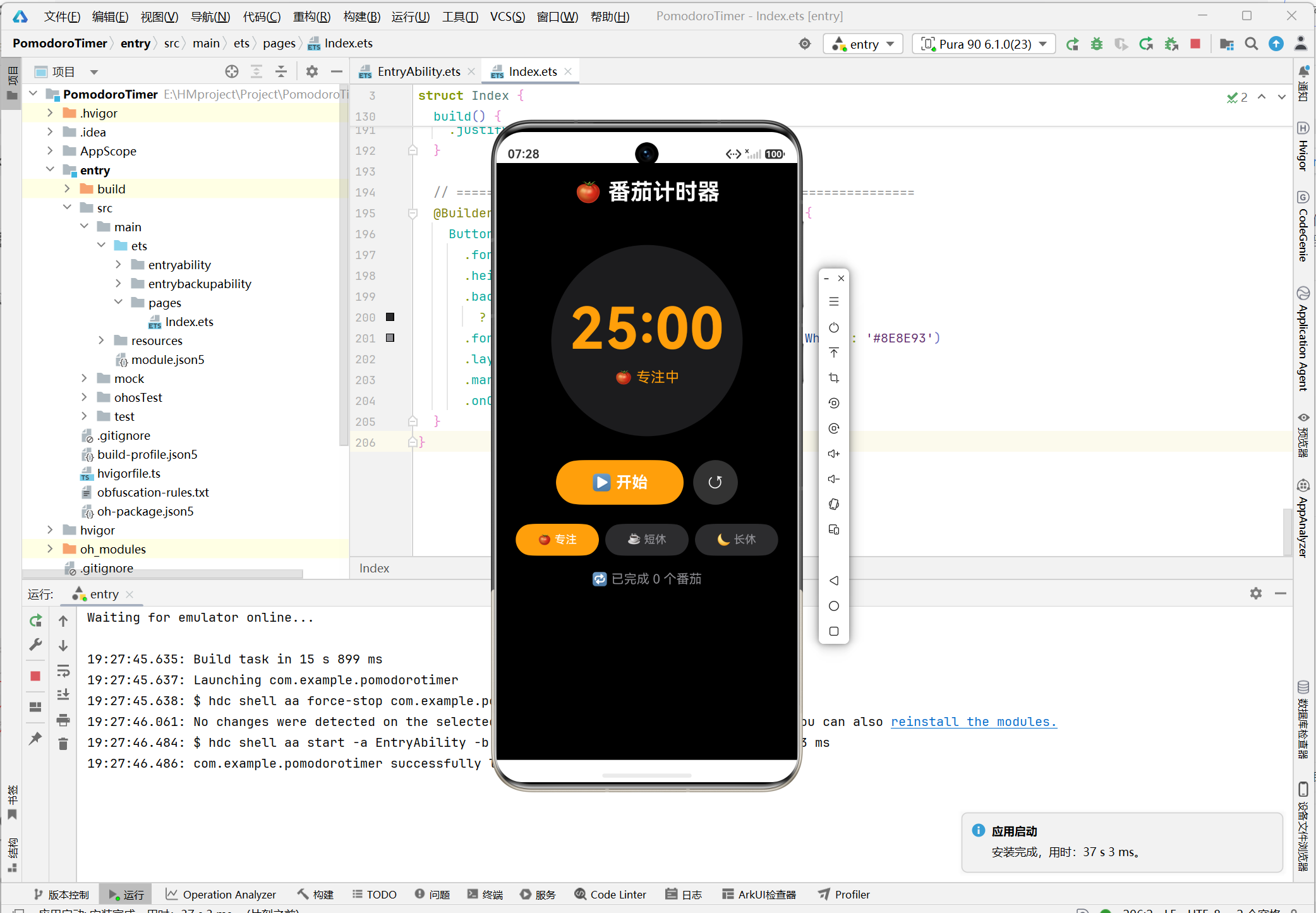
截图1:初始状态
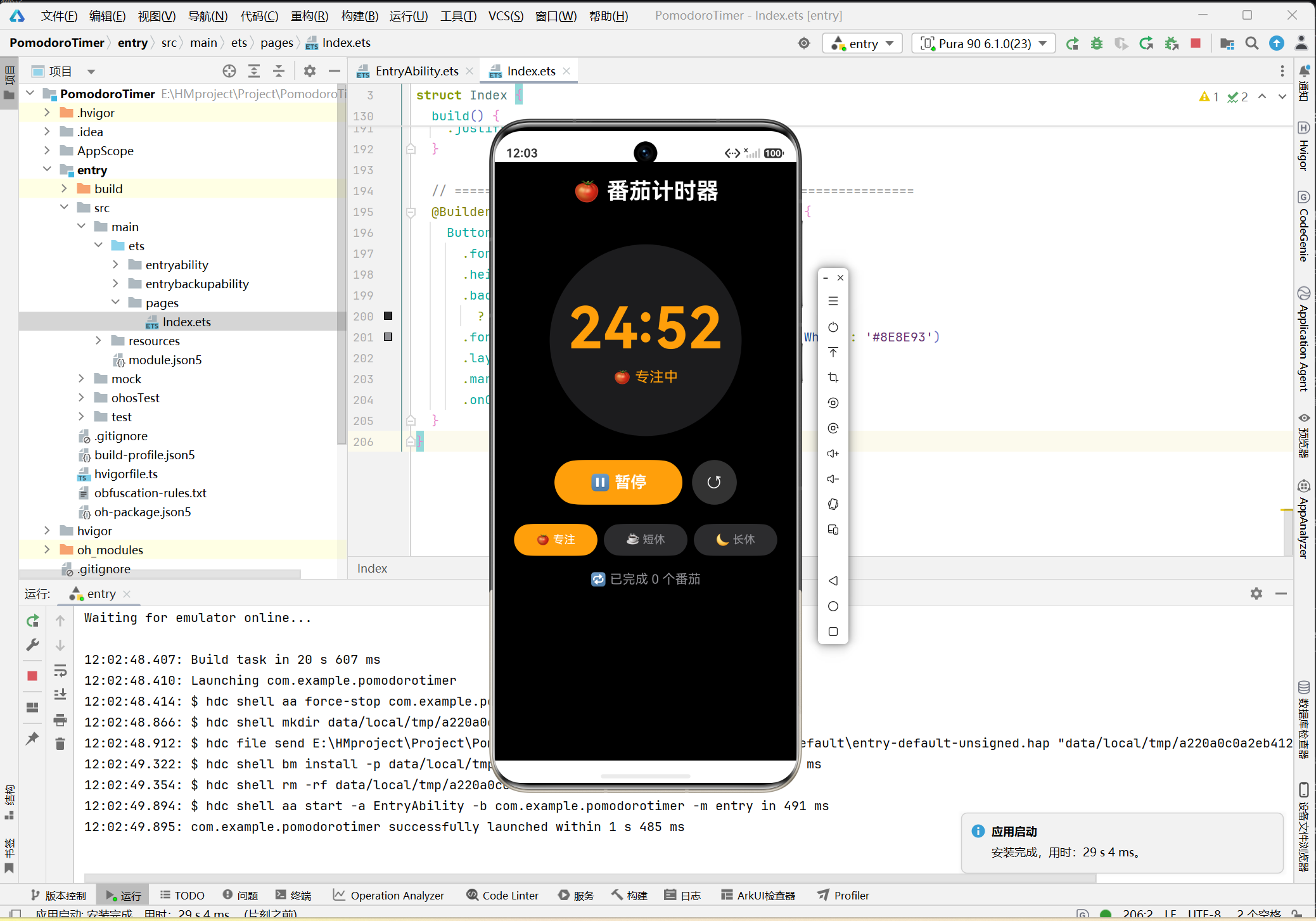
截图2:专注模式计时中
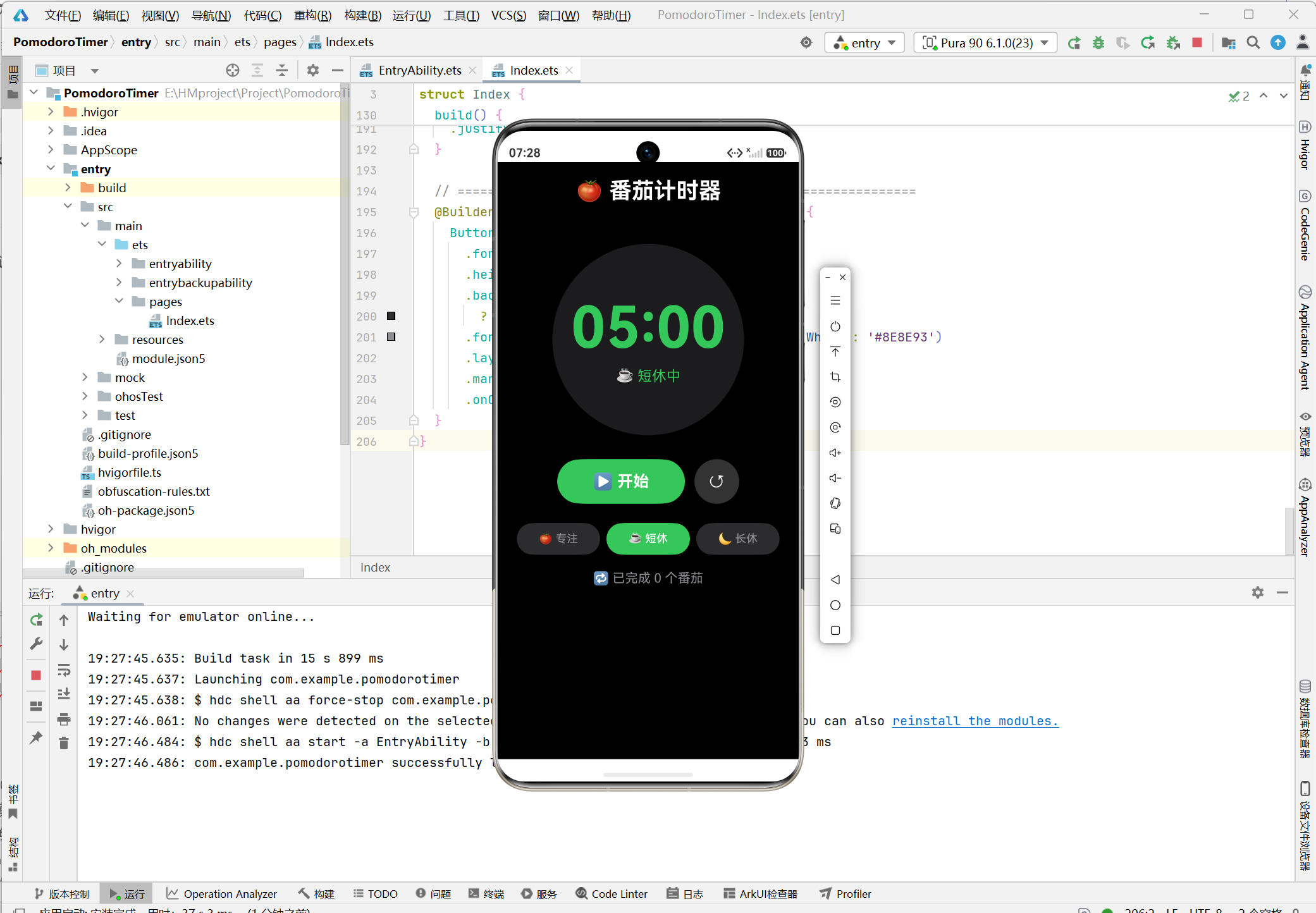
截图3:短休息模式
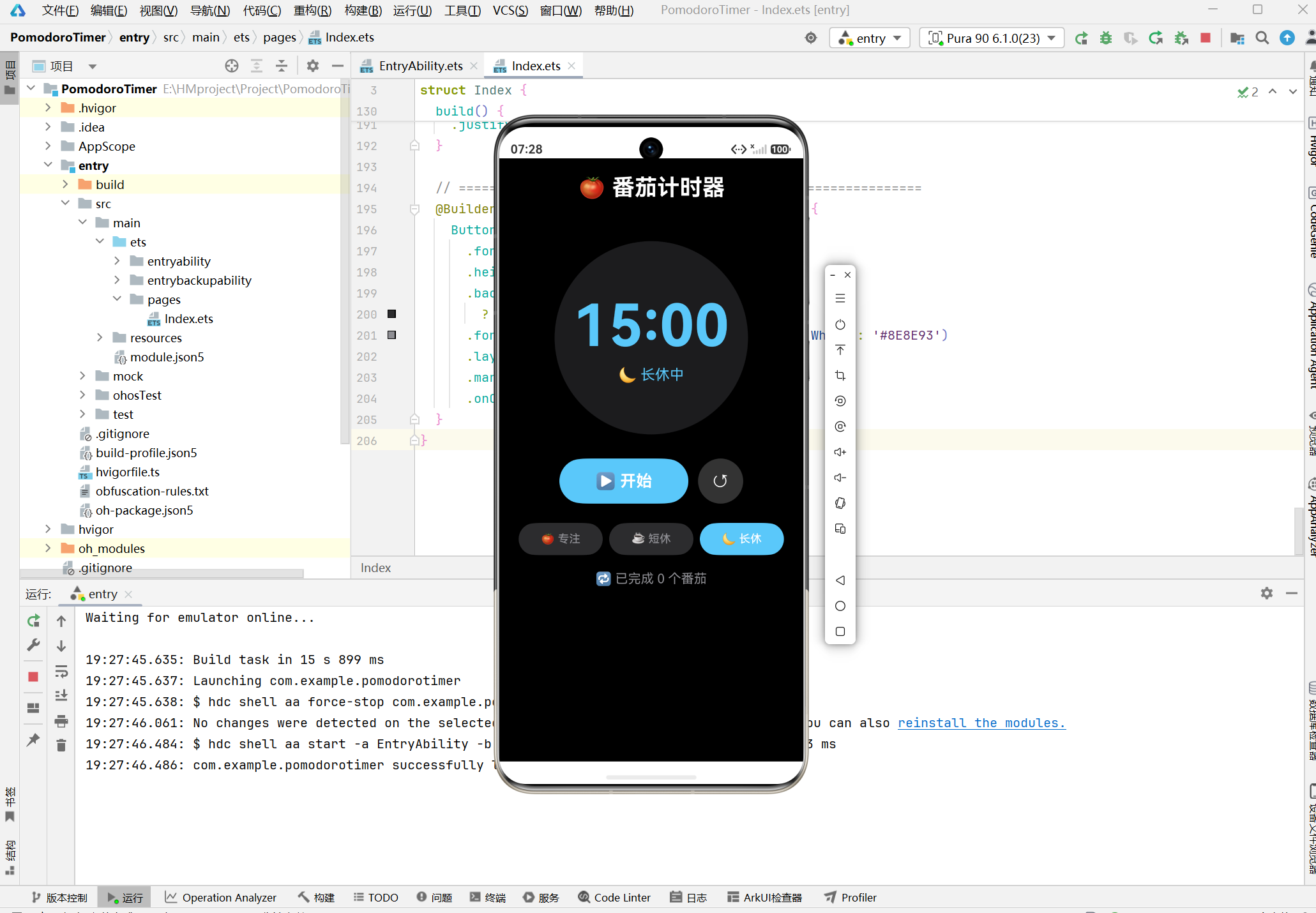
截图4:长休息模式
9 总结
本文详细阐述了基于HarmonyOS ArkUI框架的番茄计时器应用的设计与实现过程。通过该项目的开发实践,总结了以下技术要点:
- 状态管理:使用
@State装饰器管理组件内部状态,实现响应式UI更新。 - 定时器机制:合理使用
setInterval/clearInterval,注意生命周期管理。 - 组件复用:使用
@Builder装饰器封装可复用UI组件,提高代码可维护性。 - 模式管理:通过状态机模式实现模式切换逻辑,确保状态转换的可靠性。
本项目为HarmonyOS应用开发者提供了一个完整的计时器类应用开发参考,相关技术方案可应用于倒计时、秒表、闹钟等类似场景。
参考资料
- HarmonyOS应用开发指南:https://developer.harmonyos.com
- ArkUI参考文档:https://developer.harmonyos.com/cn/docs/documentation/doc-references
- 番茄工作法:Francesco Cirillo, “The Pomodoro Technique”

讨论HarmonyOS开发技术,专注于API与组件、DevEco Studio、测试、元服务和应用上架分发等。
更多推荐
 9
9 0
0- 0


 已为社区贡献6条内容

所有评论(0)