【鸿蒙原生开发会议随记 Pro】EntryAbility、SplashPage 与首页路由处理
前言
我在做《会议随记 Pro》的自动录音入口时,重新整理了一遍应用启动链路。
这个功能最开始的想法很直接:用户从外部入口进入应用以后,自动打开新建会议页,并且带上自动开始录音的参数。真正放到项目里实现时,问题很快变成了三个状态的衔接。
应用可能刚从桌面冷启动,也可能已经在后台,只是系统重新投递了一个 Want。用户可能已经同意隐私协议,也可能是第一次安装后进入应用。首页的导航栈还没有创建之前,新建会议页没有稳定的承接位置。启动页保留动画以后,外部指令还要跨过 Splash 再交给首页,不能在中途丢失。
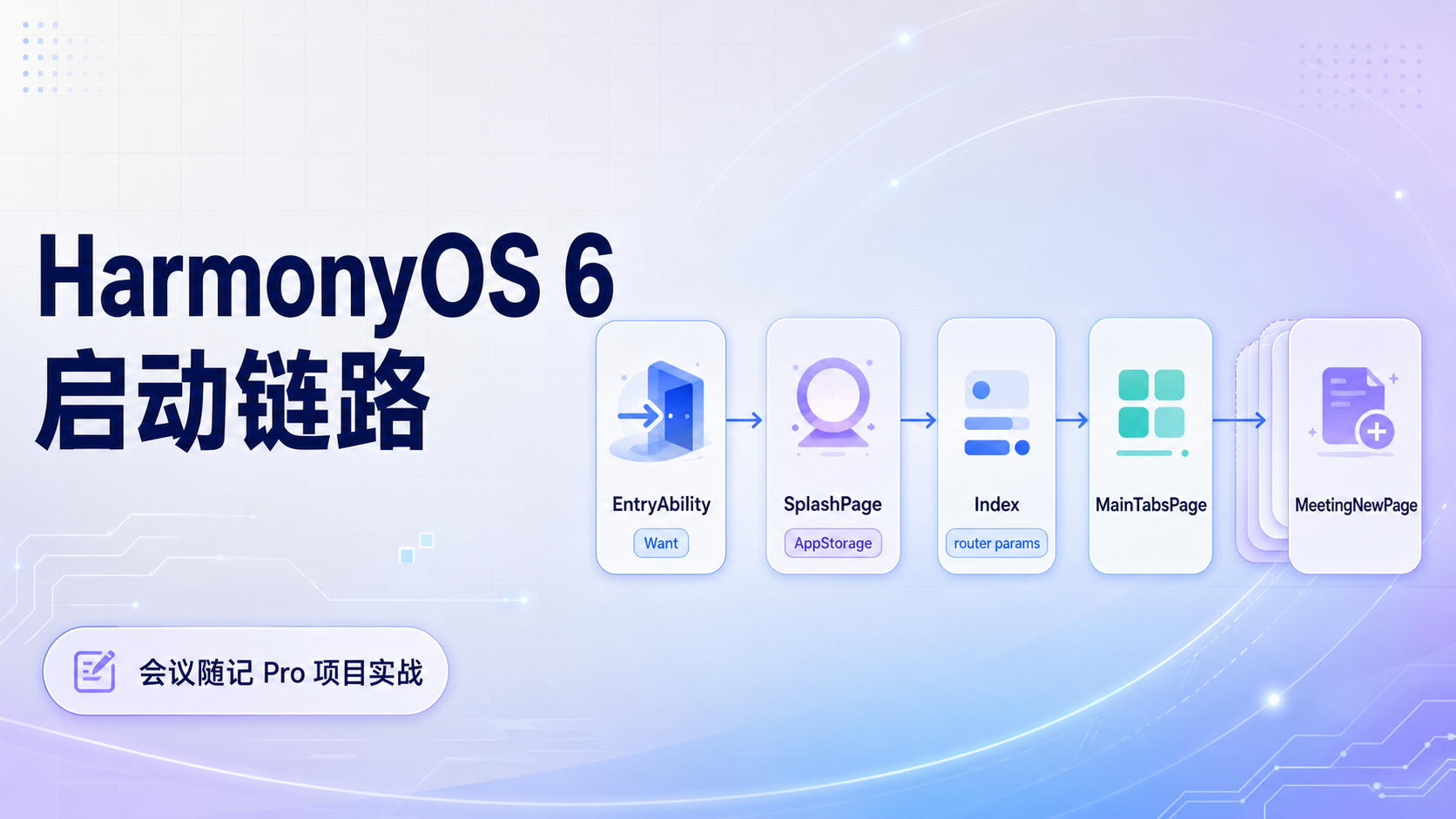
我后来把启动链路分成三段处理:
| 阶段 | 负责内容 | 不处理的内容 |
|---|---|---|
| EntryAbility | 接收 Want,初始化全局能力,暂存外部指令 | 不直接打开业务页面 |
| SplashPage | 展示启动页,把暂存指令转换成首页参数 | 不创建业务页面,不管理页面栈 |
| Index | 判断隐私状态,创建首页导航栈,消费业务指令 | 不重新处理系统 Want |
这套结构比直接跳转多了一层转交,但它把启动阶段最容易混在一起的状态分开了。入口只保存系统给到的意图,启动页只负责过渡和参数转交,首页拿到导航栈以后再处理最终页面。
一、入口只保存指令
在 HarmonyOS 项目里,EntryAbility 经常会被写得过重。它能拿到 Want,也能加载窗口内容,所以很容易把初始化、页面判断、业务跳转都塞进去。短期能工作,后面入口一多,就会变成所有启动逻辑都堆在一个文件里。
《会议随记 Pro》里我没有让 EntryAbility 直接打开新建会议页。它只做几件和系统入口有关的事情:
- 初始化应用级设置
- 处理冷启动 Want
- 处理热启动 Want
- 加载启动页
- 把外部目标暂存在
AppStorage
真实项目里的 onCreate 会初始化颜色模式和 SettingsManager,再调用 handleWant(want) 处理启动参数。窗口创建以后,项目通过 windowStage.loadContent('pages/SplashPage') 加载启动页。热启动时,onNewWant 会再次调用同一个 handleWant(want)。这几个动作都停留在入口层,不直接触碰业务页面。
handleWant() 里当前处理了三个目标:会议详情页、新建会议页、会议列表页。比如目标是新建会议页时,入口层只把 NewMeetingPage 和 autoStart 暂存起来:
private handleWant(want: Want) {
  hilog.info(0x0000, 'EntryAbility', `handleWant: ${JSON.stringify(want.parameters)}`);

  if (want.parameters?.['targetPage']) {
    const target = want.parameters['targetPage'] as string;

    if (target === 'MeetingDetailPage') {
      const meetingId = want.parameters['meetingId'] as string;
      AppStorage.setOrCreate('JumpToPage', { page: 'MeetingDetailPage', id: meetingId });
    } else if (target === 'NewMeetingPage') {
      const autoStart = want.parameters['autoStart'] as boolean;
      AppStorage.setOrCreate('JumpToPage', { page: 'NewMeetingPage', autoStart: autoStart });
    } else if (target === 'MeetingListPage') {
      AppStorage.setOrCreate('JumpToPage', { page: 'MeetingListPage' });
    }
  }
}
我保留这种写法,主要是因为 EntryAbility 此时还不知道后面的页面状态。用户是否已经同意隐私协议,首页导航栈是否已经创建,启动页动画是否已经结束,这些信息都不在入口层。它如果直接打开业务页,就要提前了解太多页面细节,后面扩展桌面卡片入口、通知入口、快捷操作入口时,入口层会越来越难维护。
把目标暂存在 AppStorage 后,入口层就完成了它该做的事。后续页面怎么解释这条指令,交给更接近 UI 状态的地方处理。
二、启动页负责转交
SplashPage 在这个链路里承担的是中转任务。
项目里的启动页有自己的动画状态,比如透明度和缩放。它进入页面后,先启动动画,再延迟跳转到首页。这个 1.5 秒的停留时间看起来只是视觉处理,实际也给了外部指令一次稳定转交的机会。
当前项目里,SplashPage 会读取 AppStorage 里的 JumpToPage。如果发现目标是 NewMeetingPage,它不会直接导入新建会议页,也不会自己管理页面栈,而是把这个指令转换成首页能理解的 router 参数:
private jumpToMainPage() {
  setTimeout(() => {
    const jumpInfo = AppStorage.get('JumpToPage') as Record<string, Object>;

    let routerParams: Record<string, Object> = {};

    if (jumpInfo && jumpInfo['page'] === 'NewMeetingPage') {
      routerParams = {
        'targetAction': 'AutoStartRecording',
        'autoStart': jumpInfo['autoStart']
      };

      AppStorage.setOrCreate('JumpToPage', undefined);
    }

    router.replaceUrl({
      url: 'pages/Index',
      params: routerParams
    });
  }, 1500);
}
这里我更在意的是职责边界。Splash 可以读取暂存指令,可以转成 Index 能理解的参数,也可以清理已经消费的指令。它不应该直接判断用户是否同意隐私协议,也不应该知道 meetingNew 这个导航目标在 NavPathStack 里叫什么。
这层转换看似只是换了一个参数名,实际把启动链路里的临时状态隔离开了。JumpToPage 是入口层和启动页之间的暂存数据,targetAction 是启动页和首页之间的路由动作。两者语义不一样,生命周期也不一样。暂存指令被消费以后要清掉,首页路由参数只在当前进入 Index 时有效。
后面如果继续补齐会议详情页和会议列表页,我会沿着这套写法扩展,不会让 Splash 变成业务页面分发器。
| 入口层暂存目标 | Splash 转换后的动作 | 首页最终处理 |
|---|---|---|
NewMeetingPage |
AutoStartRecording |
进入主页后压入新建会议页 |
MeetingDetailPage |
OpenMeetingDetail |
进入主页后压入会议详情页 |
MeetingListPage |
OpenMeetingList |
进入主页后切换到会议列表 |
三、首页先确认基础状态
Index 才是最终处理页面流向的地方。
真实项目里的 Index 提供了全局 NavPathStack 和 pageTitle,所有主要页面都在 pageMaps() 里统一注册。主 Tab、欢迎页、新建会议页、会议详情页、会议编辑页、联系人详情页、项目详情页和设置页,都从这里进入导航系统。
首页在 aboutToAppear() 里调用 checkRoute()。这一步先读取隐私同意状态。已经同意的用户先进入 mainTabs,新用户先进入 welcome。只有进入主界面以后,才继续检查自动录音参数。
async checkRoute() {
  const context = getContext(this) as common.UIAbilityContext;

  const isAgreed = await PrivacyManager.isAgreed(context);

  if (isAgreed) {
    this.appStack.pushPath({ name: 'mainTabs' }, false);
    this.checkAutoStartIntent();
  } else {
    this.appStack.pushPath({ name: 'welcome' }, false);
  }

  this.isLoading = false;
}
这个顺序我会坚持保留。会议录音涉及麦克风权限和用户音频数据,第一次安装后不能绕过欢迎页和隐私确认。外部入口可以带着自动录音指令进来,但它不能替用户完成基础授权流程。
checkAutoStartIntent() 里会读取 Splash 传过来的 router 参数。如果 targetAction 是 AutoStartRecording,首页会在 mainTabs 之上继续压入 meetingNew,并把 autoStart 参数传给新建会议页。
checkAutoStartIntent() {
  try {
    const params = router.getParams() as Record<string, Object>;

    if (params && params['targetAction'] === 'AutoStartRecording') {
      let navParam: Record<string, Object> = {
        'autoStart': true
      };

      this.appStack.pushPath({
        name: 'meetingNew',
        param: navParam
      });
    }
  } catch (e) {
    console.error('CheckIntent', `解析路由参数失败: ${JSON.stringify(e)}`);
  }
}
这里还有一个容易忽略的返回路径。自动录音入口不是替换主界面,而是在主界面之上打开新建会议页。用户完成保存或者取消以后,页面应该回到主 Tab。mainTabs 先入栈,新建页再入栈,返回关系才会稳定。
如果直接从启动页进入新建页,后面就要再处理新建页关闭后的落点。这个逻辑不复杂,但很容易散落在各个页面里。首页统一处理页面栈,后续维护成本会低很多。
四、运行页面、
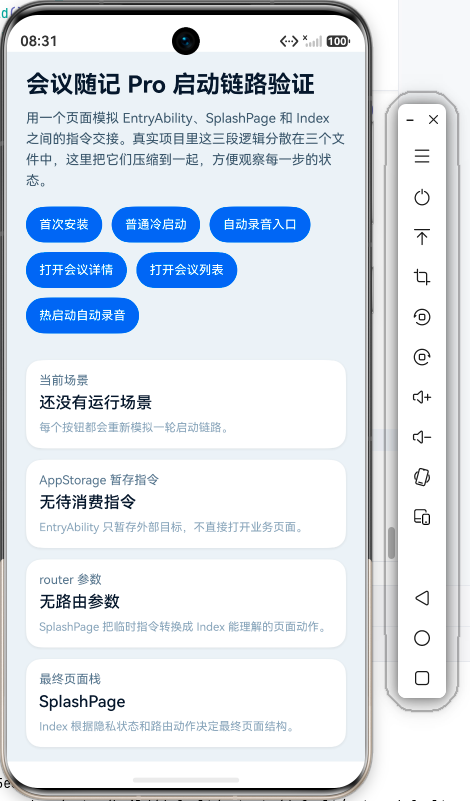
我把项目里的三段逻辑压缩到一个 Index.ets 页面里,用按钮模拟不同启动场景。这个页面不依赖真实 EntryAbility 和 SplashPage,主要用来观察每一步状态如何变化。
这个演示页保留了五类信息:
| 输出区域 | 对应真实项目 |
|---|---|
| 当前场景 | 当前模拟的启动来源 |
| 暂存指令 | EntryAbility 写入的 JumpToPage |
| 首页参数 | SplashPage 转换后的 router params |
| 最终页面栈 | Index 消费参数后的导航结构 |
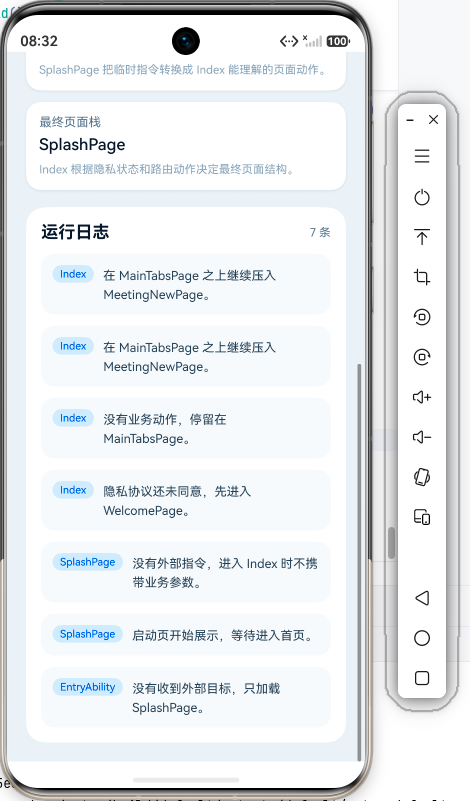
| 运行日志 | 三段链路的执行顺序 |
把下面代码放到 entry/src/main/ets/pages/Index.ets 后运行,可以分别点击首次安装、普通冷启动、自动录音入口、会议详情入口、会议列表入口和热启动自动录音,观察最终页面栈的差异。
interface TraceLog {
  id: number;
  stage: string;
  content: string;
}

enum StartupScenario {
  FirstInstall = 0,
  NormalColdStart = 1,
  AutoRecordColdStart = 2,
  OpenMeetingDetail = 3,
  OpenMeetingList = 4,
  HotStartAutoRecord = 5
}

@Entry
@Component
struct Index {
  @State privacyAgreed: boolean = true;

  @State pendingPage: string = '';
  @State pendingMeetingId: string = '';
  @State pendingAutoStart: boolean = false;

  @State routerAction: string = '';
  @State routerMeetingId: string = '';
  @State routerAutoStart: boolean = false;

  @State pageStack: string[] = ['SplashPage'];
  @State logs: TraceLog[] = [];
  @State logSeed: number = 0;
  @State currentScenarioName: string = '还没有运行场景';

  private addLog(stage: string, content: string): void {
    const next: TraceLog = {
      id: this.logSeed + 1,
      stage: stage,
      content: content
    };

    this.logSeed = next.id;
    this.logs = [next, ...this.logs].slice(0, 12);
  }

  private resetRuntime(): void {
    this.privacyAgreed = true;

    this.pendingPage = '';
    this.pendingMeetingId = '';
    this.pendingAutoStart = false;

    this.routerAction = '';
    this.routerMeetingId = '';
    this.routerAutoStart = false;

    this.pageStack = ['SplashPage'];
    this.logs = [];
    this.logSeed = 0;
  }

  private runScenario(scenario: StartupScenario): void {
    this.resetRuntime();

    if (scenario === StartupScenario.FirstInstall) {
      this.currentScenarioName = '首次安装后进入应用';
      this.privacyAgreed = false;

      this.addLog('EntryAbility', '没有收到外部目标,只加载 SplashPage。');
      this.simulateSplashPage();
      this.simulateIndexPage();
      return;
    }

    if (scenario === StartupScenario.NormalColdStart) {
      this.currentScenarioName = '老用户普通冷启动';

      this.addLog('EntryAbility', '没有收到外部目标,继续普通启动链路。');
      this.simulateSplashPage();
      this.simulateIndexPage();
      return;
    }

    if (scenario === StartupScenario.AutoRecordColdStart) {
      this.currentScenarioName = '外部入口打开新建会议并自动录音';

      this.simulateEntryAbility('NewMeetingPage', '', true);
      this.simulateSplashPage();
      this.simulateIndexPage();
      return;
    }

    if (scenario === StartupScenario.OpenMeetingDetail) {
      this.currentScenarioName = '外部入口打开会议详情';

      this.simulateEntryAbility('MeetingDetailPage', 'mtg-20260608-001', false);
      this.simulateSplashPage();
      this.simulateIndexPage();
      return;
    }

    if (scenario === StartupScenario.OpenMeetingList) {
      this.currentScenarioName = '外部入口打开会议列表';

      this.simulateEntryAbility('MeetingListPage', '', false);
      this.simulateSplashPage();
      this.simulateIndexPage();
      return;
    }

    if (scenario === StartupScenario.HotStartAutoRecord) {
      this.currentScenarioName = '热启动时收到自动录音指令';

      this.addLog('EntryAbility.onNewWant', '应用已经存在,系统重新投递 Want。');
      this.simulateEntryAbility('NewMeetingPage', '', true);
      this.simulateSplashPage();
      this.simulateIndexPage();
    }
  }

  private simulateEntryAbility(targetPage: string, meetingId: string, autoStart: boolean): void {
    this.pendingPage = targetPage;
    this.pendingMeetingId = meetingId;
    this.pendingAutoStart = autoStart;

    if (targetPage === 'NewMeetingPage') {
      this.addLog('EntryAbility', '把 NewMeetingPage 和 autoStart 暂存到 AppStorage。');
      return;
    }

    if (targetPage === 'MeetingDetailPage') {
      this.addLog('EntryAbility', `把 MeetingDetailPage 和 meetingId=${meetingId} 暂存到 AppStorage。`);
      return;
    }

    if (targetPage === 'MeetingListPage') {
      this.addLog('EntryAbility', '把 MeetingListPage 暂存到 AppStorage。');
      return;
    }

    this.addLog('EntryAbility', '没有识别到目标页面,继续普通启动。');
  }

  private simulateSplashPage(): void {
    this.pageStack = ['SplashPage'];
    this.addLog('SplashPage', '启动页开始展示,等待进入首页。');

    this.routerAction = '';
    this.routerMeetingId = '';
    this.routerAutoStart = false;

    if (this.pendingPage === 'NewMeetingPage') {
      this.routerAction = 'AutoStartRecording';
      this.routerAutoStart = this.pendingAutoStart;

      this.addLog('SplashPage', '把 NewMeetingPage 转成 AutoStartRecording 路由参数。');
      this.clearPendingJumpInfo();
      return;
    }

    if (this.pendingPage === 'MeetingDetailPage') {
      this.routerAction = 'OpenMeetingDetail';
      this.routerMeetingId = this.pendingMeetingId;

      this.addLog('SplashPage', '把 MeetingDetailPage 转成 OpenMeetingDetail 路由参数。');
      this.clearPendingJumpInfo();
      return;
    }

    if (this.pendingPage === 'MeetingListPage') {
      this.routerAction = 'OpenMeetingList';

      this.addLog('SplashPage', '把 MeetingListPage 转成 OpenMeetingList 路由参数。');
      this.clearPendingJumpInfo();
      return;
    }

    this.addLog('SplashPage', '没有外部指令,进入 Index 时不携带业务参数。');
  }

  private clearPendingJumpInfo(): void {
    this.pendingPage = '';
    this.pendingMeetingId = '';
    this.pendingAutoStart = false;

    this.addLog('SplashPage', '临时指令已经消费,避免下一次启动重复执行。');
  }

  private simulateIndexPage(): void {
    this.pageStack = ['Index'];

    if (!this.privacyAgreed) {
      this.pageStack = ['Index', 'WelcomePage'];
      this.addLog('Index', '隐私协议还未同意,先进入 WelcomePage。');
      return;
    }

    let nextStack: string[] = ['Index', 'MainTabsPage'];
    this.addLog('Index', '隐私协议已同意,先把 MainTabsPage 压入页面栈。');

    if (this.routerAction === 'AutoStartRecording') {
      nextStack.push('MeetingNewPage(autoStart=true)');
      this.addLog('Index', '在 MainTabsPage 之上继续压入 MeetingNewPage。');
    } else if (this.routerAction === 'OpenMeetingDetail') {
      nextStack.push(`MeetingDetailPage(${this.routerMeetingId})`);
      this.addLog('Index', `在 MainTabsPage 之上继续压入 MeetingDetailPage,meetingId=${this.routerMeetingId}。`);
    } else if (this.routerAction === 'OpenMeetingList') {
      nextStack.push('MeetingListTab');
      this.addLog('Index', '保留 MainTabsPage,并把当前业务目标指向会议列表。');
    } else {
      this.addLog('Index', '没有业务动作,停留在 MainTabsPage。');
    }

    this.pageStack = nextStack;
  }

  private getPendingText(): string {
    if (this.pendingPage.length === 0) {
      return '无待消费指令';
    }

    if (this.pendingPage === 'NewMeetingPage') {
      return `${this.pendingPage}, autoStart=${this.pendingAutoStart}`;
    }

    if (this.pendingPage === 'MeetingDetailPage') {
      return `${this.pendingPage}, meetingId=${this.pendingMeetingId}`;
    }

    return this.pendingPage;
  }

  private getRouterParamText(): string {
    if (this.routerAction.length === 0) {
      return '无路由参数';
    }

    if (this.routerAction === 'AutoStartRecording') {
      return `${this.routerAction}, autoStart=${this.routerAutoStart}`;
    }

    if (this.routerAction === 'OpenMeetingDetail') {
      return `${this.routerAction}, meetingId=${this.routerMeetingId}`;
    }

    return this.routerAction;
  }

  private getStackText(): string {
    return this.pageStack.join('  →  ');
  }

  @Builder
  private BuildScenarioButton(text: string, scenario: StartupScenario) {
    Button(text)
      .height(38)
      .fontSize(13)
      .backgroundColor('#2563EB')
      .fontColor(Color.White)
      .borderRadius(19)
      .padding({
        left: 14,
        right: 14
      })
      .margin({
        right: 10,
        bottom: 10
      })
      .onClick(() => {
        this.runScenario(scenario);
      })
  }

  @Builder
  private BuildInfoCard(title: string, value: string, desc: string) {
    Column({ space: 6 }) {
      Text(title)
        .fontSize(13)
        .fontColor('#64748B')

      Text(value)
        .fontSize(17)
        .fontWeight(FontWeight.Medium)
        .fontColor('#0F172A')
        .maxLines(2)
        .textOverflow({ overflow: TextOverflow.Ellipsis })

      Text(desc)
        .fontSize(12)
        .fontColor('#94A3B8')
        .lineHeight(18)
    }
    .alignItems(HorizontalAlign.Start)
    .width('100%')
    .padding(14)
    .backgroundColor(Color.White)
    .borderRadius(16)
    .shadow({
      radius: 10,
      color: '#12000000',
      offsetX: 0,
      offsetY: 3
    })
  }

  @Builder
  private BuildStageTag(text: string) {
    Text(text)
      .fontSize(11)
      .fontColor('#1D4ED8')
      .padding({
        left: 8,
        right: 8,
        top: 3,
        bottom: 3
      })
      .backgroundColor('#DBEAFE')
      .borderRadius(10)
  }

  build() {
    Scroll() {
      Column({ space: 18 }) {
        Column({ space: 8 }) {
          Text('会议随记 Pro 启动链路验证')
            .fontSize(25)
            .fontWeight(FontWeight.Bold)
            .fontColor('#0F172A')

          Text('用一个页面模拟 EntryAbility、SplashPage 和 Index 之间的指令交接。真实项目里这三段逻辑分散在三个文件中,这里把它们压缩到一起,方便观察每一步的状态。')
            .fontSize(14)
            .fontColor('#475569')
            .lineHeight(22)
        }
        .alignItems(HorizontalAlign.Start)
        .width('100%')

        Flex({
          wrap: FlexWrap.Wrap,
          justifyContent: FlexAlign.Start
        }) {
          this.BuildScenarioButton('首次安装', StartupScenario.FirstInstall)
          this.BuildScenarioButton('普通冷启动', StartupScenario.NormalColdStart)
          this.BuildScenarioButton('自动录音入口', StartupScenario.AutoRecordColdStart)
          this.BuildScenarioButton('打开会议详情', StartupScenario.OpenMeetingDetail)
          this.BuildScenarioButton('打开会议列表', StartupScenario.OpenMeetingList)
          this.BuildScenarioButton('热启动自动录音', StartupScenario.HotStartAutoRecord)
        }
        .width('100%')

        Column({ space: 12 }) {
          this.BuildInfoCard(
            '当前场景',
            this.currentScenarioName,
            '每个按钮都会重新模拟一轮启动链路。'
          )

          this.BuildInfoCard(
            'AppStorage 暂存指令',
            this.getPendingText(),
            'EntryAbility 只暂存外部目标,不直接打开业务页面。'
          )

          this.BuildInfoCard(
            'router 参数',
            this.getRouterParamText(),
            'SplashPage 把临时指令转换成 Index 能理解的页面动作。'
          )

          this.BuildInfoCard(
            '最终页面栈',
            this.getStackText(),
            'Index 根据隐私状态和路由动作决定最终页面结构。'
          )
        }
        .width('100%')

        Column({ space: 12 }) {
          Row() {
            Text('运行日志')
              .fontSize(18)
              .fontWeight(FontWeight.Bold)
              .fontColor('#0F172A')

            Blank()

            Text(`${this.logs.length} 条`)
              .fontSize(12)
              .fontColor('#64748B')
          }
          .width('100%')

          if (this.logs.length === 0) {
            Column({ space: 8 }) {
              Text('还没有运行记录')
                .fontSize(14)
                .fontColor('#64748B')

              Text('点击上方任意场景按钮,就能看到三段启动逻辑的执行顺序。')
                .fontSize(12)
                .fontColor('#94A3B8')
            }
            .width('100%')
            .padding(20)
            .backgroundColor('#F8FAFC')
            .borderRadius(16)
          } else {
            ForEach(this.logs, (item: TraceLog) => {
              Row({ space: 10 }) {
                this.BuildStageTag(item.stage)

                Text(item.content)
                  .fontSize(13)
                  .fontColor('#334155')
                  .lineHeight(20)
                  .layoutWeight(1)
              }
              .width('100%')
              .alignItems(VerticalAlign.Top)
              .padding(12)
              .backgroundColor('#F8FAFC')
              .borderRadius(14)
            }, (item: TraceLog) => item.id.toString())
          }
        }
        .width('100%')
        .padding(16)
        .backgroundColor(Color.White)
        .borderRadius(20)
      }
      .width('100%')
      .padding(20)
    }
    .width('100%')
    .height('100%')
    .backgroundColor('#EEF2F7')
  }
}
五、运行以后观察页面栈
运行页面以后,我会优先观察最终页面栈,而不是观察按钮样式。
普通冷启动会停在下面这个结构:
Index → MainTabsPage
首次安装会进入欢迎页:
Index → WelcomePage
自动录音入口会变成:
Index → MainTabsPage → MeetingNewPage(autoStart=true)
这三个结果对应了真实项目里最重要的判断。业务页没有替换首页,而是压在主界面之上。用户保存会议或者取消操作以后,返回路径仍然能回到主 Tab。这个细节比自动打开新建页本身更重要,因为启动入口处理不稳时,最容易出错的往往是返回路径。
这段演示代码还模拟了会议详情页和会议列表页。真实项目里的 EntryAbility 已经能够暂存 MeetingDetailPage 和 MeetingListPage,后续只要继续补齐 Splash 到 Index 的转换逻辑,就能沿用同一套入口结构。
迁回真实项目时,我会保留三层边界:
EntryAbility继续处理 Want 和全局初始化,不导入业务页面。SplashPage继续处理启动展示和参数转交,不维护导航栈。Index继续处理隐私状态、首页导航栈和业务路由动作。
演示页里的按钮、模拟状态、日志面板都不需要迁回项目。它们只是为了让启动链路在一个页面里完整呈现。真实项目里要保留的是这套职责划分,而不是这份演示 UI。
这类启动链路还有一个边界。应用已经在前台时,有些动作可以交给当前页面自己刷新;应用完全未启动时,更适合走 EntryAbility → SplashPage → Index 这条路径。后面继续做桌面卡片入口和通知跳转时,我也会优先沿着这个判断处理。
总结
启动链路里最容易混在一起的是系统入口、启动动画、首页路由和业务页面。EntryAbility 能接收 Want,但它不适合判断所有业务路径;SplashPage 能完成启动过渡,但它不应该管理业务页面;Index 拿到隐私状态和导航栈以后,再决定最终页面结构,返回路径会更容易维护。
《会议随记 Pro》现在把自动录音入口处理成三段:
- 入口暂存指令
- 启动页转换参数
- 首页消费动作
这个处理方式后续还能承接会议详情、桌面卡片、通知跳转这些入口。新增入口时,我会优先保留这条边界,而不是把系统参数、页面跳转和业务状态继续混在同一个文件里。
我的《会议随记 Pro》已经上架应用市场,里面包含会议录音、时间轴笔记、联系人、项目、标签管理和多设备适配这些功能。对这类鸿蒙原生应用实现感兴趣的话,可以直接下载体验一下:会议随记 Pro。

讨论HarmonyOS开发技术,专注于API与组件、DevEco Studio、测试、元服务和应用上架分发等。
更多推荐

 9
9 0
0- 0



 已为社区贡献106条内容

所有评论(0)