第73篇 | HarmonyOS 近场分享隐私:保险箱照片为什么不能默认暴露
第73篇 | HarmonyOS 近场分享隐私:保险箱照片为什么不能默认暴露
第 73 篇把分享和隐私放在一起看。近场分享越自然,越需要明确边界:公开相册里的照片可以快速分享,但保险箱照片不能因为设备碰一碰或隔空抓取就默认暴露。双镜记忆相机通过 visibility、保险箱解锁状态和页面上下文共同控制这条边界。
这一篇不会只说“要保护隐私”,而是回到项目代码看数据模型如何区分 public/private,照片如何移入和恢复,保险箱 UI 如何要求身份认证,以及解锁后哪些动作才允许继续。这样读者能理解隐私不是一句产品口号,而是一组工程状态。
本篇目标
- 理解
GalleryMoment.visibility如何划分公开相册和保险箱。 - 掌握移入保险箱后为什么要立即锁定。
- 理解近场分享只应该围绕当前可见上下文取记录。
- 明确保险箱导出、分享和恢复都要在解锁状态下操作。
对应源码位置
superImage/entry/src/main/ets/services/GalleryRecordService.etssuperImage/entry/src/main/ets/pages/Index.ets
保险箱入口不是另一个相册皮肤
保险箱页面和普通相册最大的不同不是颜色,而是访问前提。普通相册用于整理公开记忆,保险箱用于保存不希望默认出现在分享、地图和浏览流里的照片。用户进入保险箱时,页面会先展示锁定态,要求本地身份认证。
这也是近场分享隐私的核心:不是把私密照片从项目里删除,而是让它们只在明确解锁、明确进入保险箱上下文时可见。只要仍在普通相册路径里,分享目标就应该来自公开记录。
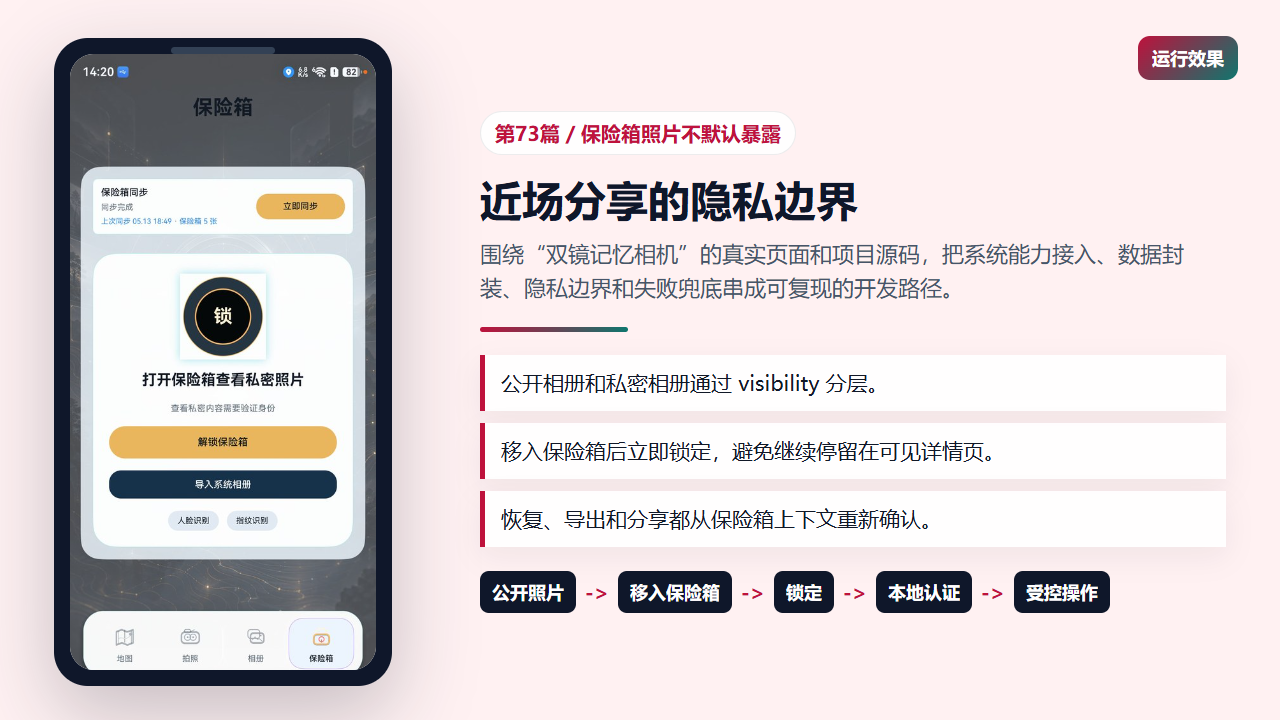
保险箱页面要求先解锁再浏览私密照片
数据模型先区分 public 和 private
GalleryMoment 里专门定义了 GalleryMomentVisibility,每条照片记录都带有 visibility 字段。它和路径、地点、AI 描述、云同步修订号放在同一个模型里,说明公开/私密不是 UI 临时状态,而是记录本身的属性。
把隐私属性放进持久化模型很关键。应用重启、同步、排序、列表渲染时都能根据同一个字段判断记录归属。如果只靠页面临时数组保存私密状态,下一次加载就容易把保险箱照片重新混进公开相册。
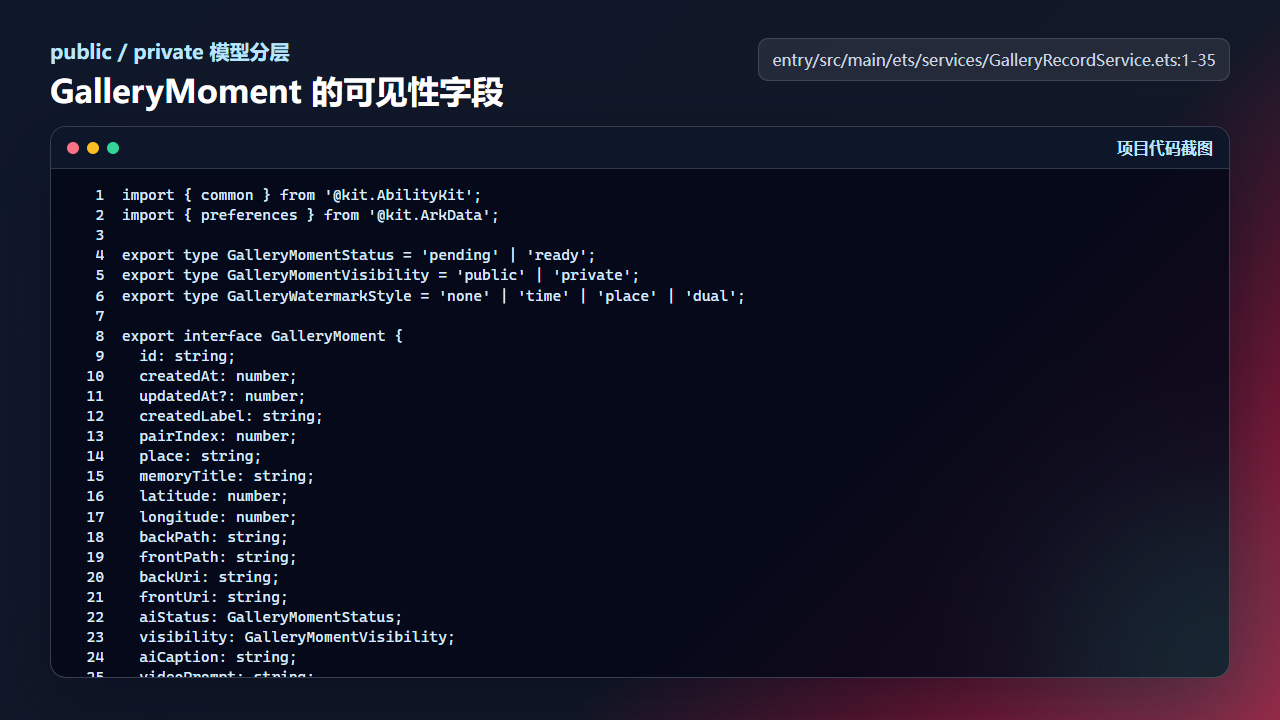
GalleryMomentVisibility 把公开照片和私密照片写进数据模型
import { common } from '@kit.AbilityKit';
import { preferences } from '@kit.ArkData';

export type GalleryMomentStatus = 'pending' | 'ready';
export type GalleryMomentVisibility = 'public' | 'private';
export type GalleryWatermarkStyle = 'none' | 'time' | 'place' | 'dual';

export interface GalleryMoment {
  id: string;
  createdAt: number;
  updatedAt?: number;
  createdLabel: string;
  pairIndex: number;
  place: string;
  memoryTitle: string;
  latitude: number;
  longitude: number;
  backPath: string;
  frontPath: string;
  backUri: string;
  frontUri: string;
  aiStatus: GalleryMomentStatus;
  visibility: GalleryMomentVisibility;
  aiCaption: string;
  videoPrompt: string;
  watermarkStyle?: GalleryWatermarkStyle;
  watermarkText?: string;
  userNote?: string;
  aiPoem?: string;
  ownerKey?: string;
  syncDirty?: boolean;
  cloudRevision?: number;
  cloudBackAssetDataUrl?: string;
  cloudFrontAssetDataUrl?: string;
}
修改可见性时要保留完整记录
updateRecordVisibility 不是简单改一个字段,它会构造新的 GalleryMoment,保留时间、地点、路径、AI 文案、水印、备注、云端资产和修订信息,同时把 updatedAt 更新为当前时间,并设置 syncDirty。
这样写可以保证移入保险箱不是“复制一份简化记录”,而是同一条记忆在公开/私密两个分层之间移动。保留云同步字段也很重要,否则私密状态改变后,端云一致性会失去依据。
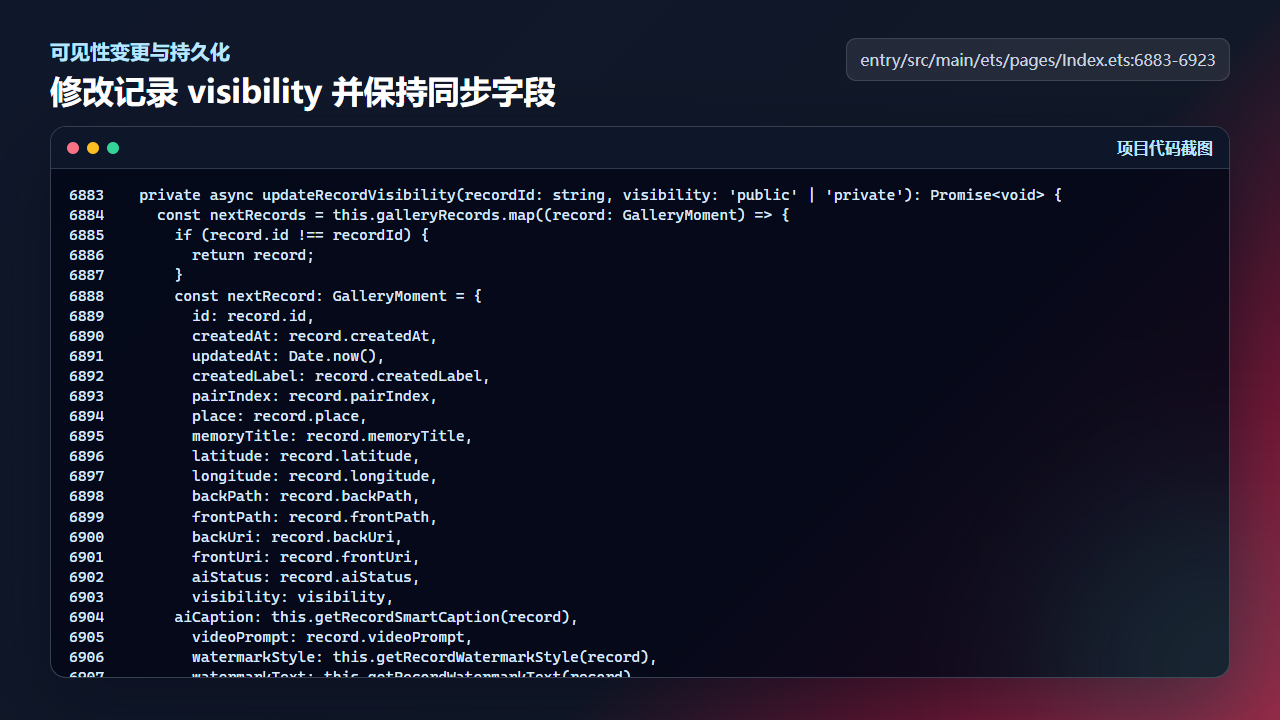
updateRecordVisibility 保留记录完整字段并写回本地存储
  private async updateRecordVisibility(recordId: string, visibility: 'public' | 'private'): Promise<void> {
    const nextRecords = this.galleryRecords.map((record: GalleryMoment) => {
      if (record.id !== recordId) {
        return record;
      }
      const nextRecord: GalleryMoment = {
        id: record.id,
        createdAt: record.createdAt,
        updatedAt: Date.now(),
        createdLabel: record.createdLabel,
        pairIndex: record.pairIndex,
        place: record.place,
        memoryTitle: record.memoryTitle,
        latitude: record.latitude,
        longitude: record.longitude,
        backPath: record.backPath,
        frontPath: record.frontPath,
        backUri: record.backUri,
        frontUri: record.frontUri,
        aiStatus: record.aiStatus,
        visibility: visibility,
      aiCaption: this.getRecordSmartCaption(record),
        videoPrompt: record.videoPrompt,
        watermarkStyle: this.getRecordWatermarkStyle(record),
        watermarkText: this.getRecordWatermarkText(record),
        userNote: this.getRecordUserNote(record),
        aiPoem: this.getRecordAiPoem(record),
        ownerKey: record.ownerKey,
        syncDirty: true,
        cloudRevision: record.cloudRevision ?? 0,
        cloudBackAssetDataUrl: record.cloudBackAssetDataUrl ?? '',
        cloudFrontAssetDataUrl: record.cloudFrontAssetDataUrl ?? ''
      };
      return nextRecord;
    });
    this.galleryRecords = nextRecords;
    this.syncRecordSelections(nextRecords);
    this.syncSelectedMapMemory(false);
    await this.syncMapMarkers();
    await this.persistGalleryRecords(nextRecords);
  }
移入保险箱后立即锁定
moveRecordToVault 调用可见性更新后,会把 vaultSelectedId 指向这条记录,同时把 vaultUnlocked 改为 false。这个细节非常重要:用户从公开详情页把照片移入保险箱后,不能让旧详情继续展示私密内容。
恢复照片时则反向操作:关闭保险箱查看器,把记录改回 public,并把相册选中项指回这条记录。移入和恢复都要同步地图标记、选择状态和本地持久化,隐私边界才不会只在一个页面上成立。
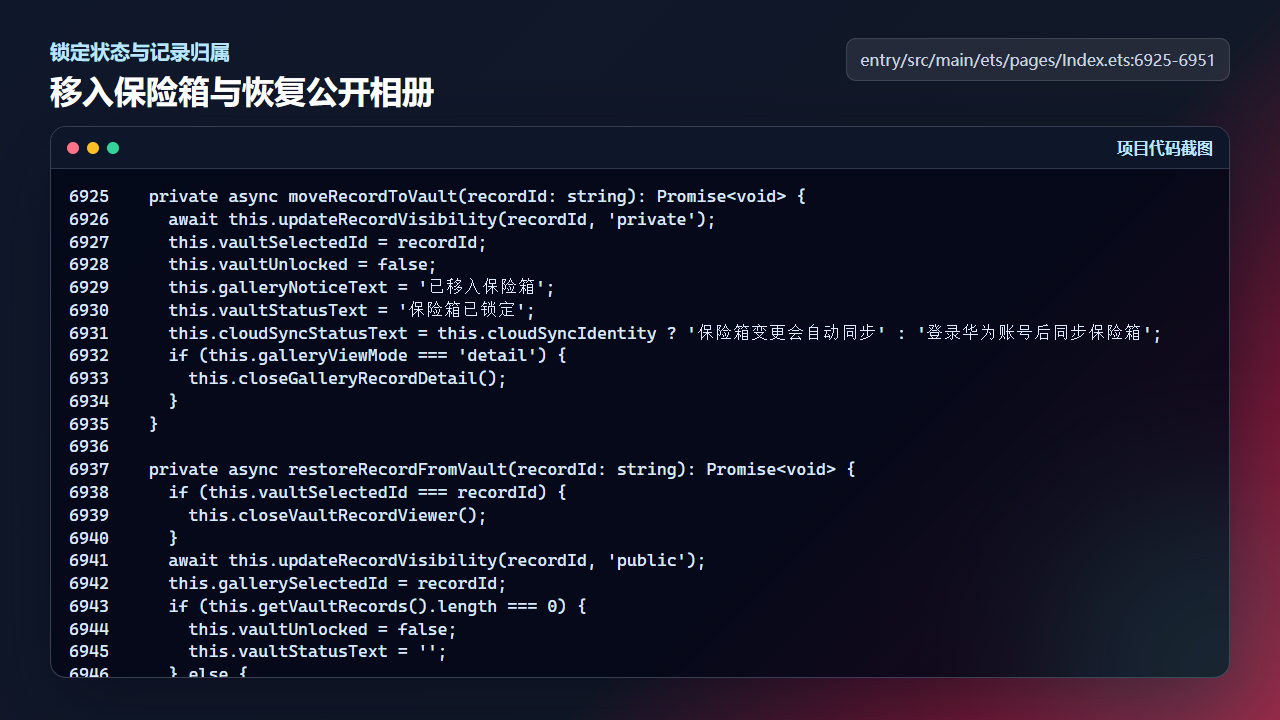
moveRecordToVault 会在移入后立即锁定保险箱
  private async moveRecordToVault(recordId: string): Promise<void> {
    await this.updateRecordVisibility(recordId, 'private');
    this.vaultSelectedId = recordId;
    this.vaultUnlocked = false;
    this.galleryNoticeText = '已移入保险箱';
    this.vaultStatusText = '保险箱已锁定';
    this.cloudSyncStatusText = this.cloudSyncIdentity ? '保险箱变更会自动同步' : '登录华为账号后同步保险箱';
    if (this.galleryViewMode === 'detail') {
      this.closeGalleryRecordDetail();
    }
  }

  private async restoreRecordFromVault(recordId: string): Promise<void> {
    if (this.vaultSelectedId === recordId) {
      this.closeVaultRecordViewer();
    }
    await this.updateRecordVisibility(recordId, 'public');
    this.gallerySelectedId = recordId;
    if (this.getVaultRecords().length === 0) {
      this.vaultUnlocked = false;
      this.vaultStatusText = '';
    } else {
      this.vaultStatusText = '';
    }
    this.galleryNoticeText = '';
    this.cloudSyncStatusText = this.cloudSyncIdentity ? '保险箱变更会自动同步' : '登录华为账号后同步保险箱';
  }
解锁后才显示恢复、导出和分享
保险箱 UI 分成空状态、锁定态和解锁态。未解锁时展示身份认证按钮,不直接渲染私密照片网格和操作按钮。也就是说,私密照片的入口先被锁定分支拦住,用户完成认证前只能看到解锁路径。
对近场分享隐私来说,这个 UI 状态很重要。附近分享回调可以根据当前上下文取记录,但私密记录只有在保险箱已解锁并且用户处在保险箱页面时才应该成为“当前可见内容”。这就是产品体验和代码状态共同形成的边界。
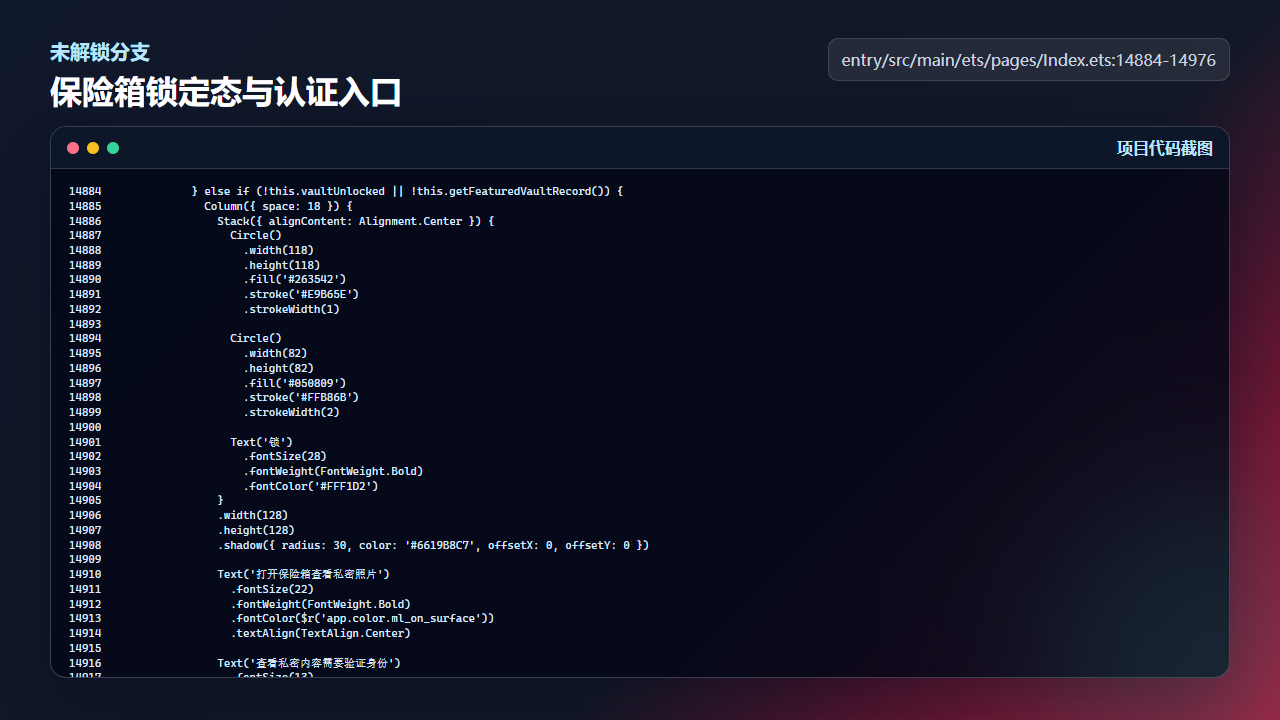
保险箱未解锁时只显示认证入口和导入入口
            } else if (!this.vaultUnlocked || !this.getFeaturedVaultRecord()) {
              Column({ space: 18 }) {
                Stack({ alignContent: Alignment.Center }) {
                  Circle()
                    .width(118)
                    .height(118)
                    .fill('#263542')
                    .stroke('#E9B65E')
                    .strokeWidth(1)

                  Circle()
                    .width(82)
                    .height(82)
                    .fill('#050809')
                    .stroke('#FFB86B')
                    .strokeWidth(2)

                  Text('锁')
                    .fontSize(28)
                    .fontWeight(FontWeight.Bold)
                    .fontColor('#FFF1D2')
                }
                .width(128)
                .height(128)
                .shadow({ radius: 30, color: '#6619B8C7', offsetX: 0, offsetY: 0 })

                Text('打开保险箱查看私密照片')
                  .fontSize(22)
                  .fontWeight(FontWeight.Bold)
                  .fontColor($r('app.color.ml_on_surface'))
                  .textAlign(TextAlign.Center)

                Text('查看私密内容需要验证身份')
                  .fontSize(13)
                  .lineHeight(20)
                  .fontColor($r('app.color.ml_on_surface_variant'))
                  .textAlign(TextAlign.Center)

                Button(this.vaultAuthBusy ? '认证中...' : '解锁保险箱')
                  .height(48)
                  .width('100%')
                  .enabled(!this.vaultAuthBusy)
                  .fontSize(15)
                  .fontWeight(FontWeight.Medium)
                  .fontColor(this.getWarmActionTextColor())
                  .backgroundColor(this.getWarmActionBackgroundColor())
                  .borderRadius(24)
                  .onClick(() => {
                    void this.unlockVaultWithFace();
                  })

                Button(this.mediaImportBusy ? '导入中...' : '导入系统相册')
                  .height(42)
                  .width('100%')
                  .enabled(!this.mediaImportBusy && !this.vaultAuthBusy)
                  .fontSize(14)
                  .fontWeight(FontWeight.Medium)
                  .fontColor(this.getSecondaryActionTextColor())
                  .backgroundColor(this.getSecondaryActionBackgroundColor())
                  .borderRadius(18)
                  .onClick(() => {
                    void this.importSystemAlbumPhotos('vault');
                  })

                Row({ space: 12 }) {
                  Text('人脸识别')
                    .fontSize(12)
                    .fontColor($r('app.color.ml_on_surface'))
                    .padding({ left: 14, right: 14, top: 8, bottom: 8 })
                    .backgroundColor(this.getDarkChipBackgroundColor())
                    .borderRadius(16)
                    .onClick(() => {
                      void this.unlockVaultWithFace();
                    })

                  Text('指纹识别')
                    .fontSize(12)
                    .fontColor($r('app.color.ml_on_surface'))
                    .padding({ left: 14, right: 14, top: 8, bottom: 8 })
                    .backgroundColor(this.getDarkChipBackgroundColor())
                    .borderRadius(16)
                    .onClick(() => {
                      void this.unlockVaultWithFingerprint();
                    })
                }
              }
              .width('100%')
              .padding({ left: 24, right: 24, top: 30, bottom: 24 })
              .backgroundColor($r('app.color.ml_panel_glass'))
              .borderRadius(34)
              .border({ width: 1, color: '#5519B8C7' })
              .alignItems(HorizontalAlign.Center)
            } else {
工程检查清单
- 私密状态必须写入记录模型,而不是只存在页面变量。
- 移入保险箱后要关闭公开详情并锁定保险箱。
- 恢复公开相册时要同步选择状态和持久化数据。
- 保险箱的导出、分享、查看入口必须依赖解锁状态。
今日练习
- 把一条公开记录改成 private,观察普通相册列表是否消失。
- 移入保险箱后立刻返回相册,确认旧详情页不再显示私密照片。
- 在保险箱锁定状态下尝试打开详情,验证
openVaultRecordViewer是否直接返回。
训练营里的每一篇都建议按同一个节奏复盘:先看页面行为,再回到源码定位状态和服务层,最后自己改一个很小的参数验证结果。这样写文章时不会停留在 API 名词,读者也能沿着真实工程把功能跑通。

讨论HarmonyOS开发技术,专注于API与组件、DevEco Studio、测试、元服务和应用上架分发等。
更多推荐
 4
4 0
0- 0


 已为社区贡献256条内容

所有评论(0)