基于HarmonyOS的一站式校园服务应用平台技术实现与价值分析
项目演示
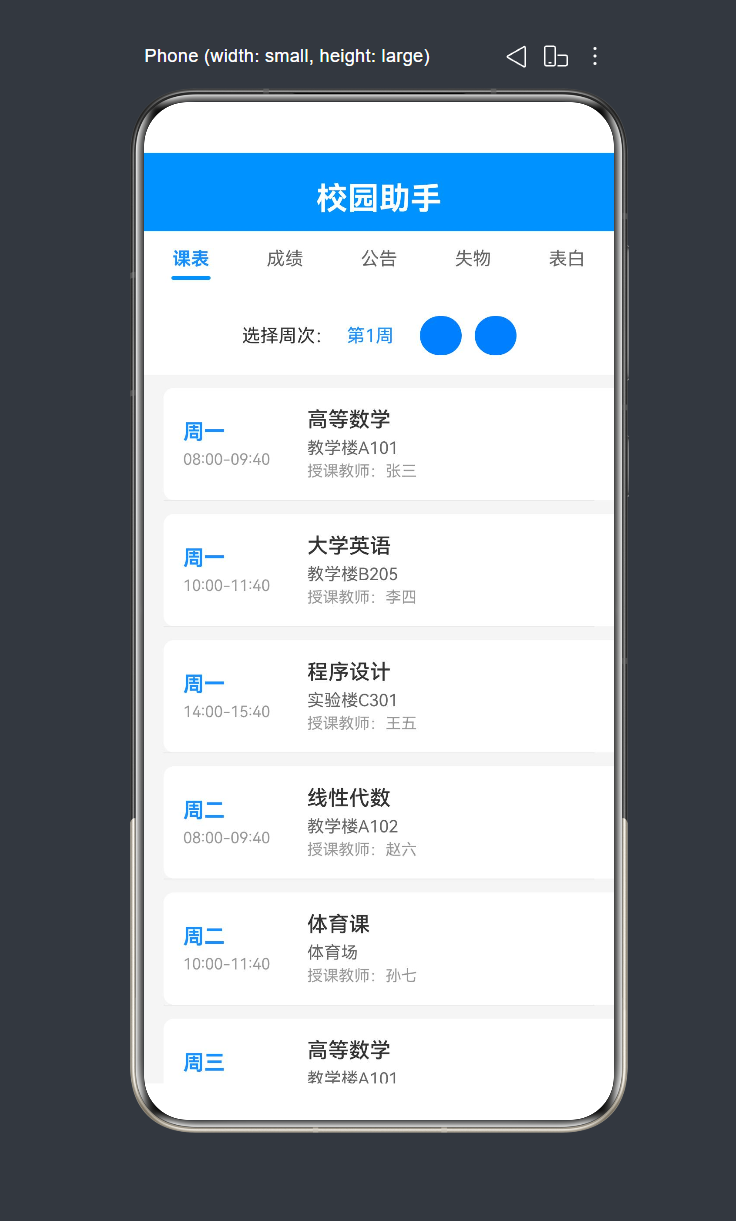
校园助手应用:基于HarmonyOS的一站式校园服务平台技术实践
一、项目背景与价值
1.1 项目概述
在数字化校园建设的浪潮中,学生日常学习生活中面临着课程管理、成绩查询、信息获取等多方面的需求。传统的校园信息系统往往分散在不同平台,学生需要在多个应用之间切换,效率低下。基于此背景,我们开发了校园助手应用,旨在为学生提供一个统一、便捷的一站式校园服务平台。
1.2 核心价值
1. 提升学生体验
- 整合课表查询、成绩查询、校园公告、失物招领、表白墙五大核心功能
- 统一的用户界面和交互体验,减少学习成本
2. 提高信息效率
- 实时获取校园公告信息
- 便捷的课表和成绩查询
- 快速发布和查找失物信息
3. 增强校园社交
- 表白墙功能促进校园情感交流
- 失物招领促进同学互助
1.3 目标用户
主要面向在校大学生群体,包括:
- 本科生:日常课程管理、成绩查询
- 研究生:科研之余的校园生活需求
- 教职工:部分功能如公告浏览
二、技术架构设计
2.1 技术选型
| 分类 | 技术 | 版本 | 选型理由 |
|---|---|---|---|
| 操作系统 | HarmonyOS | 4.0+ | 华为自研操作系统,原生支持分布式能力 |
| 开发语言 | ArkTS | 4.0 | TypeScript超集,支持声明式UI |
| UI框架 | ArkUI | 4.0 | HarmonyOS官方UI框架 |
| 构建工具 | Hvigor | 3.0+ | 华为自研构建工具 |
2.2 架构设计原则
1. 单一职责原则
- 每个组件只负责一项功能
- 数据模型与UI展示分离
2. 声明式编程
- 使用ArkUI声明式语法构建UI
- 状态驱动视图更新
3. 模块化设计
- 功能模块独立封装
- 便于后续扩展和维护
2.3 整体架构图
┌─────────────────────────────────────────────────────────────┐
│                      应用层 (Application)                    │
│  ┌─────────┐ ┌─────────┐ ┌─────────┐ ┌─────────┐ ┌─────────┐│
│  │ 课表查询 │ │ 成绩查询 │ │ 校园公告 │ │ 失物招领 │ │ 表白墙 ││
│  └────┬────┘ └────┬────┘ └────┬────┘ └────┬────┘ └────┬────┘│
│       │           │           │           │           │      │
└───────┼───────────┼───────────┼───────────┼───────────┼──────┘
        │           │           │           │           │
┌───────▼───────────▼───────────▼───────────▼───────────▼──────┐
│                      业务逻辑层 (Business Logic)              │
│              ┌───────────────────────────────────┐          │
│              │         数据管理与状态控制         │          │
│              └───────────────────────────────────┘          │
└────────────────────────────┬─────────────────────────────────┘
                             │
┌────────────────────────────▼─────────────────────────────────┐
│                      数据模型层 (Data Model)                 │
│  ┌──────────┐ ┌──────────┐ ┌──────────────┐ ┌───────────┐   │
│  │CourseItem│ │GradeItem │ │Announcement  │ │LostFound  │   │
│  └──────────┘ └──────────┘ │    Item      │ │   Item    │   │
│                            └──────────────┘ └───────────┘   │
│                            ┌───────────┐                     │
│                            │Confession │                     │
│                            │   Item    │                     │
│                            └───────────┘                     │
└──────────────────────────────────────────────────────────────┘
2.4 目录结构
entry/src/main/ets/
├── entryability/           # 应用入口
│   └── EntryAbility.ets    # 主入口能力
└── pages/
    └── Index.ets           # 主页面(包含所有功能模块)
三、核心功能模块实现
3.1 课表查询模块
3.1.1 功能概述
课表查询模块是校园助手的核心功能之一,提供以下能力:
- 周次选择(1-20周)
- 按天展示课程列表
- 显示课程名称、时间、地点、授课教师
3.1.2 数据模型设计
class CourseItem {
  day: string          // 星期几
  time: string         // 上课时间
  courseName: string   // 课程名称
  location: string     // 上课地点
  teacher: string      // 授课教师

  constructor(day: string, time: string, courseName: string, location: string, teacher: string) {
    this.day = day
    this.time = time
    this.courseName = courseName
    this.location = location
    this.teacher = teacher
  }
}
3.1.3 UI实现
课表查询模块采用列表卡片式布局,主要包含两部分:
1. 周次选择器
Row() {
  Text('选择周次:')
    .fontSize(14)
    .fontColor('#333333')
  Text('第' + this.selectedWeek + '周')
    .fontSize(14)
    .fontColor('#1890FF')
    .margin({ left: 10 })
  Button('-')
    .width(30)
    .height(30)
    .fontSize(16)
    .margin({ left: 20 })
    .onClick(() => {
      if (this.selectedWeek > 1) {
        this.selectedWeek--
      }
    })
  Button('+')
    .width(30)
    .height(30)
    .fontSize(16)
    .margin({ left: 10 })
    .onClick(() => {
      if (this.selectedWeek < 20) {
        this.selectedWeek++
      }
    })
}
.width('100%')
.padding(15)
.backgroundColor('#FFFFFF')
.justifyContent(FlexAlign.Center)
2. 课程列表
List() {
  ForEach(this.courseData, (course: CourseItem, index: number) => {
    ListItem() {
      this.buildCourseItem(course)
    }
  }, (course: CourseItem) => course.courseName)
}
.width('100%')
.layoutWeight(1)
.divider({ strokeWidth: 0.5, color: '#E5E5E5', startMargin: 15, endMargin: 15 })
3. 课程卡片组件
@Builder
buildCourseItem(course: CourseItem) {
  Column() {
    Row() {
      Column() {
        Text(course.day)
          .fontSize(16)
          .fontWeight(FontWeight.Bold)
          .fontColor('#1890FF')
        Text(course.time)
          .fontSize(12)
          .fontColor('#999999')
          .margin({ top: 5 })
      }
      .width(80)
      .alignItems(HorizontalAlign.Start)

      Column() {
        Text(course.courseName)
          .fontSize(16)
          .fontWeight(FontWeight.Medium)
          .fontColor('#333333')
        Text(course.location)
          .fontSize(13)
          .fontColor('#666666')
          .margin({ top: 5 })
        Text('授课教师:' + course.teacher)
          .fontSize(12)
          .fontColor('#999999')
          .margin({ top: 3 })
      }
      .layoutWeight(1)
      .alignItems(HorizontalAlign.Start)
      .margin({ left: 15 })
    }
    .width('100%')
    .padding(15)
  }
  .width('100%')
  .backgroundColor('#FFFFFF')
  .margin({ top: 10, left: 15, right: 15 })
  .borderRadius(8)
}
3.1.4 初始化数据
initCourseData() {
  this.courseData = [
    new CourseItem('周一', '08:00-09:40', '高等数学', '教学楼A101', '张三'),
    new CourseItem('周一', '10:00-11:40', '大学英语', '教学楼B205', '李四'),
    new CourseItem('周一', '14:00-15:40', '程序设计', '实验楼C301', '王五'),
    new CourseItem('周二', '08:00-09:40', '线性代数', '教学楼A102', '赵六'),
    new CourseItem('周二', '10:00-11:40', '体育课', '体育场', '孙七'),
    new CourseItem('周三', '08:00-09:40', '高等数学', '教学楼A101', '张三'),
    new CourseItem('周三', '14:00-15:40', '大学物理', '实验楼D201', '周八'),
    new CourseItem('周四', '10:00-11:40', '大学英语', '教学楼B205', '李四'),
    new CourseItem('周五', '08:00-09:40', '程序设计', '实验楼C301', '王五'),
    new CourseItem('周五', '14:00-15:40', '线性代数', '教学楼A102', '赵六'),
  ]
}
3.2 成绩查询模块
3.2.1 功能概述
成绩查询模块展示学生的学业成绩信息,包括:
- 绩点概览(平均绩点、不及格科目数、总科目数)
- 详细成绩列表(课程名称、分数、等级)
3.2.2 数据模型设计
class GradeItem {
  courseName: string   // 课程名称
  score: string        // 成绩分数
  grade: string        // 成绩等级

  constructor(courseName: string, score: string, grade: string) {
    this.courseName = courseName
    this.score = score
    this.grade = grade
  }
}
3.2.3 UI实现
1. 绩点概览卡片
Row() {
  Column() {
    Text('我的绩点')
      .fontSize(14)
      .fontColor('#666666')
    Text('3.85')
      .fontSize(32)
      .fontWeight(FontWeight.Bold)
      .fontColor('#1890FF')
      .margin({ top: 5 })
  }
  .layoutWeight(1)
  .alignItems(HorizontalAlign.Center)

  Column() {
    Text('不及格')
      .fontSize(14)
      .fontColor('#666666')
    Text('0')
      .fontSize(32)
      .fontWeight(FontWeight.Bold)
      .fontColor('#52C41A')
      .margin({ top: 5 })
  }
  .layoutWeight(1)
  .alignItems(HorizontalAlign.Center)

  Column() {
    Text('总科目数')
      .fontSize(14)
      .fontColor('#666666')
    Text('6')
      .fontSize(32)
      .fontWeight(FontWeight.Bold)
      .fontColor('#333333')
      .margin({ top: 5 })
  }
  .layoutWeight(1)
  .alignItems(HorizontalAlign.Center)
}
.width('100%')
.padding(20)
.backgroundColor('#FFFFFF')
.margin(15)
2. 等级颜色映射函数
getGradeColor(grade: string): string {
  if (grade.startsWith('A')) {
    return '#52C41A'    // 绿色
  } else if (grade.startsWith('B')) {
    return '#1890FF'    // 蓝色
  } else if (grade.startsWith('C')) {
    return '#FAAD14'    // 橙色
  } else {
    return '#F5222D'    // 红色
  }
}
3.3 校园公告模块
3.3.1 功能概述
校园公告模块展示学校发布的通知信息,包括:
- 公告标题
- 公告内容摘要
- 发布日期
3.3.2 数据模型设计
class AnnouncementItem {
  title: string   // 公告标题
  date: string    // 发布日期
  content: string // 公告内容

  constructor(title: string, date: string, content: string) {
    this.title = title
    this.date = date
    this.content = content
  }
}
3.3.3 UI实现
List() {
  ForEach(this.announcementData, (announcement: AnnouncementItem) => {
    ListItem() {
      Column() {
        Row() {
          Text(announcement.title)
            .fontSize(16)
            .fontWeight(FontWeight.Medium)
            .fontColor('#333333')
            .layoutWeight(1)
            .maxLines(1)
            .textOverflow({ overflow: TextOverflow.Ellipsis })
        }
        .width('100%')

        Text(announcement.content)
          .fontSize(13)
          .fontColor('#666666')
          .margin({ top: 8 })
          .maxLines(2)
          .textOverflow({ overflow: TextOverflow.Ellipsis })

        Row() {
          Text(announcement.date)
            .fontSize(12)
            .fontColor('#999999')
          Image($r('app.media.icon_arrow_right'))
            .width(16)
            .height(16)
            .fillColor('#CCCCCC')
        }
        .width('100%')
        .margin({ top: 10 })
        .justifyContent(FlexAlign.SpaceBetween)
      }
      .width('100%')
      .padding(15)
      .backgroundColor('#FFFFFF')
      .borderRadius(8)
      .margin({ left: 15, right: 15, top: 10 })
    }
  }, (announcement: AnnouncementItem) => announcement.title)
}
.width('100%')
.layoutWeight(1)
3.4 失物招领模块
3.4.1 功能概述
失物招领模块帮助学生找回遗失物品或归还捡到的物品,包括:
- 筛选功能(全部/招领中/寻找中)
- 物品状态标签
- 物品详情展示
3.4.2 数据模型设计
class LostFoundItem {
  title: string       // 物品名称
  description: string // 物品描述
  location: string    // 发现地点
  date: string        // 日期
  isFound: boolean    // 是否已找到(true=招领,false=寻找)

  constructor(title: string, description: string, location: string, date: string, isFound: boolean) {
    this.title = title
    this.description = description
    this.location = location
    this.date = date
    this.isFound = isFound
  }
}
3.4.3 UI实现
1. 筛选标签
Row() {
  Text('全部')
    .fontSize(13)
    .fontColor('#FFFFFF')
    .backgroundColor('#1890FF')
    .padding({ left: 15, right: 15, top: 5, bottom: 5 })
    .borderRadius(15)
    .margin({ right: 10 })
  Text('招领中')
    .fontSize(13)
    .fontColor('#666666')
    .backgroundColor('#FFFFFF')
    .padding({ left: 15, right: 15, top: 5, bottom: 5 })
    .borderRadius(15)
    .margin({ right: 10 })
  Text('寻找中')
    .fontSize(13)
    .fontColor('#666666')
    .backgroundColor('#FFFFFF')
    .padding({ left: 15, right: 15, top: 5, bottom: 5 })
    .borderRadius(15)
}
.width('100%')
.padding(15)
.backgroundColor('#FFFFFF')
2. 状态标签颜色
Text(item.isFound ? '招领' : '寻找')
  .fontSize(12)
  .fontColor('#FFFFFF')
  .backgroundColor(item.isFound ? '#52C41A' : '#FAAD14')
  .padding({ left: 8, right: 8, top: 3, bottom: 3 })
  .borderRadius(4)
3.5 表白墙模块
3.5.1 功能概述
表白墙模块为学生提供一个匿名表达情感的平台,包括:
- 发布表白内容
- 浏览表白列表
- 点赞和评论功能入口
3.5.2 数据模型设计
class ConfessionItem {
  title: string   // 表白标题
  content: string // 表白内容
  author: string  // 作者昵称
  date: string    // 发布日期

  constructor(title: string, content: string, author: string, date: string) {
    this.title = title
    this.content = content
    this.author = author
    this.date = date
  }
}
3.5.3 UI实现
1. 发布表白区域
Column() {
  TextInput({ placeholder: '说出你的心里话...' })
    .width('100%')
    .height(80)
    .backgroundColor('#FFFFFF')
    .borderRadius(8)
    .fontSize(14)
    .margin(15)
    .onChange((value: string) => {
      this.confessionText = value
    })
  Button('发布')
    .width(80)
    .height(35)
    .fontSize(14)
    .backgroundColor('#FF6B6B')
    .borderRadius(20)
    .alignSelf(FlexAlign.End)
    .margin({ right: 15, bottom: 15 })
    .onClick(() => {
      if (this.confessionText.trim() !== '') {
        this.confessionData.unshift(new ConfessionItem(
          '匿名表白',
          this.confessionText,
          '我',
          this.formatDate()
        ))
        this.confessionText = ''
      }
    })
}
.width('100%')
.backgroundColor('#FFFFFF')
.margin({ top: 15, left: 15, right: 15 })
.borderRadius(12)
2. 日期格式化函数
formatDate(): string {
  const now = new Date()
  const year = now.getFullYear()
  const month = now.getMonth() + 1
  const day = now.getDate()
  return year + '-' + month + '-' + day
}
四、UI组件架构
4.1 整体布局结构
应用采用经典的移动端布局模式:
┌─────────────────────────────────────┐
│           Header (标题栏)           │
│           校园助手                   │
├─────────────────────────────────────┤
│           TabBar (标签栏)           │
│  课表  |  成绩  |  公告  |  失物  |  表白  │
├─────────────────────────────────────┤
│           Content (内容区)          │
│                                    │
│            (当前选中模块内容)        │
│                                    │
│                                    │
└─────────────────────────────────────┘
4.2 Header组件
@Builder
buildHeader() {
  Column() {
    Text('校园助手')
      .fontSize(24)
      .fontWeight(FontWeight.Bold)
      .fontColor('#FFFFFF')
      .margin({ top: 10 })
  }
  .width('100%')
  .height(60)
  .backgroundColor('#1890FF')
  .justifyContent(FlexAlign.Center)
  .alignItems(HorizontalAlign.Center)
}
4.3 TabBar组件
@Builder
buildTabBar() {
  Row() {
    this.buildTabItem('课表', 0)
    this.buildTabItem('成绩', 1)
    this.buildTabItem('公告', 2)
    this.buildTabItem('失物', 3)
    this.buildTabItem('表白', 4)
  }
  .width('100%')
  .height(50)
  .backgroundColor('#FFFFFF')
  .justifyContent(FlexAlign.SpaceEvenly)
  .alignItems(VerticalAlign.Center)
}

@Builder
buildTabItem(title: string, index: number) {
  Column() {
    Text(title)
      .fontSize(14)
      .fontColor(this.currentTab === index ? '#1890FF' : '#666666')
      .fontWeight(this.currentTab === index ? FontWeight.Bold : FontWeight.Normal)
    Blank()
      .height(3)
      .width(30)
      .backgroundColor(this.currentTab === index ? '#1890FF' : '#FFFFFF')
      .borderRadius(2)
      .margin({ top: 5 })
  }
  .height('100%')
  .layoutWeight(1)
  .justifyContent(FlexAlign.Center)
  .onClick(() => {
    this.currentTab = index
  })
}
4.4 内容切换机制
@Builder
buildContent() {
  if (this.currentTab === 0) {
    this.buildCourseContent()
  } else if (this.currentTab === 1) {
    this.buildGradeContent()
  } else if (this.currentTab === 2) {
    this.buildAnnouncementContent()
  } else if (this.currentTab === 3) {
    this.buildLostFoundContent()
  } else {
    this.buildConfessionContent()
  }
}
五、状态管理与数据流转
5.1 状态变量定义
@State currentTab: number = 0              // 当前选中的标签页
@State selectedWeek: number = 1            // 当前选择的周次
@State courseData: CourseItem[] = []       // 课程数据
@State gradeData: GradeItem[] = []         // 成绩数据
@State announcementData: AnnouncementItem[] = []  // 公告数据
@State lostFoundData: LostFoundItem[] = [] // 失物招领数据
@State confessionData: ConfessionItem[] = [] // 表白墙数据
@State confessionText: string = ''         // 表白输入内容
5.2 数据初始化
在组件生命周期钩子 aboutToAppear 中初始化所有数据:
aboutToAppear() {
  this.initCourseData()
  this.initGradeData()
  this.initAnnouncementData()
  this.initLostFoundData()
  this.initConfessionData()
}
5.3 响应式更新机制
HarmonyOS ArkUI 采用声明式UI框架,状态变化会自动触发视图更新:
// 周次切换时,视图自动更新
Button('+')
  .onClick(() => {
    if (this.selectedWeek < 20) {
      this.selectedWeek++  // 状态变化 → 视图自动更新
    }
  })

// 表白发布时,列表自动更新
Button('发布')
  .onClick(() => {
    if (this.confessionText.trim() !== '') {
      this.confessionData.unshift(new ConfessionItem(...))
      this.confessionText = ''  // 状态变化 → 视图自动更新
    }
  })
六、设计模式与最佳实践
6.1 构建器模式 (Builder Pattern)
使用 @Builder 装饰器封装可复用的UI片段:
@Builder
buildCourseItem(course: CourseItem) {
  // 课程卡片UI
}

@Builder
buildTabItem(title: string, index: number) {
  // 标签项UI
}
6.2 数据模型封装
将数据模型封装为类,提供类型安全和封装性:
class CourseItem {
  day: string
  time: string
  courseName: string
  location: string
  teacher: string

  constructor(day: string, time: string, courseName: string, location: string, teacher: string) {
    this.day = day
    this.time = time
    this.courseName = courseName
    this.location = location
    this.teacher = teacher
  }
}
6.3 单一职责原则
每个组件/方法只负责一项功能:
buildCourseContent()- 构建课表内容buildGradeContent()- 构建成绩内容initCourseData()- 初始化课程数据formatDate()- 格式化日期
6.4 代码复用
通过 ForEach 循环和 @Builder 实现代码复用:
List() {
  ForEach(this.courseData, (course: CourseItem) => {
    ListItem() {
      this.buildCourseItem(course)  // 复用课程卡片组件
    }
  }, (course: CourseItem) => course.courseName)
}
七、性能优化策略
7.1 列表虚拟化
使用 List 组件实现虚拟滚动,只渲染可视区域内的列表项:
List() {
  ForEach(this.courseData, (course: CourseItem) => {
    ListItem() {
      this.buildCourseItem(course)
    }
  }, (course: CourseItem) => course.courseName)
}
.layoutWeight(1)
7.2 状态懒加载
数据只在组件首次加载时初始化一次:
aboutToAppear() {
  this.initCourseData()
  // ...
}
7.3 避免不必要的渲染
使用 @State 装饰器确保只有相关状态变化时才触发更新。
八、用户体验优化
8.1 视觉设计
- 色彩方案:蓝色主色调
#1890FF,绿色成功状态#52C41A,红色错误状态#F5222D - 卡片设计:圆角
borderRadius(8),阴影效果 - 文字层次:标题加粗、内容常规、辅助文字灰色
8.2 交互设计
- 点击反馈:按钮点击有视觉反馈
- 状态切换:标签页切换有平滑过渡
- 加载状态:虽然当前为模拟数据,但预留了加载状态接口
8.3 响应式布局
使用 layoutWeight 实现自适应布局:
Column() {
  Text('我的绩点')
    .layoutWeight(1)
  Text('不及格')
    .layoutWeight(1)
  Text('总科目数')
    .layoutWeight(1)
}
九、应用价值与社会效益
9.1 教育价值
- 提高学习效率:便捷的课表查询帮助学生合理安排时间
- 促进学业进步:及时的成绩反馈帮助学生了解学习情况
9.2 社交价值
- 增强校园凝聚力:表白墙促进同学间情感交流
- 促进互助文化:失物招领功能培养乐于助人的风气
9.3 信息化价值
- 整合校园信息:统一平台减少信息碎片化
- 提升校园数字化水平:推动智慧校园建设
十、未来规划与扩展
10.1 功能扩展
| 优先级 | 功能 | 描述 |
|---|---|---|
| 高 | 用户认证 | 接入校园统一身份认证 |
| 高 | 数据同步 | 对接教务系统实时同步数据 |
| 中 | 消息推送 | 重要公告推送通知 |
| 中 | 评论互动 | 表白墙评论功能 |
| 低 | 二手交易 | 增加二手物品交易功能 |
10.2 技术升级
- 接入真实API:替换模拟数据为真实接口
- 离线缓存:支持离线查看课表和公告
- 性能优化:图片懒加载、列表虚拟滚动优化
10.3 跨端部署
- HarmonyOS Next:适配最新版本
- 多设备协同:支持手机、平板、智慧屏多端部署
十一、总结
校园助手应用基于HarmonyOS平台,采用ArkTS语言和ArkUI框架开发,实现了课表查询、成绩查询、校园公告、失物招领、表白墙五大核心功能。应用采用模块化设计,代码结构清晰,易于维护和扩展。
通过声明式UI、响应式状态管理和组件化开发,应用实现了良好的用户体验和性能表现。未来将继续扩展功能,对接真实数据接口,打造更加完善的校园服务平台。
附录:核心文件清单
| 文件路径 | 功能说明 |
|---|---|
entry/src/main/ets/pages/Index.ets |
主页面,包含所有功能模块 |
entry/src/main/ets/entryability/EntryAbility.ets |
应用入口能力 |
entry/src/main/resources/base/element/color.json |
颜色资源定义 |
entry/src/main/resources/base/element/float.json |
尺寸资源定义 |
entry/src/main/resources/base/media/ |
图标资源目录 |
项目地址:C:\Users\Lenovo\DevEcoStudioProjects\MyApplication
技术栈:HarmonyOS 4.0 + ArkTS + ArkUI
开发工具:DevEco Studio

讨论HarmonyOS开发技术,专注于API与组件、DevEco Studio、测试、元服务和应用上架分发等。
更多推荐



 7
7 0
0- 0


 已为社区贡献1条内容

所有评论(0)