# 汉堡制作大师:HarmonyOS ArkTS 游戏应用深度解析
·
汉堡制作大师:HarmonyOS ArkTS 游戏应用深度解析
一、项目概述
1.1 应用简介
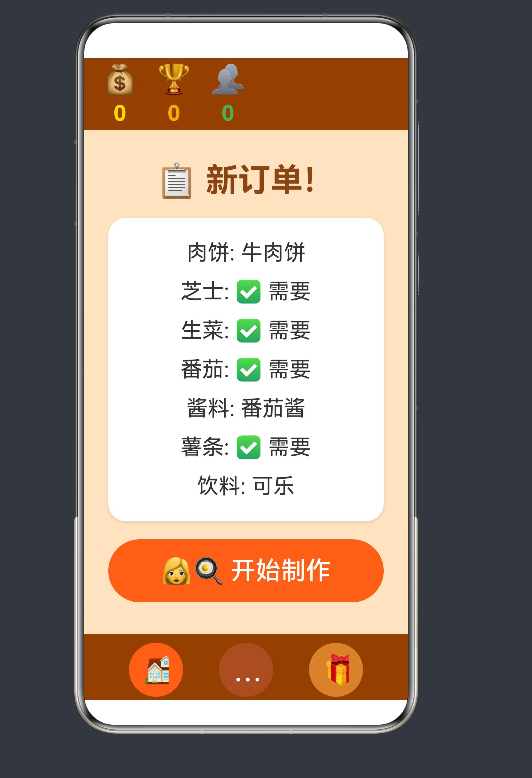
「汉堡制作大师」是一款基于 HarmonyOS ArkTS 开发的休闲模拟经营游戏。玩家扮演汉堡店厨师,根据顾客订单制作汉堡,通过精准匹配订单要求获得高分。
1.2 技术栈
| 分类 | 技术 | 版本 |
|---|---|---|
| 框架 | HarmonyOS | API 12 |
| 语言 | ArkTS | 4.0 |
| UI框架 | ArkUI | Declarative |
| 构建工具 | Hvigor | 3.x |
1.3 核心功能
- 订单系统:随机生成顾客订单
- 制作系统:选择肉饼、配料、酱料、饮料
- 评分系统:根据匹配度计算得分
- 奖励系统:金币、分数累计
- 手势交互:滑动快速提交
二、架构设计
2.1 整体架构
┌─────────────────────────────────────────────────────────┐
│                    BurgerGame 应用                      │
├─────────────────────────────────────────────────────────┤
│  ┌─────────────┐  ┌─────────────┐  ┌─────────────┐    │
│  │   UI Layer  │  │  State Mgmt │  │  Data Model │    │
│  │  (ArkUI)    │  │  (@State)   │  │ (Interface) │    │
│  └──────┬──────┘  └──────┬──────┘  └──────┬──────┘    │
│         │                │                │             │
│         └────────────────┼────────────────┘             │
│                          ▼                             │
│              ┌─────────────────────┐                   │
│              │    Game Logic       │                   │
│              │ (Business Methods)  │                   │
│              └─────────────────────┘                   │
└─────────────────────────────────────────────────────────┘
2.2 状态管理设计
应用采用 ArkTS 的响应式状态管理机制:
@Entry
@Component
struct BurgerGame {
  @State coins: number = 0           // 金币数量
  @State score: number = 0           // 总分
  @State currentOrder: Order = {...} // 当前订单
  @State playerBurger: Burger = {...} // 玩家制作的汉堡
  @State gamePhase: 'order' | 'cook' | 'result' = 'order' // 游戏阶段
  // ...
}
状态分类:
| 状态类型 | 作用 | 生命周期 |
|---|---|---|
@State | 组件内部状态 | 跟随组件 |
@Prop | 父传子单向 | 继承父组件 |
@Link | 双向绑定 | 父子同步 |
2.3 数据模型
interface Order {
  id: number
  patty: string      // 肉饼类型
  cheese: boolean    // 是否加芝士
  lettuce: boolean   // 是否加生菜
  tomato: boolean    // 是否加番茄
  sauce: string      // 酱料类型
  fries: boolean     // 是否加薯条
  drink: string      // 饮料类型
  difficulty: string // 难度等级
}

interface Burger {
  patty: string
  cheese: boolean
  lettuce: boolean
  tomato: boolean
  sauce: string
  fries: boolean
  drink: string
}

interface PattyOption {
  name: string
  label: string
  emoji: string
}
三、核心功能实现
3.1 订单系统
3.1.1 订单生成逻辑
nextOrder() {
  const patties = ['beef', 'chicken', 'veggie']
  const sauces = ['ketchup', 'mustard', 'mayo', 'bbq']
  const drinks = ['cola', 'juice', 'coffee']

  this.currentOrder = {
    id: this.currentOrder.id + 1,
    patty: patties[Math.floor(Math.random() * patties.length)],
    cheese: Math.random() > 0.5,
    lettuce: Math.random() > 0.5,
    tomato: Math.random() > 0.5,
    sauce: sauces[Math.floor(Math.random() * sauces.length)],
    fries: Math.random() > 0.5,
    drink: drinks[Math.floor(Math.random() * drinks.length)],
    difficulty: 'normal'
  }

  this.gamePhase = 'order'
}
设计亮点:
- 使用
Math.random()实现随机订单生成 - 通过数组索引实现类型选择
- 订单ID自动递增便于追踪
3.1.2 订单面板展示
@Builder
OrderPanel() {
  Column({ space: 20 }) {
    Text('📋 新订单!')
      .fontSize(36)
      .fontColor('#8B4513')
      .fontWeight(FontWeight.Bold)
      .margin({ top: 20 })

    Column({ space: 15 }) {
      Text(`肉饼: ${this.getPattyLabel(this.currentOrder.patty)}`)
        .fontSize(24)
        .fontColor('#333')

      Text(`芝士: ${this.currentOrder.cheese ? '✅ 需要' : '❌ 不要'}`)
        .fontSize(24)
        .fontColor('#333')
      // ... 其他配料展示
    }
    .width('85%')
    .padding(25)
    .backgroundColor('#FFFFFF')
    .borderRadius(20)
    .shadow({ radius: 10, color: 'rgba(0,0,0,0.1)', offsetX: 0, offsetY: 5 })

    Button('👩🍳 开始制作')
      .width('85%')
      .height(70)
      .fontSize(28)
      .backgroundColor('#FF6B35')
      .fontColor('#FFFFFF')
      .borderRadius(35)
      .onClick(() => {
        this.startCooking()
      })
  }
}
3.2 制作系统
3.2.1 食材选择界面
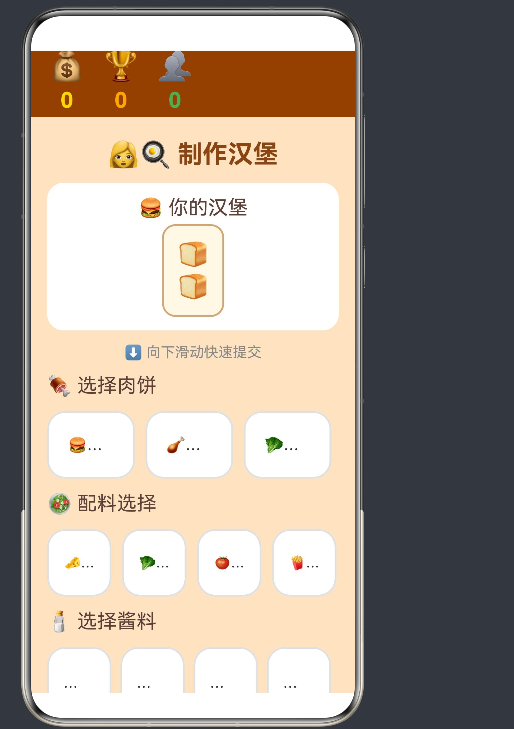
制作界面采用模块化设计,分为多个功能区域:
@Builder
CookingStation() {
  Column({ space: 15 }) {
    // 返回按钮和标题
    Row({ space: 10 }) {
      Button('⬅️')
        .width(50)
        .height(50)
        .fontSize(28)
        .backgroundColor('#FFFFFF')
        .fontColor('#8B4513')
        .borderRadius(25)
        .onClick(() => {
          this.gamePhase = 'order'
        })

      Text('👩🍳 制作汉堡')
        .fontSize(28)
        .fontColor('#8B4513')
        .fontWeight(FontWeight.Bold)
    }

    // 汉堡预览
    this.PlayerBurgerPreview()

    // 滑动提示
    Text(`⬇️ 向下滑动快速提交`)
      .fontSize(16)
      .fontColor('#888888')
      .width('90%')
      .textAlign(TextAlign.Center)

    // 可滚动的食材选择区域
    Scroll() {
      Column({ space: 15 }) {
        // 肉饼选择
        Text('🍖 选择肉饼')
          .fontSize(22)
          .fontColor('#5D4037')
          .width('90%')

        Row({ space: 12 }) {
          ForEach(this.pattyOptions, (option: PattyOption) => {
            Button(`${option.emoji}\n${option.label}`)
              .width('30%')
              .height(75)
              .fontSize(17)
              .backgroundColor(this.playerBurger.patty === option.name ? '#FF6B35' : '#FFFFFF')
              .fontColor(this.playerBurger.patty === option.name ? '#FFFFFF' : '#333')
              .borderRadius(15)
              .border({ width: 2, color: this.playerBurger.patty === option.name ? '#FF6B35' : '#E0E0E0' })
              .onClick(() => {
                this.playerBurger.patty = option.name
              })
          })
        }
        .width('90%')

        // ... 配料、酱料、饮料选择
      }
      .width('100%')
      .gesture(
        PanGesture({ direction: PanDirection.Down })
          .onActionEnd((event: GestureEvent) => {
            if (event.offsetY > 100) {
              this.submitBurger()
            }
          })
      )
    }
    .width('100%')
    .flexGrow(1)
  }
  .width('100%')
  .height('100%')
}
3.2.2 配料选择交互
配料选择采用开关式交互设计:
Button(`🧀\n芝士\n${this.playerBurger.cheese ? '✅' : '❌'}`)
  .width('22%')
  .height(75)
  .fontSize(15)
  .backgroundColor(this.playerBurger.cheese ? '#FFD700' : '#FFFFFF')
  .fontColor(this.playerBurger.cheese ? '#8B4513' : '#333')
  .borderRadius(15)
  .border({ width: 2, color: this.playerBurger.cheese ? '#FFD700' : '#E0E0E0' })
  .onClick(() => {
    this.playerBurger.cheese = !this.playerBurger.cheese
  })
交互特点:
- 点击切换选中状态
- 颜色变化反馈选中状态
- 使用 emoji 增强视觉识别
3.2.3 汉堡预览组件
@Builder
PlayerBurgerPreview() {
  Column({ space: 5 }) {
    Text('🍔 你的汉堡')
      .fontSize(22)
      .fontColor('#5D4037')

    Column({ space: 3 }) {
      Text('🍞')
        .fontSize(28)

      if (this.playerBurger.lettuce) {
        Text('🥬')
          .fontSize(24)
      }

      if (this.playerBurger.tomato) {
        Text('🍅')
          .fontSize(24)
      }

      if (this.playerBurger.patty) {
        Text(this.getPattyEmoji(this.playerBurger.patty))
          .fontSize(28)
      }

      if (this.playerBurger.cheese) {
        Text('🧀')
          .fontSize(24)
      }

      if (this.playerBurger.sauce) {
        Text(this.getSauceEmoji(this.playerBurger.sauce))
          .fontSize(20)
      }

      Text('🍞')
        .fontSize(28)
    }
    .padding(15)
    .backgroundColor('#FFF8E7')
    .borderRadius(15)
    .border({ width: 2, color: '#D4A574' })
  }
  .width('90%')
  .padding(15)
  .backgroundColor('#FFFFFF')
  .borderRadius(18)
}
预览逻辑:
- 按层次顺序展示汉堡配料
- 使用条件渲染控制显示
- 面包上下夹着配料
3.3 评分系统
3.3.1 评分算法
submitBurger() {
  let score = 0
  let total = 7

  if (this.currentOrder.patty === this.playerBurger.patty) score++
  if (this.currentOrder.cheese === this.playerBurger.cheese) score++
  if (this.currentOrder.lettuce === this.playerBurger.lettuce) score++
  if (this.currentOrder.tomato === this.playerBurger.tomato) score++
  if (this.currentOrder.sauce === this.playerBurger.sauce) score++
  if (this.currentOrder.fries === this.playerBurger.fries) score++
  if (this.currentOrder.drink === this.playerBurger.drink) score++

  this.resultScore = Math.round((score / total) * 100)
  this.score += this.resultScore
  this.coins += Math.floor(this.resultScore / 10)
  this.customersServed++

  // 评价等级
  if (this.resultScore === 100) {
    this.resultText = '🏆 完美!'
  } else if (this.resultScore >= 80) {
    this.resultText = '🌟 优秀!'
  } else if (this.resultScore >= 60) {
    this.resultText = '👍 良好'
  } else if (this.resultScore >= 40) {
    this.resultText = '😊 及格'
  } else {
    this.resultText = '😅 继续加油'
  }

  this.gamePhase = 'result'
}
评分规则:
- 7个评判项,每项1分
- 分数转换为百分比
- 金币奖励 = 分数 / 10
3.3.2 结果展示
@Builder
ResultPanel() {
  Column({ space: 25 }) {
    Text(this.resultText)
      .fontSize(36)
      .fontColor('#8B4513')
      .fontWeight(FontWeight.Bold)
      .margin({ top: 30 })

    Text(`得分: ${this.resultScore} 分`)
      .fontSize(32)
      .fontColor('#FFA500')
      .fontWeight(FontWeight.Bold)

    // 评价等级
    if (this.resultScore > 70) {
      Text('🎉 太棒了!')
        .fontSize(28)
        .fontColor('#4CAF50')
    } else if (this.resultScore > 40) {
      Text('👍 还不错!')
        .fontSize(28)
        .fontColor('#FFA500')
    } else {
      Text('💪 继续努力!')
        .fontSize(28)
        .fontColor('#E74C3C')
    }

    // 对比列表
    Column({ space: 15 }) {
      Text(`订单要求 vs 你的制作`)
        .fontSize(24)
        .fontColor('#5D4037')
        .width('100%')

      this.compareItem('肉饼', ...)
      this.compareItem('芝士', ...)
      // ...
    }

    Button('🔄 下一个订单')
      .width('85%')
      .height(70)
      .fontSize(28)
      .backgroundColor('#FF6B35')
      .fontColor('#FFFFFF')
      .borderRadius(35)
      .onClick(() => {
        this.nextOrder()
      })
  }
}
3.3.3 对比组件
@Builder
compareItem(label: string, expected: string, actual: string, match: boolean) {
  Row() {
    Text(label)
      .fontSize(22)
      .fontColor('#5D4037')
      .width('30%')
    Text(expected)
      .fontSize(22)
      .width('35%')
      .textAlign(TextAlign.Center)
    Text(actual)
      .fontSize(22)
      .width('35%')
      .textAlign(TextAlign.Center)
      .fontColor(match ? '#4CAF50' : '#E74C3C')
  }
  .width('100%')
  .padding({ top: 10, bottom: 10 })
  .backgroundColor(match ? '#E8F5E9' : '#FFEBEE')
  .borderRadius(10)
}
3.4 手势交互
3.4.1 滑动提交功能
.gesture(
  PanGesture({ direction: PanDirection.Down })
    .onActionEnd((event: GestureEvent) => {
      if (event.offsetY > 100) {
        this.submitBurger()
      }
    })
)
设计思路:
- 使用
PanGesture监听滑动手势 - 设置滑动阈值 100px 防止误触
- 向下滑动触发提交操作
3.5 底部导航栏
@Builder
FooterBar() {
  Row({ space: 40 }) {
    Button('🏠')
      .width(60)
      .height(60)
      .fontSize(32)
      .backgroundColor(this.gamePhase === 'order' ? '#FF6B35' : '#8B4513')
      .borderRadius(30)
      .onClick(() => {
        this.gamePhase = 'order'
      })

    Button('👩🍳')
      .width(60)
      .height(60)
      .fontSize(32)
      .backgroundColor(this.gamePhase === 'cook' ? '#FF6B35' : '#A0522D')
      .borderRadius(30)
      .onClick(() => {
        this.startCooking()
      })

    Button('🎁')
      .width(60)
      .height(60)
      .fontSize(32)
      .backgroundColor('#CD853F')
      .borderRadius(30)
      .onClick(() => {
        this.showRewardPanel = true
      })
  }
  .width('100%')
  .height(80)
  .backgroundColor('#8B4513')
  .justifyContent(FlexAlign.Center)
  .alignItems(VerticalAlign.Center)
}
功能说明:
- 🏠 主页:返回订单页面
- 👩🍳 制作:进入制作页面
- 🎁 奖励:打开奖励面板
四、UI/UX 设计
4.1 视觉设计
4.1.1 色彩方案
| 颜色 | 用途 | 代码 |
|---|---|---|
| 主背景 | 页面背景 | #FFE4C4 (小麦色) |
| 卡片背景 | 内容区域 | #FFFFFF (白色) |
| 主色调 | 按钮、强调 | #FF6B35 (橙色) |
| 标题色 | 文字标题 | #8B4513 (棕色) |
| 成功色 | 正确匹配 | #4CAF50 (绿色) |
| 错误色 | 错误匹配 | #E74C3C (红色) |
4.1.2 图标与表情符号
应用大量使用 emoji 表情符号增强视觉效果:
const pattyOptions: PattyOption[] = [
  { name: 'beef', label: '牛肉饼', emoji: '🍔' },
  { name: 'chicken', label: '鸡肉饼', emoji: '🍗' },
  { name: 'veggie', label: '蔬菜饼', emoji: '🥬' }
]

const sauceOptions: SauceOption[] = [
  { name: 'ketchup', label: '番茄酱', emoji: '🍅' },
  { name: 'mustard', label: '芥末酱', emoji: '💛' },
  { name: 'mayo', label: '沙拉酱', emoji: '🥚' },
  { name: 'bbq', label: '烧烤酱', emoji: '🔥' }
]
4.2 交互设计
4.2.1 状态反馈
- 选中状态:按钮变色 + 边框高亮
- 点击反馈:颜色瞬间变化
- 动画效果:平滑过渡
4.2.2 无障碍设计
- 大字体显示(16-36px)
- 高对比度颜色搭配
- 清晰的视觉层级
五、性能优化
5.1 渲染优化
5.1.1 条件渲染
使用条件渲染减少不必要的组件渲染:
if (this.playerBurger.lettuce) {
  Text('🥬')
    .fontSize(24)
}
5.1.2 懒加载
Scroll 组件内部内容按需渲染:
Scroll() {
  Column({ space: 15 }) {
    // 内容根据需要滚动显示
  }
}
5.2 状态管理优化
5.2.1 状态最小化
只维护必要的状态变量:
@State gamePhase: 'order' | 'cook' | 'result' = 'order'
5.2.2 批量更新
在 submitBurger() 方法中批量更新状态:
this.resultScore = Math.round((score / total) * 100)
this.score += this.resultScore
this.coins += Math.floor(this.resultScore / 10)
this.customersServed++
六、ArkTS 语言特性应用
6.1 响应式编程
@State playerBurger: Burger = { patty: '', cheese: false, ... }

// 状态变化自动触发UI更新
this.playerBurger.cheese = !this.playerBurger.cheese
6.2 声明式 UI
Column({ space: 15 }) {
  Text('标题')
    .fontSize(28)
    .fontColor('#8B4513')

  Button('点击')
    .width(100)
    .height(50)
}
6.3 类型安全
interface Burger {
  patty: string
  cheese: boolean
  lettuce: boolean
}

// 编译期类型检查
const burger: Burger = { patty: 'beef' } // 错误:缺少属性
6.4 Builder 模式
@Builder
HeaderBar() {
  Row({ space: 20 }) {
    Column({ space: 5 }) {
      Text('💰')
        .fontSize(32)
      Text(`${this.coins}`)
        .fontSize(24)
        .fontColor('#FFD700')
        .fontWeight(FontWeight.Bold)
    }
    // ...
  }
}
七、HarmonyOS 平台适配
7.1 屏幕适配
使用百分比和弹性布局:
.width('90%')
.height('100%')
.flexGrow(1)
7.2 手势适配
.gesture(
  PanGesture({ direction: PanDirection.Down })
    .onActionEnd((event: GestureEvent) => {
      if (event.offsetY > 100) {
        this.submitBurger()
      }
    })
)
八、项目价值与意义
8.1 技术价值
- 学习价值:完整的 ArkTS 应用示例
- 架构参考:状态管理、组件化设计
- 交互模式:手势交互、响应式设计
8.2 业务价值
- 用户体验:直观的游戏界面
- 娱乐性:休闲益智游戏
- 可扩展性:易于添加新功能
8.3 技术亮点
| 技术点 | 实现方式 | 价值 |
|---|---|---|
| 响应式状态 | @State 装饰器 | 自动UI更新 |
| 声明式UI | ArkUI组件 | 简洁代码 |
| 手势识别 | PanGesture | 自然交互 |
| 条件渲染 | if 语句 | 性能优化 |
| 组件复用 | @Builder | 代码复用 |
九、总结与展望
9.1 项目成果
完成了一个功能完整的汉堡制作游戏,包括:
- ✅ 订单系统
- ✅ 制作系统
- ✅ 评分系统
- ✅ 奖励系统
- ✅ 手势交互
- ✅ 底部导航
9.2 技术总结
- ArkTS 响应式编程:状态驱动UI更新
- ArkUI 声明式组件:简洁的UI描述
- 组件化架构:代码复用与维护
- 手势交互:自然的用户体验
9.3 未来扩展
- 多人模式:在线对战
- 成就系统:解锁奖励
- 食材商店:购买新食材
- 难度递增:挑战更高分数
附录:完整代码结构
├── Index.ets                    # 主页面
│   ├── BurgerGame 组件          # 游戏主组件
│   │   ├── @State 状态变量      # 响应式状态
│   │   ├── build()              # UI构建
│   │   ├── HeaderBar()          # 顶部状态栏
│   │   ├── OrderPanel()         # 订单面板
│   │   ├── CookingStation()     # 制作台
│   │   ├── PlayerBurgerPreview() # 汉堡预览
│   │   ├── ResultPanel()        # 结果面板
│   │   ├── compareItem()        # 对比项
│   │   ├── FooterBar()          # 底部导航
│   │   ├── RewardPanel()        # 奖励面板
│   │   └── 业务方法             # 游戏逻辑
│   └── 接口定义                 # 数据模型
│       ├── Order                # 订单接口
│       ├── Burger               # 汉堡接口
│       ├── PattyOption          # 肉饼选项
│       └── SauceOption          # 酱料选项
作者:汉堡制作大师开发团队
日期:2026年6月
版本:v1.0
技术栈:HarmonyOS ArkTS / ArkUI

讨论HarmonyOS开发技术,专注于API与组件、DevEco Studio、测试、元服务和应用上架分发等。
更多推荐
 7
7 0
0- 0


 已为社区贡献3条内容

所有评论(0)