【鸿蒙NEXT】textInput银行卡号格式化(每四位显示加一个空格),用户在中间修改时光标总是移动到最右侧重置
·
问题描述
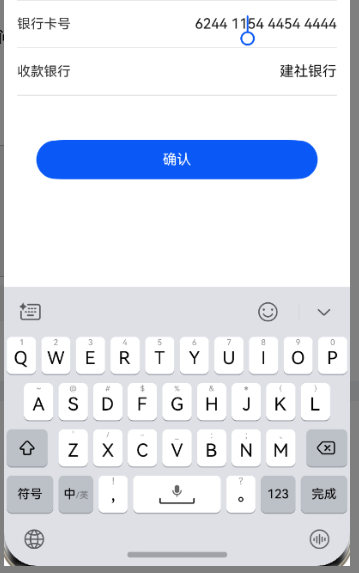

工程机版本:(如:NOH-AN00 204.0.0.65(SP1C00E67R1P12))未找到
DevEco Studio版本:DevEco Studio 5.0.3.600
SDK版本:4.1.0(11)
三方库版本:@ohos/crypto-js ^2.0.3
操作步骤:
1、点击银行卡号中间任意位置
2、删除或新增数字---光标会自动重置到最右侧
解决过程
伙伴你好,参考下这个示例6,这个需要记录光标的位置,不然每次改变值初始化的时候都会移到https://developer.huawei.com/consumer/cn/doc/harmonyos-references-V5/ts-basic-components-textinput-V5#示例6
1.在示例6基础上写的格式化银行卡号的demo
@Entry
@Component
struct phone_example {
@State submitValue: string = ''
@State text: string = ''
@State bankNumberNoSpace: string = ""
@State nextCaret: number = -1 // 用于记录下次光标设置的位置
@State actualCh: number = -1 // 用于记录光标在第i个数字后插入或者第i个数字前删除
@State lastCaretPosition: number = 0
@State lastCaretPositionEnd: number = 0
controller: TextInputController = new TextInputController()

isEmpty(str?: string): boolean {
return str == 'undefined' || !str || !new RegExp("[^\\s]").test(str)
}

removeSpace(str: string): string {
if (this.isEmpty(str)) {
return ''
}
return str.replace(new RegExp("[\\s]", "g"), '')
}

setCaret() {
if (this.nextCaret != -1) {
console.log("to keep caret position right, change caret to", this.nextCaret)
this.controller.caretPosition(this.nextCaret)
this.nextCaret = -1
}
}

calcCaretPosition(nextText: string) {
let befNumberNoSpace: string = this.removeSpace(this.text)
this.actualCh = 0
if (befNumberNoSpace.length < this.bankNumberNoSpace.length) { // 插入场景
for (let i = 0; i < this.lastCaretPosition; i++) {
if (this.text[i] != ' ') {
this.actualCh += 1
}
}
this.actualCh += this.bankNumberNoSpace.length - befNumberNoSpace.length
console.log("actualCh: " + this.actualCh)
for (let i = 0; i < nextText.length; i++) {
if (nextText[i] != ' ') {
this.actualCh -= 1
if (this.actualCh <= 0) {
this.nextCaret = i + 1
break;
}
}
}
} else if (befNumberNoSpace.length > this.bankNumberNoSpace.length) { // 删除场景
if (this.lastCaretPosition === this.text.length) {
console.log("Caret at last, no need to change")
} else if (this.lastCaretPosition === this.lastCaretPositionEnd) {
// 按键盘上回退键一个一个删的情况
for (let i = this.lastCaretPosition; i < this.text.length; i++) {
if (this.text[i] != ' ') {
this.actualCh += 1
}
}
for (let i = nextText.length - 1; i >= 0; i--) {
if (nextText[i] != ' ') {
this.actualCh -= 1
if (this.actualCh <= 0) {
this.nextCaret = i
break;
}
}
}
} else {
// 剪切/手柄选择 一次删多个字符
this.nextCaret = this.lastCaretPosition // 保持光标位置
}
}
}

build() {
Column() {
Row() {
TextInput({ text: `${this.text}`, controller: this.controller }).height('48vp')
.onChange((number: string) => {
// if(this.bankNumberNoSpace!=this.removeSpace(number)) {
this.bankNumberNoSpace = this.removeSpace(number);
let nextText: string = ""
if (this.bankNumberNoSpace.length <= 4) {
nextText = this.bankNumberNoSpace
} else {
for (let i = 0; i < this.bankNumberNoSpace.length; i++) {
nextText += this.bankNumberNoSpace[i];
if ((i + 1) % 4 === 0 && i !== this.bankNumberNoSpace.length - 1) {
nextText += ' ';
}
}
}
console.log("onChange Triggered:" + this.text + "|" + nextText + "|" + number)
if (this.text === nextText && nextText === number) {
// 此时说明数字已经格式化完成了 在这个时候改变光标位置不会被重置掉
this.setCaret()
} else {
this.calcCaretPosition(nextText)
}
this.text = nextText
// }
})
.onTextSelectionChange((selectionStart, selectionEnd) => {
// 记录光标位置
console.log("selection change: ", selectionStart, selectionEnd)
this.lastCaretPosition = selectionStart
this.lastCaretPositionEnd = selectionEnd
})
}
}
.width('100%')
.height("100%")
}
}
2.继续完善用户不能自己输入空格
伙伴你好,最简单的方式可以使用onWillInsert和onWillDelete判断是否为空格,是空格就不给添加和删除
.onWillInsert((info: InsertValue)=>{
let value = info.insertValue
if(value==' '){
return false
}else{
return true;
}
})
.onWillDelete((info: DeleteValue)=>{
let value = info.deleteValue
if(value==' '){
return false
}else{
return true;
}
})
3.用户删除空格的时候不删除空格而是直接后退一位吗?
如果需要用户删除空格的时候不删除空格而是直接后退一位,这个就需要自己去计算删除的位置是不是空格,是空格就要把光标往前缩进两个并且把值往前递增删除一个,这个我这边也没有这样实现过
高德鸿蒙版本sdk
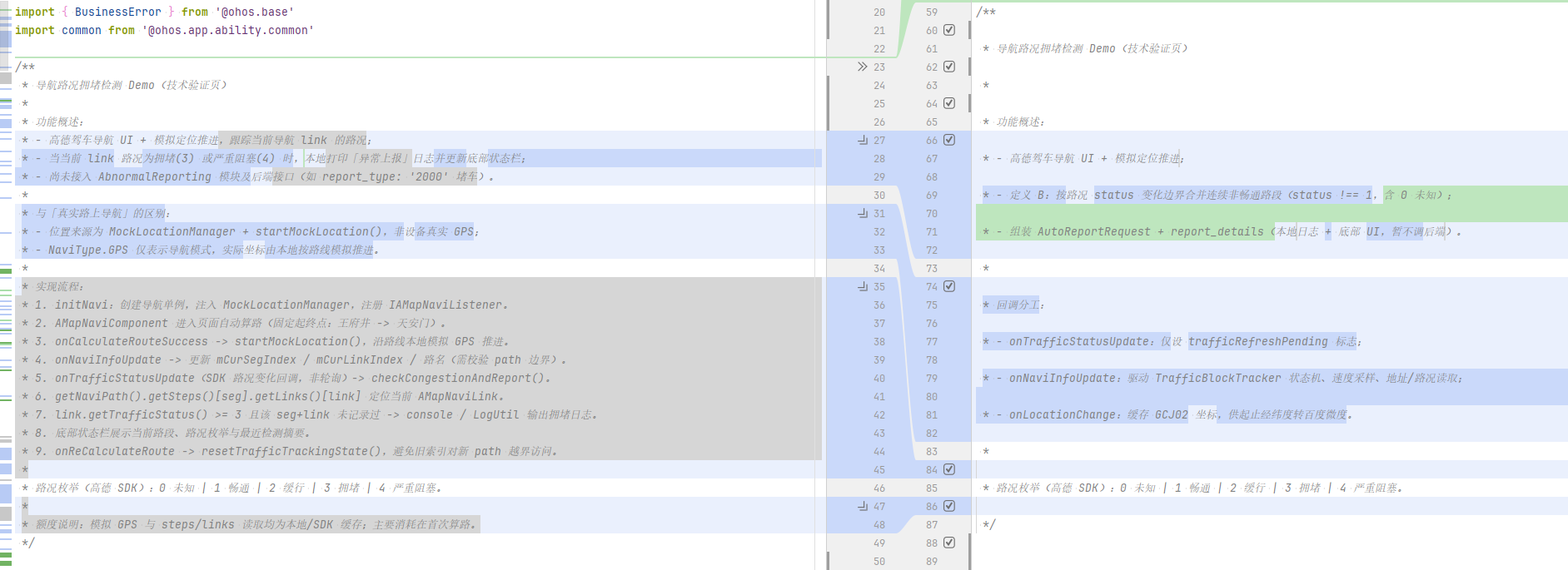
两种实现路况拥堵触发逻辑:
1.左:
通过mCurSegIndex / mCurLinkIndex定位当前 AMapNaviLink,再getTrafficStatus()拿到路况判断
2.右:
直接就是记录连续非畅通的长及子路段信息,分别计算如平均速度、驶入驶出时间等

讨论HarmonyOS开发技术,专注于API与组件、DevEco Studio、测试、元服务和应用上架分发等。
更多推荐


 7
7 0
0- 0


 已为社区贡献4条内容

所有评论(0)