【鸿蒙原生应用实战】第四篇:打包清单——勾选交互、进度计算与实用工具
【鸿蒙原生应用实战】第四篇:打包清单——勾选交互、进度计算与实用工具
前言
前三篇我们完成了首页、装备库和详情页。本篇将开发一个交互性很强的页面——打包清单(PackPage)。
打包清单是户外出行前的重要工具,核心功能:
- 按活动类型(徒步/露营/骑行/登山/野餐)生成不同清单
- 点击勾选/取消打包物品
- 实时进度条 + 百分比
- 已打包重量估算 + 进度条颜色警示
- 天气检查
- 打包技巧参考
本篇将重点讲解用户交互、状态更新、类型筛选等实战内容。
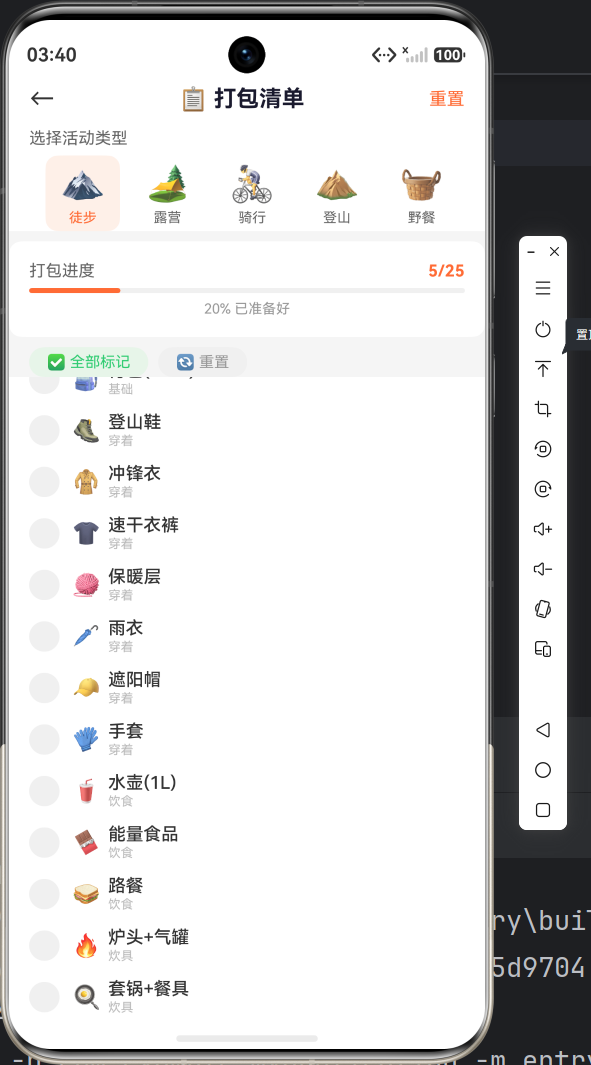
一、页面布局概览
┌──────────────────────────────────────────┐
│  ←   📋 打包清单          重置            │
├──────────────────────────────────────────┤
│  选择活动类型                             │
│  [🏔️徒步] [🏕️露营] [🚴骑行] [⛰️登山]   │
├──────────────────────────────────────────┤
│  打包进度          2/25                  │
│  ████████░░░░░░░░░  8% 已准备好          │
├──────────────────────────────────────────┤
│  [✅全部标记] [🔄重置]                   │
├──────────────────────────────────────────┤
│  ◯ 🎒 背包(40L+)             ← 可勾选   │
│  ◯ 🥾 登山鞋                            │
│  ☑ 🧥 冲锋衣                ← 已勾选    │
│  ...                                     │
├──────────────────────────────────────────┤
│  ⚖️ 重量估算                            │
│  已打包: 2件    预估重量: 1.4kg          │
│  ████████░░░░░░░  建议不超过15kg         │
├──────────────────────────────────────────┤
│  🌤️ 天气检查                            │
│  目的地天气: 晴转多云 8~15°C             │
│  夜间温度: 2°C (需注意保暖)              │
├──────────────────────────────────────────┤
│  💡 打包技巧                            │
│  1. 重的物品放背包中层靠背...            │
│  2. 防雨罩套在背包外...                  │
└──────────────────────────────────────────┘
二、数据模型
2.1 PackItem 接口
interface PackItem {
  id: number;         // 唯一标识
  name: string;       // 物品名称,如"登山鞋"
  category: string;   // 分类:基础/穿着/饮食/炊具/露营/工具/防护/电子/其他/重要
  isPacked: boolean;  // 是否已打包
  icon: string;       // Emoji 图标
}
2.2 ActivityType 接口
interface ActivityType {
  name: string;   // 活动名称:徒步/露营/骑行/登山/野餐
  icon: string;   // 图标:🏔️/🏕️/🚴/⛰️/🧺
}
2.3 清单数据
清单包含 25 件物品,覆盖 10 个分类:
generatePackList(): void {
  this.packItems = [
    { id: 1,  name: '背包(40L+)',  category: '基础', isPacked: false, icon: '🎒' },
    { id: 2,  name: '登山鞋',      category: '穿着', isPacked: false, icon: '🥾' },
    { id: 3,  name: '冲锋衣',      category: '穿着', isPacked: false, icon: '🧥' },
    { id: 4,  name: '速干衣裤',    category: '穿着', isPacked: false, icon: '👕' },
    { id: 5,  name: '保暖层',      category: '穿着', isPacked: false, icon: '🧶' },
    { id: 6,  name: '雨衣',        category: '穿着', isPacked: false, icon: '🌂' },
    { id: 7,  name: '遮阳帽',      category: '穿着', isPacked: false, icon: '🧢' },
    { id: 8,  name: '手套',        category: '穿着', isPacked: false, icon: '🧤' },
    { id: 9,  name: '水壶(1L)',    category: '饮食', isPacked: false, icon: '🥤' },
    { id: 10, name: '能量食品',    category: '饮食', isPacked: false, icon: '🍫' },
    { id: 11, name: '路餐',        category: '饮食', isPacked: false, icon: '🥪' },
    { id: 12, name: '炉头+气罐',   category: '炊具', isPacked: false, icon: '🔥' },
    { id: 13, name: '套锅+餐具',   category: '炊具', isPacked: false, icon: '🍳' },
    { id: 14, name: '帐篷',        category: '露营', isPacked: false, icon: '⛺' },
    { id: 15, name: '睡袋',        category: '露营', isPacked: false, icon: '🛌' },
    { id: 16, name: '防潮垫',      category: '露营', isPacked: false, icon: '📦' },
    { id: 17, name: '头灯/手电',   category: '工具', isPacked: false, icon: '🔦' },
    { id: 18, name: '登山杖',      category: '工具', isPacked: false, icon: '🦯' },
    { id: 19, name: '急救包',      category: '工具', isPacked: false, icon: '💊' },
    { id: 20, name: '多功能刀',    category: '工具', isPacked: false, icon: '🔪' },
    { id: 21, name: '防晒霜',      category: '防护', isPacked: false, icon: '🧴' },
    { id: 22, name: '驱虫剂',      category: '防护', isPacked: false, icon: '🦟' },
    { id: 23, name: '充电宝',      category: '电子', isPacked: false, icon: '🔋' },
    { id: 24, name: '垃圾袋',      category: '其他', isPacked: false, icon: '🗑️' },
    { id: 25, name: '身份证/现金', category: '重要', isPacked: false, icon: '🪪' }
  ];

  // 根据活动类型裁剪不需要的物品
  if (this.activityType === '骑行') {
    this.packItems = this.packItems.filter(item =>
      item.name !== '帐篷' && item.name !== '睡袋' && item.name !== '防潮垫'
    );
  } else if (this.activityType === '野餐') {
    this.packItems = this.packItems.filter(item =>
      item.name !== '帐篷' && item.name !== '睡袋'
      && item.name !== '登山杖' && item.name !== '头灯/手电'
    );
  }

  this.totalItems = this.packItems.length;
}
设计思路:
- 基础清单包含所有物品(25 件)
- 根据活动类型过滤掉不需要的物品(骑行不需要帐篷,野餐不需要登山杖)
- 这样保证了每种活动类型都有一个合理的基础清单
三、活动类型选择器
3.1 实现
@Builder buildActivityTypeSelector() {
  Column() {
    Text('选择活动类型').fontSize(13).fontColor('#666666')
      .width('100%').padding({ left: 16 })

    Scroll() {
      Row() {
        ForEach(this.activityTypes, (type: ActivityType) => {
          Column() {
            Text(type.icon).fontSize(28)
            Text(type.name)
              .fontSize(11)
              .fontColor(this.activityType === type.name ? '#FF6B35' : '#666666')
              .margin({ top: 4 })
          }
          .padding({ left: 12, right: 12, top: 6, bottom: 6 })
          .backgroundColor(this.activityType === type.name ? '#FFF0E8' : '#FFFFFF')
          .borderRadius(10)
          .margin({ right: 8 })
          .onClick(() => {
            this.activityType = type.name;   // 更新选中状态
            this.generatePackList();          // 重新生成清单
          })
        }, (type: ActivityType) => type.name)
      }
      .padding({ left: 16 })
    }
    .scrollable(ScrollDirection.Horizontal)
    .height(60).margin({ top: 6 })
  }
  .width('100%').backgroundColor('#FFFFFF')
}
关键行为:
- 点击某个活动类型 →
this.activityType = type.name generatePackList()重新执行 → 根据新类型过滤物品isPacked全部重置为false→packedItems归零- UI 自动刷新:选中态高亮 + 清单更新 + 进度条重置
这是一个完整的「选类型 → 重置清单」交互闭环。
四、打包进度条
4.1 核心实现
@Builder buildProgress() {
  Column() {
    Row() {
      Text(`打包进度`).fontSize(13).fontColor('#666666')
      Blank()
      Text(`${this.packedItems}/${this.totalItems}`)
        .fontSize(13).fontWeight(FontWeight.Bold).fontColor('#FF6B35')
    }
    .width('100%')

    Progress({ value: this.packedItems, total: this.totalItems, style: ProgressStyle.Linear })
      .width('100%').height(8).value(this.packedItems)
      .color('#FF6B35').backgroundColor('#F0F0F0').borderRadius(4)
      .margin({ top: 4 })

    Text(`${this.getProgressPercent()}% 已准备好`)
      .fontSize(11).fontColor('#999999').width('100%')
      .textAlign(TextAlign.Center).margin({ top: 4 })
  }
  .width('100%').padding(16)
  .backgroundColor('#FFFFFF').borderRadius(10)
  .margin({ top: 8, left: 16, right: 16 })
}
Progress 的实时更新:
value: this.packedItems是@State变量- 每次用户勾选/取消时
togglePack()更新packedItems - Progress 自动反映最新进度
4.2 百分比计算
getProgressPercent(): number {
  if (this.totalItems === 0) return 0;
  return Math.round((this.packedItems / this.totalItems) * 100);
}
注意:增加了除零保护。
五、勾选交互(核心功能)
5.1 勾选/取消逻辑
togglePack(itemId: number): void {
  for (let i: number = 0; i < this.packItems.length; i++) {
    if (this.packItems[i].id === itemId) {
      this.packItems[i].isPacked = !this.packItems[i].isPacked;
      break;
    }
  }
  this.packedItems = this.packItems.filter((item: PackItem) => item.isPacked).length;
}
逐行解析:
- 遍历
packItems数组 - 找到匹配
id的元素 - 取反
isPacked值(true → false或false → true) - 立即退出循环(
break) - 重新统计已打包数量
5.2 列表项 UI
@Builder buildPackItem(item: PackItem) {
  Row() {
    // 圆形勾选按钮
    Stack() {
      Column()
        .width(24).height(24).borderRadius(12)
        .backgroundColor(item.isPacked ? '#FF6B35' : '#F0F0F0')
        .justifyContent(FlexAlign.Center).alignItems(HorizontalAlign.Center)
      if (item.isPacked) {
        Text('✓').fontSize(14).fontColor(Color.White).fontWeight(FontWeight.Bold)
      }
    }

    Text(item.icon).fontSize(18).margin({ left: 10 })

    Column() {
      Text(item.name)
        .fontSize(14).fontWeight(FontWeight.Medium).fontColor('#333333')
        .decoration({
          type: item.isPacked ? TextDecorationType.LineThrough : TextDecorationType.None
        })
      Text(item.category)
        .fontSize(10).fontColor('#BBBBBB').margin({ top: 1 })
    }
    .alignItems(HorizontalAlign.Start).margin({ left: 6 }).layoutWeight(1)
  }
  .width('100%').padding({ left: 16, right: 16, top: 6, bottom: 6 })
  .backgroundColor('#FFFFFF')
  .opacity(item.isPacked ? 0.6 : 1.0)
  .onClick(() => { this.togglePack(item.id); })
}
视觉反馈(3 个维度):
| 状态 | 圆形按钮 | 文字 | 整行透明度 |
|---|---|---|---|
| 未打包 | 灰色空心 #F0F0F0 |
正常 | 100% |
| 已打包 | 橙色实心 #FF6B35 + ✓ |
删除线 | 60% |
这 3 重视觉反馈让用户一目了然地知道哪些物品已打包。
TextDecorationType.LineThrough:为已打包物品添加删除线,这是清单类应用的标准交互模式。
六、批量操作
@Builder buildBulkActions() {
  Row() {
    // 全部标记
    Text('✅ 全部标记')
      .fontSize(12).fontColor('#2ECC71')
      .padding({ left: 14, right: 14, top: 5, bottom: 5 })
      .backgroundColor('#E8F5E9').borderRadius(14)
      .onClick(() => {
        for (let i: number = 0; i < this.packItems.length; i++) {
          this.packItems[i].isPacked = true;
        }
        this.packedItems = this.totalItems;
      })

    // 重置
    Text('🔄 重置')
      .fontSize(12).fontColor('#999999')
      .padding({ left: 14, right: 14, top: 5, bottom: 5 })
      .backgroundColor('#F0F0F0').borderRadius(14)
      .margin({ left: 8 })
      .onClick(() => {
        for (let i: number = 0; i < this.packItems.length; i++) {
          this.packItems[i].isPacked = false;
        }
        this.packedItems = 0;
      })
  }
  .width('100%').padding({ left: 16, top: 8 })
}
两个按钮的对比:
| 按钮 | 颜色 | 背景 | 语义 |
|---|---|---|---|
| ✅ 全部标记 | 绿色 #2ECC71 |
#E8F5E9 |
正向操作 |
| 🔄 重置 | 灰色 #999999 |
#F0F0F0 |
负向操作 |
性能注意:这里使用 for 循环遍历并修改 isPacked,然后一次更新 packedItems。ArkTS 框架会批量处理数组变化,所以不需要逐个触发更新。
七、重量估算器
7.1 重量映射表
@Builder buildWeightCalculator() {
  Column() {
    Text('⚖️ 重量估算')
      .fontSize(14).fontWeight(FontWeight.Bold).fontColor('#1A1A2E')
      .width('100%')

    // 计算已打包物品的总重量
    const packedGears: PackItem[] = this.packItems.filter((i: PackItem) => i.isPacked);
    const weightMap: Record<string, string> = {
      '背包(40L+)': '2.0kg', '登山鞋': '0.8kg', '冲锋衣': '0.6kg',
      '速干衣裤': '0.4kg', '保暖层': '0.3kg', '雨衣': '0.3kg',
      '遮阳帽': '0.1kg', '手套': '0.1kg', '水壶(1L)': '1.0kg',
      '能量食品': '0.5kg', '路餐': '0.3kg', '炉头+气罐': '0.8kg',
      '套锅+餐具': '0.6kg', '帐篷': '2.5kg', '睡袋': '1.2kg',
      '防潮垫': '0.4kg', '头灯/手电': '0.2kg', '登山杖': '0.5kg',
      '急救包': '0.3kg', '多功能刀': '0.1kg', '防晒霜': '0.1kg',
      '驱虫剂': '0.1kg', '充电宝': '0.3kg', '垃圾袋': '0.1kg',
      '身份证/现金': '0.1kg'
    };
7.2 重量计算与进度条
    // 累加重量
    let totalWeight: number = 0;
    for (let i: number = 0; i < packedGears.length; i++) {
      const w: string = weightMap[packedGears[i].name] || '0.2kg';
      totalWeight += parseFloat(w.replace('kg', ''));
    }

    Row() {
      Text('已打包:').fontSize(12).fontColor('#666666')
      Text(`${packedGears.length}件`)
        .fontSize(12).fontColor('#FF6B35').fontWeight(FontWeight.Medium).margin({ left: 4 })
      Blank()
      Text('预估重量:').fontSize(12).fontColor('#666666')
      Text(`${totalWeight.toFixed(1)}kg`)
        .fontSize(14).fontWeight(FontWeight.Bold).fontColor('#FF6B35').margin({ left: 4 })
    }
    .width('100%').margin({ top: 6 })

    // 重量进度条(最大建议 15kg)
    const maxWeight: number = 15.0;
    const percent: number = Math.min(Math.round((totalWeight / maxWeight) * 100), 100);
    Progress({ value: percent, total: 100, style: ProgressStyle.Linear })
      .width('100%').height(6).value(percent)
      .color(percent > 80 ? '#E74C3C' : percent > 60 ? '#F39C12' : '#2ECC71')
      .backgroundColor('#F0F0F0').borderRadius(3).margin({ top: 4 })

    Text(`建议背包总重不超过${maxWeight}kg (体重的20-25%)`)
      .fontSize(10).fontColor('#999999').width('100%').margin({ top: 4 })
  }
  .width('100%').padding(14)
  .backgroundColor('#FFFFFF').borderRadius(10)
  .margin({ top: 8, left: 16, right: 16 })
  .alignItems(HorizontalAlign.Start)
}
重量进度条颜色变化:
| 重量占比 | 颜色 | 含义 |
|---|---|---|
| ≤60% | #2ECC71 绿色 |
安全 |
| 60%-80% | #F39C12 橙色 |
偏重 |
| >80% | #E74C3C 红色 |
超重危险 |
|| 默认值:weightMap[itemName] || '0.2kg' 确保即使物品名称不在映射表中,也有一个默认重量。
八、天气检查与打包技巧
8.1 天气检查
@Builder buildWeatherChecklist() {
  Column() {
    Text('🌤️ 天气检查')
      .fontSize(14).fontWeight(FontWeight.Bold).fontColor('#1A1A2E').width('100%')

    Row() {
      Text('目的地天气:').fontSize(12).fontColor('#666666')
      Blank()
      Text('晴转多云 8~15°C')
        .fontSize(12).fontColor('#333333').fontWeight(FontWeight.Medium)
    }.width('100%').margin({ top: 6 })

    Row() {
      Text('夜间温度:').fontSize(12).fontColor('#666666')
      Blank()
      Text('2°C (需注意保暖)').fontSize(12).fontColor('#E74C3C')
    }.width('100%').margin({ top: 4 })

    Row() {
      Text('降水概率:').fontSize(12).fontColor('#666666')
      Blank()
      Text('10% (无需雨具)').fontSize(12).fontColor('#2ECC71')
    }.width('100%').margin({ top: 4 })

    Row() {
      Text('风速:').fontSize(12).fontColor('#666666')
      Blank()
      Text('3-4级 (适宜户外)').fontSize(12).fontColor('#2ECC71')
    }.width('100%').margin({ top: 4 })
  }
  .width('100%').padding(14)
  .backgroundColor('#FFFFFF').borderRadius(10)
  .margin({ top: 8, left: 16, right: 16 })
  .alignItems(HorizontalAlign.Start)
}
待改进:目前天气数据是静态的,实际应该接入天气 API。但作为展示层模板,这个结构已经准备好接入真实数据。
8.2 打包技巧
@Builder buildPackTips() {
  Column() {
    Text('💡 打包技巧')
      .fontSize(14).fontWeight(FontWeight.Bold).fontColor('#1A1A2E').width('100%')

    const tips: string[] = [
      '重的物品放背包中层靠背,轻的物品放上层和外袋',
      '防雨罩套在背包外,睡袋用防水袋密封',
      '常用物品(水壶、路餐)放在侧袋或顶袋方便取用',
      '刀具、充电宝等需要配合安检的物品放在易取位置',
      '衣物用压缩袋收纳可节省40%空间',
      '背包打包完成后记得调整肩带和腰带'
    ];

    ForEach(tips, (tip: string, index?: number) => {
      Row() {
        Text(`${(index as number) + 1}.`)
          .fontSize(12).fontColor('#FF6B35').fontWeight(FontWeight.Bold)
        Text(tip)
          .fontSize(12).fontColor('#666666').margin({ left: 6 }).layoutWeight(1)
      }
      .width('100%').margin({ top: 4 })
      .alignItems(VerticalAlign.Top)    // 多行文本顶部对齐
    }, (tip: string) => tip.substring(0, 4))
  }
  .width('100%').padding(14)
  .backgroundColor('#FFF8F0').borderRadius(10)
  .margin({ top: 8, left: 16, right: 16 })
  .alignItems(HorizontalAlign.Start)
}
关键细节:
index?: number参数可选,ArkTS 中ForEach的第二个参数可以接收(item, index?)VerticalAlign.Top确保编号和文字顶部对齐,不会因为文字换行而错位tip.substring(0, 4)作为键值生成器——取前 4 个字符作为唯一键,因为 tips 的前 4 个字互不相同
九、页面组装
build(): void {
  Column() {
    this.buildHeader()              // ← 导航栏
    this.buildActivityTypeSelector() // ← 活动类型选择
    this.buildProgress()            // ← 进度条
    this.buildBulkActions()         // ← 批量操作

    Scroll() {
      Column() {
        ForEach(this.packItems, (item: PackItem) => {
          this.buildPackItem(item)
        }, (item: PackItem) => item.id.toString())

        this.buildWeightCalculator()  // ← 重量估算
        this.buildWeatherChecklist()  // ← 天气检查
        this.buildPackTips()          // ← 打包技巧
      }
      .width('100%').padding({ bottom: 30 })
    }
    .scrollable(ScrollDirection.Vertical)
    .layoutWeight(1).width('100%')
  }
  .width('100%').height('100%').backgroundColor('#F5F5F5')
}
页面结构特点:
- 4 个固定模块在顶部(导航 + 类型选择 + 进度 + 批量操作)
- 下部 Scroll 包含:列表 + 3 个工具卡片
- 这种布局保证用户切换活动类型时,进度条和操作按钮始终可见
十、数据流总结
用户选择活动类型
  → this.activityType = '骑行'
  → generatePackList()
    → 过滤掉不需要的物品(帐篷/睡袋/防潮垫)
    → packItems 更新(25→22件)
    → totalItems = 22
    → packedItems = 0
  → UI 刷新:类型高亮 / 清单 / 进度条

用户勾选物品
  → togglePack(itemId)
    → packItems[i].isPacked = true
    → packedItems = filter...length
  → UI 刷新:圆形按钮 / 删除线 / 透明度 / 进度条 / 重量估算
ArkTS 状态管理:整个过程不需要手动调用 setState() 或 update()。ArkTS 的响应式系统会自动追踪 @State 变量的变化并更新 UI。
十一、交互设计总结
交互反馈矩阵
| 用户操作 | 界面反馈 | 数据变化 |
|---|---|---|
| 选择活动类型 | 类型高亮切换、清单重置 | activityType、packItems |
| 勾选/取消物品 | 圆形变色 + ✓、删除线、透明度 | isPacked |
| 全部标记 | 所有物品勾选 | 所有 isPacked = true |
| 重置 | 所有物品取消勾选 | 所有 isPacked = false |
| 勾选时 | 进度条推进、重量估算更新 | packedItems |
可改进的交互点
- 防误触:对于「全部标记」和「重置」按钮,可以增加二次确认弹窗
- 触感反馈:可以使用
clickEffect属性添加点击视觉效果 - 动画过渡:给删除线和透明度变化添加过渡动画
十二、与其他页面的关联
打包清单与 App 中其他页面的关联:
Index ──→ PackPage(从快捷入口进入)
            ↑
GearPage ──→ PackPage(从"生成打包清单"进入)
            ↑
Index ──→ PackPage(点击即将出发的活动)
这说明 PackPage 是整个 App 的汇聚点,多个入口都能进入。
总结
本篇我们完成了打包清单页面的开发,涵盖:
- ✅ 活动类型选择器 + 动态清单生成
- ✅ 勾选/取消交互(3 重视觉反馈)
- ✅ Progress 实时进度条
- ✅ 批量操作(全部标记 / 重置)
- ✅ 重量估算 + 颜色分级进度条
- ✅ 天气检查 + 打包技巧
下一篇我们将开发 活动记录页面,学习年份筛选、统计计算、成就系统等高阶内容!
项目信息:API 23 (compatible) / API 24 (target) | Stage 模型 | ArkTS
(完)

讨论HarmonyOS开发技术,专注于API与组件、DevEco Studio、测试、元服务和应用上架分发等。
更多推荐
 0
0 0
0- 0


 已为社区贡献35条内容

所有评论(0)