【鸿蒙原生应用实战】第五篇:活动记录页——数据筛选、统计与成就系统
【鸿蒙原生应用实战】第五篇:活动记录页——数据筛选、统计与成就系统
前言
这是本系列的最后一篇。在前四篇中,我们完成了首页、装备库、装备详情和打包清单四个页面的开发。本篇将开发 App 的最后一个页面——活动记录页(ActivityRecordPage)。
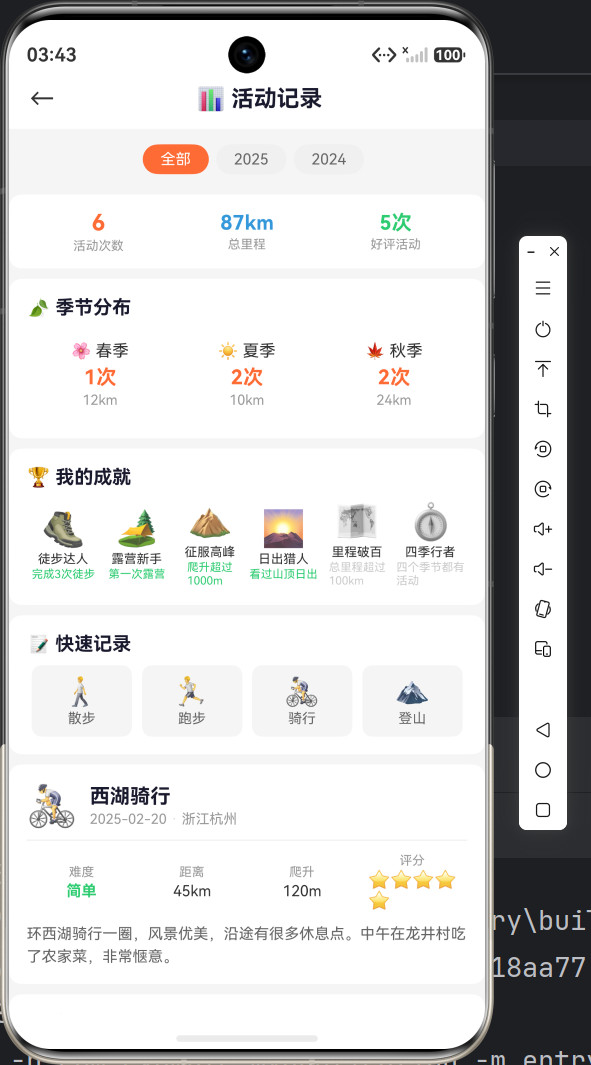
活动记录页的功能:
- 按年份筛选活动(全部/2025/2024)
- 顶部统计行(活动次数 / 总里程 / 好评活动)
- 季节分布统计
- 成就徽章系统(带灰度的解锁状态)
- 快速记录入口
- 活动卡片列表
本篇将重点讲解数组 reduce 计算、条件染色、Builder 参数化、灰度滤镜等进阶 ArkTS 技巧。
一、页面布局总览
┌──────────────────────────────────────────┐
│  📝 活动记录                              │
├──────────────────────────────────────────┤
│  [全部] [2025] [2024]                     │  ← 年份筛选
├──────────────────────────────────────────┤
│  活动次数    总里程      好评活动          │
│    6次       87km        5次              │  ← 统计行
├──────────────────────────────────────────┤
│  🍃 季节分布                              │
│  [🌸 春季 1次 12km] [☀️ 夏季 2次 10km]   │
├──────────────────────────────────────────┤
│  🏆 我的成就                              │
│  [🥾徒步达人] [🏕️露营新手] [⛰️征服高峰]  │  ← 带灰度/彩色
├──────────────────────────────────────────┤
│  📝 快速记录                              │
│  [🚶散步] [🏃跑步] [🚴骑行] [🏔️登山]    │
├──────────────────────────────────────────┤
│  🚴 西湖骑行                              │
│  2025-02-20 · 浙江杭州                    │  ← 活动卡片
│  难度 中等  |  距离 45km  | 爬升 120m    │
│  ⭐⭐⭐⭐⭐                              │
│  环西湖骑行一圈,风景优美...              │
├──────────────────────────────────────────┤
│  🏕️ 周末野营                              │
│  ...                                      │
└──────────────────────────────────────────┘
二、数据模型与初始化
2.1 Record 接口
interface Record {
  id: number;          // 唯一标识
  title: string;       // 活动标题
  date: string;        // 日期,如 "2025-02-20"
  location: string;    // 地点
  duration: string;    // 时长
  distance: string;    // 距离,如 "45km"
  elevation: string;   // 爬升高度,如 "120m"
  difficulty: string;  // 难度:简单/中等/困难
  rating: number;      // 评分 1-5
  notes: string;       // 活动笔记
  icon: string;        // Emoji 图标
}
相比前面几篇的数据模型,Record 接口的字段是最丰富的,包含了活动的完整信息。
2.2 模拟数据
loadRecords(): void {
  this.records = [
    {
      id: 1, title: '西湖骑行', date: '2025-02-20',
      location: '浙江杭州', duration: '1天',
      distance: '45km', elevation: '120m',
      difficulty: '简单', rating: 5,
      notes: '环西湖骑行一圈,风景优美,沿途有很多休息点。中午在龙井村吃了农家菜,非常惬意。',
      icon: '🚴'
    },
    {
      id: 2, title: '周末野营', date: '2025-01-10',
      location: '北京怀柔', duration: '2天1夜',
      distance: '-', elevation: '350m',
      difficulty: '中等', rating: 4,
      notes: '第一次在冬季露营,晚上温度降到-5°C,幸好带了合适的睡袋。看到了满天繁星,非常值得!',
      icon: '🏕️'
    },
    {
      id: 3, title: '海岸线徒步', date: '2024-12-05',
      location: '深圳东西涌', duration: '1天',
      distance: '12km', elevation: '680m',
      difficulty: '困难', rating: 5,
      notes: '深圳最美海岸线,全程翻越6个山头,部分路段需要手脚并用。风景绝美,但体力消耗很大,建议带足水。',
      icon: '🏖️'
    },
    {
      id: 4, title: '香山赏秋', date: '2024-11-10',
      location: '北京香山', duration: '半天',
      distance: '8km', elevation: '280m',
      difficulty: '简单', rating: 3,
      notes: '红叶季人太多了,几乎是人挤人。建议平日去,体验会好很多。',
      icon: '🍁'
    },
    {
      id: 5, title: '夜爬泰山', date: '2024-10-05',
      location: '山东泰安', duration: '1天',
      distance: '16km', elevation: '1545m',
      difficulty: '中等', rating: 5,
      notes: '凌晨出发夜爬,赶在日出前登顶。看到日出的那一刻,所有的疲惫都值得了!',
      icon: '⛰️'
    },
    {
      id: 6, title: '溯溪玩水', date: '2024-08-15',
      location: '浙江安吉', duration: '1天',
      distance: '6km', elevation: '180m',
      difficulty: '简单', rating: 4,
      notes: '夏天溯溪太舒服了!水很清澈,沿途有几个小水潭可以游泳。',
      icon: '🏊'
    }
  ];
}
6 条模拟数据覆盖了不同的难度、评分和季节,方便后续筛选和统计。
三、年份筛选
3.1 筛选逻辑
@State selectedYear: string = '全部';
@State years: string[] = ['全部', '2025', '2024'];

getFilteredRecords(): Record[] {
  if (this.selectedYear === '全部') return this.records;
  return this.records.filter((r: Record) => r.date.startsWith(this.selectedYear));
}
startsWith 是字符串比较的妙用:'2025-02-20'.startsWith('2025') 为 true,因为日期字符串以年份开头。
3.2 筛选器 UI
buildYearFilter(): void {
  // 年份标签
  Row() {
    ForEach(this.years, (year: string) => {
      Column() {
        Text(year)
          .fontSize(13)
          .fontColor(this.selectedYear === year ? '#FFFFFF' : '#666666')
          .padding({ left: 20, right: 20, top: 6, bottom: 6 })
          .backgroundColor(this.selectedYear === year ? '#FF6B35' : '#F0F0F0')
          .borderRadius(16)
      }
      .margin({ right: 8 })
      .onClick(() => { this.selectedYear = year; })
    }, (year: string) => year)
  }
  .padding({ left: 16, top: 8 })
}
这个筛选器的交互逻辑和装备库的分类筛选完全一致:点击更新 selectedYear → 驱动 getFilteredRecords() → 自动重新渲染统计行和卡片列表。
四、统计行(含 reduce 计算)
4.1 核心计算
const filtered: Record[] = this.getFilteredRecords();
const totalDist: number = filtered.reduce((sum: number, r: Record) => {
  const d: string = r.distance.replace('km', '');
  return d === '-' ? sum : sum + parseFloat(d);
}, 0);
reduce 逐行解析:
- 初始值
sum = 0 - 对每条记录,把
"45km"去掉"km"变成"45" - 如果是
"-"(表示无距离数据),跳过 - 否则
parseFloat("45")→45,累加到sum - 最终得到总里程
4.2 统计行 UI
buildStatsRow(): void {
  const filtered: Record[] = this.getFilteredRecords();
  const totalDist: number = filtered.reduce((sum, r) => {
    const d = r.distance.replace('km', '');
    return d === '-' ? sum : sum + parseFloat(d);
  }, 0);

  Row() {
    Column() {
      Text(filtered.length.toString())
        .fontSize(18).fontWeight(FontWeight.Bold).fontColor('#FF6B35')
      Text('活动次数').fontSize(10).fontColor('#999999').margin({ top: 2 })
    }
    .layoutWeight(1).alignItems(HorizontalAlign.Center)

    Column() {
      Text(totalDist.toFixed(0) + 'km')
        .fontSize(16).fontWeight(FontWeight.Bold).fontColor('#3498DB')
      Text('总里程').fontSize(10).fontColor('#999999').margin({ top: 2 })
    }
    .layoutWeight(1).alignItems(HorizontalAlign.Center)

    Column() {
      Text(`${filtered.filter((r: Record) => r.rating >= 4).length}次`)
        .fontSize(16).fontWeight(FontWeight.Bold).fontColor('#2ECC71')
      Text('好评活动').fontSize(10).fontColor('#999999').margin({ top: 2 })
    }
    .layoutWeight(1).alignItems(HorizontalAlign.Center)
  }
  .width('100%').padding(12)
  .backgroundColor('#FFFFFF').borderRadius(10)
  .margin({ top: 8, left: 16, right: 16 })
}
注意:这里的 buildStatsRow() 不是一个 @Builder,而是一个普通方法。因为 @Builder 中不能定义局部变量,而这里需要 filtered 和 totalDist 两个局部变量。
但是这段代码实际写在了 build() 方法中——ArkTS 中支持在 build() 内部直接书写局部变量声明和 UI 代码混合,这在 @Builder 中是不允许的。
五、难度颜色映射
getDifficultyColor(d: string): ResourceStr {
  if (d === '简单') return '#2ECC71';
  if (d === '中等') return '#F39C12';
  return '#E74C3C';  // 困难
}
颜色-难度映射:
| 难度 | 颜色 | 视觉语义 |
|---|---|---|
| 简单 | #2ECC71 绿色 |
安全/轻松 |
| 中等 | #F39C12 橙色 |
注意/适中 |
| 困难 | #E74C3C 红色 |
危险/挑战 |
返回类型 ResourceStr:这是鸿蒙 ArkTS 中颜色字符串的类型别名,实际上就是 string,但使用这个类型更规范。
六、活动卡片
6.1 卡片 Builder
@Builder buildRecordCard(record: Record) {
  Column() {
    // 第一行:图标 + 标题 + 日期地点
    Row() {
      Text(record.icon).fontSize(32)

      Column() {
        Text(record.title).fontSize(16).fontWeight(FontWeight.Bold).fontColor('#1A1A2E')
        Row() {
          Text(record.date).fontSize(11).fontColor('#999999')
          Text(' · ').fontSize(11).fontColor('#DDDDDD')
          Text(record.location).fontSize(11).fontColor('#999999')
        }
        .width('100%').margin({ top: 2 })
      }
      .alignItems(HorizontalAlign.Start).margin({ left: 10 }).layoutWeight(1)
    }
    .width('100%')

    // 分割线
    Row()
      .width('100%').height(0).border({ width: { top: 1 }, color: '#F0F0F0' })
      .margin({ top: 8 })

    // 第二行:难度 / 距离 / 爬升 / 评分
    Row() {
      Column() {
        Text('难度').fontSize(10).fontColor('#999999')
        Text(record.difficulty)
          .fontSize(12).fontWeight(FontWeight.Bold)
          .fontColor(this.getDifficultyColor(record.difficulty)).margin({ top: 2 })
      }
      .layoutWeight(1).alignItems(HorizontalAlign.Center)

      Column() {
        Text('距离').fontSize(10).fontColor('#999999')
        Text(record.distance).fontSize(12).fontColor('#333333').margin({ top: 2 })
      }
      .layoutWeight(1).alignItems(HorizontalAlign.Center)

      Column() {
        Text('爬升').fontSize(10).fontColor('#999999')
        Text(record.elevation).fontSize(12).fontColor('#333333').margin({ top: 2 })
      }
      .layoutWeight(1).alignItems(HorizontalAlign.Center)

      Column() {
        Text('评分').fontSize(10).fontColor('#999999')
        Text('⭐'.repeat(record.rating)).fontSize(14).margin({ top: 1 })
      }
      .layoutWeight(1).alignItems(HorizontalAlign.Center)
    }
    .width('100%').padding({ top: 10 })

    // 第三行:活动笔记(最多3行,超出省略号)
    Text(record.notes)
      .fontSize(12).fontColor('#666666').lineHeight(18)
      .width('100%').margin({ top: 8 })
      .maxLines(3).textOverflow({ overflow: TextOverflow.Ellipsis })
  }
  .width('100%').padding(14)
  .backgroundColor('#FFFFFF').borderRadius(10)
  .margin({ top: 8, left: 16, right: 16 })
  .alignItems(HorizontalAlign.Start)
}
6.2 多行省略
Text(record.notes)
  .maxLines(3)
  .textOverflow({ overflow: TextOverflow.Ellipsis })
maxLines(3) 限制最多显示 3 行,TextOverflow.Ellipsis 超出部分用 ... 表示。这是移动端卡片列表的常用手法。
6.3 评分星级显示
'⭐'.repeat(record.rating)
String.prototype.repeat(n) 返回重复 n 次的新字符串。rating=5 时返回 "⭐⭐⭐⭐⭐",rating=3 时返回 "⭐⭐⭐"。
七、季节分布统计
@Builder buildSeasonStats() {
  const seasons: string[][] = [
    ['🌸 春季', '1次', '12km', '#2ECC71'],
    ['☀️ 夏季', '2次', '10km', '#F39C12'],
    ['🍁 秋季', '2次', '24km', '#FF6B35']
  ];

  Column() {
    Text('🍃 季节分布')
      .fontSize(15).fontWeight(FontWeight.Bold).fontColor('#1A1A2E').width('100%')

    Row() {
      ForEach(seasons, (s: string[]) => {
        Column() {
          Text(s[0]).fontSize(13).fontColor('#333333')
          Text(s[1]).fontSize(16).fontWeight(FontWeight.Bold)
            .fontColor('#FF6B35').margin({ top: 4 })
          Text(s[2]).fontSize(11).fontColor('#999999').margin({ top: 2 })
        }
        .layoutWeight(1).alignItems(HorizontalAlign.Center)
        .padding(10).backgroundColor('#FFFFFF').borderRadius(8).margin({ left: 4, right: 4 })
      }, (s: string[]) => s[0])
    }
    .width('100%').margin({ top: 8 })
  }
  .width('100%').padding(14)
  .backgroundColor('#FFFFFF').borderRadius(10)
  .margin({ top: 8, left: 16, right: 16 })
  .alignItems(HorizontalAlign.Start)
}
数据组织:用二维字符串数组 string[][] 存储,每行包含季节名、次数、里程、颜色(尽管颜色字段已经在模板中硬编码了字体颜色)。
待改进:这里的季节数据是静态的。最佳实践应该从 this.records 中动态计算各季节的活动数量和里程。
八、成就徽章系统
@Builder buildAchievements() {
  Column() {
    Text('🏆 我的成就')
      .fontSize(15).fontWeight(FontWeight.Bold).fontColor('#1A1A2E').width('100%')

    const badges: string[][] = [
      ['🥾', '徒步达人', '完成3次徒步', true],
      ['🏕️', '露营新手', '第一次露营', true],
      ['⛰️', '征服高峰', '爬升超过1000m', true],
      ['🌄', '日出猎人', '看过山顶日出', true],
      ['🗺️', '里程破百', '总里程超过100km', false],
      ['🧭', '四季行者', '四个季节都有活动', false]
    ];

    Row() {
      ForEach(badges, (b: string[]) => {
        Column() {
          Text(b[0]).fontSize(28)
            .grayscale(b[3] as boolean ? 0 : 1)   // ← 关键:灰度滤镜
          Text(b[1])
            .fontSize(10).fontColor('#333333').margin({ top: 2 })
            .maxLines(1).textOverflow({ overflow: TextOverflow.Ellipsis })
          Text(b[2])
            .fontSize(9).fontColor(b[3] as boolean ? '#2ECC71' : '#CCCCCC').margin({ top: 1 })
        }
        .layoutWeight(1).alignItems(HorizontalAlign.Center)
      }, (b: string[]) => b[1])
    }
    .width('100%').margin({ top: 10 })
  }
  .width('100%').padding(14)
  .backgroundColor('#FFFFFF').borderRadius(10)
  .margin({ top: 8, left: 16, right: 16 })
  .alignItems(HorizontalAlign.Start)
}
8.1 灰度滤镜 .grayscale()
这是 ArkTS 提供的图像滤镜 API:
.grayscale(factor: number)
factor = 0:全彩色(已解锁)factor = 1:全灰度(未解锁)factor = 0.5:半灰度
b[3] as boolean:因为二维数组的元素类型是 string[],第四列 true/false 虽然是布尔值,但在数组中会被推断为 string 类型。使用 as boolean 断言确保类型正确。
8.2 已解锁 / 未解锁的视觉差异
| 状态 | Emoji | 说明文字颜色 | 视觉 |
|---|---|---|---|
已解锁 true |
全彩色 | #2ECC71 绿色 |
明亮 |
未解锁 false |
灰色 | #CCCCCC 浅灰 |
暗淡 |
这种「黑白 vs 彩色」的对比让用户一目了然地知道哪些成就已经获得、哪些还需要努力。
九、快速记录
@Builder buildQuickLog() {
  Column() {
    Text('📝 快速记录')
      .fontSize(15).fontWeight(FontWeight.Bold).fontColor('#1A1A2E').width('100%')

    Row() {
      const quickTypes: string[][] = [
        ['🚶', '散步'], ['🏃', '跑步'], ['🚴', '骑行'], ['🏔️', '登山']
      ];
      ForEach(quickTypes, (qt: string[]) => {
        Column() {
          Text(qt[0]).fontSize(22)
          Text(qt[1]).fontSize(11).fontColor('#666666').margin({ top: 2 })
        }
        .layoutWeight(1).alignItems(HorizontalAlign.Center)
        .padding(8).backgroundColor('#F5F5F5').borderRadius(8).margin({ left: 4, right: 4 })
      }, (qt: string[]) => qt[1])
    }
    .width('100%').margin({ top: 8 })
  }
  .width('100%').padding(14)
  .backgroundColor('#FFFFFF').borderRadius(10)
  .margin({ top: 8, left: 16, right: 16 })
  .alignItems(HorizontalAlign.Start)
}
设计意图:快速记录是用户最常用的 4 种活动类型,点击后应该快速进入记录创建流程(但当前版本仅做了 UI 展示)。
十、页面组装
build(): void {
  Column() {
    this.buildHeader()
    this.buildYearFilter()
    this.buildStatsRow()

    Scroll() {
      Column() {
        this.buildSeasonStats()
        this.buildAchievements()
        this.buildQuickLog()

        ForEach(this.getFilteredRecords(), (record: Record) => {
          this.buildRecordCard(record)
        }, (record: Record) => record.id.toString())
      }
      .width('100%').padding({ bottom: 30 })
    }
    .scrollable(ScrollDirection.Vertical)
    .layoutWeight(1).width('100%')
  }
  .width('100%').height('100%').backgroundColor('#F5F5F5')
}
页面数据流:
build() 执行
  → buildHeader()  — 静态头部
  → buildYearFilter() — 年份标签(绑定 selectedYear)
  → buildStatsRow() — 根据 selectedYear 计算并显示统计
  → Scroll 内:
    → buildSeasonStats() — 静态季节分布
    → buildAchievements() — 成就徽章
    → buildQuickLog() — 快速记录
    → ForEach(getFilteredRecords()) — 根据 selectedYear 显示活动卡片
当 selectedYear 变化时,getFilteredRecords() 返回值变化,ForEach 和 buildStatsRow 中的计算同时更新。
十一、ArkTS 最佳实践总结(全系列)
经过 5 篇博文、5 个页面的开发,我们总结一些 ArkTS 开发的最佳实践:
11.1 @State 变量的使用原则
| 原则 | 说明 | 示例 |
|---|---|---|
| 最小化 | 只声明必要的状态 | 能用 getFilteredRecords() 计算的就不存 |
| 单一来源 | 每个数据只有一个状态源 | 不把 filteredRecords 另存为一个 @State |
| 不可变更新 | 替换整个数组而不是修改元素 | this.packItems = newArray |
11.2 @Builder 拆分策略
| 情况 | 做法 |
|---|---|
| UI 超过 20 行 | 拆分为独立 @Builder |
| 可复用的 UI 片段 | 带参数的 @Builder |
| 需要局部变量的计算区 | 在 build() 方法直接书写,或提取为普通方法 |
11.3 避免常见陷阱
- 不要在
@Builder中声明变量——@Builder只允许 UI 描述和if/ForEach - 不要在
build()中使用@Builder的调用语法——this.buildXxx()而不是buildXxx() - 注意
ForEach的第三个参数——键必须唯一且稳定,否则会导致列表渲染异常 - 类型断言
as的必要性——在严格模式下,router.getParams()返回需要as断言
11.4 性能优化建议
| 优化点 | 做法 |
|---|---|
| ForEach 键 | 使用唯一 ID 而非 index |
| 条件渲染 | 用 if 而非 visibility 控制显隐 |
| 避免重复计算 | 用 getter 方法封装计算逻辑 |
| 懒加载 | 长列表使用 LazyForEach |
十二、项目架构回顾
5 个页面 + 路由关系的完整架构图:
entry/src/main/ets/
├── entryability/
│   └── EntryAbility.ets          ← UIAbility 生命周期
├── pages/
│   ├── Index.ets                 ← 首页(锚点)
│   ├── GearPage.ets              ← 装备库
│   ├── GearDetailPage.ets        ← 装备详情
│   ├── PackPage.ets              ← 打包清单
│   └── ActivityRecordPage.ets    ← 活动记录
└── resources/
    ├── base/element/
    │   ├── color.json            ← 颜色资源
    │   ├── float.json            ← 尺寸资源
    │   └── string.json           ← 字符串资源
    └── base/profile/
        └── main_pages.json       ← 路由注册
页面间的导航关系:
Index (首页)
  ├── → GearPage (装备库)
  │     └── → GearDetailPage (装备详情)
  ├── → PackPage (打包清单)
  └── → ActivityRecordPage (活动记录) ← 从 Tab 或菜单进入
总结
经过五篇连续的实战博文,我们完整地开发了一个鸿蒙原生「户外助手」App:
| 篇次 | 页面 | 核心技术点 |
|---|---|---|
| 第一篇 | 首页 Index | 项目搭建、路由注册、@Builder、统计行 |
| 第二篇 | 装备库 GearPage | 分类筛选、横向 Scroll、数据驱动 UI |
| 第三篇 | 装备详情 GearDetailPage | 路由传参、渐变背景、Progress 组件 |
| 第四篇 | 打包清单 PackPage | 勾选交互、进度计算、重量估算 |
| 第五篇 | 活动记录 ActivityRecordPage | 年份筛选、reduce 统计、成就灰度系统 |
技术栈总结:
- 语言:ArkTS(TypeScript 的子集)
- 框架:Stage 模型 + @Component 组件化
- 状态管理:@State 装饰器
- 路由:@ohos.router
- 兼容 SDK:API 23,目标 SDK:API 24
希望这五篇博文能帮助你快速上手鸿蒙原生应用的开发。在实际项目中,可以将模拟数据替换为真实的本地存储(@ohos.data.preferences)或网络请求(@ohos.net.http),让 App 功能更加完整。
扩展学习资源
项目信息:API 23 (compatible) / API 24 (target) | Stage 模型 | ArkTS
项目路径:D:\\harmonyos\\project\\6.12.12345\\5\\MyApplication
(全系列完)

讨论HarmonyOS开发技术,专注于API与组件、DevEco Studio、测试、元服务和应用上架分发等。
更多推荐
 0
0 0
0- 0


 已为社区贡献35条内容

所有评论(0)