第100篇 | HarmonyOS 进阶闭环复盘:地图、AI、视频和分享如何串起来
第100篇 | HarmonyOS 进阶闭环复盘:地图、AI、视频和分享如何串起来
第 100 篇把路径拉长:一张照片不只进入相册,还会在地图里形成记忆点,被 AI 生成标题和描述,被视频模块加工成短片,最后通过系统分享或近场分享发出去。
进阶闭环的难点在于跨能力边界。地图、AI、视频、分享各自都能写成单篇文章,但真正的产品体验要求它们消费同一份记录,并在失败时各自有清晰退路。
版本与环境
本文复测口径为 DevEco Studio 6.1 Release、HarmonyOS SDK 6.1.0(23)、Stage 模型 ArkTS 页面。涉及相机、地图、AI 在线能力、华为账号、系统分享或多端同步时,以真机结果为准;预览器只能用来检查页面结构和文案层级,不能替代权限、设备能力和系统弹窗验证。
对应源码位置
entry/src/main/ets/pages/Index.etsentry/src/main/ets/services/VolcengineArkService.etsentry/src/main/ets/services/GalleryVideoService.etsentry/src/main/ets/services/GalleryRecordService.ets
本篇目标
- 把地图记忆、AI 图解、视频生成、系统分享连接到同一条记录链路。
- 区分在线能力失败和本地记录失败,避免混成一个“生成失败”。
- 确认分享前的隐私边界,尤其是保险箱和沙箱路径。
- 为第 100 篇形成一个可被社区读者复现的进阶验收表。
地图让照片变成记忆点
地图不是装饰组件,它消费的是记录里的经纬度、地点文案和选中状态。只要拍摄记录能被转成地图记忆点,用户就可以从空间维度回看照片。
进阶闭环的第一步,是确认相册记录和地图 Marker 不各自维护一份不一致的数据。
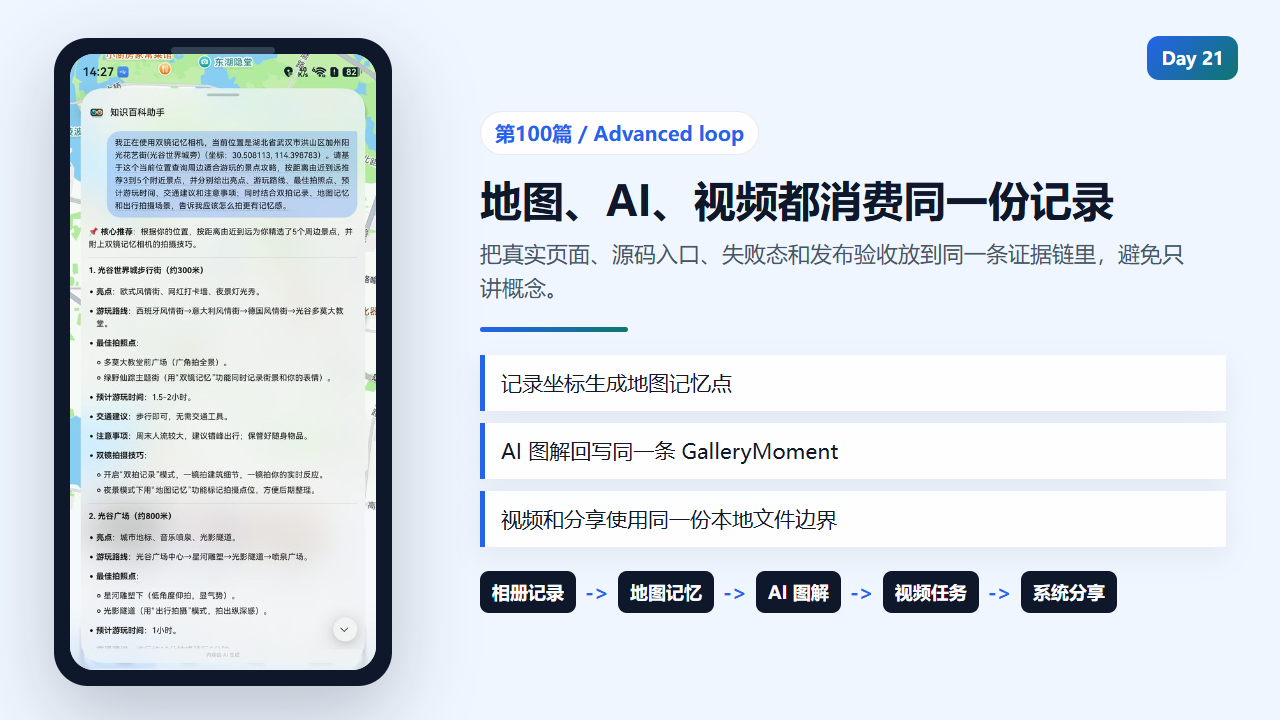
地图、AI、视频、分享串成同一条进阶闭环
    const clickAction = await this.getMemoryLiveViewClickAction();
    const notificationIcon = await this.getSceneRecallNotificationIcon();
    try {
      const request: notificationManager.NotificationRequest = {
        id: this.sceneRecallNotificationId,
        label: 'scene-recall',
        appMessageId: notificationKey,
        notificationSlotType: notificationManager.SlotType.SERVICE_INFORMATION,
        content: {
          notificationContentType: notificationManager.ContentType.NOTIFICATION_CONTENT_BASIC_TEXT,
          normal: {
            title: '这里有一段旧时光',
            text: recallText,
            additionalText: record.place || memory.place
          }
        },
        wantAgent: clickAction,
        tapDismissed: true,
        isOngoing: false,
        isUnremovable: false,
        autoDeletedTime: now + 12 * 60 * 60 * 1000
      };
      if (notificationIcon) {
        request.smallIcon = notificationIcon;
        request.largeIcon = notificationIcon;
      }
      await notificationManager.publish(request);
      this.lastSceneRecallNotificationKey = notificationKey;
      this.lastSceneRecallNotificationAt = now;
    } catch (error) {
      const err = error as BusinessError;
      console.warn(`Failed to publish scene recall notification: ${err.code ?? ''} ${err.message ?? JSON.stringify(error)}`);
    }
  }

  private async buildMemoryLiveView(
    memory: MemorySpot,
    distanceMeters: number
  ): Promise<liveViewManager.LiveView | undefined> {
    const placeLabel = this.getCompactPlaceLabel(memory.place);
    const distanceLabel = this.formatDistance(distanceMeters);
    const clickAction = await this.getMemoryLiveViewClickAction();
    if (!clickAction) {
      return undefined;
    }
    return {
      id: this.memoryLiveViewId,
      event: 'CHECK_IN',
      liveViewData: {
        primary: {
          title: '',
          content: [
            { text: '鐠烘繄顬?' },
            { text: distanceLabel, textColor: '#FFB86B' },
            { text: '' }
          ],
          keepTime: 15,
          clickAction,
AI 图解要回写记录而不是只显示弹窗
generateRemoteInsight 会先检查忙碌态、目标记录和本地 Key,再调用 VolcengineArkService。返回结果不是一次性 Toast,而是要回写到 GalleryMoment,供详情页、分享文案和视频提示词继续使用。
文章里必须写清楚:没有 Key 或网络失败时,本地图解仍然可用;在线失败不能破坏原始照片记录。
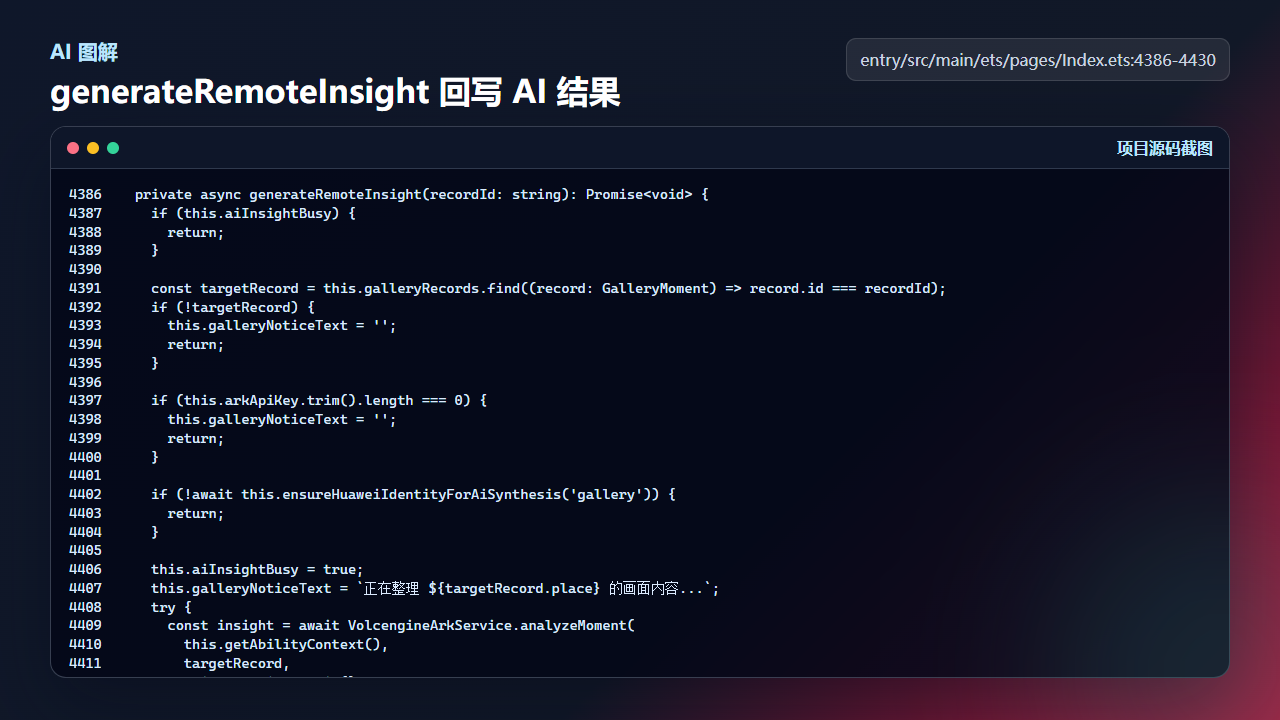
AI 图解结果要回写到记录,不能只停留在弹窗提示
  private async generateRemoteInsight(recordId: string): Promise<void> {
    if (this.aiInsightBusy) {
      return;
    }

    const targetRecord = this.galleryRecords.find((record: GalleryMoment) => record.id === recordId);
    if (!targetRecord) {
      this.galleryNoticeText = '';
      return;
    }

    if (this.arkApiKey.trim().length === 0) {
      this.galleryNoticeText = '';
      return;
    }

    if (!await this.ensureHuaweiIdentityForAiSynthesis('gallery')) {
      return;
    }

    this.aiInsightBusy = true;
    this.galleryNoticeText = `正在整理 ${targetRecord.place} 的画面内容...`;
    try {
      const insight = await VolcengineArkService.analyzeMoment(
        this.getAbilityContext(),
        targetRecord,
        this.arkApiKey.trim()
      );
      const nextRecords = this.galleryRecords.map((record: GalleryMoment) => {
        if (record.id !== recordId) {
          return record;
        }
        const nextRecord = this.buildAiReadyRecord(record, insight.aiCaption, insight.videoPrompt);
        if (this.getRecordUserNote(record).length === 0) {
          nextRecord.userNote = insight.aiCaption;
          this.galleryUserNoteDraft = insight.aiCaption;
        }
        return nextRecord;
      });
      this.galleryRecords = nextRecords;
      this.gallerySelectedId = recordId;
      this.galleryNoticeText = '';
      await this.persistGalleryRecords(nextRecords);
    } catch (error) {
      const message = error instanceof Error ? error.message : JSON.stringify(error);
视频任务是异步链路,要保存状态
远程视频生成不是同步函数。createVideoTask 会把多张照片组织成任务请求,保存任务状态,并在后续轮询里恢复。文章需要提醒读者:视频任务的成功、失败、下载和过期链接都要分开处理。
如果只讲“调用模型生成视频”,就缺少任务态、链接有效期和本地转存这些工程关键点。
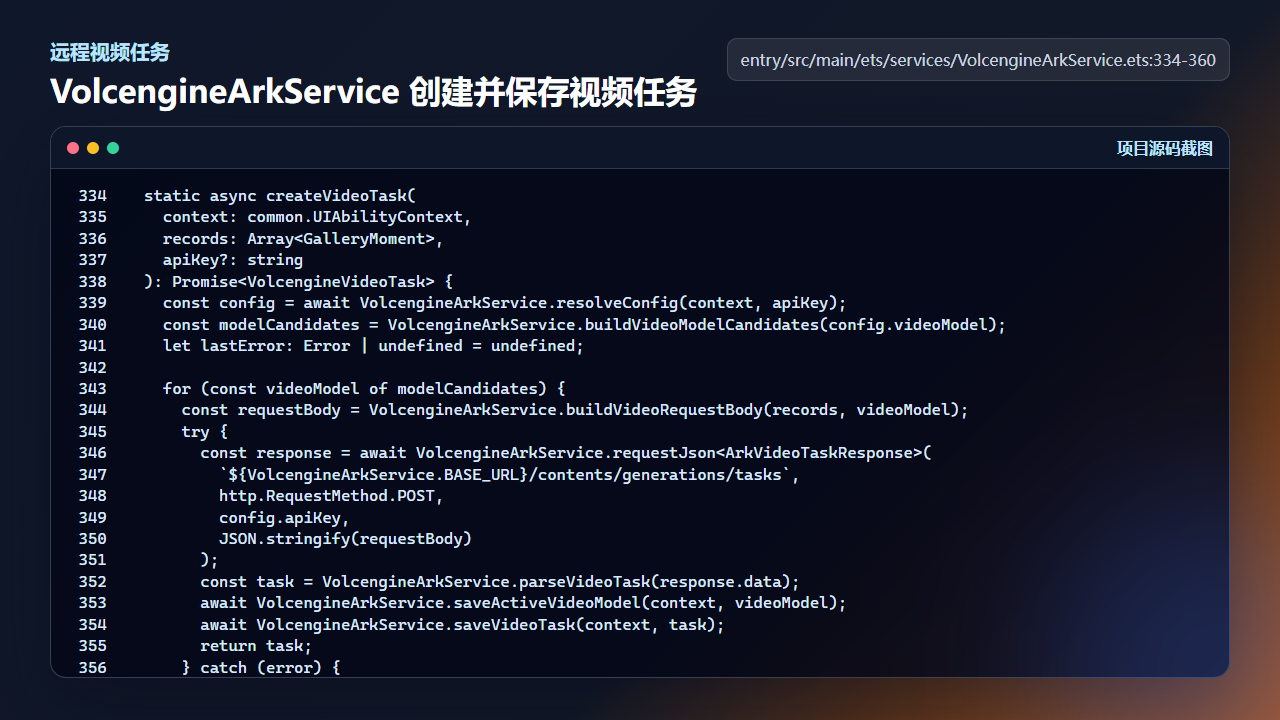
远程视频任务需要创建、保存、轮询和失败恢复
  static async createVideoTask(
    context: common.UIAbilityContext,
    records: Array<GalleryMoment>,
    apiKey?: string
  ): Promise<VolcengineVideoTask> {
    const config = await VolcengineArkService.resolveConfig(context, apiKey);
    const modelCandidates = VolcengineArkService.buildVideoModelCandidates(config.videoModel);
    let lastError: Error | undefined = undefined;

    for (const videoModel of modelCandidates) {
      const requestBody = VolcengineArkService.buildVideoRequestBody(records, videoModel);
      try {
        const response = await VolcengineArkService.requestJson<ArkVideoTaskResponse>(
          `${VolcengineArkService.BASE_URL}/contents/generations/tasks`,
          http.RequestMethod.POST,
          config.apiKey,
          JSON.stringify(requestBody)
        );
        const task = VolcengineArkService.parseVideoTask(response.data);
        await VolcengineArkService.saveActiveVideoModel(context, videoModel);
        await VolcengineArkService.saveVideoTask(context, task);
        return task;
      } catch (error) {
        lastError = error instanceof Error ? error : new Error(JSON.stringify(error));
        if (!VolcengineArkService.shouldRetryVideoModel(lastError.message)) {
          throw lastError;
        }
分享前要先构造受控 SharedData
系统分享的核心不是按钮,而是 buildSharedData 如何把本地文件转成受控分享对象。公开照片、保险箱照片和视频都要经过同一套边界检查,避免把沙箱绝对路径、API Key 或未解锁私密内容带出去。
真机验收时至少拉起一次系统分享面板,并确认目标应用能看到文件,而不是只检查代码编译通过。
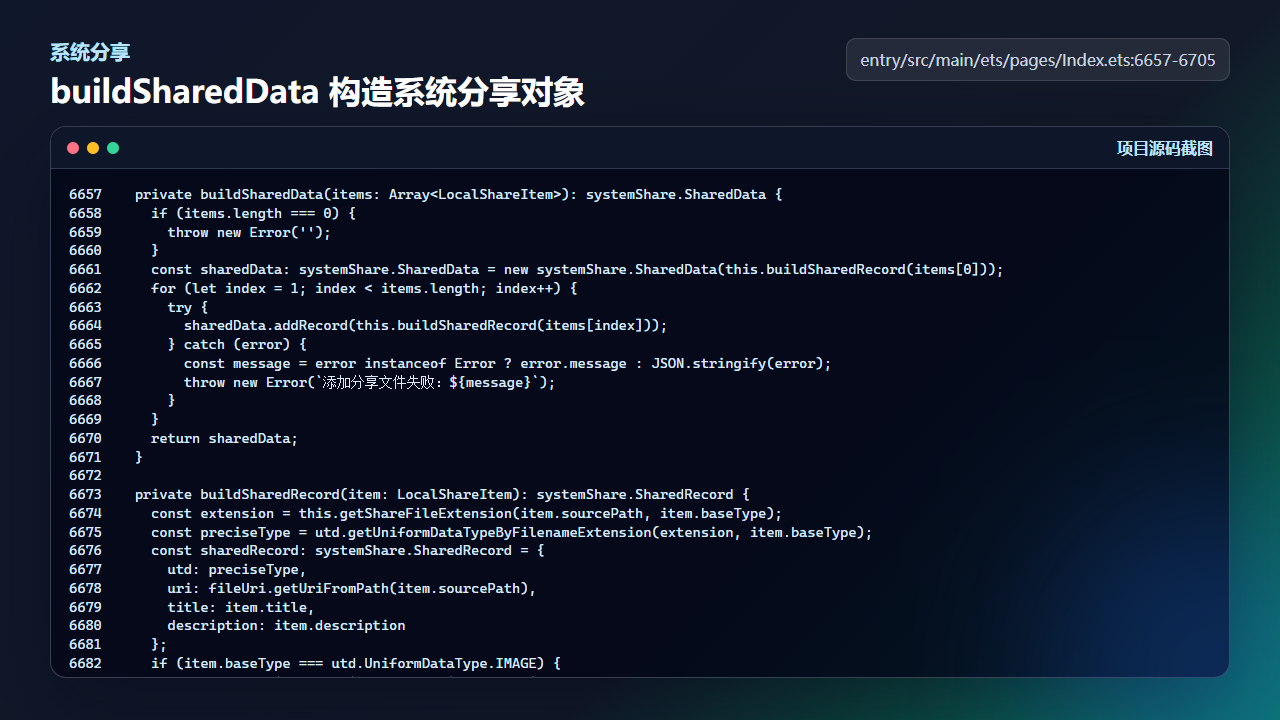
系统分享前先构造受控 SharedData,避免泄露内部路径
  private buildSharedData(items: Array<LocalShareItem>): systemShare.SharedData {
    if (items.length === 0) {
      throw new Error('');
    }
    const sharedData: systemShare.SharedData = new systemShare.SharedData(this.buildSharedRecord(items[0]));
    for (let index = 1; index < items.length; index++) {
      try {
        sharedData.addRecord(this.buildSharedRecord(items[index]));
      } catch (error) {
        const message = error instanceof Error ? error.message : JSON.stringify(error);
        throw new Error(`添加分享文件失败:${message}`);
      }
    }
    return sharedData;
  }

  private buildSharedRecord(item: LocalShareItem): systemShare.SharedRecord {
    const extension = this.getShareFileExtension(item.sourcePath, item.baseType);
    const preciseType = utd.getUniformDataTypeByFilenameExtension(extension, item.baseType);
    const sharedRecord: systemShare.SharedRecord = {
      utd: preciseType,
      uri: fileUri.getUriFromPath(item.sourcePath),
      title: item.title,
      description: item.description
    };
    if (item.baseType === utd.UniformDataType.IMAGE) {
      const thumbnailPath = item.thumbnailPath ?? item.sourcePath;
      sharedRecord.thumbnailUri = fileUri.getUriFromPath(thumbnailPath);
    }
    return sharedRecord;
  }

  private async showSystemSharePanel(items: Array<LocalShareItem>): Promise<void> {
    if (items.length === 0) {
      throw new Error('');
    }

    try {
      const sharedData = this.buildSharedData(items);
      const controller: systemShare.ShareController = new systemShare.ShareController(sharedData);
      await controller.show(this.getAbilityContext(), {
        selectionMode: systemShare.SelectionMode.SINGLE,
        previewMode: systemShare.SharePreviewMode.DETAIL
      });
    } catch (error) {
      const err = error as BusinessError;
      throw new Error(`拉起系统分享面板失败:${err.message ?? err.code ?? 'unknown'}`);
    }
  }
真机验收步骤
| 验收点 | 操作 | 预期结果 |
|---|---|---|
| 地图联动 | 拍摄一张带定位的照片并切到地图页 | 出现可点击记忆点,详情与相册记录一致 |
| AI 图解 | 配置 Key 后发起在线图解,再断网重试 | 成功时回写记录,失败时保留本地文案 |
| 视频任务 | 选择多张公开照片创建远程视频 | 任务状态可恢复,下载前校验 videoUrl |
| 系统分享 | 分享公开照片、私密照片、生成视频各一次 | 公开内容可分享,私密内容必须先解锁 |
复现边界
在线 AI 和远程视频依赖网络、有效 Key 和服务端模型可用性。本文只保证工程链路有清晰兜底,不保证外部服务每次都成功。
系统分享和近场分享需要真机系统能力支持。能力不可用时,应回退到普通分享或给出明确提示。
社区同步摘要
社区同步摘要建议写成“同一份 GalleryMoment 如何被地图、AI、视频和系统分享复用”,并标出 generateRemoteInsight、createVideoTask、buildSharedData 三个入口。
今日练习
- 给一条记录补充坐标,检查地图页是否出现记忆点。
- 模拟 AI 返回失败,确认本地图解没有被覆盖。
- 分享前检查文案里是否包含沙箱路径或密钥。

讨论HarmonyOS开发技术,专注于API与组件、DevEco Studio、测试、元服务和应用上架分发等。
更多推荐
 11
11 0
0- 0


 已为社区贡献284条内容

所有评论(0)