第101篇 | HarmonyOS 作品讲解稿:把技术能力讲成用户听得懂的故事
第101篇 | HarmonyOS 作品讲解稿:把技术能力讲成用户听得懂的故事
技术文章写到 100 篇以后,下一步不是继续堆 API,而是学会把能力讲给评审、用户和社区读者听。一个好的作品讲解稿,应该先讲用户场景,再讲工程闭环,最后讲风险边界。
这篇用双镜记忆相机做示例,把地图推荐、近场分享、LiveView 回流和系统分享改写成一段可以用于参赛或路演的讲解结构。
版本与环境
本文复测口径为 DevEco Studio 6.1 Release、HarmonyOS SDK 6.1.0(23)、Stage 模型 ArkTS 页面。涉及相机、地图、AI 在线能力、华为账号、系统分享或多端同步时,以真机结果为准;预览器只能用来检查页面结构和文案层级,不能替代权限、设备能力和系统弹窗验证。
对应源码位置
entry/src/main/ets/insightintents/NearbyAgentLocationIntent.etsentry/src/main/ets/pages/Index.etsentry/src/main/ets/services/AgentLocationService.ets
本篇目标
- 把“用了哪些 Kit”改写成“用户完成了什么事”。
- 用源码入口支撑讲解稿,避免空泛宣传。
- 把不支持设备、未授权、网络失败写进讲解边界。
- 形成一段适合社区同步的作品介绍。
先从用户故事进入
讲解稿的第一句不应该是“本项目接入了某某 Kit”,而应该是“用户拍下一段旅途记忆,应用帮他记录地点、生成描述、再次到达附近时提醒回看”。技术能力放在第二层解释。
这样写的好处是读者先理解价值,再理解实现。社区文章也更容易被非同项目的开发者读懂。
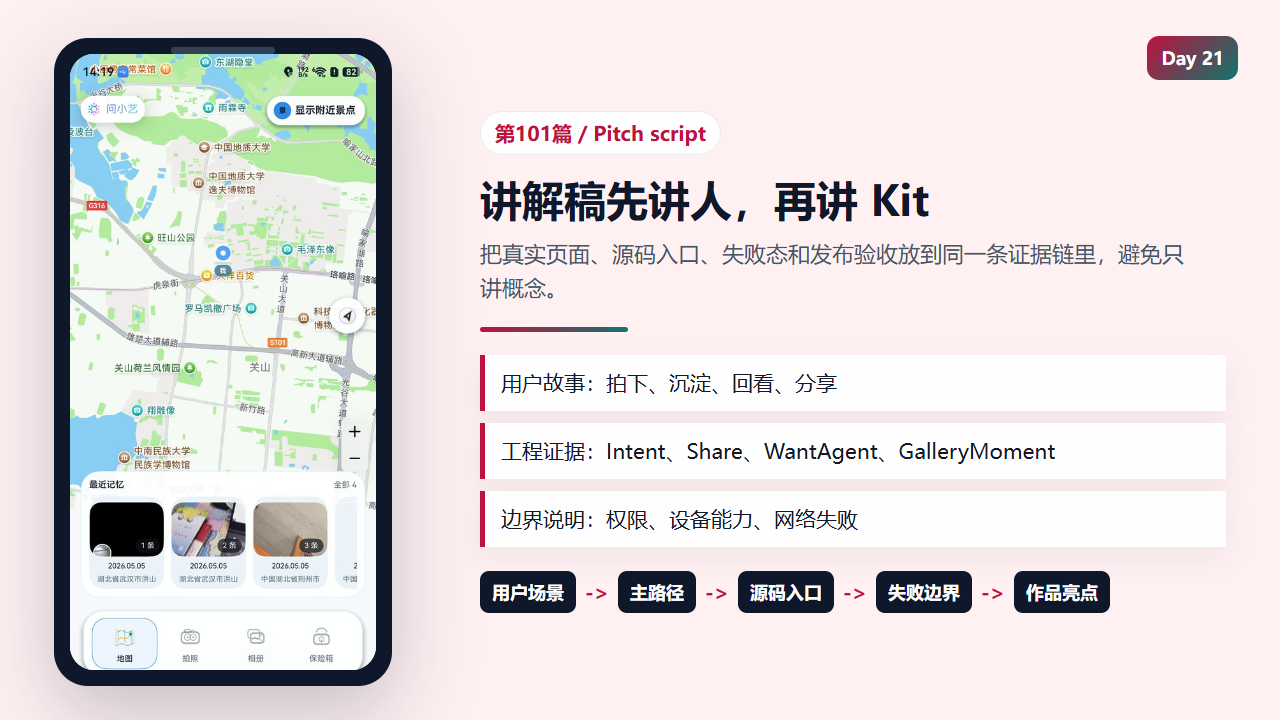
作品讲解稿要先讲用户完成的事情,再讲源码能力
  @State private vaultSelectedId: string = '';
  @State private vaultStatusText: string = '保险箱已锁定';
  @State private arkApiKey: string = '';
  @State private aiInsightBusy: boolean = false;
  @State private aiPoemBusy: boolean = false;
  @State private mediaExportBusy: boolean = false;
  @State private mediaImportBusy: boolean = false;
  @State private videoTaskBusy: boolean = false;
  @State private videoExportBusy: boolean = false;
  @State private systemShareBusy: boolean = false;
  @State private nearbyShareReady: boolean = false;
  @State private nearbyShareStatusText: string = '附近分享已就绪';
  @State private videoTaskId: string = '';
  @State private videoTaskStatusText: string = '选择照片生成双镜成片';
  @State private movieSelectionStatusText: string = '';
  @State private videoUrl: string = '';
  @State private harmonyMovieStatusText: string = '可将照片继续交给系统相册生成回忆短片';
  @State private huaweiIdentityReady: boolean = false;
  @State private huaweiIdentityBusy: boolean = false;
  @State private huaweiIdentityStatusText: string = '华为账号一键登录后,可找回同账号照片';
  @State private cloudAccountSwitching: boolean = false;
  @State private cloudSyncBusy: boolean = false;
  @State private cloudSyncStatusText: string = '请先使用华为账号一键登录';
  @State private cloudSyncLastLabel: string = '';
  @State private selectedNormalMovieMusicId: string = 'none';
小艺/智能体能力要落到位置结果
NearbyAgentLocationIntent 的讲法不是“我接入了 InsightIntentExecutor”,而是“小艺需要当前位置时,应用能返回地址、经纬度、坐标系、精度和错误信息”。这就是用户故事里的“附近推荐”依据。
讲解稿可以把它压成一句话:应用把位置能力封装成可被智能体调用的结果,成功和失败都返回结构化字段。
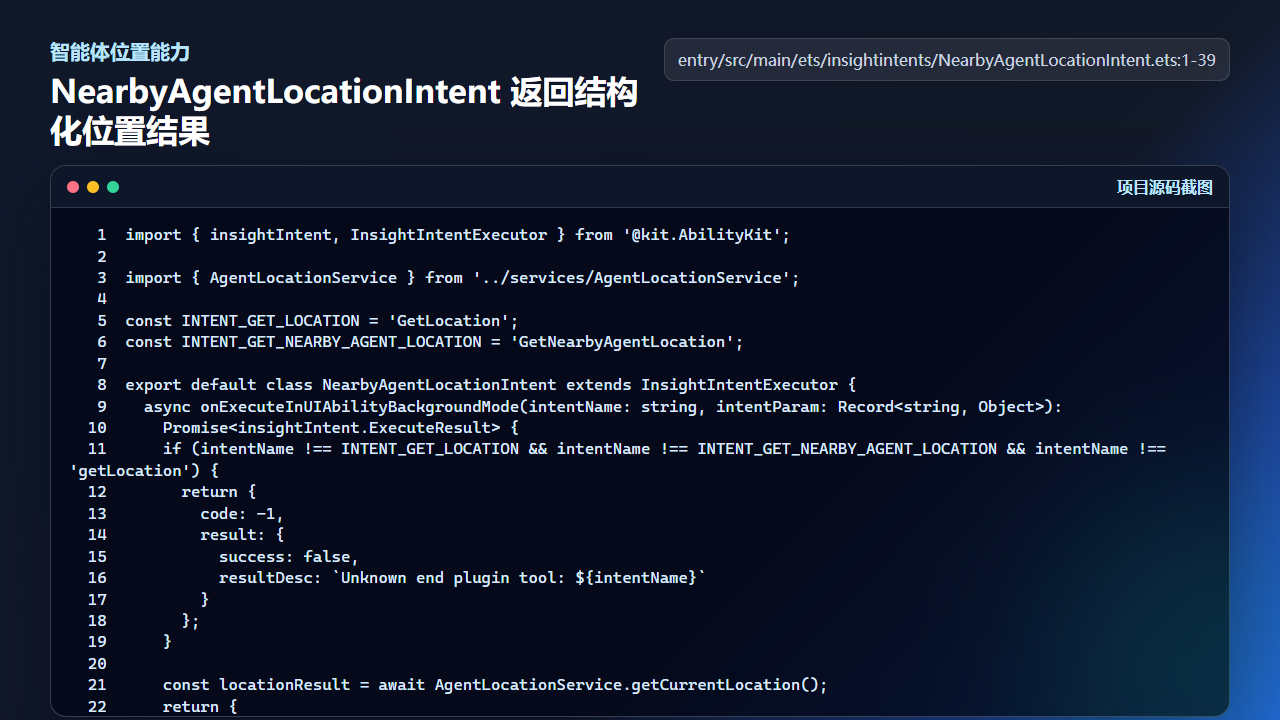
小艺/智能体能力最终要落到可用的位置结果
import { insightIntent, InsightIntentExecutor } from '@kit.AbilityKit';

import { AgentLocationService } from '../services/AgentLocationService';

const INTENT_GET_LOCATION = 'GetLocation';
const INTENT_GET_NEARBY_AGENT_LOCATION = 'GetNearbyAgentLocation';

export default class NearbyAgentLocationIntent extends InsightIntentExecutor {
  async onExecuteInUIAbilityBackgroundMode(intentName: string, intentParam: Record<string, Object>):
    Promise<insightIntent.ExecuteResult> {
    if (intentName !== INTENT_GET_LOCATION && intentName !== INTENT_GET_NEARBY_AGENT_LOCATION && intentName !== 'getLocation') {
      return {
        code: -1,
        result: {
          success: false,
          resultDesc: `Unknown end plugin tool: ${intentName}`
        }
      };
    }

    const locationResult = await AgentLocationService.getCurrentLocation();
    return {
      code: 0,
      result: {
        success: locationResult.success,
        address: locationResult.amapLocation,
        resultDesc: locationResult.resultDesc,
        latitude: locationResult.latitude,
        longitude: locationResult.longitude,
        wgs84Latitude: locationResult.wgs84Latitude,
        wgs84Longitude: locationResult.wgs84Longitude,
        amapLatitude: locationResult.amapLatitude,
        amapLongitude: locationResult.amapLongitude,
        amapLocation: locationResult.amapLocation,
        coordinateSystem: locationResult.coordinateSystem,
        accuracyMeters: locationResult.accuracyMeters,
        timeStamp: locationResult.timeStamp,
        source: locationResult.source,
        errorCode: locationResult.errorCode,
LiveView 回流要讲清点击后去哪
通知、LiveView 或回流入口最容易讲成“能提醒用户”。更准确的讲法是:点击提醒后通过 WantAgent 回到应用指定页面,并带上必要参数,让用户能直接看到那条记忆。
如果没有这一步,提醒就只是打扰;有了回流路径,提醒才变成体验闭环。
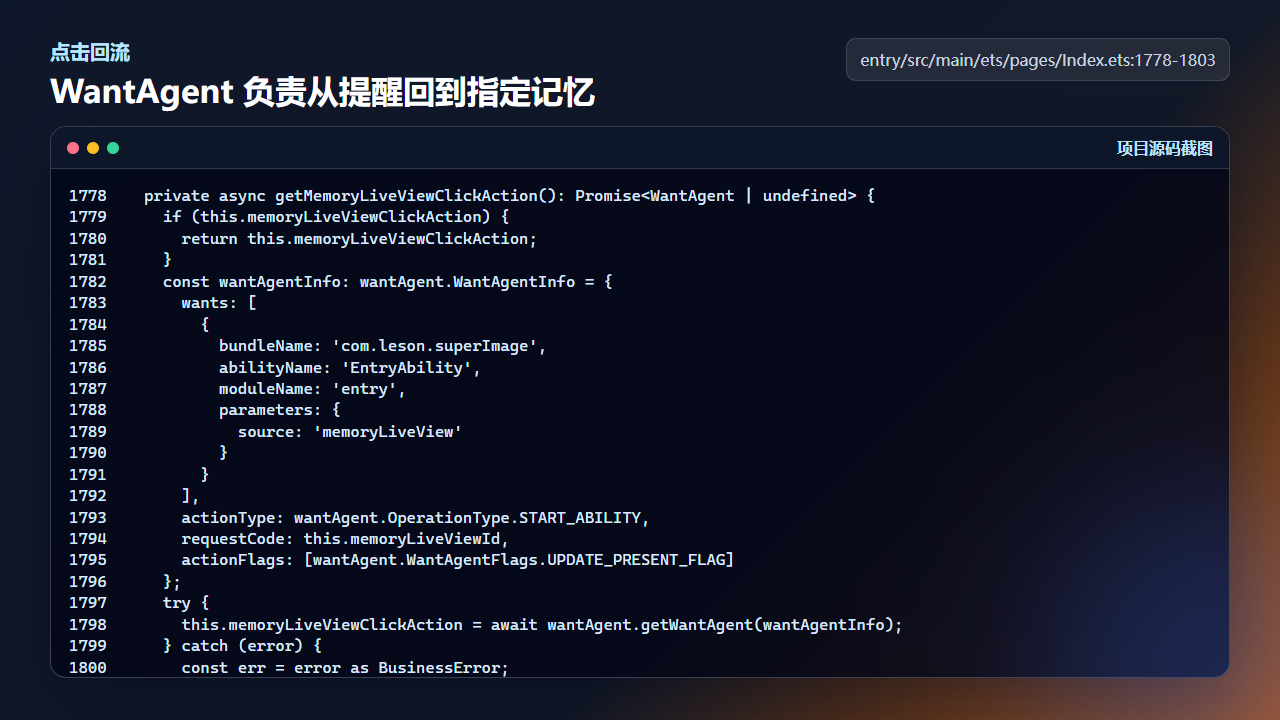
WantAgent 让通知或 LiveView 点击后回到指定应用路径
  private async getMemoryLiveViewClickAction(): Promise<WantAgent | undefined> {
    if (this.memoryLiveViewClickAction) {
      return this.memoryLiveViewClickAction;
    }
    const wantAgentInfo: wantAgent.WantAgentInfo = {
      wants: [
        {
          bundleName: 'com.leson.superImage',
          abilityName: 'EntryAbility',
          moduleName: 'entry',
          parameters: {
            source: 'memoryLiveView'
          }
        }
      ],
      actionType: wantAgent.OperationType.START_ABILITY,
      requestCode: this.memoryLiveViewId,
      actionFlags: [wantAgent.WantAgentFlags.UPDATE_PRESENT_FLAG]
    };
    try {
      this.memoryLiveViewClickAction = await wantAgent.getWantAgent(wantAgentInfo);
    } catch (error) {
      const err = error as BusinessError;
      console.warn(`Failed to create LiveView WantAgent: ${err.code ?? ''} ${err.message ?? ''}`);
      return undefined;
    }
近场分享要有降级说法
近场分享在讲解稿里可以作为亮点,但必须带降级策略。registerNearbyShareListeners 里会注册 knockShare 和 gesturesShare;如果设备或权限不支持,页面仍然要保留普通系统分享。
讲给用户听时,可以说“支持时更快,不支持时不阻断分享”。这比只喊能力名称更可信。
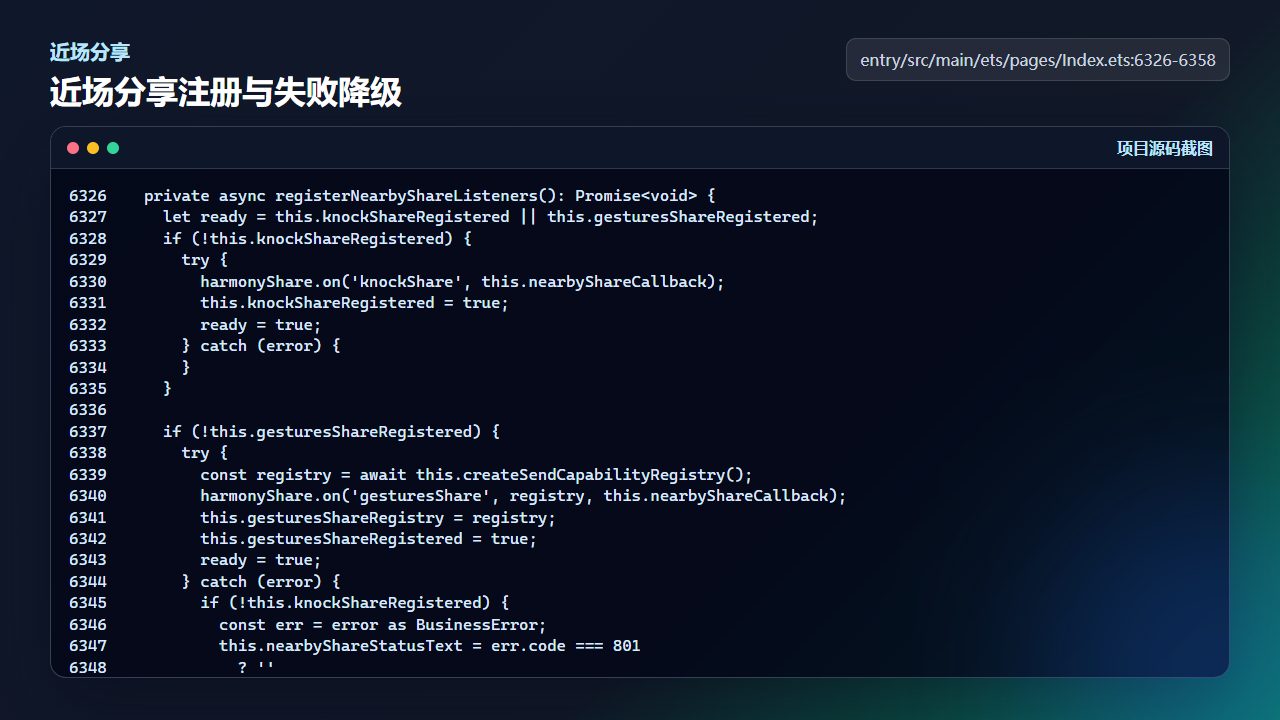
近场分享需要注册、状态提示和不支持时的降级路径
  private async registerNearbyShareListeners(): Promise<void> {
    let ready = this.knockShareRegistered || this.gesturesShareRegistered;
    if (!this.knockShareRegistered) {
      try {
        harmonyShare.on('knockShare', this.nearbyShareCallback);
        this.knockShareRegistered = true;
        ready = true;
      } catch (error) {
      }
    }

    if (!this.gesturesShareRegistered) {
      try {
        const registry = await this.createSendCapabilityRegistry();
        harmonyShare.on('gesturesShare', registry, this.nearbyShareCallback);
        this.gesturesShareRegistry = registry;
        this.gesturesShareRegistered = true;
        ready = true;
      } catch (error) {
        if (!this.knockShareRegistered) {
          const err = error as BusinessError;
          this.nearbyShareStatusText = err.code === 801
            ? ''
            : `附近分享初始化失败:${err.message ?? err.code ?? -1}`;
        }
      }
    }

    this.nearbyShareReady = ready;
    if (ready) {
      this.nearbyShareStatusText = '';
    }
  }
真机验收步骤
| 验收点 | 操作 | 预期结果 |
|---|---|---|
| 用户故事 | 用 60 秒讲清“为什么需要这款相机” | 听众能复述拍摄、回看、分享三个动作 |
| 源码依据 | 每个亮点对应一个源码入口 | 讲解不是空泛宣传 |
| 失败边界 | 说明权限拒绝、设备不支持、网络失败 | 用户知道下一步还能怎么做 |
| 社区摘要 | 把讲解稿压缩成 180 字摘要 | 能直接用于 CSDN 和社区同步 |
复现边界
作品讲解稿不是广告文案,不能承诺所有设备都支持全部能力。涉及近场、LiveView、智能体和位置能力时,都要说明真机和权限前提。
讲解稿里的每个亮点都应该能回到源码或真机截图。无法回到证据链的亮点,不建议写进正式发布稿。
社区同步摘要
社区同步时可用一句话开头:这不是单点 Demo,而是把拍摄、位置、智能体回流和分享串成用户可理解的记忆闭环。
今日练习
- 把本文的五段结构改写成 90 秒路演稿。
- 给每个亮点补一个源码文件名和函数名。
- 删掉讲解稿里所有无法用真机或源码证明的形容词。

讨论HarmonyOS开发技术,专注于API与组件、DevEco Studio、测试、元服务和应用上架分发等。
更多推荐

 10
10 0
0- 0


 已为社区贡献284条内容

所有评论(0)