第102篇 | HarmonyOS 系列质量复盘:文章如何变成可维护知识库
第102篇 | HarmonyOS 系列质量复盘:文章如何变成可维护知识库
系列文章多了以后,真正的难点不是继续写,而是保证后来的人还能查、能复现、能知道哪些结论有版本前提。第 102 篇把文章当作知识库来复盘。
这篇不会再写“主观估分”。质量只能来自后台数据、源码依据和复现路径。我们要看的是:每篇文章有没有版本环境、源码位置、真机验收、失败边界和社区同步摘要。
版本与环境
本文复测口径为 DevEco Studio 6.1 Release、HarmonyOS SDK 6.1.0(23)、Stage 模型 ArkTS 页面。涉及相机、地图、AI 在线能力、华为账号、系统分享或多端同步时,以真机结果为准;预览器只能用来检查页面结构和文案层级,不能替代权限、设备能力和系统弹窗验证。
对应源码位置
docs/training-camp/day01到docs/training-camp/day21docs/training-camp/series-quality-scores-after-low-refresh-20260607.jsondocs/training-camp/low-series-deepen-audit-20260607.jsonentry/src/main/ets/pages/Index.ets
本篇目标
- 把文章质量从“写得长”改成“能复现”。
- 用后台质量分和本地审计文件交叉验证低分文章。
- 建立后续文章的固定结构,减少返工。
- 说明为什么社区同步也要保持同一套证据链。
知识库先看结构是否稳定
一篇工程文章最怕只有成功截图,没有版本、源码入口和失败态。知识库要长期可用,至少需要五个固定块:版本与环境、对应源码位置、真机验收步骤、复现边界、社区同步摘要。
这套结构不是为了凑字数,而是为了让读者知道“我现在能不能照着复现”。
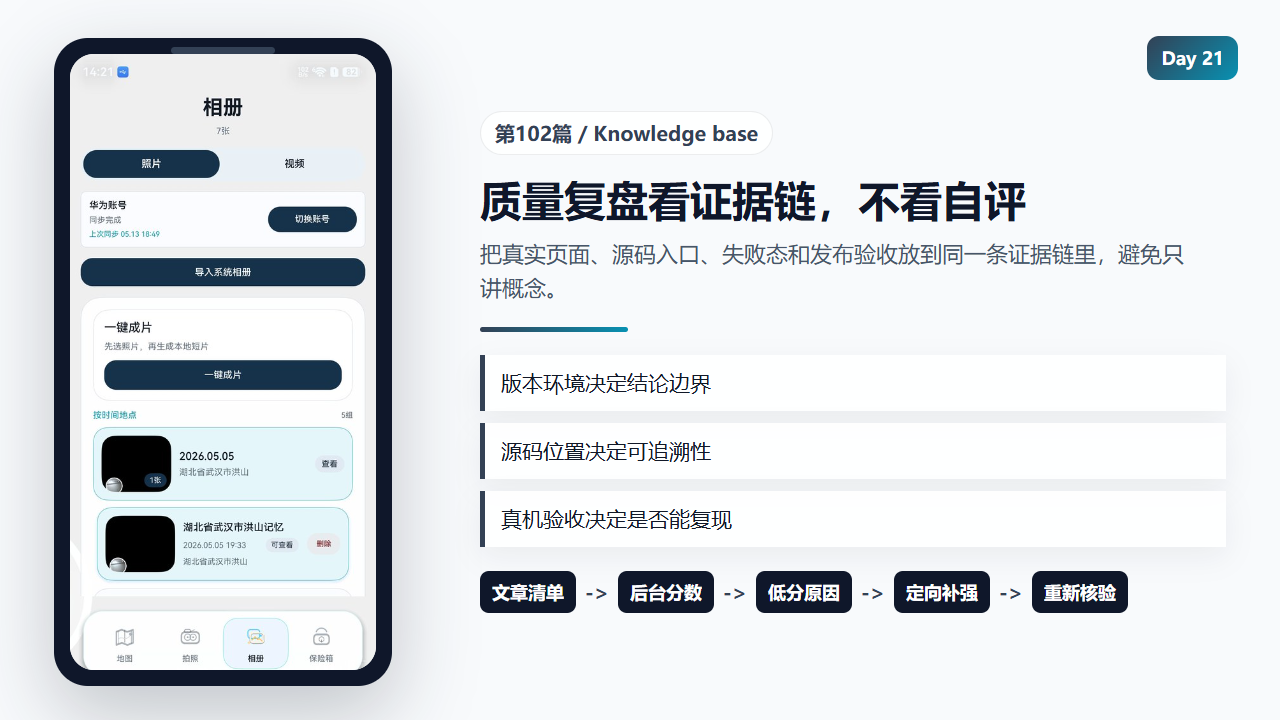
系列文章质量复盘要看后台数据和可复现证据链
        Row({ space: 8 }) {
          Button(this.aiInsightBusy ? '整理中...' : '智能解读')
          .height(38)
          .layoutWeight(1)
          .fontSize(12)
          .fontWeight(FontWeight.Medium)
          .fontColor(this.getWarmActionTextColor())
          .backgroundColor(this.getWarmActionBackgroundColor())
          .borderRadius(15)
          .enabled(!this.aiInsightBusy && !this.aiPoemBusy && this.arkApiKey.trim().length > 0)
          .onClick(() => {
            void this.generateRemoteInsight(record.id);
          })

          Button(this.aiPoemBusy ? '书写中...' : '写回忆文字')
          .height(38)
          .layoutWeight(1)
          .fontSize(12)
          .fontWeight(FontWeight.Medium)
          .fontColor(this.getMutedActionTextColor())
          .backgroundColor(this.getMutedActionBackgroundColor())
          .borderRadius(15)
          .enabled(!this.aiInsightBusy && !this.aiPoemBusy)
          .onClick(() => {
            void this.generateAiPoem(record.id);
          })
        }
        .width('100%')
      }

      if (this.aiSynthesisEntryVisible && this.getRecordSmartCaption(record).length > 0) {
        Text(this.getRecordSmartCaption(record))
          .fontSize(13)
          .lineHeight(20)
          .fontColor($r('app.color.ml_on_surface'))
          .maxLines(3)
          .textOverflow({ overflow: TextOverflow.Ellipsis })
      }

      if (this.aiSynthesisEntryVisible && this.getRecordAiPoem(record).length > 0) {
        Text(this.getRecordAiPoem(record))
          .fontSize(13)
          .lineHeight(21)
          .fontColor($r('app.color.ml_on_surface_variant'))
      }
    }
    .width('100%')
    .padding(14)
    .backgroundColor($r('app.color.ml_panel_glass_soft'))
    .borderRadius(22)
    .alignItems(HorizontalAlign.Start)
  }

  @Builder
  private buildGalleryMovieEntryCard() {
    Column({ space: 12 }) {
      Row() {
        Column({ space: 6 }) {
          Text('一键成片')
            .fontSize(18)
            .fontWeight(FontWeight.Medium)
            .fontColor($r('app.color.album_on_surface'))

          Text('先选照片,再生成本地短片')
            .fontSize(13)
            .lineHeight(20)
            .fontColor($r('app.color.album_on_surface_variant'))
        }
        .layoutWeight(1)
        .alignItems(HorizontalAlign.Start)

        if (this.getVideoSelectionText().length > 0) {
          Text(this.getVideoSelectionText())
            .fontSize(12)
            .fontColor($r('app.color.album_chip_text'))
            .padding({
              left: 10,
              right: 10,
              top: 6,
              bottom: 6
            })
            .backgroundColor($r('app.color.album_accent_soft'))
            .borderRadius(12)
        }
      }
      .width('100%')

      Button('一键成片')
        .height(44)
        .width('100%')
        .fontSize(14)
        .fontWeight(FontWeight.Medium)
        .fontColor($r('app.color.album_on_primary'))
        .backgroundColor($r('app.color.album_primary_container'))
        .borderRadius(18)
        .onClick(() => {
          this.openGalleryMovieSelection();
        })
    }
    .width('100%')
    .padding(16)
    .backgroundColor($r('app.color.album_panel'))
    .borderRadius(24)
    .border({ width: 1, color: $r('app.color.album_border') })
    .alignItems(HorizontalAlign.Start)
  }

  @Builder
  private buildHuaweiAccountLoginButton() {
    Column() {
      LoginWithHuaweiIDButton({
        params: {
          style: loginComponentManager.Style.BUTTON_RED,
          extraStyle: {
            buttonStyle: new loginComponentManager.ButtonStyle().loadingStyle({
              show: true
            })
          },
          borderRadius: 18,
          loginType: loginComponentManager.LoginType.ID,
          supportDarkMode: true
        },
        controller: this.cloudLoginButtonController
      })
    }
    .height(38)
    .width(156)
    .constraintSize({ minWidth: 144 })
  }

  @Builder
  private buildGalleryCloudSyncCard() {
    Row({ space: 12 }) {
      Column({ space: 4 }) {
        Text(this.getCloudSyncTitle())
          .fontSize(14)
          .fontWeight(FontWeight.Medium)
          .fontColor($r('app.color.album_on_surface'))
          .maxLines(1)
          .textOverflow({ overflow: TextOverflow.Ellipsis })

        Text(this.cloudSyncStatusText)
          .fontSize(12)
          .lineHeight(18)
          .fontColor($r('app.color.album_on_surface_variant'))
          .maxLines(2)
          .textOverflow({ overflow: TextOverflow.Ellipsis })

        Text(this.getCloudSyncSubtitle())
          .fontSize(11)
          .lineHeight(16)
          .fontColor($r('app.color.album_accent'))
          .maxLines(1)
          .textOverflow({ overflow: TextOverflow.Ellipsis })
      }
      .layoutWeight(1)
      .constraintSize({ minWidth: 0 })
      .alignItems(HorizontalAlign.Start)

      if (!this.cloudSyncIdentity && !this.cloudSyncBusy && !this.huaweiIdentityBusy) {
        this.buildHuaweiAccountLoginButton()
      } else {
        Button(this.getCloudSyncButtonLabel())
          .height(38)
          .constraintSize({ minWidth: 132 })
          .fontSize(13)
          .fontWeight(FontWeight.Medium)
          .fontColor($r('app.color.album_on_primary'))
          .backgroundColor($r('app.color.album_primary_container'))
          .borderRadius(18)
          .enabled(!this.cloudSyncBusy && !this.huaweiIdentityBusy)
          .onClick(() => {
            void this.handleCloudAccountAction();
          })
      }
    }
    .width('100%')
    .padding(12)
    .backgroundColor($r('app.color.album_card'))
    .borderRadius(8)
    .border({ width: 1, color: $r('app.color.album_border') })
  }

  @Builder
  private buildVaultCloudSyncCard() {
    Row({ space: 12 }) {
      Column({ space: 4 }) {
        Text(this.cloudSyncIdentity ? '保险箱同步' : '登录后同步保险箱')
          .fontSize(14)
          .fontWeight(FontWeight.Medium)
          .fontColor($r('app.color.ml_on_surface'))
          .maxLines(1)
          .textOverflow({ overflow: TextOverflow.Ellipsis })

        Text(this.getVaultCloudSyncStatusText())
          .fontSize(12)
          .lineHeight(18)
          .fontColor($r('app.color.ml_on_surface_variant'))
          .maxLines(2)
          .textOverflow({ overflow: TextOverflow.Ellipsis })

        Text(this.getVaultCloudSyncSubtitle())
          .fontSize(11)
          .lineHeight(16)
          .fontColor($r('app.color.ml_primary'))
          .maxLines(1)
          .textOverflow({ overflow: TextOverflow.Ellipsis })
      }
      .layoutWeight(1)
      .constraintSize({ minWidth: 0 })
      .alignItems(HorizontalAlign.Start)

      if (!this.cloudSyncIdentity && !this.cloudSyncBusy && !this.huaweiIdentityBusy) {
        this.buildHuaweiAccountLoginButton()
      } else {
        Button(this.getVaultCloudSyncButtonLabel())
          .height(38)
          .constraintSize({ minWidth: 132 })
          .fontSize(13)
          .fontWeight(FontWeight.Medium)
          .fontColor(this.getWarmActionTextColor())
          .backgroundColor(this.getWarmActionBackgroundColor())
          .borderRadius(18)
          .enabled(!this.cloudSyncBusy && !this.huaweiIdentityBusy)
          .onClick(() => {
            void this.handleVaultCloudSyncAction();
          })
      }
    }
    .width('100%')
    .padding(12)
低分文章要按扣分点补强
前面复查时发现,有些文章低分不是因为主题错,而是缺少版本、环境或具体边界。通用补尾巴只能解决一部分问题,真正有效的是逐篇回应后台扣分点。
例如 AI JSON 解析要补 schema,视频下载要补 videoUrl 为空的拦截,保险箱详情要补未解锁时不渲染私密内容。
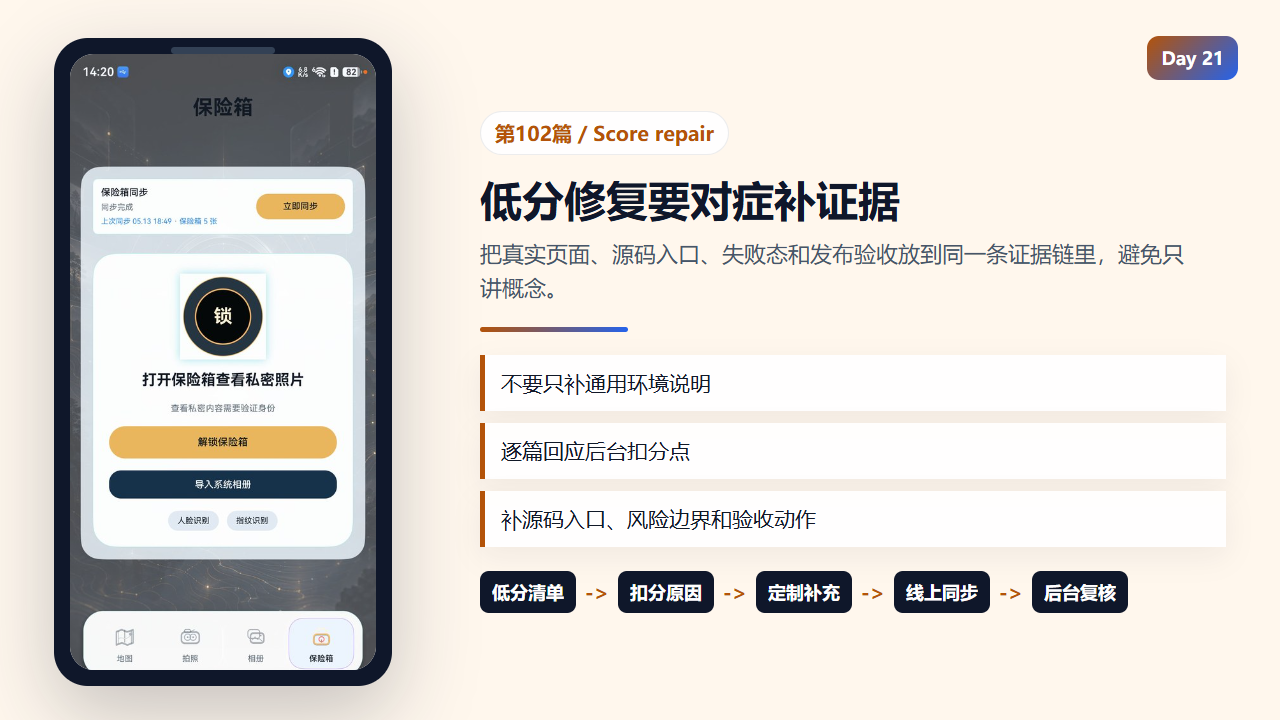
低分文章需要根据后台扣分点逐篇补强
  private openVaultRecordViewer(recordId: string): void {
    if (!this.vaultUnlocked) {
      return;
    }
    this.vaultSelectedId = recordId;
    this.vaultDetailPhotoIndex = 0;
    this.vaultDetailVisible = true;
  }

  private closeVaultRecordViewer(): void {
    this.vaultDetailVisible = false;
    this.vaultDetailPhotoIndex = 0;
  }

  private getFeaturedVaultFrames(): Array<MediaPreviewFrame> {
    const record = this.getFeaturedVaultRecord();
    if (!record) {
      return [];
    }
    return this.getGalleryDetailFrames(record);
  }

  private getVaultPreviewRecords(): Array<GalleryMoment> {
    const featuredRecord = this.getFeaturedVaultRecord();
    if (!featuredRecord) {
质量不是单篇文章的事
系列文章之间要互相引用同一套模型:GalleryMoment、GalleryVideoRecord、GallerySyncSnapshot、VolcengineVideoTask。模型名保持一致,读者才能从第 30 篇读到第 100 篇仍然知道数据在哪里流动。
如果每篇都换一套叫法,知识库会变成散文集,后续排查问题时很难定位。
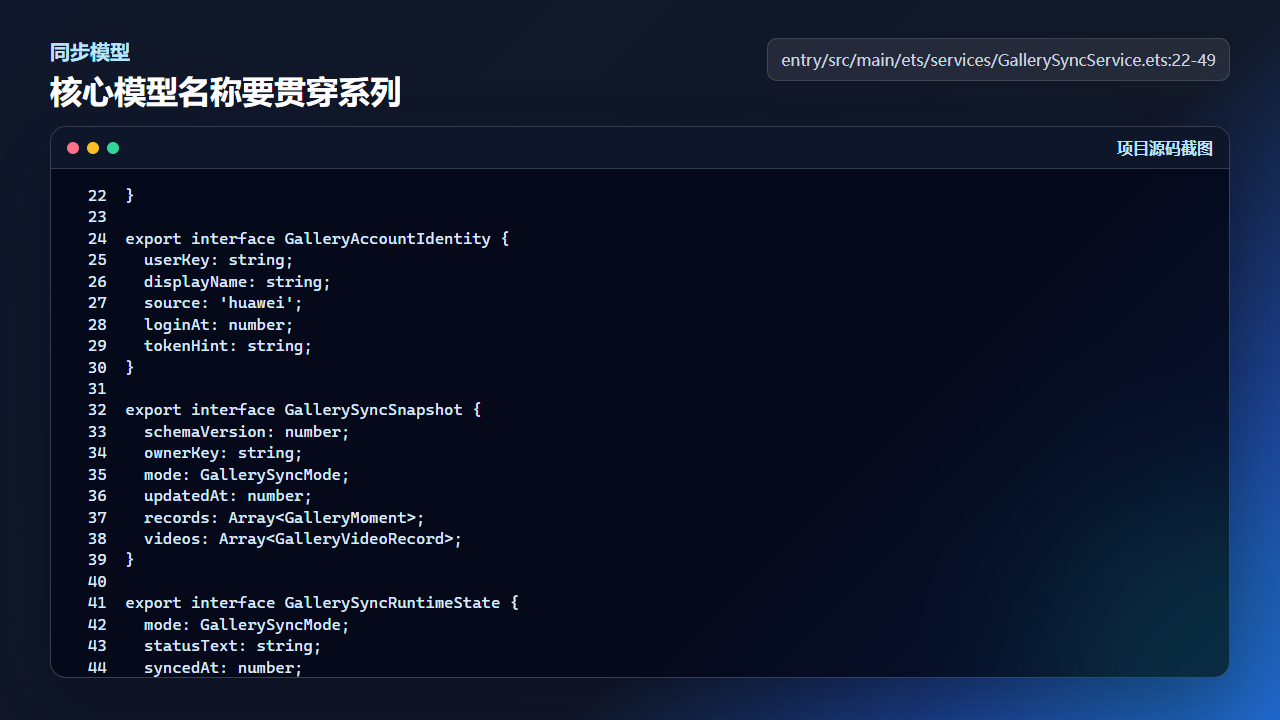
核心模型名称保持一致,系列文章才能形成可维护知识库
}

export interface GalleryAccountIdentity {
  userKey: string;
  displayName: string;
  source: 'huawei';
  loginAt: number;
  tokenHint: string;
}

export interface GallerySyncSnapshot {
  schemaVersion: number;
  ownerKey: string;
  mode: GallerySyncMode;
  updatedAt: number;
  records: Array<GalleryMoment>;
  videos: Array<GalleryVideoRecord>;
}

export interface GallerySyncRuntimeState {
  mode: GallerySyncMode;
  statusText: string;
  syncedAt: number;
  photoCount: number;
  videoCount: number;
  cloudReady: boolean;
}
社区同步也要沿用同一套摘要
同步到社区时不要另写一套与 CSDN 正文脱节的摘要。更稳的摘要结构是:一个问题、一个源码入口、一个验收动作、一个边界提醒。
这样读者从社区列表点进来,就能快速判断文章是否解决自己的问题;后续回查时,也能用同一套标题和源码路径定位。
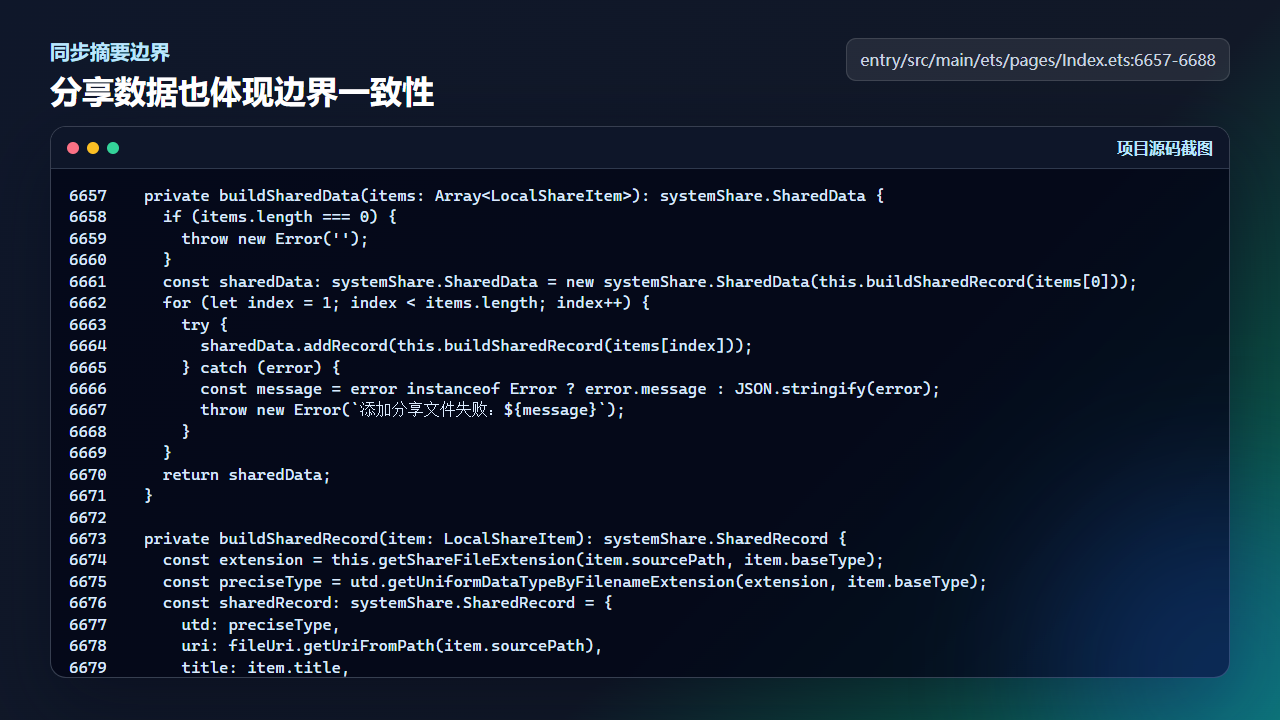
社区摘要要和正文证据链保持一致
  private buildSharedData(items: Array<LocalShareItem>): systemShare.SharedData {
    if (items.length === 0) {
      throw new Error('');
    }
    const sharedData: systemShare.SharedData = new systemShare.SharedData(this.buildSharedRecord(items[0]));
    for (let index = 1; index < items.length; index++) {
      try {
        sharedData.addRecord(this.buildSharedRecord(items[index]));
      } catch (error) {
        const message = error instanceof Error ? error.message : JSON.stringify(error);
        throw new Error(`添加分享文件失败:${message}`);
      }
    }
    return sharedData;
  }

  private buildSharedRecord(item: LocalShareItem): systemShare.SharedRecord {
    const extension = this.getShareFileExtension(item.sourcePath, item.baseType);
    const preciseType = utd.getUniformDataTypeByFilenameExtension(extension, item.baseType);
    const sharedRecord: systemShare.SharedRecord = {
      utd: preciseType,
      uri: fileUri.getUriFromPath(item.sourcePath),
      title: item.title,
      description: item.description
    };
    if (item.baseType === utd.UniformDataType.IMAGE) {
      const thumbnailPath = item.thumbnailPath ?? item.sourcePath;
      sharedRecord.thumbnailUri = fileUri.getUriFromPath(thumbnailPath);
    }
    return sharedRecord;
  }
真机验收步骤
| 验收点 | 操作 | 预期结果 |
|---|---|---|
| 结构检查 | 抽查 5 篇旧文 | 都包含版本环境、源码位置、真机验收和边界说明 |
| 后台复核 | 打开 CSDN 数据质量分 | 不把本地估算当最终结果 |
| 模型一致 | 搜索 GalleryMoment 等核心模型 | 不同文章叫法一致 |
| 社区同步 | 抽查社区摘要 | 问题、入口、验收、边界四项齐全 |
复现边界
后台质量分可能存在缓存或延迟,所以修改后要等待平台重算,并以“数据”列表结果为准。
知识库复盘不等于保证所有旧文都已经满分,它的目标是建立可持续修复方法。
社区同步摘要
社区同步摘要建议强调:本文复盘的是 HarmonyOS 系列文章的可维护结构,重点是后台质量分、源码入口、真机验收和失败边界。
今日练习
- 任选 3 篇旧文,补齐“复现边界”。
- 用后台质量分确认是否仍有低于 80 分的文章。
- 为社区同步摘要写一个四句模板。

讨论HarmonyOS开发技术,专注于API与组件、DevEco Studio、测试、元服务和应用上架分发等。
更多推荐
 14
14 0
0- 0


 已为社区贡献284条内容

所有评论(0)