鸿蒙ArkTS实战开发:自定义运动数据记录与统计应用
·
前言:对于鸿蒙开发初学者而言,想要快速掌握声明式UI开发、状态管理、数组数据处理、表单交互等核心技能,最佳方式是落地轻量化功能性项目。本文将基于 HarmonyOS NEXT 平台,使用纯 ArkTS 开发一款运动数据记录应用,无需任何第三方依赖,实现运动数据新增、智能统计、历史记录管理、动态图标适配等实用功能,代码简洁规范,适合练手学习、课程作业与二次开发。
一、项目整体介绍
1.1 开发背景与应用价值
现如今,全民健身已经成为主流生活方式,多数人日常会进行跑步、健身、瑜伽、球类运动等各类体育活动。但大部分用户没有专属的轻量化记录工具,无法系统化统计自己的运动频次、运动时长以及热量消耗,难以直观看到自身的运动成果,也无法针对性调整运动计划。
基于此,我们开发一款极简风格的运动追踪应用,聚焦轻量化数据记录与可视化统计,帮助用户随时录入运动数据,自动汇总本周运动核心数据,清晰掌握运动情况,助力养成长期运动的健康习惯。
1.2 核心功能实现
本项目摒弃冗余功能,主打实用核心能力,具体功能如下:
- 多品类运动类型选择:涵盖跑步、游泳、骑行、健身、球类等十余种常见运动
- 自定义运动数据录入:支持填写运动时长、消耗卡路里、运动备注信息
- 本周数据智能统计:自动筛选近7日运动数据,统计运动次数、总时长、总消耗热量
- 可视化图标适配:不同运动类型匹配专属Emoji图标,界面直观生动
- 智能日期展示:自动区分今天、昨天、常规日期,优化用户阅读体验
- 历史记录管理:实时展示全部运动记录,支持单条记录删除
- 合规数据校验:拦截非法输入,保证录入数据真实有效
1.3 开发环境与技术栈 - 开发工具:DevEco Studio 最新版
- 适配平台:HarmonyOS NEXT
- API版本:API 20及以上
- 开发语言:ArkTS
- 核心技术:声明式UI、@State响应式状态、数组高阶运算、自定义弹窗、日期格式化、表单校验
二、项目核心技术解析
本项目整合了鸿蒙开发高频核心知识点,每一个功能都对应经典开发场景,非常适合新手积累实战经验。
2.1 响应式数据驱动
全程使用 @State 装饰器管理页面状态,包含表单数据、运动记录列表、弹窗显示状态等。所有数据变更都会自动触发页面刷新,无需手动操作DOM,贴合ArkTS数据驱动视图的核心开发思想。
2.2 数组高阶运算实现数据统计
运用 JS/TS 经典高阶方法完成数据筛选与统计:通过 filter 过滤出本周有效运动记录,再通过 reduce 完成时长、卡路里的累加计算,代码精简高效,避免冗余循环遍历。
2.3 键值对映射实现图标自动匹配
自定义运动类型与图标的映射对象,根据用户选择的运动类型,自动匹配对应专属图标,扩展性极强。后续新增运动类型,仅需在映射表中添加配置即可,无需修改核心逻辑。
2.4 封装工具方法处理日期逻辑
统一封装日期格式化、日期比对、相对日期转换工具函数,实现标准日期存储、人性化日期展示,解决日期筛选不准、显示不统一的常见问题。
2.5 精细化表单校验
针对运动时长、卡路里数值设置合理数值范围,过滤空值、负数、非数字等无效输入,保障后台数据规范性,规避异常数据导致的统计错误。
三、项目完整结构预览
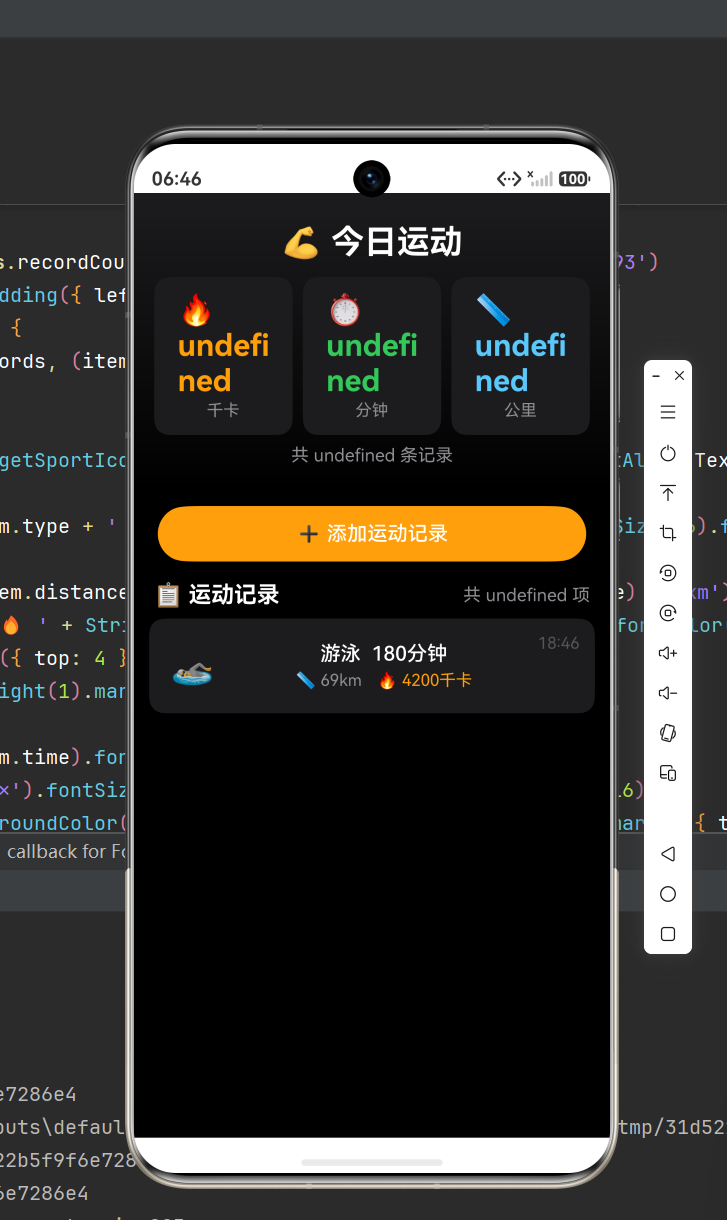
项目采用单页面模块化开发,页面层级清晰,自上而下分为四大模块:
- 顶部导航模块:展示页面标题、新增记录按钮
- 数据统计模块:卡片式展示本周运动核心数据
- 弹窗表单模块:自定义新增运动记录弹窗,完成数据录入
- 历史列表模块:渲染所有运动记录,支持删除操作
四、完整可直接运行源码
新建鸿蒙空白项目,将以下代码直接替换 Index.ets 文件内容,即可一键编译运行,无报错、无兼容问题。
/**
 * 项目名称:Exercise-tracker 运动数据记录应用
 * 开发平台:HarmonyOS NEXT API20+
 * 核心能力:运动数据录入、本周数据统计、历史记录管理、日期智能适配
 */

// 定义运动记录数据结构
interface ExerciseItem {
  id: number;         // 唯一标识
  sportType: string;  // 运动类型
  duration: number;    // 运动时长(分钟)
  calorie: number;     // 消耗卡路里
  date: string;        // 记录日期
  remark: string;      // 备注信息
}

@Entry
@Component
struct SportTracker {
  // 弹窗显示状态
  @State isShowAddDialog: boolean = false;

  // 表单录入数据
  @State selectSport: string = "跑步";
  @State inputDuration: string = "30";
  @State inputCalorie: string = "200";
  @State inputRemark: string = "";

  // 运动记录总列表
  @State sportList: ExerciseItem[] = [];

  // 全部运动类型集合
  private sportTypeList: string[] = ["跑步", "游泳", "骑行", "健身", "瑜伽", "跳绳", "篮球", "羽毛球", "足球", "网球"];

  // 运动类型图标映射关系
  private sportIconMap: Record<string, string> = {
    "跑步": "🏃",
    "游泳": "🏊",
    "骑行": "🚴",
    "健身": "💪",
    "瑜伽": "🧘",
    "跳绳": "⚡",
    "篮球": "🏀",
    "羽毛球": "🏸",
    "足球": "⚽",
    "网球": "🎾"
  };

  // 根据运动类型获取对应图标
  private getSportIcon(type: string): string {
    return this.sportIconMap[type] || "🏃";
  }

  // 获取今日标准日期字符串
  private getCurrentDate(): string {
    const now = new Date();
    const year = now.getFullYear();
    const month = (now.getMonth() + 1).toString().padStart(2, "0");
    const day = now.getDate().toString().padStart(2, "0");
    return `${year}-${month}-${day}`;
  }

  // 日期格式化展示(月日)
  private formatShowDate(dateStr: string): string {
    const date = new Date(dateStr);
    const month = (date.getMonth() + 1).toString().padStart(2, "0");
    const day = date.getDate().toString().padStart(2, "0");
    return `${month}月${day}日`;
  }

  // 日期转标准字符串
  private transDateToStr(date: Date): string {
    const year = date.getFullYear();
    const month = (date.getMonth() + 1).toString().padStart(2, "0");
    const day = date.getDate().toString().padStart(2, "0");
    return `${year}-${month}-${day}`;
  }

  // 智能相对日期展示
  private getRelativeDateText(dateStr: string): string {
    const today = this.getCurrentDate();
    if (dateStr === today) return "今天";

    const yesterday = new Date();
    yesterday.setDate(yesterday.getDate() - 1);
    if (dateStr === this.transDateToStr(yesterday)) return "昨天";

    return this.formatShowDate(dateStr);
  }

  // 时长数据校验
  private checkDuration(val: string): boolean {
    const num = parseInt(val);
    return !isNaN(num) && num > 0 && num <= 480;
  }

  // 卡路里数据校验
  private checkCalorie(val: string): boolean {
    const num = parseInt(val);
    return !isNaN(num) && num > 0 && num <= 5000;
  }

  // 计算本周运动统计数据
  private calcWeeklyData() {
    const now = new Date();
    // 计算7天前时间戳
    const weekStartTime = new Date(now.getTime() - 7 * 24 * 60 * 60 * 1000);
    // 筛选本周记录
    const weekRecord = this.sportList.filter(item => {
      const recordTime = new Date(item.date);
      return recordTime >= weekStartTime && recordTime <= now;
    })
    // 统计计算
    return {
      sportCount: weekRecord.length,
      totalTime: weekRecord.reduce((sum, item) => sum + item.duration, 0),
      totalCalorie: weekRecord.reduce((sum, item) => sum + item.calorie, 0)
    }
  }

  // 清空表单数据
  private resetForm() {
    this.selectSport = "跑步";
    this.inputDuration = "30";
    this.inputCalorie = "200";
    this.inputRemark = "";
  }

  // 新增运动记录
  private addSportRecord() {
    // 数据校验拦截
    if (!this.checkDuration(this.inputDuration) || !this.checkCalorie(this.inputCalorie)) {
      return;
    }
    // 组装新数据
    const newRecord: ExerciseItem = {
      id: Date.now(),
      sportType: this.selectSport,
      duration: parseInt(this.inputDuration),
      calorie: parseInt(this.inputCalorie),
      date: this.getCurrentDate(),
      remark: this.inputRemark.trim()
    }
    // 头部插入新记录
    this.sportList.unshift(newRecord);
    // 重置表单、关闭弹窗
    this.resetForm();
    this.isShowAddDialog = false;
  }

  // 删除单条运动记录
  private delSportRecord(id: number) {
    this.sportList = this.sportList.filter(item => item.id !== id);
  }

  // 自定义新增弹窗组件
  @Builder
  AddSportDialog() {
    Column() {
      Text("新增运动记录")
        .fontSize(22)
        .fontWeight(FontWeight.Bold)
        .margin({ bottom: 24 })

      // 运动类型选择
      Text("选择运动类型")
        .fontSize(14)
        .fontColor("#333333")
        .width("100%")
      Select(this.sportTypeList.map(item => ({ value: item })))
        .value(this.selectSport)
        .width("100%")
        .height(48)
        .margin({ bottom: 16 })
        .onSelect((index: number) => {
          this.selectSport = this.sportTypeList[index];
        })

      // 运动时长输入
      Text("运动时长(分钟)")
        .fontSize(14)
        .fontColor("#333333")
        .width("100%")
      TextInput({ text: this.inputDuration, placeholder: "请输入1-480有效数值" })
        .width("100%")
        .height(48)
        .inputType(InputType.Number)
        .onChange(val => this.inputDuration = val)
        .margin({ bottom: 16 })

      // 卡路里输入
      Text("消耗卡路里")
        .fontSize(14)
        .fontColor("#333333")
        .width("100%")
      TextInput({ text: this.inputCalorie, placeholder: "请输入1-5000有效数值" })
        .width("100%")
        .height(48)
        .inputType(InputType.Number)
        .onChange(val => this.inputCalorie = val)
        .margin({ bottom: 16 })

      // 备注输入
      Text("运动备注(选填)")
        .fontSize(14)
        .fontColor("#333333")
        .width("100%")
      TextInput({ text: this.inputRemark, placeholder: "记录本次运动心得、场景等" })
        .width("100%")
        .height(48)
        .onChange(val => this.inputRemark = val)
        .margin({ bottom: 24 })

      // 操作按钮
      Row({ space: 20 }) {
        Button("取消")
          .layoutWeight(1)
          .height(44)
          .backgroundColor("#EEEEEE")
          .fontColor("#666666")
          .onClick(() => {
            this.isShowAddDialog = false;
            this.resetForm();
          })
        Button("保存记录")
          .layoutWeight(1)
          .height(44)
          .backgroundColor("#22C55E")
          .onClick(() => this.addSportRecord())
      }
    }
    .width("92%")
    .padding(24)
    .backgroundColor(Color.White)
    .borderRadius(20)
  }

  build() {
    Column() {
      // 顶部导航栏
      Row() {
        Text("我的运动记录")
          .fontSize(24)
          .fontWeight(FontWeight.Bold)
          .fontColor("#1F2937")
        Blank()
        Button("+ 新增记录")
          .backgroundColor("#22C55E")
          .fontSize(14)
          .borderRadius(20)
          .onClick(() => this.isShowAddDialog = true)
      }
      .width("100%")
      .padding({ left: 20, right: 20, top: 24, bottom: 16 })

      // 本周统计卡片
      Column() {
        Text("本周运动统计")
          .fontSize(18)
          .fontColor("#6B7280")
          .width("100%")
          .margin({ bottom: 16 })

        Row({ space: 10 }) {
          Column() {
            Text(`${this.calcWeeklyData().sportCount}`)
              .fontSize(30)
              .fontWeight(FontWeight.Bold)
              .fontColor("#22C55E")
            Text("运动次数")
              .fontSize(13)
              .fontColor("#9CA3AF")
              .margin({ top: 4 })
          }
          .layoutWeight(1)
          .alignItems(HorizontalAlign.Center)

          Column() {
            Text(`${this.calcWeeklyData().totalTime}`)
              .fontSize(30)
              .fontWeight(FontWeight.Bold)
              .fontColor("#22C55E")
            Text("总时长(分钟)")
              .fontSize(13)
              .fontColor("#9CA3AF")
              .margin({ top: 4 })
          }
          .layoutWeight(1)
          .alignItems(HorizontalAlign.Center)

          Column() {
            Text(`${this.calcWeeklyData().totalCalorie}`)
              .fontSize(30)
              .fontWeight(FontWeight.Bold)
              .fontColor("#22C55E")
            Text("总卡路里")
              .fontSize(13)
              .fontColor("#9CA3AF")
              .margin({ top: 4 })
          }
          .layoutWeight(1)
          .alignItems(HorizontalAlign.Center)
        }
      }
      .width("92%")
      .padding(24)
      .backgroundColor(Color.White)
      .borderRadius(20)
      .margin({ bottom: 20 })

      // 运动记录列表
      if (this.sportList.length > 0) {
        List() {
          ForEach(this.sportList, (item: ExerciseItem) => {
            ListItem() {
              Row() {
                // 运动图标
                Text(this.getSportIcon(item.sportType))
                  .fontSize(36)
                  .margin({ right: 16 })

                // 运动详情
                Column() {
                  Text(item.sportType)
                    .fontSize(17)
                    .fontWeight(FontWeight.Medium)
                    .fontColor("#1F2937")
                  Text(`时长${item.duration}分钟 · 消耗${item.calorie}千卡`)
                    .fontSize(13)
                    .fontColor("#6B7280")
                    .margin({ top: 4 })
                  if (item.remark) {
                    Text(item.remark)
                      .fontSize(12)
                      .fontColor("#9CA3AF")
                      .maxLines(1)
                      .textOverflow({ overflow: TextOverflow.Ellipsis })
                      .margin({ top: 2 })
                  }
                }
                .layoutWeight(1)

                // 日期+删除按钮
                Column() {
                  Text(this.getRelativeDateText(item.date))
                    .fontSize(12)
                    .fontColor("#6B7280")
                  Button("删除")
                    .fontSize(12)
                    .height(26)
                    .backgroundColor("#EF4444")
                    .margin({ top: 8 })
                    .onClick(() => this.delSportRecord(item.id))
                }
                .alignItems(HorizontalAlign.End)
              }
              .width("100%")
              .padding(18)
              .backgroundColor(Color.White)
              .borderRadius(16)
              .margin({ bottom: 10 })
            }
          })
        }
        .width("92%")
        .layoutWeight(1)
      } else {
        // 空数据提示
        Column() {
          Text("暂无运动记录,点击上方按钮开始记录你的第一次运动")
            .fontSize(14)
            .fontColor("#9CA3AF")
            .textAlign(TextAlign.Center)
        }
        .layoutWeight(1)
        .width("100%")
        .justifyContent(FlexAlign.Center)
      }

      // 遮罩+弹窗
      if (this.isShowAddDialog) {
        Stack() {
          // 半透明遮罩
          Rect().width("100%").height("100%").fillColor(0x88000000)
          // 自定义弹窗
          this.AddSportDialog()
        }
        .width("100%")
        .height("100%")
        .position({ x: 0, y: 0 })
      }
    }
    .width("100%")
    .height("100%")
    .backgroundColor("#F9FAFB")
  }
}
五、项目运行逻辑详解
- 初始化状态:应用启动后,记录列表为空,统计数据默认归零,展示空数据提示文案。
- 新增运动记录:点击新增按钮唤起自定义弹窗,选择运动类型、填写合规数据后保存,新记录会置顶展示,统计数据实时更新。
- 自动统计更新:每次页面渲染都会重新计算本周数据,新增、删除记录后,统计卡片数据自动刷新,无需手动触发更新。
- 智能日期展示:系统自动识别记录日期,优先展示「今天/昨天」,历史久远记录展示具体月日,提升视觉体验。
- 删除记录功能:点击单条记录的删除按钮,可即时移除对应数据,列表和统计数据同步更新。
六、开发常见问题与解决方案
问题1:输入非法数值导致统计错乱
解决方案:新增双层数据校验逻辑,限制时长和卡路里的数值区间,自动拦截空值、负数、超大数值,从源头规避异常数据。
问题2:新增/删除数据后统计数据不刷新
解决方案:统计方法不做静态缓存,页面每次渲染都会重新执行计算逻辑,保证数据实时同步最新列表状态。
问题3:弹窗关闭后数据残留
解决方案:监听弹窗关闭操作,每次关闭都会自动重置表单为默认值,杜绝数据残留问题。
问题4:本周日期筛选范围不准确
解决方案:通过时间戳精准计算7天时间区间,使用Date对象比对时间,规避字符串匹配带来的误差问题。
七、项目拓展优化方向
本项目可基于现有功能持续迭代,适合进阶开发学习:
- 增加本地数据持久化,重启应用保留历史记录
- 添加运动目标打卡、数据趋势图表展示
- 新增记录编辑、批量删除功能
- 增加运动数据筛选、搜索功能
- 适配深色模式,优化多场景视觉体验
八、总结
这款运动记录应用是非常优质的鸿蒙入门实战项目,覆盖了UI布局、状态管理、表单开发、弹窗封装、数组运算、数据校验、日期处理等超多高频知识点。项目代码结构清晰、注释完善、功能完整,无冗余逻辑,既适合新手巩固基础,也可作为课程实训、期末作业直接提交,同时可作为健康类App的基础模板进行二次开发。
项目官方名称:Exercise-tracker 运动记录追踪应用
适配版本:HarmonyOS NEXT API20+

讨论HarmonyOS开发技术,专注于API与组件、DevEco Studio、测试、元服务和应用上架分发等。
更多推荐

 3
3 0
0- 0


 已为社区贡献13条内容

所有评论(0)