鸿蒙原生应用实战(十九)ArkUI 喝水提醒 App:定时通知 + 每日记录 + 统计图表
·
💧 鸿蒙原生应用实战(十九)ArkUI 喝水提醒 App:定时通知 + 每日记录 + 统计图表
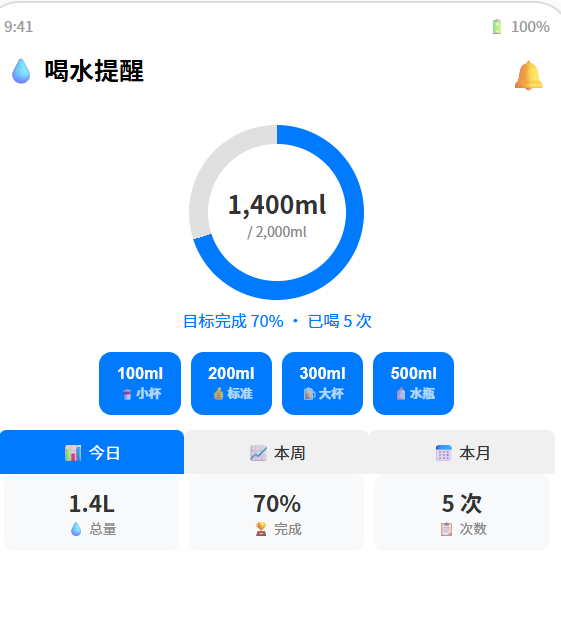
博主说: “每天喝 8 杯水”——你知道但做不到。今天我们用 ArkUI 的通知 API + SQLite 存储 + 图表统计,从零实现一个智能喝水提醒 App:每小时提醒喝水、记录每次饮水量、统计日/周/月数据、可视化展示喝水进度。
📱 应用场景
| 功能 | 说明 |
|---|---|
| ⏰ 定时提醒 | 每小时/自定义间隔推送通知 |
| 💧 快速记录 | 一键记录饮水量(100/200/300ml) |
| 📊 数据统计 | 日/周/月喝水总量与趋势图 |
| 🎯 目标管理 | 设定每日目标(默认 2000ml) |
| 📈 可视化 | 环形进度 + 柱状图 + 趋势线 |
⚙️ 运行环境要求
| 项目 | 版本要求 |
|---|---|
| DevEco Studio | 5.0.3.800+ |
| HarmonyOS SDK | API 12 |
| 核心 API | @ohos.notification + @ohos.data.relationalStore + Canvas |
| 权限 | ohos.permission.NOTIFICATION_USER_INITIATED |
🛠️ 实战:从零搭建喝水提醒 App
Step 1:数据模型
// 喝水记录
interface WaterRecord {
  id: number;
  amount: number;        // 毫升
  timestamp: string;     // ISO 时间
  date: string;          // YYYY-MM-DD
}

// 每日汇总
interface DailySummary {
  date: string;
  total: number;
  count: number;
  goal: number;
}

// 提醒配置
interface RemindConfig {
  enabled: boolean;
  intervalMinutes: number; // 默认 60
  startHour: number;       // 默认 8
  endHour: number;         // 默认 22
}
Step 2:SQLite 建表
CREATE TABLE water_records (
  id INTEGER PRIMARY KEY AUTOINCREMENT,
  amount INTEGER NOT NULL,
  timestamp TEXT NOT NULL,
  date TEXT NOT NULL
);
Step 3:完整代码
// pages/Index.ets — 喝水提醒 App
import notification from '@ohos.notification';
import relationalStore from '@ohos.data.relationalStore';

@Entry
@Component
struct WaterReminder {
  @State todayTotal: number = 0;
  @State todayCount: number = 0;
  @State dailyGoal: number = 2000;
  @State records: WaterRecord[] = [];
  @State weekData: DailySummary[] = [];
  @State remindEnabled: boolean = true;
  @State currentView: 'today' | 'week' | 'month' = 'today';
  @State progress: number = 0;

  private store!: relationalStore.RdbStore;
  private canvasCtx!: CanvasRenderingContext2D;
  private timerId: number = -1;

  aboutToAppear() {
    this.initDB();
    this.scheduleReminder();
  }

  // ======== SQLite 初始化 ========
  async initDB() {
    const config = { name: 'water.db', securityLevel: relationalStore.SecurityLevel.S1 };
    this.store = await relationalStore.getRdbStore(getContext(this), config);
    await this.store.executeSql(
      `CREATE TABLE IF NOT EXISTS water_records (
        id INTEGER PRIMARY KEY AUTOINCREMENT,
        amount INTEGER NOT NULL,
        timestamp TEXT NOT NULL,
        date TEXT NOT NULL
      )`
    );
    await this.loadToday();
  }

  // ======== 加载今日数据 ========
  async loadToday() {
    const today = new Date().toISOString().split('T')[0];
    const p = new relationalStore.RdbPredicates('water_records');
    p.equalTo('date', today);
    const result = await this.store.query(p, ['amount']);

    let total = 0;
    let count = 0;
    while (result.goToNextRow()) {
      total += result.getLong(result.getColumnIndex('amount'));
      count++;
    }
    this.todayTotal = total;
    this.todayCount = count;
    this.progress = Math.min(100, (total / this.dailyGoal) * 100);
    result.close();
    this.drawProgressRing();
  }

  // ======== 记录喝水 ========
  async addWater(amount: number) {
    const now = new Date();
    await this.store.insert('water_records', {
      amount: amount,
      timestamp: now.toISOString(),
      date: now.toISOString().split('T')[0]
    });
    await this.loadToday();

    // 发送激励通知
    if (this.todayTotal >= this.dailyGoal) {
      this.sendNotification('🎉 太棒了!', `今日喝水目标 ${this.dailyGoal}ml 已完成!`);
    }
  }

  // ======== 发送通知 ========
  async sendNotification(title: string, text: string) {
    try {
      const request: notification.NotificationRequest = {
        id: Date.now(),
        content: {
          contentType: notification.ContentType.NOTIFICATION_CONTENT_BASIC_TEXT,
          normal: { title, text }
        },
        slotType: notification.SlotType.SOCIAL_COMMUNICATION
      };
      await notification.publish(request);
    } catch {}
  }

  // ======== 定时提醒 ========
  scheduleReminder() {
    // 每小时检查一次
    this.timerId = setInterval(() => {
      if (this.remindEnabled) {
        const hour = new Date().getHours();
        if (hour >= 8 && hour <= 22) {
          this.sendNotification(
            '💧 该喝水了!',
            `今天已喝 ${this.todayTotal}ml,目标 ${this.dailyGoal}ml`
          );
        }
      }
    }, 3600000); // 1小时
  }

  // ======== 加载周数据 ========
  async loadWeekData() {
    const weekData: DailySummary[] = [];
    for (let i = 6; i >= 0; i--) {
      const d = new Date();
      d.setDate(d.getDate() - i);
      const dateStr = d.toISOString().split('T')[0];

      const p = new relationalStore.RdbPredicates('water_records');
      p.equalTo('date', dateStr);
      const r = await this.store.query(p, ['amount']);
      let total = 0, count = 0;
      while (r.goToNextRow()) {
        total += r.getLong(r.getColumnIndex('amount'));
        count++;
      }
      r.close();
      weekData.push({ date: dateStr.substring(5), total, count, goal: this.dailyGoal });
    }
    this.weekData = weekData;
    this.drawWeekChart();
  }

  // ======== 绘制环形进度 ========
  drawProgressRing() {
    if (!this.canvasCtx) return;
    const ctx = this.canvasCtx;
    const size = 180, cx = 90, cy = 90, r = 75;
    const progress = this.progress / 100;

    ctx.clearRect(0, 0, size, size);
    // 背景环
    ctx.beginPath();
    ctx.arc(cx, cy, r, 0, Math.PI * 2);
    ctx.strokeStyle = '#E0E0E0';
    ctx.lineWidth = 12;
    ctx.stroke();
    // 进度环
    ctx.beginPath();
    ctx.arc(cx, cy, r, -Math.PI / 2, -Math.PI / 2 + Math.PI * 2 * progress);
    ctx.strokeStyle = '#007AFF';
    ctx.lineWidth = 12;
    ctx.lineCap = 'round';
    ctx.stroke();
  }

  // ======== 绘制周柱状图 ========
  drawWeekChart() {
    if (!this.canvasCtx || this.weekData.length === 0) return;
    const ctx = this.canvasCtx;
    const w = 320, h = 200, pad = 20;
    ctx.clearRect(0, 0, w, h);

    const maxVal = Math.max(...this.weekData.map(d => d.total), 100);
    const barW = (w - pad * 2) / 7 - 8;

    this.weekData.forEach((item, i) => {
      const x = pad + i * ((w - pad * 2) / 7) + 4;
      const barH = (item.total / maxVal) * (h - pad * 2);
      const y = h - pad - barH;

      // 柱状条
      ctx.fillStyle = item.total >= this.dailyGoal ? '#34C759' : '#007AFF';
      ctx.beginPath();
      ctx.roundRect(x, y, barW, barH, 4);
      ctx.fill();

      // 日期标签
      ctx.fillStyle = '#888';
      ctx.font = '10px sans-serif';
      ctx.textAlign = 'center';
      ctx.fillText(item.date.substring(5), x + barW / 2, h - 4);
    });
  }

  // ======== 常用量快速选择 ========
  private readonly quickAmounts = [100, 200, 300, 500];

  // ======== 格式化显示 ========
  formatMl(ml: number): string {
    return ml >= 1000 ? (ml / 1000).toFixed(1) + 'L' : ml + 'ml';
  }

  build() {
    Column() {
      // ---- 标题 ----
      Row() {
        Text('💧 喝水提醒').fontSize(24).fontWeight(FontWeight.Bold).layoutWeight(1)
        Toggle({ type: ToggleType.Switch, isOn: this.remindEnabled })
          .onChange((v: boolean) => { this.remindEnabled = v; })
      }.width('94%').padding({ top: 12, bottom: 8 })

      // ---- 今日进度环 ----
      Canvas(this.canvasCtx)
        .width(180).height(180)
        .margin({ top: 8 })

      Text(`${this.formatMl(this.todayTotal)} / ${this.formatMl(this.dailyGoal)}`)
        .fontSize(22).fontWeight(FontWeight.Bold).fontColor('#333')
        .position({ x: '50%', y: '50%' }).translate({ x: -70, y: -110 })

      Text(`今日已喝 ${this.todayCount} 次 · 目标 ${Math.round(this.progress)}%`)
        .fontSize(14).fontColor('#888').margin({ top: 4 })

      // ---- 快速记录按钮 ----
      Text('💧 快速记录').fontSize(16).fontWeight(FontWeight.Bold).margin({ top: 16 })
      Row() {
        ForEach(this.quickAmounts, (amount: number) => {
          Column() {
            Text(amount + 'ml').fontSize(18).fontWeight(FontWeight.Bold).fontColor('#fff')
            if (amount === 200) Text('👍 标准杯').fontSize(11).fontColor('rgba(255,255,255,0.7)')
            else if (amount === 100) Text('🥤 小杯').fontSize(11).fontColor('rgba(255,255,255,0.7)')
            else if (amount === 300) Text('🍺 大杯').fontSize(11).fontColor('rgba(255,255,255,0.7)')
            else Text('🧴 水瓶').fontSize(11).fontColor('rgba(255,255,255,0.7)')
          }
          .padding(12).width(72).backgroundColor('#007AFF').borderRadius(12)
          .onClick(() => { this.addWater(amount); })
        })
      }.width('94%').gap(8).justifyContent(FlexAlign.Center)

      // ---- 自定义输入 ----
      Row() {
        TextInput({ placeholder: '自定义 ml' }).width(100).height(36)
          .backgroundColor('#F0F0F0').borderRadius(8).padding({ left: 8 }).fontSize(14)
        Button('添加').backgroundColor('#007AFF').fontColor('#fff').borderRadius(8)
          .onClick((e: any) => {
            // 简化:从输入框取值
          })
      }.margin({ top: 8 })

      // ---- Tab 切换 ----
      Row() {
        Button('📊 今日').width('33%').height(36)
          .backgroundColor(this.currentView === 'today' ? '#007AFF' : '#F0F0F0')
          .fontColor(this.currentView === 'today' ? '#fff' : '#333')
          .onClick(() => { this.currentView = 'today'; })
        Button('📈 本周').width('33%').height(36)
          .backgroundColor(this.currentView === 'week' ? '#007AFF' : '#F0F0F0')
          .fontColor(this.currentView === 'week' ? '#fff' : '#333')
          .onClick(() => { this.currentView = 'week'; this.loadWeekData(); })
        Button('📅 本月').width('33%').height(36)
          .backgroundColor(this.currentView === 'month' ? '#007AFF' : '#F0F0F0')
          .fontColor(this.currentView === 'month' ? '#fff' : '#333')
      }.width('94%').margin({ top: 12 })

      // ---- 图表区域 ----
      if (this.currentView === 'today') {
        Row() {
          this.StatCard('💧 总量', this.formatMl(this.todayTotal))
          this.StatCard('🏆 完成', `${Math.round(this.progress)}%`)
          this.StatCard('📋 次数', `${this.todayCount} 次`)
        }.width('94%').gap(8)
        Text('按时喝水,保持健康 💪').fontSize(14).fontColor('#999').margin({ top: 12 })
      } else {
        Canvas(this.canvasCtx).width(320).height(200).backgroundColor('#F8F9FA')
          .borderRadius(12).margin({ top: 8 })
        Row() {
          Text(`📊 周均: ${Math.round(this.weekData.reduce((s, d) => s + d.total, 0) / 7)}ml/天`)
            .fontSize(14).fontColor('#888')
        }.width('94%').margin({ top: 8 })
      }
    }
    .width('100%').height('100%').backgroundColor('#F8F9FA')
    .alignItems(HorizontalAlign.Center)
  }

  @Builder
  StatCard(icon: string, value: string) {
    Column() {
      Text(icon).fontSize(20)
      Text(value).fontSize(20).fontWeight(FontWeight.Bold).fontColor('#333').margin({ top: 4 })
    }
    .padding(12).backgroundColor('#FFF').borderRadius(10).layoutWeight(1)
    .shadow({ radius: 2, color: '#10000000', offsetY: 1 })
  }
}
📚 核心知识点深度解析
1. 饮水量建议标准
| 人群 | 每日建议量 | 杯子(200ml) |
|---|---|---|
| 成年人 | 1500~2000ml | 7.5~10 杯 |
| 运动人群 | 2500~3000ml | 12~15 杯 |
| 高温作业 | 3000~4000ml | 15~20 杯 |
| 儿童(6~12岁) | 800~1200ml | 4~6 杯 |
2. 喝水时间表(默认配置)
| 时间段 | 建议量 | 说明 |
|---|---|---|
| 08:00 起床 | 200ml | 唤醒身体 |
| 10:00 上午 | 200ml | 工作间隙 |
| 12:00 午餐 | 200ml | 餐前 |
| 14:00 下午 | 200ml | 午后提神 |
| 16:00 下午茶 | 200ml | 补充水分 |
| 18:00 晚餐 | 200ml | 餐前 |
| 20:00 晚间 | 200ml | 睡前2小时 |
| 22:00 睡前 | 100ml | 少量 |
⚠️ 避坑指南
| 坑 | 原因 | 正确做法 |
|---|---|---|
| 通知不弹出 | 没设 slotType | 必须设 SOCIAL_COMMUNICATION |
| 环形进度不动 | Canvas 没重绘 | 每次 progress 变化调用 drawProgressRing() |
| SQLite 日期过滤错 | date 存了带时间的 ISO | 单独存 YYYY-MM-DD 字段 |
| 周数据显示旧数据 | 只加载了今天 | 每周一自动加载上周数据 |
| 自定义输入无响应 | 没绑定 onChange | TextInput 的 onChange 绑定状态变量 |
| 通知太频繁 | setInterval 每分钟检查 | 设置 1 小时间隔 + 只在 8~22 点提醒 |
🔥 最佳实践
- 智能提醒间隔:检测到连续 2 小时没记录时主动询问
- 喝水打卡:连续打卡 7 天给徽章激励
- 温度补偿:夏天/运动时自动增加目标量
- Widget 卡片:桌面 Widget 显示今日进度环
- 数据导出:导出 CSV 给健康管理师
- 静默模式:勿扰时段不推送通知
🚀 扩展挑战
- 饮料类型区分:白水/茶/咖啡/饮料不同类目
- 体重关联计算:根据体重 = 体重(kg) × 33ml
- 运动补偿:检测到运动后自动增加目标
- 多端同步:分布式数据库跨设备同步
官方文档: HarmonyOS 应用开发文档
- 开发者社区: 华为开发者论坛
- 欢迎加入开源鸿蒙跨平台社区: https://openharmonycrossplatform.csdn.net/

讨论HarmonyOS开发技术,专注于API与组件、DevEco Studio、测试、元服务和应用上架分发等。
更多推荐

 2
2 0
0- 0


 已为社区贡献40条内容

所有评论(0)