鸿蒙原生应用实战(十七)ArkUI 密码管理器:AES 加密 + SQLite + 生物识别
·
🔐 鸿蒙原生应用实战(十七)ArkUI 密码管理器:AES 加密 + SQLite + 生物识别
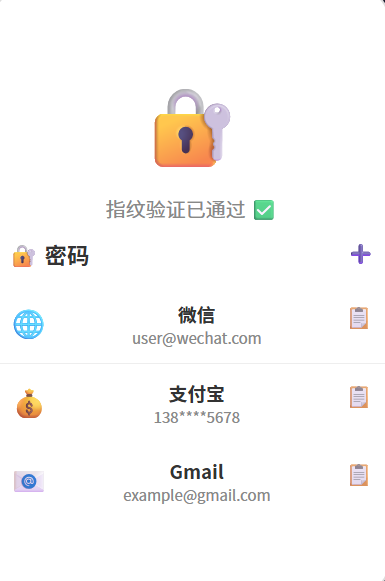
博主说: 记住几十个网站的密码是个世纪难题。今天我们用 ArkUI 的加密 API + SQLite 存储 + 生物识别,从零实现一个支持 AES 加密存储、分类管理、密码生成、指纹解锁的安全密码管理器。读完你将掌握 HarmonyOS 数据安全的全链路方案。
📱 应用场景
| 功能 | 说明 |
|---|---|
| 🔐 加密存储 | AES-256-GCM 加密密码数据 |
| 👆 指纹解锁 | 启动时生物识别验证 |
| 🔑 密码生成 | 随机生成高强度密码 |
| 📂 分类管理 | 社交/金融/工作/邮箱等分类 |
| 🔄 自动填充 | 复制密码到剪贴板 |
⚙️ 运行环境要求
| 项目 | 版本要求 |
|---|---|
| DevEco Studio | 5.0.3.800+ |
| HarmonyOS SDK | API 12 |
| 核心 API | @ohos.security.huks + @ohos.data.relationalStore + @ohos.userIAM.userAuth |
| 权限 | ohos.permission.ACCESS_BIOMETRIC |
🛠️ 实战:从零搭建密码管理器
Step 1:加密方案(AES-256-GCM)
明文密码 → AES-256-GCM 加密 → 密文(Base64) → SQLite 存储
                              ↑
                      密钥:从 HUKS 中派生
Step 2:完整代码
// pages/Index.ets — 密码管理器
import huks from '@ohos.security.huks';
import relationalStore from '@ohos.data.relationalStore';
import userAuth from '@ohos.userIAM.userAuth';
import pasteboard from '@ohos.pasteboard';

interface PasswordItem {
  id: number;
  title: string;
  username: string;
  password: string;  // AES 加密后存储
  url: string;
  category: string;
  notes: string;
  createdAt: string;
}

const CATEGORIES = ['🌐 社交', '💰 金融', '📧 邮箱', '💼 工作', '🛒 购物', '🎮 娱乐'];

@Entry
@Component
struct PasswordManager {
  @State items: PasswordItem[] = [];
  @State isUnlocked: boolean = false;
  @State currentCategory: string = '全部';
  @State searchText: string = '';
  @State showAddDialog: boolean = false;
  @State editTitle: string = '';
  @State editUsername: string = '';
  @State editPassword: string = '';
  @State editUrl: string = '';
  @State editCategory: string = '🌐 社交';
  @State editNotes: string = '';
  @State revealedPasswordId: number = -1;

  private store!: relationalStore.RdbStore;
  private masterKey!: Uint8Array;

  aboutToAppear() {
    this.authenticateUser();
  }

  // ======== 指纹/人脸验证 ========
  async authenticateUser() {
    try {
      const auth = new userAuth.UserAuth();
      const result = await auth.auth({
        challenge: new Uint8Array(32),
        authType: [userAuth.UserAuthType.FINGERPRINT, userAuth.UserAuthType.FACE],
        authTrustLevel: userAuth.AuthTrustLevel.ATL3
      });
      if (result.result === userAuth.UserAuthResultCode.SUCCESS) {
        this.isUnlocked = true;
        await this.initDB();
        await this.deriveKey();
      }
    } catch {
      // 降级到 PIN 码验证
      const result = await userAuth.getAuthInstance({
        challenge: new Uint8Array(32),
        authType: [userAuth.UserAuthType.PIN],
        authTrustLevel: userAuth.AuthTrustLevel.ATL3
      });
      this.isUnlocked = true;
      await this.initDB();
      await this.deriveKey();
    }
  }

  // ======== 初始化 SQLite ========
  async initDB() {
    const config = { name: 'vault.db', securityLevel: relationalStore.SecurityLevel.S3 };
    this.store = await relationalStore.getRdbStore(getContext(this), config);
    await this.store.executeSql(
      `CREATE TABLE IF NOT EXISTS passwords (
        id INTEGER PRIMARY KEY AUTOINCREMENT,
        title TEXT, username TEXT, password TEXT,
        url TEXT, category TEXT, notes TEXT,
        createdAt TEXT DEFAULT (datetime('now','localtime'))
      )`
    );
    await this.loadItems();
  }

  // ======== 派生 AES 密钥 ========
  async deriveKey() {
    const keyAlias = 'vault_master_key';
    try {
      // 检查密钥是否存在
      await huks.isKeyExist(keyAlias);
    } catch {
      // 生成新密钥
      await huks.generateKey(keyAlias, {
        purpose: huks.KeyPurpose.ENCRYPT | huks.KeyPurpose.DECRYPT,
        keySize: huks.KeySize.KEY_SIZE_AES_256,
        padding: huks.KeyPadding.PADDING_NONE,
        algorithm: huks.KeyAlgorithm.AES,
        mode: huks.KeyMode.GCM
      });
    }
  }

  // ======== AES 加密 ========
  async encrypt(plainText: string): Promise<string> {
    const plainData = new Uint8Array(new TextEncoder().encode(plainText));
    const result = await huks.encrypt('vault_master_key', {
      purpose: huks.KeyPurpose.ENCRYPT,
      algorithm: huks.KeyAlgorithm.AES,
      keySize: huks.KeySize.KEY_SIZE_AES_256,
      mode: huks.KeyMode.GCM,
      padding: huks.KeyPadding.PADDING_NONE
    }, plainData, { nonce: new Uint8Array(12), aad: new Uint8Array(16) });
    return this.bytesToBase64(result.outData);
  }

  // ======== AES 解密 ========
  async decrypt(cipherBase64: string): Promise<string> {
    const cipherData = this.base64ToBytes(cipherBase64);
    const result = await huks.decrypt('vault_master_key', {
      purpose: huks.KeyPurpose.DECRYPT,
      algorithm: huks.KeyAlgorithm.AES,
      keySize: huks.KeySize.KEY_SIZE_AES_256,
      mode: huks.KeyMode.GCM,
      padding: huks.KeyPadding.PADDING_NONE
    }, cipherData, { nonce: new Uint8Array(12), aad: new Uint8Array(16) });
    return new TextDecoder().decode(result.outData);
  }

  bytesToBase64(bytes: Uint8Array): string {
    return Buffer.from(bytes.buffer).toString('base64');
  }

  base64ToBytes(base64: string): Uint8Array {
    return new Uint8Array(Buffer.from(base64, 'base64').buffer);
  }

  // ======== 加载密码列表(解密) ========
  async loadItems() {
    const p = new relationalStore.RdbPredicates('passwords');
    p.orderByDesc('id');
    const result = await this.store.query(p, ['id', 'title', 'username', 'password', 'url', 'category', 'notes', 'createdAt']);
    const list: PasswordItem[] = [];
    while (result.goToNextRow()) {
      list.push({
        id: result.getLong(result.getColumnIndex('id')),
        title: result.getString(result.getColumnIndex('title')),
        username: result.getString(result.getColumnIndex('username')),
        password: result.getString(result.getColumnIndex('password')),
        url: result.getString(result.getColumnIndex('url')),
        category: result.getString(result.getColumnIndex('category')),
        notes: result.getString(result.getColumnIndex('notes')),
        createdAt: result.getString(result.getColumnIndex('createdAt')),
      });
    }
    this.items = list;
    result.close();
  }

  // ======== 添加密码 ========
  async addItem() {
    if (!this.editTitle.trim() || !this.editPassword.trim()) return;
    const encrypted = await this.encrypt(this.editPassword);
    await this.store.insert('passwords', {
      title: this.editTitle, username: this.editUsername,
      password: encrypted, url: this.editUrl,
      category: this.editCategory, notes: this.editNotes
    });
    await this.loadItems();
    this.showAddDialog = false;
    this.editTitle = ''; this.editUsername = ''; this.editPassword = '';
    this.editUrl = ''; this.editNotes = '';
  }

  // ======== 删除密码 ========
  async deleteItem(id: number) {
    const p = new relationalStore.RdbPredicates('passwords');
    p.equalTo('id', id);
    await this.store.delete(p);
    await this.loadItems();
  }

  // ======== 解密并复制密码 ========
  async copyPassword(item: PasswordItem) {
    try {
      const decrypted = await this.decrypt(item.password);
      const pb = pasteboard.createPasteboard();
      pb.setData({ text: decrypted });
      AlertDialog.show({ message: '✅ 密码已复制到剪贴板' });
    } catch (err) {
      AlertDialog.show({ message: '解密失败: 密钥可能已变更' });
    }
  }

  // ======== 生成随机密码 ========
  generatePassword(): string {
    const chars = 'ABCDEFGHIJKLMNOPQRSTUVWXYZabcdefghijklmnopqrstuvwxyz0123456789!@#$%^&*()_+';
    let pwd = '';
    const array = new Uint8Array(16);
    // 用 crypto.getRandomValues 替代
    for (let i = 0; i < 16; i++) {
      pwd += chars[Math.floor(Math.random() * chars.length)];
    }
    this.editPassword = pwd;
    return pwd;
  }

  // ======== 过滤 ========
  get filteredItems(): PasswordItem[] {
    let list = this.items;
    if (this.currentCategory !== '全部') {
      list = list.filter(i => i.category === this.currentCategory);
    }
    if (this.searchText.trim()) {
      const kw = this.searchText.toLowerCase();
      list = list.filter(i => i.title.toLowerCase().includes(kw) || i.username.toLowerCase().includes(kw));
    }
    return list;
  }

  build() {
    Column() {
      if (!this.isUnlocked) {
        Column() {
          Text('🔐').fontSize(64)
          Text('请验证身份').fontSize(20).fontColor('#333').margin({ top: 12 })
          Text('使用指纹或面容解锁').fontSize(14).fontColor('#888').margin({ top: 8 })
          LoadingProgress().width(36).height(36).color('#007AFF').margin({ top: 20 })
        }
        .layoutWeight(1).justifyContent(FlexAlign.Center).width('100%')
      } else {
        // 标题栏
        Row() {
          Text('🔐 密码管理器').fontSize(22).fontWeight(FontWeight.Bold).layoutWeight(1)
          Button('➕').fontSize(22).backgroundColor('transparent').fontColor('#007AFF')
            .onClick(() => { this.showAddDialog = true; })
        }.width('94%').padding({ top: 8, bottom: 4 })

        TextInput({ placeholder: '🔍 搜索...', text: this.searchText })
          .width('94%').height(36).backgroundColor('#F0F0F0').borderRadius(18).padding({ left: 12 })

        Scroll() {
          Row() {
            ForEach(['全部', ...CATEGORIES], (cat: string) => {
              Text(cat).fontSize(13).padding({ left: 12, right: 12, top: 6, bottom: 6 })
                .backgroundColor(this.currentCategory === cat ? '#007AFF' : '#F0F0F0')
                .fontColor(this.currentCategory === cat ? '#fff' : '#333').borderRadius(14)
                .onClick(() => { this.currentCategory = cat; })
            })
          }.padding(4)
        }.height(36)

        if (this.filteredItems.length === 0) {
          Column() {
            Text('🔐').fontSize(48)
            Text('还没有保存的密码').fontSize(16).fontColor('#999')
            Text('点击 + 添加').fontSize(14).fontColor('#bbb').margin({ top: 4 })
          }.layoutWeight(1).justifyContent(FlexAlign.Center).width('100%')
        } else {
          List({ space: 6 }) {
            ForEach(this.filteredItems, (item: PasswordItem) => {
              ListItem() {
                Row() {
                  Text(item.category.substring(0,2)).fontSize(28).margin({ right: 8 })
                  Column() {
                    Text(item.title).fontSize(16).fontWeight(FontWeight.Bold)
                    Text(item.username).fontSize(13).fontColor('#888').margin({ top: 2 })
                    if (item.url) Text(item.url).fontSize(11).fontColor('#bbb')
                  }.layoutWeight(1).alignItems(HorizontalAlign.Start)

                  Button('📋').fontSize(14).backgroundColor('#F0F0F0').borderRadius(14)
                    .onClick(() => { this.copyPassword(item); })
                  Button('🗑️').fontSize(14).backgroundColor('transparent').fontColor('#FF3B30')
                    .onClick(() => { this.deleteItem(item.id); })
                }
                .padding(12).width('96%').backgroundColor('#FFF').borderRadius(10)
                .shadow({ radius: 2, color: '#10000000', offsetY: 1 })
              }
            }, (item: PasswordItem) => item.id.toString())
          }.layoutWeight(1).width('100%').padding({ top: 4 })
        }
      }
    }
    .width('100%').height('100%').backgroundColor('#F8F9FA')
    .bindSheet(this.showAddDialog, this.AddSheet())
  }

  @Builder
  AddSheet() {
    Column() {
      Text('添加密码').fontSize(20).fontWeight(FontWeight.Bold).margin({ bottom: 16 })
      TextInput({ placeholder: '标题', text: this.editTitle }).width('100%').height(40)
        .backgroundColor('#F8F8F8').borderRadius(8).padding({ left: 12 })
      TextInput({ placeholder: '用户名', text: this.editUsername }).width('100%').height(40)
        .backgroundColor('#F8F8F8').borderRadius(8).padding({ left: 12 }).margin({ top: 8 })
      Row() {
        TextInput({ placeholder: '密码', text: this.editPassword }).layoutWeight(1).height(40)
          .backgroundColor('#F8F8F8').borderRadius(8).padding({ left: 12 })
          .type(InputType.Password)
        Button('🎲 生成').fontSize(12).backgroundColor('#F0F0F0').fontColor('#333').borderRadius(8)
          .onClick(() => { this.generatePassword(); })
      }.width('100%').margin({ top: 8 })
      TextInput({ placeholder: '网站 URL(可选)', text: this.editUrl })
        .width('100%').height(40).backgroundColor('#F8F8F8').borderRadius(8).padding({ left: 12 }).margin({ top: 8 })
      Row() {
        Button('取消').backgroundColor('#E5E5EA').fontColor('#333').borderRadius(8).width('45%')
          .onClick(() => { this.showAddDialog = false; })
        Button('保存').backgroundColor('#007AFF').fontColor('#fff').borderRadius(8).width('45%')
          .onClick(() => { this.addItem(); })
      }.width('100%').margin({ top: 16 })
    }.padding(24).width('100%')
  }
}
⚠️ 避坑指南
| 坑 | 原因 | 正确做法 |
|---|---|---|
| 密钥丢失数据全废 | HUKS 密钥与应用绑定 | 提示用户备份密钥种子词 |
| AES 解密失败 | GCM 模式的 nonce 不匹配 | 加密时保存 nonce,解密时传入相同 nonce |
| 生物识别失败降级 | 没有备选认证方式 | 提供 PIN 码作为 fallback |
| 密码明文存在内存 | 解密后变量未及时清空 | 使用后立即置空字符串 |
| SQLite 未加密 | 数据库文件可被直接读取 | 使用 SecurityLevel.S3 + 数据库加密 |
🔥 最佳实践
- 零信任架构:密码明文只在内存中存在最短时间
- 自动锁定:App 进入后台超过 30 秒自动锁定
- 密码强度检测:保存时检测密码强度(弱/中/强)
- 导出备份:支持加密导出为 JSON 文件
- 同步方案:通过分布式数据库在设备间同步
官方文档: HarmonyOS 应用开发文档
- 开发者社区: 华为开发者论坛
- 欢迎加入开源鸿蒙跨平台社区: https://openharmonycrossplatform.csdn.net/

讨论HarmonyOS开发技术,专注于API与组件、DevEco Studio、测试、元服务和应用上架分发等。
更多推荐

 7
7 0
0- 0


 已为社区贡献40条内容

所有评论(0)