鸿蒙原生应用实战(十八)ArkUI 记账本:SQLite 账单 + 图表统计 + 分类管理
·
💰 鸿蒙原生应用实战(十八)ArkUI 记账本:SQLite 账单 + 图表统计 + 分类管理
博主说: “钱去哪儿了?”——这是每个人月底的灵魂拷问。今天用 ArkUI 的 SQLite 数据库 + Canvas 绘图,从零实现一个支持账单录入、分类统计、月度图表、预算管理的完整记账本。读完你将掌握移动端记账 App 的全套设计思路。
📱 应用场景
| 功能 | 说明 |
|---|---|
| 💳 账单录入 | 添加收入/支出记录 |
| 📊 图表统计 | 饼图+柱状图展示消费结构 |
| 📅 月度账单 | 按月查看收支总览 |
| 🎯 预算管理 | 设定分类预算提醒 |
| 🔍 账单搜索 | 按备注/金额/分类搜索 |
⚙️ 运行环境要求
| 项目 | 版本要求 |
|---|---|
| DevEco Studio | 5.0.3.800+ |
| HarmonyOS SDK | API 12 |
| 核心 API | @ohos.data.relationalStore + Canvas |
🛠️ 实战:从零搭建记账本
Step 1:数据结构
interface BillRecord {
  id: number;
  type: 'income' | 'expense';
  category: string;       // 餐饮/交通/购物/...
  amount: number;
  note: string;
  date: string;           // YYYY-MM-DD
  createdAt: string;
}

const CATEGORIES_EXPENSE = ['🍚 餐饮','🚌 交通','🛒 购物','🏠 居住','📱 通讯','🎮 娱乐','📚 学习','💊 医疗','✈️ 旅行','🎁 人情','其他'];
const CATEGORIES_INCOME = ['💼 工资','📈 投资','🎁 红包','💵 兼职','其他'];
Step 2:完整代码
// pages/Index.ets — 记账本
import relationalStore from '@ohos.data.relationalStore';
import preferences from '@ohos.data.preferences';

@Entry
@Component
struct ExpenseTracker {
  @State records: BillRecord[] = [];
  @State currentMonth: string = '';       // YYYY-MM
  @State totalIncome: number = 0;
  @State totalExpense: number = 0;
  @State currentView: 'list' | 'chart' = 'list';
  @State showAddDialog: boolean = false;
  @State editType: 'expense' | 'income' = 'expense';
  @State editCategory: string = '🍚 餐饮';
  @State editAmount: string = '';
  @State editNote: string = '';
  @State editDate: string = '';
  @State monthlyBudget: number = 3000;

  private store!: relationalStore.RdbStore;
  private pref!: preferences.Preferences;

  aboutToAppear() {
    const now = new Date();
    this.currentMonth = `${now.getFullYear()}-${String(now.getMonth()+1).padStart(2,'0')}`;
    this.editDate = this.currentMonth + '-' + String(now.getDate()).padStart(2,'0');
    this.initDB();
    this.loadBudget();
  }

  async initDB() {
    const config = { name: 'finance.db', securityLevel: relationalStore.SecurityLevel.S1 };
    this.store = await relationalStore.getRdbStore(getContext(this), config);
    await this.store.executeSql(
      `CREATE TABLE IF NOT EXISTS bills (
        id INTEGER PRIMARY KEY AUTOINCREMENT,
        type TEXT, category TEXT, amount REAL,
        note TEXT, date TEXT, createdAt TEXT DEFAULT (datetime('now','localtime'))
      )`
    );
    await this.loadMonthData();
  }

  async loadBudget() {
    this.pref = await preferences.getPreferences(getContext(this), 'budget');
    const b = this.pref.get('monthly', 3000);
    this.monthlyBudget = b as number;
  }

  async saveBudget() {
    await this.pref.put('monthly', this.monthlyBudget);
    await this.pref.flush();
  }

  async loadMonthData() {
    const p = new relationalStore.RdbPredicates('bills');
    p.like('date', this.currentMonth + '%');
    p.orderByDesc('date');
    const result = await this.store.query(p, ['id', 'type', 'category', 'amount', 'note', 'date']);

    const list: BillRecord[] = [];
    let income = 0, expense = 0;
    while (result.goToNextRow()) {
      const type = result.getString(result.getColumnIndex('type')) as 'income' | 'expense';
      const amount = result.getDouble(result.getColumnIndex('amount'));
      if (type === 'income') income += amount;
      else expense += amount;
      list.push({
        id: result.getLong(result.getColumnIndex('id')),
        type, category: result.getString(result.getColumnIndex('category')),
        amount, note: result.getString(result.getColumnIndex('note')),
        date: result.getString(result.getColumnIndex('date')),
        createdAt: ''
      });
    }
    this.records = list;
    this.totalIncome = income;
    this.totalExpense = expense;
    result.close();
  }

  async addRecord() {
    if (!this.editAmount || isNaN(Number(this.editAmount)) || Number(this.editAmount) <= 0) {
      AlertDialog.show({ message: '请输入有效金额' });
      return;
    }
    await this.store.insert('bills', {
      type: this.editType,
      category: this.editCategory,
      amount: Number(this.editAmount),
      note: this.editNote,
      date: this.editDate
    });
    await this.loadMonthData();
    this.showAddDialog = false;
    this.editAmount = ''; this.editNote = '';
  }

  async deleteRecord(id: number) {
    const p = new relationalStore.RdbPredicates('bills');
    p.equalTo('id', id);
    await this.store.delete(p);
    await this.loadMonthData();
  }

  changeMonth(delta: number) {
    const [y, m] = this.currentMonth.split('-').map(Number);
    const d = new Date(y, m - 1 + delta);
    this.currentMonth = `${d.getFullYear()}-${String(d.getMonth()+1).padStart(2,'0')}`;
    this.loadMonthData();
  }

  // ======== 分类统计 ========
  get categoryStats(): { label: string; amount: number; ratio: number }[] {
    const map: Record<string, number> = {};
    for (const r of this.records) {
      if (r.type === 'expense') {
        map[r.category] = (map[r.category] || 0) + r.amount;
      }
    }
    const total = Object.values(map).reduce((a, b) => a + b, 0);
    return Object.entries(map)
      .map(([label, amount]) => ({ label, amount, ratio: total > 0 ? amount / total : 0 }))
      .sort((a, b) => b.amount - a.amount);
  }

  get budgetUsage(): number {
    return this.monthlyBudget > 0 ? Math.min(100, (this.totalExpense / this.monthlyBudget) * 100) : 0;
  }

  // ======== Canvas 绘制饼图 ========
  private chartCtx!: CanvasRenderingContext2D;
  private chartInited: boolean = false;

  drawPieChart() {
    if (!this.chartCtx) return;
    const ctx = this.chartCtx;
    const w = 280, h = 280, cx = w/2, cy = h/2, r = 110;
    ctx.clearRect(0, 0, w, h);

    const stats = this.categoryStats;
    if (stats.length === 0) {
      ctx.fillStyle = '#ddd';
      ctx.font = '16px sans-serif';
      ctx.textAlign = 'center';
      ctx.fillText('暂无支出数据', cx, cy);
      return;
    }

    const colors = ['#FF3B30','#FF9500','#FFCC00','#34C759','#007AFF','#5856D6','#AF52DE','#FF2D55','#8E8E93','#5AC8FA','#C7C7CC'];
    let startAngle = -Math.PI / 2;

    stats.forEach((s, i) => {
      const arc = s.ratio * Math.PI * 2;
      ctx.beginPath();
      ctx.moveTo(cx, cy);
      ctx.arc(cx, cy, r, startAngle, startAngle + arc);
      ctx.closePath();
      ctx.fillStyle = colors[i % colors.length];
      ctx.fill();

      // 标签
      const midAngle = startAngle + arc / 2;
      const labelX = cx + (r * 0.7) * Math.cos(midAngle);
      const labelY = cy + (r * 0.7) * Math.sin(midAngle);
      ctx.fillStyle = '#fff';
      ctx.font = '12px sans-serif';
      ctx.textAlign = 'center';
      ctx.fillText(`${Math.round(s.ratio * 100)}%`, labelX, labelY + 4);

      startAngle += arc;
    });

    // 中心白圈
    ctx.beginPath();
    ctx.arc(cx, cy, 50, 0, Math.PI * 2);
    ctx.fillStyle = '#fff';
    ctx.fill();
    ctx.fillStyle = '#333';
    ctx.font = 'bold 20px sans-serif';
    ctx.textAlign = 'center';
    ctx.fillText(`¥${this.totalExpense}`, cx, cy + 7);
  }

  build() {
    Column() {
      // ---- 头部统计 ----
      Column() {
        Row() {
          Button('<').fontSize(22).backgroundColor('transparent').fontColor('#fff')
            .onClick(() => { this.changeMonth(-1); })
          Text(this.currentMonth).fontSize(20).fontWeight(FontWeight.Bold).fontColor('#fff').layoutWeight(1).textAlign(TextAlign.Center)
          Button('>').fontSize(22).backgroundColor('transparent').fontColor('#fff')
            .onClick(() => { this.changeMonth(1); })
        }.width('90%')

        Row() {
          Column() {
            Text('收入').fontSize(13).fontColor('rgba(255,255,255,0.7)')
            Text(`+¥${this.totalIncome}`).fontSize(22).fontWeight(FontWeight.Bold).fontColor('#fff')
          }.layoutWeight(1).alignItems(HorizontalAlign.Center)
          Column() {
            Text('支出').fontSize(13).fontColor('rgba(255,255,255,0.7)')
            Text(`-¥${this.totalExpense}`).fontSize(22).fontWeight(FontWeight.Bold).fontColor('#fff')
          }.layoutWeight(1).alignItems(HorizontalAlign.Center)
        }.margin({ top: 8 })

        // 预算进度条
        Row() {
          Text('预算').fontSize(12).fontColor('rgba(255,255,255,0.7)')
          Column() {
            Row() {
              Column().width(`${this.budgetUsage}%`).height(6).backgroundColor('#FF3B30').borderRadius(3)
            }.width('100%').height(6).backgroundColor('rgba(255,255,255,0.3)').borderRadius(3)
          }.layoutWeight(1).margin({ left: 8, right: 8 })
          Text(`¥${this.totalExpense}/¥${this.monthlyBudget}`).fontSize(11).fontColor('rgba(255,255,255,0.7)')
        }.width('94%').margin({ top: 8 })
      }
      .padding(16)
      .backgroundColor('#007AFF')
      .borderRadius({ bottomLeft: 20, bottomRight: 20 })

      // ---- Tab: 列表/图表 ----
      Row() {
        Button('📋 账单').width('50%').height(36).fontSize(14)
          .backgroundColor(this.currentView === 'list' ? '#007AFF' : '#F0F0F0')
          .fontColor(this.currentView === 'list' ? '#fff' : '#333').borderRadius(0)
          .onClick(() => { this.currentView = 'list'; })
        Button('📊 图表').width('50%').height(36).fontSize(14)
          .backgroundColor(this.currentView === 'chart' ? '#007AFF' : '#F0F0F0')
          .fontColor(this.currentView === 'chart' ? '#fff' : '#333').borderRadius(0)
          .onClick(() => { this.currentView = 'chart'; this.drawPieChart(); })
      }.width('94%').margin({ top: 8 })

      // ---- 内容 ----
      if (this.currentView === 'list') {
        if (this.records.length === 0) {
          Column() {
            Text('💳').fontSize(48)
            Text('本月还没有账单').fontSize(16).fontColor('#999')
          }.layoutWeight(1).justifyContent(FlexAlign.Center).width('100%')
        } else {
          List({ space: 6 }) {
            ForEach(this.records, (r: BillRecord) => {
              ListItem() {
                Row() {
                  Text(r.category.substring(0,2)).fontSize(24).margin({ right: 8 })
                  Column() {
                    Text(r.category).fontSize(15).fontWeight(FontWeight.Bold)
                    Text(r.note || r.date).fontSize(12).fontColor('#888')
                  }.layoutWeight(1).alignItems(HorizontalAlign.Start)

                  Column() {
                    Text(`${r.type === 'income' ? '+' : '-'}¥${r.amount.toFixed(0)}`)
                      .fontSize(16).fontWeight(FontWeight.Bold)
                      .fontColor(r.type === 'income' ? '#34C759' : '#FF3B30')
                    Text(r.date.substring(5)).fontSize(11).fontColor('#bbb')
                  }.alignItems(HorizontalAlign.End)

                  Button('✕').fontSize(12).backgroundColor('transparent').fontColor('#FF3B30').margin({ left: 4 })
                    .onClick(() => { this.deleteRecord(r.id); })
                }
                .padding(12).width('96%').backgroundColor('#FFF').borderRadius(10)
                .shadow({ radius: 2, color: '#10000000', offsetY: 1 })
              }
            }, (r: BillRecord) => r.id.toString())
          }.layoutWeight(1).width('100%').padding({ top: 4 })
        }
      } else {
        // 图表视图
        Scroll() {
          Column() {
            Canvas(this.chartCtx).width(280).height(280).margin({ top: 8 })

            // 分类明细
            ForEach(this.categoryStats, (s, idx) => {
              Row() {
                Text(s.label).fontSize(14).width(80)
                Column() {
                  Column().width(`${s.ratio * 100}%`).height(8)
                    .backgroundColor(['#FF3B30','#FF9500','#FFCC00','#34C759','#007AFF','#5856D6'][idx as number % 6])
                    .borderRadius(4)
                }.layoutWeight(1).margin({ left: 8, right: 8 })
                Text(`¥${s.amount.toFixed(0)}`).fontSize(14).fontWeight(FontWeight.Bold).width(80).textAlign(TextAlign.End)
              }.padding({ top: 6, bottom: 6 }).width('94%')
            })
          }.width('100%').alignItems(HorizontalAlign.Center)
        }.layoutWeight(1)
      }

      // ---- 添加按钮 ----
      Button('➕ 记一笔')
        .width('90%').height(48)
        .backgroundColor('#007AFF').fontColor('#fff').borderRadius(24).fontSize(16)
        .margin({ bottom: 12 })
        .onClick(() => { this.showAddDialog = true; })
    }
    .width('100%').height('100%').backgroundColor('#F8F9FA')
    .bindSheet(this.showAddDialog, this.AddSheet())
  }

  @Builder
  AddSheet() {
    Column() {
      Text('记一笔').fontSize(20).fontWeight(FontWeight.Bold).margin({ bottom: 16 })

      Row() {
        Button('支出').width('45%').height(40)
          .backgroundColor(this.editType === 'expense' ? '#FF3B30' : '#F0F0F0')
          .fontColor(this.editType === 'expense' ? '#fff' : '#333').borderRadius(20)
          .onClick(() => { this.editType = 'expense'; this.editCategory = CATEGORIES_EXPENSE[0]; })
        Button('收入').width('45%').height(40)
          .backgroundColor(this.editType === 'income' ? '#34C759' : '#F0F0F0')
          .fontColor(this.editType === 'income' ? '#fff' : '#333').borderRadius(20)
          .onClick(() => { this.editType = 'income'; this.editCategory = CATEGORIES_INCOME[0]; })
      }.width('100%').justifyContent(FlexAlign.Center).gap(8)

      TextInput({ placeholder: '金额', text: this.editAmount })
        .width('100%').height(44).backgroundColor('#F8F8F8').borderRadius(8).padding({ left: 12 })
        .type(InputType.Number).margin({ top: 8 })

      Text('分类:').fontSize(14).fontColor('#333').margin({ top: 8 })
      Wrap() {
        ForEach(this.editType === 'expense' ? CATEGORIES_EXPENSE : CATEGORIES_INCOME, (cat: string) => {
          Text(cat).fontSize(13).padding({ left: 12, right: 12, top: 6, bottom: 6 })
            .backgroundColor(this.editCategory === cat ? (this.editType === 'expense' ? '#FF3B30' : '#34C759') : '#F0F0F0')
            .fontColor(this.editCategory === cat ? '#fff' : '#333').borderRadius(14).margin(3)
            .onClick(() => { this.editCategory = cat; })
        })
      }.width('100%').margin({ top: 4 })

      TextInput({ placeholder: '备注(可选)', text: this.editNote })
        .width('100%').height(40).backgroundColor('#F8F8F8').borderRadius(8).padding({ left: 12 }).margin({ top: 8 })

      Row() {
        Button('取消').backgroundColor('#E5E5EA').fontColor('#333').borderRadius(8).width('45%')
          .onClick(() => { this.showAddDialog = false; })
        Button('保存').backgroundColor('#007AFF').fontColor('#fff').borderRadius(8).width('45%')
          .onClick(() => { this.addRecord(); })
      }.width('100%').margin({ top: 16 })
    }.padding(24).width('100%')
  }
}
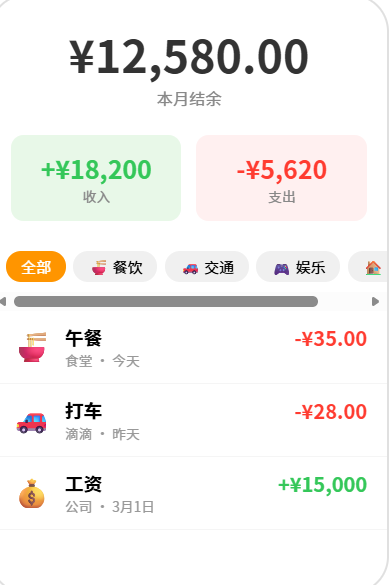
📊 预算管理建议
| 消费类别 | 建议占比 | 月薪 8K 预算 | 月薪 15K 预算 |
|---|---|---|---|
| 🍚 餐饮 | 25~30% | 2,000~2,400 | 3,750~4,500 |
| 🏠 居住 | 25~30% | 2,000~2,400 | 3,750~4,500 |
| 🚌 交通 | 8~12% | 640~960 | 1,200~1,800 |
| 🛒 购物 | 10~15% | 800~1,200 | 1,500~2,250 |
| 🎮 娱乐 | 5~10% | 400~800 | 750~1,500 |
⚠️ 避坑指南
| 坑 | 原因 | 正确做法 |
|---|---|---|
| 统计数字不对 | 当月和跨月数据混在一起 | 用 LIKE 'YYYY-MM%' 过滤月份 |
| 饼图标签重叠 | 小分类角度太小 | 合并 ❤️% 的分类为"其他" |
| 金额精度问题 | 浮点数相加误差 | 用整数存储(分),展示时除以 100 |
| 月份切换后数据不刷新 | 忘了重新 load | 每次 changeMonth 后调 loadMonthData |
| 删除后总金额不变 | 删了记录没重新计算 | 每次增删后重新汇总统计数据 |
🔥 最佳实践
- 首次引导:新用户添加第一笔账单时弹出分类引导
- 预算预警:支出超过预算 80% 时推送通知提醒
- 周期账单:支持每月自动重复的固定账单(房租/话费)
- 数据导出:支持 CSV 导出,方便在 Excel 中分析
- 多币种:支持设置默认币种并自动换算
- 云备份:通过分布式数据库在设备间同步账单数据
官方文档: HarmonyOS 应用开发文档
- 开发者社区: 华为开发者论坛
- 欢迎加入开源鸿蒙跨平台社区: https://openharmonycrossplatform.csdn.net/

讨论HarmonyOS开发技术,专注于API与组件、DevEco Studio、测试、元服务和应用上架分发等。
更多推荐

 5
5 0
0- 0


 已为社区贡献40条内容

所有评论(0)