【共创季稿事节】 HarmonyOS7 互动卡片开发实践:运动状态为什么要放到应用侧统一更新
金牌创作者
·
文章目录
前言
上一篇讲了状态机,这一篇讲状态到底由谁来改。
答案很明确:不要让普通卡片自己改最终状态。普通卡片只发动作,应用侧统一改状态,再刷新所有相关卡片。
效果图
运动卡片的状态变化要稳定,关键就是让应用侧统一处理开始、结束、重置这些动作。

先看完整链路

运动卡片点击按钮
  -> ActionUtils 发 EXERCISE_ACTION
  -> CardActionHandler 接收动作
  -> FormUtils 更新运动状态
  -> ExerciseFileStore 保存状态
  -> updateForm 刷新所有 ExerciseCard
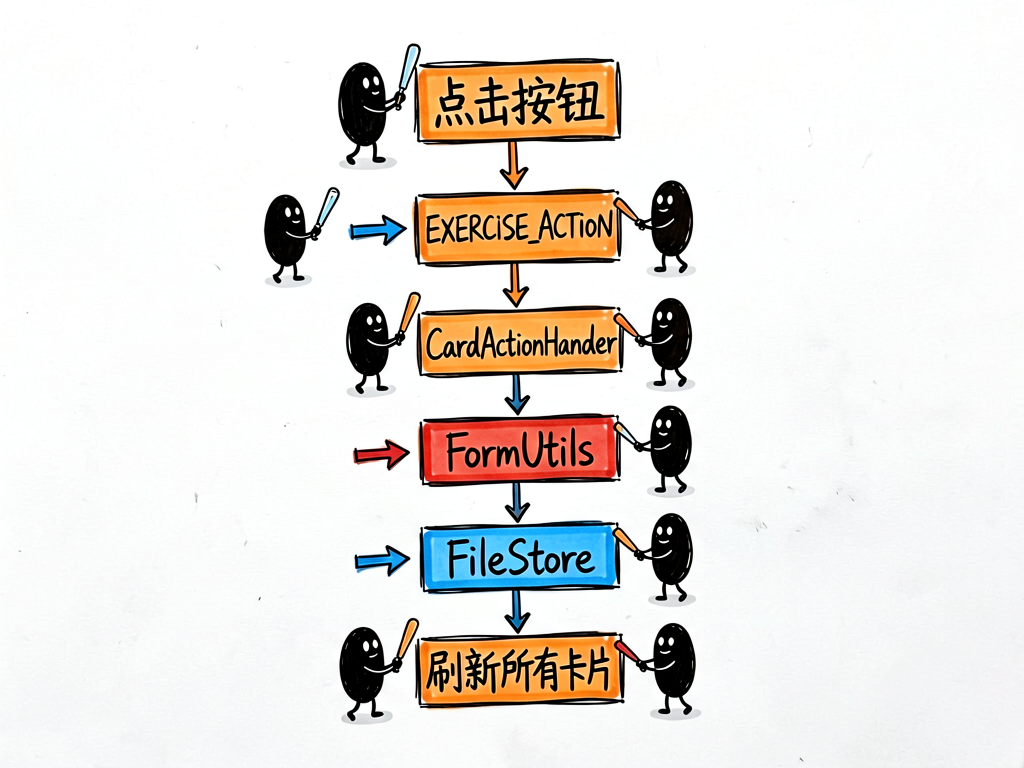
这个流程看起来多,但每一步职责很清楚。
卡片侧只发动作
假设用户点击“开始运动”,卡片侧应该发:
ActionUtils.exerciseAction(this, ExerciseAction.START_EXERCISE, this.formId);
不要直接写:
this.currentState = ExerciseState.IN_PROGRESS;
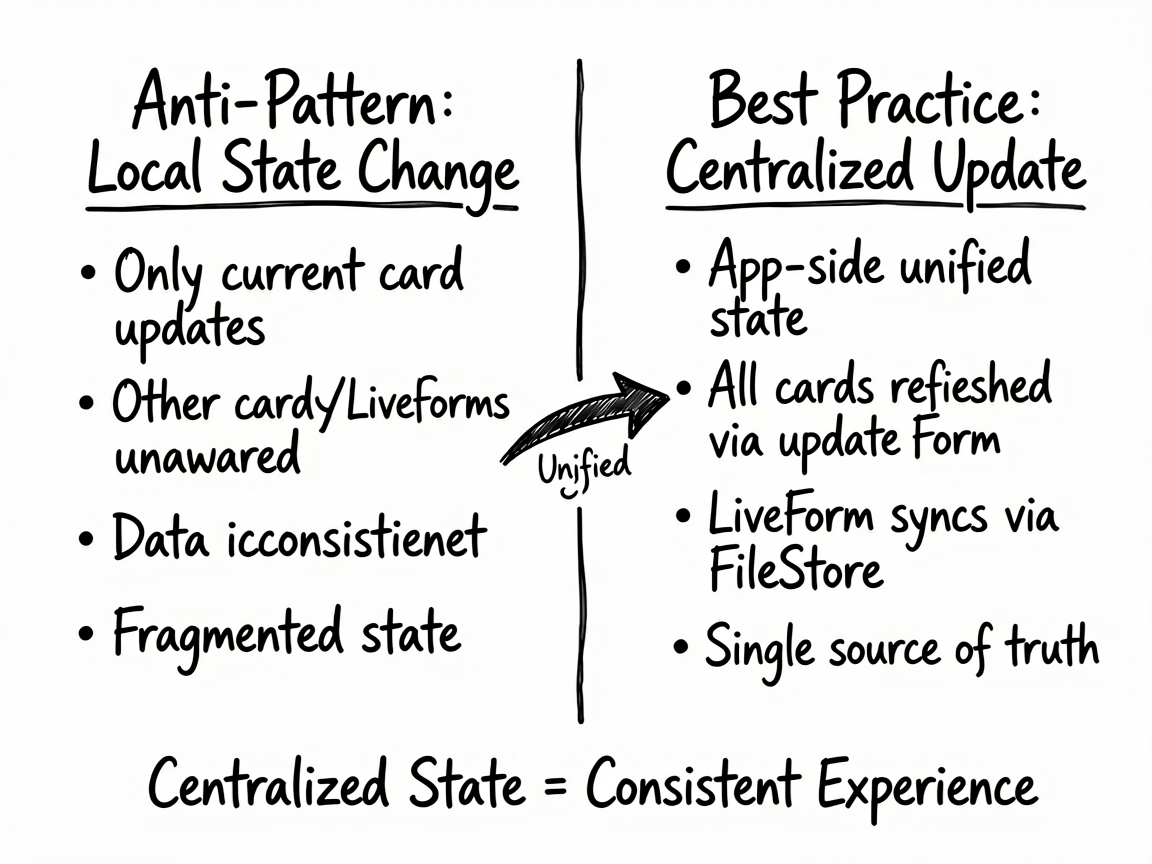
因为这样只改了当前卡片组件,其他卡片、LiveForm、应用页面都不知道。
Handler 接收动作
CardActionHandler.ets 里:
private handleExerciseAction(params: Record<string, string>): void {
  if (params.exerciseAction && this.context) {
    switch (params.exerciseAction) {
      case ExerciseAction.START_EXERCISE:
        FormUtils.updateExerciseCardState(this.context, ExerciseState.IN_PROGRESS);
        break;
      case ExerciseAction.END_EXERCISE:
        FormUtils.updateExerciseCardState(this.context, ExerciseState.COMPLETED);
        break;
      case ExerciseAction.RESET_EXERCISE:
        FormUtils.resetExerciseCard(this.context);
        break;
    }
  }
}
这段代码是运动状态的总入口。
FormUtils 更新状态
FormUtils.ets 里:
async updateExerciseCardState(context: Context, state: number): Promise<void> {
  ExerciseFileStore.writeExerciseState(context, state);

  let formList: FormInfo[] = await FormRdbHelper.getInstance(context).queryFormByName('ExerciseCard');
  formList.forEach((formInfo) => {
    class ExerciseUpdateData {
      public currentState: number = state;
      public calories: number = 0;
    }
    this.updateForm(formInfo.formId, new ExerciseUpdateData());
  });
}
这段做了两件事。
第一,把状态写进 ExerciseFileStore。
第二,查出所有 ExerciseCard,逐个调用 updateForm() 刷新。
为什么要写 ExerciseFileStore
LiveForm 创建时,也需要知道当前运动状态。
如果状态只存在普通卡片里,LiveForm 打开后读不到。所以项目把状态写入文件:
ExerciseFileStore.writeExerciseState(context, state);
这样普通卡片、LiveForm、应用侧都能围绕同一个状态工作。
为什么要查询所有 ExerciseCard
用户可能在桌面放了多张运动卡片。
只刷新当前 formId 会导致其他运动卡片还停留在旧状态。
项目用:
queryFormByName('ExerciseCard')
拿到所有运动卡片实例,再批量刷新。
reset 是怎么做的
async resetExerciseCard(context: Context): Promise<void> {
  await this.updateExerciseCardState(context, ExerciseState.NOT_STARTED);
}
重置其实就是把状态改回 NOT_STARTED。
这种复用很干净,不需要再写一套刷新逻辑。
小白练习:加卡路里字段
项目里已经预留:
public calories: number = 0;
如果你要真的更新卡路里,可以把方法改成:
async updateExerciseCardState(context: Context, state: number, calories: number): Promise<void> {
  let formList = await FormRdbHelper.getInstance(context).queryFormByName('ExerciseCard');
  formList.forEach((formInfo) => {
    class ExerciseUpdateData {
      public currentState: number = state;
      public calories: number = calories;
    }
    this.updateForm(formInfo.formId, new ExerciseUpdateData());
  });
}
然后卡片侧用:
@LocalStorageProp('calories') calories: number = 0;
字段名要一致。
常见坑
- 卡片里直接改
currentState,导致刷新不统一。 - 状态没写文件,LiveForm 打开后读不到。
- 只更新一张卡,多张运动卡不同步。
currentState字段名和@LocalStorageProp不一致。
写在最后
运动卡片的状态管理思路很适合其他业务复用。
小白记住:卡片发动作,应用改状态,工具类批量刷新。

讨论HarmonyOS开发技术,专注于API与组件、DevEco Studio、测试、元服务和应用上架分发等。
更多推荐



 50
50 0
0- 0


 已为社区贡献246条内容

所有评论(0)