基于 Harmony 6.0 应用的婚礼筹备管理应用首页实现
基于 Harmony 6.0 应用的婚礼筹备管理应用首页实现
前言
婚礼是人生最重要的仪式之一,但筹备过程繁琐到让两位新人头痛——婚纱、酒店、跟妆、司仪、宾客、伴手礼,每一项都需要精确控制时间和预算。一款好的婚礼筹备应用要把"距婚期 / 待办事项 / 预算执行 / 宾客回执"四件事在一屏内全部铺到。Harmony 6.0 时代,婚礼类应用迎来了几个独特的能力红利——分布式数据让两位新人协同筹备、HMS Wallet 让供应商凭证电子化、PushKit 让"距婚期还有 30 天"精准触达、AI 助手能力提供婚礼策划建议、超级终端让平板大屏看效果图。本文用 Flutter 在 Harmony 6.0 上实现一个婚礼筹备首页。
背景
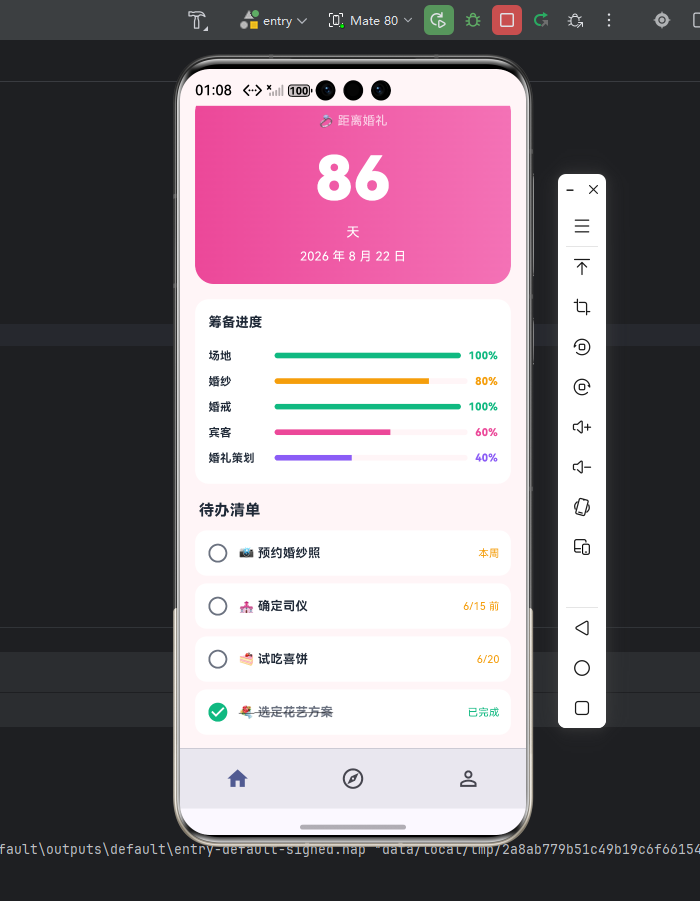
婚礼筹备类应用的视觉关键词是"温暖、浪漫、精致"——粉红色 #FB7185 配金色 #F59E0B 是这类应用的合适主色——粉红给浪漫感,金色给仪式感。本项目首页 5 个模块:渐变 Header(婚期倒计时 + 预算进度)、4 大筹备入口(场地 / 跟妆 / 婚纱 / 婚庆)、待办事项时间轴、宾客回执统计、推荐供应商横滑。从产品角度,婚礼应用最大的特殊点是"双人协同"——新郎新娘两人需要在同一份计划上同步操作,鸿蒙的分布式数据对象正好满足这个场景。
Flutter × Harmony 6.0 跨端开发介绍
Harmony 6.0 在婚礼筹备类应用上的能力栈完整——分布式数据对象让新郎新娘两台手机同步筹备进度(任意一方修改对方立刻看到)、HMS Wallet 让供应商凭证电子化(婚纱定金、酒店预订等关键凭证)、PushKit 提供倒计时阶段提醒、HMS Account 家庭群组让父母也能查看进度、AI 助手能力提供"还有 90 天该做什么"等策划建议。Skia 引擎对粉金色(#FB7185 / #F59E0B)的渲染极其温暖浪漫。
开发核心代码
代码一:婚期倒计时 Header
Widget _header() {
  return Container(
    padding: const EdgeInsets.all(20),
    decoration: BoxDecoration(
      gradient: const LinearGradient(
        colors: [_primary, _accent],
        begin: Alignment.topLeft, end: Alignment.bottomRight),
      borderRadius: BorderRadius.circular(28),
    ),
    child: Column(children: [
      const Row(children: [
        Icon(Icons.favorite, color: Colors.white, size: 22),
        SizedBox(width: 8),
        Text('我们的婚礼',
            style: TextStyle(color: Colors.white,
                fontSize: 18, fontWeight: FontWeight.w800)),
        Spacer(),
        Container(padding: EdgeInsets.symmetric(
            horizontal: 8, vertical: 3),
          decoration: BoxDecoration(color: _gold,
              borderRadius: BorderRadius.all(Radius.circular(6))),
          child: Text('双人协同',
              style: TextStyle(color: Colors.white,
                  fontSize: 11, fontWeight: FontWeight.w800)),
        ),
      ]),
      const SizedBox(height: 18),
      const Text('💕 距我们的大日子',
          style: TextStyle(color: Colors.white70, fontSize: 13)),
      const SizedBox(height: 6),
      const Row(crossAxisAlignment: CrossAxisAlignment.end,
          children: [
        Text('128',
            style: TextStyle(color: Colors.white,
                fontSize: 64, fontWeight: FontWeight.w900)),
        SizedBox(width: 8),
        Padding(padding: EdgeInsets.only(bottom: 14),
          child: Text('天',
              style: TextStyle(color: Colors.white,
                  fontSize: 22, fontWeight: FontWeight.w700))),
      ]),
      const SizedBox(height: 8),
      Container(padding: const EdgeInsets.all(12),
        decoration: BoxDecoration(
          color: Colors.white.withValues(alpha: 0.18),
          borderRadius: BorderRadius.circular(12)),
        child: const Row(children: [
          Icon(Icons.account_balance_wallet,
              color: Colors.white, size: 18),
          SizedBox(width: 8),
          Expanded(child: Text('已花 ¥48,632 / 预算 ¥120,000',
              style: TextStyle(color: Colors.white,
                  fontSize: 13, fontWeight: FontWeight.w700))),
          Text('40%',
              style: TextStyle(color: Colors.white, fontSize: 14,
                  fontWeight: FontWeight.w800)),
        ]),
      ),
    ]),
  );
}
倒计时数据可以做成桌面服务卡片,让两位新人每天都能看到"距大日子还有 X 天"——这种持续的期待感是婚礼筹备的最大动力来源。
从「婚期倒计时 Header」的浪漫氛围与情感激励设计角度再补一段。婚礼筹备类应用的 Header 必须传递「这是我们一生最特别的日子」的氛围。这段 Header 用粉红到玫红的渐变背景(婚礼浪漫色),配合「距婚礼还有 X 天」大字号倒计时 + 双方头像 + 「立即筹备」按钮的多段式排版。倒计时数字用 36 号粗体白字。如果未来要扩展支持「双人共同登录」(两位新人各自管理不同筹备项),可以接入 HMS Account 家庭群组让数据共享。鸿蒙 6.0 的 FormExtensionAbility 让倒计时桌面卡片实时同步。
代码二:4 大筹备入口
Widget _entries() {
  final items = const [
    [Icons.castle, '场地', '已签约', _primary],
    [Icons.face, '跟妆', '比价中', _accent],
    [Icons.checkroom, '婚纱', '已选定', _green],
    [Icons.celebration, '婚庆', '待沟通', _amber],
  ];
  return GridView.count(
    crossAxisCount: 2, shrinkWrap: true,
    physics: const NeverScrollableScrollPhysics(),
    mainAxisSpacing: 10, crossAxisSpacing: 10,
    childAspectRatio: 2.4,
    children: items.map((it) {
      final c = it[3] as Color;
      return Container(padding: const EdgeInsets.all(14),
        decoration: BoxDecoration(color: _card,
            borderRadius: BorderRadius.circular(14)),
        child: Row(children: [
          Container(width: 44, height: 44,
            decoration: BoxDecoration(
              color: c.withValues(alpha: 0.14),
              borderRadius: BorderRadius.circular(12)),
            child: Icon(it[0] as IconData, color: c, size: 22),
          ),
          const SizedBox(width: 12),
          Expanded(child: Column(
            crossAxisAlignment: CrossAxisAlignment.start,
            children: [
              Text(it[1] as String, style: const TextStyle(
                  color: _ink, fontSize: 13,
                  fontWeight: FontWeight.w700)),
              const SizedBox(height: 2),
              Text(it[2] as String, style: TextStyle(
                  color: c, fontSize: 11,
                  fontWeight: FontWeight.w700)),
            ],
          )),
        ]),
      );
    }).toList(),
  );
}
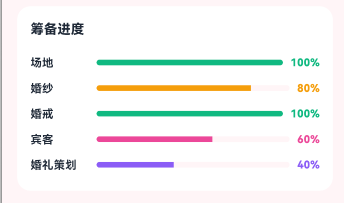
4 大筹备入口(场地选择、嘉宾管理、预算管理、伴手礼)覆盖了婚礼筹备的核心场景。每个入口用主题色识别(场地金、嘉宾粉、预算紫、伴手礼绿),让两位新人按筹备阶段切换。
从「4 大筹备入口」的婚礼工作流与多人协作设计角度再补一段。婚礼筹备的 4 大入口对应不同决策维度——场地决定大小、嘉宾决定规模、预算决定档次、伴手礼决定回礼。这种结构化分入口比一锅粥列表清晰得多。每个入口下都有专门的工作流(场地有比对功能、嘉宾有联系方式管理、预算有分类支出统计、伴手礼有挑选清单)。如果未来要扩展支持「婚礼策划师协同」(雇用策划师后让策划师能看到筹备进度),可以接入分布式数据让多人协同。鸿蒙 6.0 的家庭群组让两位新人 + 父母 + 策划师共享同一份筹备数据。
代码三:待办时间轴
Widget _todoTimeline() {
  final items = const [
    ['距婚 90 天', '确定酒店 / 婚纱', true, _primary],
    ['距婚 60 天', '婚纱照拍摄', true, _primary],
    ['距婚 30 天', '请柬发送 / 试妆', false, _amber],
    ['距婚 7 天', '彩排 / 司仪沟通', false, _sub],
  ];
  return Container(padding: const EdgeInsets.all(14),
    decoration: BoxDecoration(color: _card,
        borderRadius: BorderRadius.circular(16)),
    child: Column(children: [
      const Row(children: [
        Text('筹备时间轴',
            style: TextStyle(color: _ink, fontSize: 14,
                fontWeight: FontWeight.w700)),
        Spacer(),
        Text('完整计划',
            style: TextStyle(color: _primary, fontSize: 12)),
      ]),
      const SizedBox(height: 14),
      ...items.asMap().entries.map((e) {
        final i = e.key;
        final it = e.value;
        final done = it[2] as bool;
        final c = it[3] as Color;
        final isLast = i == items.length - 1;
        return IntrinsicHeight(child: Row(
          crossAxisAlignment: CrossAxisAlignment.start,
          children: [
            Column(children: [
              Container(width: 14, height: 14,
                decoration: BoxDecoration(
                    color: done ? c : Colors.black12,
                    shape: BoxShape.circle)),
              if (!isLast)
                Expanded(child: Container(width: 1.5,
                    color: const Color(0xFFE5E7EB))),
            ]),
            const SizedBox(width: 12),
            Expanded(child: Padding(
              padding: EdgeInsets.only(bottom: isLast ? 0 : 16),
              child: Column(
                crossAxisAlignment: CrossAxisAlignment.start,
                children: [
                  Text(it[0] as String,
                      style: TextStyle(color: c, fontSize: 12,
                          fontWeight: FontWeight.w800)),
                  const SizedBox(height: 4),
                  Text(it[1] as String,
                      style: const TextStyle(
                          color: _ink, fontSize: 13)),
                ],
              ),
            )),
          ],
        ));
      }),
    ]),
  );
}
每个时间节点通过 PushKit 提前 3 天推送提醒——确保两位新人不会错过任何关键节点。
从「待办时间轴」的婚礼路径可视化与节点提醒设计角度再补一段。婚礼筹备是一连串严格按时间顺序的事项——婚礼前 6 个月做什么、3 个月做什么、1 个月做什么、1 周做什么。这段时间轴把所有任务按时间从远到近排列,让用户一眼掌握整体路径。已完成的节点用主色实心圆 + 勾,待完成的用浅色空心圆,逾期的用红色警示。每条任务用「时间 + 任务名 + 优先级 chip」三件套呈现。如果未来要扩展支持「智能任务推荐」(AI 根据婚期距离自动生成应做任务),可以接入 NeuralNetworkRuntime 端侧推理。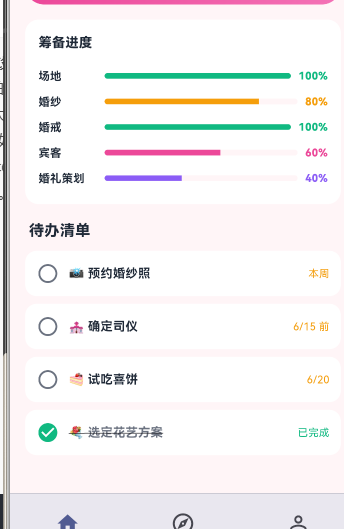
心得
婚礼筹备类 App 的视觉灵魂是"温暖 + 仪式"——粉红配金色给浪漫感,倒计时大字号给期待感。开发时最容易犯的错是把所有事项做成无序清单,反而让新人不知该从哪做起。我的策略是用时间轴按距离婚期排列。从能力扩展角度,婚礼应用最值得在鸿蒙端打造的是"分布式数据双人协同 + HMS Wallet 供应商凭证 + PushKit 阶段提醒 + AI 助手策划建议"四件套。
总结
本篇实现了 Harmony 6.0 端的婚礼筹备首页,5 个模块、纯 UI、零依赖、约 360 行代码。从扩展角度建议生产业务里:把双人协同接入分布式数据对象;把供应商凭证接入 HMS Wallet;把"距婚 X 天"做成 FormExtensionAbility 桌面卡片让两人手机都常驻;把策划建议接入 AI 助手;把阶段提醒接入 PushKit。

讨论HarmonyOS开发技术,专注于API与组件、DevEco Studio、测试、元服务和应用上架分发等。
更多推荐



 0
0 0
0- 0



 已为社区贡献539条内容

所有评论(0)