鸿蒙6.0应用开发——阅读app仿真翻页实现
鸿蒙6.0应用开发——阅读app仿真翻页实现
场景描述
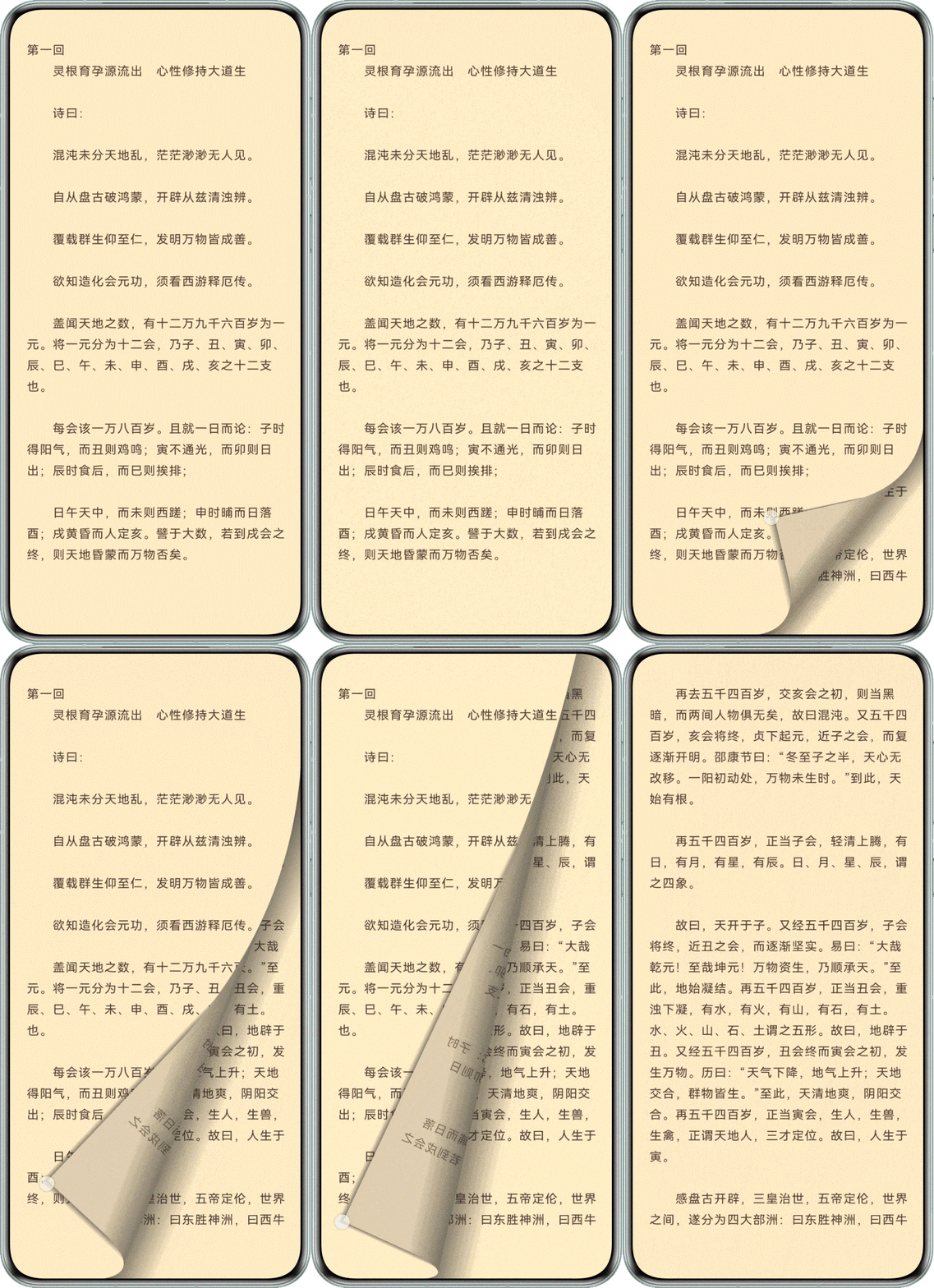
仿真翻页效果模拟真实纸质书的翻页体验。用户拖动页面的角落(右上角或右下角),被拖动的页面会随着手指的移动而卷曲、折叠。在翻动过程中,可以看到当前页的背面(为当前页的翻转显示效果)以及被翻页覆盖的下一页内容逐渐显露出来。翻页轨迹遵循贝塞尔曲线,并伴有阴影效果增强立体感。翻页效果如下:
实现原理
仿真翻页基于覆盖翻页的页面布局,使用系统接口对当前页或上一页进行截图保存为pixelMap,传递至ArkGraphics 2D的@ohos.graphics.drawing (绘制模块)的相关绘制接口实现了当前页、背页、阴影等区域的绘制。页面绘制通过滑动手势事件PanGesture触发,获取手指在屏幕上的位置,通过该位置信息计算仿真翻页曲线所依赖的相关点位。手势结束时使用定时器模拟滑动触摸的点位并触发页面绘制,判断结束条件终止绘制。
仿真翻页绘制实现关键点
-
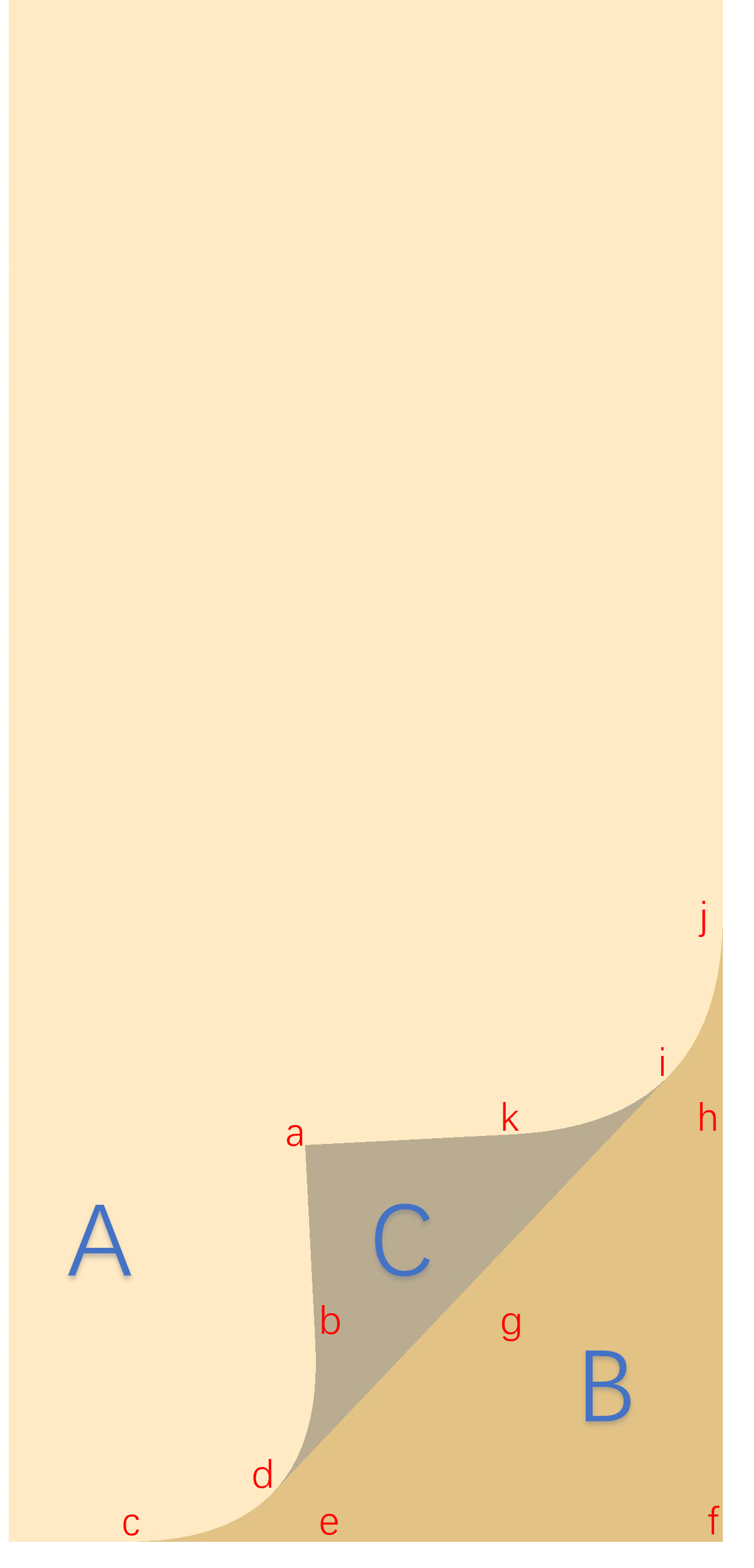
仿真翻页控制点。仿真翻页可以看作下图三个区域组合而成。要绘制出其中曲线及直线,需要计算出一组特定的坐标点(参考下图),计算公式详见开发步骤。
-
曲线绘制。为使用上述坐标点绘制出曲线,需要使用@ohos.graphics.drawing (绘制模块)的相关接口实现,如Path.lineTo()连接线段;Path.quadTo()实现二阶贝塞尔曲线;Canvas.clipPath()实现对画布裁剪等。
-
内容绘制。仿真翻页绘制的内容来源于使用@ohos.arkui.componentSnapshot (组件截图)的componentSnapshot.getSync()接口获取的组件截图pixelMap,然后使用@ohos.graphics.drawing (绘制模块)的Canvas.drawPixelMapMesh()实现绘制。
-
阴影效果渲染。主要使用了@ohos.graphics.drawing (绘制模块)的ShaderEffect着色器实现。通过为画刷设置着色器效果,并设置相关参数,完成了渐变阴影的绘制。
开发步骤
-
仿真翻页页面布局
仿真翻页页面布局同覆盖翻页大体相同,屏幕区域保留当前页和下一页层叠,上一页向左移出屏幕。不同的是增加NodeContainer组件,在滑动手势事件触发时显示,用于绘制仿真翻页效果,翻页效果结束时隐藏。
// entry/src/main/ets/view/EmulationFlipPage.ets Stack() { // Page area is the same as overlay page cover. ReaderPage({ content: this.rightPageContent }) ReaderPage({ content: this.midPageContent }) .translate({ x: this.offsetX >= Constants.PAGE_FLIP_ZERO ? Constants.PAGE_FLIP_ZERO : this.offsetX }) .id('middlePage')// Mark the component ID and use it as a screenshot. // ... ReaderPage({ content: this.leftPageContent }) .translate({ x: -this.screenW + this.offsetX }) .id('leftPage') // Mark the component ID and use it as a screenshot. // Display when flipping pages, drawing the current or previous page. NodeContainer(this.myNodeController) .width(this.getUIContext().px2vp(this.windowWidth)) .height(this.getUIContext().px2vp(this.windowHeight)) .visibility(this.isNodeShow ? Visibility.Visible : Visibility.None) } -
滑动手势事件
-
滑动手势事件触发时,记录首个点的横纵坐标,作为手势的起始位置,横坐标用于判断手势结束时页面的滑动方向,纵坐标用于判断手势的起始位置,上部、中部或下部,绘制仿真翻页时区分仿真翻页的类型。
// entry/src/main/ets/view/EmulationFlipPage.ets build() { // ... Stack() { // ... } .gesture( PanGesture({ fingers: 1 }) .onActionUpdate((event: GestureEvent) => { // ... if (this.panPositionX === 0) { this.initPanPositionX(tmpFingerInfo); return; } // ... }) // ... ) // ... } // ... private initPanPositionX(tmpFingerInfo: FingerInfo): void { this.panPositionX = tmpFingerInfo.localX; let panPositionY = this.getUIContext().vp2px(tmpFingerInfo.localY); // Obtain the position of the first touch point and determine the starting area for sliding. if (panPositionY < (this.windowHeight / 3)) { this.drawPosition = DrawPosition.DP_TOP; } else if (panPositionY > (this.windowHeight * 2 / 3)) { this.drawPosition = DrawPosition.DP_BOTTOM; } else { this.drawPosition = DrawPosition.DP_MIDDLE; } } -
在onActionUpdate回调中,当检测到第二个触摸点坐标时,与首个点横坐标进行比较。横坐标大于首个点,手势向右,截图上一页,用于绘制上一页的仿真翻页显示在屏幕中覆盖当前页;横坐标小于首个点,手势向左,截图当前页,用于绘制当前页仿真翻页效果露出下一页, 并隐藏当前页。设置NodeContainer组件为显示状态。
// entry/src/main/ets/view/EmulationFlipPage.ets build() { // ... Stack() { // ... } .gesture( PanGesture({ fingers: 1 }) .onActionUpdate((event: GestureEvent) => { // ... // Perform a check before starting to draw. if (!this.isDrawing) { // ... this.firstDrawingInit(tmpFingerInfo); } // ... }) // ... ) // ... } // ... private firstDrawingInit(tmpFingerInfo: FingerInfo): void { // The initial sliding direction of the page is used to determine whether to continue or cancel flipping forward or backward. if (this.panPositionX < tmpFingerInfo.localX) { // When flipping forward, take a screenshot of the previous page, and the flipping type is middle flipping. this.pageMoveForward = MoveForward.MF_FORWARD; this.snapPageId = 'leftPage'; this.drawPosition = DrawPosition.DP_MIDDLE } else { // When flipping back, take a screenshot of the current page and hide it. this.pageMoveForward = MoveForward.MF_BACKWARD; this.snapPageId = 'middlePage'; this.isMiddlePageHide = true; } // Take a screenshot after confirming the sliding direction of the page. if (this.pagePixelMap) { this.pagePixelMap.release(); } try { this.pagePixelMap = this.getUIContext().getComponentSnapshot().getSync(this.snapPageId); } catch (error) { hilog.error(0x0000, 'EmulationFlip', `getComponentSnapshot().getSync failed. Cause: ${JSON.stringify(error)}`) } this.isDrawing = true; this.isNodeShow = true; } -
准备绘制需要的坐标数据,横纵坐标转换为px单位,用于仿真翻页绘制,使用AppStorage保存。比较当前横坐标与上一次的横坐标,判断当前手势的方向,用于手势释放判断页面自动翻页的方向。记录当前横坐标。调用newRectNode()方法更新NodeContainer组件。
// entry/src/main/ets/view/EmulationFlipPage.ets
build() {
  // ...
  Stack() {
    // ...
  }
  .gesture(
    PanGesture({ fingers: 1 })
      .onActionUpdate((event: GestureEvent) => {
        // ...
        // Execute drawing.
        this.drawing(tmpFingerInfo);
      })
      // ...
  )
  // ...
}
// ...
private drawing(tmpFingerInfo: FingerInfo): void {
  // Determine the latest sliding direction of the gesture, and after releasing the gesture,
  // combine it with the sliding direction of the page to determine whether to flip or cancel.
  if (this.panPositionX < tmpFingerInfo.localX) {
    this.gestureMoveForward = MoveForward.MF_FORWARD;
    this.panPositionX = tmpFingerInfo.localX;
  } else {
    this.gestureMoveForward = MoveForward.MF_BACKWARD;
    this.panPositionX = tmpFingerInfo.localX;
  }
  AppStorage.setOrCreate('drawState', DrawState.DS_MOVING);

  // Convert to px units.
  this.positionX = this.getUIContext().vp2px(tmpFingerInfo.localX);
  this.positionY = this.getUIContext().vp2px(tmpFingerInfo.localY);
  AppStorage.setOrCreate('positionX', this.positionX);
  AppStorage.setOrCreate('positionY', this.positionY);

  // Execute drawing.
  this.newRectNode();
}
-
-
仿真页面绘制
-
NodeContainer组件控制器清空所有节点,新增渲染节点,渲染节点用于仿真翻页的绘制。
// entry/src/main/ets/view/EmulationFlipPage.ets newRectNode() { // Creates a RectRenderNode object. const rectNode = new RectRenderNode(); // ... this.myNodeController.clearNodes(); this.myNodeController.addNode(rectNode); } -
在RenderNode进行绘制时,draw()方法会被调用。首先执行初始化init()方法。通过AppStorage获取触摸点的横纵坐标,并判断手势起始位置,计算仿真翻页需要的坐标点以及绘制阴影时需要的相关数值。通过手势触摸点计算页角点A,限制A点纵坐标的范围,从而限制书页的翻起程度。保存点A的纵坐标。各点的计算方法见代码。计算结束后判断当前区域是否还在屏幕区域内,保存判断结果。
// entry/src/main/ets/viewmodel/PageNodeController.ets export class RectRenderNode extends RenderNode { // ... draw(context: DrawContext): void { const canvas = context.canvas; // Initialize data. init(); // ... } } // ... /** * Initialize data. */ function init(): void { // ... // Obtain touch points. let x: number = AppStorage.get('positionX') as number; let y: number = AppStorage.get('positionY') as number; let viewWidth: number = AppStorage.get('windowWidth') as number; let viewHeight: number = AppStorage.get('windowHeight') as number; pointA = new MyPoint(x, y); // ... let touchPoint = new MyPoint(x, y); let drawState: number = AppStorage.get('drawState') as number; let drawStartPosition: number = AppStorage.get('drawPosition') as number; // Determine the area where sliding begins. if (DrawPosition.DP_TOP === drawStartPosition) { // The touch point is at the top. pointF = new MyPoint(viewWidth, 0); if (drawState !== DrawState.DS_RELEASE) { calcPointAByTouchPoint(touchPoint); } } else if (DrawPosition.DP_BOTTOM === drawStartPosition) { // The touch point is below. pointF = new MyPoint(viewWidth, viewHeight); if (drawState !== DrawState.DS_RELEASE) { calcPointAByTouchPoint(touchPoint); } } else { // The touch point is in the middle. pointA.y = viewHeight - 1; pointF.x = viewWidth; pointF.y = viewHeight; } // Saves the y-coordinate of point A. AppStorage.setOrCreate<number>('flipPositionY', pointA.y); // Calculate all path points. calcPointsXY(); } /** * Calculate the y-coordinate of point A based on the touch point. * @param touchPoint Touch point. */ function calcPointAByTouchPoint(touchPoint: MyPoint): void { let viewWidth: number = AppStorage.get('windowWidth') as number; let viewHeight: number = AppStorage.get('windowHeight') as number; let r = Constants.SIXTY_PERCENT * viewWidth; pointA.x = touchPoint.x; // Reset the y value and restrict the region where the y value is located. if (pointF.y === viewHeight) { let tmpY = viewHeight - Math.abs(Math.sqrt(Math.pow(r, 2) - Math.pow(touchPoint.x - (viewWidth - r), 2))) pointA.y = touchPoint.y >= tmpY ? touchPoint.y : tmpY; } else { let tmpY = Math.abs(Math.sqrt(Math.pow(r, 2) - Math.pow(touchPoint.x - (viewWidth - r), 2))) pointA.y = touchPoint.y >= tmpY ? tmpY : touchPoint.y; } } /** * Calculate the coordinates of each path point. */ function calcPointsXY(): void { pointG.x = (pointA.x + pointF.x) / 2; pointG.y = (pointA.y + pointF.y) / 2; pointE.x = pointG.x - (pointF.y - pointG.y) * (pointF.y - pointG.y) / (pointF.x - pointG.x); pointE.y = pointF.y; pointH.x = pointF.x; pointH.y = pointG.y - (pointF.x - pointG.x) * (pointF.x - pointG.x) / (pointF.y - pointG.y); pointC.x = pointE.x - (pointF.x - pointE.x) / 2; pointC.y = pointF.y; pointJ.x = pointF.x; pointJ.y = pointH.y - (pointF.y - pointH.y) / 2; pointB = getIntersectionPoint(pointA, pointE, pointC, pointJ); pointK = getIntersectionPoint(pointA, pointH, pointC, pointJ); pointD.x = (pointC.x + 2 * pointE.x + pointB.x) / 4; pointD.y = (2 * pointE.y + pointC.y + pointB.y) / 4; pointI.x = (pointJ.x + 2 * pointH.x + pointK.x) / 4; pointI.y = (2 * pointH.y + pointJ.y + pointK.y) / 4; //Calculate the distance from point d to line ae and use it to draw shadows. let lA: number = pointA.y - pointE.y; let lB: number = pointE.x - pointA.x; let lC: number = pointA.x * pointE.y - pointE.x * pointA.y; lPathAShadowDis = Math.abs((lA * pointD.x + lB * pointD.y + lC) / Math.hypot(lA, lB)); // Calculate the distance from point i to ah and use it to draw shadows. let rA: number = pointA.y - pointH.y; let rB: number = pointH.x - pointA.x; let rC: number = pointA.x * pointH.y - pointH.x * pointA.y; rPathAShadowDis = Math.abs((rA * pointI.x + rB * pointI.y + rC) / Math.hypot(rA, rB)); // Check if the drawing area is still in the window. If it is not in the window, the drawing ends. if (!checkDrawingAreaInWindow()) { AppStorage.setOrCreate('isFinished', true); } } -
绘制下一页上的阴影。使用上一步计算的相关数值,配置绘制阴影所需的着色器shaderEffect,使用canvas及画刷绘制阴影。
// entry/src/main/ets/viewmodel/PageNodeController.ets export class RectRenderNode extends RenderNode { // ... draw(context: DrawContext): void { const canvas = context.canvas; // ... // Draw the shadow shown on the next page. drawPathBShadow(canvas); // ... } } // ... /** * Draw the shadow shown on the next page. * * @param canvas canvas */ function drawPathBShadow(canvas: drawing.Canvas) { canvas.save() // Gradient color array. let deepColor: number = 0xff111111; let lightColor: number = 0x00111111; let gradientColors: number[] = [deepColor, lightColor]; let viewWidth: number = AppStorage.get('windowWidth') as number; let viewHeight: number = AppStorage.get('windowHeight') as number; // The distance from A to F. let aToF = Math.hypot((pointA.x - pointF.x), (pointA.y - pointF.y)); // The distance from A to F. let viewDiagonalLength = Math.hypot(viewWidth, viewHeight); let left: number = 0; let right: number = 0; let top: number = pointC.y; let bottom: number = viewDiagonalLength + pointC.y; if (pointF.x === viewWidth && pointF.y === 0) { // The F point is located in the upper right corner. left = pointC.x; right = pointC.x + aToF / 4; } else { left = pointC.x - aToF / 4; right = pointC.x; } // Calculate the rotation angle between two points (calculated in radians and converted into angles). let deltaX: number = pointH.y - pointF.y; let deltaY: number = pointE.x - pointF.x; let radians: number = Math.atan2(deltaY, deltaX); // Convert radians to angles. let rotateDegrees: number = radians * 180 / Math.PI; let startPt: common2D.Point = { x: pointF.y === 0 ? right : left, y: top }; let endPt: common2D.Point = { x: pointF.y === 0 ? left : right, y: top }; let shaderEffect = drawing.ShaderEffect.createLinearGradient(endPt, startPt, gradientColors, drawing.TileMode.MIRROR); // Perform rotation. canvas.rotate(rotateDegrees, pointC.x, pointC.y); // Draw shadows. let rect: common2D.Rect = { left: left, top: top, right: right, bottom: bottom }; drawShadow(canvas, shaderEffect, rect); } // ... /** * Draw shaded areas. * * @param canvas canvas * @param shaderEffect shader effect * @param rect rect */ function drawShadow(canvas: drawing.Canvas, shaderEffect: drawing.ShaderEffect, rect: common2D.Rect) { let tmpBrush = new drawing.Brush(); tmpBrush.setShaderEffect(shaderEffect); canvas.attachBrush(tmpBrush); canvas.drawRect(rect.left, rect.top, rect.right, rect.bottom); canvas.detachBrush(); canvas.restore(); } -
绘制仿真翻页背面内容及阴影。首先根据计算出的绘制曲线依赖的点,规划出背面区域pathC ,使用clipPath()方法裁剪出该区域。为绘制区域设置旋转矩阵,实现将截图获取的页面pixelMap,旋转并翻转成需要的背页效果。最后绘制背页区域的阴影,此处阴影计算的算法同上一步。
// entry/src/main/ets/viewmodel/PageNodeController.ets export class RectRenderNode extends RenderNode { // ... draw(context: DrawContext): void { const canvas = context.canvas; // ... // Draw the back area for flipping pages. drawPathC(canvas); // ... } } // ... /** * Draw the back area for flipping pages. * * @param canvas canvas */ function drawPathC(canvas: drawing.Canvas): void { if (canIUse('SystemCapability.Graphics.Drawing')) { canvas.attachBrush(pathABrush); pathC.reset(); pathC.moveTo(pointI.x, pointI.y); pathC.lineTo(pointD.x, pointD.y); pathC.lineTo(pointB.x, pointB.y); pathC.lineTo(pointA.x, pointA.y); pathC.lineTo(pointK.x, pointK.y); pathC.close(); canvas.drawPath(pathC); // Draw the content on the back. canvas.save(); canvas.clipPath(pathC); // Set the inversion and rotation matrices. let eh = Math.hypot(pointF.x - pointE.x, pointH.y - pointF.y); let sin0 = (pointF.x - pointE.x) / eh; let cos0 = (pointH.y - pointF.y) / eh; let value: Array<number> = [0, 0, 0, 0, 0, 0, 0, 0, 1.0]; value[0] = -(1 - 2 * sin0 * sin0); value[1] = 2 * sin0 * cos0; value[3] = 2 * sin0 * cos0; value[4] = 1 - 2 * sin0 * sin0; let matrix = new drawing.Matrix(); matrix.reset(); matrix.setMatrix(value); matrix.preTranslate(-pointE.x, -pointE.y); matrix.postTranslate(pointE.x, pointE.y); canvas.concatMatrix(matrix); // Draw the current page on the back. let pagePixelMap: image.PixelMap = AppStorage.get('pagePixelMap') as image.PixelMap; let viewWidth: number = AppStorage.get('windowWidth') as number; let viewHeight: number = AppStorage.get('windowHeight') as number; let verts: Array<number> = [0, 0, viewWidth, 0, 0, viewHeight, viewWidth, viewHeight]; canvas.drawPixelMapMesh(pagePixelMap, 1, 1, verts, 0, null, 0); canvas.restore(); // Change the color on the back. canvas.detachBrush(); canvas.attachBrush(pathCBrush); canvas.drawPath(pathC); canvas.detachBrush(); // Draw shadows in the back area. canvas.save(); canvas.clipPath(pathC); drawPathCShadow(canvas); canvas.restore(); } } -
绘制页面左侧文字区域及阴影。根据计算出的绘制曲线依赖的点,规划出背面区域pathA,裁剪出该区域。将截图保存的页面pixelMap绘制在该区域,并绘制该区域的阴影。完成仿真翻页的绘制。
// entry/src/main/ets/viewmodel/PageNodeController.ets
export class RectRenderNode extends RenderNode {
  // ...
  draw(context: DrawContext): void {
    const canvas = context.canvas;

    // ...
    // Retrieve the cropped area of the current page.
    getPathA();

    // Draw the current page area.
    drawPathAContent(canvas);
  }
}

/**
 * Retrieve the cropped area of the current page.
 */
function getPathA(): void {
  if (canIUse('SystemCapability.Graphics.Drawing')) {
    let viewWidth: number = AppStorage.get('windowWidth') as number;
    let viewHeight: number = AppStorage.get('windowHeight') as number;
    // Point F is located in the upper right corner, calculate pathA.
    if (pointF.x === viewWidth && pointF.y === 0) {
      pathA.reset();
      pathA.lineTo(pointC.x, pointC.y);
      pathA.quadTo(pointE.x, pointE.y, pointB.x, pointB.y);
      pathA.lineTo(pointA.x, pointA.y);
      pathA.lineTo(pointK.x, pointK.y);
      pathA.quadTo(pointH.x, pointH.y, pointJ.x, pointJ.y);
      pathA.lineTo(viewWidth, viewHeight);
      pathA.lineTo(0, viewHeight);
      pathA.close();
    }
    // Point F is located in the bottom right corner, calculate pathA.
    if (pointF.x === viewWidth && pointF.y === viewHeight) {
      pathA.reset();
      pathA.lineTo(0, viewHeight);
      pathA.lineTo(pointC.x, pointC.y);
      pathA.quadTo(pointE.x, pointE.y, pointB.x, pointB.y);
      pathA.lineTo(pointA.x, pointA.y);
      pathA.lineTo(pointK.x, pointK.y);
      pathA.quadTo(pointH.x, pointH.y, pointJ.x, pointJ.y);
      pathA.lineTo(viewWidth, 0);
      pathA.close();
    }
  }
}
// ...

/**
 * Draw the current page area.
 *
 * @param canvas canvas
 */
function drawPathAContent(canvas: drawing.Canvas): void {
  if (canIUse('SystemCapability.Graphics.Drawing')) {
    canvas.attachBrush(pathABrush);

    canvas.save();
    canvas.clipPath(pathA);

    // Obtain a screenshot pixelMap for displaying the current page.
    let pagePixelMap: image.PixelMap = AppStorage.get('pagePixelMap') as image.PixelMap;
    let viewWidth: number = AppStorage.get('windowWidth') as number;
    let viewHeight: number = AppStorage.get('windowHeight') as number;
    let verts: Array<number> = [0, 0, viewWidth, 0, 0, viewHeight, viewWidth, viewHeight];
    // Execute drawing.
    canvas.drawPixelMapMesh(pagePixelMap, 1, 1, verts, 0, null, 0);
    canvas.restore();

    // Draw the shadow of the current page.
    if (AppStorage.get('drawPosition') === DrawPosition.DP_MIDDLE) {
      drawPathAHorizontalShadow(canvas);
    } else {
      drawPathALeftShadow(canvas);
      drawPathARightShadow(canvas);
    }
  }
}
-
-
滑动手势结束。滑动手势结束后获取最后一次绘制的页角A点的纵坐标。判断当前手势的移动方向,设置自动绘制的步进值。使用定时器执行自动绘制。
// entry/src/main/ets/view/EmulationFlipPage.ets build() { // ... Stack() { // ... } .gesture( PanGesture({ fingers: 1 }) // ... .onActionEnd(() => { // ... // Perform automatic sliding. this.autoFlipPage(); this.isDrawing = false; }) ) // ... } // ... /** * Perform automatic drawing. */ private autoFlipPage(): void { AppStorage.set('drawState', DrawState.DS_RELEASE); // Get the vertical axis of the drawn footer. AppStorage.setOrCreate('positionY', (AppStorage.get('flipPositionY') as number)); let num: number = Constants.DISTANCE_FRACTION; if (this.gestureMoveForward === MoveForward.MF_FORWARD) { // Page forward to calculate diff. let xDiff = (this.windowWidth - this.positionX) / num; let yDiff = 0; if (this.drawPosition === DrawPosition.DP_BOTTOM) { yDiff = (this.windowHeight - this.positionY) / num; } else { yDiff = (0 - this.positionY) / num; } this.setTimer(xDiff, yDiff, () => { this.newRectNode(); }); } else { // Next Page. this.setTimer(Constants.FLIP_X_DIFF, 0, () => { this.newRectNode(); }); } } -
自动绘制翻页动效
-
根据最后手势的移动方向,页面需要自动向右侧还原,或向左侧翻页。根据上一步获取的步进值,计算新的触摸点,执行新的绘制。并使用定时器更新触摸点。
// entry/src/main/ets/view/EmulationFlipPage.ets private setTimer(xDiff: number, yDiff: number, drawNode: () => void) { // Automatically flip forward. if (this.gestureMoveForward === MoveForward.MF_FORWARD) { this.timeID = setInterval((xDiff: number, yDiff: number, drawNode: () => void) => { let x = AppStorage.get('positionX') as number + xDiff; let y = AppStorage.get('positionY') as number + yDiff; // Page forward termination condition. if (x >= (AppStorage.get('windowWidth') as number) - 1 || y >= (AppStorage.get('windowHeight') as number) || y <= 0) { this.finishLastGesture(); } else { AppStorage.setOrCreate('positionX', x); AppStorage.setOrCreate('positionY', y); drawNode(); } }, Constants.TIMER_DURATION, xDiff, yDiff, drawNode); } else { // Automatically flip backwards. AppStorage.setOrCreate('isFinished', false); this.timeID = setInterval((xDiff: number, _: number, drawNode: () => void) => { let x = AppStorage.get('positionX') as number + xDiff; let y = AppStorage.get('positionY') as number; // Obtain the termination condition for determining when flipping back to draw. let isFinished: boolean = AppStorage.get('isFinished') as boolean; if (isFinished) { // End automatic drawing. this.finishLastGesture(); } else { AppStorage.setOrCreate('positionX', x); AppStorage.setOrCreate('positionY', y); drawNode(); } }, Constants.TIMER_DURATION, xDiff, yDiff, drawNode); } } -
定时器中增加绘制结束条件判断,页面向右侧还原时使用触摸的横纵坐标判断,页面向左翻页使用计算曲线关键点时判断绘制区域是否还在屏幕内存储的结果。执行finishLastGesture()结束绘制。
// entry/src/main/ets/view/EmulationFlipPage.ets
private setTimer(xDiff: number, yDiff: number, drawNode: () => void) {
  // Automatically flip forward.
  if (this.gestureMoveForward === MoveForward.MF_FORWARD) {
    this.timeID = setInterval((xDiff: number, yDiff: number, drawNode: () => void) => {
      // ...
      // Page forward termination condition.
      if (x >= (AppStorage.get('windowWidth') as number) - 1 || y >= (AppStorage.get('windowHeight') as number) ||
        y <= 0) {
        this.finishLastGesture();
      } else {
        // ...
      }
    }, Constants.TIMER_DURATION, xDiff, yDiff, drawNode);
  } else {
    // Automatically flip backwards.
    AppStorage.setOrCreate('isFinished', false);
    this.timeID = setInterval((xDiff: number, _: number, drawNode: () => void) => {
      // ...
      // Obtain the termination condition for determining when flipping back to draw.
      let isFinished: boolean = AppStorage.get('isFinished') as boolean;
      if (isFinished) {
        // End automatic drawing.
        this.finishLastGesture();
      } else {
        // ...
      }
    }, Constants.TIMER_DURATION, xDiff, yDiff, drawNode);
  }
}
-
-
动效结束更新内容页。判断动效结束后,清空定时器,根据页面初始移动方向及最后的手势移动方向更新页面内容,重新绘制页面。重置相关手势、绘制过程的状态变量。此时结束一次仿真翻页的绘制。
// entry/src/main/ets/view/EmulationFlipPage.ets
private finishLastGesture() {
  clearInterval(this.timeID);
  this.timeID = -1;

  // Previous page.
  if (this.pageMoveForward === MoveForward.MF_FORWARD && this.gestureMoveForward === MoveForward.MF_FORWARD) {
    this.currentPageNum--;
    this.simulatePageContent();
  }

  // Next page.
  if (this.pageMoveForward === MoveForward.MF_BACKWARD && this.gestureMoveForward === MoveForward.MF_BACKWARD) {
    this.currentPageNum++;
    this.simulatePageContent();
  }

  AppStorage.setOrCreate('positionX', -1);
  AppStorage.setOrCreate('positionY', -1);
  AppStorage.setOrCreate('drawPosition', DrawPosition.DP_NONE);
  AppStorage.setOrCreate('drawState', DrawState.DS_NONE);
  this.isMiddlePageHide = false;
  this.isNodeShow = false;
  this.gestureMoveForward = MoveForward.MF_NONE;
  this.panPositionX = 0;
  this.drawPosition = DrawPosition.DP_NONE;
  this.isDrawing = false;
  this.pagePixelMap?.release();
}

讨论HarmonyOS开发技术,专注于API与组件、DevEco Studio、测试、元服务和应用上架分发等。
更多推荐

 10
10 0
0- 0


 已为社区贡献95条内容

所有评论(0)