【HarmonyOS】鸿蒙开发(六):实现页面路由与跳转(第一期学习结束 附完整代码)
·
目录
一、登录页路由实现
前期准备
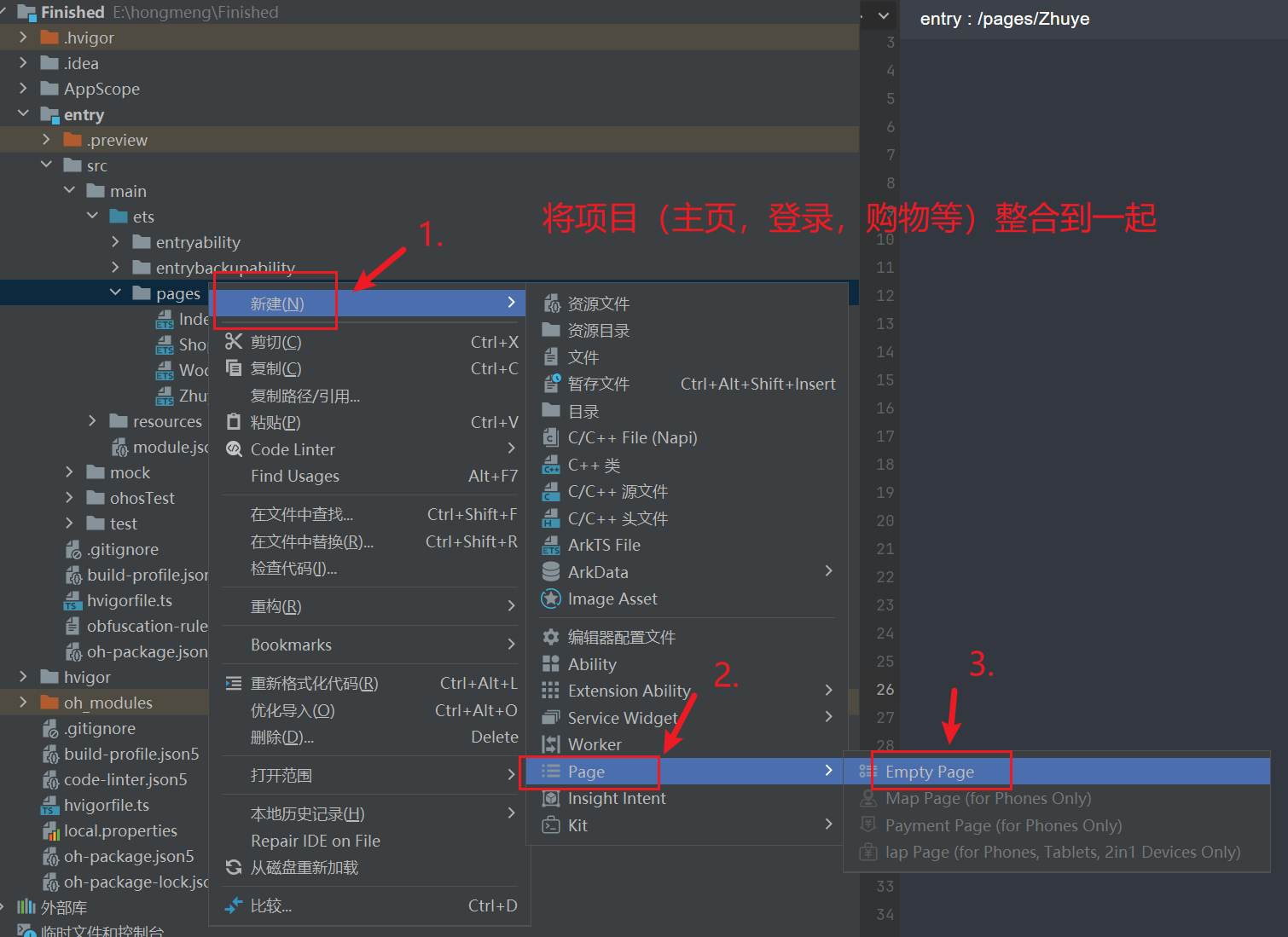
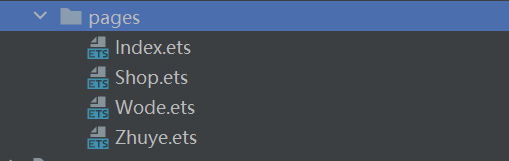
路由核心代码解析
登录页的路由逻辑是整个应用的入口,核心是“验证通过则跳转,否则提示错误”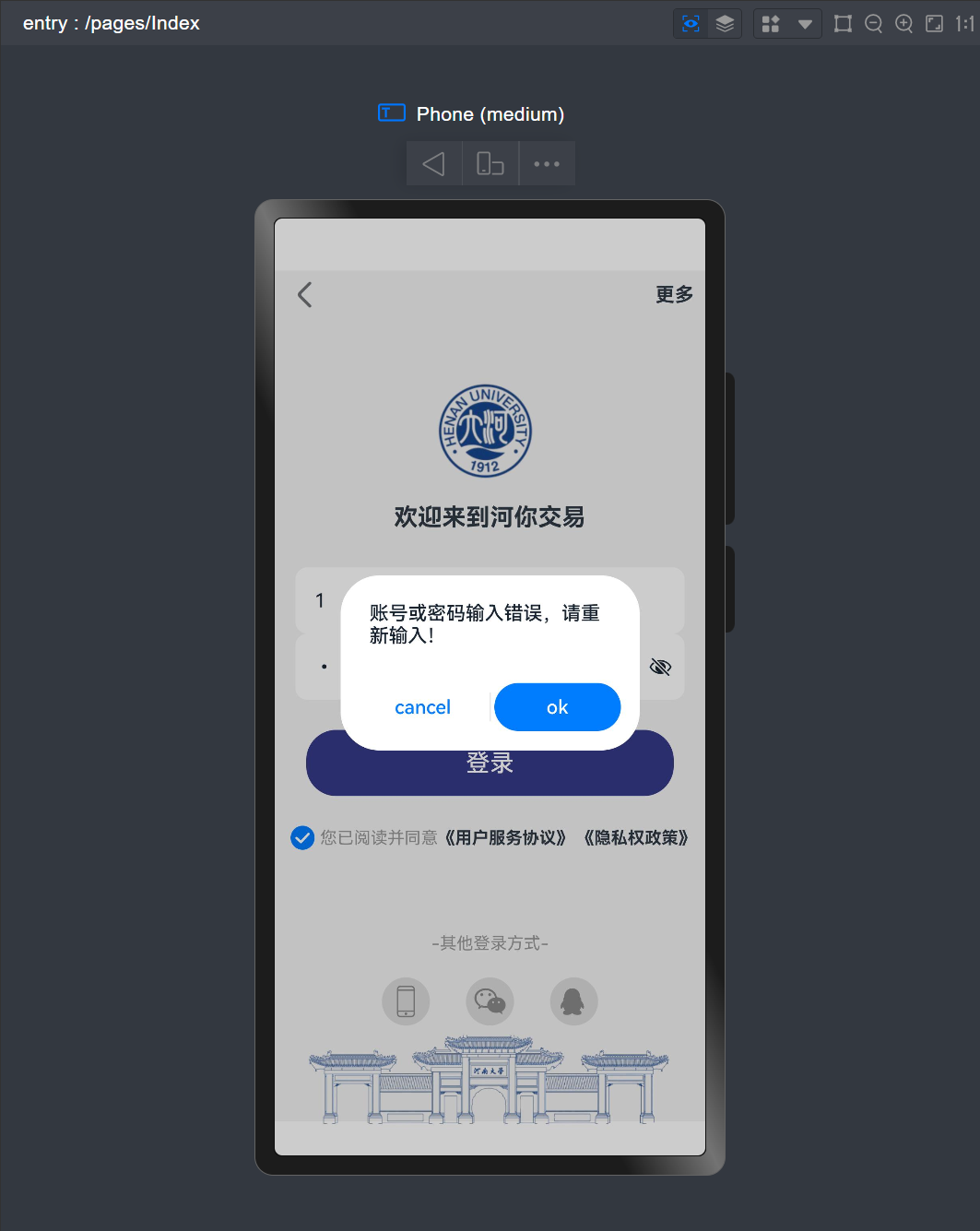
输入正确时点击即可跳转页面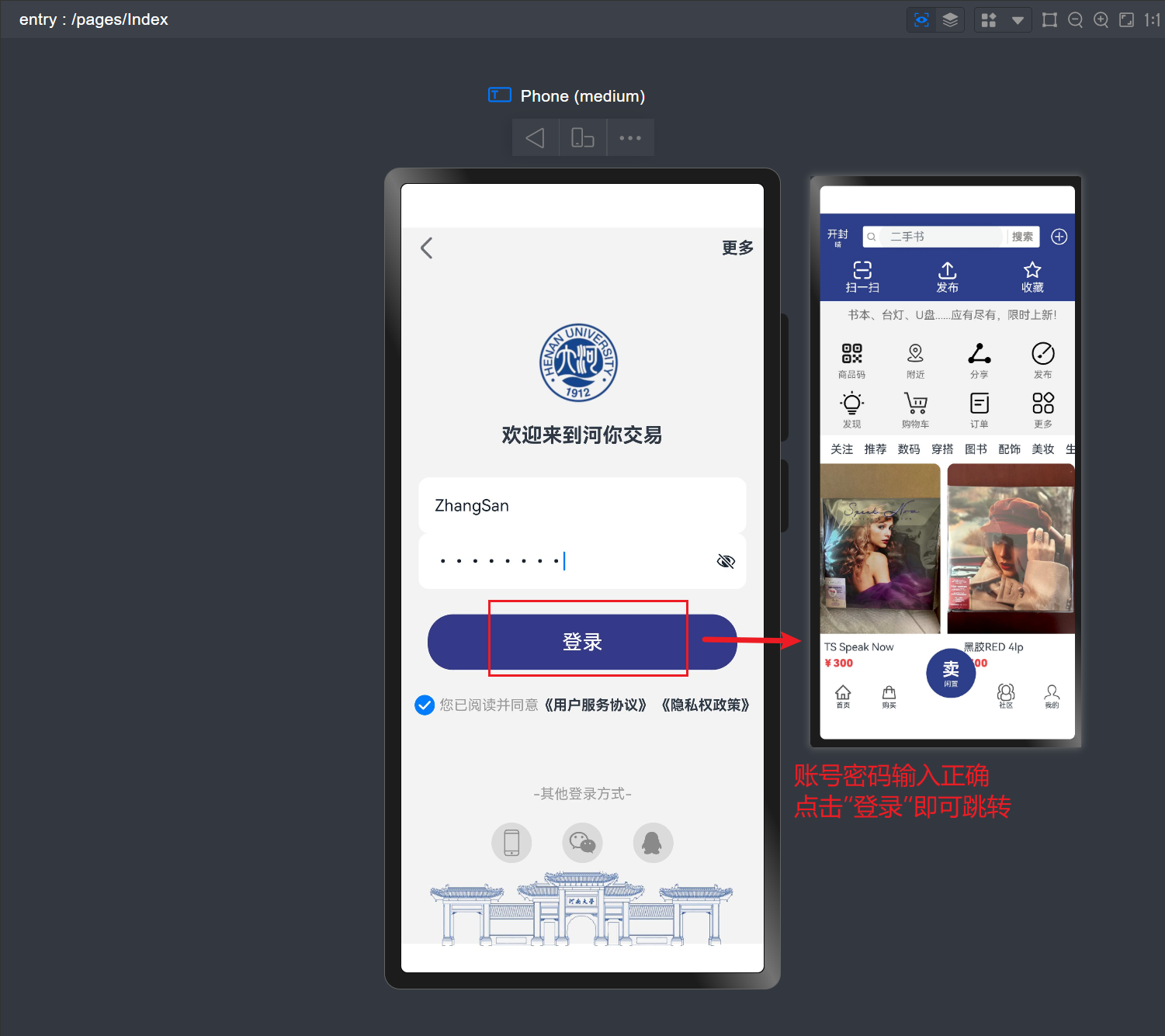
关键代码如下:
// 登录按钮点击事件(含路由跳转)
Button('登录')
  .width('85%')
  .backgroundColor("#353a88")
  .height(55)
  .borderRadius(25)
  .fontSize(20)
  .margin({ top: 25 })
  .onClick(() => {
    // 登录验证条件:账号ZhangSan,密码00000000
    if (this.account === 'ZhangSan' && this.password === '00000000') {
      // 验证通过,跳转首页
      router.pushUrl({
        url: 'pages/Zhuye' // 首页路径
      }).then(() => {
        console.info('登录成功,跳转首页');
      }).catch((err: BusinessError) => {
        console.error(`跳转失败:${err.message},错误码:${err.code}`);
      });
    } else {
      // 验证失败,显示错误弹窗
      this.getUIContext().showAlertDialog({
        title: '账号或密码输入错误',
        message: '请重新输入',
        buttons: [
          {
            value: '确定',
            action: () => { console.info('用户确认错误提示'); }
          }
        ]
      });
    }
  })
代码细节:
- 首先通过
if语句判断账号密码是否正确(ZhangSan和00000000) - 正确则调用
router.pushUrl,url设置为pages/Zhuye,即首页路径 - 通过
then输出成功日志,catch捕获跳转错误(如路径错误、页面未注册) - 错误则调用
showAlertDialog显示弹窗,不执行跳转
登录页完整代码
import { BusinessError } from '@ohos.base';
import router from '@ohos/router';

@Entry
@Component
struct Index {
  // 存储账号和密码的状态变量
  @State account: string = '';
  @State password: string = '';

  build() {
    Column() {
      // 顶部箭头和"更多"文本
      Row() {
        Image($r('app.media.ic_public_arrow_left'))
          .width(40)
        Text('更多')
          .fontWeight(FontWeight.Bold)
          .fontSize(16)
      }
      .justifyContent(FlexAlign.SpaceBetween)
      .width('100%')
      .padding({ bottom: 50, right: 10, left: 5 })
      .margin({ left: 15, right: 15 })

      // 河大logo
      Image($r('app.media.HenuLogo'))
        .width(140)

      // 欢迎文本
      Text('欢迎来到河你交易')
        .fontWeight(FontWeight.Bold)
        .fontSize(20)
        .padding({ top: 18, bottom: 30 })

      // 账号输入框
      TextInput({
        placeholder: '请输入账号',
        text: this.account
      })
        .onChange((value) => { this.account = value; }) // 实时更新账号
        .width("90%")
        .backgroundColor('#ffffff')
        .height(55)
        .border({ radius: 10 })
        .margin({ bottom: 10 })

      // 密码输入框(密码类型)
      TextInput({
        placeholder: '请输入密码',
        text: this.password
      })
        .type(InputType.Password) // 密码显示为圆点
        .onChange((value) => { this.password = value; }) // 实时更新密码
        .width("90%")
        .backgroundColor('#ffffff')
        .height(55)
        .border({ radius: 10 })
        .margin({ bottom: 25 })

      // 登录按钮(含路由跳转逻辑)
      Button('登录')
        .width('85%')
        .backgroundColor("#353a88")
        .height(55)
        .borderRadius(25)
        .fontSize(20)
        .onClick(() => {
          // 验证账号密码
          if (this.account === 'ZhangSan' && this.password === '00000000') {
            // 跳转首页
            router.pushUrl({ url: 'pages/Zhuye' })
              .then(() => { console.info('跳转首页成功'); })
              .catch((err: BusinessError) => {
                console.error(`跳转失败:${err.message},错误码${err.code}`);
              });
          } else {
            // 错误提示
            this.getUIContext().showAlertDialog({
              title: '账号或密码错误',
              message: '请输入正确的账号和密码',
              buttons: [{ value: '确定', action: () => {} }]
            });
          }
        })

      // 协议勾选区
      Row() {
        Radio({ value: 'Radio1', group: 'radioGroup' }).checked(false).width(20)
        Text('您已阅读并同意')
          .fontSize(14)
          .fontColor('#999999')
        Text('《用户服务协议》 《隐私权政策》')
          .fontSize(14)
          .fontWeight(FontWeight.Bold)
      }
      .padding({ top: 20 })
    }
    .width('100%')
    .backgroundColor("#f3f3f3")
    .padding({ top: 5 })
  }
}
二、底部导航路由实现
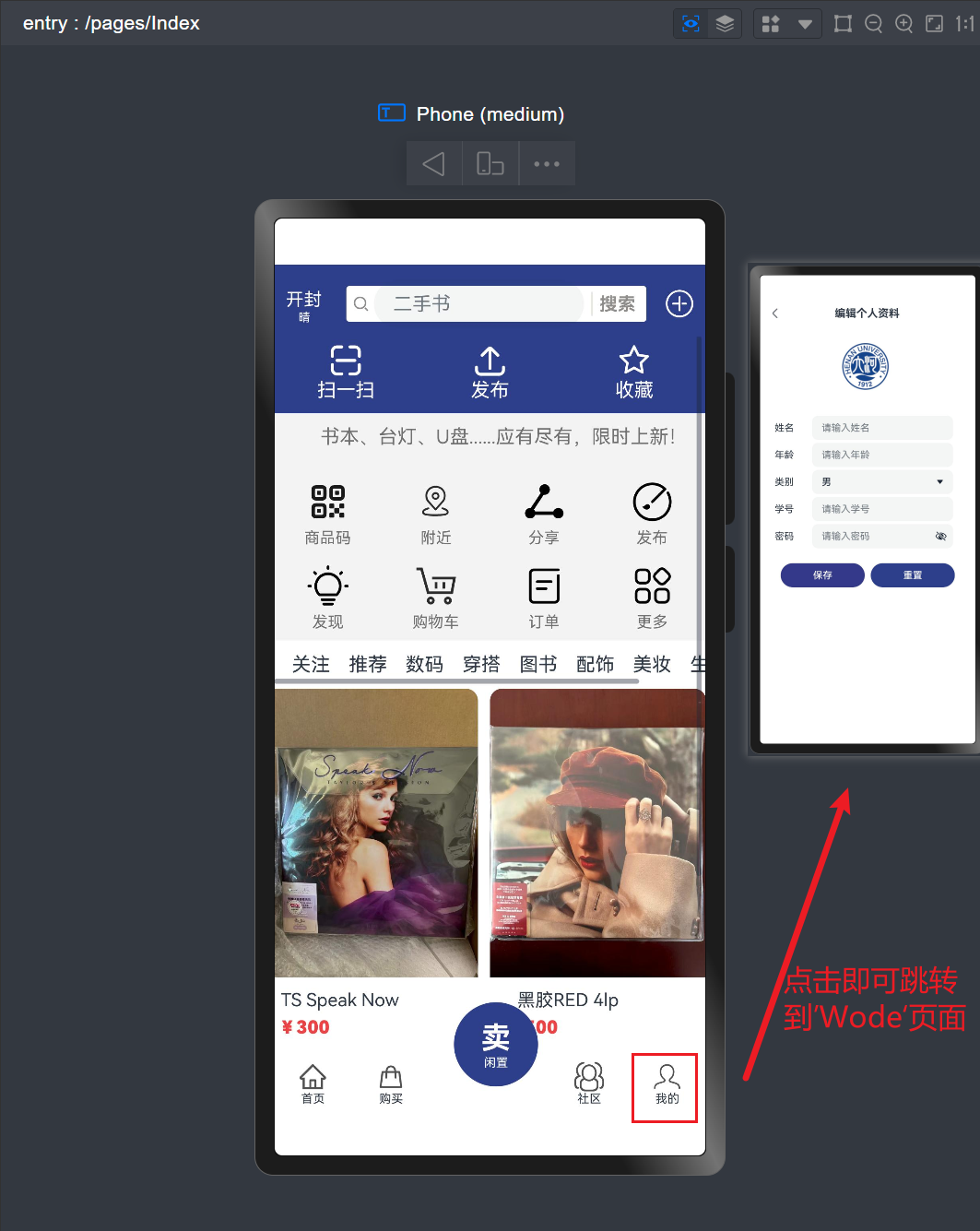
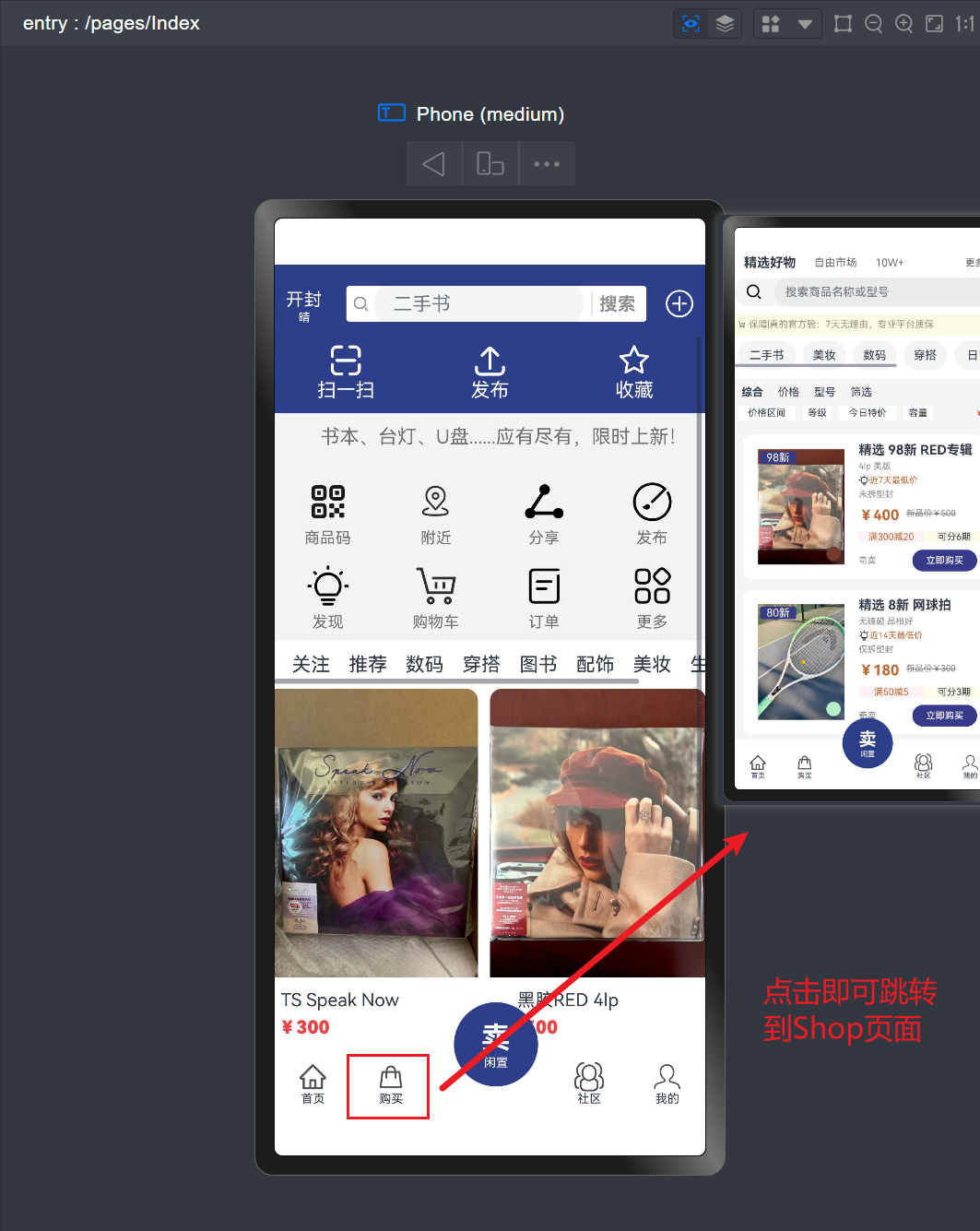
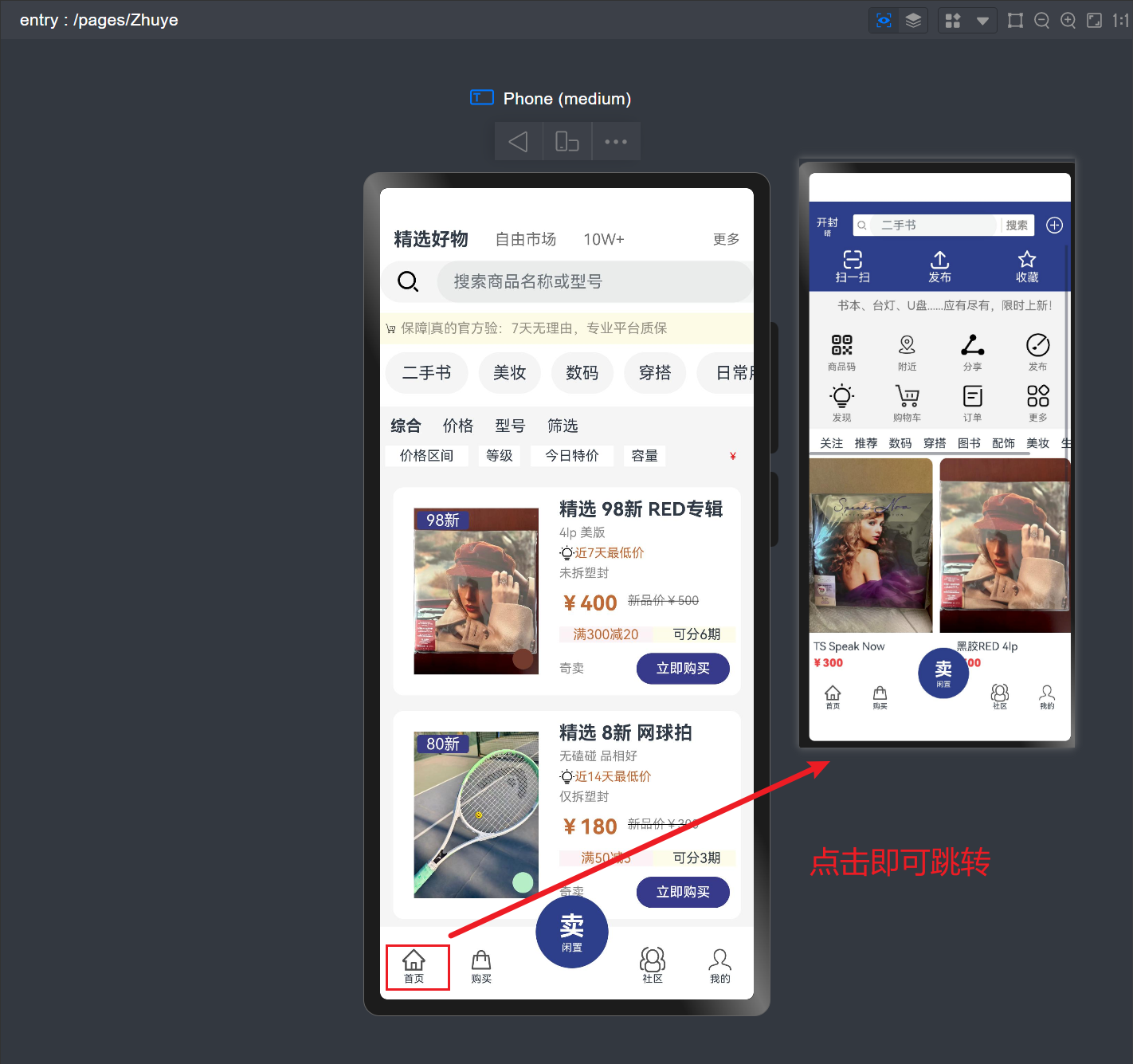
路由核心代码解析
底部导航是应用的核心导航区,为“首页”“购买”“我的”三个选项绑定了路由,关键代码如下:
// 底部导航组件中的路由绑定
@Component
struct myComponent {
  build() {
    Row() {
      // 首页导航(跳转首页)
      Column() {
        Image($r('app.media.home')).width(25).padding({ top: 5 })
        Text('首页').fontSize(10)
      }.padding({ left: 20 }).onClick(() => {
        router.pushUrl({ url: 'pages/Zhuye' })
          .catch((err) => console.error(`首页跳转失败:${err.message}`));
      })

      // 购买导航(跳转购物页)
      Column() {
        Image($r('app.media.buy_icon')).width(25).padding({ top: 5 })
        Text('购买').fontSize(10)
      }.padding({ left: 40 }).onClick(() => {
        router.pushUrl({ url: 'pages/Shop' })
          .catch((err) => console.error(`购物页跳转失败:${err.message}`));
      })

      // 卖闲置(无跳转)
      Column() { /* 代码略 */ }

      // 我的导航(跳转个人中心)
      Column() {
        Image($r('app.media.wo_de')).width(25).padding({ top: 5 })
        Text('我的').fontSize(10)
      }.padding({ left: 40 }).onClick(() => {
        router.pushUrl({ url: 'pages/Wode' })
          .catch((err) => console.error(`个人中心跳转失败:${err.message}`));
      })
    }
    .width('100%').height(70).backgroundColor('#fff').zIndex(5)
  }
}
代码细节:
- 每个导航项都是
Column组件,包含图标和文本 - 通过
onClick事件绑定router.pushUrl,分别对应三个页面:- 首页:
pages/Zhuye - 购物页:
pages/Shop - 个人中心:
pages/Wode
- 首页:
- 设置
zIndex:5确保导航栏在最上层,不被其他内容遮挡 - 每个路由都通过
catch捕获错误,便于调试
底部导航完整代码
import { BusinessError } from '@ohos.base';
import router from '@ohos/router';

// 底部导航组件(含路由跳转)
@Component
struct myComponent {
  build() {
    Row() {
      // 首页导航
      Column() {
        Image($r('app.media.home')) // 首页图标
          .width(25)
          .padding({ top: 5 })
        Text('首页').fontSize(10)
      }
      .padding({ left: 20 })
      .onClick(() => {
        // 点击首页,跳转至首页
        router.pushUrl({
          url: 'pages/Zhuye'
        }).catch((err: BusinessError) => {
          console.error(`首页导航跳转失败:${err.message}`);
        });
      })

      // 购买导航
      Column() {
        Image($r('app.media.buy_icon')) // 购买图标
          .width(25)
          .padding({ top: 5 })
        Text('购买').fontSize(10)
      }
      .padding({ left: 40 })
      .onClick(() => {
        // 点击购买,跳转至购物页
        router.pushUrl({
          url: 'pages/Shop'
        }).catch((err: BusinessError) => {
          console.error(`购物页导航跳转失败:${err.message}`);
        });
      })

      // 卖闲置(中间突出按钮,无跳转)
      Column() {
        Text('卖').fontColor('#fff').fontSize(25).padding({ top: 15 }).fontWeight(FontWeight.Bold)
        Text('闲置').fontColor('#fff').fontSize(10)
      }
      .layoutWeight(1)
      .backgroundColor('#2d3f8b')
      .width(70).height(70)
      .border({ radius: 35 })
      .position({ x: 150, y: -30 })

      // 社区导航(无跳转)
      Column() {
        Image($r('app.media.she_qu')).width(25).padding({ top: 5 })
        Text('社区').fontSize(10)
      }.padding({ left: 140 })

      // 我的导航
      Column() {
        Image($r('app.media.wo_de')) // 我的图标
          .width(25)
          .padding({ top: 5 })
        Text('我的').fontSize(10)
      }
      .padding({ left: 40 })
      .onClick(() => {
        // 点击我的,跳转至个人中心
        router.pushUrl({
          url: 'pages/Wode'
        }).catch((err: BusinessError) => {
          console.error(`个人中心导航跳转失败:${err.message}`);
        });
      })
    }
    .width('100%')
    .height(70)
    .backgroundColor('#fff')
    .zIndex(5) // 确保在最上层显示
  }
}
三、个人中心返回路由实现
路由核心代码解析
个人中心页的返回箭头用于跳转回首页,是关键的返回场景,代码如下:
// 个人中心页的返回箭头路由
Row() {
  // 返回箭头图标
  Image($r('app.media.ic_public_arrow_left'))
    .width(30)
    .onClick(() => {
      // 点击箭头,跳转回首页
      router.pushUrl({
        url: 'pages/Zhuye'
      }).catch((err: BusinessError) => {
        console.error(`从个人中心返回首页失败:${err.message}`);
      });
    })
  Text('编辑个人资料')
    .fontSize(18)
    .fontWeight(FontWeight.Bold)
    .offset({ x: '25%' })
}
.width('100%')
.padding(10)
代码细节:
- 为左上角的返回箭头图标绑定
onClick事件 - 调用
router.pushUrl,url设置为pages/Zhuye,跳转回首页 - 通过
catch捕获跳转错误,如首页未加载或路径错误
个人中心页完整代码(含返回路由)
import { BusinessError } from '@ohos.base';
import router from '@ohos/router';
import { promptAction } from '@kit.ArkUI';

// 用户信息接口
interface UserInfo {
  name: string;
  age: string;
  gender: '男' | '女';
  student_ID: string;
  password: string;
}

@Entry
@Component
struct PersonInfo {
  @State myInfo: UserInfo = {
    name: '',
    age: '',
    gender: '男',
    student_ID: '',
    password: ''
  }

  build() {
    Column() {
      // 顶部返回区(含路由)
      Row() {
        // 返回箭头,绑定跳转首页路由
        Image($r('app.media.ic_public_arrow_left'))
          .width(30)
          .onClick(() => {
            router.pushUrl({
              url: 'pages/Zhuye' // 跳转首页
            }).catch((err: BusinessError) => {
              console.error(`返回首页失败:${err.message}`);
            });
          })
        Text('编辑个人资料')
          .fontSize(18)
          .fontWeight(FontWeight.Bold)
          .offset({ x: '25%' })
      }
      .width('100%')
      .padding(10)

      // 河大logo
      Image($r('app.media.HenuLogo'))
        .width(140)
        .padding({ top: 20, bottom: 40 })

      // 表单内容(略,与路由无关)
      Column() {
        // 姓名、年龄等表单项(代码略)

        // 保存和重置按钮(代码略)
      }
    }
  }
}
通过以上三个部分的路由实现,覆盖了登录跳转、导航跳转、返回跳转等核心场景,完整实现了学习报告中要求的页面导航逻辑。每个路由都包含路径配置、事件绑定和错误处理,确保跳转稳定可靠。
四、完整代码
Index.ets(登录页面)
// 导入路由模块和错误处理工具
import { BusinessError } from '@ohos.base';
import router from '@ohos/router';

@Entry
@Component
struct Index {
  // 声明状态变量,用于存储用户输入的账号和密码
  @State account: string = '';
  @State password: string = '';

  build() {
    Column() {
      // 顶部操作区:左箭头图标和"更多"文本
      Row() {
        Image($r('app.media.ic_public_arrow_left')) // 左箭头图标
          .width(40)
        Text('更多') // 右侧"更多"文本
          .fontWeight(FontWeight.Bold)
          .fontSize(16)
      }
      .justifyContent(FlexAlign.SpaceBetween) // 两端对齐
      .width('100%')
      .padding({ bottom: 50, right: 10, left: 5 }) // 内边距调整
      .margin({ left: 15, right: 15 }) // 外边距调整

      // 显示河大logo
      Image($r('app.media.HenuLogo'))
        .width(140) // 设置logo宽度

      // 欢迎文本
      Text('欢迎来到河你交易')
        .fontWeight(FontWeight.Bold) // 加粗
        .fontSize(20) // 字号
        .padding({ top: 18, bottom: 30 }) // 上下内边距

      // 账号输入框
      TextInput({
        placeholder: '请输入账号', // 默认提示文本
        text: this.account // 绑定账号输入值
      })
        .onChange((value) => {
          this.account = value; // 实时更新账号输入
        })
        .width("90%") // 宽度占屏幕90%
        .backgroundColor('#ffffff') // 白色背景
        .height(55) // 高度
        .border({ radius: 10 }) // 圆角边框
        .margin({ bottom: 10 }) // 底部外边距

      // 密码输入框
      TextInput({
        placeholder: '请输入密码', // 默认提示文本
        text: this.password // 绑定密码输入值
      })
        .type(InputType.Password) // 设置为密码类型,输入内容显示为圆点
        .onChange((value) => {
          this.password = value; // 实时更新密码输入
        })
        .width("90%") // 宽度占屏幕90%
        .backgroundColor('#ffffff') // 白色背景
        .height(55) // 高度
        .border({ radius: 10 }) // 圆角边框
        .margin({ bottom: 25 }) // 底部外边距

      // 登录按钮
      Button('登录')
        .width('85%') // 宽度
        .backgroundColor("#353a88") // 按钮背景色
        .height(55) // 高度
        .borderRadius(25) // 圆角
        .fontSize(20) // 文字大小
        .onClick(() => {
          // 验证账号密码:账号为ZhangSan,密码为00000000
          if (this.account === 'ZhangSan' && this.password === '00000000') {
            // 验证通过,跳转到首页
            router.pushUrl({
              url: 'pages/Zhuye' // 首页路径
            }).then(() => {
              console.info('登录成功,已跳转至首页'); // 成功日志
            }).catch((err: BusinessError) => {
              // 捕获跳转错误并输出
              console.error(`跳转失败,错误信息:${err.message},错误码:${err.code}`);
            });
          } else {
            // 验证失败,显示错误弹窗
            this.getUIContext().showAlertDialog({
              title: '账号或密码输入错误', // 弹窗标题
              message: '请重新输入', // 弹窗内容
              autoCancel: true, // 点击外部可关闭
              buttons: [
                {
                  value: '确定', // 按钮文字
                  action: () => {
                    console.info('用户确认错误提示'); // 按钮点击日志
                  }
                }
              ]
            });
          }
        })

      // 协议勾选区
      Row() {
        Radio({ value: 'Radio1', group: 'radioGroup' }) // 单选按钮
          .checked(false) // 默认未选中
          .width(20) // 大小
        Text('您已阅读并同意') // 协议文本
          .fontSize(14)
          .fontColor('#999999') // 灰色文字
        Text('《用户服务协议》 《隐私权政策》') // 协议链接文本
          .fontSize(14)
          .fontWeight(FontWeight.Bold) // 加粗
      }
      .padding({ top: 20 }) // 顶部内边距
    }
    .width('100%') // 占满屏幕宽度
    .backgroundColor("#f3f3f3") // 页面背景色
    .padding({ top: 5 }) // 顶部内边距
  }
}
Zhuye.ets(首页)
// 导入路由模块和错误处理工具
import { BusinessError } from '@ohos.base';
import router from '@ohos/router';

// 底部导航组件
@Component
struct myComponent {
  build() {
    Row() {
      // 首页导航项
      Column() {
        Image($r('app.media.home')) // 首页图标
          .width(25) // 图标大小
          .padding({ top: 5 }) // 顶部内边距
        Text('首页').fontSize(10) // 文字
      }
      .padding({ left: 20 }) // 左侧外边距
      .onClick(() => {
        // 点击跳转至首页
        router.pushUrl({ url: 'pages/Zhuye' })
          .then(() => console.info('跳转至首页成功'))
          .catch((err: BusinessError) =>
            console.error(`首页跳转失败:${err.message}`)
          );
      })

      // 购买导航项
      Column() {
        Image($r('app.media.buy_icon')) // 购买图标
          .width(25) // 图标大小
          .padding({ top: 5 }) // 顶部内边距
        Text('购买').fontSize(10) // 文字
      }
      .padding({ left: 40 }) // 左侧外边距
      .onClick(() => {
        // 点击跳转至购物页
        router.pushUrl({ url: 'pages/Shop' })
          .then(() => console.info('跳转至购物页成功'))
          .catch((err: BusinessError) =>
            console.error(`购物页跳转失败:${err.message}`)
          );
      })

      // 卖闲置(中间突出按钮)
      Column() {
        Text('卖') // 文字"卖"
          .fontColor('#fff') // 白色文字
          .fontSize(25) // 字号
          .padding({ top: 15 }) // 顶部内边距
          .fontWeight(FontWeight.Bold) // 加粗
        Text('闲置').fontColor('#fff').fontSize(10) // 文字"闲置"
      }
      .layoutWeight(1)
      .backgroundColor('#2d3f8b') // 深蓝色背景
      .width(70).height(70) // 宽高
      .border({ radius: 35 }) // 圆形边框
      .position({ x: 150, y: -30 }) // 向上偏移,实现悬浮效果

      // 社区导航项(无跳转)
      Column() {
        Image($r('app.media.she_qu')) // 社区图标
          .width(25) // 图标大小
          .padding({ top: 5 }) // 顶部内边距
        Text('社区').fontSize(10) // 文字
      }.padding({ left: 140 }) // 左侧外边距

      // 我的导航项
      Column() {
        Image($r('app.media.wo_de')) // 我的图标
          .width(25) // 图标大小
          .padding({ top: 5 }) // 顶部内边距
        Text('我的').fontSize(10) // 文字
      }
      .padding({ left: 40 }) // 左侧外边距
      .onClick(() => {
        // 点击跳转至个人中心页
        router.pushUrl({ url: 'pages/Wode' })
          .then(() => console.info('跳转至个人中心成功'))
          .catch((err: BusinessError) =>
            console.error(`个人中心跳转失败:${err.message}`)
          );
      })
    }
    .width('100%') // 占满宽度
    .height(70) // 高度
    .backgroundColor('#fff') // 白色背景
    .zIndex(5) // 层级设置,确保在最上层
  }
}

// 首页主组件
@Entry
@Component
struct Index {
  @State message: string = 'Hello World';

  build() {
    // 层叠布局,底部对齐
    Stack({ alignContent: Alignment.Bottom }) {
      // 上部内容(顶部导航+主体)
      Stack({ alignContent: Alignment.Top }) {
        // 顶部导航栏
        Row() {
          // 地理位置与天气
          Column() {
            Text('开封') // 城市名
              .fontSize(15)
              .fontColor('#fff') // 白色文字
            Text('晴') // 天气
              .fontSize(10)
              .fontColor('#fff') // 白色文字
          }.padding({ top: 10, left: 10, right: 20 }) // 内边距

          // 搜索框
          Row() {
            Image($r('app.media.search')) // 搜索图标
              .width(23) // 大小
              .fillColor('#908c8a') // 图标颜色
              .padding({ left: 5, right: 3 }) // 内边距
            TextInput({ placeholder: '二手书' }) // 搜索输入框
              .width(175).height(40).margin({ right: 5 })
            Image($r('app.media.logo')) // 分隔线图标
              .width(3).height(20).fillColor('#fff')
            Text('搜索') // 搜索文字
              .fontSize(15)
              .fontColor('#908c8a')
              .fontWeight(FontWeight.Bold)
              .padding({ left: 5 })
          }
          .width(250) // 宽度
          .height(30) // 高度
          .backgroundColor('#fff') // 白色背景
          .borderRadius('3') // 圆角
          .margin({ top: 5 }) // 顶部外边距

          // 右侧加号图标
          Row() {
            Image($r('app.media.plus')) // 加号图标
              .fillColor('#fff') // 白色
              .width(25) // 大小
          }.padding({ left: 15, top: 5 }) // 内边距
        }
        .zIndex(4) // 层级
        .backgroundColor('#2d3f8b') // 深蓝色背景
        .width('100%').height(60) // 宽高

        // 主体内容(可滚动)
        Scroll() {
          Column() {
            // 快捷功能区(扫一扫、发布、收藏)
            Row() {
              Column() {
                Image($r('app.media.scan')) // 扫一扫图标
                  .width(30).fillColor('#fff')
                Text('扫一扫').fontColor('#fff')
              }.layoutWeight(1)
              Column() {
                Image($r('app.media.upload')) // 发布图标
                  .width(30).fillColor('#fff')
                Text('发布').fontColor('#fff')
              }.layoutWeight(1)
              Column() {
                Image($r('app.media.star')) // 收藏图标
                  .width(30).fillColor('#fff')
                Text('收藏').fontColor('#fff')
              }.layoutWeight(1)
            }.padding({ bottom: 10 })

            // 广告轮播区
            Swiper() {
              Text('         书本、台灯、U盘......应有尽有,限时上新!')
                .fontColor('#717171')
              Text('         更有河南大学周边等你抢购!')
                .fontColor('#717171')
            }
            .indicator(false) // 隐藏指示器
            .loop(true) // 循环轮播
            .autoPlay(true) // 自动播放
            .width('100%')
            .backgroundColor('#f3f3f3')
            .padding({ top: 10, bottom: 20 })

            // 功能Grid布局(8个功能入口)
            Grid() {
              GridItem() {
                Column() {
                  Image($r('app.media.code')).width(35).padding({ bottom: 5 })
                  Text('商品码').fontSize(13).fontColor('#717171')
                }
              }
              GridItem() {
                Column() {
                  Image($r('app.media.arround')).width(35).padding({ bottom: 5 })
                  Text('附近').fontSize(13).fontColor('#717171')
                }
              }
              GridItem() {
                Column() {
                  Image($r('app.media.share')).width(35).padding({ bottom: 5 })
                  Text('分享').fontSize(13).fontColor('#717171')
                }
              }
              GridItem() {
                Column() {
                  Image($r('app.media.post')).width(35).padding({ bottom: 5 })
                  Text('发布').fontSize(13).fontColor('#717171')
                }
              }
              GridItem() {
                Column() {
                  Image($r('app.media.find')).width(35).padding({ bottom: 5 })
                  Text('发现').fontSize(13).fontColor('#717171')
                }
              }
              GridItem() {
                Column() {
                  Image($r('app.media.shopCar')).width(35).padding({ bottom: 5 })
                  Text('购物车').fontSize(13).fontColor('#717171')
                }
              }
              GridItem() {
                Column() {
                  Image($r('app.media.order')).width(35).padding({ bottom: 5 })
                  Text('订单').fontSize(13).fontColor('#717171')
                }
              }
              GridItem() {
                Column() {
                  Image($r('app.media.more')).width(35).padding({ bottom: 5 })
                  Text('更多').fontSize(13).fontColor('#717171')
                }
              }
            }
            .height(140)
            .width('100%')
            .rowsTemplate("1fr 1fr") // 2行
            .columnsTemplate('1fr 1fr 1fr 1fr') // 4列
            .backgroundColor('#f3f3f3')

            // 横向商品分类(可滚动)
            Scroll() {
              Row() {
                Text('关注').fontSize(16).padding({ left: 15 })
                Text('推荐').fontSize(16).padding({ left: 15 })
                Text('数码').fontSize(16).padding({ left: 15 })
                Text('穿搭').fontSize(16).padding({ left: 15 })
                Text('图书').fontSize(16).padding({ left: 15 })
                Text('配饰').fontSize(16).padding({ left: 15 })
                Text('美妆').fontSize(16).padding({ left: 15 })
                Text('生活').fontSize(16).padding({ left: 15 })
                Text('文创').fontSize(16).padding({ left: 15 })
              }
            }
            .backgroundColor('#fff')
            .width('100%')
            .height(40)
            .scrollable(ScrollDirection.Horizontal) // 水平滚动

            // 商品列表Grid
            Grid() {
              GridItem() {
                Column() {
                  Image($r('app.media.mygood1'))
                    .width(180)
                    .borderRadius({ topLeft: 10, topRight: 10 })
                    .padding({ bottom: 10 })
                  Text('TS Speak Now').fontSize(15).margin({ right: 50 })
                  Text('¥300').fontColor('#ec4446')
                    .fontSize(15).fontWeight(FontWeight.Bolder)
                    .margin({ right: 110, top: 5 })
                }
              }.padding({ right: 20, bottom: 50 })
              GridItem() {
                Column() {
                  Image($r('app.media.mygood3'))
                    .width(180)
                    .borderRadius({ topLeft: 10, topRight: 10 })
                    .padding({ bottom: 10 })
                  Text('黑胶RED 4lp').fontSize(15).margin({ right: 50 })
                  Text('¥500').fontColor('#ec4446')
                    .fontSize(15).fontWeight(FontWeight.Bolder)
                    .margin({ right: 110, top: 5 })
                }
              }.padding({ bottom: 50 })
              GridItem() {
                Column() {
                  Image($r('app.media.mygood4'))
                    .width(180)
                    .borderRadius({ topLeft: 10, topRight: 10 })
                    .padding({ bottom: 10 })
                  Text('Lover黑胶TS').fontSize(15).margin({ right: 50 })
                  Text('¥420').fontColor('#ec4446')
                    .fontSize(15).fontWeight(FontWeight.Bolder)
                    .margin({ right: 110, top: 5 })
                }
              }.padding({ right: 20, bottom: 50 })
              GridItem() {
                Column() {
                  Image($r('app.media.mygood2'))
                    .width(180)
                    .borderRadius({ topLeft: 10, topRight: 10 })
                    .padding({ bottom: 10 })
                  Text('典藏林忆莲《0》').fontSize(15).margin({ right: 50 })
                  Text('¥600').fontColor('#ec4446')
                    .fontSize(15).fontWeight(FontWeight.Bolder)
                    .margin({ right: 110, top: 5 })
                }
              }.padding({ bottom: 50 })
            }
            .width('100%')
            .rowsTemplate("1fr 1fr") // 2行
            .columnsTemplate('1fr 1fr') // 2列
            .backgroundColor('#fff')
          }
        }
        .padding({ top: 65, bottom: 40 }) // 内边距
        .zIndex(2) // 层级
      }.width('100%')

      // 底部导航组件
      myComponent().zIndex(5)
    }
    .width('100%').height('100%')
    .backgroundColor('#2d3f8b') // 背景色
  }
}
Wode.ets(个人中心页面)
// 导入路由模块、错误处理工具和弹窗工具
import { BusinessError } from '@ohos.base';
import router from '@ohos/router';
import { promptAction } from '@kit.ArkUI';

// 定义用户信息接口,规范数据结构
interface UserInfo {
  name: string; // 姓名
  age: string; // 年龄
  gender: '男' | '女'; // 性别(仅男/女)
  student_ID: string; // 学号
  password: string; // 密码
}

@Entry
@Component
struct PersonInfo {
  // 初始化用户信息状态变量
  @State myInfo: UserInfo = {
    name: '',
    age: '',
    gender: '男', // 默认性别为男
    student_ID: '',
    password: ''
  }

  build() {
    Column() {
      // 顶部返回区
      Row() {
        // 返回箭头图标,点击跳转回首页
        Image($r('app.media.ic_public_arrow_left'))
          .width(30)
          .onClick(() => {
            router.pushUrl({
              url: 'pages/Zhuye' // 首页路径
            }).then(() => {
              console.info('从个人中心返回首页成功');
            }).catch((err: BusinessError) => {
              console.error(`返回首页失败:${err.message}`);
            })
          })
        Text('编辑个人资料') // 标题
          .fontSize(18)
          .fontWeight(FontWeight.Bold)
          .offset({ x: '25%' }) // 居中偏移
      }.width('100%').padding(10) // 宽高和内边距

      // 河大logo
      Image($r('app.media.HenuLogo'))
        .width(140)
        .padding({ top: 20, bottom: 40 }) // 上下内边距

      // 表单内容区
      Column() {
        // 姓名字段
        Row() {
          Text('姓名').padding({ right: 30 }) // 标签
          TextInput({
            placeholder: '请输入姓名',
            text: this.myInfo.name // 绑定姓名
          })
          .onChange((name) => {
            this.myInfo.name = name; // 实时更新姓名
          })
          .width('70%') // 宽度
          .borderRadius(10) // 圆角
        }.width('100%').padding({ left: 25, bottom: 5 }) // 布局

        // 年龄字段
        Row() {
          Text('年龄').padding({ right: 30 }) // 标签
          TextInput({
            placeholder: '请输入年龄',
            text: this.myInfo.age // 绑定年龄
          })
          .onChange((age) => {
            this.myInfo.age = age; // 实时更新年龄
          })
          .width('70%')
          .borderRadius(10)
        }.width('100%').padding({ left: 25, bottom: 5 })

        // 性别字段
        Row() {
          Text('类别').padding({ right: 30 }) // 标签
          Select([{ value: '男' }, { value: '女' }]) // 下拉选择器
            .value(this.myInfo.gender) // 绑定当前性别
            .onSelect((index, value) => {
              this.myInfo.gender = value as '男' | '女'; // 更新性别
            })
            .width('70%')
            .borderRadius(10)
        }.width('100%').padding({ left: 25, bottom: 5 })

        // 学号字段
        Row() {
          Text('学号').padding({ right: 30 }) // 标签
          TextInput({
            placeholder: '请输入学号',
            text: this.myInfo.student_ID // 绑定学号
          })
          .onChange((ID) => {
            this.myInfo.student_ID = ID; // 实时更新学号
          })
          .width('70%')
          .borderRadius(10)
        }.width('100%').padding({ left: 25, bottom: 5 })

        // 密码字段
        Row() {
          Text('密码').padding({ right: 30 }) // 标签
          TextInput({
            placeholder: '请输入密码',
            text: this.myInfo.password // 绑定密码
          })
          .type(InputType.Password) // 密码类型
          .onChange((password) => {
            this.myInfo.password = password; // 实时更新密码
          })
          .width('70%')
          .borderRadius(10)
        }.width('100%').padding({ left: 25, bottom: 25 })

        // 按钮行(保存和重置)
        Row({ space: 10 }) {
          Button('保存') // 保存按钮
            .width(140)
            .backgroundColor('#353a88')
            .onClick(() => {
              // 弹窗显示保存的信息
              promptAction.showToast({
                message: `保存成功:\n姓名::${this.myInfo.name}\n年龄::${this.myInfo.age}\n性别::${this.myInfo.gender}\n学号::${this.myInfo.student_ID}\n密码::${this.myInfo.password}`
              })
            })

          Button('重置') // 重置按钮
            .width(140)
            .backgroundColor('#2d3f8b')
            .onClick(() => {
              // 清空所有字段
              this.myInfo.name = '';
              this.myInfo.age = '';
              this.myInfo.gender = '男';
              this.myInfo.student_ID = '';
              this.myInfo.password = '';
            })
        }
      }
    }
  }
}
Shop.ets(购物页面)
// 导入路由模块和错误处理工具
import { BusinessError } from '@ohos.base';
import router from '@ohos/router';

// 定义商品数据接口
interface Product {
  id: string; // 商品ID
  title: string; // 商品标题
  specs: string; // 商品规格
  discountInfo: string; // 折扣信息
  condition: string; // 商品状态
  price: string; // 现价
  originalPrice: string; // 原价
  promotionThreshold: string; // 满减门槛
  promotionDiscount: string; // 满减金额
  conditionPercentage: number; // 分期数
  color: string; // 商品颜色(色值)
  image: Resource; // 商品图片
  nowcondition: string; // 新旧程度
}

// 底部导航组件(与首页复用)
@Component
struct myComponent {
  build() {
    Row() {
      // 首页导航项
      Column() {
        Image($r('app.media.home')).width(25).padding({ top: 5 })
        Text('首页').fontSize(10)
      }.padding({ left: 20 }).onClick(() => {
        router.pushUrl({ url: 'pages/Zhuye' })
          .catch((err) => console.error(`首页跳转失败:${err.message}`));
      })

      // 购买导航项
      Column() {
        Image($r('app.media.buy_icon')).width(25).padding({ top: 5 })
        Text('购买').fontSize(10)
      }.padding({ left: 40 }).onClick(() => {
        router.pushUrl({ url: 'pages/Shop' })
          .catch((err) => console.error(`购物页跳转失败:${err.message}`));
      })

      // 卖闲置(中间突出按钮)
      Column() {
        Text('卖').fontColor('#fff').fontSize(25).padding({ top: 15 }).fontWeight(FontWeight.Bold)
        Text('闲置').fontColor('#fff').fontSize(10)
      }
      .layoutWeight(1)
      .backgroundColor('#2d3f8b')
      .width(70).height(70)
      .border({ radius: 35 })
      .position({ x: 150, y: -30 })

      // 社区导航项(无跳转)
      Column() {
        Image($r('app.media.she_qu')).width(25).padding({ top: 5 })
        Text('社区').fontSize(10)
      }.padding({ left: 140 })

      // 我的导航项
      Column() {
        Image($r('app.media.wo_de')).width(25).padding({ top: 5 })
        Text('我的').fontSize(10)
      }.padding({ left: 40 }).onClick(() => {
        router.pushUrl({ url: 'pages/Wode' })
          .catch((err) => console.error(`个人中心跳转失败:${err.message}`));
      })
    }
    .width('100%').height(70).backgroundColor('#fff').zIndex(5)
  }
}

// 购物页主组件
@Entry
@Component
struct Index {
  // 商品数据数组
  @State product: Product[] = [
    {
      id: '0001',
      title: '精选 98新 RED专辑',
      specs: '4lp 美版',
      discountInfo: '近7天最低价',
      condition: '未拆塑封',
      price: '¥400',
      originalPrice: '新品价¥500',
      promotionThreshold: '满300',
      promotionDiscount: '减20',
      conditionPercentage: 6,
      color: '#723b2d',
      image: $r('app.media.red'),
      nowcondition: '98新'
    },
    {
      id: '0002',
      title: '精选 8新 网球拍',
      specs: '无磕碰 品相好',
      discountInfo: '近14天最低价',
      condition: '仅拆塑封',
      price: '¥180',
      originalPrice: '新品价¥300',
      promotionThreshold: '满50',
      promotionDiscount: '减5',
      conditionPercentage: 3,
      color: '#b5eec7',
      image: $r('app.media.qiupai'),
      nowcondition: '80新'
    },
    {
      id: '0003',
      title: '精选 9新 贵州冰箱贴',
      specs: '当地正品',
      discountInfo: '近21天最低价',
      condition: '有包装盒',
      price: '¥40',
      originalPrice: '¥新品价60',
      promotionThreshold: '满10',
      promotionDiscount: '减2',
      conditionPercentage: 2,
      color: '#837a65',
      image: $r('app.media.bingxiangtie'),
      nowcondition: '90新'
    }
  ]

  build() {
    Column() {
      Column() {
        // 顶部标题区
        Row() {
          Text('精选好物').fontSize(18).fontWeight(FontWeight.Bold).padding({ right: 25 })
          Text('自由市场').fontSize(15).fontColor('#6d6d6d').padding({ right: 25 })
          Text('10W+').fontSize(15).fontColor('#6d6d6d').padding({ right: 15 })
          Text('更多').fontSize(13).fontColor('#6d6d6d').padding({ left: 70 })
        }.padding({ bottom: 10 })

        // 搜索框
        Row() {
          Image($r('app.media.search')).padding({ left: 15, right: 15 }).width(55)
          TextInput({ placeholder: '搜索商品名称或型号' })
        }
        .width('100%').borderRadius(20).height(40).backgroundColor('#f5f5f5')

        // 广告轮播区
        Swiper() {
          Row() {
            Image($r('app.media.shopCar')).width(20).padding({ right: 5, left: 5 })
            Text('保障|真的官方验:7天无理由,专业平台质保').fontSize(13).fontColor('#959186')
          }
        }
        .indicator(false)
        .backgroundColor('#fdfbe6')
        .margin({ top: 10 })
        .width('100%').height(30)

        // 横向分类导航
        Row() {
          Scroll() {
            Row() {
              // 分类项1:二手书
              Row() { Text('二手书').fontSize(16) }
                .margin({ left: 5, right: 10 })
                .backgroundColor('#f5f5f5').height(40).width(80)
                .borderRadius(20).justifyContent(FlexAlign.Center)

              // 分类项2:美妆
              Row() { Text('美妆').fontSize(16) }
                .margin({ right: 10 })
                .backgroundColor('#f5f5f5').height(40).width(60)
                .borderRadius(20).justifyContent(FlexAlign.Center)

              // 分类项3:数码
              Row() { Text('数码').fontSize(16) }
                .margin({ right: 10 })
                .backgroundColor('#f5f5f5').height(40).width(60)
                .borderRadius(20).justifyContent(FlexAlign.Center)

              // 分类项4:穿搭
              Row() { Text('穿搭').fontSize(16) }
                .margin({ right: 10 })
                .backgroundColor('#f5f5f5').height(40).width(60)
                .borderRadius(20).justifyContent(FlexAlign.Center)

              // 分类项5:日常用品
              Row() { Text('日常用品').fontSize(16) }
                .margin({ right: 10 })
                .backgroundColor('#f5f5f5').height(40).width(100)
                .borderRadius(20).justifyContent(FlexAlign.Center)

              // 分类项6:猜你喜欢
              Row() { Text('猜你喜欢').fontSize(16) }
                .margin({ right: 10 })
                .backgroundColor('#f5f5f5').height(40).width(100)
                .borderRadius(20).justifyContent(FlexAlign.Center)

              // 分类项7:其它
              Row() { Text('其它').fontSize(16) }
                .backgroundColor('#f5f5f5').height(40).width(50)
                .borderRadius(20).justifyContent(FlexAlign.Center)
            }
          }
          .backgroundColor('#fff').width('100%').height(40)
          .scrollable(ScrollDirection.Horizontal)
        }.height(60).padding({ bottom: 5 })

        // 筛选栏
        Column() {
          // 一级筛选
          Row(){
            Text('综合').fontSize(15).fontWeight(FontWeight.Bold).padding({right:20,left:10})
            Text('价格').fontSize(15).padding({right:20})
            Text('型号').fontSize(15).padding({right:20})
            Text('筛选').fontSize(15)
          }.width('100%').padding({top:10})

          // 二级筛选
          Row(){
            Row(){Text('价格区间').fontSize(13)}.margin({ left: 5, right: 10 })
              .backgroundColor(Color.White).height(20).width(80)
              .justifyContent(FlexAlign.Center)
            Row(){Text('等级').fontSize(13)}.margin({ right: 10 })
              .backgroundColor(Color.White).height(20).width(40)
              .justifyContent(FlexAlign.Center)
            Row(){Text('今日特价').fontSize(13)}.margin({ right: 10 })
              .backgroundColor(Color.White).height(20).width(80)
              .justifyContent(FlexAlign.Center)
            Row(){Text('容量').fontSize(13)}.margin({ right: 10 })
              .backgroundColor(Color.White).height(20).width(40)
              .justifyContent(FlexAlign.Center)
            Text('¥').fontColor(Color.Red).padding({left:50}).fontSize(10)
          }.width('100%').padding({top:10,bottom:20})

          // 商品列表(循环渲染)
          Scroll(){
            Column(){
              ForEach(this.product,(item:Product)=>{
                Row(){
                  // 商品图片区
                  Column(){
                    Image(item.image).width(140).padding({left:20})
                    // 新旧程度标签
                    Row(){Text(item.nowcondition).fontSize(15).fontColor(Color.White)}
                      .backgroundColor('#393b85').position({ x: 23, y: 3 })
                      .width(50).borderRadius(3).justifyContent(FlexAlign.Center)
                    // 颜色指示器
                    Row(){}.backgroundColor(item.color)
                      .position({ x: 115, y: 135 }).borderRadius(20)
                      .width(20).height(20)
                  }

                  // 商品信息区
                  Column(){
                    Text(item.title).fontSize(18).fontWeight(FontWeight.Bold)
                      .width('100%').padding({bottom:5})
                    Text(item.specs).fontSize(12).fontColor('#868688')
                      .width('100%').padding({bottom:5})
                    Row(){
                      Image($r('app.media.ic_gallery_create')).width(15)
                      Text(item.discountInfo).fontColor('#bf6a35').fontSize(12)
                    }.width('100%').padding({bottom:5})
                    Text(item.condition).fontSize(12).fontColor('#868688')
                      .width('100%').padding({bottom:5})
                    // 价格信息
                    Row(){
                      Text(item.price).fontSize(20).fontColor('#bf6a35')
                        .fontWeight(FontWeight.Bold).padding({top:5})
                      Text(item.originalPrice).fontSize(12).fontColor('#868688')
                        .decoration({ type: TextDecorationType.LineThrough })
                        .padding({left:10})
                    }.padding({bottom:3}).width('100%')
                    // 优惠信息
                    Row(){
                      Row(){
                        Text(item.promotionThreshold+item.promotionDiscount)
                          .fontSize(13).fontColor('#bf6a35')
                      }.backgroundColor('#fcf3f6').width(90)
                      .justifyContent(FlexAlign.Center)
                      Row(){
                        Text('可分'+item.conditionPercentage+'期').fontSize(13)
                      }.backgroundColor('#fdfbea').width(80)
                      .justifyContent(FlexAlign.Center).padding({left:5})
                    }.width('100%').padding({top:8})
                    // 购买按钮
                    Row(){
                      Text('奇卖').fontSize(12).fontColor('#868688')
                      Button('立即购买').backgroundColor('#373a8b').fontSize(13)
                        .margin({left:50}).height(30).width(90)
                    }.width('100%').padding({top:10})
                  }.padding({left:20}).width('100%')
                }
                .width('95%').height(200).margin({bottom:15})
                .backgroundColor(Color.White).borderRadius(10)
              })
              // 占位行
              Row(){}.width('98%').height(80).backgroundColor('f5f5f5')
            }.backgroundColor('#f5f5f5')
          }.width('98%').backgroundColor('#f5f5f5')
        }.width('100%').backgroundColor('#f5f5f5').height(500)

        // 底部导航
        myComponent().zIndex(5)
      }
    }
  }
}
恭喜你完成了鸿蒙第一期学习!

讨论HarmonyOS开发技术,专注于API与组件、DevEco Studio、测试、元服务和应用上架分发等。
更多推荐



 19
19 0
0- 0


 已为社区贡献6条内容

所有评论(0)