鸿蒙PC - ArkTS对象字面量类型声明错误解析与解决方案
欢迎加入开源鸿蒙PC社区:
https://harmonypc.csdn.net/
atomgit错误演示仓库地址: https://atomgit.com/yty-/hongmengPCArkTSbujuyichang
atomgit修正代码仓库地址:
https://atomgit.com/yty-/hongmengPCbujuxiuzhengbugProject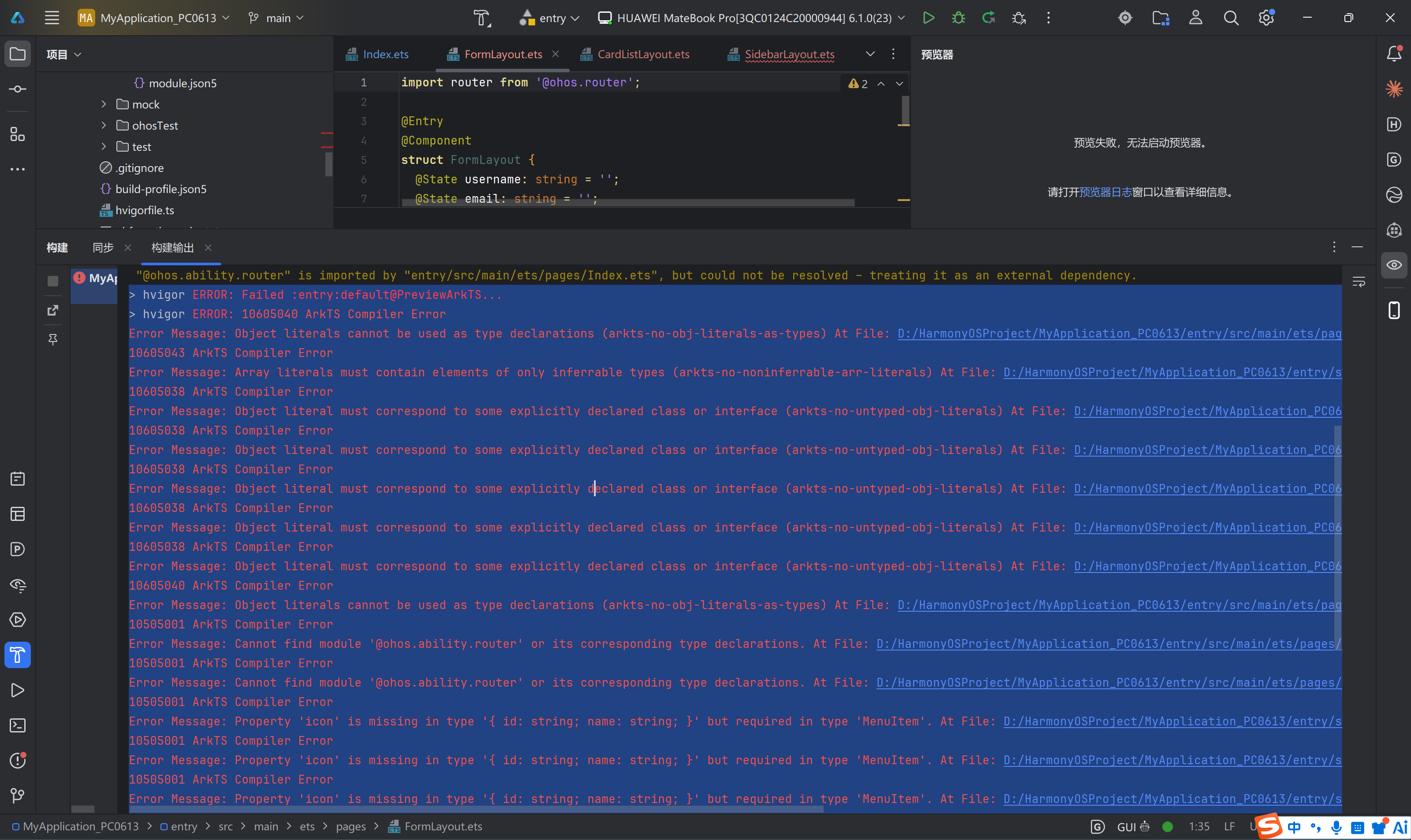
运行成功效果: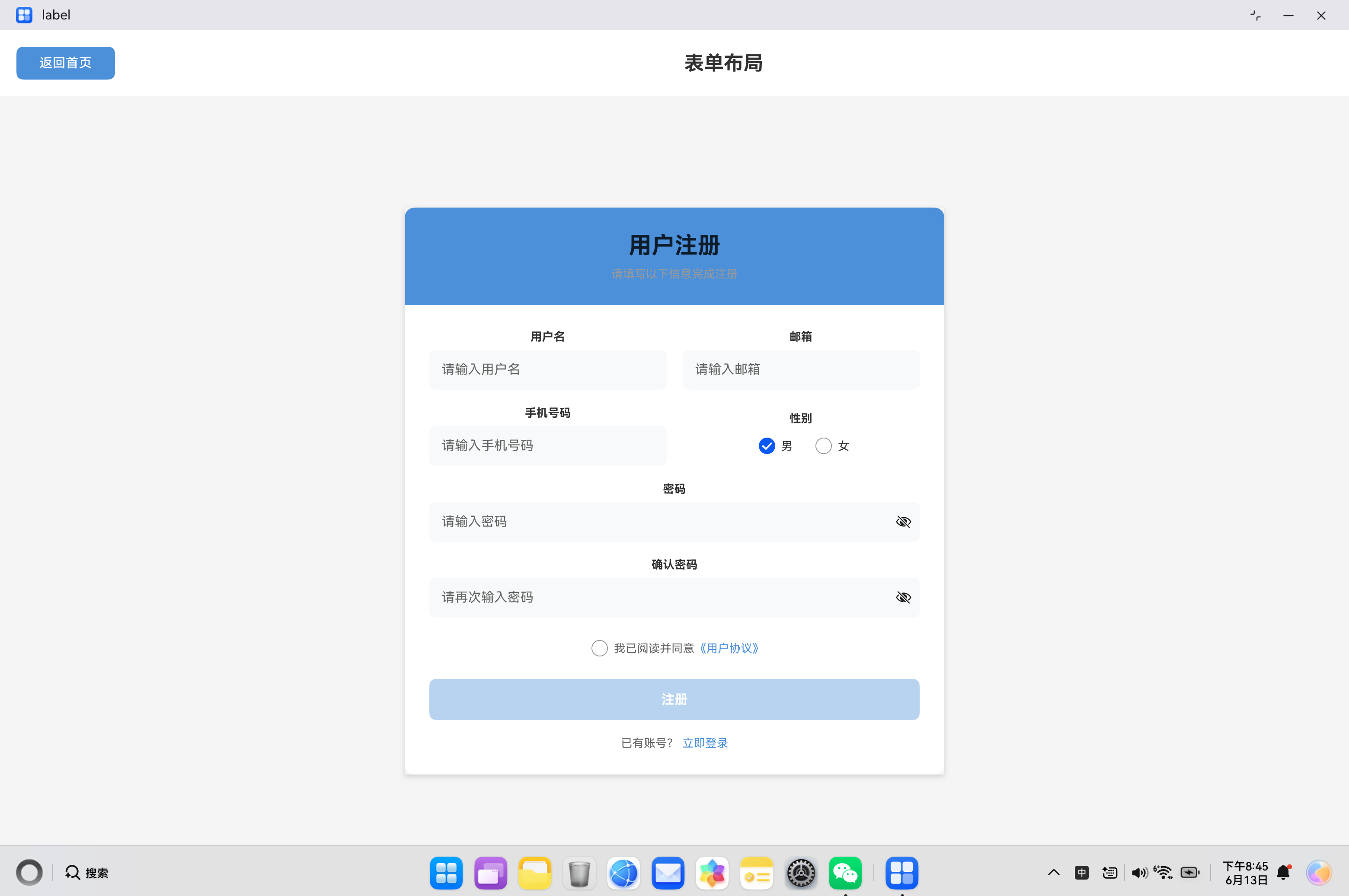
一、问题引入与错误场景再现
1.1 开发背景
在HarmonyOS应用开发过程中,表单处理是一个常见的功能需求。开发者在构建用户注册、信息采集等表单页面时,往往需要将用户输入的数据组织成结构化的对象进行传递和处理。对于熟悉TypeScript的开发者来说,使用对象字面量类型声明是一种简洁直观的方式,但在ArkTS中,这种写法会引发编译错误。
1.2 错误场景再现
让我们看一个典型的表单提交场景。在一个用户注册页面中,开发者需要收集用户的基本信息,包括用户名、邮箱、手机号和性别。当表单验证通过后,需要将这些数据打包成一个对象进行后续处理。
错误代码示例:
import router from '@ohos.router';

@Entry
@Component
struct FormLayout {
  @State username: string = '';
  @State email: string = '';
  @State phone: string = '';
  @State password: string = '';
  @State confirmPassword: string = '';
  @State gender: string = 'male';
  @State agreeTerms: boolean = false;

  @State usernameError: string = '';
  @State emailError: string = '';
  @State passwordError: string = '';

  validateForm(): boolean {
    let isValid = true;

    if (this.username.length === 0) {
      this.usernameError = '用户名不能为空';
      isValid = false;
    } else if (this.username.length < 3) {
      this.usernameError = '用户名至少3个字符';
      isValid = false;
    } else {
      this.usernameError = '';
    }

    if (this.email.length === 0) {
      this.emailError = '邮箱不能为空';
      isValid = false;
    } else if (!this.email.includes('@')) {
      this.emailError = '请输入有效的邮箱地址';
      isValid = false;
    } else {
      this.emailError = '';
    }

    if (this.password.length === 0) {
      this.passwordError = '密码不能为空';
      isValid = false;
    } else if (this.password.length < 6) {
      this.passwordError = '密码至少6个字符';
      isValid = false;
    } else if (this.password !== this.confirmPassword) {
      this.passwordError = '两次输入的密码不一致';
      isValid = false;
    } else {
      this.passwordError = '';
    }

    return isValid;
  }

  onSubmit(): void {
    if (this.validateForm()) {
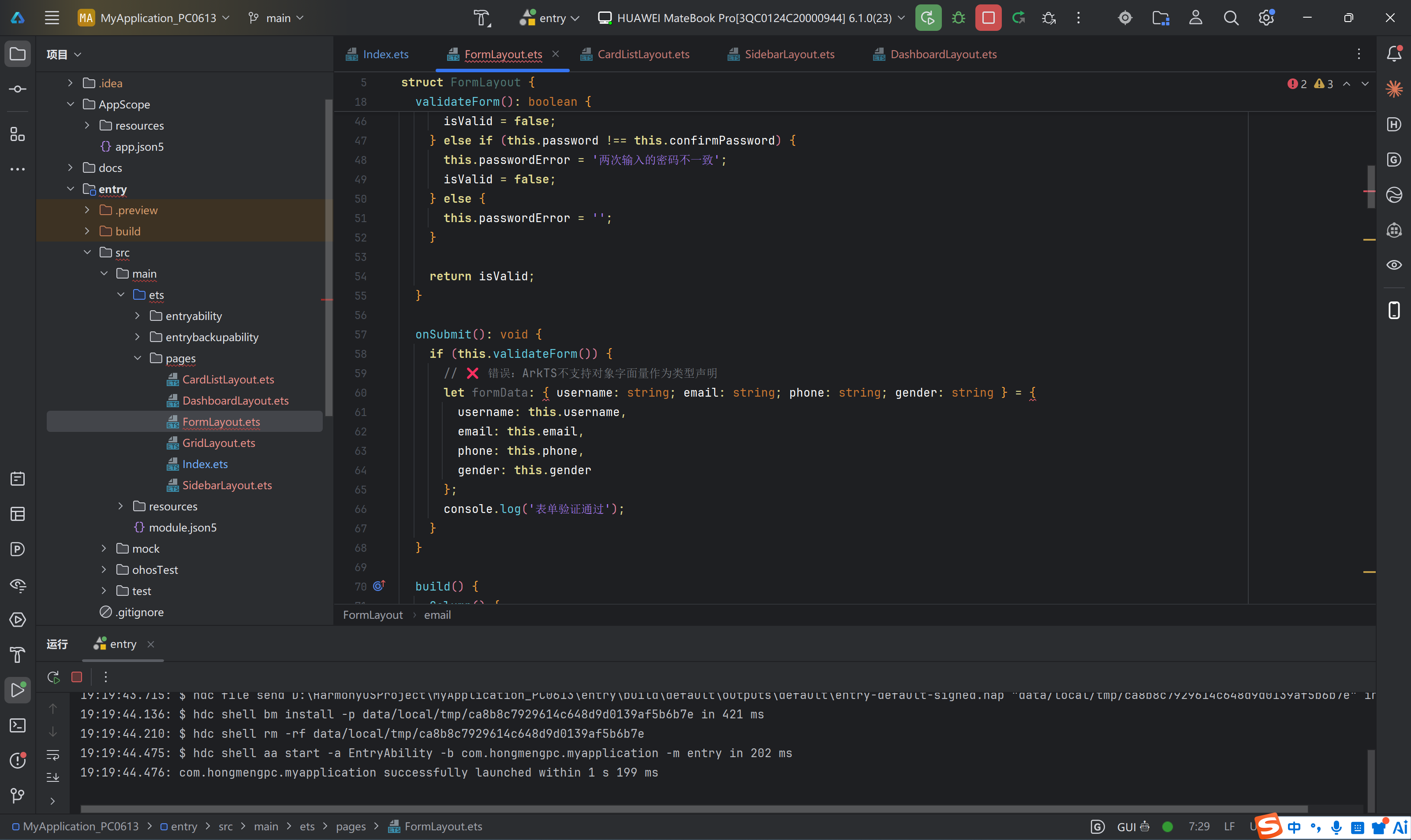
      // ❌ 错误:ArkTS不支持对象字面量作为类型声明
      let formData: { username: string; email: string; phone: string; gender: string } = {
        username: this.username,
        email: this.email,
        phone: this.phone,
        gender: this.gender
      };
      console.log('表单验证通过');
    }
  }

  build() {
    // UI构建代码...
  }
}
编译错误信息:
ERROR: Object literals cannot be used as type declarations (arkts-no-obj-literals-as-types)
File: d:\HarmonyOSProject\MyApplication_PC0613\entry\src\main\ets\pages\FormLayout.ets
Line: 60, Column: 7
1.3 错误影响分析
这个编译错误会导致整个项目无法构建成功,阻止应用的正常运行。对于从TypeScript迁移到ArkTS的开发者来说,这是一个常见且容易困惑的问题,因为同样的代码在TypeScript中是完全合法的。
错误的根本原因在于ArkTS的类型系统与TypeScript存在差异,ArkTS采用了更严格的静态类型约束,不允许使用对象字面量直接作为类型声明。
二、对象字面量类型声明在TypeScript中的用法
2.1 TypeScript中的对象字面量类型
在TypeScript中,对象字面量类型(Object Literal Types)是一种非常灵活的类型定义方式,允许开发者在需要的地方直接定义匿名对象类型,而无需预先声明接口或类型别名。
基本语法:
// 在TypeScript中,可以直接使用对象字面量作为类型
let user: { name: string; age: number } = {
  name: '张三',
  age: 25
};

// 函数参数使用对象字面量类型
function greet(person: { name: string; age: number }): void {
  console.log(`Hello, ${person.name}! You are ${person.age} years old.`);
}

// 函数返回值使用对象字面量类型
function createUser(): { id: number; name: string; email: string } {
  return {
    id: 1,
    name: '张三',
    email: 'zhangsan@example.com'
  };
}
2.2 TypeScript对象字面量类型的优势
1. 代码简洁性
对象字面量类型减少了类型定义的样板代码,特别是在只需要使用一次的场景中:
// 使用对象字面量类型 - 简洁
function processConfig(config: { apiUrl: string; timeout: number }): void {
  // 处理配置
}

// 对比使用接口 - 冗余
interface Config {
  apiUrl: string;
  timeout: number;
}
function processConfig(config: Config): void {
  // 处理配置
}
2. 内联类型定义
在复杂的类型组合中,对象字面量类型可以内联使用:
// 嵌套对象字面量类型
function fetchUser(): {
  user: {
    profile: {
      name: string;
      avatar: string;
    };
    settings: {
      theme: 'light' | 'dark';
      language: string;
    };
  };
  meta: {
    timestamp: number;
    version: string;
  };
} {
  return {
    user: {
      profile: { name: '张三', avatar: 'avatar.png' },
      settings: { theme: 'light', language: 'zh-CN' }
    },
    meta: { timestamp: Date.now(), version: '1.0.0' }
  };
}
3. 联合类型中的应用
// 对象字面量类型与联合类型结合
type Result =
  | { success: true; data: string }
  | { success: false; error: string };

function handleResult(result: Result): void {
  if (result.success) {
    console.log('Data:', result.data);
  } else {
    console.error('Error:', result.error);
  }
}
2.3 TypeScript对象字面量类型的高级用法
可选属性:
interface User {
  name: string;
  age: number;
  email?: string;  // 可选属性
}

// 或使用对象字面量类型
function createUser(name: string, age: number): { name: string; age: number; email?: string } {
  return { name, age };
}
只读属性:
// 使用readonly修饰符
let config: { readonly apiUrl: string; readonly timeout: number } = {
  apiUrl: 'https://api.example.com',
  timeout: 5000
};

// config.apiUrl = 'new-url'; // 编译错误:无法分配到"apiUrl",因为它是只读属性
索引签名:
// 字符串索引签名
let stringMap: { [key: string]: string } = {
  name: '张三',
  city: '北京'
};

// 数字索引签名
let numberArray: { [index: number]: string } = ['a', 'b', 'c'];
2.4 TypeScript与ArkTS的差异对比
| 特性 | TypeScript | ArkTS |
|---|---|---|
| 对象字面量类型 | ✅ 完全支持 | ❌ 不支持 |
| 匿名类型 | ✅ 支持 | ❌ 必须显式声明 |
| 内联类型定义 | ✅ 支持 | ❌ 需要预定义接口 |
| 类型推断 | ✅ 强大的类型推断 | ⚠️ 受限的类型推断 |
| 动态属性访问 | ✅ 支持 | ❌ 不支持 |
三、ArkTS不支持对象字面量类型声明的原因分析
3.1 静态类型系统的设计理念
ArkTS作为HarmonyOS的专用开发语言,其设计目标是构建高性能、高可靠性的应用。为了实现这一目标,ArkTS采用了严格的静态类型系统,这与TypeScript的设计理念存在本质差异。
编译期类型确定原则:
ArkTS要求所有类型信息在编译期必须完全确定,不允许存在运行时才能确定的类型。对象字面量类型虽然在TypeScript中是静态的,但其匿名特性使得编译器难以进行完整的类型分析和优化。
// TypeScript允许
let data: { name: string } = { name: 'test' };

// ArkTS要求显式声明
interface Data {
  name: string;
}
let data: Data = { name: 'test' };
3.2 性能优化的需求
内存布局优化:
明确的接口定义允许编译器在编译期确定对象的内存布局,从而生成更高效的内存访问代码。
// 显式接口定义 - 编译器可以优化内存布局
interface FormData {
  username: string;   // 偏移量: 0
  email: string;      // 偏移量: 8
  phone: string;       // 偏移量: 16
  gender: string;      // 偏移量: 24
}

// 对象字面量类型 - 内存布局不确定
let formData: { username: string; email: string; phone: string; gender: string } = { ... };
运行时性能提升:
ArkTS代码会被编译成方舟字节码(Ark Bytecode),进而转换为机器码执行。显式的类型声明使得编译器能够:
- 内联优化:直接访问对象属性,无需运行时查找
- 类型特化:针对特定类型生成优化的机器码
- 内存预分配:在对象创建时精确分配所需内存
3.3 代码可维护性考虑
类型复用性:
显式声明的接口可以在多个地方复用,提高代码的可维护性:
// 接口定义一次,多处使用
interface FormData {
  username: string;
  email: string;
  phone: string;
  gender: string;
}

// 函数参数
function validateForm(data: FormData): boolean { ... }

// 函数返回值
function getFormData(): FormData { ... }

// 变量声明
let formData: FormData = { ... };
IDE支持增强:
显式类型声明为IDE提供了更丰富的类型信息,支持更好的代码补全、重构和错误检查功能。
3.4 跨语言互操作性
HarmonyOS应用可能需要与C/C++等原生代码进行交互。显式的类型定义使得ArkTS能够:
- 生成一致的ABI:确保ArkTS对象与原生代码的内存布局兼容
- 类型映射:建立ArkTS类型与原生类型的明确映射关系
- 序列化优化:提供高效的对象序列化和反序列化支持
3.5 技术实现层面的原因
编译器实现复杂度:
支持对象字面量类型会显著增加编译器的实现复杂度:
- 类型比较:匿名类型的结构比较需要复杂的算法
- 类型推断:需要处理复杂的类型推断场景
- 错误诊断:匿名类型的错误信息难以清晰表达
类型系统一致性:
ArkTS的类型系统设计遵循"显式优于隐式"的原则,所有类型都应该有明确的名称和定义,这有助于:
- 保持类型系统的一致性
- 降低学习曲线
- 提高代码的可读性
四、错误分析与解决方案
4.1 错误深度分析
错误代码位置:
// 文件:FormLayout.ets
// 行号:60
let formData: { username: string; email: string; phone: string; gender: string } = {
  username: this.username,
  email: this.email,
  phone: this.phone,
  gender: this.gender
};
错误原因:
ArkTS编译器在解析到第60行时,检测到变量formData的类型声明使用了对象字面量语法{ username: string; email: string; phone: string; gender: string },这违反了ArkTS的类型约束规则。
编译器处理流程:
源代码
  ↓
词法分析
  ↓
语法分析 → 检测到对象字面量类型声明
  ↓
语义分析 → 验证类型约束 → 发现违规
  ↓
错误报告 → arkts-no-obj-literals-as-types
4.2 解决方案设计
方案一:使用接口定义(推荐)
这是最标准、最推荐的解决方案,符合ArkTS的最佳实践。
// 定义接口
interface FormData {
  username: string;
  email: string;
  phone: string;
  gender: string;
}

// 使用接口类型
let formData: FormData = {
  username: this.username,
  email: this.email,
  phone: this.phone,
  gender: this.gender
};
优点:
- 类型定义清晰,易于理解
- 支持类型复用
- IDE支持完善
- 符合ArkTS规范
方案二:使用类定义
当需要封装行为时,可以使用类定义:
class FormData {
  username: string = '';
  email: string = '';
  phone: string = '';
  gender: string = '';

  constructor(username: string, email: string, phone: string, gender: string) {
    this.username = username;
    this.email = email;
    this.phone = phone;
    this.gender = gender;
  }

  isValid(): boolean {
    return this.username.length > 0 && this.email.includes('@');
  }
}

let formData = new FormData(this.username, this.email, this.phone, this.gender);
优点:
- 支持方法定义
- 支持构造函数
- 面向对象编程
方案三:使用类型别名
type FormData = {
  username: string;
  email: string;
  phone: string;
  gender: string;
};

let formData: FormData = {
  username: this.username,
  email: this.email,
  phone: this.phone,
  gender: this.gender
};
注意: ArkTS对类型别名的支持有限,推荐优先使用接口。
4.3 方案选择建议
| 场景 | 推荐方案 | 原因 |
|---|---|---|
| 纯数据结构 | 接口 | 简洁、高效 |
| 需要方法 | 类 | 支持行为封装 |
| 类型复用 | 接口 | 易于维护 |
| 简单场景 | 接口 | 符合最佳实践 |
五、完整修复代码
5.1 修复后的FormLayout.ets
import router from '@ohos.router';

// 定义表单数据接口
interface FormData {
  username: string;
  email: string;
  phone: string;
  gender: string;
}

// 定义表单验证结果接口
interface ValidationResult {
  isValid: boolean;
  errors: Array<string>;
}

@Entry
@Component
struct FormLayout {
  @State username: string = '';
  @State email: string = '';
  @State phone: string = '';
  @State password: string = '';
  @State confirmPassword: string = '';
  @State gender: string = 'male';
  @State agreeTerms: boolean = false;

  @State usernameError: string = '';
  @State emailError: string = '';
  @State passwordError: string = '';

  // 验证表单
  validateForm(): boolean {
    let isValid = true;

    // 验证用户名
    if (this.username.length === 0) {
      this.usernameError = '用户名不能为空';
      isValid = false;
    } else if (this.username.length < 3) {
      this.usernameError = '用户名至少3个字符';
      isValid = false;
    } else {
      this.usernameError = '';
    }

    // 验证邮箱
    if (this.email.length === 0) {
      this.emailError = '邮箱不能为空';
      isValid = false;
    } else if (!this.email.includes('@')) {
      this.emailError = '请输入有效的邮箱地址';
      isValid = false;
    } else {
      this.emailError = '';
    }

    // 验证密码
    if (this.password.length === 0) {
      this.passwordError = '密码不能为空';
      isValid = false;
    } else if (this.password.length < 6) {
      this.passwordError = '密码至少6个字符';
      isValid = false;
    } else if (this.password !== this.confirmPassword) {
      this.passwordError = '两次输入的密码不一致';
      isValid = false;
    } else {
      this.passwordError = '';
    }

    return isValid;
  }

  // 创建表单数据对象
  createFormData(): FormData {
    let formData: FormData = {
      username: this.username,
      email: this.email,
      phone: this.phone,
      gender: this.gender
    };
    return formData;
  }

  // 提交表单
  onSubmit(): void {
    if (this.validateForm()) {
      // ✅ 正确:使用显式接口类型
      let formData: FormData = this.createFormData();

      console.log('表单验证通过');
      console.log('用户名:', formData.username);
      console.log('邮箱:', formData.email);
      console.log('手机号:', formData.phone);
      console.log('性别:', formData.gender);

      // 这里可以继续处理表单数据,如发送到服务器
      this.submitToServer(formData);
    }
  }

  // 提交到服务器
  submitToServer(data: FormData): void {
    // 模拟网络请求
    console.log('正在提交数据到服务器...');
    // 实际项目中这里会调用网络API
  }

  build() {
    Column() {
      Row() {
        Button('返回首页')
          .width(120)
          .height(40)
          .backgroundColor('#4A90D9')
          .fontColor(Color.White)
          .onClick(() => {
            router.back();
          })

        Text('表单布局')
          .fontSize(24)
          .fontWeight(FontWeight.Bold)
          .layoutWeight(1)
          .textAlign(TextAlign.Center)
      }
      .width('100%')
      .padding(20)
      .backgroundColor('#FFFFFF')

      Scroll() {
        Column() {
          Column() {
            Text('用户注册')
              .fontSize(28)
              .fontWeight(FontWeight.Bold)
              .margin({ bottom: 10 })

            Text('请填写以下信息完成注册')
              .fontSize(14)
              .fontColor('#999999')
          }
          .width('100%')
          .padding(30)
          .backgroundColor('#4A90D9')
          .borderRadius({ topLeft: 12, topRight: 12 })

          Column({ space: 20 }) {
            Row({ space: 20 }) {
              Column({ space: 8 }) {
                Text('用户名')
                  .fontSize(14)
                  .fontWeight(FontWeight.Bold)

                TextInput({ placeholder: '请输入用户名' })
                  .width('100%')
                  .height(48)
                  .borderRadius(8)
                  .backgroundColor('#F8F9FA')
                  .padding({ left: 15 })
                  .onChange((value: string) => {
                    this.username = value;
                  })

                if (this.usernameError.length > 0) {
                  Text(this.usernameError)
                    .fontSize(12)
                    .fontColor('#FF6B6B')
                }
              }
              .layoutWeight(1)

              Column({ space: 8 }) {
                Text('邮箱')
                  .fontSize(14)
                  .fontWeight(FontWeight.Bold)

                TextInput({ placeholder: '请输入邮箱' })
                  .width('100%')
                  .height(48)
                  .borderRadius(8)
                  .backgroundColor('#F8F9FA')
                  .padding({ left: 15 })
                  .onChange((value: string) => {
                    this.email = value;
                  })

                if (this.emailError.length > 0) {
                  Text(this.emailError)
                    .fontSize(12)
                    .fontColor('#FF6B6B')
                }
              }
              .layoutWeight(1)
            }

            Row({ space: 20 }) {
              Column({ space: 8 }) {
                Text('手机号码')
                  .fontSize(14)
                  .fontWeight(FontWeight.Bold)

                TextInput({ placeholder: '请输入手机号码' })
                  .width('100%')
                  .height(48)
                  .borderRadius(8)
                  .backgroundColor('#F8F9FA')
                  .padding({ left: 15 })
                  .onChange((value: string) => {
                    this.phone = value;
                  })
              }
              .layoutWeight(1)

              Column({ space: 8 }) {
                Text('性别')
                  .fontSize(14)
                  .fontWeight(FontWeight.Bold)

                Row({ space: 20 }) {
                  Row() {
                    Radio({ value: 'male', group: 'gender' })
                      .checked(this.gender === 'male')
                      .onChange((isChecked: boolean) => {
                        if (isChecked) {
                          this.gender = 'male';
                        }
                      })

                    Text('男')
                      .fontSize(14)
                  }

                  Row() {
                    Radio({ value: 'female', group: 'gender' })
                      .checked(this.gender === 'female')
                      .onChange((isChecked: boolean) => {
                        if (isChecked) {
                          this.gender = 'female';
                        }
                      })

                    Text('女')
                      .fontSize(14)
                  }
                }
              }
              .layoutWeight(1)
            }

            Column({ space: 8 }) {
              Text('密码')
                .fontSize(14)
                .fontWeight(FontWeight.Bold)

              TextInput({ placeholder: '请输入密码' })
                .type(InputType.Password)
                .width('100%')
                .height(48)
                .borderRadius(8)
                .backgroundColor('#F8F9FA')
                .padding({ left: 15 })
                .onChange((value: string) => {
                  this.password = value;
                })

              if (this.passwordError.length > 0) {
                Text(this.passwordError)
                  .fontSize(12)
                  .fontColor('#FF6B6B')
              }
            }

            Column({ space: 8 }) {
              Text('确认密码')
                .fontSize(14)
                .fontWeight(FontWeight.Bold)

              TextInput({ placeholder: '请再次输入密码' })
                .type(InputType.Password)
                .width('100%')
                .height(48)
                .borderRadius(8)
                .backgroundColor('#F8F9FA')
                .padding({ left: 15 })
                .onChange((value: string) => {
                  this.confirmPassword = value;
                })
            }

            Row() {
              Checkbox()
                .select(this.agreeTerms)
                .onChange((isSelected: boolean) => {
                  this.agreeTerms = isSelected;
                })

              Text('我已阅读并同意')
                .fontSize(14)
                .fontColor('#666666')

              Text('《用户协议》')
                .fontSize(14)
                .fontColor('#4A90D9')
            }

            Button('注册')
              .width('100%')
              .height(50)
              .backgroundColor('#4A90D9')
              .fontColor(Color.White)
              .fontSize(16)
              .fontWeight(FontWeight.Bold)
              .borderRadius(8)
              .enabled(this.agreeTerms)
              .onClick(() => {
                this.onSubmit();
              })

            Row() {
              Text('已有账号?')
                .fontSize(14)
                .fontColor('#666666')

              Text('立即登录')
                .fontSize(14)
                .fontColor('#4A90D9')
                .margin({ left: 5 })
            }
            .justifyContent(FlexAlign.Center)
          }
          .width('100%')
          .padding(30)
          .backgroundColor('#FFFFFF')
          .borderRadius({ bottomLeft: 12, bottomRight: 12 })
        }
        .width('40%')
        .margin({ top: 50 })
        .shadow({ radius: 10, color: '#D0D0D0', offsetX: 0, offsetY: 5 })
      }
      .width('100%')
      .layoutWeight(1)
      .backgroundColor('#F5F5F5')
    }
    .width('100%')
    .height('100%')
  }
}
5.2 修复要点说明
核心代码解析:
// ✅ 正确做法:在文件顶部定义接口
interface FormData {
  username: string;
  email: string;
  phone: string;
  gender: string;
}

// ✅ 正确做法:使用接口类型声明变量
let formData: FormData = {
  username: this.username,
  email: this.email,
  phone: this.phone,
  gender: this.gender
};
修复步骤:
- 提取接口定义:将对象字面量类型提取为独立的接口定义
- 放置位置:接口定义放在文件顶部,组件定义之前
- 类型引用:使用接口名称作为类型声明
- 代码组织:相关接口可以集中管理
六、其他对象字面量场景及解决方案
6.1 函数返回值类型
错误场景:
// ❌ 错误:函数返回值使用对象字面量类型
function getUserInfo(): { name: string; age: number; email: string } {
  return {
    name: '张三',
    age: 25,
    email: 'zhangsan@example.com'
  };
}
解决方案:
// ✅ 正确:定义接口
interface UserInfo {
  name: string;
  age: number;
  email: string;
}

function getUserInfo(): UserInfo {
  return {
    name: '张三',
    age: 25,
    email: 'zhangsan@example.com'
  };
}
6.2 函数参数类型
错误场景:
// ❌ 错误:函数参数使用对象字面量类型
function processUser(user: { id: number; name: string; role: string }): void {
  console.log(`Processing user: ${user.name}`);
}
解决方案:
// ✅ 正确:定义接口
interface User {
  id: number;
  name: string;
  role: string;
}

function processUser(user: User): void {
  console.log(`Processing user: ${user.name}`);
}
6.3 嵌套对象类型
错误场景:
// ❌ 错误:嵌套对象使用对象字面量类型
function getCompany(): {
  name: string;
  address: { city: string; street: string }
} {
  return {
    name: '科技公司',
    address: { city: '北京', street: '中关村大街' }
  };
}
解决方案:
// ✅ 正确:为每一层对象定义接口
interface Address {
  city: string;
  street: string;
}

interface Company {
  name: string;
  address: Address;
}

function getCompany(): Company {
  return {
    name: '科技公司',
    address: { city: '北京', street: '中关村大街' }
  };
}
6.4 数组元素类型
错误场景:
// ❌ 错误:数组元素使用对象字面量类型
let users: Array<{ id: number; name: string }> = [
  { id: 1, name: '张三' },
  { id: 2, name: '李四' }
];
解决方案:
// ✅ 正确:定义接口
interface User {
  id: number;
  name: string;
}

let users: Array<User> = [
  { id: 1, name: '张三' },
  { id: 2, name: '李四' }
];
6.5 Record类型中的对象字面量
错误场景:
// ❌ 错误:Record值类型使用对象字面量
let config: Record<string, { enabled: boolean; value: number }> = {
  'feature1': { enabled: true, value: 10 },
  'feature2': { enabled: false, value: 20 }
};
解决方案:
// ✅ 正确:定义接口
interface ConfigEntry {
  enabled: boolean;
  value: number;
}

let config: Record<string, ConfigEntry> = {
  'feature1': { enabled: true, value: 10 },
  'feature2': { enabled: false, value: 20 }
};
6.6 泛型类型参数
错误场景:
// ❌ 错误:泛型参数使用对象字面量类型
function fetchData<T extends { id: number; name: string }>(): T {
  // 获取数据
  return {} as T;
}
解决方案:
// ✅ 正确:定义接口
interface BaseEntity {
  id: number;
  name: string;
}

function fetchData<T extends BaseEntity>(): T {
  // 获取数据
  return {} as T;
}
6.7 复杂嵌套结构
错误场景:
// ❌ 错误:复杂嵌套结构使用对象字面量类型
function getApiResponse(): {
  code: number;
  message: string;
  data: {
    users: Array<{
      id: number;
      profile: {
        name: string;
        avatar: string;
      };
    }>;
  };
} {
  return {
    code: 200,
    message: 'success',
    data: {
      users: [
        { id: 1, profile: { name: '张三', avatar: 'avatar1.png' } }
      ]
    }
  };
}
解决方案:
// ✅ 正确:为每一层定义接口
interface UserProfile {
  name: string;
  avatar: string;
}

interface User {
  id: number;
  profile: UserProfile;
}

interface ResponseData {
  users: Array<User>;
}

interface ApiResponse {
  code: number;
  message: string;
  data: ResponseData;
}

function getApiResponse(): ApiResponse {
  return {
    code: 200,
    message: 'success',
    data: {
      users: [
        { id: 1, profile: { name: '张三', avatar: 'avatar1.png' } }
      ]
    }
  };
}
七、ArkTS接口定义最佳实践
7.1 接口命名规范
命名约定:
| 类型 | 命名规则 | 示例 |
|---|---|---|
| 数据接口 | PascalCase,描述性名词 | FormData, UserInfo, ProductItem |
| 响应接口 | 以Response结尾 | LoginResponse, ApiResponse |
| 配置接口 | 以Config或Options结尾 | UIConfig, RequestOptions |
| 状态接口 | 以State结尾 | FormState, LoadingState |
| Props接口 | 以Props结尾 | ButtonProps, ListItemProps |
示例:
// ✅ 推荐:清晰的命名
interface FormData {
  username: string;
  email: string;
  phone: string;
  gender: string;
}

interface LoginResponse {
  success: boolean;
  token: string;
  userId: string;
}

interface UIConfig {
  theme: string;
  language: string;
  fontSize: number;
}

// ❌ 不推荐:模糊的命名
interface Data { ... }
interface Info { ... }
interface Config { ... }
7.2 接口文件组织
目录结构:
entry/src/main/ets/
├── common/
│   ├── types/
│   │   ├── index.ets          # 类型导出入口
│   │   ├── form.ts            # 表单相关类型
│   │   ├── user.ts            # 用户相关类型
│   │   ├── api.ts             # API相关类型
│   │   └── config.ts          # 配置相关类型
│   └── constants/
│       └── index.ets          # 常量定义
├── pages/
│   └── FormLayout.ets
└── services/
    └── ApiService.ets
类型导出入口:
// File: common/types/index.ets
export { FormData, FormValidation, FormState } from './form';
export { User, UserInfo, UserProfile } from './user';
export { ApiResponse, ApiError, RequestOptions } from './api';
export { UIConfig, ThemeConfig, LanguageConfig } from './config';
使用示例:
// File: pages/FormLayout.ets
import { FormData, User, ApiResponse } from '../common/types';

@Entry
@Component
struct FormLayout {
  @State formData: FormData = {
    username: '',
    email: '',
    phone: '',
    gender: 'male'
  };

  // ...
}
7.3 接口设计原则
单一职责原则:
// ✅ 推荐:每个接口只描述一个概念
interface UserBasicInfo {
  id: string;
  name: string;
  email: string;
}

interface UserSecurityInfo {
  password: string;
  lastLoginTime: string;
  loginAttempts: number;
}

// ❌ 不推荐:混合多个概念
interface User {
  id: string;
  name: string;
  password: string;
  lastLoginTime: string;
  loginAttempts: number;
}
接口继承:
// 基础接口
interface BaseEntity {
  id: string;
  createdAt: string;
  updatedAt: string;
}

// 扩展接口
interface User extends BaseEntity {
  name: string;
  email: string;
  role: string;
}

interface Product extends BaseEntity {
  name: string;
  price: number;
  stock: number;
}
可选属性:
interface User {
  id: string;           // 必填
  name: string;         // 必填
  email?: string;       // 可选
  phone?: string;       // 可选
  avatar?: string;      // 可选
}

// 使用
let user: User = {
  id: '1',
  name: '张三'
  // email, phone, avatar 可以省略
};
只读属性:
interface Config {
  readonly apiUrl: string;     // 只读
  readonly apiKey: string;      // 只读
  timeout: number;             // 可修改
}

let config: Config = {
  apiUrl: 'https://api.example.com',
  apiKey: 'secret-key',
  timeout: 5000
};

// config.apiUrl = 'new-url';  // 编译错误
config.timeout = 10000;         // 正确
7.4 接口与类的选择
使用接口的场景:
- 纯数据结构,不包含行为
- 需要描述对象的形状
- 多个类需要实现相同的契约
- 需要类型复用
使用类的场景:
- 需要封装数据和行为
- 需要构造函数
- 需要继承和方法重写
- 需要实例化多个对象
对比示例:
// 接口:纯数据结构
interface Point {
  x: number;
  y: number;
}

// 类:包含行为
class Point {
  x: number;
  y: number;

  constructor(x: number, y: number) {
    this.x = x;
    this.y = y;
  }

  distance(): number {
    return Math.sqrt(this.x * this.x + this.y * this.y);
  }

  move(dx: number, dy: number): void {
    this.x += dx;
    this.y += dy;
  }
}
7.5 泛型接口
基本泛型接口:
interface Result<T> {
  success: boolean;
  data: T;
  message: string;
}

// 使用
let userResult: Result<User> = {
  success: true,
  data: { id: '1', name: '张三', email: 'zhang@example.com' },
  message: '获取成功'
};

let productResult: Result<Product> = {
  success: true,
  data: { id: '1', name: '商品', price: 99.9 },
  message: '获取成功'
};
多泛型参数:
interface Pair<K, V> {
  key: K;
  value: V;
}

let stringPair: Pair<string, string> = {
  key: 'name',
  value: '张三'
};

let numberPair: Pair<string, number> = {
  key: 'age',
  value: 25
};
泛型约束:
interface Entity {
  id: string;
}

interface Repository<T extends Entity> {
  findById(id: string): T | null;
  findAll(): Array<T>;
  save(entity: T): void;
  delete(id: string): void;
}

// 实现
class UserRepository implements Repository<User> {
  private users: Array<User> = [];

  findById(id: string): User | null {
    for (let i: number = 0; i < this.users.length; i++) {
      if (this.users[i].id === id) {
        return this.users[i];
      }
    }
    return null;
  }

  findAll(): Array<User> {
    return this.users;
  }

  save(entity: User): void {
    this.users.push(entity);
  }

  delete(id: string): void {
    this.users = this.users.filter((user: User) => user.id !== id);
  }
}
八、编译错误排查指南
8.1 错误信息解读
典型错误信息:
ERROR: Object literals cannot be used as type declarations (arkts-no-obj-literals-as-types)
File: d:\HarmonyOSProject\MyApplication_PC0613\entry\src\main\ets\pages\FormLayout.ets
Line: 60, Column: 7
错误信息组成:
| 组成部分 | 说明 |
|---|---|
| ERROR | 错误级别 |
| Object literals cannot be used as type declarations | 错误描述 |
| arkts-no-obj-literals-as-types | 错误代码 |
| File | 错误所在文件 |
| Line | 错误所在行号 |
| Column | 错误所在列号 |
8.2 错误定位步骤
步骤一:定位文件和行号
根据错误信息中的文件路径和行号,定位到具体代码位置。
步骤二:识别对象字面量类型
在定位的代码行中,查找使用对象字面量作为类型声明的部分:
// 查找类似这样的模式
let variable: { ... } = { ... };
function name(): { ... } { ... }
function name(param: { ... }): void { ... }
步骤三:分析上下文
查看错误代码的上下文,理解其用途:
onSubmit(): void {
  if (this.validateForm()) {
    // 上下文:表单验证通过后,创建表单数据对象
    let formData: { username: string; email: string; phone: string; gender: string } = {
      username: this.username,
      email: this.email,
      phone: this.phone,
      gender: this.gender
    };
    console.log('表单验证通过');
  }
}
步骤四:设计解决方案
根据上下文设计合适的接口定义:
// 分析:这是一个表单数据对象,包含用户注册信息
// 解决方案:定义FormData接口
interface FormData {
  username: string;
  email: string;
  phone: string;
  gender: string;
}
8.3 常见错误模式
模式一:变量声明
// ❌ 错误
let data: { name: string; value: number } = { name: 'test', value: 10 };

// ✅ 修复
interface Data {
  name: string;
  value: number;
}
let data: Data = { name: 'test', value: 10 };
模式二:函数返回值
// ❌ 错误
function getData(): { id: number; name: string } {
  return { id: 1, name: 'test' };
}

// ✅ 修复
interface DataResult {
  id: number;
  name: string;
}
function getData(): DataResult {
  return { id: 1, name: 'test' };
}
模式三:函数参数
// ❌ 错误
function process(config: { url: string; timeout: number }): void { }

// ✅ 修复
interface Config {
  url: string;
  timeout: number;
}
function process(config: Config): void { }
模式四:数组类型
// ❌ 错误
let items: Array<{ id: number; name: string }> = [];

// ✅ 修复
interface Item {
  id: number;
  name: string;
}
let items: Array<Item> = [];
8.4 批量修复策略
使用IDE重构功能:
- 选中对象字面量类型
- 右键选择"提取接口"
- 输入接口名称
- 确认重构
手动批量修复流程:
// 步骤1:收集所有对象字面量类型
// 文件扫描,找到所有 { ... } 类型声明

// 步骤2:按用途分类
// - 表单数据类型
// - API响应类型
// - 配置类型
// - 状态类型

// 步骤3:创建类型文件
// common/types/form.ts
// common/types/api.ts
// common/types/config.ts

// 步骤4:替换所有引用
// 使用IDE的查找替换功能
8.5 编译检查工具
使用hvigor编译:
# 执行编译
hvigor build

# 查看详细错误信息
hvigor build --verbose

# 生成编译报告
hvigor build --report
IDE实时检查:
DevEco Studio提供实时的类型检查,在编写代码时会即时显示错误提示。
配置编译选项:
// build-profile.json5
{
  "app": {
    "products": [
      {
        "name": "default",
        "signingConfig": "default",
        "compileSdkVersion": 9,
        "compatibleSdkVersion": 9,
        "runtimeOS": "HarmonyOS",
        "buildOption": {
          "strictMode": {
            "useNormalizedOHMUrl": true
          }
        }
      }
    ]
  }
}
九、性能优化建议
9.1 接口定义的性能影响
内存布局优化:
显式接口定义允许编译器优化对象的内存布局,减少内存占用和提高访问速度。
// 优化前:对象字面量类型(如果支持)
let user: { name: string; age: number; email: string } = { ... };

// 优化后:显式接口
interface User {
  name: string;   // 偏移量固定
  age: number;    // 偏移量固定
  email: string;  // 偏移量固定
}
let user: User = { ... };
编译器优化:
// 显式类型允许编译器进行以下优化:
// 1. 内联属性访问
// 2. 预计算偏移量
// 3. 类型特化
// 4. 死代码消除
9.2 数据结构选择
数组 vs Record:
// 场景1:频繁遍历
// 推荐:数组
interface Item {
  id: string;
  name: string;
}
let items: Array<Item> = [];
for (let i: number = 0; i < items.length; i++) {
  console.log(items[i].name);
}

// 场景2:频繁查找
// 推荐:Record
interface User {
  id: string;
  name: string;
}
let users: Record<string, User> = {};
let user = users['user-123'];  // O(1) 查找
索引优化:
interface User {
  id: string;
  name: string;
  email: string;
}

class UserStore {
  private users: Array<User> = [];
  private idIndex: Record<string, number> = {};

  add(user: User): void {
    let index = this.users.length;
    this.users.push(user);
    this.idIndex[user.id] = index;
  }

  findById(id: string): User | null {
    let index = this.idIndex[id];
    if (index !== undefined) {
      return this.users[index];
    }
    return null;
  }

  findByName(name: string): User | null {
    for (let i: number = 0; i < this.users.length; i++) {
      if (this.users[i].name === name) {
        return this.users[i];
      }
    }
    return null;
  }
}
9.3 对象池模式
减少对象创建开销:
interface PoolObject {
  reset(): void;
}

class ObjectPool<T extends PoolObject> {
  private pool: Array<T> = [];
  private createFn: () => T;

  constructor(createFn: () => T) {
    this.createFn = createFn;
  }

  acquire(): T {
    if (this.pool.length > 0) {
      return this.pool.pop() as T;
    }
    return this.createFn();
  }

  release(obj: T): void {
    obj.reset();
    this.pool.push(obj);
  }
}

// 使用示例
interface FormData extends PoolObject {
  username: string;
  email: string;
  phone: string;
  gender: string;
  reset(): void;
}

let formPool = new ObjectPool<FormData>(() => ({
  username: '',
  email: '',
  phone: '',
  gender: 'male',
  reset(): void {
    this.username = '';
    this.email = '';
    this.phone = '';
    this.gender = 'male';
  }
}));

// 使用
let formData = formPool.acquire();
// 使用formData...
formPool.release(formData);
9.4 类型缓存
避免重复创建对象:
// 优化前:每次调用都创建新对象
function getDefaultConfig(): Config {
  return {
    theme: 'light',
    language: 'zh-CN',
    fontSize: 14
  };
}

// 优化后:使用缓存
interface Config {
  theme: string;
  language: string;
  fontSize: number;
}

class ConfigCache {
  private static defaultConfig: Config | null = null;

  static getDefaultConfig(): Config {
    if (this.defaultConfig === null) {
      this.defaultConfig = {
        theme: 'light',
        language: 'zh-CN',
        fontSize: 14
      };
    }
    return this.defaultConfig;
  }
}
9.5 懒加载策略
按需加载大型数据结构:
interface LargeData {
  id: string;
  content: string;
  metadata: Record<string, string>;
}

class LazyLoader {
  private data: LargeData | null = null;

  getData(): LargeData {
    if (this.data === null) {
      this.data = this.loadData();
    }
    return this.data;
  }

  private loadData(): LargeData {
    // 模拟耗时加载
    return {
      id: '1',
      content: 'large content...',
      metadata: {}
    };
  }
}
9.6 序列化优化
高效的序列化/反序列化:
interface Serializable {
  serialize(): string;
  deserialize(data: string): void;
}

interface User extends Serializable {
  id: string;
  name: string;
  email: string;
  serialize(): string;
  deserialize(data: string): void;
}

class UserImpl implements User {
  id: string = '';
  name: string = '';
  email: string = '';

  serialize(): string {
    return JSON.stringify({
      id: this.id,
      name: this.name,
      email: this.email
    });
  }

  deserialize(data: string): void {
    let obj = JSON.parse(data) as User;
    this.id = obj.id;
    this.name = obj.name;
    this.email = obj.email;
  }
}
十、总结与展望
10.1 核心要点回顾
问题本质:
ArkTS不支持对象字面量类型声明,这是由其静态类型系统的设计理念决定的。开发者必须使用显式的接口或类来定义对象类型。
解决方案:
- 接口定义:为对象字面量类型创建对应的接口
- 类型复用:将接口定义放在合适的位置,便于复用
- 代码组织:建立清晰的类型文件结构
最佳实践:
- 遵循接口命名规范
- 保持接口的单一职责
- 合理使用泛型
- 考虑性能优化
10.2 开发建议
编码规范:
- 在文件顶部定义接口
- 使用有意义的接口名称
- 保持接口定义简洁
- 及时重构重复的类型定义
团队协作:
- 建立统一的类型定义规范
- 使用共享的类型文件
- 进行代码审查时关注类型定义
- 编写清晰的类型文档
工具使用:
- 利用IDE的重构功能
- 使用编译检查工具
- 配置代码格式化规则
- 启用严格的类型检查
10.3 迁移策略
从TypeScript迁移:
- 识别问题代码:扫描所有对象字面量类型
- 分类整理:按功能模块分类
- 创建接口:为每类对象创建接口
- 替换引用:更新所有类型引用
- 测试验证:确保功能正常
迁移检查清单:
- 所有变量声明的类型检查
- 所有函数参数的类型检查
- 所有函数返回值的类型检查
- 所有数组元素的类型检查
- 所有Record值类型的检查
- 所有泛型约束的检查
10.4 未来展望
ArkTS语言发展:
随着HarmonyOS生态的成熟,ArkTS语言可能会:
- 增强类型推断:提供更智能的类型推断能力
- 简化类型定义:可能引入更简洁的类型定义语法
- 改进错误提示:提供更友好的错误信息和修复建议
开发工具改进:
- IDE增强:更强大的代码补全和重构功能
- 自动化工具:自动检测和修复类型问题的工具
- 性能分析:更完善的性能分析和优化建议
生态系统建设:
- 类型库:丰富的共享类型定义库
- 最佳实践:完善的开发指南和最佳实践
- 社区支持:活跃的开发者社区和知识分享
10.5 结语
ArkTS对象字面量类型声明的限制虽然增加了代码编写的复杂度,但带来了更严格的类型安全和更好的运行时性能。理解这一限制背后的设计理念,掌握正确的解决方案,是每个HarmonyOS开发者的必备技能。
通过本文的详细解析,我们深入了解了:
- 错误产生的根本原因
- TypeScript与ArkTS的差异
- 完整的解决方案
- 最佳实践和性能优化
希望本文能够帮助开发者更好地理解和应对ArkTS开发中的类型约束问题,编写出更高质量、更高性能的HarmonyOS应用。
附录:快速参考
A.1 常见错误速查表
| 错误代码 | 错误描述 | 解决方案 |
|---|---|---|
| arkts-no-obj-literals-as-types | 对象字面量不能作为类型声明 | 创建显式接口 |
| arkts-no-no-untyped-obj-literals | 对象字面量必须对应显式声明 | 创建接口或类 |
A.2 类型定义模板
基础接口模板:
interface EntityName {
  // 必填字段
  field1: Type1;
  field2: Type2;

  // 可选字段
  field3?: Type3;

  // 只读字段
  readonly field4: Type4;
}
泛型接口模板:
interface GenericEntity<T> {
  data: T;
  metadata: Metadata;
}
继承接口模板:
interface BaseEntity {
  id: string;
  createdAt: string;
}

interface ExtendedEntity extends BaseEntity {
  name: string;
  value: number;
}
A.3 修复检查清单
- 识别所有对象字面量类型声明
- 创建对应的接口定义
- 更新所有类型引用
- 验证编译通过
- 测试功能正常
- 代码审查通过
参考资料:
版本历史:
- v1.0 - 初始版本 (2026-06-13)

讨论HarmonyOS开发技术,专注于API与组件、DevEco Studio、测试、元服务和应用上架分发等。
更多推荐


 14
14 0
0- 0


 已为社区贡献25条内容

所有评论(0)