鸿蒙中Flex组件的详细使用教程
·
弹性布局组件
既可以设置为横向也可以设置为纵向,以弹性方式布局子组件的容器组件(存在二次布局)
如何设置布局方向
需要传入一些参数,以对象的形式传进去
关于方向的键值对是
- 键:direction
- 值:FlexDirection的枚举(里面有要设置的枚举)
注意,Flex布局中,改变布局的对齐方式的方法,并不是通过属性的方法改变,而是通过构造参数的方法传进去,
如歌改变布局方向呢
同样还是用 justifyContent() 和 alignItems()这两个来改变对齐方向,只不过它们现在换成键值对的键了,值还是之前要传进去的参数
如何换行
Flex布局中传入构造参数wrap(作为键值对的键)
然后它的值是FlexWrap的枚举
然后这个组件他默认的方向是横向的
下面我们先来用一个简单的案例进行测试
我们做一些方格再这个布局里面如下
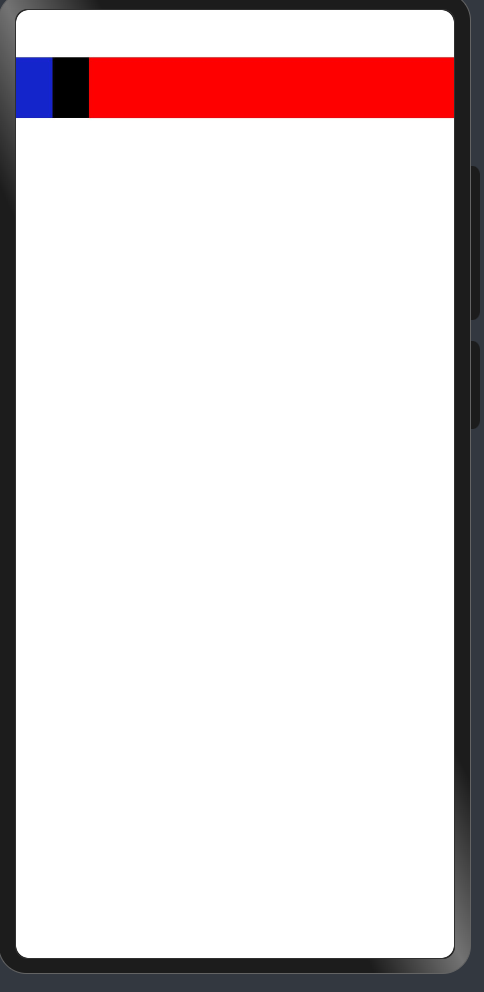
@Entry
@Component
struct FlexCase {
  @State message: string = 'Hello World';

  build() {
    Flex(){
      Row().width(50).height(50)
        .backgroundColor("#ff1325cb")

      Row().width(50).height(50)
        .backgroundColor(Color.Black)
      Row().width(50).height(50)
        .backgroundColor(Color.Red)
      Row().width(50).height(50)
        .backgroundColor(Color.Red)
      Row().width(50).height(50)
        .backgroundColor(Color.Red)
      Row().width(50).height(50)
        .backgroundColor(Color.Red)
      Row().width(50).height(50)
        .backgroundColor(Color.Red)
      Row().width(50).height(50)
        .backgroundColor(Color.Red)
      Row().width(50).height(50)
        .backgroundColor(Color.Red)
      Row().width(50).height(50)
        .backgroundColor(Color.Red)
      Row().width(50).height(50)
        .backgroundColor(Color.Red)
      Row().width(50).height(50)
        .backgroundColor(Color.Red)

    }
    .width("100%")
    .height("100%")
  }
}
上面的这个是默认的布局,然后呢,我们给他传入一个FlexDirection的枚举,这样就可以改变他的一个布局方向了,如下
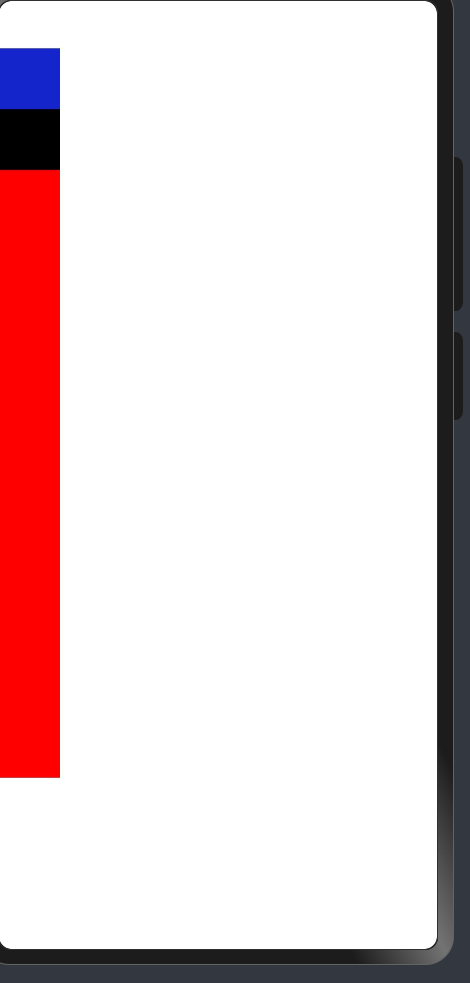
@Entry
@Component
struct FlexCase {
  @State message: string = 'Hello World';

  build() {
    Flex({direction:FlexDirection.Column}){
      Row().width(50).height(50)
        .backgroundColor("#ff1325cb")

      Row().width(50).height(50)
        .backgroundColor(Color.Black)
      Row().width(50).height(50)
        .backgroundColor(Color.Red)
      Row().width(50).height(50)
        .backgroundColor(Color.Red)
      Row().width(50).height(50)
        .backgroundColor(Color.Red)
      Row().width(50).height(50)
        .backgroundColor(Color.Red)
      Row().width(50).height(50)
        .backgroundColor(Color.Red)
      Row().width(50).height(50)
        .backgroundColor(Color.Red)
      Row().width(50).height(50)
        .backgroundColor(Color.Red)
      Row().width(50).height(50)
        .backgroundColor(Color.Red)
      Row().width(50).height(50)
        .backgroundColor(Color.Red)
      Row().width(50).height(50)
        .backgroundColor(Color.Red)

    }
    .width("100%")
    .height("100%")
  }
}

讨论HarmonyOS开发技术,专注于API与组件、DevEco Studio、测试、元服务和应用上架分发等。
更多推荐


 9
9 0
0- 0


 已为社区贡献7条内容

所有评论(0)