Harmonyos应用实例200: 平面法向量探寻
·
2. 平面法向量探寻
对应章节:1.4 空间向量的应用
功能简介:
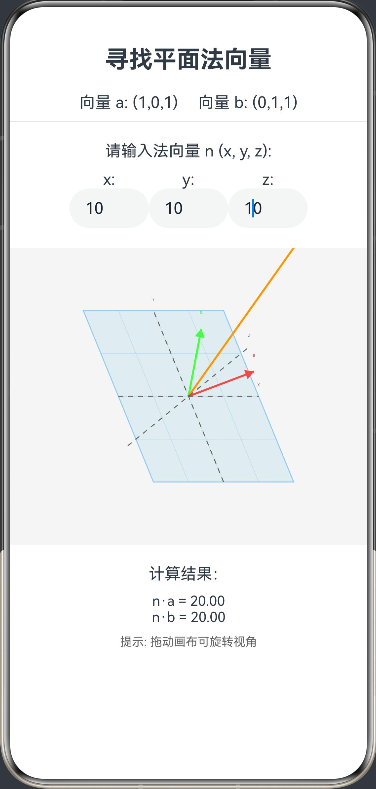
给定平面上的两个不共线向量 a⃗\vec{a}a 和 b⃗\vec{b}b。学生需要输入一个向量 n⃗=(x,y,z)\vec{n}=(x,y,z)n=(x,y,z),系统实时计算 n⃗⋅a⃗\vec{n} \cdot \vec{a}n⋅a 和 n⃗⋅b⃗\vec{n} \cdot \vec{b}n⋅b 是否为0。当两个数量积均为0时,屏幕高亮提示“找到法向量!”,展示法向量与平面垂直的关系。
interface Vector2 {
  x: number
  y: number
}

@Entry
@Component
struct NormalVectorFinder {
  @State vecA: number[] = [1, 0, 1] // 预设向量a
  @State vecB: number[] = [0, 1, 1] // 预设向量b
  @State inputN: number[] = [0, 0, 0] // 学生输入
  @State isPerpendicular: boolean = false
  @State rotateX: number = -30
  @State rotateY: number = 45
  private settings: RenderingContextSettings = new RenderingContextSettings(true)
  private context: CanvasRenderingContext2D = new CanvasRenderingContext2D(this.settings)

  build() {
    Column() {
      Text('寻找平面法向量')
        .fontSize(24).fontWeight(FontWeight.Bold).margin({ bottom: 20 })

      Row() {
        Text(`向量 a: (${this.vecA.join(',')})`)
          .fontSize(16).margin({ right: 20 })
        Text(`向量 b: (${this.vecB.join(',')})`)
          .fontSize(16)
      }.margin({ bottom: 10 })

      Divider().margin({ bottom: 20 })

      Text('请输入法向量 n (x, y, z):')
        .fontSize(16).margin({ bottom: 10 })

      Row() {
        Column() {
          Text('x:')
          TextInput({
            placeholder: '0',
            text: this.inputN[0].toString()
          })
            .width(80)
            .onChange((value: string) => {
              this.inputN[0] = parseFloat(value) || 0
              this.checkPerpendicular()
              this.drawVectors(this.context)
            })
        }
        Column() {
          Text('y:')
          TextInput({
            placeholder: '0',
            text: this.inputN[1].toString()
          })
            .width(80)
            .onChange((value: string) => {
              this.inputN[1] = parseFloat(value) || 0
              this.checkPerpendicular()
              this.drawVectors(this.context)
            })
        }
        Column() {
          Text('z:')
          TextInput({
            placeholder: '0',
            text: this.inputN[2].toString()
          })
            .width(80)
            .onChange((value: string) => {
              this.inputN[2] = parseFloat(value) || 0
              this.checkPerpendicular()
              this.drawVectors(this.context)
            })
        }
      }.margin({ bottom: 20 })

      Stack() {
        Canvas(this.context)
          .width(400)
          .height(300)
          .onReady(() => this.drawVectors(this.context))
      }
      .margin({ bottom: 20 })
      .gesture(
        PanGesture()
          .onActionUpdate((e) => {
            this.rotateY += e.offsetX
            this.rotateX -= e.offsetY
            this.drawVectors(this.context)
          })
      )

      Text(`计算结果:`)
        .fontSize(16).margin({ bottom: 10 })
      Text(`n·a = ${this.dotProduct(this.inputN, this.vecA).toFixed(2)}`)
        .fontSize(14)
      Text(`n·b = ${this.dotProduct(this.inputN, this.vecB).toFixed(2)}`)
        .fontSize(14)

      if (this.isPerpendicular) {
        Text('✅ 找到法向量!该向量垂直于平面!')
          .fontColor('#4CAF50').fontSize(20).fontWeight(FontWeight.Bold)
          .margin({ top: 10 })
      }

      Text('提示: 拖动画布可旋转视角')
        .fontSize(12).fontColor('#666')
        .margin({ top: 10 })
    }
  }

  private dotProduct(v1: number[], v2: number[]): number {
    return v1[0]*v2[0] + v1[1]*v2[1] + v1[2]*v2[2]
  }

  private checkPerpendicular() {
    const dotA = this.dotProduct(this.inputN, this.vecA)
    const dotB = this.dotProduct(this.inputN, this.vecB)
    // 允许一定的误差范围
    this.isPerpendicular = Math.abs(dotA) < 0.001 && Math.abs(dotB) < 0.001
  }

  private drawVectors(ctx: CanvasRenderingContext2D) {
    const width = 400
    const height = 300
    const centerX = width / 2
    const centerY = height / 2
    const scale = 50

    // 清空画布
    ctx.clearRect(0, 0, width, height)
    ctx.fillStyle = '#F5F5F5'
    ctx.fillRect(0, 0, width, height)

    // 计算旋转角度(弧度)
    const rotX = this.rotateX * Math.PI / 180
    const rotY = this.rotateY * Math.PI / 180

    // 3D到2D的投影函数
    const project = (point: number[]): Vector2 => {
      let x = point[0]
      let y = point[1] * Math.cos(rotX) - point[2] * Math.sin(rotX)
      let z = point[1] * Math.sin(rotX) + point[2] * Math.cos(rotX)

      x = x * Math.cos(rotY) + z * Math.sin(rotY)
      z = -x * Math.sin(rotY) + z * Math.cos(rotY)

      return {
        x: centerX + x * scale,
        y: centerY - y * scale
      } as Vector2
    }

    // 绘制平面
    this.drawPlane(ctx, project, scale)

    // 绘制向量a
    this.drawVector(ctx, project([0, 0, 0]), project(this.vecA), '#FF4444', 'a')

    // 绘制向量b
    this.drawVector(ctx, project([0, 0, 0]), project(this.vecB), '#44FF44', 'b')

    // 绘制输入的向量n
    if (this.inputN[0] !== 0 || this.inputN[1] !== 0 || this.inputN[2] !== 0) {
      const color = this.isPerpendicular ? '#4CAF50' : '#FF9800'
      this.drawVector(ctx, project([0, 0, 0]), project(this.inputN), color, 'n')
    }

    // 绘制坐标轴
    this.drawAxes(ctx, project, scale)
  }

  private drawPlane(ctx: CanvasRenderingContext2D, project: (point: number[]) => Vector2, scale: number) {
    // 计算平面上的四个点
    const points: Vector2[] = [
      project([-2, -2, 0]),
      project([2, -2, 0]),
      project([2, 2, 0]),
      project([-2, 2, 0])
    ]

    // 绘制平面
    ctx.fillStyle = 'rgba(173, 216, 230, 0.3)'
    ctx.strokeStyle = '#90CAF9'
    ctx.lineWidth = 1
    ctx.beginPath()
    ctx.moveTo(points[0].x, points[0].y)
    for (let i = 1; i < points.length; i++) {
      ctx.lineTo(points[i].x, points[i].y)
    }
    ctx.closePath()
    ctx.fill()
    ctx.stroke()

    // 绘制平面网格
    ctx.strokeStyle = 'rgba(144, 202, 249, 0.5)'
    ctx.lineWidth = 0.5

    // 水平线
    for (let y = -2; y <= 2; y += 1) {
      const start = project([-2, y, 0])
      const end = project([2, y, 0])
      ctx.beginPath()
      ctx.moveTo(start.x, start.y)
      ctx.lineTo(end.x, end.y)
      ctx.stroke()
    }

    // 垂直线
    for (let x = -2; x <= 2; x += 1) {
      const start = project([x, -2, 0])
      const end = project([x, 2, 0])
      ctx.beginPath()
      ctx.moveTo(start.x, start.y)
      ctx.lineTo(end.x, end.y)
      ctx.stroke()
    }
  }

  private drawVector(ctx: CanvasRenderingContext2D, start: Vector2, end: Vector2, color: string, label: string) {
    // 绘制向量线
    ctx.strokeStyle = color
    ctx.lineWidth = 2
    ctx.beginPath()
    ctx.moveTo(start.x, start.y)
    ctx.lineTo(end.x, end.y)
    ctx.stroke()

    // 绘制箭头
    const arrowSize = 10
    const angle = Math.atan2(end.y - start.y, end.x - start.x)
    ctx.beginPath()
    ctx.moveTo(end.x, end.y)
    ctx.lineTo(
      end.x - arrowSize * Math.cos(angle - Math.PI / 6),
      end.y - arrowSize * Math.sin(angle - Math.PI / 6)
    )
    ctx.lineTo(
      end.x - arrowSize * Math.cos(angle + Math.PI / 6),
      end.y - arrowSize * Math.sin(angle + Math.PI / 6)
    )
    ctx.closePath()
    ctx.fillStyle = color
    ctx.fill()

    // 绘制标签
    ctx.fillStyle = color
    ctx.font = '14px sans-serif'
    ctx.textAlign = 'center'
    ctx.fillText(label, end.x, end.y - 15)
  }

  private drawAxes(ctx: CanvasRenderingContext2D, project: (point: number[]) => Vector2, scale: number) {
    // 绘制坐标轴
    const axisLength = 2
    ctx.strokeStyle = '#666666'
    ctx.lineWidth = 1
    ctx.setLineDash([5, 5])

    // X轴
    const xStart = project([-axisLength, 0, 0])
    const xEnd = project([axisLength, 0, 0])
    ctx.beginPath()
    ctx.moveTo(xStart.x, xStart.y)
    ctx.lineTo(xEnd.x, xEnd.y)
    ctx.stroke()

    // Y轴
    const yStart = project([0, -axisLength, 0])
    const yEnd = project([0, axisLength, 0])
    ctx.beginPath()
    ctx.moveTo(yStart.x, yStart.y)
    ctx.lineTo(yEnd.x, yEnd.y)
    ctx.stroke()

    // Z轴
    const zStart = project([0, 0, -axisLength])
    const zEnd = project([0, 0, axisLength])
    ctx.beginPath()
    ctx.moveTo(zStart.x, zStart.y)
    ctx.lineTo(zEnd.x, zEnd.y)
    ctx.stroke()

    ctx.setLineDash([])

    // 绘制坐标轴标签
    ctx.fillStyle = '#666666'
    ctx.font = '12px sans-serif'
    ctx.textAlign = 'center'
    ctx.fillText('X', xEnd.x, xEnd.y - 10)
    ctx.fillText('Y', yEnd.x, yEnd.y - 10)
    ctx.fillText('Z', zEnd.x, zEnd.y - 10)
  }
}

讨论HarmonyOS开发技术,专注于API与组件、DevEco Studio、测试、元服务和应用上架分发等。
更多推荐


 0
0 0
0- 0


 已为社区贡献402条内容

所有评论(0)