Harmonyos应用实例193:圆与方程探索
·
5. 圆与方程探索
功能简介:输入圆心坐标和半径,绘制圆并显示标准方程,探索圆与直线的位置关系。这是一个功能强大的圆方程计算器,支持通过滑块交互式调整圆心坐标和半径,实时绘制圆形并显示标准方程。用户可选择显示直线,通过调整斜率和截距探索圆与直线的位置关系,系统会自动分析并显示相离、相切或相交的判断结果。界面设计直观清晰,操作流畅,是理解圆的几何性质和解析几何关系的理想学习工具。
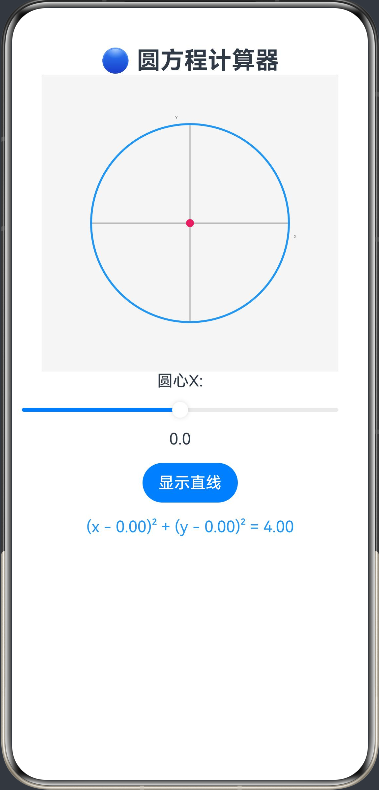
ArkTS代码:
@Entry
@Component
struct CircleEquation {
  @State private centerX: number = 0
  @State private centerY: number = 0
  @State private radius: number = 2
  @State private equation: string = ''
  @State private showLine: boolean = false
  @State private lineSlope: number = 1
  @State private lineIntercept: number = 0
  @State private positionRelation: string = ''
  private settings: RenderingContextSettings = new RenderingContextSettings(true)
  private context: CanvasRenderingContext2D = new CanvasRenderingContext2D(this.settings)

  build() {
    Column() {
      Text('🔵 圆方程计算器')
        .fontSize(24).fontWeight(FontWeight.Bold)

      Canvas(this.context)
        .width(300).height(300)
        .onReady(() => this.drawCircle(this.context))

      Row() {
        Column() {
          Text('圆心X:')
          Slider({ value: this.centerX, min: -3, max: 3, step: 0.1 })
            .onChange((val: number) => {
              this.centerX = val
              this.drawCircle(this.context)
            })
          Text(`${this.centerX.toFixed(1)}`)
        }
        .margin({ right: 20 })

        Column() {
          Text('圆心Y:')
          Slider({ value: this.centerY, min: -3, max: 3, step: 0.1 })
            .onChange((val: number) => {
              this.centerY = val
              this.drawCircle(this.context)
            })
          Text(`${this.centerY.toFixed(1)}`)
        }
        .margin({ right: 20 })

        Column() {
          Text('半径:')
          Slider({ value: this.radius, min: 0.5, max: 4, step: 0.1 })
            .onChange((val: number) => {
              this.radius = val
              this.drawCircle(this.context)
            })
          Text(`${this.radius.toFixed(1)}`)
        }
      }
      .margin({ bottom: 15 })

      Row() {
        Button('显示直线').onClick(() => {
          this.showLine = !this.showLine
          this.drawCircle(this.context)
        })
      }
      .margin({ bottom: 15 })

      if (this.showLine) {
        Row() {
          Column() {
            Text('直线斜率:')
            Slider({ value: this.lineSlope, min: -3, max: 3, step: 0.1 })
              .onChange((val: number) => {
                this.lineSlope = val
                this.drawCircle(this.context)
              })
            Text(`${this.lineSlope.toFixed(1)}`)
          }
          .margin({ right: 20 })

          Column() {
            Text('直线截距:')
            Slider({ value: this.lineIntercept, min: -3, max: 3, step: 0.1 })
              .onChange((val: number) => {
                this.lineIntercept = val
                this.drawCircle(this.context)
              })
            Text(`${this.lineIntercept.toFixed(1)}`)
          }
        }
        .margin({ bottom: 15 })
      }

      Text(this.equation)
        .fontSize(16).fontColor('#2196F3')

      if (this.showLine) {
        Text(this.positionRelation)
          .fontSize(16).fontColor('#4CAF50')
      }
    }
  }

  private drawCircle(ctx: CanvasRenderingContext2D) {
    const width = 300
    const height = 300
    const canvasCenterX = width / 2
    const canvasCenterY = height / 2

    // 清空画布
    ctx.clearRect(0, 0, width, height)
    ctx.fillStyle = '#F5F5F5'
    ctx.fillRect(0, 0, width, height)

    // 绘制坐标系
    this.drawCoordinateSystem(ctx, canvasCenterX, canvasCenterY)

    // 计算圆的标准方程
    this.calculateCircleEquation()

    // 转换圆心坐标到画布坐标
    const canvasCircleX = canvasCenterX + this.centerX * 50
    const canvasCircleY = canvasCenterY - this.centerY * 50
    const canvasRadius = this.radius * 50

    // 绘制圆
    ctx.strokeStyle = '#2196F3'
    ctx.lineWidth = 2
    ctx.beginPath()
    ctx.arc(canvasCircleX, canvasCircleY, canvasRadius, 0, Math.PI * 2)
    ctx.stroke()

    // 绘制圆心
    ctx.fillStyle = '#E91E63'
    ctx.beginPath()
    ctx.arc(canvasCircleX, canvasCircleY, 4, 0, Math.PI * 2)
    ctx.fill()

    // 如果显示直线,绘制直线并分析位置关系
    if (this.showLine) {
      this.drawLine(ctx, canvasCenterX, canvasCenterY)
      this.analyzePositionRelation()
    }
  }

  private drawCoordinateSystem(ctx: CanvasRenderingContext2D, centerX: number, centerY: number) {
    // 绘制坐标系
    ctx.strokeStyle = '#999999'
    ctx.lineWidth = 1

    // X轴
    ctx.beginPath()
    ctx.moveTo(50, centerY)
    ctx.lineTo(250, centerY)
    ctx.stroke()

    // Y轴
    ctx.beginPath()
    ctx.moveTo(centerX, 50)
    ctx.lineTo(centerX, 250)
    ctx.stroke()

    // 标注
    ctx.fillStyle = '#666666'
    ctx.font = '12px sans-serif'
    ctx.fillText('X', 255, centerY + 15)
    ctx.fillText('Y', centerX - 15, 45)
  }

  private calculateCircleEquation() {
    this.equation = `(x - ${this.centerX.toFixed(2)})² + (y - ${this.centerY.toFixed(2)})² = ${(this.radius * this.radius).toFixed(2)}`
  }

  private drawLine(ctx: CanvasRenderingContext2D, centerX: number, centerY: number) {
    // 计算直线上的两个点
    const x1 = -5
    const y1 = this.lineSlope * x1 + this.lineIntercept
    const x2 = 5
    const y2 = this.lineSlope * x2 + this.lineIntercept

    // 转换为画布坐标
    const canvasX1 = centerX + x1 * 50
    const canvasY1 = centerY - y1 * 50
    const canvasX2 = centerX + x2 * 50
    const canvasY2 = centerY - y2 * 50

    // 绘制直线
    ctx.strokeStyle = '#4CAF50'
    ctx.lineWidth = 2
    ctx.beginPath()
    ctx.moveTo(canvasX1, canvasY1)
    ctx.lineTo(canvasX2, canvasY2)
    ctx.stroke()
  }

  private analyzePositionRelation() {
    // 计算圆心到直线的距离
    // 直线方程:ax + by + c = 0
    const a = this.lineSlope
    const b = -1
    const c = this.lineIntercept

    // 距离公式:|a*x0 + b*y0 + c| / sqrt(a² + b²)
    const distance = Math.abs(a * this.centerX + b * this.centerY + c) / Math.sqrt(a * a + b * b)

    if (distance > this.radius) {
      this.positionRelation = '圆与直线相离'
    } else if (Math.abs(distance - this.radius) < 0.001) {
      this.positionRelation = '圆与直线相切'
    } else {
      this.positionRelation = '圆与直线相交'
    }
  }
}

讨论HarmonyOS开发技术,专注于API与组件、DevEco Studio、测试、元服务和应用上架分发等。
更多推荐

 0
0 0
0- 0


 已为社区贡献402条内容

所有评论(0)