Harmonyos应用实例137:鸡兔同笼逻辑模拟
·
应用实例七:鸡兔同笼逻辑模拟
知识点:第八章《二元一次方程组》—— 实际问题与方程组。
功能:经典“鸡兔同笼”问题。学生输入头和脚的总数,应用通过动画演示“抬腿法”或方程组求解过程,直观展示未知数的设定和消元过程。
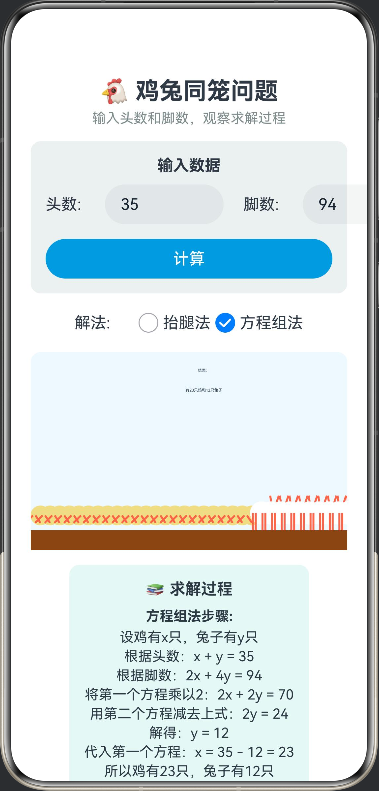
/**
 * 鸡兔同笼问题
 * 知识点:二元一次方程组、抬腿法、消元法
 */

interface ChickenRabbitResult {
  chickens: number
  rabbits: number
  valid: boolean
  message: string
}

@Entry
@Component
struct ChickenRabbitProblem {
  @State private heads: number = 35
  @State private legs: number = 94
  @State private result: ChickenRabbitResult = { chickens: 0, rabbits: 0, valid: false, message: '' }
  @State private solutionMethod: 'legLift' | 'equation' = 'legLift'
  @State private animationStep: number = 0
  @State private animationRunning: boolean = false

  // 画布上下文
  private settings: RenderingContextSettings = new RenderingContextSettings(true)
  private context: CanvasRenderingContext2D = new CanvasRenderingContext2D(this.settings)

  // 计算鸡兔数量
  private calculateResult(): void {
    if (this.heads <= 0 || this.legs <= 0) {
      this.result = { chickens: 0, rabbits: 0, valid: false, message: '请输入有效的头数和脚数' }
      return
    }

    if (this.legs % 2 !== 0) {
      this.result = { chickens: 0, rabbits: 0, valid: false, message: '脚数必须是偶数' }
      return
    }

    if (this.legs < 2 * this.heads) {
      this.result = { chickens: 0, rabbits: 0, valid: false, message: '脚数太少,不可能' }
      return
    }

    if (this.legs > 4 * this.heads) {
      this.result = { chickens: 0, rabbits: 0, valid: false, message: '脚数太多,不可能' }
      return
    }

    const rabbits = (this.legs - 2 * this.heads) / 2
    const chickens = this.heads - rabbits

    if (rabbits < 0 || chickens < 0 || rabbits % 1 !== 0 || chickens % 1 !== 0) {
      this.result = { chickens: 0, rabbits: 0, valid: false, message: '没有整数解' }
      return
    }

    this.result = {
      chickens: Math.round(chickens),
      rabbits: Math.round(rabbits),
      valid: true,
      message: `有${Math.round(chickens)}只鸡和${Math.round(rabbits)}只兔子`
    }

    this.startAnimation()
  }

  // 开始动画
  private startAnimation(): void {
    this.animationStep = 0
    this.animationRunning = true
    this.animate()
  }

  // 动画过程
  private animate(): void {
    if (this.animationStep > 6) {
      this.animationRunning = false
      return
    }

    this.drawAnimation()
    this.animationStep++
    setTimeout(() => this.animate(), 1000)
  }

  // 绘制动画
  private drawAnimation(): void {
    const ctx = this.context
    const width = 350
    const height = 200

    ctx.clearRect(0, 0, width, height)

    if (!this.result.valid) return

    const chickens = this.result.chickens
    const rabbits = this.result.rabbits

    // 绘制地面
    ctx.fillStyle = '#8B4513'
    ctx.fillRect(0, height - 20, width, 20)

    // 绘制动物
    const totalAnimals = chickens + rabbits
    const animalWidth = width / (totalAnimals + 1)

    let x = animalWidth

    // 绘制鸡
    for (let i = 0; i < chickens; i++) {
      this.drawChicken(ctx, x, height - 20, this.animationStep)
      x += animalWidth
    }

    // 绘制兔子
    for (let i = 0; i < rabbits; i++) {
      this.drawRabbit(ctx, x, height - 20, this.animationStep)
      x += animalWidth
    }

    // 绘制步骤说明
    this.drawStepText(ctx, width, height)
  }

  // 绘制鸡
  private drawChicken(ctx: CanvasRenderingContext2D, x: number, y: number, step: number): void {
    const size = 30

    // 身体
    ctx.fillStyle = '#F0DC82'
    ctx.beginPath()
    ctx.arc(x, y - size/2, size/3, 0, Math.PI * 2)
    ctx.fill()

    // 头
    ctx.beginPath()
    ctx.arc(x + size/3, y - size/2, size/4, 0, Math.PI * 2)
    ctx.fill()

    // 腿
    ctx.strokeStyle = '#FF6347'
    ctx.lineWidth = 2

    if (step <= 2) {
      // 正常站立
      ctx.beginPath()
      ctx.moveTo(x - size/4, y - size/2)
      ctx.lineTo(x - size/4, y)
      ctx.stroke()

      ctx.beginPath()
      ctx.moveTo(x - size/6, y - size/2)
      ctx.lineTo(x - size/6, y)
      ctx.stroke()
    } else if (step <= 4) {
      // 抬起一条腿
      ctx.beginPath()
      ctx.moveTo(x - size/4, y - size/2)
      ctx.lineTo(x - size/4, y)
      ctx.stroke()

      ctx.beginPath()
      ctx.moveTo(x - size/6, y - size/2)
      ctx.lineTo(x, y - size/4)
      ctx.stroke()
    } else {
      // 抬起两条腿
      ctx.beginPath()
      ctx.moveTo(x - size/4, y - size/2)
      ctx.lineTo(x - size/2, y - size/4)
      ctx.stroke()

      ctx.beginPath()
      ctx.moveTo(x - size/6, y - size/2)
      ctx.lineTo(x, y - size/4)
      ctx.stroke()
    }
  }

  // 绘制兔子
  private drawRabbit(ctx: CanvasRenderingContext2D, x: number, y: number, step: number): void {
    const size = 35

    // 身体
    ctx.fillStyle = '#FFFFFF'
    ctx.beginPath()
    ctx.arc(x, y - size/2, size/3, 0, Math.PI * 2)
    ctx.fill()

    // 头
    ctx.beginPath()
    ctx.arc(x + size/3, y - size/2, size/4, 0, Math.PI * 2)
    ctx.fill()

    // 耳朵
    ctx.beginPath()
    ctx.moveTo(x + size/3, y - size/2)
    ctx.lineTo(x + size/2, y - size)
    ctx.stroke()

    ctx.beginPath()
    ctx.moveTo(x + size/3, y - size/2)
    ctx.lineTo(x + size/4, y - size)
    ctx.stroke()

    // 腿
    ctx.strokeStyle = '#FF6347'
    ctx.lineWidth = 2

    if (step <= 2) {
      // 正常站立
      ctx.beginPath()
      ctx.moveTo(x - size/4, y - size/2)
      ctx.lineTo(x - size/4, y)
      ctx.stroke()

      ctx.beginPath()
      ctx.moveTo(x - size/6, y - size/2)
      ctx.lineTo(x - size/6, y)
      ctx.stroke()

      ctx.beginPath()
      ctx.moveTo(x + size/6, y - size/2)
      ctx.lineTo(x + size/6, y)
      ctx.stroke()

      ctx.beginPath()
      ctx.moveTo(x + size/4, y - size/2)
      ctx.lineTo(x + size/4, y)
      ctx.stroke()
    } else if (step <= 4) {
      // 抬起两条腿
      ctx.beginPath()
      ctx.moveTo(x - size/4, y - size/2)
      ctx.lineTo(x - size/4, y)
      ctx.stroke()

      ctx.beginPath()
      ctx.moveTo(x - size/6, y - size/2)
      ctx.lineTo(x - size/6, y)
      ctx.stroke()

      ctx.beginPath()
      ctx.moveTo(x + size/6, y - size/2)
      ctx.lineTo(x + size/3, y - size/4)
      ctx.stroke()

      ctx.beginPath()
      ctx.moveTo(x + size/4, y - size/2)
      ctx.lineTo(x + size/2, y - size/4)
      ctx.stroke()
    } else {
      // 抬起两条腿(保持)
      ctx.beginPath()
      ctx.moveTo(x - size/4, y - size/2)
      ctx.lineTo(x - size/4, y)
      ctx.stroke()

      ctx.beginPath()
      ctx.moveTo(x - size/6, y - size/2)
      ctx.lineTo(x - size/6, y)
      ctx.stroke()

      ctx.beginPath()
      ctx.moveTo(x + size/6, y - size/2)
      ctx.lineTo(x + size/3, y - size/4)
      ctx.stroke()

      ctx.beginPath()
      ctx.moveTo(x + size/4, y - size/2)
      ctx.lineTo(x + size/2, y - size/4)
      ctx.stroke()
    }
  }

  // 绘制步骤说明
  private drawStepText(ctx: CanvasRenderingContext2D, width: number, height: number): void {
    ctx.fillStyle = '#2C3E50'
    ctx.font = '12px Arial'
    ctx.textAlign = 'center'

    switch (this.animationStep) {
      case 0:
        ctx.fillText('初始状态', width/2, 20)
        break
      case 1:
        ctx.fillText(`总头数: ${this.heads}, 总脚数: ${this.legs}`, width/2, 20)
        break
      case 2:
        ctx.fillText('第一步:所有动物抬起一条腿', width/2, 20)
        ctx.fillText(`剩余脚数: ${this.legs - this.heads}`, width/2, 40)
        break
      case 3:
        ctx.fillText('第二步:所有动物再抬起一条腿', width/2, 20)
        ctx.fillText(`剩余脚数: ${this.legs - 2 * this.heads}`, width/2, 40)
        break
      case 4:
        ctx.fillText('第三步:鸡已经没有脚着地', width/2, 20)
        ctx.fillText(`剩下的脚都是兔子的: ${this.legs - 2 * this.heads}`, width/2, 40)
        break
      case 5:
        ctx.fillText('第四步:计算兔子数量', width/2, 20)
        ctx.fillText(`兔子: ${this.result.rabbits}, 鸡: ${this.result.chickens}`, width/2, 40)
        break
      case 6:
        ctx.fillText('结果:', width/2, 20)
        ctx.fillText(`${this.result.message}`, width/2, 40)
        break
    }
  }

  // 获取方程组解法步骤
  private getEquationSteps(): string[] {
    const steps: string[] = []
    steps.push(`设鸡有x只,兔子有y只`)
    steps.push(`根据头数:x + y = ${this.heads}`)
    steps.push(`根据脚数:2x + 4y = ${this.legs}`)
    steps.push(`将第一个方程乘以2:2x + 2y = ${2 * this.heads}`)
    steps.push(`用第二个方程减去上式:2y = ${this.legs - 2 * this.heads}`)
    steps.push(`解得:y = ${(this.legs - 2 * this.heads) / 2}`)
    steps.push(`代入第一个方程:x = ${this.heads} - ${(this.legs - 2 * this.heads) / 2} = ${this.result.chickens}`)
    steps.push(`所以鸡有${this.result.chickens}只,兔子有${this.result.rabbits}只`)
    return steps
  }

  build() {
    Column() {
      Text('🐔 鸡兔同笼问题')
        .fontSize(24).fontWeight(FontWeight.Bold).margin({ top: 10 })

      Text('输入头数和脚数,观察求解过程')
        .fontSize(14).fontColor('#7F8C8D').margin({ top: 5, bottom: 15 })

      // 输入区域
      Column() {
        Text('输入数据')
          .fontSize(16).fontWeight(FontWeight.Bold).margin({ bottom: 10 })

        Row() {
          Text('头数:')
            .width(60)
          TextInput({
            text: this.heads.toString(),
            placeholder: '请输入头数'
          })
            .width(120)
            .type(InputType.Number)
            .onChange((value: string) => {
              this.heads = parseInt(value) || 0
            })

          Text('脚数:')
            .width(60).margin({ left: 20 })
          TextInput({
            text: this.legs.toString(),
            placeholder: '请输入脚数'
          })
            .width(120)
            .type(InputType.Number)
            .onChange((value: string) => {
              this.legs = parseInt(value) || 0
            })
        }

        Button('计算')
          .margin({ top: 15 })
          .width('100%')
          .backgroundColor('#3498DB')
          .fontColor('#FFF')
          .onClick(() => {
            this.calculateResult()
          })
      }
      .padding(15)
      .backgroundColor('#ECF0F1')
      .borderRadius(10)
      .margin({ bottom: 15 })

      // 解法选择
      Row() {
        Text('解法:')
          .width(60)
        Row() {
          Radio({ value: 'legLift', group: 'solution' })
            .checked(this.solutionMethod === 'legLift')
            .onChange((isChecked: boolean) => {
              if (isChecked) this.solutionMethod = 'legLift'
            })
          Text('抬腿法')

          Radio({ value: 'equation', group: 'solution' })
            .checked(this.solutionMethod === 'equation')
            .onChange((isChecked: boolean) => {
              if (isChecked) this.solutionMethod = 'equation'
            })
          Text('方程组法')
        }
      }
      .margin({ bottom: 15 })

      // 动画区域
      Canvas(this.context)
        .width('100%')
        .height(200)
        .backgroundColor('#F0F8FF')
        .borderRadius(10)
        .margin({ bottom: 15 })

      // 结果显示
      if (this.result.valid) {
        Column() {
          Text('📚 求解过程')
            .fontSize(16).fontWeight(FontWeight.Bold).margin({ bottom: 10 })

          if (this.solutionMethod === 'legLift') {
            Column() {
              Text('抬腿法步骤:')
                .fontSize(14).fontWeight(FontWeight.Bold).margin({ bottom: 5 })
              Text('1. 所有动物抬起一条腿')
                .fontSize(14)
              Text(`2. 剩余脚数: ${this.legs - this.heads}`)
                .fontSize(14)
              Text('3. 所有动物再抬起一条腿')
                .fontSize(14)
              Text(`4. 剩余脚数: ${this.legs - 2 * this.heads}`)
                .fontSize(14)
              Text('5. 剩下的脚都是兔子的')
                .fontSize(14)
              Text(`6. 兔子数量: ${this.result.rabbits}`)
                .fontSize(14)
              Text(`7. 鸡数量: ${this.result.chickens}`)
                .fontSize(14)
            }
          } else {
            Column() {
              Text('方程组法步骤:')
                .fontSize(14).fontWeight(FontWeight.Bold).margin({ bottom: 5 })
              ForEach(this.getEquationSteps(), (step: string) => {
                Text(step)
                  .fontSize(14)
                  .margin({ bottom: 3 })
              }, (step: string) => step)
            }
          }
        }
        .padding(15)
        .backgroundColor('#E8F8F5')
        .borderRadius(10)
        .margin({ bottom: 15 })

        // 结果
        Row() {
          Text('🐔 鸡:')
            .fontSize(16).fontWeight(FontWeight.Bold)
          Text(`${this.result.chickens}只`)
            .fontSize(18).fontWeight(FontWeight.Bold).fontColor('#27AE60')
            .margin({ left: 10 })

          Text('🐰 兔子:')
            .fontSize(16).fontWeight(FontWeight.Bold)
            .margin({ left: 30 })
          Text(`${this.result.rabbits}只`)
            .fontSize(18).fontWeight(FontWeight.Bold).fontColor('#E74C3C')
            .margin({ left: 10 })
        }
        .margin({ bottom: 15 })
      } else if (this.result.message) {
        Text(this.result.message)
          .fontSize(14)
          .fontColor('#E74C3C')
          .margin({ bottom: 15 })
      }

      // 示例
      Column() {
        Text('📝 示例')
          .fontSize(16).fontWeight(FontWeight.Bold).margin({ bottom: 10 })

        Row() {
          Button('经典问题')
            .margin({ right: 10 })
            .onClick(() => {
              this.heads = 35
              this.legs = 94
            })

          Button('简单问题')
            .onClick(() => {
              this.heads = 10
              this.legs = 28
            })
        }
      }
      .padding(15)
      .backgroundColor('#F8F9FA')
      .borderRadius(10)
    }
    .width('100%')
    .height('100%')
    .padding(20)
    .justifyContent(FlexAlign.Start)
  }
}

讨论HarmonyOS开发技术,专注于API与组件、DevEco Studio、测试、元服务和应用上架分发等。
更多推荐


 0
0 0
0- 0


 已为社区贡献402条内容

所有评论(0)