Harmonyos应用实例105:圆面积推导动画
·
应用实例五:圆面积推导动画
知识点:理解圆面积公式的推导过程。
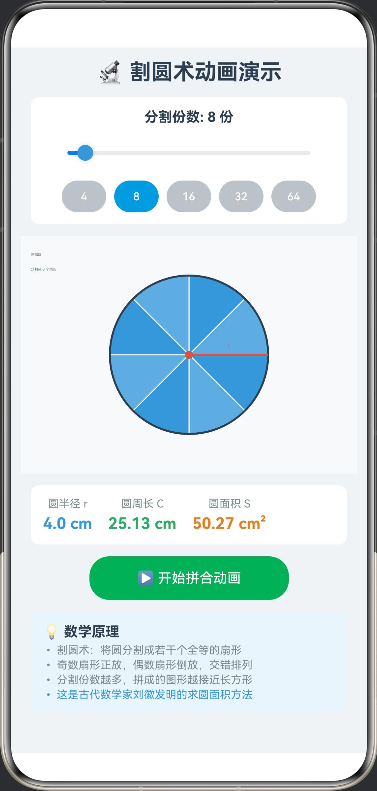
功能:经典的“割圆术”动画演示。将圆分割成若干等份,拼成近似的长方形。学生可以通过滑块增加分割份数,观察拼成的图形越来越接近长方形,从而理解 S=πr2S = \pi r^2S=πr2。
// CyclotomicMethod.ets

interface Sector {
  index: number
  angle: number
  isFlipped: boolean
}

@Entry
@Component
struct CyclotomicMethod {
  private settings: RenderingContextSettings = new RenderingContextSettings(true);
  private context: CanvasRenderingContext2D = new CanvasRenderingContext2D(this.settings);

  @State private radius: number = 80
  @State private numSectors: number = 8
  @State private animationProgress: number = 0
  @State private isAnimating: boolean = false
  @State private showRectangle: boolean = false
  @State private showFormula: boolean = false

  private readonly centerX: number = 170
  private readonly centerY: number = 120
  private readonly maxSectors: number = 64

  aboutToAppear(): void {
    this.drawScene()
  }

  private startAnimation(): void {
    if (this.isAnimating) return

    this.isAnimating = true
    this.animationProgress = 0
    this.showRectangle = false
    this.showFormula = false

    const duration = 2000
    const startTime = Date.now()

    const animate = () => {
      const elapsed = Date.now() - startTime
      this.animationProgress = Math.min(elapsed / duration, 1)

      if (this.animationProgress >= 1) {
        this.isAnimating = false
        this.showRectangle = true
        this.showFormula = true
      } else {
        setTimeout(animate, 16)
      }

      this.drawScene()
    }

    animate()
  }

  build() {
    Column({ space: 12 }) {
      Text('🔬 割圆术动画演示')
        .fontSize(22)
        .fontWeight(FontWeight.Bold)
        .fontColor('#2C3E50')

      Column({ space: 8 }) {
        Text(`分割份数: ${this.numSectors} 份`)
          .fontSize(14)
          .fontColor('#2C3E50')
          .fontWeight(FontWeight.Bold)

        Slider({
          value: this.numSectors,
          min: 4,
          max: this.maxSectors,
          step: 4
        })
          .width('90%')
          .blockColor('#3498DB')
          .onChange((value: number) => {
            if (!this.isAnimating) {
              this.numSectors = Math.round(value)
              this.animationProgress = 0
              this.showRectangle = false
              this.showFormula = false
              this.drawScene()
            }
          })

        Row({ space: 8 }) {
          ForEach([4, 8, 16, 32, 64], (n: number) => {
            Button(`${n}`)
              .fontSize(11)
              .height(32)
              .width(45)
              .backgroundColor(this.numSectors === n ? '#3498DB' : '#BDC3C7')
              .onClick(() => {
                if (!this.isAnimating) {
                  this.numSectors = n
                  this.animationProgress = 0
                  this.showRectangle = false
                  this.showFormula = false
                  this.drawScene()
                }
              })
          })
        }
      }
      .width('95%')
      .padding(12)
      .backgroundColor('#FFFFFF')
      .borderRadius(8)

      Canvas(this.context)
        .width(340)
        .height(240)
        .backgroundColor('#F8F9FA')
        .borderRadius(8)
        .shadow({ radius: 3, color: '#00000010' })
        .onReady(() => {
          this.drawScene()
        })

      Row({ space: 16 }) {
        Column({ space: 4 }) {
          Text('圆半径 r')
            .fontSize(11)
            .fontColor('#7F8C8D')
          Text(`${(this.radius / 20).toFixed(1)} cm`)
            .fontSize(16)
            .fontColor('#3498DB')
            .fontWeight(FontWeight.Bold)
        }

        Column({ space: 4 }) {
          Text('圆周长 C')
            .fontSize(11)
            .fontColor('#7F8C8D')
          Text(`${(2 * Math.PI * this.radius / 20).toFixed(2)} cm`)
            .fontSize(16)
            .fontColor('#27AE60')
            .fontWeight(FontWeight.Bold)
        }

        Column({ space: 4 }) {
          Text('圆面积 S')
            .fontSize(11)
            .fontColor('#7F8C8D')
          Text(`${(Math.PI * this.radius * this.radius / 400).toFixed(2)} cm²`)
            .fontSize(16)
            .fontColor('#E67E22')
            .fontWeight(FontWeight.Bold)
        }
      }
      .width('95%')
      .padding(12)
      .backgroundColor('#FFFFFF')
      .borderRadius(8)

      Button(this.isAnimating ? '演示中...' : '▶️ 开始拼合动画')
        .fontSize(14)
        .height(44)
        .width('60%')
        .backgroundColor(this.isAnimating ? '#95A5A6' : '#27AE60')
        .enabled(!this.isAnimating)
        .onClick(() => this.startAnimation())

      if (this.showFormula) {
        Column({ space: 8 }) {
          Text('📐 推导公式')
            .fontSize(14)
            .fontWeight(FontWeight.Bold)
            .fontColor('#2C3E50')

          Text(`当分割份数越来越多时:`)
            .fontSize(11)
            .fontColor('#7F8C8D')

          Text(`拼成的图形 ≈ 长方形`)
            .fontSize(12)
            .fontColor('#3498DB')
            .margin({ top: 4 })

          Row({ space: 8 }) {
            Text(`长 ≈ 圆周长的一半 = πr`)
              .fontSize(11)
              .fontColor('#27AE60')

            Text(`宽 ≈ 圆半径 = r`)
              .fontSize(11)
              .fontColor('#E67E22')
          }

          Text(`圆面积 = 长方形面积 = 长 × 宽 = πr × r = πr²`)
            .fontSize(13)
            .fontColor('#E74C3C')
            .fontWeight(FontWeight.Bold)
            .margin({ top: 8 })
        }
        .width('95%')
        .padding(12)
        .backgroundColor('#FFF9C4')
        .borderRadius(8)
      }

      Column() {
        Text('💡 数学原理')
          .fontSize(14)
          .fontWeight(FontWeight.Bold)
          .fontColor('#2C3E50')

        Text('• 割圆术:将圆分割成若干个全等的扇形')
          .fontSize(11)
          .fontColor('#7F8C8D')
          .margin({ top: 4 })

        Text('• 奇数扇形正放,偶数扇形倒放,交错排列')
          .fontSize(11)
          .fontColor('#7F8C8D')
          .margin({ top: 2 })

        Text('• 分割份数越多,拼成的图形越接近长方形')
          .fontSize(11)
          .fontColor('#7F8C8D')
          .margin({ top: 2 })

        Text('• 这是古代数学家刘徽发明的求圆面积方法')
          .fontSize(11)
          .fontColor('#3498DB')
          .margin({ top: 2 })
      }
      .width('95%')
      .padding(12)
      .backgroundColor('#EBF5FB')
      .borderRadius(8)
      .alignItems(HorizontalAlign.Start)
    }
    .width('100%')
    .height('100%')
    .backgroundColor('#F0F3F6')
    .padding(12)
  }

  private drawScene(): void {
    const ctx = this.context
    const w = 340
    const h = 240

    ctx.clearRect(0, 0, w, h)
    ctx.fillStyle = '#F8F9FA'
    ctx.fillRect(0, 0, w, h)

    if (this.animationProgress === 0 && !this.showRectangle) {
      this.drawOriginalCircle(ctx)
    } else if (this.animationProgress > 0 && this.animationProgress < 1) {
      this.drawAnimation(ctx)
    } else {
      this.drawRectangle(ctx)
    }

    this.drawInfo(ctx)
  }

  private drawOriginalCircle(ctx: CanvasRenderingContext2D): void {
    const anglePerSector = (Math.PI * 2) / this.numSectors

    for (let i = 0; i < this.numSectors; i++) {
      const startAngle = i * anglePerSector - Math.PI / 2
      const endAngle = (i + 1) * anglePerSector - Math.PI / 2

      ctx.fillStyle = i % 2 === 0 ? '#3498DB' : '#5DADE2'
      ctx.beginPath()
      ctx.moveTo(this.centerX, this.centerY)
      ctx.arc(this.centerX, this.centerY, this.radius, startAngle, endAngle)
      ctx.closePath()
      ctx.fill()

      ctx.strokeStyle = '#FFFFFF'
      ctx.lineWidth = 1
      ctx.stroke()
    }

    ctx.strokeStyle = '#2C3E50'
    ctx.lineWidth = 2
    ctx.beginPath()
    ctx.arc(this.centerX, this.centerY, this.radius, 0, Math.PI * 2)
    ctx.stroke()

    ctx.fillStyle = '#E74C3C'
    ctx.beginPath()
    ctx.arc(this.centerX, this.centerY, 4, 0, Math.PI * 2)
    ctx.fill()

    ctx.strokeStyle = '#E74C3C'
    ctx.lineWidth = 2
    ctx.beginPath()
    ctx.moveTo(this.centerX, this.centerY)
    ctx.lineTo(this.centerX + this.radius, this.centerY)
    ctx.stroke()

    ctx.fillStyle = '#E74C3C'
    ctx.font = '12px sans-serif'
    ctx.textAlign = 'center'
    ctx.fillText('r', this.centerX + this.radius / 2, this.centerY - 8)
  }

  private drawAnimation(ctx: CanvasRenderingContext2D): void {
    const anglePerSector = (Math.PI * 2) / this.numSectors
    const easeProgress = 1 - Math.pow(1 - this.animationProgress, 3)

    const rectWidth = Math.PI * this.radius
    const rectHeight = this.radius
    const rectX = this.centerX - rectWidth / 2
    const rectY = this.centerY + 60

    for (let i = 0; i < this.numSectors; i++) {
      const startAngle = i * anglePerSector - Math.PI / 2
      const isEven = i % 2 === 0

      const originalX = this.centerX
      const originalY = this.centerY

      const sectorWidth = rectWidth / this.numSectors
      const targetX = rectX + i * sectorWidth + sectorWidth / 2
      const targetY = isEven ? rectY - rectHeight / 2 : rectY + rectHeight / 2

      const currentX = originalX + (targetX - originalX) * easeProgress
      const currentY = originalY + (targetY - originalY) * easeProgress

      ctx.save()
      ctx.translate(currentX, currentY)

      if (easeProgress > 0.5) {
        const rotationProgress = (easeProgress - 0.5) * 2
        if (!isEven) {
          ctx.rotate(Math.PI * rotationProgress)
        }
      }

      ctx.fillStyle = isEven ? '#3498DB' : '#5DADE2'
      ctx.beginPath()
      ctx.moveTo(0, 0)
      ctx.arc(0, 0, this.radius, -anglePerSector / 2, anglePerSector / 2)
      ctx.closePath()
      ctx.fill()

      ctx.strokeStyle = '#FFFFFF'
      ctx.lineWidth = 1
      ctx.stroke()

      ctx.restore()
    }

    if (easeProgress > 0.8) {
      const alpha = (easeProgress - 0.8) * 5
      ctx.strokeStyle = `rgba(231, 76, 60, ${alpha})`
      ctx.lineWidth = 2
      ctx.setLineDash([5, 5])
      ctx.strokeRect(rectX, rectY - rectHeight / 2, rectWidth, rectHeight)
      ctx.setLineDash([])
    }
  }

  private drawRectangle(ctx: CanvasRenderingContext2D): void {
    const rectWidth = Math.PI * this.radius
    const rectHeight = this.radius
    const rectX = this.centerX - rectWidth / 2
    const rectY = this.centerY + 60

    const anglePerSector = (Math.PI * 2) / this.numSectors
    const sectorWidth = rectWidth / this.numSectors

    for (let i = 0; i < this.numSectors; i++) {
      const isEven = i % 2 === 0
      const x = rectX + i * sectorWidth + sectorWidth / 2
      const y = isEven ? rectY - rectHeight / 2 : rectY + rectHeight / 2

      ctx.save()
      ctx.translate(x, y)

      if (!isEven) {
        ctx.rotate(Math.PI)
      }

      ctx.fillStyle = isEven ? '#3498DB' : '#5DADE2'
      ctx.beginPath()
      ctx.moveTo(0, 0)
      ctx.arc(0, 0, this.radius, -anglePerSector / 2, anglePerSector / 2)
      ctx.closePath()
      ctx.fill()

      ctx.strokeStyle = '#FFFFFF'
      ctx.lineWidth = 1
      ctx.stroke()

      ctx.restore()
    }

    ctx.strokeStyle = '#E74C3C'
    ctx.lineWidth = 2
    ctx.setLineDash([5, 5])
    ctx.strokeRect(rectX, rectY - rectHeight / 2, rectWidth, rectHeight)
    ctx.setLineDash([])

    ctx.fillStyle = '#E74C3C'
    ctx.font = '11px sans-serif'
    ctx.textAlign = 'center'
    ctx.fillText(`长 = πr ≈ ${(Math.PI * this.radius / 20).toFixed(2)}cm`, rectX + rectWidth / 2, rectY - rectHeight / 2 - 10)

    ctx.save()
    ctx.translate(rectX - 15, rectY)
    ctx.rotate(-Math.PI / 2)
    ctx.fillText(`宽 = r = ${(this.radius / 20).toFixed(1)}cm`, 0, 0)
    ctx.restore()
  }

  private drawInfo(ctx: CanvasRenderingContext2D): void {
    ctx.fillStyle = '#7F8C8D'
    ctx.font = '11px sans-serif'
    ctx.textAlign = 'left'

    if (this.animationProgress === 0 && !this.showRectangle) {
      ctx.fillText('原始圆', 10, 20)
      ctx.fillText(`分割成 ${this.numSectors} 个扇形`, 10, 35)
    } else if (this.showRectangle) {
      ctx.fillText('拼成的近似长方形', 10, 20)
      const error = (Math.PI / this.numSectors) * 100
      ctx.fillText(`误差约 ${error.toFixed(1)}%`, 10, 35)
    }

    if (this.numSectors >= 32) {
      ctx.fillStyle = '#27AE60'
      ctx.fillText('✓ 已非常接近长方形!', 10, 55)
    }
  }
}

讨论HarmonyOS开发技术,专注于API与组件、DevEco Studio、测试、元服务和应用上架分发等。
更多推荐


 0
0 0
0- 0


 已为社区贡献402条内容

所有评论(0)