Harmonyos应用实例197:几何概型可视化
·
9. 几何概型可视化
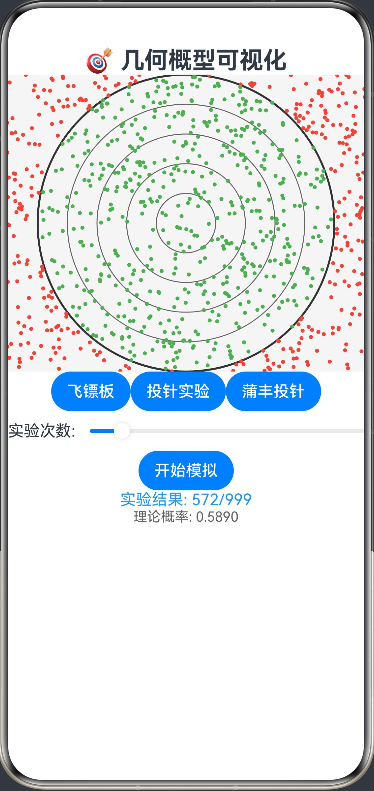
功能简介:通过几何图形展示几何概型,如投针实验、蒲丰投针问题等。几何概型可视化功能支持飞镖板、投针实验和蒲丰投针问题三种经典几何概率实验,可调整实验次数(100-10000次),实时计算观测概率并与理论概率对比。飞镖板实验展示圆与正方形面积比,投针实验计算针与平行线相交概率,蒲丰投针实验通过统计方法估计π的值。界面包含直观的几何图形绘制,绿色表示击中/相交,红色表示未击中/不相交,帮助用户理解几何概率的基本原理和大数定律的应用。
ArkTS代码:
interface Point {
  x: number
  y: number
  hit: boolean
}

@Entry
@Component
struct GeometricProbability {
  @State private model: string = 'dartboard'
  @State private trials: number = 1000
  @State private hitCount: number = 0
  @State private estimatedPi: number = 0
  @State private points: Point[] = []
  private settings: RenderingContextSettings = new RenderingContextSettings(true)
  private context: CanvasRenderingContext2D = new CanvasRenderingContext2D(this.settings)

  build() {
    Column() {
      Text('🎯 几何概型可视化')
        .fontSize(24).fontWeight(FontWeight.Bold)

      Canvas(this.context)
        .width(400).height(300)
        .onReady(() => this.drawModel(this.context))

      Row() {
        Button('飞镖板').onClick(() => {
          this.model = 'dartboard'
          this.drawModel(this.context)
        })
        Button('投针实验').onClick(() => {
          this.model = 'needle'
          this.drawModel(this.context)
        })
        Button('蒲丰投针').onClick(() => {
          this.model = 'buffon'
          this.drawModel(this.context)
        })
      }

      Row() {
        Text('实验次数: ')
        Slider({ value: this.trials, min: 100, max: 10000 })
          .onChange((val: number) => this.trials = val)
      }

      Button('开始模拟')
        .onClick(() => this.runSimulation())

      Text(`实验结果: ${this.hitCount}/${this.trials}`)
        .fontSize(16).fontColor('#2196F3')

      if (this.model === 'buffon') {
        Text(`π的估计值: ${this.estimatedPi.toFixed(4)}`)
          .fontSize(16).fontColor('#4CAF50')
      }

      Text(`理论概率: ${this.getTheoreticalProbability().toFixed(4)}`)
        .fontSize(14).fontColor('#666')
    }
  }

  private runSimulation() {
    this.hitCount = 0
    this.points = []

    switch (this.model) {
      case 'dartboard':
        this.simulateDartboard()
        break
      case 'needle':
        this.simulateNeedle()
        break
      case 'buffon':
        this.simulateBuffon()
        break
    }

    this.drawModel(this.context)
  }

  private simulateDartboard() {
    // 飞镖板模拟:计算飞镖击中靶心的概率
    const radius = 150
    const centerX = 200
    const centerY = 150

    for (let i = 0; i < this.trials; i++) {
      // 生成随机点
      const x = Math.random() * 400
      const y = Math.random() * 300

      // 计算距离中心的距离
      const distance = Math.sqrt(Math.pow(x - centerX, 2) + Math.pow(y - centerY, 2))
      const hit = distance <= radius

      if (hit) this.hitCount++
      this.points.push({x, y, hit})
    }
  }

  private simulateNeedle() {
    // 投针实验:计算针与平行线相交的概率
    const needleLength = 50
    const lineSpacing = 100

    for (let i = 0; i < this.trials; i++) {
      // 生成随机针的位置和角度
      const x = Math.random() * 400
      const y = Math.random() * 300
      const angle = Math.random() * Math.PI

      // 计算针的两端点
      const x1 = x + Math.cos(angle) * needleLength / 2
      const y1 = y + Math.sin(angle) * needleLength / 2
      const x2 = x - Math.cos(angle) * needleLength / 2
      const y2 = y - Math.sin(angle) * needleLength / 2

      // 检查是否与平行线相交
      const hit = this.checkNeedleIntersection(y1, y2, lineSpacing)

      if (hit) this.hitCount++
      this.points.push({x, y, hit})
    }
  }

  private simulateBuffon() {
    // 蒲丰投针问题:估计π的值
    const needleLength = 50
    const lineSpacing = 100

    for (let i = 0; i < this.trials; i++) {
      // 生成随机针的位置和角度
      const y = Math.random() * 300
      const angle = Math.random() * Math.PI

      // 计算针的两端点
      const y1 = y + Math.sin(angle) * needleLength / 2
      const y2 = y - Math.sin(angle) * needleLength / 2

      // 检查是否与平行线相交
      const hit = this.checkNeedleIntersection(y1, y2, lineSpacing)

      if (hit) this.hitCount++
    }

    // 估计π的值:π ≈ 2L / (d * (h/n))
    if (this.hitCount > 0) {
      const L = 50 // 针长
      const d = 100 // 线距
      this.estimatedPi = (2 * L * this.trials) / (d * this.hitCount)
    } else {
      this.estimatedPi = 0
    }
  }

  private checkNeedleIntersection(y1: number, y2: number, lineSpacing: number): boolean {
    // 检查针是否与平行线相交
    const minY = Math.min(y1, y2)
    const maxY = Math.max(y1, y2)

    // 检查是否与任何平行线相交
    for (let y = 0; y <= 300; y += lineSpacing) {
      if (minY <= y && maxY >= y) {
        return true
      }
    }
    return false
  }

  private getTheoreticalProbability(): number {
    switch (this.model) {
      case 'dartboard':
        // 飞镖板:圆面积与正方形面积之比
        const circleArea = Math.PI * Math.pow(150, 2)
        const squareArea = 400 * 300
        return circleArea / squareArea
      case 'needle':
      case 'buffon':
        // 投针实验:2L / (πd)
        const L = 50
        const d = 100
        return (2 * L) / (Math.PI * d)
      default:
        return 0
    }
  }

  private drawModel(ctx: CanvasRenderingContext2D) {
    const width = 400
    const height = 300

    // 清空画布
    ctx.clearRect(0, 0, width, height)
    ctx.fillStyle = '#F5F5F5'
    ctx.fillRect(0, 0, width, height)

    switch (this.model) {
      case 'dartboard':
        this.drawDartboard(ctx, width, height)
        break
      case 'needle':
        this.drawNeedleExperiment(ctx, width, height)
        break
      case 'buffon':
        this.drawBuffonExperiment(ctx, width, height)
        break
    }
  }

  private drawDartboard(ctx: CanvasRenderingContext2D, width: number, height: number) {
    const centerX = width / 2
    const centerY = height / 2
    const radius = 150

    // 绘制飞镖板
    ctx.strokeStyle = '#333333'
    ctx.lineWidth = 2
    ctx.beginPath()
    ctx.arc(centerX, centerY, radius, 0, 2 * Math.PI)
    ctx.stroke()

    // 绘制同心圆
    ctx.strokeStyle = '#666666'
    ctx.lineWidth = 1
    for (let r = radius / 5; r < radius; r += radius / 5) {
      ctx.beginPath()
      ctx.arc(centerX, centerY, r, 0, 2 * Math.PI)
      ctx.stroke()
    }

    // 绘制飞镖点
    for (let i = 0; i < this.points.length; i++) {
      const point = this.points[i]
      ctx.fillStyle = point.hit ? '#4CAF50' : '#F44336'
      ctx.beginPath()
      ctx.arc(point.x, point.y, 2, 0, 2 * Math.PI)
      ctx.fill()
    }
  }

  private drawNeedleExperiment(ctx: CanvasRenderingContext2D, width: number, height: number) {
    const lineSpacing = 100

    // 绘制平行线
    ctx.strokeStyle = '#666666'
    ctx.lineWidth = 1
    ctx.setLineDash([5, 5])

    for (let y = 0; y <= height; y += lineSpacing) {
      ctx.beginPath()
      ctx.moveTo(0, y)
      ctx.lineTo(width, y)
      ctx.stroke()
    }
    ctx.setLineDash([])

    // 绘制针
    const needleLength = 50
    for (let i = 0; i < this.points.length; i++) {
      const point = this.points[i]
      // 随机角度
      const angle = Math.random() * Math.PI

      // 计算针的两端点
      const x1 = point.x + Math.cos(angle) * needleLength / 2
      const y1 = point.y + Math.sin(angle) * needleLength / 2
      const x2 = point.x - Math.cos(angle) * needleLength / 2
      const y2 = point.y - Math.sin(angle) * needleLength / 2

      ctx.strokeStyle = point.hit ? '#4CAF50' : '#F44336'
      ctx.lineWidth = 1
      ctx.beginPath()
      ctx.moveTo(x1, y1)
      ctx.lineTo(x2, y2)
      ctx.stroke()
    }
  }

  private drawBuffonExperiment(ctx: CanvasRenderingContext2D, width: number, height: number) {
    const lineSpacing = 100

    // 绘制平行线
    ctx.strokeStyle = '#666666'
    ctx.lineWidth = 1
    ctx.setLineDash([5, 5])

    for (let y = 0; y <= height; y += lineSpacing) {
      ctx.beginPath()
      ctx.moveTo(0, y)
      ctx.lineTo(width, y)
      ctx.stroke()
    }
    ctx.setLineDash([])

    // 绘制标题
    ctx.fillStyle = '#333333'
    ctx.font = '14px sans-serif'
    ctx.fillText('蒲丰投针实验:估计π的值', 10, 20)
  }
}

讨论HarmonyOS开发技术,专注于API与组件、DevEco Studio、测试、元服务和应用上架分发等。
更多推荐



 3
3 0
0- 0


 已为社区贡献402条内容

所有评论(0)