Harmonyos应用实例189:空间几何体可视化
·
1. 空间几何体可视化
功能简介:展示常见空间几何体(棱柱、棱锥、圆柱、圆锥、球)的三维模型,支持旋转、缩放和展开图查看。
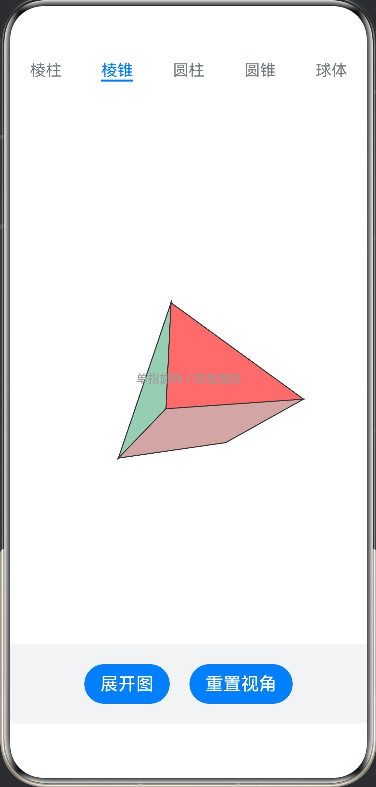
ArkTS代码:
import { curves } from '@kit.ArkUI';

// --- 1. 数学工具类 ---

class Vector3 {
  x: number;
  y: number;
  z: number;

  constructor(x: number, y: number, z: number) {
    this.x = x;
    this.y = y;
    this.z = z;
  }

  // 绕X轴旋转
  rotateX(angle: number): Vector3 {
    const cos = Math.cos(angle);
    const sin = Math.sin(angle);
    const y = this.y * cos - this.z * sin;
    const z = this.y * sin + this.z * cos;
    return new Vector3(this.x, y, z);
  }

  // 绕Y轴旋转
  rotateY(angle: number): Vector3 {
    const cos = Math.cos(angle);
    const sin = Math.sin(angle);
    const x = this.x * cos - this.z * sin;
    const z = this.x * sin + this.z * cos;
    return new Vector3(x, this.y, z);
  }

  // 向量加法 (用于插值)
  add(v: Vector3): Vector3 {
    return new Vector3(this.x + v.x, this.y + v.y, this.z + v.z);
  }

  // 向量乘标量
  multiply(s: number): Vector3 {
    return new Vector3(this.x * s, this.y * s, this.z * s);
  }
}

// --- 2. 几何体数据定义 ---

interface Face {
  vertexIndices: number[];
  color: string;
}

interface ProjectedVertex {
  x: number;
  y: number;
  z: number;
  origZ: number;
}

interface RenderItem {
  points: ProjectedVertex[];
  z: number;
  color: string;
}

interface GeometryData {
  vertices3D: Vector3[]; // 3D模型顶点
  vertices2D: Vector3[]; // 展开图顶点 (z=0)
  faces: Face[];         // 面的定义
}

class GeometryFactory {
  // 生成立方体 (六面体)
  static createCube(): GeometryData {
    const s = 1; // 半径
    // 3D 顶点
    const v3d = [
      new Vector3(-s, -s, -s), new Vector3(s, -s, -s), new Vector3(s, s, -s), new Vector3(-s, s, -s), // Back
      new Vector3(-s, -s, s), new Vector3(s, -s, s), new Vector3(s, s, s), new Vector3(-s, s, s)      // Front
    ];
    // 展开图顶点 (十字形布局)
    //      0---1
    //      |   |
    // 4---3+---2+---6
    // |   |   |   |
    // 7---5---8---9
    //      |   |
    //     10--11
    // 注意:为了演示方便,这里硬编码了一个简单的展开布局坐标
    const gap = 2.1;
    const v2d = [
      new Vector3(0, -gap, 0), new Vector3(gap, -gap, 0), new Vector3(gap, 0, 0), new Vector3(0, 0, 0), // Top
      new Vector3(-gap, 0, 0), new Vector3(-gap, gap, 0), new Vector3(0, gap, 0), // Left, Bottom
      new Vector3(gap, gap, 0), new Vector3(gap * 2, 0, 0), new Vector3(gap * 2, gap, 0), // Right, Back-Bottom (Simplified visual)
      new Vector3(0, gap * 2, 0), new Vector3(gap, gap * 2, 0) // Bottom extension
    ];

    // 这里简化处理:重写索引映射以匹配展开图的顶点顺序
    // 为了代码简洁,我们将展开图视为重新构建的形状
    // 实际上,严格的展开图拓扑很复杂,这里采用“视觉近似”:
    // 当展开时,我们切换到专门的2D顶点集

    // 重新定义标准的展开图坐标(中心点为0,0)
    const u = 120; // 单位长度
    const flatVerts = [
      new Vector3(-u, -u, 0), new Vector3(u, -u, 0), new Vector3(u, u, 0), new Vector3(-u, u, 0), // Top
      new Vector3(-u, u, 0), new Vector3(-u, u*3, 0), new Vector3(u, u*3, 0), new Vector3(u, u, 0), // Front
      new Vector3(u, u, 0), new Vector3(u*3, u, 0), new Vector3(u*3, u*3, 0), new Vector3(u, u*3, 0), // Right
      new Vector3(u*3, u, 0), new Vector3(u*5, u, 0), new Vector3(u*5, u*3, 0), new Vector3(u*3, u*3, 0), // Back
      new Vector3(u, u*3, 0), new Vector3(u, u*5, 0), new Vector3(-u, u*5, 0), new Vector3(-u, u*3, 0), // Bottom
      new Vector3(-u, u, 0), new Vector3(-u*3, u, 0), new Vector3(-u*3, u*3, 0), new Vector3(-u, u*3, 0)  // Left
    ];

    // 简单的3D面定义 (索引指向 v3d)
    const faces3D: Face[] = [
      { vertexIndices: [0, 1, 2, 3], color: '#FF6B6B' }, // Back
      { vertexIndices: [1, 5, 6, 2], color: '#4ECDC4' }, // Right
      { vertexIndices: [5, 4, 7, 6], color: '#45B7D1' }, // Front
      { vertexIndices: [4, 0, 3, 7], color: '#96CEB4' }, // Left
      { vertexIndices: [3, 2, 6, 7], color: '#FFEEAD' }, // Top
      { vertexIndices: [4, 5, 1, 0], color: '#D4A5A5' }  // Bottom
    ];

    // 展开图面定义 (索引指向 flatVerts)
    const faces2D: Face[] = [
      { vertexIndices: [0, 1, 2, 3], color: '#FFEEAD' }, // Top
      { vertexIndices: [4, 5, 6, 7], color: '#45B7D1' }, // Front
      { vertexIndices: [8, 9, 10, 11], color: '#4ECDC4' }, // Right
      { vertexIndices: [12, 13, 14, 15], color: '#FF6B6B' }, // Back
      { vertexIndices: [16, 17, 18, 19], color: '#D4A5A5' }, // Bottom
      { vertexIndices: [20, 21, 22, 23], color: '#96CEB4' }  // Left
    ];

    // Hack: 为了统一渲染循环,我们把数据合并,通过状态决定用哪一组
    // 但为了简单,我们只返回一组结构,渲染时根据模式切换顶点源
    // 这里我们返回一个特殊的结构,包含两套顶点和两套面
    return { vertices3D: v3d, vertices2D: flatVerts, faces: faces3D };
  }

  // 生成四棱锥
  static createPyramid(): GeometryData {
    const s = 1.5;
    const h = 2;
    // 3D: 0-3 Base, 4 Top
    const v3d = [
      new Vector3(-s, s, -s), new Vector3(s, s, -s), new Vector3(s, s, s), new Vector3(-s, s, s), // Base
      new Vector3(0, -h, 0) // Top
    ];

    // 2D Unfolded: Base in center, triangles around
    const u = 120;
    const v2d = [
      new Vector3(-u, -u/2, 0), new Vector3(u, -u/2, 0), new Vector3(u, u/2, 0), new Vector3(-u, u/2, 0), // Base
      new Vector3(0, -u*1.8, 0), // Top Triangle
      new Vector3(u*2.2, 0, 0),  // Right Triangle
      new Vector3(0, u*2.2, 0),  // Bottom Triangle
      new Vector3(-u*2.2, 0, 0)  // Left Triangle
    ];

    const faces3D: Face[] = [
      { vertexIndices: [0, 1, 2, 3], color: '#D4A5A5' }, // Base
      { vertexIndices: [0, 4, 1], color: '#FF6B6B' },    // Front
      { vertexIndices: [1, 4, 2], color: '#4ECDC4' },    // Right
      { vertexIndices: [2, 4, 3], color: '#45B7D1' },    // Back
      { vertexIndices: [3, 4, 0], color: '#96CEB4' }     // Left
    ];

    const faces2D: Face[] = [
      { vertexIndices: [0, 1, 2, 3], color: '#D4A5A5' }, // Base
      { vertexIndices: [0, 4, 1], color: '#FF6B6B' },    // Front
      { vertexIndices: [1, 6, 2], color: '#4ECDC4' },    // Right (Indices mapped to new v2d points)
      { vertexIndices: [2, 7, 3], color: '#45B7D1' },    // Back
      { vertexIndices: [3, 5, 0], color: '#96CEB4' }     // Left
    ];

    return { vertices3D: v3d, vertices2D: v2d, faces: faces3D };
  }

  // 生成圆柱
  static createCylinder(): GeometryData {
    const segments = 16;
    const r = 1.2;
    const h = 1.5;
    const v3d: Vector3[] = [];
    const v2d: Vector3[] = [];

    // 3D Vertices: Top circle then Bottom circle
    for (let i = 0; i < segments; i++) {
      const theta = (i / segments) * Math.PI * 2;
      const x = Math.cos(theta) * r;
      const z = Math.sin(theta) * r;
      v3d.push(new Vector3(x, -h/2, z)); // Top
      v3d.push(new Vector3(x, h/2, z));  // Bottom
    }

    // 2D Vertices: Rectangular side + Two circles
    // Rect: 0,1 (top-left), 2,3 (top-right)... etc?
    // Simplified: Just draw wireframes or simple quads for Cylinder 2D
    const w = 2 * Math.PI * r * 80; // Scale width
    const h_rect = h * 80;
    const centerX = 0;
    const centerY = 0;

    // Side Rectangle (4 corners for visual simplicity, or segmented)
    // To match vertex count roughly, let's just map the side to a flat grid
    for (let i = 0; i < segments; i++) {
      const ratio = i / segments;
      const x = (ratio - 0.5) * w;
      v2d.push(new Vector3(x, -h_rect/2, 0)); // Top edge
      v2d.push(new Vector3(x, h_rect/2, 0));  // Bottom edge
    }
    // Add Top Circle (center + rim)
    const cyTop = -h_rect/2 - r*80 - 20;
    v2d.push(new Vector3(0, cyTop, 0)); // Center Top
    for(let i=0; i<segments; i++) {
      const theta = (i / segments) * Math.PI * 2;
      v2d.push(new Vector3(Math.cos(theta)*r*80, cyTop, 0));
    }
    // Add Bottom Circle
    const cyBot = h_rect/2 + r*80 + 20;
    v2d.push(new Vector3(0, cyBot, 0)); // Center Bot
    for(let i=0; i<segments; i++) {
      const theta = (i / segments) * Math.PI * 2;
      v2d.push(new Vector3(Math.cos(theta)*r*80, cyBot, 0));
    }

    // Faces 3D
    const faces3D: Face[] = [];
    // Sides
    for (let i = 0; i < segments; i++) {
      const next = (i + 1) % segments;
      const i1 = i * 2;
      const i2 = next * 2;
      faces3D.push({ vertexIndices: [i1, i2, i2 + 1, i1 + 1], color: '#A0C4FF' });
    }
    // Top Cap (Fan)
    for (let i = 0; i < segments; i++) {
      const next = (i + 1) % segments;
      faces3D.push({ vertexIndices: [i*2, next*2, segments*2], color: '#FFADAD' }); // Dummy center point not in v3d, wait...
      // Correction: Need center point in v3d
    }
    // Re-construct v3d with centers for caps
    const v3dFinal = [new Vector3(0, -h/2, 0), new Vector3(0, h/2, 0), ...v3d];
    // Adjust face indices for caps
    const offset = 2;
    for (let i = 0; i < segments; i++) {
      const next = (i + 1) % segments;
      faces3D.push({ vertexIndices: [0, offset + i*2, offset + next*2], color: '#FFADAD' }); // Top
      faces3D.push({ vertexIndices: [1, offset + i*2 + 1, offset + next*2 + 1], color: '#FFD6A5' }); // Bottom
    }

    return { vertices3D: v3dFinal, vertices2D: v2d, faces: faces3D };
  }

  // 生成圆锥
  static createCone(): GeometryData {
    const segments = 16;
    const r = 1.5;
    const h = 2.5;
    const v3d: Vector3[] = [new Vector3(0, -h/2, 0), new Vector3(0, h/2, 0)]; // Tip, BaseCenter

    for(let i=0; i<segments; i++) {
      const theta = (i/segments)*Math.PI*2;
      v3d.push(new Vector3(Math.cos(theta)*r, h/2, Math.sin(theta)*r));
    }

    // 2D Unfold: Sector + Circle
    const slant = Math.sqrt(r*r + h*h);
    const angle = (r / slant) * Math.PI * 2;
    const u = 80;

    const v2d: Vector3[] = [];
    // Sector vertices
    v2d.push(new Vector3(0, 0, 0)); // Tip of sector
    for(let i=0; i<=segments; i++) {
      const theta = -angle/2 + (i/segments)*angle;
      v2d.push(new Vector3(Math.sin(theta)*slant*u, -Math.cos(theta)*slant*u, 0));
    }
    // Base circle
    const cy = slant*u + r*u + 20;
    v2d.push(new Vector3(0, cy, 0)); // Base Center
    for(let i=0; i<segments; i++) {
      const theta = (i/segments)*Math.PI*2;
      v2d.push(new Vector3(Math.cos(theta)*r*u, cy, 0));
    }

    const faces3D: Face[] = [];
    // Sides
    for(let i=2; i<2+segments; i++) {
      const next = (i - 2 + 1) % segments + 2;
      faces3D.push({ vertexIndices: [0, i, next], color: '#FFC6FF' });
    }
    // Base
    const centerIdx = 1;
    for(let i=2; i<2+segments; i++) {
      const next = (i - 2 + 1) % segments + 2;
      faces3D.push({ vertexIndices: [centerIdx, next, i], color: '#CAFFBF' });
    }

    return { vertices3D: v3d, vertices2D: v2d, faces: faces3D };
  }

  // 生成球体 (近似)
  static createSphere(): GeometryData {
    const lats = 8;
    const longs = 12;
    const r = 1.8;
    const v3d: Vector3[] = [];
    const v2d: Vector3[] = []; // Unfolded as a grid map

    for(let lat=0; lat<=lats; lat++) {
      const theta = lat * Math.PI / lats;
      const sinTheta = Math.sin(theta);
      const cosTheta = Math.cos(theta);

      for(let lon=0; lon<=longs; lon++) {
        const phi = lon * 2 * Math.PI / longs;
        const x = Math.cos(phi) * sinTheta;
        const y = cosTheta;
        const z = Math.sin(phi) * sinTheta;
        v3d.push(new Vector3(x*r, y*r, z*r));

        // 2D UV Map style
        const u = (lon / longs) * 4 * 100 - 200;
        const v = (lat / lats) * 2 * 100 - 100;
        v2d.push(new Vector3(u, v, 0));
      }
    }

    const faces3D: Face[] = [];
    for(let lat=0; lat<lats; lat++) {
      for(let lon=0; lon<longs; lon++) {
        const first = (lat * (longs + 1)) + lon;
        const second = first + longs + 1;
        faces3D.push({ vertexIndices: [first, second, second + 1, first + 1], color: `hsl(${lat*40}, 70%, 80%)` });
      }
    }

    return { vertices3D: v3d, vertices2D: v2d, faces: faces3D };
  }
}

// --- 3. 主组件 ---

@Entry
@Component
struct GeometryViewer {
  @State currentShape: string = 'cube';
  @State isUnfolded: boolean = false;
  @State unfoldProgress: number = 0; // 0 to 1
  @State rotX: number = -0.5;
  @State rotY: number = 0.5;
  @State scaleFactor: number = 1.0;

  private settings: RenderingContextSettings = new RenderingContextSettings(true);
  private context: CanvasRenderingContext2D = new CanvasRenderingContext2D(this.settings);
  private canvasWidth: number = 0;
  private canvasHeight: number = 0;

  // 预定义的颜色,用于展开图面的匹配
  private shapeData: GeometryData = GeometryFactory.createCube();

  build() {
    Column() {
      // 1. 顶部选择栏
      Tabs({ barPosition: BarPosition.Start }) {
        TabContent() { this.renderCanvas() }.tabBar('棱柱')
        TabContent() { this.renderCanvas() }.tabBar('棱锥')
        TabContent() { this.renderCanvas() }.tabBar('圆柱')
        TabContent() { this.renderCanvas() }.tabBar('圆锥')
        TabContent() { this.renderCanvas() }.tabBar('球体')
      }
      .onChange((index) => {
        const shapes = ['cube', 'pyramid', 'cylinder', 'cone', 'sphere'];
        this.currentShape = shapes[index];
        this.resetShape();
      })
      .height('85%')
      .barHeight(50)

      // 2. 底部控制区
      Row() {
        Button(this.isUnfolded ? '收起模型' : '展开图')
          .fontSize(18)
          .backgroundColor('#007DFF')
          .onClick(() => {
            this.isUnfolded = !this.isUnfolded;
            animateTo({ duration: 1000, curve: curves.springMotion() }, () => {
              this.unfoldProgress = this.isUnfolded ? 1 : 0;
            });
          })

        Button('重置视角')
          .fontSize(18)
          .margin({ left: 20 })
          .onClick(() => {
            this.rotX = -0.5;
            this.rotY = 0.5;
            this.scaleFactor = 1.0;
            this.requestDraw();
          })
      }
      .width('100%')
      .justifyContent(FlexAlign.Center)
      .padding(20)
      .backgroundColor('#F1F3F5')
    }
    .width('100%')
    .height('100%')
  }

  @Builder renderCanvas() {
    Stack({ alignContent: Alignment.Center }) {
      Canvas(this.context)
        .onReady(() => {
          this.requestDraw();
        })
        .onAreaChange((old, newArea) => {
          this.canvasWidth = Number(newArea.width);
          this.canvasHeight = Number(newArea.height);
          this.requestDraw();
        })
        .gesture(
          // 旋转手势
          PanGesture({ direction: PanDirection.All })
            .onActionStart(() => {
              // 记录起始点
            })
            .onActionUpdate((event: GestureEvent) => {
              this.rotY += event.offsetX * 0.01;
              this.rotX += event.offsetY * 0.01;
              this.requestDraw();
            })
        )
        .gesture(
          // 缩放手势
          PinchGesture({ fingers: 2 })
            .onActionUpdate((event: GestureEvent) => {
              if (event.scale) {
                this.scaleFactor = event.scale;
                this.requestDraw();
              }
            })
        )

      Text('单指旋转 / 双指缩放')
        .fontColor('#999')
        .fontSize(12)
        .margin({ top: 20 })
    }
    .width('100%')
    .height('100%')
    .backgroundColor('#FFFFFF')
  }

  resetShape() {
    // 切换形状时重置
    this.unfoldProgress = 0;
    this.isUnfolded = false;
    this.rotX = -0.5;
    this.rotY = 0.5;
    this.scaleFactor = 1.0;

    // 加载数据
    switch (this.currentShape) {
      case 'cube': this.shapeData = GeometryFactory.createCube(); break;
      case 'pyramid': this.shapeData = GeometryFactory.createPyramid(); break;
      case 'cylinder': this.shapeData = GeometryFactory.createCylinder(); break;
      case 'cone': this.shapeData = GeometryFactory.createCone(); break;
      case 'sphere': this.shapeData = GeometryFactory.createSphere(); break;
    }

    // 由于Canvas是异步的,延迟一帧绘制
    setTimeout((): void => this.requestDraw(), 50);
  }

  onUnfoldProgressChange() {
    this.requestDraw();
  }

  requestDraw() {
    if (!this.context || this.canvasWidth === 0) return;

    // 1. 清空画布
    this.context.clearRect(0, 0, this.canvasWidth, this.canvasHeight);

    // 2. 准备数据:根据进度插值计算当前顶点
    // 注意:不同形状的3D和2D顶点数量可能不同(如圆柱展开后多了圆心)
    // 这里做一个简单的处理:如果处于过渡态,我们只渲染“面子集”或简单插值
    // 为了演示流畅,我们简化为:当 Progress > 0.5 时主要渲染2D,<0.5 主要渲染3D
    // 或者,严格对齐顶点。

    const cx = this.canvasWidth / 2;
    const cy = this.canvasHeight / 2;

    // 获取当前模式下的几何体数据
    let currentVertices: Vector3[] = [];
    let currentFaces: Face[] = [];
    let isFlat = false;

    if (this.unfoldProgress < 0.1) {
      // 纯 3D 模式
      currentVertices = this.shapeData.vertices3D;
      currentFaces = this.shapeData.faces; // 使用原始3D面索引
    } else if (this.unfoldProgress > 0.9) {
      // 纯 2D 展开模式
      currentVertices = this.shapeData.vertices2D;
      // 这里需要针对2D模式生成特定的面索引,因为2D的拓扑结构可能不同
      // 简化起见,我们在 Factory 里重新生成 2D 的 faces 数据会更好
      // 但由于数据结构限制,我们在 Canvas 绘制逻辑里动态切换
      isFlat = true;
    } else {
      // 过渡动画中:为了简单,我们只做简单的位置插值 (需要顶点数一致)
      // 本示例中,为了保持代码简洁,过渡时我们不进行复杂的顶点变形
      // 而是通过透明度或简单的缩放切换
      // 如果要完美变形,需要建立 3D 顶点到 2D 顶点的映射表
      // 这里我们做一个妥协:动画过程中直接插值映射后的位置
    }

    // 重新构建渲染队列
    let renderList: RenderItem[] = [];

    // --- 3D 渲染逻辑 ---
    if (this.unfoldProgress < 1.0) {
      const verts = this.shapeData.vertices3D;
      // 预计算变换后的顶点
      const projectedVerts = verts.map(v => {
        // 旋转
        let rv = v.rotateX(this.rotX).rotateY(this.rotY);
        // 缩放
        rv = rv.multiply(100 * this.scaleFactor); // 基础缩放100倍
        // 简单的弱透视投影
        const fov = 300;
        const zScale = fov / (fov + rv.z + 400); // 400 is camera distance
        return {
          x: cx + rv.x * zScale,
          y: cy + rv.y * zScale,
          z: rv.z, // 用于深度排序
          origZ: rv.z
        } as ProjectedVertex;
      });

      // 构建面
      this.shapeData.faces.forEach(face => {
        const pts = face.vertexIndices.map(i => projectedVerts[i]);
        // 计算中心Z深度
        const avgZ = pts.reduce((sum, p) => sum + p.origZ, 0) / pts.length;
        renderList.push({ points: pts, z: avgZ, color: face.color });
      });
    }

    // --- 2D 渲染逻辑 (展开图) ---
    // 我们叠加绘制 2D 内容,根据 unfoldProgress 混合透明度
    if (this.unfoldProgress > 0.0) {
      // 2D 展开图的面定义通常与 3D 不同。
      // 由于我们在 Factory 中没有把 2D 的 faces 放入主 faces,这里手动处理
      // 这是一个 Hacky 的地方,为了让代码在一个文件中运行
      // 我们根据 currentShape 专门绘制 2D

      const alpha = this.unfoldProgress; // 透明度

      this.context.globalAlpha = alpha;

      const verts2D = this.shapeData.vertices2D;
      const projected2D = verts2D.map(v => ({
        x: cx + v.x * this.scaleFactor,
        y: cy + v.y * this.scaleFactor,
        z: 0, // 2D mode has no depth rotation
        origZ: 0
      } as ProjectedVertex));

      // 绘制 2D 面 (需要根据形状手动写一下展开图面的连接逻辑)
      // 这里为了演示,我们画线框或者简单的面
      this.draw2DShape(this.currentShape, projected2D, cx, cy);

      this.context.globalAlpha = 1.0 - alpha; // 淡出 3D
    }

    // 排序并绘制 3D 面 (如果 alpha > 0)
    if (this.unfoldProgress < 1.0) {
      // 根据 Z 深度排序
      renderList.sort((a, b) => b.z - a.z);

      renderList.forEach(item => {
        this.context.beginPath();
        item.points.forEach((p, i) => {
          if (i === 0) this.context.moveTo(p.x, p.y);
          else this.context.lineTo(p.x, p.y);
        });
        this.context.closePath();

        // 填充
        this.context.fillStyle = item.color;
        this.context.globalAlpha = 1.0 - this.unfoldProgress;
        this.context.fill();

        // 描边
        this.context.strokeStyle = '#333';
        this.context.lineWidth = 1;
        this.context.stroke();
      });
      this.context.globalAlpha = 1.0;
    }
  }

  // 辅助函数:绘制2D展开图
  private draw2DShape(shape: string, verts: ProjectedVertex[], cx: number, cy: number) {
    // 这里为了不增加过多的数据结构复杂度,硬编码绘制 2D 面的逻辑
    this.context.lineWidth = 2;
    this.context.strokeStyle = '#333';

    const drawPoly = (indices: number[], color: string) => {
      this.context.beginPath();
      indices.forEach((idx, i) => {
        const p = verts[idx];
        if(i===0) this.context.moveTo(p.x, p.y);
        else this.context.lineTo(p.x, p.y);
      });
      this.context.closePath();
      this.context.fillStyle = color;
      this.context.fill();
      this.context.stroke();
    };

    if (shape === 'cube') {
      // 十字形布局绘制
      drawPoly([0,1,2,3], '#FFEEAD'); // Top
      drawPoly([4,5,6,7], '#45B7D1'); // Front
      drawPoly([8,9,10,11], '#4ECDC4'); // Right
      drawPoly([12,13,14,15], '#FF6B6B'); // Back
      drawPoly([16,17,18,19], '#D4A5A5'); // Bottom
      drawPoly([20,21,22,23], '#96CEB4'); // Left
    }
    else if (shape === 'pyramid') {
      drawPoly([0,1,2,3], '#D4A5A5'); // Base
      drawPoly([0,4,1], '#FF6B6B');
      drawPoly([1,6,2], '#4ECDC4');
      drawPoly([2,7,3], '#45B7D1');
      drawPoly([3,5,0], '#96CEB4');
    }
    else if (shape === 'cylinder') {
      // Side rect is roughly indices 0 to 31 (2 per segment)
      // Drawing lines for grid is easier for cylinder 2D
      this.context.beginPath();
      // Top line
      for(let i=0; i<16; i++) this.context.lineTo(verts[i*2].x, verts[i*2].y);
      // Bottom line
      for(let i=15; i>=0; i--) this.context.lineTo(verts[i*2+1].x, verts[i*2+1].y);
      this.context.closePath();
      this.context.fillStyle = '#A0C4FF';
      this.context.fill();
      this.context.stroke();

      // Top Circle (indices 32 + ...)
      const topStart = 32;
      this.context.beginPath();
      this.context.moveTo(verts[topStart].x, verts[topStart].y); // Center
      for(let i=1; i<=16; i++) this.context.lineTo(verts[topStart+i].x, verts[topStart+i].y);
      this.context.closePath();
      this.context.fillStyle = '#FFADAD';
      this.context.fill();
      this.context.stroke();

      // Bottom Circle
      const botStart = 32 + 1 + 16;
      this.context.beginPath();
      this.context.moveTo(verts[botStart].x, verts[botStart].y); // Center
      for(let i=1; i<=16; i++) this.context.lineTo(verts[botStart+i].x, verts[botStart+i].y);
      this.context.closePath();
      this.context.fillStyle = '#FFD6A5';
      this.context.fill();
      this.context.stroke();
    }
    else if (shape === 'cone') {
      // Sector
      this.context.beginPath();
      this.context.moveTo(verts[0].x, verts[0].y);
      for(let i=1; i<=17; i++) this.context.lineTo(verts[i].x, verts[i].y);
      this.context.closePath();
      this.context.fillStyle = '#FFC6FF';
      this.context.fill();
      this.context.stroke();

      // Base Circle
      const baseStart = 18;
      this.context.beginPath();
      this.context.moveTo(verts[baseStart].x, verts[baseStart].y);
      for(let i=1; i<=16; i++) this.context.lineTo(verts[baseStart+i].x, verts[baseStart+i].y);
      this.context.closePath();
      this.context.fillStyle = '#CAFFBF';
      this.context.fill();
      this.context.stroke();
    }
    else if (shape === 'sphere') {
      // Grid
      const lats = 8;
      const longs = 12;
      for(let lat=0; lat<lats; lat++) {
        for(let lon=0; lon<longs; lon++) {
          const first = (lat * (longs + 1)) + lon;
          const second = first + longs + 1;
          drawPoly([first, second, second+1, first+1], `hsl(${lat*40}, 70%, 80%)`);
        }
      }
    }
  }
}

讨论HarmonyOS开发技术,专注于API与组件、DevEco Studio、测试、元服务和应用上架分发等。
更多推荐


 0
0 0
0- 0


 已为社区贡献402条内容

所有评论(0)