Harmonyos应用实例176:特殊角三角板拼图
·
应用实例六:特殊角三角板拼图
知识点:第二十八章《锐角三角函数》—— 特殊角。
功能:提供虚拟的 30∘−60∘−90∘30^\circ-60^\circ-90^\circ30∘−60∘−90∘ 和 45∘−45∘−90∘45^\circ-45^\circ-90^\circ45∘−45∘−90∘ 三角板。学生可以将它们拼合、摆放,测量边长,记忆特殊角的三角函数值。
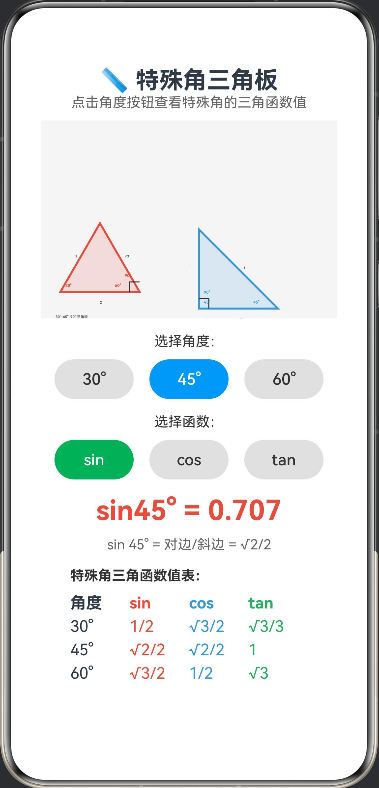
interface TriangleInfo {
  name: string
  angles: number[]
  sides: number[]
  color: string
}

@Entry
@Component
struct SpecialAnglePuzzle {
  @State private selectedAngle: string = '30°'
  @State private selectedFunction: string = 'sin'

  private settings: RenderingContextSettings = new RenderingContextSettings(true)
  private context: CanvasRenderingContext2D = new CanvasRenderingContext2D(this.settings)

  aboutToAppear() {
    this.drawPieces()
  }

  build() {
    Column() {
      Text('📏 特殊角三角板')
        .fontSize(24).fontWeight(FontWeight.Bold)

      Text('点击角度按钮查看特殊角的三角函数值')
        .fontSize(14).fontColor('#666').margin({ bottom: 10 })

      Canvas(this.context)
        .width(300).height(200)
        .backgroundColor('#f5f5f5')
        .onReady(() => this.drawPieces())

      Text('选择角度:')
        .fontSize(14).fontColor('#333').margin({ top: 15 })

      Row() {
        ForEach(['30°', '45°', '60°'], (angle: string) => {
          Button(angle)
            .width(80)
            .height(40)
            .backgroundColor(this.selectedAngle === angle ? '#2196F3' : '#e0e0e0')
            .fontColor(this.selectedAngle === angle ? '#fff' : '#333')
            .onClick(() => {
              this.selectedAngle = angle
              this.drawPieces()
            })
        })
      }.margin({ top: 10 }).justifyContent(FlexAlign.SpaceAround).width('90%')

      Text('选择函数:')
        .fontSize(14).fontColor('#333').margin({ top: 15 })

      Row() {
        ForEach(['sin', 'cos', 'tan'], (func: string) => {
          Button(func)
            .width(80)
            .height(40)
            .backgroundColor(this.selectedFunction === func ? '#27AE60' : '#e0e0e0')
            .fontColor(this.selectedFunction === func ? '#fff' : '#333')
            .onClick(() => {
              this.selectedFunction = func
              this.drawPieces()
            })
        })
      }.margin({ top: 10 }).justifyContent(FlexAlign.SpaceAround).width('90%')

      Column() {
        Text(`${this.selectedFunction}${this.selectedAngle} = ${this.getValue()}`)
          .fontSize(28)
          .fontWeight(FontWeight.Bold)
          .fontColor('#E74C3C')
          .margin({ top: 15 })

        Text(this.getExplanation())
          .fontSize(14)
          .fontColor('#666')
          .margin({ top: 10 })
      }.alignItems(HorizontalAlign.Center)

      Column() {
        Text('特殊角三角函数值表:')
          .fontSize(14).fontWeight(FontWeight.Bold).fontColor('#333')

        Row() {
          Text('角度').width(60).fontWeight(FontWeight.Bold)
          Text('sin').width(60).fontWeight(FontWeight.Bold).fontColor('#E74C3C')
          Text('cos').width(60).fontWeight(FontWeight.Bold).fontColor('#3498DB')
          Text('tan').width(60).fontWeight(FontWeight.Bold).fontColor('#27AE60')
        }.margin({ top: 10 })

        this.buildTableRow('30°', '1/2', '√3/2', '√3/3')
        this.buildTableRow('45°', '√2/2', '√2/2', '1')
        this.buildTableRow('60°', '√3/2', '1/2', '√3')
      }.margin({ top: 15 }).alignItems(HorizontalAlign.Start)
    }.width('100%').padding(20)
  }

  @Builder
  buildTableRow(angle: string, sinVal: string, cosVal: string, tanVal: string) {
    Row() {
      Text(angle).width(60)
      Text(sinVal).width(60).fontColor('#E74C3C')
      Text(cosVal).width(60).fontColor('#3498DB')
      Text(tanVal).width(60).fontColor('#27AE60')
    }.margin({ top: 5 })
  }

  private getValue(): string {
    const angle = parseInt(this.selectedAngle)
    const rad = angle * Math.PI / 180

    switch (this.selectedFunction) {
      case 'sin':
        return Math.sin(rad).toFixed(3)
      case 'cos':
        return Math.cos(rad).toFixed(3)
      case 'tan':
        return Math.tan(rad).toFixed(3)
      default:
        return '0'
    }
  }

  private getExplanation(): string {
    const angle = parseInt(this.selectedAngle)

    switch (this.selectedFunction) {
      case 'sin':
        if (angle === 30) return 'sin 30° = 对边/斜边 = 1/2'
        if (angle === 45) return 'sin 45° = 对边/斜边 = √2/2'
        if (angle === 60) return 'sin 60° = 对边/斜边 = √3/2'
        break
      case 'cos':
        if (angle === 30) return 'cos 30° = 邻边/斜边 = √3/2'
        if (angle === 45) return 'cos 45° = 邻边/斜边 = √2/2'
        if (angle === 60) return 'cos 60° = 邻边/斜边 = 1/2'
        break
      case 'tan':
        if (angle === 30) return 'tan 30° = 对边/邻边 = √3/3'
        if (angle === 45) return 'tan 45° = 对边/邻边 = 1'
        if (angle === 60) return 'tan 60° = 对边/邻边 = √3'
        break
    }
    return ''
  }

  private drawPieces() {
    const ctx = this.context
    ctx.clearRect(0, 0, 300, 200)

    this.drawTriangle306090(ctx, 60, 150, 80)
    this.drawTriangle454590(ctx, 200, 150, 80)
  }

  private drawTriangle306090(ctx: CanvasRenderingContext2D, cx: number, cy: number, size: number) {
    const height = size * Math.sin(60 * Math.PI / 180)
    const halfBase = size / 2

    const x1 = cx - halfBase
    const y1 = cy + height / 3
    const x2 = cx + halfBase
    const y2 = cy + height / 3
    const x3 = cx
    const y3 = cy - 2 * height / 3

    ctx.strokeStyle = '#E74C3C'
    ctx.lineWidth = 2
    ctx.fillStyle = 'rgba(231, 76, 60, 0.15)'
    ctx.beginPath()
    ctx.moveTo(x1, y1)
    ctx.lineTo(x2, y2)
    ctx.lineTo(x3, y3)
    ctx.closePath()
    ctx.fill()
    ctx.stroke()

    ctx.strokeStyle = '#333'
    ctx.lineWidth = 1
    ctx.beginPath()
    ctx.moveTo(x2 - 10, y2)
    ctx.lineTo(x2 - 10, y2 - 10)
    ctx.lineTo(x2, y2 - 10)
    ctx.stroke()

    ctx.fillStyle = '#E74C3C'
    ctx.font = 'bold 12px sans-serif'
    ctx.fillText('30°', x1 + 5, y1 - 5)
    ctx.fillText('60°', x2 - 25, y2 - 5)
    ctx.fillText('90°', x2 - 15, y2 - 15)

    ctx.fillStyle = '#333'
    ctx.font = '10px sans-serif'
    ctx.fillText('1', (x1 + x3) / 2 - 5, (y1 + y3) / 2)
    ctx.fillText('√3', (x2 + x3) / 2 + 5, (y2 + y3) / 2)
    ctx.fillText('2', (x1 + x2) / 2, y1 + 12)

    ctx.fillStyle = '#666'
    ctx.font = 'bold 11px sans-serif'
    ctx.fillText('30°-60°-90° 三角板', cx - 45, cy + height / 2 + 15)
  }

  private drawTriangle454590(ctx: CanvasRenderingContext2D, cx: number, cy: number, size: number) {
    const halfSize = size / 2

    const x1 = cx - halfSize
    const y1 = cy + halfSize
    const x2 = cx + halfSize
    const y2 = cy + halfSize
    const x3 = cx - halfSize
    const y3 = cy - halfSize

    ctx.strokeStyle = '#3498DB'
    ctx.lineWidth = 2
    ctx.fillStyle = 'rgba(52, 152, 219, 0.15)'
    ctx.beginPath()
    ctx.moveTo(x1, y1)
    ctx.lineTo(x2, y2)
    ctx.lineTo(x3, y3)
    ctx.closePath()
    ctx.fill()
    ctx.stroke()

    ctx.strokeStyle = '#333'
    ctx.lineWidth = 1
    ctx.beginPath()
    ctx.moveTo(x1 + 10, y1)
    ctx.lineTo(x1 + 10, y1 - 10)
    ctx.lineTo(x1, y1 - 10)
    ctx.stroke()

    ctx.fillStyle = '#3498DB'
    ctx.font = 'bold 12px sans-serif'
    ctx.fillText('45°', x1 + 5, y1 - 5)
    ctx.fillText('45°', x2 - 25, y2 - 5)
    ctx.fillText('90°', x1 + 5, y1 - 15)

    ctx.fillStyle = '#333'
    ctx.font = '10px sans-serif'
    ctx.fillText('1', (x1 + x3) / 2 - 10, (y1 + y3) / 2)
    ctx.fillText('1', (x2 + x3) / 2 + 5, (y2 + y3) / 2)
    ctx.fillText('√2', (x1 + x2) / 2, y1 + 12)

    ctx.fillStyle = '#666'
    ctx.font = 'bold 11px sans-serif'
    ctx.fillText('45°-45°-90° 三角板', cx - 45, cy + halfSize + 15)
  }
}

讨论HarmonyOS开发技术,专注于API与组件、DevEco Studio、测试、元服务和应用上架分发等。
更多推荐

 0
0 0
0- 0


 已为社区贡献402条内容

所有评论(0)