Harmonyos应用实例152:勾股定理交互证明
·
应用实例二:勾股定理交互证明
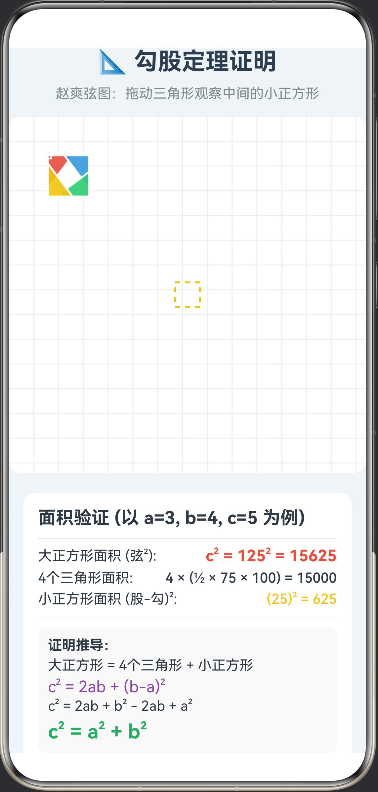
知识点:第十七章《勾股定理》—— 勾股定理的证明(赵爽弦图)。
功能:经典的“赵爽弦图”拼图演示。屏幕上展示四个全等的直角三角形围成一个大正方形。学生拖动三角形重组位置,直观验证“大正方形面积 = 四个小三角形 + 中间小正方形”,即 c2=a2+b2c^2 = a^2 + b^2c2=a2+b2。
/**
 * 勾股定理证明 - 赵爽弦图(组件化拼图版)
 * 核心原理:c² = 4 * (1/2 * a * b) + (b - a)²
 */

interface Point {
  x: number;
  y: number;
}

// 向量接口
interface Vector {
  x: number;
  y: number;
}

// 三角形数据模型
interface PieceModel {
  id: number;
  color: string;
  // 三角形顶点路径
  points: Point[];
  // 初始位置偏移
  initOffset: Point;
  // 当前位置偏移
  currentOffset: Point;
  // 旋转角度
  rotation: number;
}

@Entry
@Component
struct PythagoreanProofV2 {
  // 基础参数:直角三角形边长 (经典 3:4:5 比例放大)
  private readonly A: number = 75;  // 勾
  private readonly B: number = 100; // 股
  private readonly C: number = 125; // 弦

  // 画布参数
  private readonly CANVAS_SIZE: number = 360;
  private readonly CENTER: number = 180;

  // 状态:是否打乱
  @State isScrambled: boolean = false;
  // 状态:四个拼图块的数据
  @State pieces: PieceModel[] = [];

  aboutToAppear() {
    this.initPieces();
  }

  build() {
    Column() {
      // 标题区
      Row() {
        Text('📐 勾股定理证明')
          .fontSize(24)
          .fontWeight(FontWeight.Bold)
          .fontColor('#2C3E50')
      }
      .margin({ bottom: 10 })

      Text('赵爽弦图:拖动三角形观察中间的小正方形')
        .fontSize(14)
        .fontColor('#7F8C8D')
        .margin({ bottom: 15 })

      // 游戏区域
      Stack() {
        // 1. 底层:绘制网格和中心小正方形
        Canvas(this.context)
          .width(this.CANVAS_SIZE)
          .height(this.CANVAS_SIZE)
          .backgroundColor('#FFFFFF')
          .borderRadius(12)
          .onReady(() => {
            this.drawBackground();
          })

        // 2. 上层:四个可拖拽的三角形组件
        ForEach(this.pieces, (piece: PieceModel, index: number) => {
          this.TrianglePiece(piece, index)
        })
      }
      .width(this.CANVAS_SIZE)
      .height(this.CANVAS_SIZE)
      .clip(true) // 限制在区域内

      // 数学原理面板
      Column() {
        this.MathPanel()
      }
      .width('92%')
      .padding(15)
      .margin({ top: 20 })
      .backgroundColor('#FFFFFF')
      .borderRadius(12)
      .shadow({ radius: 8, color: '#00000015', offsetY: 2 })

      // 控制按钮
      Row() {
        Button(this.isScrambled ? '复原拼图' : '打乱演示')
          .onClick(() => this.toggleScramble())
          .backgroundColor(this.isScrambled ? '#27AE60' : '#3498DB')
          .width('45%')

        Button('重置数据')
          .onClick(() => this.initPieces())
          .backgroundColor('#95A5A6')
          .width('45%')
          .margin({ left: '5%' })
      }
      .width('92%')
      .margin({ top: 15 })
    }
    .width('100%')
    .height('100%')
    .backgroundColor('#F0F4F8')
  }

  // ------------------ 组件构建区 ------------------

  // 单个三角形拼图块
  @Builder
  TrianglePiece(piece: PieceModel, index: number) {
    // 使用 Stack 包装 Shape,实现绝对定位
    Stack() {
      Shape() {
        Path()
        // 根据三个顶点绘制三角形
          .commands(this.getTrianglePath(piece.points))
          .fill(piece.color)
          .stroke(Color.White)
          .strokeWidth(2)
          .opacity(0.9)

        // 绘制直角标记 (小方块)
        if (index === 0) { // 只在一个三角形上画直角标记演示
          Path()
            .commands(this.getRightAngleMarker(piece.points))
            .stroke(Color.White)
            .strokeWidth(1.5)
            .fill(Color.Transparent)
        }
      }
      .width(this.CANVAS_SIZE) // 给 Shape 足够大的画布
      .height(this.CANVAS_SIZE)
      .viewPort({ x: 0, y: 0, width: this.CANVAS_SIZE, height: this.CANVAS_SIZE })
    }
    .width(this.CANVAS_SIZE)
    .height(this.CANVAS_SIZE)
    // 绝对定位:初始位置 + 当前拖拽偏移
    .position({
      x: piece.initOffset.x + piece.currentOffset.x,
      y: piece.initOffset.y + piece.currentOffset.y
    })
    .rotate({ angle: piece.rotation }) // 旋转
    .gesture(
      PanGesture()
        .onActionUpdate((e: GestureEvent) => {
          // 更新当前位置
          this.pieces[index].currentOffset = {
            x: piece.currentOffset.x + e.offsetX,
            y: piece.currentOffset.y + e.offsetY
          };
        })
    )
    .animation({ duration: 100, curve: Curve.Linear })
  }

  // 数学证明面板
  @Builder
  MathPanel() {
    Column() {
      Text('面积验证 (以 a=3, b=4, c=5 为例)')
        .fontSize(18)
        .fontWeight(FontWeight.Bold)
        .margin({ bottom: 10 })

      Divider().margin({ bottom: 8 })

      // 公式展示
      Row() {
        Text('大正方形面积 (弦²): ')
          .fontSize(14)
        Text(`c² = ${this.C}² = ${this.C * this.C}`)
          .fontSize(16)
          .fontWeight(FontWeight.Bold)
          .fontColor('#E74C3C')
      }.width('100%').justifyContent(FlexAlign.SpaceBetween)

      Row() {
        Text('4个三角形面积: ')
          .fontSize(14)
        Text(`4 × (½ × ${this.A} × ${this.B}) = ${2 * this.A * this.B}`)
          .fontSize(14)
          .fontWeight(FontWeight.Medium)
      }.width('100%').justifyContent(FlexAlign.SpaceBetween).margin({ top: 5 })

      Row() {
        Text('小正方形面积 (股-勾)²: ')
          .fontSize(14)
        Text(`(${this.B - this.A})² = ${(this.B - this.A) * (this.B - this.A)}`)
          .fontSize(14)
          .fontColor('#F1C40F')
          .fontWeight(FontWeight.Medium)
      }.width('100%').justifyContent(FlexAlign.SpaceBetween).margin({ top: 5 })

      Divider().margin({ top: 10, bottom: 10 })

      // 证明结论
      Column() {
        Text('证明推导:')
          .fontSize(14)
          .fontWeight(FontWeight.Bold)
        Text('大正方形 = 4个三角形 + 小正方形')
          .fontSize(14)
          .margin({ top: 4 })
        Text('c² = 2ab + (b-a)²')
          .fontSize(16)
          .fontColor('#8E44AD')
          .margin({ top: 4 })
        Text('c² = 2ab + b² - 2ab + a²')
          .fontSize(14)
          .margin({ top: 2 })
        Text('c² = a² + b²')
          .fontSize(20)
          .fontWeight(FontWeight.Bold)
          .fontColor('#27AE60')
          .margin({ top: 6 })
      }
      .width('100%')
      .alignItems(HorizontalAlign.Start)
      .padding(10)
      .backgroundColor('#F9F9F9')
      .borderRadius(8)
    }
    .width('100%')
    .alignItems(HorizontalAlign.Start)
  }

  // ------------------ 逻辑处理区 ------------------

  private settings: RenderingContextSettings = new RenderingContextSettings(true)
  private context: CanvasRenderingContext2D = new CanvasRenderingContext2D(this.settings)

  // 绘制背景:网格 + 中心小正方形
  private drawBackground() {
    const ctx = this.context;
    ctx.clearRect(0, 0, this.CANVAS_SIZE, this.CANVAS_SIZE);

    // 1. 绘制网格
    ctx.strokeStyle = '#EEEEEE';
    ctx.lineWidth = 1;
    for (let i = 0; i < this.CANVAS_SIZE; i += 25) {
      ctx.beginPath(); ctx.moveTo(i, 0); ctx.lineTo(i, this.CANVAS_SIZE); ctx.stroke();
      ctx.beginPath(); ctx.moveTo(0, i); ctx.lineTo(this.CANVAS_SIZE, i); ctx.stroke();
    }

    // 2. 绘制中心小正方形 (显露出的部分)
    const side = this.B - this.A; // 边长 b-a
    // 中心小正方形的坐标计算较为复杂,这里通过几何关系定位
    // 它是倾斜的,角度取决于三角形。
    // 为了简化视觉,我们绘制一个视觉参考区域或者仅靠拖拽后的留白展示。
    // 这里我们在中心绘制一个半透明的虚线框作为提示
    ctx.save();
    ctx.translate(this.CENTER, this.CENTER);
    ctx.strokeStyle = '#F1C40F';
    ctx.lineWidth = 2;
    ctx.setLineDash([5, 5]);
    ctx.strokeRect(-side/2, -side/2, side, side); // 简化的正方形,实际赵爽弦图中间是正方形
    ctx.restore();
  }

  // 初始化拼图块数据
  private initPieces() {
    this.isScrambled = false;
    const a = this.A;
    const b = this.B;
    const c = this.C;

    // 计算大正方形左上角坐标,使其居中
    const startX = this.CENTER - c / 2;
    const startY = this.CENTER - c / 2;

    // 定义四个三角形相对于大正方形左上角(0,0)的坐标
    // 三角形形状:直角顶点朝外,斜边朝内

    this.pieces = [
      {
        id: 0, color: '#E74C3C', // 红
        // 上方三角形:直角在左上角 (0,0)
        // 顶点:(0,0) -> (b,0) -> (0,a)
        // 修正:大正方形边长是c。
        // 几何构造:
        // 三角形1 (上): 直角在 (0, b-a)?? 不,直角在 (0,0) 或 ...
        // 标准赵爽弦图:
        // 顶点 P1(0,0). P2(c,0). P3(c,c). P4(0,c).
        // T1 (上): 顶点 P1(0,0), Q1(a,0), Q2(0,b).
        //   验证:P1->Q1 = a, P1->Q2 = b. Q1->Q2 = sqrt(a²+b²) = c. 正确。
        points: [
          {x: startX, y: startY},
          {x: startX + a, y: startY},
          {x: startX, y: startY + b}
        ],
        initOffset: {x:0, y:0},
        currentOffset: {x:0, y:0},
        rotation: 0
      },
      {
        id: 1, color: '#3498DB', // 蓝
        // 右方三角形:直角在右上角 -> Q3(c, a)?? 不,需要旋转匹配。
        // 手动计算顶点映射:
        // 直角顶点在 (c,0) (大正方形右上角)
        // 顶点:, (c-a, 0), (c, b) ?? 不,边长需匹配。
        // 正确映射:
        // 直角顶点 P2(c,0). 一条边长为a向左,一条边长为b向下。
        points: [
          {x: startX + c, y: startY},
          {x: startX + c - a, y: startY},
          {x: startX + c, y: startY + b}
        ],
        initOffset: {x:0, y:0},
        currentOffset: {x:0, y:0},
        rotation: 0
      },
      {
        id: 2, color: '#2ECC71', // 绿
        // 下方三角形:直角在右下角
        // 直角顶点 P3(c,c). 边长a向左,边长b向上。
        // 这里的顶点顺序决定了三角形的方向,需要保证是闭合的
        // 稍作修正:为了保证全等,只是旋转。
        // T3的顶点应为: 直角, (c-b, c), (c, c-a)
        points: [
          {x: startX + c, y: startY + c}, // 直角
          {x: startX + c, y: startY + c - a}, // 向上 a
          {x: startX + c - b, y: startY + c}  // 向左 b
        ],
        initOffset: {x:0, y:0},
        currentOffset: {x:0, y:0},
        rotation: 0
      },
      {
        id: 3, color: '#F1C40F', // 黄
        // 左方三角形:直角在左下角
        // 直角顶点 P4(0,c). 边长a向右,边长b向上。
        points: [
          {x: startX, y: startY + c},
          {x: startX + a, y: startY + c},
          {x: startX, y: startY + c - b}
        ],
        initOffset: {x:0, y:0},
        currentOffset: {x:0, y:0},
        rotation: 0
      }
    ];
  }

  // 生成三角形Path命令
  private getTrianglePath(points: Point[]): string {
    return `M ${points[0].x} ${points[0].y} L ${points[1].x} ${points[1].y} L ${points[2].x} ${points[2].y} Z`;
  }

  // 生成直角标记路径
  private getRightAngleMarker(points: Point[]): string {
    // 在直角顶点(points[0])处画小正方形标记
    const p0 = points[0];
    const p1 = points[1];
    const p2 = points[2];

    // 计算单位向量
    const len = 10; // 标记大小
    const v1: Vector = { x: (p1.x - p0.x) / this.A * len, y: (p1.y - p0.y) / this.A * len };
    const v2: Vector = { x: (p2.x - p0.x) / this.B * len, y: (p2.y - p0.y) / this.B * len };

    const m1: Point = { x: p0.x + v1.x, y: p0.y + v1.y };
    const m2: Point = { x: p0.x + v2.x, y: p0.y + v2.y };
    const m3: Point = { x: p0.x + v1.x + v2.x, y: p0.y + v1.y + v2.y };

    return `M ${m1.x} ${m1.y} L ${m3.x} ${m3.y} L ${m2.x} ${m2.y}`;
  }

  // 打乱或复原
  private toggleScramble() {
    if (this.isScrambled) {
      // 复原
      this.pieces.forEach((p, i) => {
        p.currentOffset = { x: 0, y: 0 };
      });
    } else {
      // 打乱:随机偏移
      this.pieces.forEach((p, i) => {
        p.currentOffset = {
          x: (Math.random() - 0.5) * 200,
          y: (Math.random() - 0.5) * 200
        };
      });
    }
    this.isScrambled = !this.isScrambled;
  }
}

讨论HarmonyOS开发技术,专注于API与组件、DevEco Studio、测试、元服务和应用上架分发等。
更多推荐

 0
0 0
0- 0


 已为社区贡献402条内容

所有评论(0)