Harmonyos应用实例93:长方体体积计算器
·
应用实例三:长方体体积计算器
知识点:掌握长方体体积计算公式,理解长、宽、高与体积的关系。
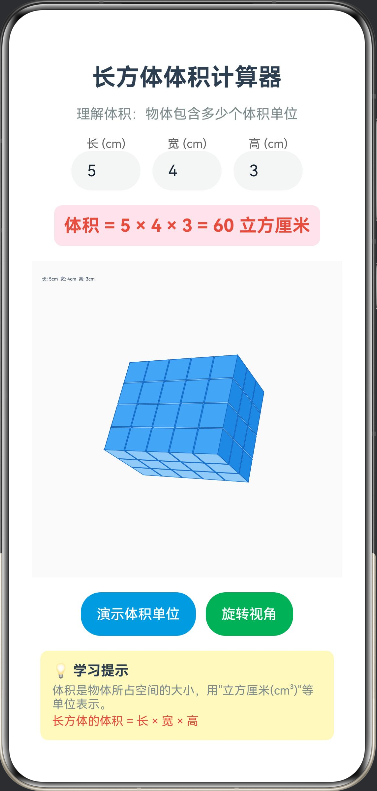
功能:学生输入长方体的长、宽、高,应用动态生成一个按比例缩放的3D长方体模型,并计算其体积。通过动画演示,将长方体切割成若干个“1立方厘米”的小正方体,直观展示体积就是物体包含多少个“体积单位”。
// CuboidVolumeCalculator.ets
interface CubeUnit {
  x: number
  y: number
  z: number
  visible: boolean
  opacity: number
}

@Entry
@Component
struct CuboidVolumeCalculator {
  @State cuboidLength: number = 5
  @State cuboidWidth: number = 4
  @State cuboidHeight: number = 3
  @State volume: number = 60
  @State showAnimation: boolean = false
  @State animationProgress: number = 0
  @State currentCubeCount: number = 0
  @State animationText: string = ''
  private settings: RenderingContextSettings = new RenderingContextSettings(true)
  private context: CanvasRenderingContext2D = new CanvasRenderingContext2D(this.settings)
  private rotationAngleX: number = -25
  private rotationAngleY: number = -30
  private animationTimer: number = -1
  private cubes: CubeUnit[] = []

  aboutToAppear(): void {
    this.calculate()
    this.generateCubes()
  }

  build() {
    Column({
      space: 15
    }) {
      Text('长方体体积计算器')
        .fontSize(24)
        .fontWeight(FontWeight.Bold)
        .fontColor('#2C3E50')

      Text('理解体积:物体包含多少个体积单位')
        .fontSize(14)
        .fontColor('#7F8C8D')

      Row({
        space: 12
      }) {
        Column() {
          Text('长 (cm)')
            .fontSize(12)
            .fontColor('#666')
          TextInput({ text: this.cuboidLength.toString() })
            .width(70)
            .height(40)
            .type(InputType.Number)
            .onChange((value: string) => {
              this.cuboidLength = Math.max(1, Math.min(8, parseFloat(value) || 1))
              this.calculate()
              this.generateCubes()
              this.resetAnimation()
            })
        }
        Column() {
          Text('宽 (cm)')
            .fontSize(12)
            .fontColor('#666')
          TextInput({ text: this.cuboidWidth.toString() })
            .width(70)
            .height(40)
            .type(InputType.Number)
            .onChange((value: string) => {
              this.cuboidWidth = Math.max(1, Math.min(8, parseFloat(value) || 1))
              this.calculate()
              this.generateCubes()
              this.resetAnimation()
            })
        }
        Column() {
          Text('高 (cm)')
            .fontSize(12)
            .fontColor('#666')
          TextInput({ text: this.cuboidHeight.toString() })
            .width(70)
            .height(40)
            .type(InputType.Number)
            .onChange((value: string) => {
              this.cuboidHeight = Math.max(1, Math.min(8, parseFloat(value) || 1))
              this.calculate()
              this.generateCubes()
              this.resetAnimation()
            })
        }
      }

      Text(`体积 = ${this.cuboidLength} × ${this.cuboidWidth} × ${this.cuboidHeight} = ${this.volume} 立方厘米`)
        .fontSize(18)
        .fontWeight(FontWeight.Bold)
        .fontColor('#E74C3C')
        .padding(10)
        .backgroundColor('#FCE4EC')
        .borderRadius(8)

      Canvas(this.context)
        .width('95%')
        .height(320)
        .backgroundColor('#FAFAFA')
        .borderRadius(12)
        .onReady(() => {
          this.draw()
        })

      Row({
        space: 10
      }) {
        Button(this.showAnimation ? '重置动画' : '演示体积单位')
          .fontSize(14)
          .height(44)
          .backgroundColor(this.showAnimation ? '#95A5A6' : '#3498DB')
          .onClick(() => {
            if (this.showAnimation) {
              this.resetAnimation()
            } else {
              this.startAnimation()
            }
          })

        Button('旋转视角')
          .fontSize(14)
          .height(44)
          .backgroundColor('#27AE60')
          .onClick(() => {
            this.rotationAngleY += 30
            this.draw()
          })
      }

      if (this.showAnimation) {
        Column() {
          Text(this.animationText)
            .fontSize(16)
            .fontColor('#2C3E50')
            .fontWeight(FontWeight.Medium)

          Text(`已显示: ${this.currentCubeCount} / ${this.volume} 个小正方体`)
            .fontSize(14)
            .fontColor('#7F8C8D')
            .margin({ top: 5 })

          Progress({
            value: this.currentCubeCount,
            total: this.volume,
            type: ProgressType.Linear
          })
            .width('80%')
            .margin({ top: 10 })
        }
        .padding(15)
        .backgroundColor('#E8F5E9')
        .borderRadius(10)
        .width('90%')
      }

      Column() {
        Text('💡 学习提示')
          .fontSize(14)
          .fontWeight(FontWeight.Bold)
          .fontColor('#2C3E50')
        Text('体积是物体所占空间的大小,用"立方厘米(cm³)"等单位表示。')
          .fontSize(12)
          .fontColor('#7F8C8D')
          .margin({ top: 5 })
        Text('长方体的体积 = 长 × 宽 × 高')
          .fontSize(12)
          .fontColor('#E74C3C')
          .margin({ top: 3 })
      }
      .padding(12)
      .backgroundColor('#FFF9C4')
      .borderRadius(8)
      .width('90%')
      .alignItems(HorizontalAlign.Start)
    }
    .width('100%')
    .height('100%')
    .padding(15)
  }

  private calculate(): void {
    this.volume = this.cuboidLength * this.cuboidWidth * this.cuboidHeight
  }

  private generateCubes(): void {
    this.cubes = []
    for (let x = 0; x < this.cuboidLength; x++) {
      for (let y = 0; y < this.cuboidWidth; y++) {
        for (let z = 0; z < this.cuboidHeight; z++) {
          this.cubes.push({
            x: x,
            y: y,
            z: z,
            visible: true,
            opacity: 1
          })
        }
      }
    }
  }

  private resetAnimation(): void {
    this.showAnimation = false
    this.animationProgress = 0
    this.currentCubeCount = 0
    this.animationText = ''
    if (this.animationTimer !== -1) {
      clearInterval(this.animationTimer)
      this.animationTimer = -1
    }
    this.generateCubes()
    this.draw()
  }

  private startAnimation(): void {
    this.showAnimation = true
    this.animationProgress = 0
    this.currentCubeCount = 0
    this.animationText = '正在分解长方体...'

    this.cubes.forEach((cube: CubeUnit) => {
      cube.visible = false
      cube.opacity = 0
    })

    this.draw()

    let currentIndex = 0
    const totalCubes = this.cubes.length

    this.animationTimer = setInterval(() => {
      if (currentIndex < totalCubes) {
        this.cubes[currentIndex].visible = true
        this.cubes[currentIndex].opacity = 1
        this.currentCubeCount = currentIndex + 1
        this.animationProgress = (currentIndex + 1) / totalCubes

        if (currentIndex === Math.floor(totalCubes * 0.25)) {
          this.animationText = '继续添加小正方体...'
        } else if (currentIndex === Math.floor(totalCubes * 0.5)) {
          this.animationText = '已完成一半!'
        } else if (currentIndex === Math.floor(totalCubes * 0.75)) {
          this.animationText = '快要完成了...'
        }

        this.draw()
        currentIndex++
      } else {
        clearInterval(this.animationTimer)
        this.animationTimer = -1
        this.animationText = `完成!共 ${this.volume} 个1立方厘米的小正方体`
        this.draw()
      }
    }, 80)
  }

  private draw(): void {
    const width = this.context.width
    const height = this.context.height
    const centerX = width / 2
    const centerY = height / 2

    this.context.clearRect(0, 0, width, height)

    this.context.fillStyle = '#FAFAFA'
    this.context.fillRect(0, 0, width, height)

    const scale = 25
    const radX = this.rotationAngleX * Math.PI / 180
    const radY = this.rotationAngleY * Math.PI / 180

    const offsetX = -this.cuboidLength / 2
    const offsetY = -this.cuboidWidth / 2
    const offsetZ = -this.cuboidHeight / 2

    interface FaceData {
      depth: number
      vertices: Point2D[]
      color: string
      strokeColor: string
    }

    const faces: FaceData[] = []

    this.cubes.forEach((cube: CubeUnit) => {
      if (!cube.visible) return

      const px = (cube.x + offsetX) * scale
      const py = (cube.y + offsetY) * scale
      const pz = (cube.z + offsetZ) * scale

      const unitSize = scale * 0.95

      const cubeVertices: Point3D[] = [
        { x: px, y: py, z: pz },
        { x: px + unitSize, y: py, z: pz },
        { x: px + unitSize, y: py + unitSize, z: pz },
        { x: px, y: py + unitSize, z: pz },
        { x: px, y: py, z: pz + unitSize },
        { x: px + unitSize, y: py, z: pz + unitSize },
        { x: px + unitSize, y: py + unitSize, z: pz + unitSize },
        { x: px, y: py + unitSize, z: pz + unitSize }
      ]

      const rotatedVertices: Point3D[] = cubeVertices.map((v: Point3D) => this.rotatePoint(v, radX, radY))

      const projectedVertices: Point2D[] = rotatedVertices.map((v: Point3D) => this.projectPoint(v, centerX, centerY))

      const faceDefinitions: FaceDef[] = [
        { indices: [0, 1, 2, 3], color: '#64B5F6', strokeColor: '#1976D2' },
        { indices: [4, 5, 6, 7], color: '#42A5F5', strokeColor: '#1565C0' },
        { indices: [0, 1, 5, 4], color: '#90CAF9', strokeColor: '#1976D2' },
        { indices: [2, 3, 7, 6], color: '#BBDEFB', strokeColor: '#1976D2' },
        { indices: [0, 3, 7, 4], color: '#E3F2FD', strokeColor: '#1976D2' },
        { indices: [1, 2, 6, 5], color: '#1E88E5', strokeColor: '#1565C0' }
      ]

      faceDefinitions.forEach((faceDef: FaceDef) => {
        const faceVertices: Point3D[] = faceDef.indices.map((i: number) => rotatedVertices[i])
        const avgDepth = faceVertices.reduce((sum: number, v: Point3D) => sum + v.z, 0) / 4

        faces.push({
          depth: avgDepth,
          vertices: faceVertices.map((v: Point3D) => this.projectPoint(v, centerX, centerY)),
          color: faceDef.color,
          strokeColor: faceDef.strokeColor
        })
      })
    })

    faces.sort((a: FaceData, b: FaceData) => a.depth - b.depth)

    faces.forEach((face: FaceData) => {
      this.context.beginPath()
      this.context.moveTo(face.vertices[0].x, face.vertices[0].y)
      for (let i = 1; i < face.vertices.length; i++) {
        this.context.lineTo(face.vertices[i].x, face.vertices[i].y)
      }
      this.context.closePath()
      this.context.fillStyle = face.color
      this.context.fill()
      this.context.strokeStyle = face.strokeColor
      this.context.lineWidth = 0.5
      this.context.stroke()
    })

    this.context.fillStyle = '#2C3E50'
    this.context.font = '14px sans-serif'
    this.context.fillText(`长: ${this.cuboidLength}cm  宽: ${this.cuboidWidth}cm  高: ${this.cuboidHeight}cm`, 10, 20)

    if (this.showAnimation) {
      this.context.fillStyle = '#E74C3C'
      this.context.font = 'bold 12px sans-serif'
      this.context.fillText(`体积单位: ${this.currentCubeCount} cm³`, 10, height - 10)
    }
  }

  private rotatePoint(point: Point3D, radX: number, radY: number): Point3D {
    let x = point.x
    let y = point.y
    let z = point.z

    const cosX = Math.cos(radX)
    const sinX = Math.sin(radX)
    const y1 = y * cosX - z * sinX
    const z1 = y * sinX + z * cosX

    const cosY = Math.cos(radY)
    const sinY = Math.sin(radY)
    const x2 = x * cosY + z1 * sinY
    const z2 = -x * sinY + z1 * cosY

    return { x: x2, y: y1, z: z2 }
  }

  private projectPoint(point: Point3D, centerX: number, centerY: number): Point2D {
    const perspective = 500
    const scale = perspective / (perspective - point.z)
    return {
      x: centerX + point.x * scale,
      y: centerY - point.y * scale
    }
  }
}

interface Point3D {
  x: number
  y: number
  z: number
}

interface Point2D {
  x: number
  y: number
}

interface FaceDef {
  indices: number[]
  color: string
  strokeColor: string
}

讨论HarmonyOS开发技术,专注于API与组件、DevEco Studio、测试、元服务和应用上架分发等。
更多推荐



 0
0 0
0- 0


 已为社区贡献402条内容

所有评论(0)