Harmonyos应用实例134:平面直角坐标系寻宝
·
应用实例四:平面直角坐标系寻宝
知识点:第七章《平面直角坐标系》—— 用坐标表示位置。
功能:一个简易的坐标系网格,屏幕随机给出一个坐标(如(2, -3)),学生需要点击网格中正确的位置来“挖掘宝藏”。答对得分,帮助学生熟练掌握各象限坐标的符号特征。
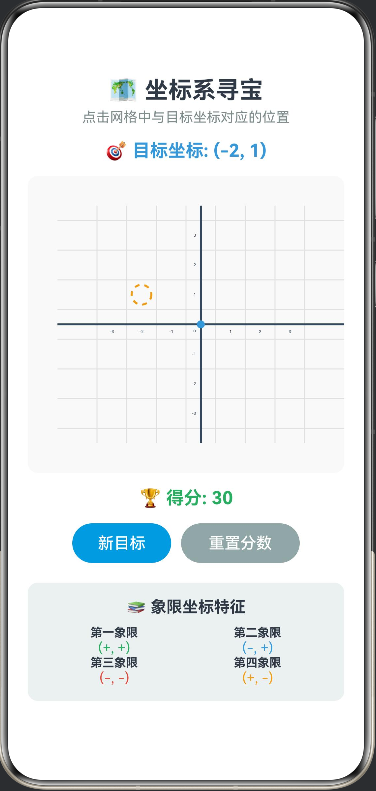
/**
 * 坐标系寻宝游戏
 * 知识点:坐标系、象限、坐标符号特征
 */

interface Coordinate {
  x: number
  y: number
}

@Entry
@Component
struct CoordinateTreasureHunt {
  @State private score: number = 0
  @State private currentTarget: Coordinate = { x: 0, y: 0 }
  @State private showTreasure: boolean = false
  @State private clickPosition: Coordinate | null = null
  @State private isCorrect: boolean = false
  @State private message: string = ''
  @State private showMessage: boolean = false

  // 画布上下文
  private settings: RenderingContextSettings = new RenderingContextSettings(true)
  private context: CanvasRenderingContext2D = new CanvasRenderingContext2D(this.settings)

  // 网格参数
  private gridSize: number = 30
  private gridWidth: number = 7
  private gridHeight: number = 7
  private centerX: number = 175
  private centerY: number = 150

  // 生成随机目标坐标
  private generateTarget(): void {
    // 生成 -3 到 3 之间的整数坐标
    const x = Math.floor(Math.random() * 7) - 3
    const y = Math.floor(Math.random() * 7) - 3
    this.currentTarget = { x, y }
    this.showTreasure = false
    this.clickPosition = null
    this.isCorrect = false
    this.showMessage = false
    this.drawGrid()
  }

  // 检查点击位置
  private checkClick(x: number, y: number): void {
    // 计算点击位置对应的网格坐标
    const gridX = Math.round((x - this.centerX) / this.gridSize)
    const gridY = Math.round((this.centerY - y) / this.gridSize)

    this.clickPosition = { x: gridX, y: gridY }
    this.isCorrect = (gridX === this.currentTarget.x && gridY === this.currentTarget.y)

    if (this.isCorrect) {
      this.score += 10
      this.message = '🎉 正确!找到宝藏了!'
      this.showTreasure = true
      setTimeout(() => {
        this.generateTarget()
      }, 1500)
    } else {
      this.message = `❌ 错误!目标是 (${this.currentTarget.x}, ${this.currentTarget.y})`
    }

    this.showMessage = true
    this.drawGrid()
  }

  // 绘制网格
  private drawGrid(): void {
    const ctx = this.context
    const width = 350
    const height = 300

    // 清空画布
    ctx.clearRect(0, 0, width, height)

    // 绘制网格
    ctx.strokeStyle = '#E0E0E0'
    ctx.lineWidth = 1

    // 垂直线
    for (let i = -this.gridWidth/2; i <= this.gridWidth/2; i++) {
      const x = this.centerX + i * this.gridSize
      ctx.beginPath()
      ctx.moveTo(x, 30)
      ctx.lineTo(x, height - 30)
      ctx.stroke()
    }

    // 水平线
    for (let i = -this.gridHeight/2; i <= this.gridHeight/2; i++) {
      const y = this.centerY + i * this.gridSize
      ctx.beginPath()
      ctx.moveTo(30, y)
      ctx.lineTo(width - 30, y)
      ctx.stroke()
    }

    // 绘制坐标轴
    ctx.strokeStyle = '#34495E'
    ctx.lineWidth = 2

    // X轴
    ctx.beginPath()
    ctx.moveTo(30, this.centerY)
    ctx.lineTo(width - 30, this.centerY)
    ctx.stroke()

    // Y轴
    ctx.beginPath()
    ctx.moveTo(this.centerX, 30)
    ctx.lineTo(this.centerX, height - 30)
    ctx.stroke()

    // 绘制坐标轴标签
    ctx.fillStyle = '#2C3E50'
    ctx.font = '12px Arial'
    ctx.textAlign = 'center'
    ctx.textBaseline = 'top'

    // X轴标签
    for (let i = -3; i <= 3; i++) {
      if (i === 0) continue
      const x = this.centerX + i * this.gridSize
      ctx.fillText(`${i}`, x, this.centerY + 5)
    }

    // Y轴标签
    ctx.textBaseline = 'middle'
    ctx.textAlign = 'right'
    for (let i = -3; i <= 3; i++) {
      if (i === 0) continue
      const y = this.centerY - i * this.gridSize
      ctx.fillText(`${i}`, this.centerX - 5, y)
    }

    // 绘制原点
    ctx.fillStyle = '#3498DB'
    ctx.beginPath()
    ctx.arc(this.centerX, this.centerY, 4, 0, Math.PI * 2)
    ctx.fill()
    ctx.fillStyle = '#2C3E50'
    ctx.font = '10px Arial'
    ctx.textAlign = 'right'
    ctx.textBaseline = 'top'
    ctx.fillText('O', this.centerX - 5, this.centerY + 5)

    // 绘制目标位置(如果未找到)
    if (!this.showTreasure) {
      const targetX = this.centerX + this.currentTarget.x * this.gridSize
      const targetY = this.centerY - this.currentTarget.y * this.gridSize

      ctx.strokeStyle = '#F39C12'
      ctx.lineWidth = 2
      ctx.setLineDash([5, 5])
      ctx.beginPath()
      ctx.arc(targetX, targetY, 10, 0, Math.PI * 2)
      ctx.stroke()
      ctx.setLineDash([])
    }

    // 绘制点击位置
    if (this.clickPosition) {
      const clickX = this.centerX + this.clickPosition.x * this.gridSize
      const clickY = this.centerY - this.clickPosition.y * this.gridSize

      ctx.fillStyle = this.isCorrect ? '#27AE60' : '#E74C3C'
      ctx.beginPath()
      ctx.arc(clickX, clickY, 6, 0, Math.PI * 2)
      ctx.fill()
    }

    // 绘制宝藏
    if (this.showTreasure) {
      const treasureX = this.centerX + this.currentTarget.x * this.gridSize
      const treasureY = this.centerY - this.currentTarget.y * this.gridSize

      ctx.fillStyle = '#F1C40F'
      ctx.beginPath()
      ctx.arc(treasureX, treasureY, 12, 0, Math.PI * 2)
      ctx.fill()

      ctx.fillStyle = '#D35400'
      ctx.font = 'bold 14px Arial'
      ctx.textAlign = 'center'
      ctx.textBaseline = 'middle'
      ctx.fillText('💰', treasureX, treasureY)
    }
  }

  build() {
    Column() {
      Text('🗺️ 坐标系寻宝')
        .fontSize(24).fontWeight(FontWeight.Bold).margin({ top: 10 })

      Text('点击网格中与目标坐标对应的位置')
        .fontSize(14).fontColor('#7F8C8D').margin({ top: 5, bottom: 15 })

      // 目标坐标显示
      Text(`🎯 目标坐标: (${this.currentTarget.x}, ${this.currentTarget.y})`)
        .fontSize(18).fontWeight(FontWeight.Bold).fontColor('#3498DB')
        .margin({ bottom: 15 })

      // 画布
      Canvas(this.context)
        .width('100%')
        .height(300)
        .backgroundColor('#F9F9F9')
        .borderRadius(10)
        .onReady(() => {
          this.generateTarget()
        })
        .onClick((event: ClickEvent) => {
          const x: number = event.x
          const y: number = event.y
          this.checkClick(x, y)
        })

      // 分数显示
      Text(`🏆 得分: ${this.score}`)
        .fontSize(18).fontWeight(FontWeight.Bold).fontColor('#27AE60')
        .margin({ top: 15, bottom: 15 })

      // 消息提示
      if (this.showMessage) {
        Text(this.message)
          .fontSize(14)
          .fontColor(this.isCorrect ? '#27AE60' : '#E74C3C')
          .fontWeight(FontWeight.Bold)
          .margin({ bottom: 15 })
      }

      // 控制按钮
      Row() {
        Button('新目标')
          .backgroundColor('#3498DB')
          .fontColor('#FFF')
          .width(100)
          .onClick(() => this.generateTarget())

        Button('重置分数')
          .margin({ left: 10 })
          .backgroundColor('#95A5A6')
          .fontColor('#FFF')
          .width(120)
          .onClick(() => {
            this.score = 0
            this.generateTarget()
          })
      }
      .margin({ bottom: 20 })

      // 象限符号特征
      Column() {
        Text('📚 象限坐标特征')
          .fontSize(16).fontWeight(FontWeight.Bold).margin({ bottom: 10 })

        Row() {
          Column() {
            Text('第一象限')
              .fontSize(12).fontWeight(FontWeight.Bold)
            Text('(+, +)')
              .fontSize(14).fontColor('#27AE60')
          }.width('50%')

          Column() {
            Text('第二象限')
              .fontSize(12).fontWeight(FontWeight.Bold)
            Text('(-, +)')
              .fontSize(14).fontColor('#3498DB')
          }.width('50%')
        }

        Row() {
          Column() {
            Text('第三象限')
              .fontSize(12).fontWeight(FontWeight.Bold)
            Text('(-, -)')
              .fontSize(14).fontColor('#E74C3C')
          }.width('50%')

          Column() {
            Text('第四象限')
              .fontSize(12).fontWeight(FontWeight.Bold)
            Text('(+, -)')
              .fontSize(14).fontColor('#F39C12')
          }.width('50%')
        }
      }
      .padding(15)
      .backgroundColor('#ECF0F1')
      .borderRadius(10)
    }
    .width('100%')
    .height('100%')
    .padding(20)
    .justifyContent(FlexAlign.Start)
  }
}

讨论HarmonyOS开发技术,专注于API与组件、DevEco Studio、测试、元服务和应用上架分发等。
更多推荐

 0
0 0
0- 0


 已为社区贡献402条内容

所有评论(0)