Harmonyos应用实例145:轴对称艺术画板
·
应用实例五:轴对称艺术画板
知识点:第十三章《轴对称》—— 轴对称图形。
功能:左侧是画板,右侧是镜像区。学生可以在左侧自由绘画,右侧实时生成关于中轴线的对称图形。支持多条对称轴(垂直、水平、倾斜),帮助学生直观理解对称变换。
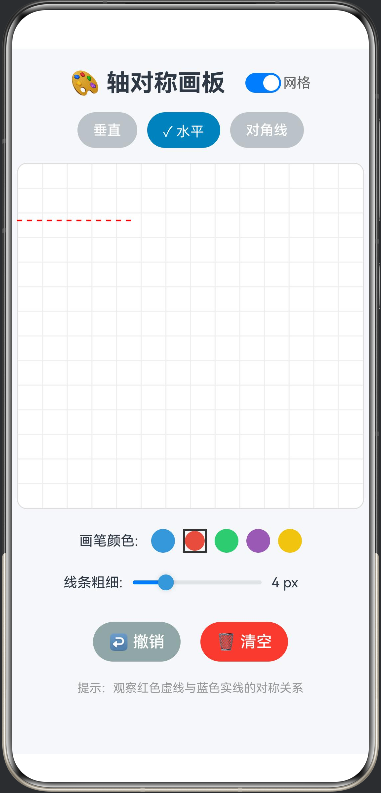
interface Point {
  x: number;
  y: number;
}

@Entry
@Component
struct SymmetryPainter {
  @State private paths: Point[][] = []
  @State private currentPath: Point[] = []
  @State private symmetryType: string = 'vertical' // vertical, horizontal, diagonal
  @State private isDrawing: boolean = false

  build() {
    Column() {
      Text('🎨 轴对称画板')
        .fontSize(24).fontWeight('bold')
        .margin({ bottom: 20 })

      // 对称轴选择
      Row() {
        Button(this.symmetryType === 'vertical' ? '✓ 垂直' : '垂直')
          .onClick(() => this.changeSymmetryType('vertical'))
          .backgroundColor(this.symmetryType === 'vertical' ? '#2980B9' : '#95A5A6')

        Button(this.symmetryType === 'horizontal' ? '✓ 水平' : '水平')
          .onClick(() => this.changeSymmetryType('horizontal'))
          .backgroundColor(this.symmetryType === 'horizontal' ? '#2980B9' : '#95A5A6')
          .margin({ left: 10, right: 10 })

        Button(this.symmetryType === 'diagonal' ? '✓ 对角线' : '对角线')
          .onClick(() => this.changeSymmetryType('diagonal'))
          .backgroundColor(this.symmetryType === 'diagonal' ? '#2980B9' : '#95A5A6')
      }
      .margin({ bottom: 20 })

      Stack() {
        // 主画布
        Canvas(this.context)
          .width(300).height(300)
          .backgroundColor('#F0F0F0')
          .onReady(() => {
            this.drawMirror()
          })
          .onTouch((e) => {
            if (e.type === 0) { // DOWN
              this.isDrawing = true
              this.currentPath = [{x: e.touches[0].x, y: e.touches[0].y} as Point]
            } else if (e.type === 1 && this.isDrawing) { // MOVE
              this.currentPath.push({x: e.touches[0].x, y: e.touches[0].y} as Point)
              this.drawMirror()
            } else if (e.type === 2) { // UP
              this.isDrawing = false
              if (this.currentPath.length > 1) {
                this.paths.push(this.currentPath)
              }
              this.currentPath = []
            }
          })

        // 对称轴
        if (this.symmetryType === 'vertical') {
          Divider()
            .vertical(true)
            .height(300)
            .color('#E74C3C')
        } else if (this.symmetryType === 'horizontal') {
          Divider()
            .vertical(false)
            .width(300)
            .color('#E74C3C')
        } else if (this.symmetryType === 'diagonal') {
          // 对角线对称轴
          Shape() {
            Path()
              .commands('M 0 0 L 300 300')
              .stroke('#E74C3C')
              .strokeWidth(2)
          }
          .width(300)
          .height(300)
        }
      }

      Row() {
        Button('清除画布')
          .margin({ top: 20, right: 10 })
          .onClick(() => {
            this.paths = []
            this.currentPath = []
            this.drawMirror()
          })

        Button('重置')
          .margin({ top: 20 })
          .onClick(() => {
            this.paths = []
            this.currentPath = []
            this.symmetryType = 'vertical'
            this.drawMirror()
          })
      }
    }
    .width('100%')
    .height('100%')
    .backgroundColor('#FFFFFF')
    .padding(20)
    .alignItems(0) // HorizontalAlign.CENTER
  }

  private settings: RenderingContextSettings = new RenderingContextSettings(true)
  private context: CanvasRenderingContext2D = new CanvasRenderingContext2D(this.settings)

  private changeSymmetryType(type: string) {
    this.symmetryType = type
    this.drawMirror()
  }

  private drawMirror() {
    const ctx = this.context
    ctx.clearRect(0, 0, 300, 300)

    // 绘制所有已完成的路径
    for (let path of this.paths) {
      this.drawPath(ctx, path, '#3498DB')
      this.drawSymmetricPath(ctx, path)
    }

    // 绘制当前正在绘制的路径
    if (this.currentPath.length > 0) {
      this.drawPath(ctx, this.currentPath, '#3498DB')
      this.drawSymmetricPath(ctx, this.currentPath)
    }
  }

  private drawPath(ctx: CanvasRenderingContext2D, path: Point[], color: string) {
    if (path.length < 2) return

    ctx.beginPath()
    ctx.strokeStyle = color
    ctx.lineWidth = 3
    ctx.moveTo(path[0].x, path[0].y)
    for (let i = 1; i < path.length; i++) {
      ctx.lineTo(path[i].x, path[i].y)
    }
    ctx.stroke()
  }

  private drawSymmetricPath(ctx: CanvasRenderingContext2D, path: Point[]) {
    if (path.length < 2) return

    ctx.beginPath()
    ctx.strokeStyle = '#E74C3C'
    ctx.lineWidth = 3

    const firstPoint = this.getSymmetricPoint(path[0])
    ctx.moveTo(firstPoint.x, firstPoint.y)

    for (let i = 1; i < path.length; i++) {
      const point = this.getSymmetricPoint(path[i])
      ctx.lineTo(point.x, point.y)
    }

    ctx.stroke()
  }

  private getSymmetricPoint(point: Point): Point {
    if (this.symmetryType === 'vertical') {
      // 垂直对称轴 (x=150)
      return { x: 300 - point.x, y: point.y }
    } else if (this.symmetryType === 'horizontal') {
      // 水平对称轴 (y=150)
      return { x: point.x, y: 300 - point.y }
    } else if (this.symmetryType === 'diagonal') {
      // 对角线对称轴 (y=x)
      return { x: point.y, y: point.x }
    }
    return point
  }
}```

讨论HarmonyOS开发技术,专注于API与组件、DevEco Studio、测试、元服务和应用上架分发等。
更多推荐



 0
0 0
0- 0


 已为社区贡献402条内容

所有评论(0)