Harmonyos应用实例95:展开图拼装游戏
·
应用实例五:展开图拼装游戏
知识点:认识长方体和正方体的展开图,培养空间想象能力。
功能:屏幕上随机显示一个长方体或正方体的平面展开图(打乱状态的6个面)。学生需要通过拖动、旋转这些面,将它们正确拼合成一个完整的展开图。游戏成功后,应用会用动画折叠成3D立体图形,验证学生的判断。
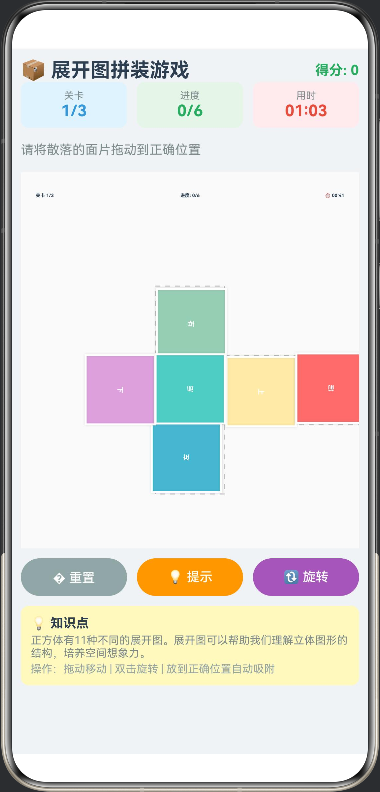
/**
 * 展开图拼装游戏
 * 核心功能:拖拽拼图、旋转校正、3D折叠验证动画
 * 教育目标:培养学生的空间想象能力,理解立体图形与展开图的关系
 */

// 面片数据模型
interface FacePiece {
  id: number;
  type: 'square' | 'rect_v' | 'rect_h';
  color: string;
  label: string;
  currentX: number;
  currentY: number;
  rotation: number;
  targetGridX: number;
  targetGridY: number;
  targetRotation: number;
  isPlaced: boolean;
  isDragging: boolean;
}

// 目标位置
interface TargetPosition {
  x: number
  y: number
  rot: number
}

// 展开图类型
interface NetPattern {
  name: string
  description: string
  targets: TargetPosition[]
}

// 3D动画状态
interface FoldAnimation {
  progress: number;
  isPlaying: boolean;
}

@Entry
@Component
struct NetPuzzleGame {
  private settings: RenderingContextSettings = new RenderingContextSettings(true);
  private context: CanvasRenderingContext2D = new CanvasRenderingContext2D(this.settings);

  // 游戏数据
  @State private pieces: FacePiece[] = [];
  @State private gridSize: number = 70;
  @State private centerX: number = 0;
  @State private centerY: number = 0;

  // 游戏状态
  @State private gameStatus: 'playing' | 'success' = 'playing';
  @State private foldAnim: FoldAnimation = { progress: 0, isPlaying: false };
  @State private message: string = '请将散落的面片拖动到中央网格,点击面片可旋转';
  @State private currentLevel: number = 1;
  @State private totalLevels: number = 3;
  @State private score: number = 0;
  @State private timeElapsed: number = 0;
  @State private isTimerRunning: boolean = false;
  @State private showHint: boolean = false;
  @State private placedCount: number = 0;

  // 拖拽临时变量
  private dragOffsetX: number = 0;
  private dragOffsetY: number = 0;
  private activePieceId: number = -1;
  private timer: number = -1;

  // 展开图模式库
  private netPatterns: NetPattern[] = [
    {
      name: '十字形',
      description: '最常见的展开图,中间一行4个面',
      targets: [
        { x: 0, y: 0, rot: 0 },
        { x: 2, y: 0, rot: 0 },
        { x: -1, y: 0, rot: 0 },
        { x: 1, y: 0, rot: 0 },
        { x: 0, y: -1, rot: 0 },
        { x: 0, y: 1, rot: 0 }
      ]
    },
    {
      name: 'Z字形',
      description: '像字母Z一样的展开图',
      targets: [
        { x: 0, y: 0, rot: 0 },
        { x: 1, y: 0, rot: 0 },
        { x: 1, y: 1, rot: 0 },
        { x: 1, y: 2, rot: 0 },
        { x: 0, y: 1, rot: 0 },
        { x: 2, y: 0, rot: 0 }
      ]
    },
    {
      name: 'T字形',
      description: '像字母T一样的展开图',
      targets: [
        { x: 0, y: 0, rot: 0 },
        { x: 1, y: 0, rot: 0 },
        { x: -1, y: 0, rot: 0 },
        { x: 0, y: 1, rot: 0 },
        { x: 0, y: 2, rot: 0 },
        { x: 0, y: -1, rot: 0 }
      ]
    }
  ];

  aboutToAppear(): void {
    this.initGame();
  }

  aboutToDisappear(): void {
    if (this.timer !== -1) {
      clearInterval(this.timer);
    }
  }

  // 初始化游戏
  private initGame(): void {
    this.pieces = [];
    this.gameStatus = 'playing';
    this.foldAnim = { progress: 0, isPlaying: false };
    this.showHint = false;
    this.placedCount = 0;
    this.message = '请将散落的面片拖动到正确位置';

    const colors = ['#FF6B6B', '#4ECDC4', '#45B7D1', '#96CEB4', '#FFEAA7', '#DDA0DD'];
    const labels = ['前', '后', '左', '右', '上', '下'];

    const patternIndex = (this.currentLevel - 1) % this.netPatterns.length;
    const pattern = this.netPatterns[patternIndex];

    for (let i = 0; i < 6; i++) {
      const randomRot = Math.floor(Math.random() * 4) * 90;
      const randomX = 30 + Math.random() * 80;
      const randomY = 80 + Math.random() * 120;

      this.pieces.push({
        id: i,
        type: 'square',
        color: colors[i],
        label: labels[i],
        currentX: randomX,
        currentY: randomY,
        rotation: randomRot,
        targetGridX: pattern.targets[i].x,
        targetGridY: pattern.targets[i].y,
        targetRotation: pattern.targets[i].rot,
        isPlaced: false,
        isDragging: false
      });
    }

    this.pieces = this.shuffleArray(this.pieces);
    this.startTimer();
  }

  private startTimer(): void {
    if (this.timer !== -1) {
      clearInterval(this.timer);
    }
    this.isTimerRunning = true;
    this.timer = setInterval(() => {
      this.timeElapsed++;
    }, 1000);
  }

  private stopTimer(): void {
    if (this.timer !== -1) {
      clearInterval(this.timer);
      this.timer = -1;
    }
    this.isTimerRunning = false;
  }

  private formatTime(seconds: number): string {
    const mins = Math.floor(seconds / 60);
    const secs = seconds % 60;
    return `${mins.toString().padStart(2, '0')}:${secs.toString().padStart(2, '0')}`;
  }

  // 绘制函数
  private draw(): void {
    const ctx = this.context;
    const w = ctx.width;
    const h = ctx.height;
    this.centerX = w / 2;
    this.centerY = h / 2 + 30;

    ctx.clearRect(0, 0, w, h);

    ctx.fillStyle = '#FAFAFA';
    ctx.fillRect(0, 0, w, h);

    if (this.foldAnim.isPlaying) {
      this.drawFolding3D();
    } else {
      this.drawGuideGrid();

      this.pieces.filter((p: FacePiece) => p.isPlaced).forEach((p: FacePiece) => this.drawPiece(p));
      this.pieces.filter((p: FacePiece) => !p.isPlaced && p.id !== this.activePieceId).forEach((p: FacePiece) => this.drawPiece(p));

      if (this.activePieceId !== -1) {
        const active = this.pieces.find((p: FacePiece) => p.id === this.activePieceId);
        if (active) this.drawPiece(active);
      }
    }

    this.drawUI();
  }

  // 绘制引导网格
  private drawGuideGrid(): void {
    const ctx = this.context;
    const s = this.gridSize;
    const cx = this.centerX;
    const cy = this.centerY;

    const patternIndex = (this.currentLevel - 1) % this.netPatterns.length;
    const pattern = this.netPatterns[patternIndex];

    ctx.strokeStyle = '#E0E0E0';
    ctx.lineWidth = 1;
    ctx.setLineDash([5, 5]);

    pattern.targets.forEach((target: TargetPosition) => {
      const x = cx + target.x * s - s / 2;
      const y = cy + target.y * s - s / 2;

      ctx.fillStyle = this.showHint ? 'rgba(76, 175, 80, 0.1)' : '#F5F5F5';
      ctx.strokeStyle = this.showHint ? '#4CAF50' : '#BDBDBD';
      ctx.fillRect(x, y, s, s);
      ctx.strokeRect(x, y, s, s);
    });

    ctx.setLineDash([]);
  }

  // 绘制单个面片
  private drawPiece(piece: FacePiece): void {
    const ctx = this.context;
    ctx.save();

    ctx.translate(piece.currentX, piece.currentY);
    ctx.rotate(piece.rotation * Math.PI / 180);

    const s = this.gridSize;
    const half = s / 2;

    if (piece.isDragging) {
      ctx.shadowColor = 'rgba(0,0,0,0.3)';
      ctx.shadowBlur = 15;
      ctx.shadowOffsetY = 5;
    } else {
      ctx.shadowColor = 'rgba(0,0,0,0.1)';
      ctx.shadowBlur = 5;
    }

    ctx.fillStyle = piece.color;
    ctx.fillRect(-half, -half, s, s);

    ctx.strokeStyle = piece.isPlaced ? '#4CAF50' : (piece.isDragging ? '#2196F3' : '#FFFFFF');
    ctx.lineWidth = piece.isPlaced ? 3 : 2;
    ctx.strokeRect(-half, -half, s, s);

    ctx.shadowBlur = 0;
    ctx.fillStyle = '#FFFFFF';
    ctx.font = 'bold 20px sans-serif';
    ctx.textAlign = 'center';
    ctx.textBaseline = 'middle';
    ctx.fillText(piece.label, 0, 0);

    ctx.restore();
  }

  // 绘制UI信息
  private drawUI(): void {
    const ctx = this.context;
    const w = ctx.width;

    ctx.fillStyle = '#2C3E50';
    ctx.font = 'bold 14px sans-serif';
    ctx.textAlign = 'left';
    ctx.fillText(`关卡 ${this.currentLevel}/${this.totalLevels}`, 15, 25);

    ctx.textAlign = 'right';
    ctx.fillText(`⏱️ ${this.formatTime(this.timeElapsed)}`, w - 15, 25);

    ctx.textAlign = 'center';
    ctx.fillText(`进度: ${this.placedCount}/6`, w / 2, 25);
  }

  // 绘制3D折叠动画
  private drawFolding3D(): void {
    const ctx = this.context;
    const s = this.gridSize;
    const p = this.foldAnim.progress;

    ctx.save();
    ctx.translate(this.centerX, this.centerY - 30);

    const angle = p * Math.PI / 2;

    ctx.fillStyle = this.pieces.find((pc: FacePiece) => pc.label === '前')?.color || '#FFF';
    ctx.fillRect(-s/2, -s/2, s, s);
    this.drawFaceLabel(0, 0, '前', s);
    ctx.strokeStyle = '#FFF';
    ctx.lineWidth = 2;
    ctx.strokeRect(-s/2, -s/2, s, s);

    ctx.save();
    const rightW = s * Math.cos(angle);
    if (rightW > 1) {
      ctx.translate(s/2, 0);
      ctx.scale(rightW / s, 1);
      ctx.translate(-s/2, 0);
      ctx.fillStyle = this.pieces.find((pc: FacePiece) => pc.label === '右')?.color || '#FFF';
      ctx.fillRect(0, -s/2, s, s);
      this.drawFaceLabel(s/2, 0, '右', s);
      ctx.strokeStyle = '#FFF';
      ctx.lineWidth = 2;
      ctx.strokeRect(0, -s/2, s, s);
    }
    ctx.restore();

    ctx.save();
    const leftW = s * Math.cos(angle);
    if (leftW > 1) {
      ctx.translate(-s/2, 0);
      ctx.scale(leftW / s, 1);
      ctx.translate(-s/2, 0);
      ctx.fillStyle = this.pieces.find((pc: FacePiece) => pc.label === '左')?.color || '#FFF';
      ctx.fillRect(0, -s/2, s, s);
      this.drawFaceLabel(s/2, 0, '左', s);
      ctx.strokeStyle = '#FFF';
      ctx.lineWidth = 2;
      ctx.strokeRect(0, -s/2, s, s);
    }
    ctx.restore();

    ctx.save();
    const topH = s * Math.cos(angle);
    if (topH > 1) {
      ctx.translate(0, -s/2);
      ctx.scale(1, topH / s);
      ctx.translate(0, -s/2);
      ctx.fillStyle = this.pieces.find((pc: FacePiece) => pc.label === '上')?.color || '#FFF';
      ctx.fillRect(-s/2, 0, s, s);
      this.drawFaceLabel(0, s/2, '上', s);
      ctx.strokeStyle = '#FFF';
      ctx.lineWidth = 2;
      ctx.strokeRect(-s/2, 0, s, s);
    }
    ctx.restore();

    ctx.save();
    const bottomH = s * Math.cos(angle);
    if (bottomH > 1) {
      ctx.translate(0, s/2);
      ctx.scale(1, bottomH / s);
      ctx.translate(0, -s/2);
      ctx.fillStyle = this.pieces.find((pc: FacePiece) => pc.label === '下')?.color || '#FFF';
      ctx.fillRect(-s/2, 0, s, s);
      this.drawFaceLabel(0, s/2, '下', s);
      ctx.strokeStyle = '#FFF';
      ctx.lineWidth = 2;
      ctx.strokeRect(-s/2, 0, s, s);
    }
    ctx.restore();

    ctx.restore();
  }

  private drawFaceLabel(x: number, y: number, label: string, size: number): void {
    const ctx = this.context;
    ctx.fillStyle = 'rgba(255,255,255,0.9)';
    ctx.font = `bold ${size/3}px sans-serif`;
    ctx.textAlign = 'center';
    ctx.textBaseline = 'middle';
    ctx.fillText(label, x, y);
  }

  // 触摸事件处理
  private handleTouch(event: TouchEvent): void {
    const touch = event.touches[0];
    const x = touch.x;
    const y = touch.y;

    if (event.type === TouchType.Down) {
      if (this.activePieceId !== -1) {
        const piece = this.pieces.find((p: FacePiece) => p.id === this.activePieceId);
        if (piece && this.isPointInPiece(x, y, piece)) {
          this.startDrag(piece, x, y);
          return;
        }
      }

      for (let i = this.pieces.length - 1; i >= 0; i--) {
        const piece = this.pieces[i];
        if (!piece.isPlaced && this.isPointInPiece(x, y, piece)) {
          this.startDrag(piece, x, y);
          this.activePieceId = piece.id;
          break;
        }
      }

    } else if (event.type === TouchType.Move) {
      if (this.activePieceId !== -1) {
        const piece = this.pieces.find((p: FacePiece) => p.id === this.activePieceId);
        if (piece) {
          piece.currentX = x + this.dragOffsetX;
          piece.currentY = y + this.dragOffsetY;
        }
      }
    } else if (event.type === TouchType.Up || event.type === TouchType.Cancel) {
      if (this.activePieceId !== -1) {
        const piece = this.pieces.find((p: FacePiece) => p.id === this.activePieceId);
        if (piece) {
          this.checkSnap(piece);
          piece.isDragging = false;
        }
        this.activePieceId = -1;
      }
    }
    this.draw();
  }

  private startDrag(piece: FacePiece, x: number, y: number): void {
    piece.isDragging = true;
    piece.isPlaced = false;
    this.dragOffsetX = piece.currentX - x;
    this.dragOffsetY = piece.currentY - y;
    this.placedCount = this.pieces.filter((p: FacePiece) => p.isPlaced).length;
  }

  private isPointInPiece(x: number, y: number, piece: FacePiece): boolean {
    const half = this.gridSize / 2;
    const dx = Math.abs(x - piece.currentX);
    const dy = Math.abs(y - piece.currentY);
    return dx < half && dy < half;
  }

  private checkSnap(piece: FacePiece): void {
    const targetX = this.centerX + piece.targetGridX * this.gridSize;
    const targetY = this.centerY + piece.targetGridY * this.gridSize;

    const distance = Math.sqrt(Math.pow(piece.currentX - targetX, 2) + Math.pow(piece.currentY - targetY, 2));

    if (distance < 35) {
      const rotDiff = Math.abs((piece.rotation % 360) - piece.targetRotation);
      if (rotDiff < 15 || rotDiff > 345) {
        piece.currentX = targetX;
        piece.currentY = targetY;
        piece.rotation = piece.targetRotation;
        piece.isPlaced = true;
        this.placedCount = this.pieces.filter((p: FacePiece) => p.isPlaced).length;
        this.checkWin();
      }
    }
  }

  private rotateActivePiece(): void {
    if (this.activePieceId !== -1) {
      const piece = this.pieces.find((p: FacePiece) => p.id === this.activePieceId);
      if (piece) {
        piece.rotation = (piece.rotation + 90) % 360;
        this.draw();
      }
    }
  }

  private checkWin(): void {
    const allPlaced = this.pieces.every((p: FacePiece) => p.isPlaced);
    if (allPlaced) {
      this.gameStatus = 'success';
      this.stopTimer();

      const timeBonus = Math.max(0, 300 - this.timeElapsed) * 2;
      this.score += 100 + timeBonus;

      const patternIndex = (this.currentLevel - 1) % this.netPatterns.length;
      const pattern = this.netPatterns[patternIndex];
      this.message = `🎉 太棒了!${pattern.name}展开图拼装正确!`;

      setTimeout(() => {
        this.startFoldAnimation();
      }, 500);
    }
  }

  private startFoldAnimation(): void {
    this.foldAnim.isPlaying = true;
    this.foldAnim.progress = 0;

    const duration = 2000;
    const startTime = Date.now();

    const animLoop = () => {
      const now = Date.now();
      const elapsed = now - startTime;
      this.foldAnim.progress = Math.min(elapsed / duration, 1.0);

      this.draw();

      if (this.foldAnim.progress < 1.0) {
        setTimeout(animLoop, 16);
      } else {
        this.message = '✅ 验证完成!这是一个正方体的展开图。点击"下一关"继续挑战!';
      }
    };
    animLoop();
  }

  private nextLevel(): void {
    if (this.currentLevel < this.totalLevels) {
      this.currentLevel++;
    } else {
      this.currentLevel = 1;
    }
    this.initGame();
  }

  private shuffleArray<T>(array: T[]): T[] {
    for (let i = array.length - 1; i > 0; i--) {
      const j = Math.floor(Math.random() * (i + 1));
      const temp = array[i];
      array[i] = array[j];
      array[j] = temp;
    }
    return array;
  }

  build() {
    Column() {
      Row() {
        Text('📦 展开图拼装游戏')
          .fontSize(20)
          .fontWeight(FontWeight.Bold)
          .fontColor('#2C3E50')
          .layoutWeight(1)

        Text(`得分: ${this.score}`)
          .fontSize(14)
          .fontColor('#27AE60')
          .fontWeight(FontWeight.Bold)
      }
      .width('95%')
      .margin({ top: 10 })

      Row({
        space: 10
      }) {
        Column() {
          Text('关卡')
            .fontSize(10)
            .fontColor('#7F8C8D')
          Text(`${this.currentLevel}/${this.totalLevels}`)
            .fontSize(16)
            .fontWeight(FontWeight.Bold)
            .fontColor('#3498DB')
        }
        .layoutWeight(1)
        .padding(8)
        .backgroundColor('#E3F2FD')
        .borderRadius(8)

        Column() {
          Text('进度')
            .fontSize(10)
            .fontColor('#7F8C8D')
          Text(`${this.placedCount}/6`)
            .fontSize(16)
            .fontWeight(FontWeight.Bold)
            .fontColor('#27AE60')
        }
        .layoutWeight(1)
        .padding(8)
        .backgroundColor('#E8F5E9')
        .borderRadius(8)

        Column() {
          Text('用时')
            .fontSize(10)
            .fontColor('#7F8C8D')
          Text(this.formatTime(this.timeElapsed))
            .fontSize(16)
            .fontWeight(FontWeight.Bold)
            .fontColor('#E74C3C')
        }
        .layoutWeight(1)
        .padding(8)
        .backgroundColor('#FFEBEE')
        .borderRadius(8)
      }
      .width('95%')

      Text(this.message)
        .fontSize(13)
        .fontColor('#7F8C8D')
        .margin({ top: 5, bottom: 5 })
        .width('95%')
        .height(35)

      Canvas(this.context)
        .width('95%')
        .height(380)
        .backgroundColor('#FFFFFF')
        .borderRadius(12)
        .shadow({ radius: 8, color: '#00000015' })
        .onReady(() => {
          this.draw();
        })
        .onTouch((event: TouchEvent) => this.handleTouch(event))
        .gesture(
          TapGesture({ count: 2 })
            .onAction(() => {
              this.rotateActivePiece();
            })
        )

      Row({
        space: 10
      }) {
        Button('� 重置')
          .fontSize(13)
          .height(38)
          .layoutWeight(1)
          .backgroundColor('#95A5A6')
          .onClick(() => this.initGame())

        Button(this.showHint ? '隐藏提示' : '💡 提示')
          .fontSize(13)
          .height(38)
          .layoutWeight(1)
          .backgroundColor(this.showHint ? '#E74C3C' : '#F39C12')
          .onClick(() => {
            this.showHint = !this.showHint;
            this.draw();
          })

        Button('🔃 旋转')
          .fontSize(13)
          .height(38)
          .layoutWeight(1)
          .backgroundColor('#9B59B6')
          .onClick(() => {
            const unplaced = this.pieces.find((p: FacePiece) => !p.isPlaced);
            if (unplaced) {
              unplaced.rotation = (unplaced.rotation + 90) % 360;
              this.draw();
            }
          })
      }
      .width('95%')
      .margin({ top: 10 })

      if (this.gameStatus === 'success') {
        Button('➡️ 下一关')
          .fontSize(15)
          .height(44)
          .width('95%')
          .backgroundColor('#27AE60')
          .margin({ top: 10 })
          .onClick(() => this.nextLevel())
      }

      Column() {
        Text('💡 知识点')
          .fontSize(13)
          .fontWeight(FontWeight.Bold)
          .fontColor('#2C3E50')

        Text('正方体有11种不同的展开图。展开图可以帮助我们理解立体图形的结构,培养空间想象力。')
          .fontSize(11)
          .fontColor('#7F8C8D')
          .margin({ top: 3 })

        Text('操作:拖动移动 | 双击旋转 | 放到正确位置自动吸附')
          .fontSize(11)
          .fontColor('#95A5A6')
          .margin({ top: 3 })
      }
      .width('95%')
      .padding(10)
      .backgroundColor('#FFF9C4')
      .borderRadius(8)
      .alignItems(HorizontalAlign.Start)
      .margin({ top: 10 })
    }
    .width('100%')
    .height('100%')
    .backgroundColor('#F0F3F6')
  }
}

讨论HarmonyOS开发技术,专注于API与组件、DevEco Studio、测试、元服务和应用上架分发等。
更多推荐
 0
0 0
0- 0


 已为社区贡献402条内容

所有评论(0)