Harmonyos应用实例111:温度计上的负数
·
应用实例一:温度计上的负数
知识点:认识负数,理解正负数表示具有相反意义的量。
功能:模拟一个可交互的温度计。学生拖动水银柱上下移动,屏幕实时显示对应的温度值(如+15℃、-5℃)。背景随温度变化(从烈日到冰雪),直观感受正负数的意义及零上零下的区分。
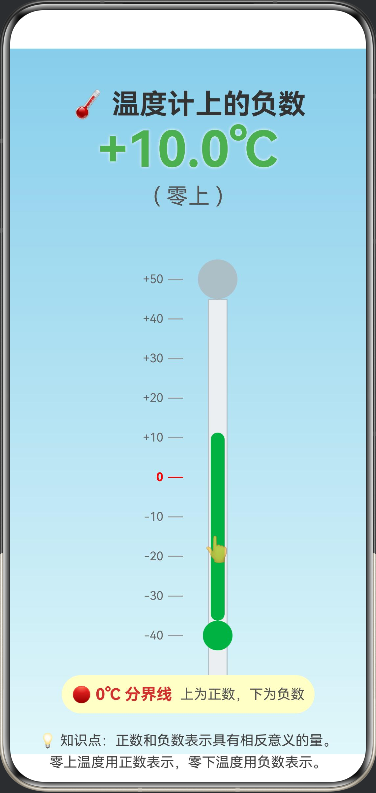
/**
 * 温度计上的负数 - 教学演示工具
 * 知识点:认识负数,理解正负数表示具有相反意义的量
 */

@Entry
@Component
struct ThermometerLesson {
  // 状态变量
  @State private currentTemp: number = 20; // 当前温度,默认20度
  @State private minTemp: number = -40;
  @State private maxTemp: number = 50;

  // 动画相关
  @State private bgColor: string = '#87CEEB'; // 背景色
  @State private particleOpacity: number = 0; // 雪花/阳光粒子透明度

  // 布局常量
  private thermometerHeight: number = 400; // 温度计总高度
  private thermometerWidth: number = 40;   // 温度计宽度

  // 手势偏移累计
  private lastY: number = 0;

  // 计算温度对应的颜色
  private getTempColor(temp: number): string {
    if (temp >= 30) return '#FF5722'; // 炎热 - 深橙红
    if (temp >= 15) return '#FF9800'; // 温暖 - 橙色
    if (temp >= 0) return '#4CAF50';  // 舒适 - 绿色
    if (temp >= -15) return '#2196F3'; // 寒冷 - 蓝色
    return '#3F51B5'; // 严寒 - 深蓝
  }

  // 获取背景渐变颜色数组
  private getBgGradient(): LinearGradient {
    let topColor: string = '#87CEEB'; // 天蓝
    let bottomColor: string = '#E0F7FA'; // 浅蓝

    if (this.currentTemp < 0) {
      topColor = '#5C6BC0'; // 深蓝灰
      bottomColor = '#ECEFF1'; // 雪白
    } else if (this.currentTemp > 35) {
      topColor = '#FF7043'; // 火红
      bottomColor = '#FFCCBC'; // 浅橙
    }

    return {
      angle: 180,
      colors: [[topColor, 0.0], [bottomColor, 1.0]]
    };
  }

  // 更新温度状态
  private updateTemperature(deltaY: number) {
    // 灵敏度调整:移动10像素约等于1度
    const sensitivity = 10;
    const deltaTemp = -deltaY / sensitivity;

    let newTemp = this.currentTemp + deltaTemp;

    // 限制范围
    if (newTemp < this.minTemp) newTemp = this.minTemp;
    if (newTemp > this.maxTemp) newTemp = this.maxTemp;

    // 保留一位小数
    this.currentTemp = Math.round(newTemp * 2) / 2; // 步进0.5度体验更好

    // 更新粒子效果状态
    this.particleOpacity = this.currentTemp < 0 ? 1 : 0;
  }

  build() {
    Stack() {
      // 1. 动态背景层
      Column()
        .width('100%')
        .height('100%')
        .linearGradient(this.getBgGradient())

      // 2. 天气特效层 (雪花/太阳)
      if (this.currentTemp < 0)
        ForEach(Array.from({ length: 20 }), (item: void, index: number) => {
          // 雪花效果
          Text('❄')
            .fontSize(15 + Math.random() * 20)
            .fontColor('#FFFFFF')
            .opacity(0.7)
            .position({
              x: Math.random() * 100 + '%',
              y: (Date.now() / 50 + index * 100) % 110 + '%'
            })
            .animation({ duration: 3000, curve: Curve.Linear, iterations: -1 })
        })
      else if (this.currentTemp > 30)
      Column() {
        // 烈日效果
        Text('☀️')
          .fontSize(80)
          .opacity(0.8)
          .position({ x: '75%', y: '10%' })
      }

      // 3. 主交互层
      Column() {
        // 标题
        Text('🌡️ 温度计上的负数')
          .fontSize(28)
          .fontWeight(FontWeight.Bold)
          .fontColor(this.currentTemp < 0 ? '#FFFFFF' : '#333333')
          .margin({ top: 40 })
          .textShadow({ radius: 2, color: '#00000030', offsetX: 1, offsetY: 1 })

        // 温度显示区
        Column() {
          Text(`${this.currentTemp > 0 ? '+' : ''}${this.currentTemp.toFixed(1)}℃`)
            .fontSize(50)
            .fontWeight(FontWeight.Bold)
            .fontColor(this.getTempColor(this.currentTemp))
            .textShadow({ radius: 5, color: '#FFFFFF', offsetX: 0, offsetY: 0 })

          Text(this.currentTemp >= 0 ? '( 零上 )' : '( 零下 )')
            .fontSize(22)
            .fontColor(this.currentTemp < 0 ? '#E3F2FD' : '#555')
            .margin({ top: 5 })
        }
        .height(120)

        // 温度计主体
        Row() {
          // 刻度尺
          Column() {
            ForEach([50, 40, 30, 20, 10, 0, -10, -20, -30, -40], (val: number) => {
              Row() {
                Text(`${val > 0 ? '+' : ''}${val}`)
                  .fontSize(12)
                  .fontColor(val === 0 ? '#FF0000' : '#666')
                  .fontWeight(val === 0 ? FontWeight.Bold : FontWeight.Normal)
                  .width(40)
                  .textAlign(TextAlign.End)
                // 刻度线
                Row()
                  .width(val % 10 === 0 ? 15 : 8)
                  .height(1)
                  .backgroundColor(val === 0 ? '#FF0000' : '#999')
                  .margin({ left: 5 })
              }
              .height(this.thermometerHeight / 10) // 平均分布
              .alignItems(VerticalAlign.Center)
            })
          }
          .height(this.thermometerHeight)

          // 温度计容器
          Stack() {
            // 玻璃管外框
            Column() {
              // 顶部圆头
              Row()
                .width(this.thermometerWidth)
                .height(this.thermometerWidth)
                .borderRadius(this.thermometerWidth / 2)
                .backgroundColor('#B0BEC5')

              // 管身
              Column() {
                // 玻璃效果背景
                Row()
                  .width(20)
                  .height('100%')
                  .backgroundColor('#ECEFF1')
                  .border({ width: 1, color: '#B0BEC5' })
              }
              .padding({ left: 10, right: 10 })
            }

            // 水银柱 (动态部分)
            Column() {
              Column() {
                // 水银柱主体
                Row()
                  .width(14)
                  .height(this.getHeightFromTemp(this.currentTemp))
                  .backgroundColor(this.getTempColor(this.currentTemp))
                  .borderRadius(7)

                // 底部球体
                Row()
                  .width(this.thermometerWidth - 10)
                  .height(this.thermometerWidth - 10)
                  .borderRadius((this.thermometerWidth - 10) / 2)
                  .backgroundColor(this.getTempColor(this.currentTemp))
              }
            }
            .height(this.thermometerHeight)
            .justifyContent(FlexAlign.End) // 从底部向上填充
            .alignItems(HorizontalAlign.Center)
            .padding({ bottom: 5 })

            // 手势拖动层
            Column() {
              Blank()
              Row() {
                Text('👆')
                  .fontSize(24)
                  .opacity(0.8)
              }
              .height(50) // 拖拽热区
              .justifyContent(FlexAlign.Center)
            }
            .height(this.thermometerHeight)
            .justifyContent(FlexAlign.End)
            .margin({ bottom: this.getHeightFromTemp(this.currentTemp) - 25 })
            .gesture(
              PanGesture()
                .onActionStart((event: GestureEvent) => {
                  this.lastY = event.offsetY;
                })
                .onActionUpdate((event: GestureEvent) => {
                  // 计算偏移量
                  const deltaY = event.offsetY - this.lastY;
                  this.updateTemperature(deltaY);
                  this.lastY = event.offsetY;
                })
            )
          }
          .width(this.thermometerWidth + 30)
          .height(this.thermometerHeight)
        }
        .margin({ top: 20 })

        // 0度分界线教学提示
        Column() {
          Row() {
            Text('🔴 0℃ 分界线')
              .fontSize(16)
              .fontWeight(FontWeight.Bold)
              .fontColor('#D32F2F')

            Text('  上为正数,下为负数')
              .fontSize(14)
              .fontColor('#555')
          }
          .padding(10)
          .backgroundColor('#FFFFFFCC')
          .borderRadius(20)
          .margin({ top: 20 })

          Text('💡 知识点:正数和负数表示具有相反意义的量。\n零上温度用正数表示,零下温度用负数表示。')
            .fontSize(14)
            .fontColor('#444')
            .textAlign(TextAlign.Center)
            .margin({ top: 15 })
            .padding({ left: 20, right: 20 })
            .lineHeight(22)
        }

        Blank()
      }
      .width('100%')
      .height('100%')
    }
    .width('100%')
    .height('100%')
  }

  // 辅助计算函数:将温度转换为水银柱高度
  // 刻度尺从上到下排列:50, 40, 30, 20, 10, 0, -10, -20, -30, -40
  private getHeightFromTemp(temp: number): number {
    // 刻度尺有10个刻度(50到-40)
    const scaleCount = 10;
    const scaleHeight = this.thermometerHeight / scaleCount; // 40px

    // 底部球体高度
    const bulbHeight = this.thermometerWidth - 10; // 30px

    // 计算当前温度对应的刻度索引(从上到下)
    // 50度对应索引0,40度对应索引1,依此类推
    const tempIndex = (this.maxTemp - temp) / 10;

    // 刻度中心位置(从上到下)
    const scaleTop = tempIndex * scaleHeight + scaleHeight / 2;

    // 从底部到刻度中心的距离
    const heightFromBottom = this.thermometerHeight - scaleTop;

    // 水银柱主体高度 = 从底部到刻度中心的距离 - 底部球体高度
    const mercuryHeight = heightFromBottom - bulbHeight;

    return Math.max(0, mercuryHeight);
  }

  // 获取0度线距离底部的距离(用于定位参考线)
  private heightFromZero(temp: number): number {
    const scaleCount = 10;
    const scaleHeight = this.thermometerHeight / scaleCount; // 40px

    // 0度对应的索引是5
    const zeroIndex = 5;
    const bottomIndex = scaleCount - 1; // 9

    return (bottomIndex - zeroIndex) * scaleHeight;
  }
}

讨论HarmonyOS开发技术,专注于API与组件、DevEco Studio、测试、元服务和应用上架分发等。
更多推荐


 3
3 0
0- 0


 已为社区贡献402条内容

所有评论(0)