Harmonyos应用实例187:单位圆与正弦线动态演示
·
第五章:三角函数
7. 单位圆与正弦线动态演示
对应章节:5.2 三角函数的概念
功能简介:
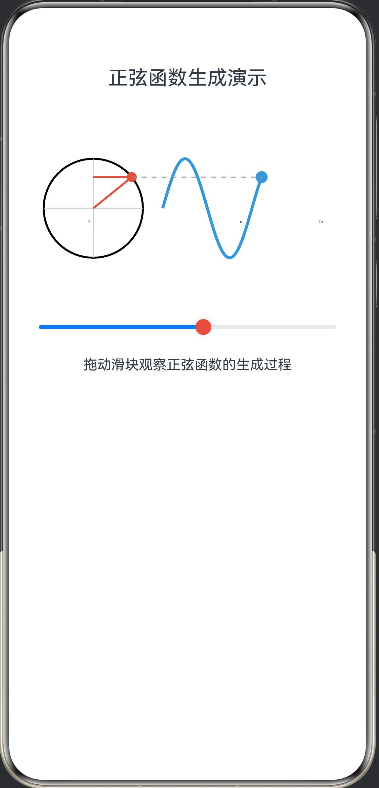
左侧展示单位圆,右侧展示正弦波。随着单位圆上的点 PPP 旋转,动态绘制正弦线,并将 yyy 坐标映射到右侧曲线图上,直观展示正弦函数的生成过程。
@Entry
@Component
struct SineWaveGenerator {
  @State angle: number = 0
  private settings: RenderingContextSettings = new RenderingContextSettings(true)
  private context: CanvasRenderingContext2D = new CanvasRenderingContext2D(this.settings)

  build() {
    Column() {
      Text('正弦函数生成演示')
        .fontSize(20)
        .margin({ bottom: 20 })

      Canvas(this.context)
        .width(350)
        .height(200)
        .onReady(() => {
          this.drawScene()
        })

      Slider({ value: this.angle, min: 0, max: 720 })
        .blockColor('#E74C3C')
        .onChange((value: number) => {
          this.angle = value
          this.drawScene()
        })

      Text('拖动滑块观察正弦函数的生成过程')
        .fontSize(14)
        .margin({ top: 10 })
    }
    .padding(20)
    .backgroundColor('#FFFFFF')
  }

  drawScene() {
    const ctx = this.context
    ctx.clearRect(0, 0, 350, 200)

    // 1. 画单位圆(左侧)
    ctx.beginPath()
    ctx.strokeStyle = '#000000'
    ctx.lineWidth = 2
    ctx.arc(80, 100, 50, 0, 6.28)
    ctx.stroke()

    // 画坐标轴
    ctx.beginPath()
    ctx.strokeStyle = '#CCCCCC'
    ctx.lineWidth = 1
    ctx.moveTo(80, 50)
    ctx.lineTo(80, 150)
    ctx.moveTo(30, 100)
    ctx.lineTo(130, 100)
    ctx.stroke()

    // 2. 画旋转的半径和正弦线
    const rad = this.angle / 180 * Math.PI
    const px = 80 + 50 * Math.cos(rad)
    const py = 100 - 50 * Math.sin(rad)

    // 半径
    ctx.beginPath()
    ctx.strokeStyle = '#E74C3C'
    ctx.lineWidth = 2
    ctx.moveTo(80, 100)
    ctx.lineTo(px, py)
    ctx.stroke()

    // 点P
    ctx.beginPath()
    ctx.fillStyle = '#E74C3C'
    ctx.arc(px, py, 5, 0, 6.28)
    ctx.fill()

    // 正弦线(从点P到Y轴)
    ctx.beginPath()
    ctx.strokeStyle = '#E74C3C'
    ctx.lineWidth = 2
    ctx.moveTo(px, py)
    ctx.lineTo(80, py)
    ctx.stroke()

    // 3. 画正弦曲线(右侧)
    ctx.beginPath()
    ctx.strokeStyle = '#3498DB'
    ctx.lineWidth = 3
    ctx.moveTo(150, 100 - 50 * Math.sin(0))

    for (let i = 0; i <= this.angle; i++) {
      let x = 150 + i * 0.25
      let y = 100 - 50 * Math.sin(i / 180 * Math.PI)
      ctx.lineTo(x, y)
    }
    ctx.stroke()

    // 画当前点在正弦曲线上的位置
    const curveX = 150 + this.angle * 0.25
    const curveY = 100 - 50 * Math.sin(rad)
    ctx.beginPath()
    ctx.fillStyle = '#3498DB'
    ctx.arc(curveX, curveY, 6, 0, 6.28)
    ctx.fill()

    // 画连接线(从单位圆到正弦曲线)
    ctx.beginPath()
    ctx.strokeStyle = '#999999'
    ctx.lineWidth = 1
    ctx.setLineDash([5, 5])
    ctx.moveTo(px, py)
    ctx.lineTo(curveX, curveY)
    ctx.stroke()
    ctx.setLineDash([])

    // 4. 画X轴和Y轴标签
    ctx.font = '12px sans-serif'
    ctx.fillStyle = '#000000'
    ctx.fillText('0', 75, 115)
    ctx.fillText('π', 150 + 78, 115)
    ctx.fillText('2π', 150 + 157, 115)
    ctx.fillText('3π', 150 + 235, 115)
    ctx.fillText('4π', 150 + 314, 115)
  }
}

讨论HarmonyOS开发技术,专注于API与组件、DevEco Studio、测试、元服务和应用上架分发等。
更多推荐


 6
6 0
0- 0


 已为社区贡献402条内容

所有评论(0)