Harmonyos应用实例109:数与形:平方数规律
·
应用实例九:数与形:平方数规律
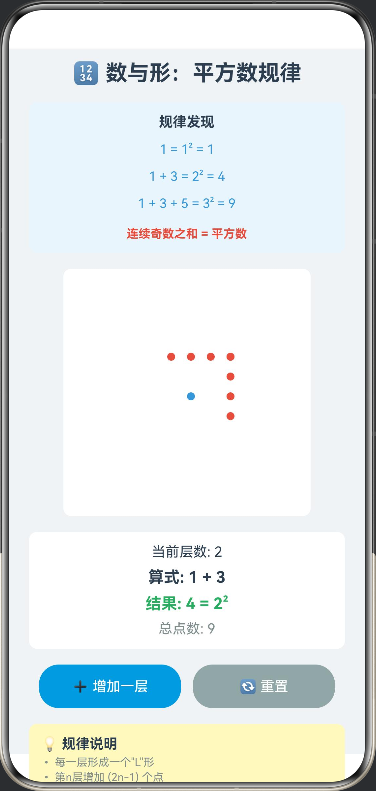
知识点:体会“数形结合”的思想,发现平方数的规律(1+3+5+…)。
功能:动态演示由点组成的“L”形层层增加形成正方形的过程。点击“增加一层”,图形扩大,同时数字累加算式更新,直观展示 1=12,1+3=22,1+3+5=321=1^2, 1+3=2^2, 1+3+5=3^21=12,1+3=22,1+3+5=32 等规律。
// NumberShapeSquare.ets

interface Dot {
  x: number
  y: number
  isNew: boolean
}

@Entry
@Component
struct NumberShapeSquare {
  @State currentLayer: number = 1
  @State dots: Array<Dot> = []
  @State expression: string = "1"
  @State result: string = "1"
  @State dotSize: number = 8

  private readonly centerX: number = 125
  private readonly centerY: number = 125
  private readonly spacing: number = 20

  aboutToAppear(): void {
    this.init()
  }

  build() {
    Column({ space: 16 }) {
      Text('🔢 数与形:平方数规律')
        .fontSize(22)
        .fontWeight(FontWeight.Bold)
        .fontColor('#2C3E50')

      Column({ space: 12 }) {
        Text('规律发现')
          .fontSize(14)
          .fontWeight(FontWeight.Bold)
          .fontColor('#2C3E50')

        Text(`1 = 1² = 1`)
          .fontSize(13)
          .fontColor('#3498DB')

        Text(`1 + 3 = 2² = 4`)
          .fontSize(13)
          .fontColor('#3498DB')

        Text(`1 + 3 + 5 = 3² = 9`)
          .fontSize(13)
          .fontColor('#3498DB')

        Text(`连续奇数之和 = 平方数`)
          .fontSize(12)
          .fontColor('#E74C3C')
          .fontWeight(FontWeight.Bold)
          .margin({ top: 4 })
      }
      .width('95%')
      .padding(12)
      .backgroundColor('#EBF5FB')
      .borderRadius(8)

      Stack() {
        ForEach(this.dots, (dot: Dot) => {
          Circle()
            .width(this.dotSize)
            .height(this.dotSize)
            .fill(dot.isNew ? '#E74C3C' : '#3498DB')
            .position({ x: dot.x, y: dot.y })
        })
      }
      .width(250)
      .height(250)
      .backgroundColor('#FFFFFF')
      .borderRadius(8)
      .shadow({ radius: 3, color: '#00000010' })

      Column({ space: 8 }) {
        Text(`当前层数: ${this.currentLayer}`)
          .fontSize(14)
          .fontColor('#2C3E50')

        Text(`算式: ${this.expression}`)
          .fontSize(16)
          .fontWeight(FontWeight.Bold)
          .fontColor('#2C3E50')

        Text(`结果: ${this.result} = ${this.currentLayer}²`)
          .fontSize(16)
          .fontWeight(FontWeight.Bold)
          .fontColor('#27AE60')

        Text(`总点数: ${this.dots.length}`)
          .fontSize(14)
          .fontColor('#7F8C8D')
      }
      .width('95%')
      .padding(12)
      .backgroundColor('#FFFFFF')
      .borderRadius(8)

      Row({ space: 12 }) {
        Button('➕ 增加一层')
          .fontSize(14)
          .height(44)
          .width('45%')
          .backgroundColor('#3498DB')
          .onClick(() => this.addLayer())

        Button('🔄 重置')
          .fontSize(14)
          .height(44)
          .width('45%')
          .backgroundColor('#95A5A6')
          .onClick(() => this.reset())
      }
      .width('95%')
      .justifyContent(FlexAlign.Center)

      Column() {
        Text('💡 规律说明')
          .fontSize(14)
          .fontWeight(FontWeight.Bold)
          .fontColor('#2C3E50')

        Text('• 每一层形成一个"L"形')
          .fontSize(11)
          .fontColor('#7F8C8D')
          .margin({ top: 4 })

        Text('• 第n层增加 (2n-1) 个点')
          .fontSize(11)
          .fontColor('#7F8C8D')
          .margin({ top: 2 })

        Text('• 所有点组成一个正方形')
          .fontSize(11)
          .fontColor('#7F8C8D')
          .margin({ top: 2 })

        Text('• 连续奇数之和 = 平方数')
          .fontSize(11)
          .fontColor('#3498DB')
          .margin({ top: 2 })

        Text('• 红色点表示新增加的点')
          .fontSize(11)
          .fontColor('#E74C3C')
          .margin({ top: 2 })
      }
      .width('95%')
      .padding(12)
      .backgroundColor('#FFF9C4')
      .borderRadius(8)
      .alignItems(HorizontalAlign.Start)
    }
    .width('100%')
    .height('100%')
    .backgroundColor('#F0F3F6')
    .padding(12)
  }

  private init(): void {
    this.currentLayer = 1
    this.dots = []
    this.expression = "1"
    this.result = "1"

    const centerDot: Dot = {
      x: this.centerX,
      y: this.centerY,
      isNew: false
    }
    this.dots.push(centerDot)
  }

  private reset(): void {
    this.init()
  }

  private addLayer(): void {
    if (this.currentLayer >= 6) {
      return
    }

    this.currentLayer++
    const oddNum = 2 * this.currentLayer - 1

    if (this.expression === "1") {
      this.expression = `1 + ${oddNum}`
    } else {
      this.expression += ` + ${oddNum}`
    }

    this.result = `${this.currentLayer * this.currentLayer}`

    const newDots = this.calculateLayerDots(this.currentLayer)

    for (let i = 0; i < newDots.length; i++) {
      this.dots.push(newDots[i])
    }
  }

  private calculateLayerDots(layer: number): Array<Dot> {
    const newDots: Array<Dot> = []
    const halfSize = layer

    for (let i = -halfSize + 1; i <= halfSize; i++) {
      const dot: Dot = {
        x: this.centerX + i * this.spacing,
        y: this.centerY - halfSize * this.spacing,
        isNew: true
      }
      newDots.push(dot)
    }

    for (let i = -halfSize; i < halfSize; i++) {
      const dot: Dot = {
        x: this.centerX + halfSize * this.spacing,
        y: this.centerY + i * this.spacing,
        isNew: true
      }
      newDots.push(dot)
    }

    return newDots
  }
}

讨论HarmonyOS开发技术,专注于API与组件、DevEco Studio、测试、元服务和应用上架分发等。
更多推荐


 0
0 0
0- 0


 已为社区贡献402条内容

所有评论(0)